How to Measure Whether Conversation Intelligence Is Improving Rep Performance
Learn how to measure whether conversation intelligence improves rep performance, beyond talk ratio.



You can tell whether conversation intelligence is improving your reps, but talk ratio won't tell you. Talk ratio describes how one call went. Improvement shows up in three layers you can check quarter over quarter:
- Coverage: are enough of the right calls recorded to trust any score?
- Skill: each rep's methodology profile, built from whole opportunities, compared with 90 days ago on the one skill you're coaching.
- Outcome: the same reps' stage conversion and close-date movement, joined in Salesforce.
This method shows whether the skill moved and whether the deals moved with it. It doesn't prove the CI tool caused the change. Nobody can honestly sell you that, so don't take that promise to your VP.
Most of the method works with any recorder. The outcome layer depends on one thing: methodology scores have to land in Salesforce fields on the opportunity, next to stage and close date. We built Weflow Conversation Intelligence + AI Field Updates to write them there, and the steps below show where that matters and where it doesn't.
Why your conversation intelligence dashboard can't show rep improvement
Your dashboard can't answer the improvement question because it measures calls, samples them badly, and never meets the deal outcome. This is a structural problem. Reviewing more calls won't fix it.
Most managers review three to five calls a week. That's the practical ceiling, however many calls the team records. And the sample isn't random.
So the picture you carry of each rep comes from a handful of calls you opened because something had already gone wrong. Three more problems sit underneath that.
Talk ratio and question count describe the call, not the skill
Interaction metrics tell you how one conversation went. They don't tell you whether a rep got better at qualifying.
A rep can hit a perfect talk ratio on a discovery call and still leave without knowing who signs. Even the vendors who publish these numbers can't agree on what good looks like:
| Vendor | Stated talk-ratio target and context |
|---|---|
| Gong | About 43% for the rep, as a recommended range on recorded calls |
| Jiminny | 61% on video meetings, from Jiminny's own data |
| Clari | Below 50% on discovery calls |
If three vendors put "good" anywhere from 43% to 61%, a trend line on talk ratio can't carry a development plan. Keep these metrics as diagnostics for a specific call or rep. They're not the scoreboard.
Per-call methodology scores mostly measure which stage deals are in
A sales methodology describes a whole deal cycle, so scoring it call by call punishes reps for not repeating what they already settled.
Average those call scores into a rep score and you mostly measure the stage mix of that rep's pipeline. A rep whose deals sit in late stages looks weak on Metrics. A rep full of early discovery looks weak on Decision process and Paper process, which weren't relevant yet.
It also trains the wrong behavior. Reps learn to force late-stage questions into early conversations to protect their score.
Scores that stay inside the CI tool never meet deal outcomes
A methodology score that never reaches the Salesforce opportunity can't be reported against stage conversion or win rate. And in most teams, it never gets there.
CI scores and trackers live in the vendor's cloud. The Salesforce methodology fields that should hold the same information are a mess:
- In the Salesforce orgs we connect to, methodology fields are almost always empty before automation.
- Where they're filled, it's often with filler typed to get past a validation rule.
Gong is a good example of the gap. Teams use Gong trackers to detect whether MEDDIC or SPICED topics came up on a call, but Gong doesn't produce a deal-level methodology score. Teams that want one build it in Salesforce themselves, with RevOps and IT.
So "what the rep did on calls" and "what happened to the deal" sit in two systems that never join. Improvement isn't hard to measure here. It's unmeasurable by construction.
What you need in place before you start measuring
You need five things before the steps work. Most of them need a RevOps or Salesforce admin for an afternoon, not a project.
- Your methodology written down, including what doesn't count. Headcount isn't a Metric. An internal employee isn't a champion. If the definition only lives in your head, any scorer, human or AI, will fill the field with something plausible and wrong.
- MEDDIC or your methodology's fields on the Salesforce opportunity. Without them, scores have nowhere to land and nothing to report against in Step 5.
- Recordings as audio or video files. A text transcript exported from another tool can't be re-scored against a new rubric. Keep the files.
- Stage and close-date history on opportunities in Salesforce. You need to see when deals moved stage and how often close dates were pushed, not just where they sit today.
- One named owner for the scorecard prompts. Usually RevOps or enablement. Without a named owner the prompts go stale, the output drifts, and people stop trusting it. That failure reads as a product failure, but it's an ownership gap.
Step 1: Check recording coverage before you trust any score
Find out what share of customer meetings gets recorded, and why the rest doesn't, before you read a single skill score. A scorecard built on a sample the rep chose measures what the rep was happy to record.
Across our Conversation Intelligence customers, recording coverage typically lands between 50% and 70% of meetings. One team we spoke with was a year into Gong, had just under 80% of meetings recorded, and was only then putting coaching on its agenda. Coverage comes first. Coaching comes second.
These are the holes we see most often:
| Coverage hole | How it shows up | How to close it |
|---|---|---|
| Rep opt-outs | A rep with far fewer recordings than customer meetings on the calendar | Set join rules centrally and make recording the default, not the rep's choice |
| Notetaker stuck in a lobby | The customer booked the meeting, never joined to admit the recorder, and it left after waiting | Teach reps to ask the customer to admit it. In Weflow, a rep can send the notetaker back in from the calendar mid-call |
| Licensed users who never signed in | Seats look allocated, but some reps have zero recordings | Check every licensed rep has at least one recording. In Weflow, the notetaker only joins after a user signs in once |
| Internal-only meetings | Excluded by design, since most notetakers only join calls with an external attendee | Not a hole. Take them out of your denominator |
| Phone calls | Dialler and softphone calls never appear, because a meeting recorder only sees meeting links | Pull dialler recordings in, or record softphone calls through a desktop app |
We won't give you a minimum percentage, because the number matters less than where the gaps sit. The real test is whether the missing calls cluster.
If the gap is spread evenly, your scores describe the team. If it sits with two reps, or with late-stage negotiation calls, your scores describe a sample. Fix that first.
Step 2: Pick one skill per rep and set a 90-day baseline
Turn "is coaching working?" into a question about one named skill per rep, with a recorded starting point.
Coaching five things at once means you can't tell which one moved. Pick one per rep per quarter:
- Choose the skill. Pick a single methodology element, such as economic buyer access or decision process.
- Define what "established" looks like. Write down what a fully established economic buyer means on your deals, and what doesn't count.
- Pull last quarter's opportunities and their calls. Use every deal the rep worked in that window, not the ones you remember.
- Score them as the baseline. Rate the chosen element on each opportunity using the rules in Step 3, and record where the rep stood.
The value of narrowing it down is focus, for you and for the rep:
So yeah, leaders don't often know what call to listen to or what skill to coach to. And so anything that gives them the insight on, your rep's really great at these things, but they're struggling with negotiation, or they're struggling to ask the right deep discovery questions. That gives that manager who's scrambling and can't control their calendar at least a focus. And that is how we create scale in revenue.
Kelly Lewis, RevOps and sales leadership coach; co-host, The Revenue Insiders podcast
If you only started recording recently, import the recordings from your previous CI tool, or upload audio files of past calls, and score those. Calls that were never recorded can't be recovered, so the baseline starts wherever your recordings do.
Before you write your definition of "established", work through our Checklist: MEDDIC Sales Process. It gives you the questions behind each element, so your baseline and your scorecard prompts use the same standard.
Step 3: Score MEDDIC per opportunity, not per call
Judge each methodology element across everything on the deal (calls, emails and CRM fields), and rate it as fully established, partially established, or never discussed. An element that isn't relevant yet scores neutral, not low. And filler a rep typed into a field doesn't count as complete.
This step fixes the unit problem from the diagnostic section. You still want call scores, but each level answers a different question:
| Scoring level | What it answers, and for whom |
|---|---|
| Call | How did this conversation go? Feedback for the rep while it's fresh. |
| Opportunity | Is this deal qualified? For the manager in pipeline review. |
| Rep | Which skill is weak across all their deals? For the manager's development plan. |
The rules that keep opportunity scoring fair:
- One block per element. A single free-form judgement on the whole of MEDDPICC is hard to act on. Separate blocks give each element its own score and reason.
- A stated scale, everywhere. Put the scale in every prompt or rubric that reports it. Otherwise the scale drifts, for example 1 to 10 in a summary email against 1 to 5 in the app.
- A neutral rule. An element not yet discussed scores neutral, so a discovery call doesn't drag a rep down on paper process.
- Email counts. Qualification often happens outside calls.
The email rule matters more than most teams expect.
You can run this by hand for a team of ten, using a spreadsheet and a few hours a quarter. A tool can also do it automatically across every deal, which we cover in the Weflow section below.
Step 4: Roll opportunity scores into each rep's skill profile
Aggregate each rep's element scores across every opportunity they worked in the quarter, and you get a skill profile. Then compare the coached element against the Step 2 baseline. That comparison is your answer to "is she better than 90 days ago?"
Here's what that looks like for a rep, call her Sam, who spent the quarter working on economic buyer access:
| Element | Last quarter | This quarter | Coached? |
|---|---|---|---|
| Metrics | Fully established on most deals | Fully established on most deals | No |
| Economic buyer | Partial on most deals | Fully established on most deals | Yes |
| Decision criteria | Partial on most deals | Partial on most deals | No |
| Decision process | Never discussed on most deals | Never discussed on most deals | Next quarter |
| Identify pain | Fully established on most deals | Fully established on most deals | No |
| Champion | Partial on most deals | Partial on most deals | No |
Sam's profile tells you two things: the coached skill moved, and decision process is the gap to pick next. Stable rows matter too. They show the movement on economic buyer isn't just a different mix of deals.
The same profile measures ramp. Score a new hire's first quarter of deals and you can see which elements they've picked up, instead of guessing from the calls you happened to join.
Doing this by hand means building the roll-up yourself each quarter. A tool that scores opportunities can aggregate them per rep for you.
Step 5: Join skill scores to stage conversion in Salesforce
Report each rep's skill profile next to their stage-to-stage conversion and close-date pushes in Salesforce, then cut it by stage and segment. This is the layer your VP cares about.
- Confirm the methodology scores sit on the opportunity. If they live only in your CI tool, you can't join them to deal outcomes in a Salesforce report.
- Build the report. Show skill scores alongside stage conversion and close-date changes, grouped by rep.
- Add stage and segment groupings. This separates a rep problem from a funnel or segment problem.
- Read the movement against the baseline quarter. Compare like with like, the same reps over the same 90-day windows.
How to read what you find:
| Pattern you see | What it most likely means |
|---|---|
| Skill up, conversion up | The coaching and the outcome are moving together. Keep the standard and pick the next skill. |
| Skill up, conversion flat | The coached element isn't what's holding these deals back, or the deals haven't reached the stage where it shows. |
| Skill flat, conversion up | Something other than coaching moved the number. Don't credit CI for it. |
| One rep low, whole stage low | It's a stage problem, such as exit criteria or process, not a rep problem. |
| All reps flat in one segment | It's a segment or ICP problem. Coaching individuals won't fix it. |
Read every row as correlation. You're showing that qualification improved and deals moved with it, which is a strong story for a VP. It isn't proof that the tool caused it.
When methodology scores are already fields on the opportunity, this is a standard Salesforce report. When they live in the CI tool, someone has to build the join before you can run it.
Step 6: Decide who sees rep scores before you launch
Separate the audiences before anyone sees a rep-level number. Rep metrics shown to the whole team on day one get read as surveillance, reps quietly resist the recorder, and your coverage from Step 1 collapses.
| Audience | What they see | Why |
|---|---|---|
| Rep | Their own call feedback, plus the time-saving parts such as summaries and field updates | The feedback is for them, and the time saved is what makes them want to record |
| Manager | Each rep's skill profile and coached element against baseline, in their own view | This is the coaching input |
| VP or leadership | Team-level trends, coverage, and skill against conversion by team | They make resourcing decisions and don't need a rep leaderboard on launch day |
| RevOps or enablement | Scorecard prompts and patterns across teams | They own the prompts and turn patterns into enablement standards |
Manager override is what makes the scores trustworthy to your team. When a rep disputes an AI score, you listen to the moment behind it and correct the score. That treats the AI as a first read, not a verdict, and reps notice the difference quickly.
Step 7: Review progress inside meetings you already run
Run the quarterly comparison inside the last pipeline review or 1:1 of the quarter. Don't add a meeting. Coaching that needs its own hour is the first thing that gets cancelled when the quarter tightens, which is exactly when reps need it.
A 20-minute slot at quarter end covers it:
- Coverage check: did the gaps from Step 1 close, or move?
- Coached skill against baseline: did each rep's one element move?
- Conversion read: what pattern from the Step 5 table do you see?
- Next skill: pick each rep's element for next quarter from the gaps in their profile.
Get the summary pushed to you by email or Slack instead of opening a dashboard.
This routine is also a test of your own coaching, and that's uncomfortable but true. The scores show whether a skill moved. Whether it moves depends on you.
Very often also with our own software, I think the manager is so often the make or break point when it comes to these things.
Mistakes that make rep improvement data look better than it is
The most damaging errors aren't empty data. They're data that looks complete and tells you something false.
| Mistake | What to do instead |
|---|---|
| Methodology fields filled with plausible but wrong values, like headcount entered as a Metric, because the prompt has no exclusions | Write what doesn't count into every element's definition and prompt |
| Scoring renewals and demos with the discovery rubric | Assign a scorecard per meeting type, so each call gets judged against what it was for |
| Reading reply rate or activity volume as a sign of skill, when auto-replies inflate it | Treat volume as context. A rep sending a hundred emails a day collects out-of-office replies, which only prove the address is live |
| Judging the scorecard before older opportunities have been scored | Score the existing pipeline first, or your profiles only reflect deals opened since setup |
| Crediting CI for a win-rate change it can't be isolated from | Report skill movement and conversion side by side, and call it correlation |
How Weflow scores methodology at call, opportunity and rep level
Weflow is the Revenue AI Orchestration platform for sales, customer success, and RevOps teams. For this job, its difference is opportunity-level methodology judgement written into Salesforce fields. That's what makes Steps 3 to 5 possible without a custom build. Here's what Weflow does, where it stops, and where another tool fits you better.
Weflow scores every recorded call against your team's scorecard
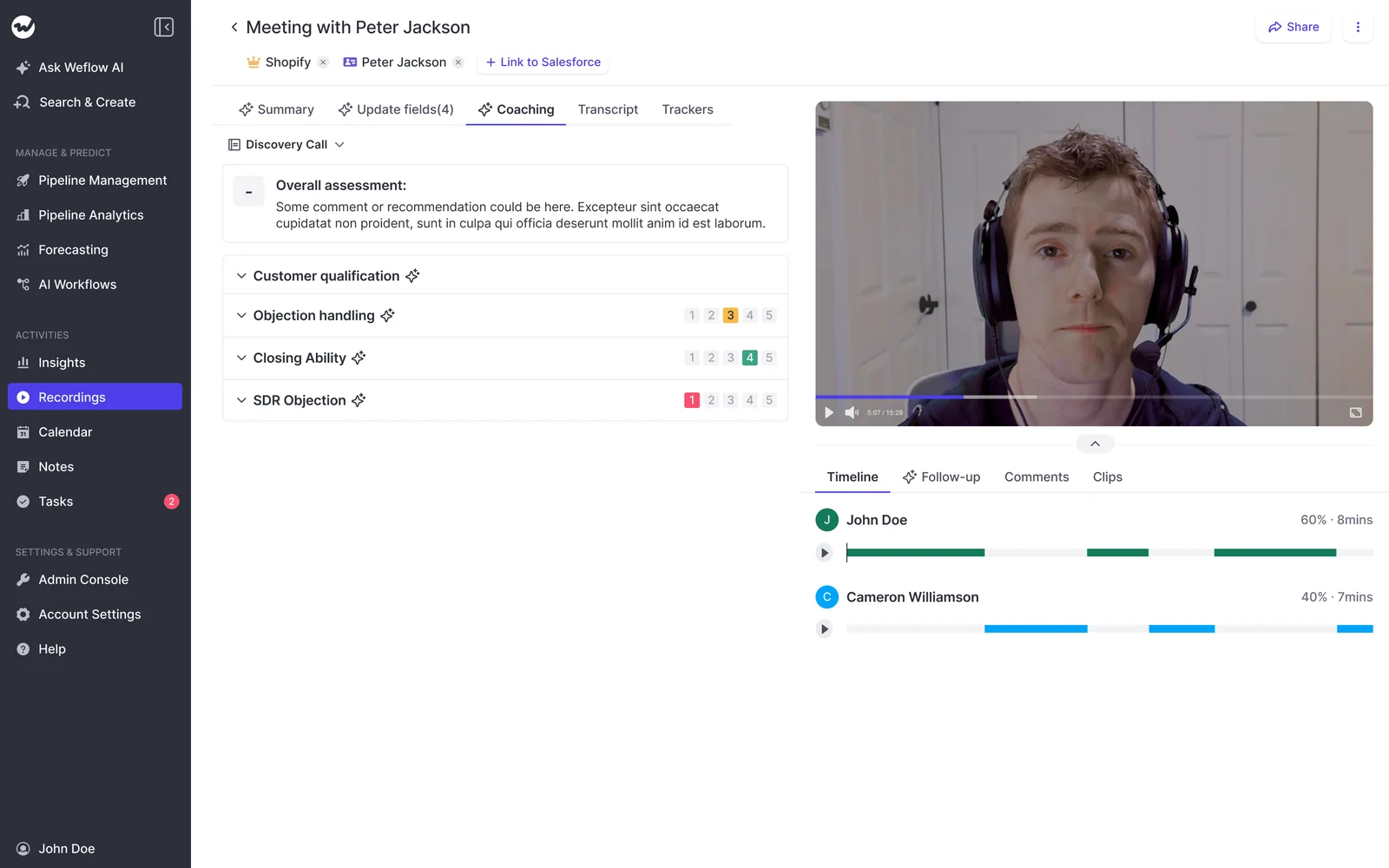
Weflow scores every recorded call automatically against the coaching template assigned to that team, so no manager has to fill in a scorecard. The rep gets feedback right after the call, and you can see how one rep's economic buyer identification has moved over months.
The configuration choices you control:
- Templates per team: start from prebuilt templates for MEDDIC, MEDDPICC, Challenger and others, edit them, or write your own.
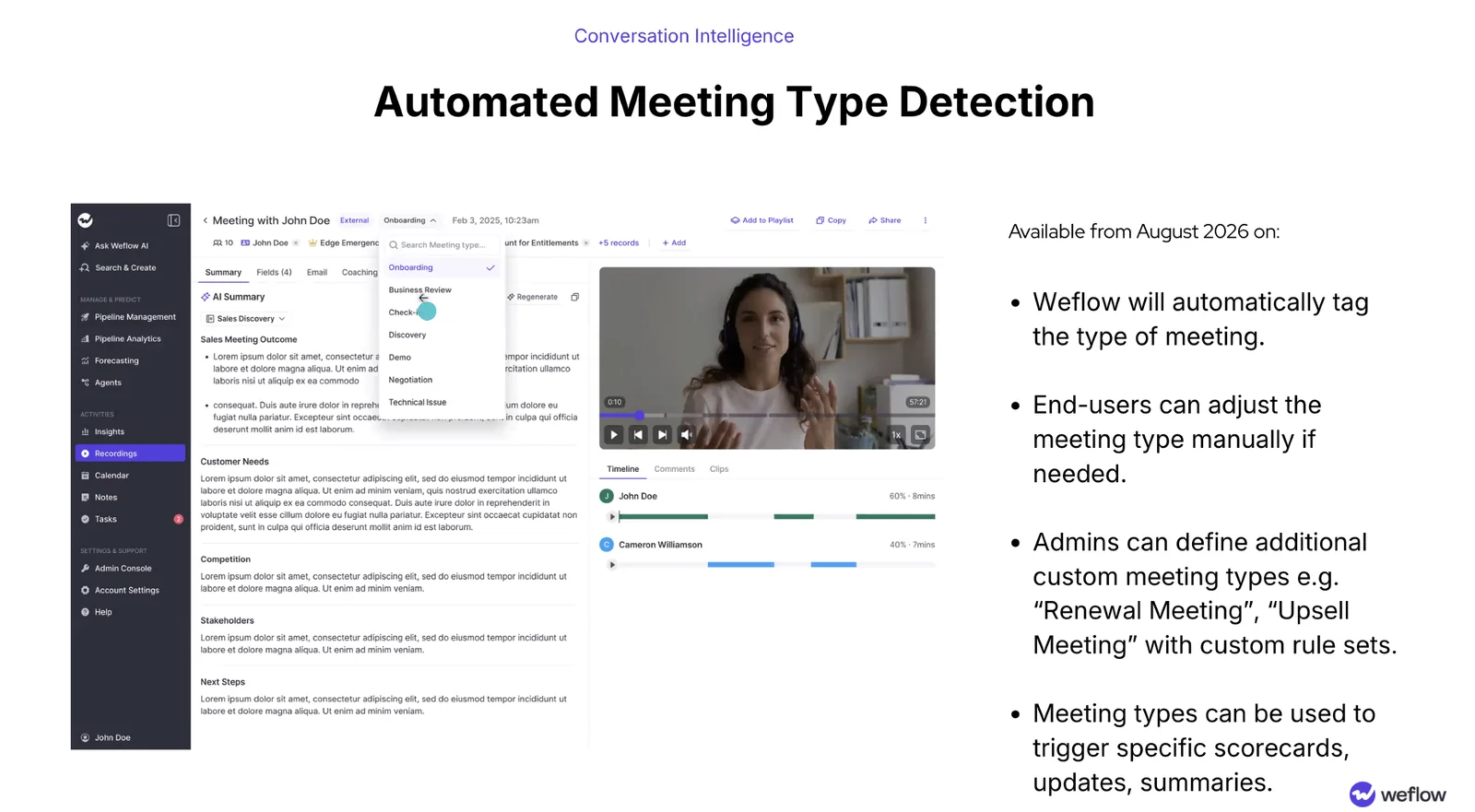
- Meeting type triggers its own scorecard: Weflow tags each recording with a type such as discovery, demo or negotiation, and admins can add custom types like renewal. A renewal doesn't get scored with the discovery rubric.
- Rating or free text: each criterion is rated 1 to 5 or answered in free text.
- Manager override: you can change any AI score by hand.
Weflow AI Playbooks judge how well each MEDDIC element is established
Weflow AI Playbooks score the whole opportunity by reading every email, meeting, transcript and CRM field on the deal. They run two passes. The first fills in each methodology element from the evidence. The second judges how well each element is actually established:
- Fully established
- Partially established, with a note on what's missing
- Never discussed
The second pass also reads what reps typed. A rep who fills a MEDDIC field with filler gets that element marked as not assessed, not complete. When a rep overrides a field, Weflow checks the override for plausibility against the deal.
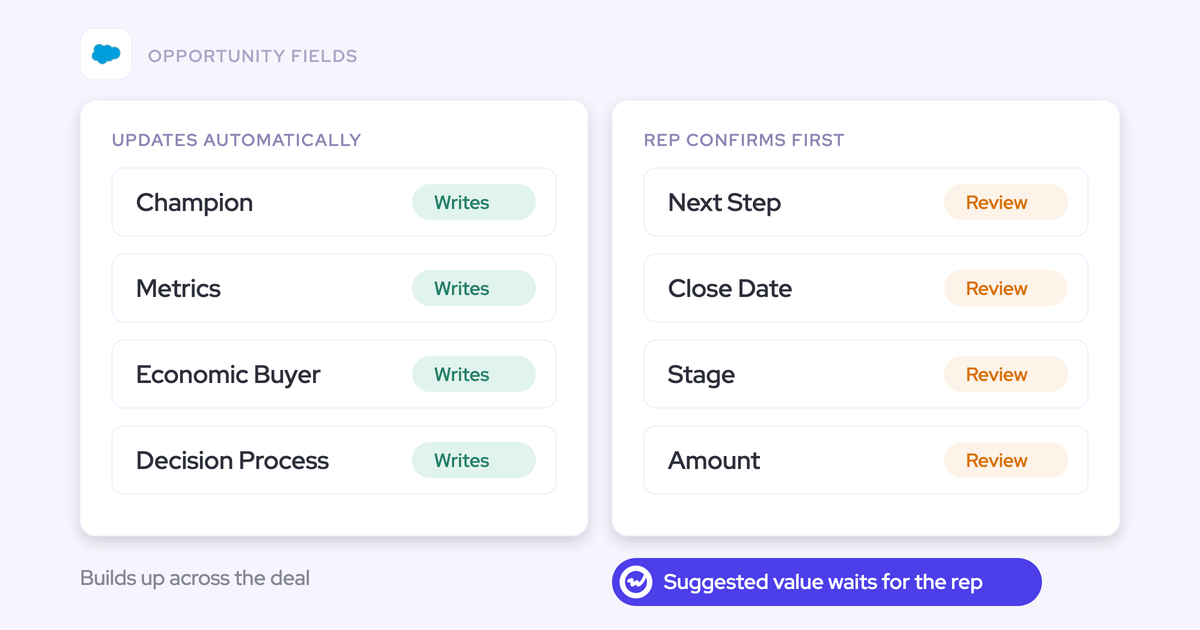
Playbooks rerun when new activity lands on the deal, and otherwise every three hours. They write results to the corresponding Salesforce fields, along with a next-step recommendation. When AI Field Updates write to a methodology field that already has content, they add to it instead of replacing it. Early qualification from call one doesn't get erased by call six.
Weflow Rep 360 turns deal scores into a rep skill profile
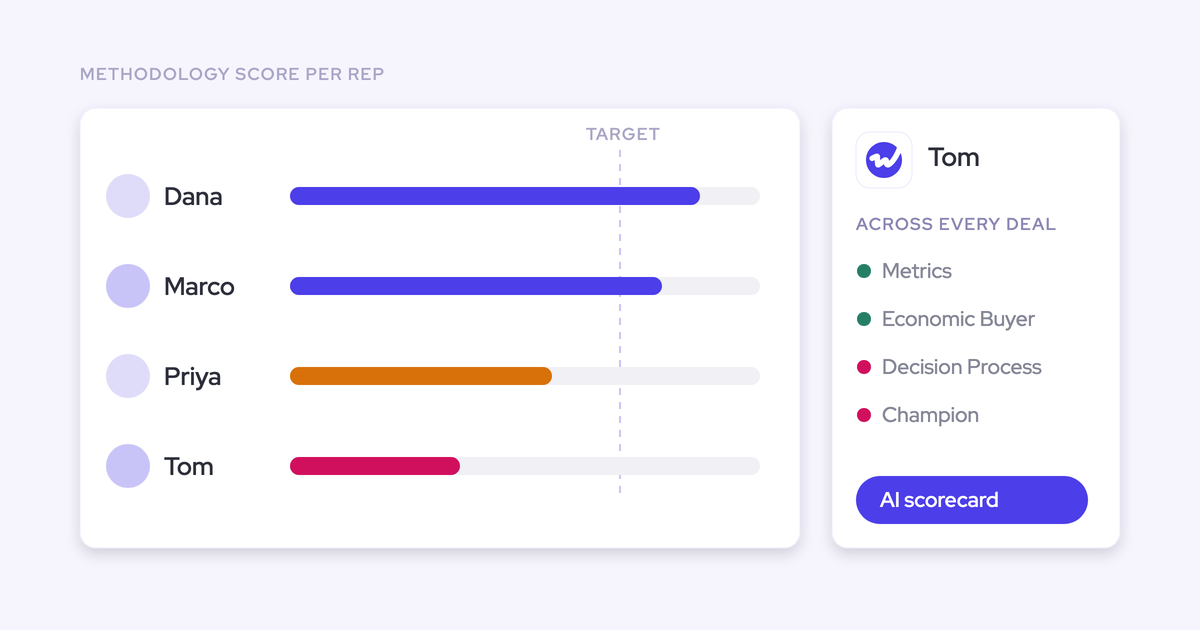
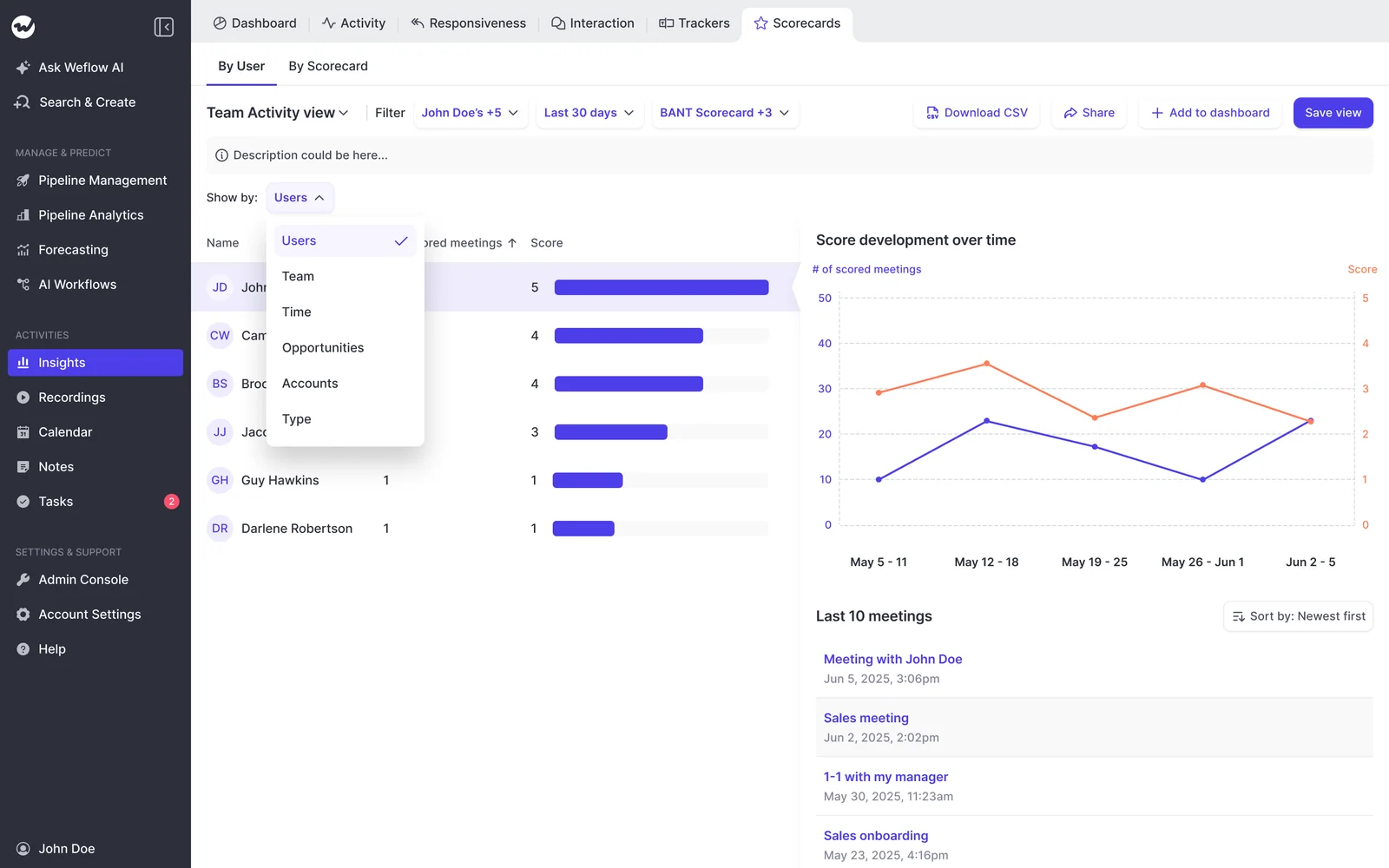
Weflow Rep 360 aggregates a rep's methodology scores across every deal they've worked over months. That's the Step 4 profile without the spreadsheet: strong on Metrics and Economic buyer, weak on Decision process, so you coach the weakness instead of reviewing calls at random. Score development over time shows whether the coached element moved, and it makes a new hire's ramp visible.
What Weflow doesn't measure, and the workarounds
These are the limits you'll hit, and what to do about each one:
| Limit | Workaround |
|---|---|
| Weflow counts the questions a rep asks but doesn't judge which questions were good | Ask Weflow AI across a set of calls, or build an Agent Builder agent that reviews the week's recordings and posts findings to Slack |
| No yes, no or partial scale for a done-or-not criterion | Map it to the 1 to 5 scale: 1 for not done, 3 for partly done with a reason, 5 for done |
| AI Playbooks fill only for opportunities created or changed after setup | Select older opportunities and run Generate AI Playbooks on them in bulk |
| Past calls can't be scored from text transcripts | Upload the audio or video files, which Weflow transcribes and scores like any recording |
| No individual seller scoring when several reps are on the same meeting | None |
| No live in-call coaching or real-time battlecards | None. Coaching arrives after the call |
| No anonymous peer review on calls | None. Every comment shows who wrote it |
When Gong, Chorus or Momentum fits your coaching better
- Gong has the deepest conversation analytics in the category. If your coaching runs on fine-grained call behavior, Gong does more there than we do.
- Chorus runs coaching as dated, time-boxed initiatives with leaderboards, strong and weak areas, and a close date. If you want a coaching programme with a start and an end, that model is real, and Weflow doesn't replicate it.
- Momentum also produces a per-rep MEDDPICC trend, scoring each element on a 0 to 2 scale. Rep-level methodology tracking isn't unique to Weflow.
Weflow's distinct ground is opportunity-level methodology evaluation across calls, emails and CRM fields, written into Salesforce fields where your own reports can join it to conversion.
What Weflow Conversation Intelligence costs
Weflow Conversation Intelligence costs $39 per user per month, billed annually, with a 10-user minimum. Each seat includes the desktop app, Weflow Mobile Copilot, Ask Weflow AI Pro and Agent Builder Free with 25 agent actions per month. Viewer seats for leaders who only consume dashboards are free.
| Plan | Price per user per month | What it adds |
|---|---|---|
| Weflow Conversation Intelligence | $39 | Recording, transcription, AI Field Updates, coaching scorecards, trackers |
| Weflow Revenue AI Foundation | $49 | Activity & Contact Capture plus Conversation Intelligence |
| Weflow Revenue AI Business | $59 | Foundation plus Deal Intelligence |
| Weflow Revenue AI Enterprise | $79 | Business plus Forecasting |
FAQ
Can I score last quarter's calls if we only just started recording?
Yes, if the recordings exist somewhere. Weflow imports recordings from most conversation intelligence tools, through the vendor's API or from exported files. Past calls need to be audio or video, not text transcripts. Calls that were never recorded can't be recovered.
How long before a coached skill shows up in the scores?
Compare quarter against quarter, using the 90-day window from Step 2. We don't have data to give you a reliable timeline for a skill change, and it depends on your cycle length. In long cycles, the change only becomes visible at all with opportunity-level scoring, because per-call scores bury it under stage mix.
How reliable is an AI coaching score, and can I correct it?
AI assessments can vary between runs, so treat an individual score as a coaching prompt, not a verdict. In Weflow, managers can override any call score. When a rep overrides an AI Playbook field, Weflow checks that override for plausibility against the deal.
Should AI coaching scores go into comp or MBOs?
Keep them out. Scores vary between runs, and a disputed score tied to pay damages trust in the whole system. Use them to coach individual reps and to set enablement standards for the team.
Which interaction metrics are still worth tracking?
Keep talk ratio, longest monologue, email responsiveness and keyword trackers as diagnostics on a specific call or rep. They're useful when you're asking why one call went sideways. Don't use them to measure whether a rep is improving.
Can my VP see rep scores without a paid seat?
Yes. Weflow viewer and analytics seats for leaders who only consume dashboards are free. Seats can be reallocated between seat types each quarter as your team changes.
Does this work for long cycles, phone-led teams or reps calling in other languages?
Long cycles are what opportunity-level scoring is built for, since it judges qualification across the whole deal rather than one call. For phone-led teams, Weflow pulls in calls made through Outreach's dialler, and the desktop app records softphone calls such as Aircall and RingCentral. Templated emails carry little signal, so in phone-led teams the calls do most of the work. Weflow detects language automatically across 96+ languages.