How to Configure Recording Consent in Weflow, and Where Consent Stays the Rep's Job
Learn how to configure recording consent in Weflow and when reps still need to ask for consent.


Weflow handles recording consent inside the product wherever the Weflow notetaker joins a meeting. You get these controls:
- A choice of three consent modes: opt-out, opt-in or none.
- A pre-meeting email that lets external guests decline before the call.
- A chat notice with a link anyone can use to stop the recording.
- A domain exclusion list for customers who must never be recorded.
- A short retention option, such as deleting recordings every 30 days.
- A downloadable CSV consent log for every meeting.
The automation stops in three places:
- When a rep records with the Weflow desktop app.
- When you set the consent mode to none.
- For Microsoft Teams participants who join late and may miss the chat notice.
Calls from a connected dialer follow the dialer's own consent handling, because the dialer is the recorder.
Weflow is the Revenue AI Orchestration platform for sales, customer success, and RevOps teams. This page covers one part of it: how consent behaves in Weflow Conversation Intelligence. We wrote it as the working procedure your legal team, DPO or works council asked for, so you can configure from it and forward it as is.
Pick your consent mode first: opt-out, opt-in or none
The consent mode decides how many of your meetings get recorded, so agree it with legal and sales before you touch any other setting. Each mode trades consent quality against coverage.
| Opt-out | Opt-in | None (manual) | |
|---|---|---|---|
| How recording starts | The meeting records by default. Guests see the notice and can object. | Recording starts only after every participant actively accepts. | The seller asks in the room. Nothing in the product enforces the ask. |
| Who has to act | Only a guest who objects | Every participant | The seller, on every call |
| Where it holds up | One-to-one and group meetings | One-to-one and small meetings. In a larger group, one person forgetting to accept means no recording. | Wherever sellers ask consistently |
| Coverage effect | Near-complete coverage, and reps don't have to remember anything | Cleaner consent, thinner data | As complete as each seller's habits |
| What legal gets | A notice, a decline route, and a log entry when someone opts out | Explicit acceptance from each participant before recording | Consent that rests on the seller's conduct |
Expect your sales leader and your legal team to want different things here. The first question a sales leader asks us about a recorder is whether reps can switch it off. They want coverage across the whole team, because the calls that go unrecorded tend to be the weakest ones.
Opt-out is the closest you get to mandatory recording that still gives every guest a real way to decline. Recording is the default, and the decision to stop belongs to the guest, not the rep. Opt-in hands every attendee a veto they use simply by not clicking.
Most teams choose opt-out. Pick opt-in when legal requires active acceptance, and accept that your conversation data will be thinner as a result, especially on group calls.
What to agree with legal before you configure consent
Settle a short list of decisions with legal before you open the settings. Configuration then becomes a transcription of what legal already approved, and nothing gets reworked after review.
Decisions to make with legal:
- The consent mode: opt-out, opt-in or none.
- Which teams or markets get which configuration. Consent attaches to a configuration, so different consent behavior means separate configurations.
- The customers to exclude by domain. These are accounts that treat a recorder as a new sub-processor.
- The retention window: the default, or periodic deletion after a set period.
- The consent message wording and the language or languages it appears in.
What needs to be in place in Weflow:
- An admin to make the settings. Admins also hold the only right to delete recordings.
- Conversation Intelligence seats for every user whose meetings you record. Recording lives in Weflow Conversation Intelligence, not in Weflow Activity & Contact Capture.
- Every user signed in to Weflow at least once. The notetaker doesn't join meetings for a licensed user who has never signed in. In the admin view, those users show as external even though their seat looks allocated.
- Your internal domains configured. The notetaker only joins meetings with at least one attendee outside those domains.
How to configure recording consent in Weflow, step by step
Six steps produce a consent setup legal can read from start to finish.
Set the consent mode for each team's configuration
Weflow sets the consent mode per activity capture configuration, and the mode applies to every meeting that configuration covers.
The configuration attaches to a team, not to the account a rep is meeting. If two groups need different behavior, give them separate configurations.
For example, your DACH sales team can run on opt-out in one configuration. A team selling into accounts whose legal departments insist on active acceptance can run on opt-in in a second configuration.

Turn on the pre-meeting email for external participants
The pre-meeting email lets external participants opt in or out before the call starts, so the customer arrives having already decided.
This fixes a cost reps feel on every call. Without an upfront notice, consent eats the opening minutes, before any rapport exists.
On Microsoft Teams and Google Meet, which have no built-in consent dialog, the email also carries most of your notice. We come back to this in the Teams section below.
Write the in-meeting chat notice in your customers' language
The Weflow notetaker posts a notice in the meeting chat when it joins. The notice carries a link any participant can use to stop the recording. You control the text and the language completely.
Because one configuration has one message, a team selling into Germany and France from the same configuration can put both languages in the same notice.
A notice that holds up in review usually covers four things:
- That the meeting is being recorded and transcribed by your company's notetaker.
- What you use the recording for, for example meeting notes and updating your CRM.
- The stop link, and what using it does: the recording, transcript and notes are deleted.
- Who to contact with questions about the recording.
Exclude risk-averse customers by domain
Add a customer's domain to the notetaker exclusion list, and Weflow keeps that customer out of recording centrally.
This is the control for the account that treats any new recorder as a new sub-processor and would send you through its vendor-governance process. Your reps don't have to remember that account on every invite. The admin decides once.
The notetaker also joins only meetings with an external attendee. That keeps internal meetings out by default.
Set the recording retention window legal approved
By default, Weflow keeps call recordings for as long as you subscribe, with no storage cap under fair use. Recordings stay available for the contract term plus 90 days, then they're gone.
If legal won't accept that, you can have Weflow delete all recordings after a set period, for example every 30 days. Customers who treat retention as a data security control use exactly this option.
Retention is often where French legal teams draw the line:
"French law has some specific regulations and we have a lot of people in France. So they are kind of concerned about keeping customer data longer than 90 days, or 30 days even."
A prospect, on a call with us
Include one more item in what you document. Weflow writes the call summary and the full transcript into a recording object in your Salesforce org, and that record survives the end of the subscription. Add that object to the retention policy you hand to legal.
Download the consent log for each meeting
Weflow stores consent history per meeting and exports it as a CSV. The log shows the outcome and the reason. This is the artifact legal asked to see.
| Outcome in the log | What happened to the meeting |
|---|---|
| Opted out | A participant declined. Nothing from the meeting was kept. |
| Not admitted | The notetaker waited in the lobby, nobody let it in, and it left without recording. |
| Error | The notetaker couldn't record the meeting. |
Coverage reporting keeps "not admitted" separate from opt-outs, so a lobby problem doesn't read as a customer refusing consent. Weflow also reports recording volume per rep as internal and external counts with a weekly average. That's the number to watch if one rep's coverage looks thin.
What Weflow keeps after an opt-out or host removal
An opt-out destroys the recording, transcript and notes instantly. A host removing the notetaker mid-call keeps everything recorded up to that point.
| Event | What Weflow keeps | What the log shows |
|---|---|---|
| Guest opts out through the pre-meeting email | Nothing. The guest declined before the call. | Opted out |
| Guest uses the stop link in the chat notice | Nothing. The notetaker leaves, and the recording, transcript and notes are destroyed instantly. | Opted out |
| Host removes the notetaker mid-call | Everything up to the moment of removal | The log doesn't record who removed it |
| Nobody admits the notetaker from the lobby | Nothing. The notetaker leaves after about ten minutes. | Not admitted |
Host removal is how you record the working half of a call and leave a private second half unrecorded. The guest's stop link, by contrast, wipes the whole meeting. Tell your sellers which is which before rollout, because the consent mode is the first thing guests ask about.
How the consent notice reaches Microsoft Teams participants
Microsoft Teams has no native consent prompt, so Weflow delivers the notice through the pre-meeting email and the meeting chat.
Zoom has a built-in recording consent prompt. Teams and Google Meet don't. This is a platform constraint, not a vendor choice, and it's why every recorder behaves differently on Teams than on Zoom. Teams-first companies often end up building their own workarounds.
The gap on Teams is the late joiner. Depending on your Teams chat settings, someone who joins after the notetaker may not see the chat history, and with it the notice.
| Notice channel | Participant who joins early | Participant who joins late |
|---|---|---|
| Pre-meeting email | Received before the call | Received before the call, regardless of when they join |
| Chat notice with stop link | Sees it when the notetaker joins | May not see it, depending on Teams chat settings |
| Notetaker in the participant list | Visible | Visible |
Keep both the email and the chat notice on for European customers. Our customer success team gives the same advice for GDPR: the chat notice covers people who join on time, and the email covers everyone who doesn't.
Where Weflow stores recordings and who can open them
Weflow holds video recordings in its own AWS environment in the region you choose, writes transcripts and summaries into your Salesforce org, and controls access through your Salesforce permissions.
Where recordings and transcripts physically live
Weflow is a German company hosted in Frankfurt. It sets up your instance in the region where your Salesforce is hosted, and you can override that to keep data in the EU or UK.
| Video recording | Summary and full transcript | |
|---|---|---|
| Where it lives | Weflow's AWS environment | A native recording object in your Salesforce org |
| Region | Frankfurt, New York or Sydney. It follows your Salesforce region by default, with an EU or UK override. | Wherever your Salesforce org is hosted |
| Separation from other customers | Every record is scoped to your tenant ID, enforced at the application layer. Data is encrypted at rest and in transit. | Physically separate, because it sits in your own org |
| Retention | Weflow's default term, or periodic deletion such as every 30 days | Your Salesforce record, which survives the end of the subscription |
Weflow deletes temporary processing data after processing, under the same tenant isolation. AI processing runs under Zero Data Retention, and Weflow never uses your data to train models. These segregation controls sit inside our audited SOC 2 Type II scope.
Who can open a recording, and who can delete one
Access to a recording follows the permissions you already run in Salesforce, with one exception you need to rebuild.
- Sign-in: users sign in to Weflow only through your Salesforce authentication, using whatever SSO or two-factor your org enforces. Deactivating a user in Salesforce removes their Weflow access immediately.
- What Weflow inherits: permission sets, field-level security and the role hierarchy. A user sees in Weflow what they see in Salesforce.
- What it doesn't inherit: restrictions enforced through list views or Lightning component visibility. If you segregate access that way, an admin rebuilds it in Weflow. You create the views centrally, assign them per team, and switch off users' ability to build their own.
- Deletion: only admins can delete a recording, and reps can't remove their own calls. If a recording is gone but its Salesforce summary survives, an admin deleted it after the summary was written, and you can identify which admin.
The DPA with Standard Contractual Clauses and the public sub-processor list complete the documentation set. The FAQ below lists everything we provide.
Where Weflow's automated consent stops, and who takes over
Weflow's automated consent runs wherever the Weflow notetaker joins the meeting. Three recording routes sit outside it, and each one has a named owner.
Recording with the Weflow desktop app skips the consent flow
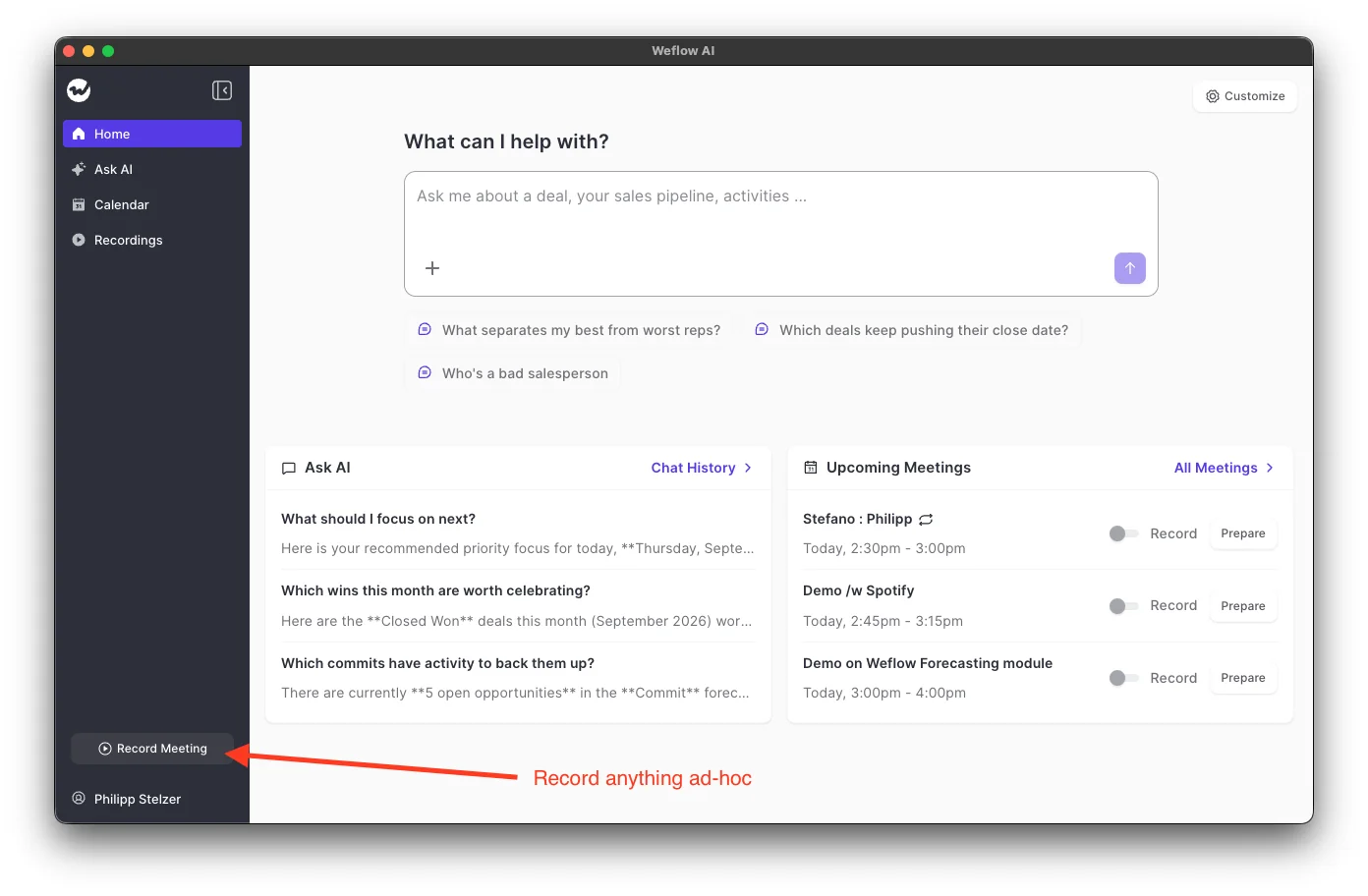
When a rep records with the Weflow desktop app, Weflow doesn't manage consent. The rep is responsible for getting consent from the participants.
The app records the system audio, the microphone and, where there is one, the video on the rep's own machine. Nothing joins the meeting, so:
- no notice gets posted,
- no stop link exists,
- nothing leaves the call when someone objects.
The rep starts each recording, either with the Record meeting button or by accepting the prompt the app shows when they join a Zoom or Google Meet call.
Teams that adopt the desktop app to avoid a visible bot give up the automated consent flow at the same time. Botless recording removes the friction and moves the liability onto the rep's conduct and local law.
Some legal teams prefer a visible bot for exactly that reason, because a recorder that asks and logs the answer is easier to defend than one nobody sees. Weflow's guidance is to agree the consent requirements for your participants' countries with your legal team before reps use the desktop app.
Consent mode none leaves the ask to the seller
With consent mode none, the seller asks for consent in the room, and nothing in the product enforces that they do. If you choose this mode, your policy is the control, so write down what sellers say and when they say it.
Dialer calls follow the dialer's own consent handling
For a connected dialer, the dialer records the call, so the dialer handles recording compliance, including the announcements some countries and US states require before recording. Weflow then pulls that recording, transcribes and analyzes it, and writes it to Salesforce as a call activity.
| Recording route | Who handles consent | What to write into your policy |
|---|---|---|
| Weflow notetaker, opt-out or opt-in | Weflow: pre-meeting email, chat notice, stop link and consent log | The mode, the message text and language, the retention window and the excluded domains |
| Weflow desktop app | The rep, under the participants' local law | How reps announce the recording and get consent before pressing record, per country |
| Consent mode none | The seller in the room | The wording sellers use and the rule that they ask on every call |
| Connected dialer | The dialer | The dialer's announcement and recording settings |
What Weflow recording consent doesn't do today
Four limits are worth knowing before legal or the works council finds them.
Consent doesn't change by country or account
Weflow applies consent as configured. It doesn't adapt the mode to the region an account sits in. A team selling into several jurisdictions gets one consent behavior across all of them, and separating markets means separate teams with separate configurations.
Gong is stronger here. Its consent profiles set different rules by team and region, with a choice of consent page, audio prompt and pre-call email, in the language you pick.
Chorus is also stronger. Its Compliance Mode landing page adapts prompts and disclaimer to the attendee's location and language. Where GDPR applies, it records only if every attendee consents.
If one team sells into many countries and you need consent to change per participant, those tools fit that requirement better. If you can split markets by team, Weflow's per-configuration model covers it.
An opt-out deletes the internal notes too
When an external participant opts out, Weflow keeps nothing, including the internal-only meeting notes. The call doesn't fall back to a written recap for the seller.
If your sellers want notes on opted-out calls, they take them by hand or dictate a voice note in Weflow Mobile Copilot after the meeting.
Weflow can't take notes without recording audio
Weflow produces the transcript, summary, field updates and coaching from the call audio, so a meeting with no audio yields nothing. Some works councils draw the line exactly there.
If your works council won't accept any recorded audio, choose a tool built for that:
- Bliro transcribes without recording.
- Airspeed's transcript-only mode never downloads or stores the audio and video.
- Fireflies Enterprise can keep the transcript and summary with the audio deleted, or the summary alone.
What Weflow offers instead is automatic deletion of recordings after a set period, and Mobile Copilot voice notes dictated after the meeting.
The consent log doesn't show who removed the notetaker
The consent log records each meeting's outcome and its reason, but not the person who removed the notetaker from a call. If your auditors need that name, the log won't give it to them.
If you'd like to go through this configuration live, bring your DPO or legal counsel to the call and we'll walk them through the consent settings on a real workspace. See how Weflow captures activity, updates Salesforce fields from calls, and rolls up your forecast. Book a 30-minute demo.
FAQ: recording consent in Weflow Conversation Intelligence
Does Weflow's consent flow cover consent to analyze the recording?
Weflow's consent flow covers notice of recording and the route to decline. That means the consent mode, the pre-meeting email, and the chat notice with its stop link.
The legal basis for processing and analyzing the recording afterwards is a determination your DPIA makes. The consent message is where you tell participants what the recording is used for, and you write that text yourself.
Does the Weflow notetaker wait in the lobby if nobody admits it?
Yes, for about ten minutes, then it leaves and the consent log records the meeting as "not admitted."
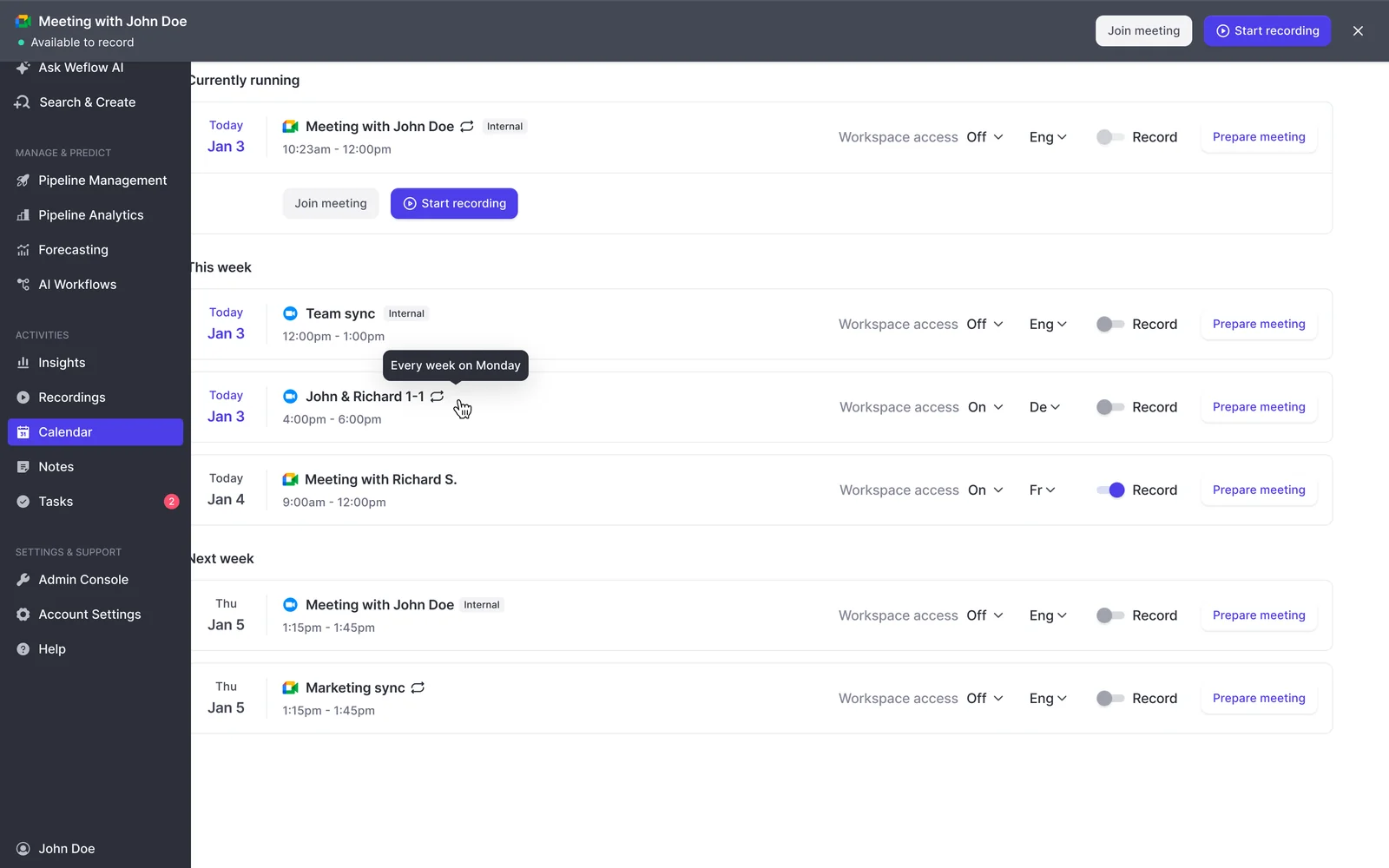
On platforms with a lobby, only the organizer can admit a guest. If the customer booked the meeting and never joined, the notetaker waits outside. While the call is still running, the rep can send the notetaker back in from the Weflow calendar and ask the customer to admit it.
Does Weflow record internal meetings?
Not by default. The Weflow notetaker joins only meetings with at least one attendee outside your configured internal domains. Recording an internal meeting is an explicit opt-in for that meeting.
Can we configure Weflow before legal signs off?
Yes. Weflow reads no mailbox until a user is enrolled in an activity capture configuration. Installing the managed packages, connecting the integration user and adding the workspace application grant access without capturing anything.
The notetaker also doesn't join any meetings for a user until that user signs in. You can finish the technical setup while the legal review is still open.
What documents does Weflow provide for a DPIA or works council review?
Weflow provides:
- a Data Processing Agreement with EU Standard Contractual Clauses,
- a public sub-processor list with advance notice of changes, so you can object before a new sub-processor takes effect,
- a 48-hour breach notification commitment,
- SOC 2 Type II certification and GDPR compliance,
- Zero Data Retention for AI processing, with no customer data used to train models.
ISO 27001 is a commitment, not a certification we hold today. We're working toward it with a target date of December 2026.
What happens if IT blocks third-party notetakers in Microsoft Teams?
The Weflow notetaker joins Teams meetings as a participant, so it falls under whatever your Teams policy allows for meeting participants. The Weflow desktop app records without joining the meeting. On that route, the product's consent flow doesn't run and consent moves to the rep.
Is the Weflow desktop app included in the Conversation Intelligence price?
Yes. The Weflow desktop app comes with every Weflow Conversation Intelligence seat, at $39 per user per month billed annually, standalone or inside a bundle that includes Conversation Intelligence. There's no separate license. A user with a seat downloads the app and signs in with the same account.