Security Review Questions Buyers Ask About Revenue AI Tools: Patterns From Sales Calls
Learn the security review questions that stall revenue AI deals: consent, EU residency, due diligence.


The certificate is the easy part. A SOC 2 Type II report gets a revenue AI tool into the security review. What stalls the review is the depth of the follow-up questions. Approval boards rarely stop on a red flag. They stop on the volume of information they want, and since AI arrived, "where is it stored" has become the easiest question on the list.
These are the questions that actually stall reviews, in the order this article answers them:
- Where is the data processed, not just stored?
- Which model sees the conversation, and does it train on it?
- Does consent to record cover consent to analyze?
- How do deletion, retention and litigation requests actually get executed?
- Does the tool act as the logged-in Salesforce user?
- Is a visible recorder the more compliant one?
- Will AI arrive later as a separate meter?
For each one, you get why reviewers ask it, what a good answer sounds like, and where vendor answers diverge. Our own answers, gaps included, serve as one worked example. We built Weflow around AI field updates that turn call data into Salesforce deal workflows, so these questions land on our calls every week. The last section covers what you can move forward while legal is still reviewing.
Why SOC 2 Type II alone won't clear your security review
SOC 2 Type II opens a revenue AI security review, but the review stalls on the depth of information the approval board requests and on AI-specific questions that a certificate doesn't answer.
You already know this if you've sent a SOC 2 PDF and received ten new questions back. The certificate earns you the next question. Here's how the questions shifted:
| What reviewers asked before AI | What stalls the review now |
|---|---|
| Where is the data stored? | Where is it processed, and which model and sub-processors touch it on the way? |
| Do you have a certificate? | Show us the working procedure for deletion, retention and litigation requests. |
| Do you ask for consent to record? | Does that consent also cover processing and analyzing the recording? |
| What can the tool do? | What does the tool refuse to do, and whose Salesforce permissions does it act under? |
| What's the seat price? | How is AI consumption capped, and will future AI cost extra? |
The commercial owner can't overrule any of this. A recording tool touches every customer conversation your company has, so it lands with the people who ask where data sits, who processes it and under whose law. That's why vendors lose here quietly and never find out why.
One prospect put the real problem better than we could:
"The issue is not the number of red flags. The issue is the extent of the information the approval board is looking for."
A prospect on a sales call with us
How we gathered these patterns from calls, RFPs and podcasts
These patterns come from Weflow's own buyer conversations and documents, grouped under one theme: security, compliance and procurement. Each source type is labeled for what it is:
| Source type | What it contributed | How it's attributed here |
|---|---|---|
| Private sales calls | The pains, objections and exact phrasing prospects use when a review stalls | Anonymized as "a prospect". Quoted only when the words are verbatim |
| RFP and security questionnaire documents | The written requirements: certifications with audit dates, no-training clauses for sub-processors, itemized AI charges, integration without middleware | Anonymized and paraphrased, never attributed to a company |
| RevOps Lab podcast episodes | How European revenue teams talk about data sovereignty and how buyers compare tools | Summarized, not quoted |
| One competitor webinar | A buyer question on GDPR and confidentiality inside a recorded conversation | Summarized as a buyer question |
| Vendors' public documentation | How Gong, Clari, Attention and others answer the same questions | Cited to each vendor's own help center, security FAQ or trust pages |
We anonymized every prospect and customer who isn't named in a published case study. We don't give a count of calls or documents, because the patterns matter more than the tally.
The questions that actually stall revenue AI security reviews
Seven recurring questions decide most revenue AI security reviews, and each one has a recognizable good answer. If you're building your questionnaire, start here:
| Question | Why buyers ask it | What a good answer includes |
|---|---|---|
| Where is our call data processed, not just stored? | "EU data centre" and "processed in the EU" are different promises | Storage region, processing locations, and every sub-processor with its jurisdiction |
| Which AI model sees our conversations, and does it train? | A no-training promise means little if the model provider retains data | The named model provider, its retention position, and a no-training commitment for the whole chain |
| Does consent to record cover consent to analyze? | GDPR treats processing and analysis as a separate step | A per-session notice, a stop mechanism, and a consent log you can export |
| How does legal execute deletion, retention and litigation requests? | Legal fields the request, not the DPA | Step-by-step procedures, shown in the product |
| Does the tool act as the logged-in Salesforce user? | Service accounts and middleware walk around your permission model | User-level access, inherited field-level security and role hierarchy, no middleware |
| Is a visible recording bot safer than a botless recorder? | Legal and works councils disagree on which mode is compliant | Both modes explained, with what each does for consent |
| Will AI features show up as a separate meter later? | Budgets get approved per seat, then invoices arrive with AI lines | Every separately charged component named, and future AI pricing in writing |
Where is our call data processed, not just stored?
Reviewers now ask separately where call data is stored and where it's processed, because a vendor can store data in the EU and still process it elsewhere.
Regulated and EU-headquartered buyers write residency into the requirement itself, sometimes down to the country. They also want the sub-processor list with the jurisdiction of each entry. The vendor that separates storage from processing without being asked earns trust before the demo.
"irrespective of how compliant the vendor is, there's still a process"
A prospect on a sales call with us
Credit where it's due first. Gong's certification set is complete: SOC 2 Type II, ISO 27001, 27017, 27018 and 27701, the Cloud Security Alliance STAR registry, and the EU-US Data Privacy Framework. The distinctions worth drawing sit in residency and processing, not in certification.
Where vendor answers diverge:
- Gong offers US or EU storage, chosen at onboarding, with the US as the default. Choosing EU storage doesn't confine processing to the EU: Gong processes data in the United States, Israel and Ireland.
- Clari hosts customer data for its services in the US-east region only.
- Salesforce Einstein Activity Capture follows the region where the org's Sales Cloud or Service Cloud data lives. Some related data still sits in the United States when Lead Scoring, Call Coaching or Einstein Conversation Insights is on.
- Revenue Grid stores and processes personal information on Microsoft Azure in the United States by default.
- A third pattern is storage that follows your CRM region. Your org has already approved that location, so the residency answer is one you can point to.
Which AI model sees our conversations, and does it train?
"We don't train on your data" is an incomplete answer unless the vendor also names its model provider and states that provider's retention position.
In Germany and Austria, this is now the question that kills deals at the works council. Buyers have to answer, in writing, whether any conversation data reaches a model that trains on it, including through a sub-processor the vendor didn't mention. A vendor that can't answer for the whole chain doesn't get to the pilot.
Where vendor answers diverge:
- Gong states it never uses customer data to train generative models, but doesn't disclose its model providers or whether those providers retain data.
- Revenue Grid contractually restricts its AI providers, including Microsoft, from training on customer content. It restricts provider retention to delivering the feature and detecting abuse, so retention is limited rather than zero.
- ZoomInfo forbids training on data reached through its MCP server, but the only enforcement point is a training setting the customer switches off in their own AI client.
- Nektar names its providers, OpenAI, Google Gemini and AWS Bedrock, under agreements that prohibit storage or training. That's the shape of an answer you can write into a review.
Does consent to record cover consent to analyze under GDPR?
A consent flow that covers recording leaves the consent to process and analyze that recording unaddressed, and legal teams increasingly ask about the two separately.
Works councils add a second requirement: every recorded session carries its own consent notice. A line in an employment contract doesn't count. What buyers want is consent handled by the product rather than by policy, so a rep never has to remember it.
Where vendor answers diverge:
- Gong uses consent profiles that set different rules by team and region, choosing among a hosted consent page, an audio prompt when participants join, and a pre-call email.
- Momentum collects consent before the meeting by rewriting the calendar invite with a consent page. The bot leaves only when a recognized participant declines, meaning someone on the invite or sharing the host's email domain.
- Salesloft relies on the meeting platforms' own notices (Zoom's disclaimer, Teams' banner, Meet's pre-join notice) plus a Do Not Record domain list.
How does legal execute deletion, retention and litigation requests?
Legal approves a recording tool once it sees how deletion, consent logging, retention and litigation recovery work in practice, not when it receives the DPA.
Ask the vendor to demonstrate each of these procedures:
- The vendor shows you, step by step, how a right-to-be-forgotten request removes a person's recordings, transcripts and derived data.
- The vendor shows where the consent log lives and how you export it.
- The vendor shows where retention periods are set, and at what scope: workspace, team or recording.
- The vendor shows how you recover one specific conversation if litigation calls for it.
- The vendor shows which copies of a recording exist outside the main retention policy.
Retention limits are sometimes written down to the day. One prospect described the French constraint like this:
"French law has some specific regulations and we have a lot of people in France. So they are kind of concerned about keeping customer data longer than 90 days, or 30 days even."
A prospect on a sales call with us
Where vendor answers diverge:
- Gong excludes calls saved to its library from the three-year retention policy and keeps them indefinitely, so a retention question about Gong has two answers.
- Revenue Grid deletes sales engagement, forecasting and AI module data three months after a subscription ends, and purges diagnostic logs after 90 days.
Does the tool act as the logged-in Salesforce user?
Salesforce admins judge a revenue AI tool on restraint, not capability. They ask four things:
- Does it act as the logged-in user?
- Does it respect field-level security and role hierarchy?
- Does it write into your existing record types or create its own?
- Does it run without middleware?
Breaches put these questions first. We hear buyers describe them plainly:
"We have a very tight security model here. We've had kind of our customer list and our pipeline stolen a few times at least."
A prospect on a sales call with us
"we were impacted by the Drift thing"
A prospect at a security company, on a sales call with us
Middleware is now close to a disqualifier. Admins have explained to IT why a third system holds a copy of customer data, and they don't want to do it again. A vendor whose answer involves a sync service usually doesn't reach the demo.
Where vendor answers diverge:
- Attention requires the connecting Salesforce user to hold API Enabled, Customize Application and Modify All Data. Modify All Data overrides sharing rules and every object and record-level permission.
- Gong Agent Studio applies opposite permission models across two agents. AI Data Extractor can draw on non-private calls the configuring admin can't open, while AI Builder excludes calls its creator can't access.
- Revenue Grid's AI Mentor uses the rep's own Salesforce permissions for every read and write.
Is a visible recording bot safer than a botless recorder?
Botless recording isn't automatically safer. Some legal teams prefer a visible bot because it asks for consent and logs it, while some works councils reject any recorder that joins the meeting.
One prospect's legal team called a background recorder non-compliant and ruled it out ahead of a FedRAMP push. Here's how the two modes compare on what reviewers care about:
| What reviewers check | Visible meeting bot | Background or desktop recorder |
|---|---|---|
| Consent prompt | The product can post a notice and offer a way to stop the recording | Nothing joins the meeting, so the rep has to ask |
| Consent record | The product can log each decision | No product log unless the vendor adds one |
| What other participants see | A named recorder in the attendee list | Nothing, unless a chat notice is posted |
| Exposure to IT policy | Blocked if IT stops third-party notetakers in Teams | Needs operating-system recording permissions that laptop fleet policy controls |
| How some legal teams read it | The compliant option | A compliance exposure |
IT policy pushes the other way. Several prospects told us their IT teams will block third-party notetakers in Microsoft Teams and authorize only Copilot to record. And some DACH teams avoided the works council question entirely by choosing a transcript-only tool.
One detail matters more than people expect: how the recorder looks. In our own beta feedback, a recorder named plainly, like "Note taker", drew fewer objections than one with an AI-styled logo. Participants judge the name and picture before they read any notice.
Where vendor answers diverge:
- Attention's desktop app posts a chat message when recording starts, but the feature is in beta and Attention switches it on per organization on request.
- Attention's desktop app on macOS asks for Full Disk Access among its four permissions, the one a laptop fleet policy is most likely to refuse.
- Airspeed offers no bot-free capture. It handles consent by announcing itself, with a consent page in seven languages and an in-meeting announcement.
Will AI features show up as a separate meter later?
Buyers now write into the RFP that every separately charged AI, recording or consumption component must be named, and that any future AI fees must be stated in writing.
They've been through it once. The budget gets approved on a per-seat number, then the invoice arrives with recording, storage, conversation intelligence and AI consumption on separate lines. Nobody wants to renegotiate from inside a two-year contract because the pricing model changed when AI became the product.
The RFP asks worth copying:
- The vendor itemizes every seat and every module in the quote.
- The vendor names every component charged separately, including AI, recording, storage and consumption.
- The vendor states in writing whether future AI capabilities may carry additional fees.
- Where AI is metered, the vendor shows a visible meter, a hard tier boundary you can't cross without an explicit purchase, and a per-workflow breakdown of consumption.
Predictability beats generosity here. A vendor that's vague on what's included gets marked down on total cost before anyone looks at the product.
How security reviews differ in DACH, France and regulated industries
The same revenue AI tool meets a different stopping point depending on your region and industry:
| Segment | What stalls the review | What reviewers ask for |
|---|---|---|
| DACH works councils | A visible video recorder in sales calls, and any doubt about model training | Documentation of what's captured, where it's processed and who can hear it; a consent notice per session; a no-training answer for the whole sub-processor chain |
| France | Holding customer data beyond 30 or 90 days | Where retention is set, and automatic deletion after a fixed period |
| Regulated and public-sector orgs | A separate AI governance committee on its own schedule, and approved-cloud lists that block even a sandbox trial | Cloud clearances such as FedRAMP in the first call, and a way to buy capture without the AI |
| Acquired companies | Procurement, security and GDPR due diligence move to the parent group | A vendor that has been through a group-level review, with paperwork ready |
| Security and fintech firms | Breach-driven disqualifiers, and trials limited to prospects only | No middleware, no copies of data in a third system, and security cleared before a short POC starts |
| Sellers with risk-averse customers | A client treats the new recorder as a new sub-processor on their data | Admin-level exclusion of specific customers, set once rather than by each rep |
How Weflow answers these questions, gaps included
Weflow is the Revenue AI Orchestration platform for sales, customer success, and RevOps teams. What follows is how we answer the questions above, in the same order, with our limits stated plainly. It's one worked example of a specific answer, not a ranking.
Weflow stores your data in your Salesforce instance's region
Weflow stores customer data in the region where your Salesforce instance sits, so an org hosted in Europe keeps its Weflow data in Europe. You can override that to keep data in the EU or UK.
We're a German company hosted in Frankfurt, and our regions are Frankfurt, New York and Sydney. Because data follows the CRM, residency is a configuration, not a migration project. Your org has already approved that location, so legal gets an answer it recognizes.
One exception: video recordings. We hold them and stream them back, because Salesforce is a poor place to store large files.
Weflow runs on Google Gemini with Zero Data Retention
Weflow runs on third-party foundation models, primarily Google Gemini, with Zero Data Retention and no training on customer data. You can write the provider's name into your review.
We deliberately don't compete at the model layer. A better answer comes from the context we assemble around the question: your activity record, your conversations and your Salesforce structure. That keeps the model question answerable with a vendor name and a contractual position.
Weflow handles recording consent in the product and logs it
Weflow handles recording consent in the product and writes every decision to a log you can download. Here's how consent plays out on a recorded meeting:
- Your admin sets the consent mode for each capture configuration: opt-out, opt-in, or none, where the seller decides in the room. Most customers pick opt-out, because opt-in breaks down in larger groups where one person forgetting to accept kills the recording.
- An optional pre-meeting email lets a guest decline before the call.
- When the notetaker joins, it posts a notice in the meeting chat with a link any participant can use to stop the recording. You customize the message and its language.
- If a participant opts out, the notetaker leaves and the recording, transcript and notes are deleted. The host can also remove the notetaker mid-call and keep everything recorded up to that point.
- Every consent decision lands in a downloadable CSV log.
- Recordings can delete automatically after a set period, which answers the French 30 and 90-day retention concern.
The per-meeting chat notice is what a works council asks for. Our consent gaps are listed in the "falls short" section below.
Weflow writes call data into your Salesforce objects
Weflow writes activity, contacts, transcripts, summaries and AI field updates into standard Salesforce objects (Task, EmailMessage, Event, Contact) and custom objects through a managed package, with no middleware copy in between.
That answers the question your admin is really asking: how many places does customer data live? Your CRM data sits in your own Salesforce org, physically separated from every other customer by design.
Recordings, transcripts and Weflow-native fields sit in our AWS environment, in Frankfurt, New York or Sydney. Every record is scoped to your workspace, encrypted at rest and in transit, and temporary processing data is deleted after processing. These segregation controls sit inside our SOC 2 Type II audited scope.
Our support team can't read your email either. When they troubleshoot, they see whether each message synced and which rule skipped it, not what it says.
"The records are now only stored in Salesforce. This way it's secure"
Arnold Kemoli, Salesforce Team Lead & Engineering Manager, Blacklane
Weflow signs in through Salesforce and inherits its permissions
Weflow signs users in through Salesforce only and applies your existing Salesforce permission model:
- The only way to sign in is Salesforce OAuth, with whatever SSO or two-factor your org already enforces. There's no separate Weflow password to phish.
- Deactivating a user in Salesforce removes their Weflow access immediately, so joiners and leavers are a non-event for IT.
- Weflow inherits your permission sets, field-level security, role hierarchy, validation rules and field dependencies. A user sees in Weflow what they see in Salesforce.
- Ask Weflow AI authenticates with the user's own Salesforce token and adds its own guardrails on top, so it can withhold information a user could reach directly in Salesforce.
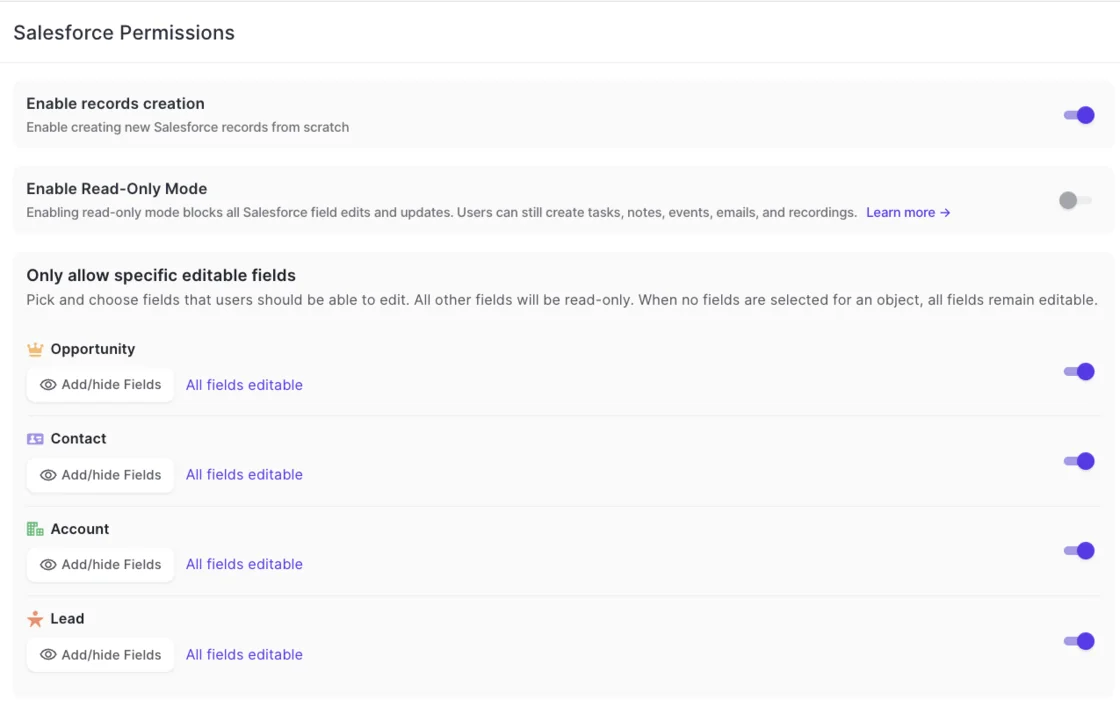
- Admins can switch Weflow into read-only mode or limit which fields are editable per object.
- The gap: Weflow doesn't inherit visibility you enforce through list-view restrictions or Lightning component visibility. You rebuild that by creating pipeline and account views centrally, assigning them per team, and switching off users' ability to build their own views.
Where Weflow falls short today, from ISO 27001 to audio-free notes
These are the limits you should know before you choose Weflow:
- We hold SOC 2 Type II, not ISO 27001. We're targeting ISO 27001 for December 2026. Gong and Chorus, through ZoomInfo, hold ISO 27001 today, so if your policy mandates it now, we don't meet it yet.
- Weflow isn't FedRAMP certified.
- Consent doesn't vary by the region an account sits in. A configuration attaches to a team, so selling into several jurisdictions with different rules means separate teams with separate configurations.
- Desktop-app recordings carry no product consent flow. Nothing joins the meeting, so the rep is responsible for obtaining consent.
- In Microsoft Teams, depending on chat settings, someone who joins after the notetaker may not see the chat notice. The notetaker stays visible in the participant list, and the pre-meeting email covers cases where the in-meeting notice isn't enough.
- Weflow can't produce notes without audio. If your works council rejects any audio recording, a transcript-only tool serves you better. Where the concern is keeping recordings, auto-delete and a post-meeting voice note in the mobile app are the alternatives we offer.
- Exclusion works by domain. Weflow doesn't exclude records by Salesforce attributes, such as an account flagged confidential.
- A failed AI field update to Salesforce can't be replayed. Test writes against every object your activities map to before rollout.
What Weflow costs, and why Ask Weflow AI isn't metered
Weflow publishes its pricing. Weflow Conversation Intelligence costs $39 per user per month, billed annually, with unlimited recordings and transcripts.
Ask Weflow AI Pro comes with every plan and every bundle. It isn't metered or priced separately: a fair use policy governs it, and no customer has reached it yet. Agent Builder Free, with 25 agent actions per month, is included the same way. That's the answer to the meter question: the AI people use daily is the one they never have to ration.
If an AI governance committee is still open, Weflow Activity & Contact Capture is sold standalone at $19 per user per month. It still includes Ask Weflow AI and Agent Builder, so it isn't an AI-free product. What it gives you is the capture foundation first, while recording and AI field updates wait for approval.
If your legal team wants to see the consent settings and permission behavior rather than read about them, walk through the product yourself, no call required.
What you can move forward while legal reviews the tool
Run the security review as a parallel workstream that starts alongside technical setup, not as a gate at the end. Here's what you can move this week:
- Send the full question set on day one. Volume stalls reviews, so get every question in front of the vendor before the first demo is over.
- Ask whether installing and connecting the tool grants access without capturing anything. In Weflow, no mailbox is read until a user is enrolled in a capture configuration, so setup finishes while legal is still open.
- Negotiate POC deletion clauses counsel-to-counsel. Legal won't approve a POC on real customer data, and a sandbox POC proves nothing. Written terms that delete captured data when the trial ends break that loop.
- Consider a prospects-only trial. One prospect needed two months to get approval to trial Gong, and even then only with prospects, not existing clients.
- Carve AI out and buy capture first if a governance committee is pending. Your reps' activity starts landing in the CRM while the AI review runs on its own clock.
- Document capture for the works council early: what gets recorded, where it's processed, who can hear it and how each session gets its notice.
- Settle exclusions for risk-averse customers up front, at admin level, before any rep has to explain the tool to a client's vendor-governance team.
How to cite this security review research
Suggested citation: Weflow (2026). Security Review Questions Buyers Ask About Revenue AI Tools: Patterns From Sales Calls. Weflow blog.
Sources: anonymized Weflow sales calls, anonymized RFP and security questionnaire documents, RevOps Lab podcast episodes and one competitor webinar, grouped under security, compliance and procurement.
We cite each vendor behavior described here to that vendor's own public documentation, such as help centers, security FAQs and trust pages.
FAQ: security review questions about revenue AI tools
Will a vendor share its SOC 2 Type II report and audit details?
Ask for the most recent SOC 2 Type II report under NDA, along with the audit dates and the name of the certifying body. Ask which certifications exist today rather than on a roadmap. Weflow has held SOC 2 Type II since 2021, runs third-party penetration testing, and publishes certificates and controls in its trust center.
Is a missing ISO 27001 certificate a dealbreaker?
A dated commitment usually lets a deal proceed, while a vague "in progress" stalls it. Weflow targets ISO 27001 for December 2026 and doesn't hold it today. If your policy requires ISO 27001 at signature, that's a hard stop until then.
Can we exclude one customer from recording and capture?
Yes, by domain. In Weflow, an admin adds the customer's domain to the notetaker exclusion list. Also ask how manual recordings treat exclusions: in Gong, ad hoc recordings bypass exclude lists and are always recorded.
What happens if IT blocks third-party notetakers in Microsoft Teams?
A meeting bot can't join, so the alternative is a desktop recorder on the rep's machine. Weflow's desktop app records Zoom, Google Meet and Microsoft Teams meetings without a bot, and the recording runs through the same AI field updates and summaries. The trade-off is consent: it moves from the product to the rep.
Is a desktop recording app compliant from a consent standpoint?
With a desktop recorder, the rep owns consent, because nothing joins the meeting to post a notice or leave when someone objects. Weflow's consent flow doesn't run on desktop-app recordings. Our guidance is to settle the consent rules for your participants' countries with your legal team before reps use it.
Can we run a proof of concept on real customer data?
Yes, when the contract carries it. The route that works is contractual: clauses stating captured data isn't retained and is permanently deleted when the trial ends, negotiated between both legal teams before the pilot starts. A prospects-only trial is the fallback when legal still won't allow existing-client data.
Can we buy activity capture first and switch AI on later?
Yes. Weflow Activity & Contact Capture is sold standalone, and you add Weflow Conversation Intelligence once your governance committee approves it. Capture still includes Ask Weflow AI and Agent Builder, so it isn't AI-free, but recording and AI field updates stay off until you buy them.
What should the Salesforce integration be allowed to access?
Avoid integrations that need Modify All Data for the connecting user, and avoid anything with middleware or a sync service in the path. Weflow connects through a managed package, writes to native Salesforce objects directly, and respects validation rules, field dependencies, permissions and role hierarchy.
How should external AI assistant and API access be secured?
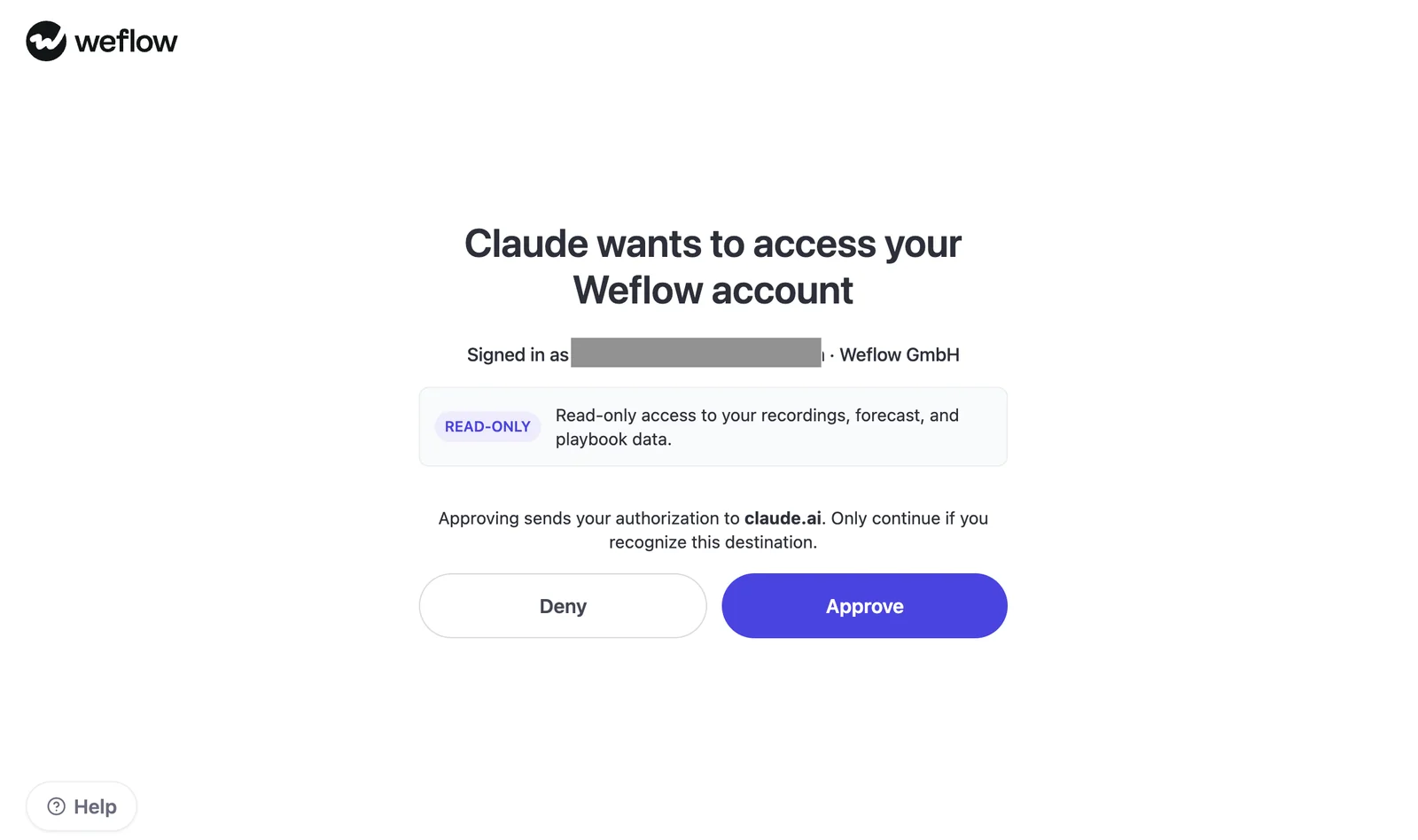
Every call from an external assistant should run under the caller's own identity. Org-level API keys carry full organization access with no user binding. Weflow exposes a public API, and our MCP connector asks the user to approve read-only access to recordings, forecast and playbook data through an OAuth consent screen.
What uptime commitment and status visibility should we ask for?
Ask for an uptime SLA in the contract and a public status page with real-time and historical availability. Weflow commits to 99.5 percent-plus uptime, backed by an SLA, and publishes its status at status.weflow.ai.
Does Weflow hold FedRAMP certification?
No. Weflow isn't FedRAMP certified. If your organization needs FedRAMP or an approved public-sector cloud listing before a trial, Weflow doesn't meet that requirement today.