How to Decide Which Salesforce Fields AI Should Fill From Calls: Start With a Free-Text Summary, Then Promote to Fields
Learn which call details belong in Salesforce fields vs a free-text summary—and when to promote them.


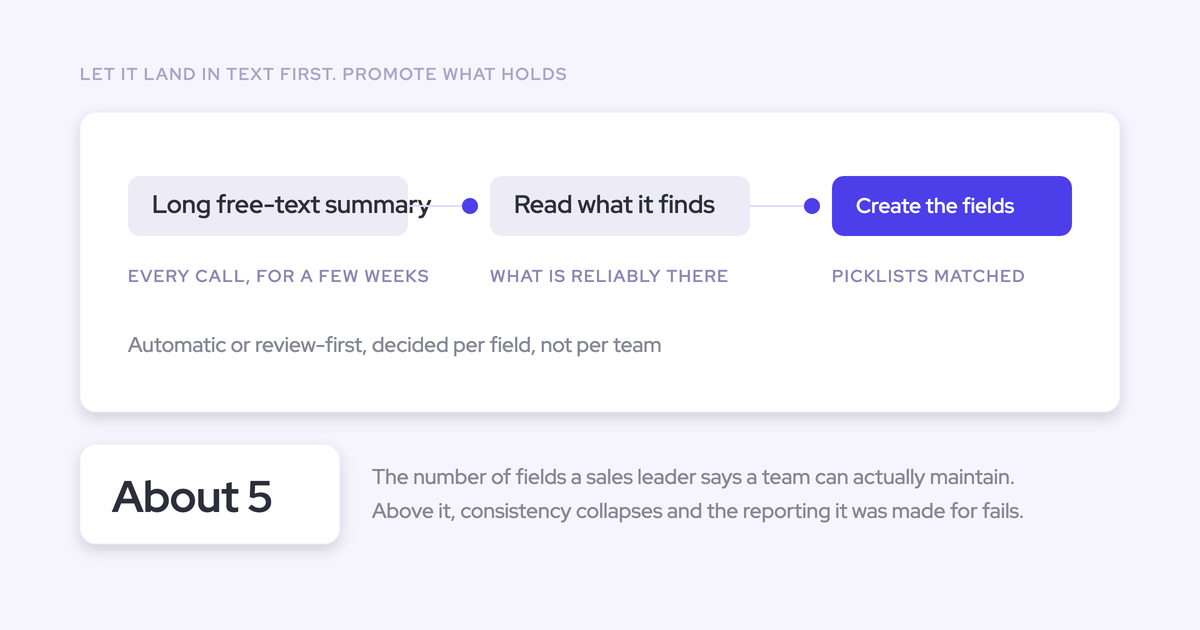

Start with free-text call summaries, then promote recurring information into Salesforce fields only when you can define it, use it, and govern its updates. You don’t need to settle the entire schema before examining what your calls contain.
The question isn’t how much AI can extract. It’s which answers deserve a permanent place in your operating process. A useful qualification detail might belong in an existing methodology field. A recurring category might justify a new picklist. Something interesting that nobody uses in a report, workflow, or decision should stay in the summary. That distinction keeps automation from creating more field sprawl.
Weflow is the Revenue AI Orchestration platform for sales, customer success, and RevOps teams. Our Weflow Conversation Intelligence supports this progression from configurable summaries to structured AI Field Updates. Here’s how we’d approach the field design before expanding automation.
Gather call evidence and existing Salesforce field definitions
Start with call evidence and your current Salesforce schema, not a request for new production fields. You need enough context to distinguish missing data from a missing definition.
- For discovery: Collect accessible transcripts and summaries across the teams and call types you want to support.
- For field design: Gather existing field definitions, types, allowed values, and destination objects.
- For operational relevance: Identify the reports, workflows, and review meetings that will consume each candidate value.
- For ownership: Name the business owner who defines the answer and the Salesforce admin who owns the write path.
- For write testing: Prepare an approved testing environment, test records, integration permissions, and the applicable validation rules.
For example, if managers already review a Metrics text field on the Salesforce Opportunity, bring that definition into discovery. An empty field doesn’t automatically justify creating a replacement.
1. Find recurring information in free-text call summaries
Read summaries to find candidate information, then return to the transcript to establish what the buyer actually said. A summary helps you scan; it isn’t ground truth.
- Group comparable calls. Separate discovery, negotiation, onboarding, and account reviews so different motions don’t blur together.
- Record repeated details. Look for information that changes how someone qualifies, reviews, or acts on a record.
- Keep the source attached. Record the call reference and supporting passage alongside the candidate.
- Write down the ambiguity. Capture disagreements before they become prompt instructions.
Your observation log might look like this:
| Recurring information | Source calls | Team or call type | Supporting evidence | Unresolved ambiguity |
|---|---|---|---|---|
| Time spent on manual handoffs | Discovery and follow-up calls on the same deal | New-business sales | The buyer describes repeated work and its operational impact | Is this a quantified metric or an unquantified pain? |
| Security review requirement | Technical evaluation calls | Sales engineering | The buyer says security approval must precede purchase | Does the field describe a requirement or the review’s current status? |
| Preferred meeting format | Discovery and account reviews | Sales and customer success | The buyer prefers a working session over a presentation | Will anyone use this outside the call summary? |
We hear this design problem from teams that can’t yet name the fields they want. Examining the summaries first gives them something concrete to discuss instead of another schema workshop.
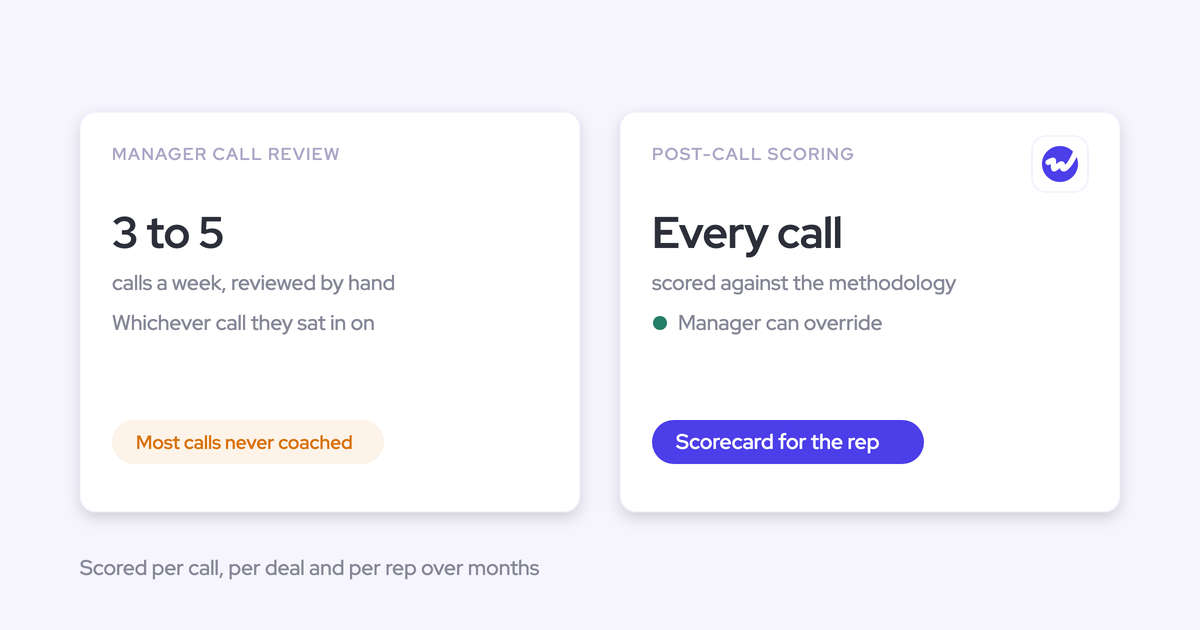
Weflow writes configurable call summaries to the Salesforce Event, so you can retain the conversation’s context while your field model takes shape.

2. Decide which call details deserve Salesforce fields
Promote information only when it passes five tests: recurrence, definition, operational use, field fit, and governance. Repetition alone isn’t enough.
| Criterion | Question to answer | Decision consequence |
|---|---|---|
| Recurring | Does this appear across the relevant calls or deals? | Keep isolated details in the summary unless a specific process requires them. |
| Definable | Would two reviewers agree on what qualifies? | Resolve the definition before configuring extraction. |
| Operationally useful | Which report, workflow, review, or decision uses it? | Without a named use, don’t create a field. |
| Structurally suitable | Can the answer fit a field type without losing necessary meaning? | Use structured values for grouping and prose for supporting context. |
| Governable | Who owns errors, existing values, and approval? | Keep writes reviewed until the update policy is explicit. |
Search your existing schema before adding anything. Reusing the field managers already inspect avoids a second version of qualification that nobody trusts.
| Candidate | Outcome | Why |
|---|---|---|
| Preferred meeting format | Keep in the summary | It helps the next conversation, but no recurring report or workflow needs a separate column. |
| Quantified business impact | Use the existing Opportunity Metrics field | The deal review already reads that field. Better evidence improves the existing process. |
| Security review requirement | Create a field if the schema lacks one | A defined value can feed an evaluation checklist or review queue that has an accountable owner. |
Salesforce field creation should follow a business use, not the availability of an extraction prompt.
3. Define what each Salesforce field should capture
A field is ready to test when its meaning, permitted output, destination, and evidence scope are explicit. The label “Metrics” doesn’t tell an AI what your team considers a metric.
We’ll carry the existing Opportunity Metrics field through the design. Start with this short specification:
| Specification item | Metrics example |
|---|---|
| Business use | Help managers judge whether discovery establishes measurable customer value. |
| Destination | Existing Metrics field on the Salesforce Opportunity. |
| Definition | Customer-specific, quantified business impact connected to the problem or desired outcome. |
| Accountable owner | The sales methodology owner, with RevOps maintaining the extraction configuration. |
Match each Salesforce field type to its intended use
Choose the field type for the decision it supports. A readable paragraph and a reportable category serve different jobs.
| Field type | Intended use | Permitted output and validation |
|---|---|---|
| Text | Qualification evidence and next-step context | Concise supporting detail within the field’s length limit. |
| Picklist | Group records into one defined category | One allowed value. Include the exact choices and their meanings in the prompt. |
| Multi-select | Record several applicable categories | Only allowed values. Test how later updates interact with existing selections. |
| Number | Measure or calculate a quantity | A number with a defined unit, period, and treatment of estimates. |
| Date | Track an explicitly stated milestone | An unambiguous date tied to the named event, not another date mentioned nearby. |
Keep our Metrics example as text because the manager needs the measurement and its business context. If you later need to chart a specific quantity, define that measure separately rather than forcing unrelated metrics into one number field.
Weflow AI Field Updates support text, picklist, multi-select, number, and date fields across Salesforce Account, Contact, Opportunity, and Lead records. Custom objects require setup from our support team.
Define what counts as evidence for each Salesforce field
Write the qualifying evidence and the exclusions together. Most plausible extraction errors expose a definition the team never wrote down.
We’ve seen methodology prompts return company headcount as a value metric. The number was present; the business meaning was wrong.
| Definition requirement | Metrics example |
|---|---|
| Qualifying evidence | The buyer quantifies a cost, delay, workload, revenue impact, or desired improvement connected to this purchase. |
| Exclusions | Company size, seller claims, unrelated numbers, and benefits the buyer hasn’t established. |
| Units and context | Retain the stated unit, period, affected process, and whether the number describes current or target performance. |
| Absent or ambiguous evidence | Propose no addition. Don’t insert prose saying the call didn’t discuss metrics. |
For example, a buyer’s quantified description of time lost to manual handoffs qualifies. Their total employee count doesn’t, unless they connect it to the business impact you’re measuring.
For a Champion field, apply the same discipline to people: define the buyer-side role and exclude your own employees. A name alone isn’t qualification evidence.
Choose single-call or deal-wide evidence for each Salesforce field
Use single-call evidence for what happened in that conversation. Use deal-wide evidence for the current qualification answer across the opportunity.
| Question | Single-call evidence | Deal-wide evidence |
|---|---|---|
| What should the output answer? | What did this conversation establish? | What do we currently know about the deal? |
| Example | The action agreed during a discovery call. | The established metrics and remaining qualification gaps. |
| Weflow mechanism | Post-call AI Field Updates. | AI Playbooks reading related calls, emails, activities, and CRM fields. |
Weflow AI Playbooks maintain Salesforce field answers from deal-wide evidence rather than treating the latest call as the entire opportunity.
For our Metrics example, post-call updates can add newly discussed evidence. If the manager needs a reconciled current answer across the deal, use an AI Playbook. Source scope and write behavior remain separate decisions.
4. Set rules for changing each Salesforce field
A plausible extraction doesn’t authorize a Salesforce change. Your field specification also needs a write policy and a person accountable for exceptions.
Extend the Metrics specification before enabling writes:
- Write behavior: Add relevant evidence without discarding earlier qualification.
- Review mode: Start with the rep reviewing proposed changes.
- Escalation: Send contradictory measurements or unclear units to the methodology owner.
- Automation condition: Require acceptable extraction quality, preserved context, and continued use in deal reviews.
| Current Metrics value | Proposed addition | Reviewer action |
|---|---|---|
| Manual handoffs delay onboarding; impact hasn’t been quantified. | The buyer now provides a measurement of weekly handoff work. | Accept the supported measurement with its unit and period; reconcile the earlier statement about missing quantification. |
Decide when AI should change existing Salesforce values
Define how new evidence should interact with the current value before automating the field. The correct action depends on both.
| Current value | New evidence | Intended action | What the test must demonstrate |
|---|---|---|---|
| Empty | Explicit, qualifying answer | Populate | The value fits the definition and reaches the right record. |
| Existing methodology text | Additional supporting evidence | Append or amend | Earlier evidence remains available without unnecessary repetition. |
| Existing single value | Explicit replacement | Overwrite under the field’s approval policy | The new statement supersedes the old one. |
| Existing multi-select values | Another qualifying category | Merge where the configured write behavior supports it | The update retains relevant existing selections. |
| Any value | No evidence or unresolved contradiction | Leave unchanged; route conflicts to review | Absence doesn’t erase evidence or create filler. |
These are field-policy requirements, not interchangeable controls in every product.
Weflow adds to existing methodology text rather than replacing it with the latest call’s content. That preserves early qualification, but adding text alone doesn’t resolve contradictions. Your reviewer still needs to catch them.
Choose which Salesforce field updates need human review
Assign ownership field by field, based on the judgment involved and the consequence of a wrong answer. Don’t use one accuracy target for the whole schema.
| Ownership mode | When to use it | Review responsibility | Condition for change |
|---|---|---|---|
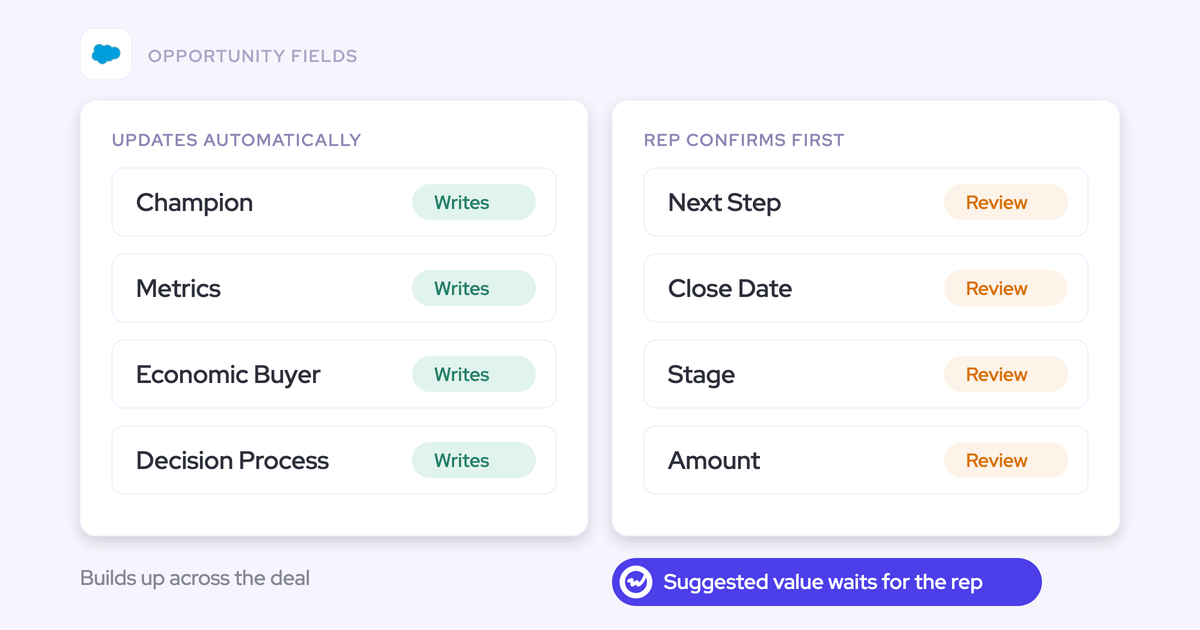
| Manual ownership | The value expresses seller judgment, such as forecast confidence. | The rep owns the decision. | Keep the judgment manual even when AI supplies supporting evidence. |
| Reviewed AI updates | Evidence is extractable, but mistakes affect stage, amount, commitments, or qualification. | The rep accepts, edits, or rejects each proposal. | Reduce review only after field-specific testing supports it. |
| Automatic updates | The answer is explicit, the write behavior is predictable, and error consequences are acceptable. | RevOps monitors results and owns exceptions. | Return to review when definitions, prompts, or downstream uses change. |
Keep Stage under human review. Weflow can update it from call evidence, but a wrong transition changes the sales process and the forecast assumptions attached to it.
Our Metrics example starts reviewed too. Weflow shows proposed Salesforce values beside current values, so the rep can judge what changes without reconstructing the record.
5. Pilot Weflow AI Field Updates before expanding automation
Your pilot should prove that useful, supported values reach the correct Salesforce records under the agreed rules. A generated answer is only part of that test.
- Choose a small candidate set. Include the Metrics example and fields with different types or write consequences.
- Configure the prompts and team template. Weflow provides more than 250 pre-built prompts you can adapt to your definitions.
- Start with reviewed proposals. Test destinations and existing-value behavior before widening the pilot.
- Inspect the Salesforce result. Record extraction errors separately from mapping and write failures.
- Approve each field independently. Keep unresolved fields reviewed or remove them from the model.
Weflow’s prompt editor includes an Auto-update Salesforce option. Leave it off while the field earns automation through observed results.

Test Salesforce writes on every intended destination object
Test the actual destination record, including account-level and post-sale cases. A successful Opportunity write doesn’t prove that Account writes work.
- Start in an approved Salesforce testing environment. Separate configuration tests from the live pilot.
- Inspect integration access. Include object permissions, field access, record access, and applicable validation rules.
- Exercise existing-value cases. Test empty, populated, contradictory, and absent-evidence inputs.
- Inspect mapping and the saved result. Open the resulting Salesforce record rather than relying on the generated output.
- Assign recovery ownership. The admin fixes the write path; the business reviewer approves any manual correction.
In Salesforce orgs with Private org-wide defaults, Weflow’s integration user needs Modify All Records on Account, Opportunity, and Contact. Read, Edit, and View All alone don’t support subsequent updates in those cases.
| Intended destination | Expected write | Result to record | Corrective action if it fails |
|---|---|---|---|
| Opportunity Metrics field | Add supported qualification evidence. | Saved content and retained earlier evidence. | Correct field access, prompt definition, or mapping. |
| Event related to an Account | Store the call summary on the intended meeting. | Summary presence and correct account relationship. | Correct permissions or activity mapping. |
| Account for a post-sale call | Write the team’s account-level output. | No update to an unrelated sales opportunity. | Correct the template destination and record association. |
Weflow’s recording and the Salesforce Event are separate records. Changing the mapping inside the Weflow app moves only the recording; correcting it through the Outlook or Chrome extension moves both.
That distinction matters when the same account has renewal and expansion opportunities. Inspect both records after a correction.
Check extracted field values against the original call evidence
Measure agreement with the field definition and source evidence, not just completion rate. A populated field can still contain an unsupported answer.
Use a review log that makes corrections traceable:
| Log item | Metrics test case |
|---|---|
| Expected value | No addition to Metrics. |
| Proposed value | Company headcount. |
| Evidence | The buyer describes company size but gives no quantified business impact. |
| Reviewer decision | Reject the proposal. |
| Error category | Unsupported value under the field definition. |
| Prompt version | Record the version that produced the proposal. |
| Review effort | Record time spent finding evidence and making the correction. |
Separate these outcomes in your results:
- Missed evidence: The call contains a qualifying answer, but extraction misses it.
- Unsupported value: The proposal goes beyond the evidence or misinterprets it.
- Correct abstention: The call contains no qualifying answer and the field stays unchanged.
Make targeted prompt changes, then test them against earlier cases as well as new calls. Adding more instructions isn’t automatically better; a clear definition and a useful exclusion often do more.
Approve automation separately for each Salesforce field
Move a field to automatic updates only when its quality, write behavior, risk, and downstream usefulness meet the requirements you agreed before the pilot.
| Pilot result | Ownership mode | Unresolved issue | Owner and retest trigger |
|---|---|---|---|
| Metrics evidence is useful, but conflicting measurements need interpretation. | Reviewed AI updates | Reconciliation across calls. | Methodology owner; retest after changing the definition or evidence scope. |
| An explicit factual field produces supported values and predictable writes. | Automatic updates | Monitor exceptions. | RevOps; retest after prompt, schema, or workflow changes. |
| Stage proposals meet some exit criteria but require seller judgment. | Reviewed AI updates | Authorization to advance the deal. | Sales manager; retest when stage criteria change. |
| A recurring detail has no downstream consumer. | Summary only | No operational use. | Business owner; reconsider only when a specific use emerges. |
After rollout, monitor rejected proposals, write failures, and review effort. Also watch whether managers still use the fields you created. A field that nobody reads hasn’t earned its maintenance cost.
Start with one existing qualification field. Write its definition, exclusions, evidence scope, and update policy, then test it against real calls before expanding.
For a category reference as you evaluate your setup, download the Free Conversation Intelligence & AI Cheat Sheet.
FAQs about choosing Salesforce fields for AI
Call coverage, team differences, and recovery behavior affect how you run the pilot. Treat them separately from the extraction prompt itself.
How many calls should we review before choosing Salesforce fields?
Use representative coverage and stable definitions as your stopping criteria, rather than a fixed call count.
- Your sample covers the teams, stages, and call types the field will serve.
- Reviewers agree on qualifying evidence and exclusions.
- You’ve tested absent, ambiguous, and contradictory evidence.
- Additional calls no longer keep changing the field’s meaning.
Keep rare but consequential cases in the test set. A field can perform well on routine discovery calls and fail during a renewal or escalation.
Can historical calls populate newly created Salesforce fields?
Historical calls can supply evidence for newly created fields, but reviewing that evidence and automatically backfilling Salesforce are separate jobs.
Use existing transcripts to test whether the proposed definition works across earlier deals. For any historical value you enter, preserve its time context: an old buying requirement shouldn’t silently become the current answer on an active opportunity.
Can different teams use different Salesforce field-update templates?
Yes. Weflow supports different summary and field-update templates by team, with outputs mapped to different Salesforce objects.
Sales can maintain opportunity qualification while customer success captures account-level needs. Share definitions where teams mean the same thing; use separate templates where their operating questions differ.
How can we recover a failed Weflow Salesforce field update?
A failed Weflow post-call summary or field write can’t be replayed. The generated content remains in the Weflow recording object, and someone must copy the approved content into Salesforce manually.
- Find the retained content and identify the intended destination record.
- Have the admin correct the permissions or configuration that caused the failure.
- Review the content against the current record before copying it across.
- Test a new call through the corrected write path before expanding the rollout.