How to Create Different AI Call Summaries for Discovery, Handoff, and Renewal Meetings with Weflow
Learn how to create Weflow AI call summaries for discovery, handoff, and renewal meetings in Salesforce


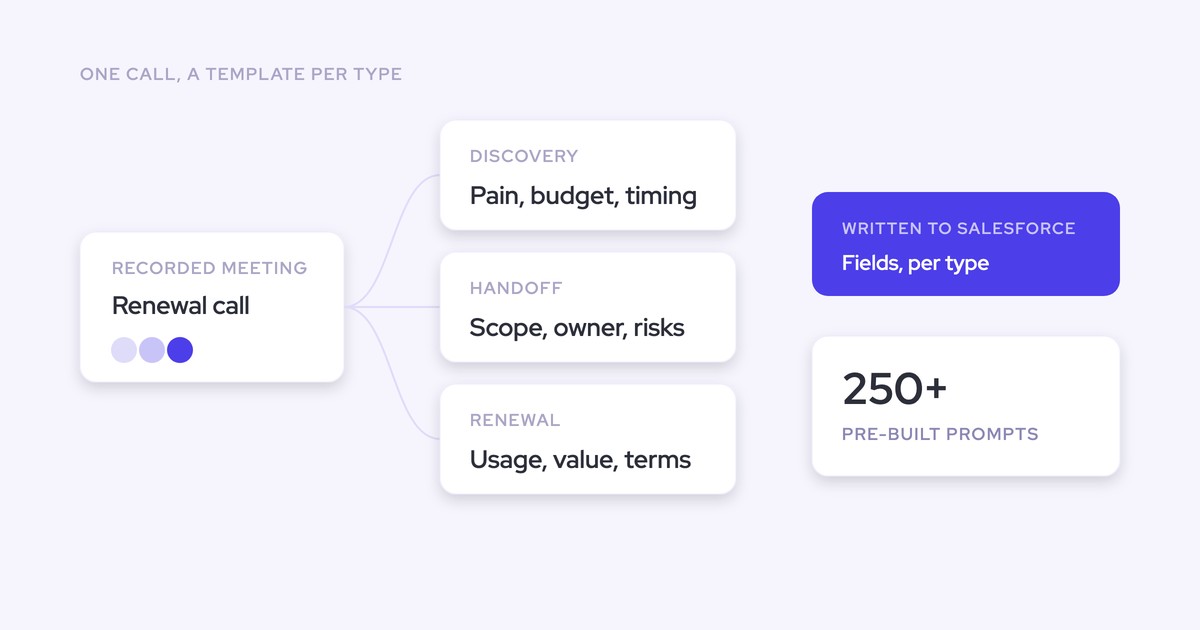

A renewal call comes back summarized like a discovery call for one reason: there's a single summary template pointed at every recorded meeting. It isn't a prompt-quality problem, and rewriting that prompt won't fix it, because the same prompt still has to serve a discovery call, an onboarding session, a QBR, and an escalation.
The fix is to bind the summary, and the field updates that go with it, to a detected meeting type. Each conversation then gets summarized in its own language, on the Salesforce record it belongs to, without a second tool for the post-sale team.
Weflow is the Revenue AI Orchestration platform for sales, customer success, and RevOps teams, and this article walks the setup end to end as we build it with customers: auto-tag, custom types, per-team templates, where the output lands, and the account-level roll-up renewals actually need.
It also covers the two places this goes wrong in real orgs, a mis-tagged call and a misfiled post-sale call, and what you do about each. If you want the wider context first, this is the deal execution job it feeds.
Why renewal calls get summarized like discovery calls
Conversation intelligence tools built the summary for the sales call first, so the shape of the output is a discovery recap: outcome, needs, competition, stakeholders, next steps.
One-size-fits-all summaries are a design default, not a tuning failure.
The funnel doesn't stop at the deal. Onboarding, QBRs, renewals, and expansions are separate motions with separate audiences, and each one is a funnel somebody is meant to report on.
Point a discovery rubric at all of them and every post-sale meeting comes back described as a deal that isn't there.
Once a CSM reads a summary that misdescribes their own call, they stop reading the next one.
| What the meeting actually was | What a discovery-shaped summary reports |
| Renewal conversation: usage, seats, budget cycle, who signs, what nearly broke last year | "Customer needs" and "competition", with next steps read as deal progression |
| AE to CSM handoff: promises made in the sales cycle, constraints, politics, the thing they said they'd walk away over | A sales recap of the last call, written for the person leaving rather than the person arriving |
| Implementation review: milestones, blockers, technical owners, dates slipping | Stakeholders and next steps framed as buying committee and close plan |
| Escalation: what's broken, impact, commitment made to fix it | Objections and risk, attached to whichever opportunity happened to match |
How Weflow detects the meeting type on every call
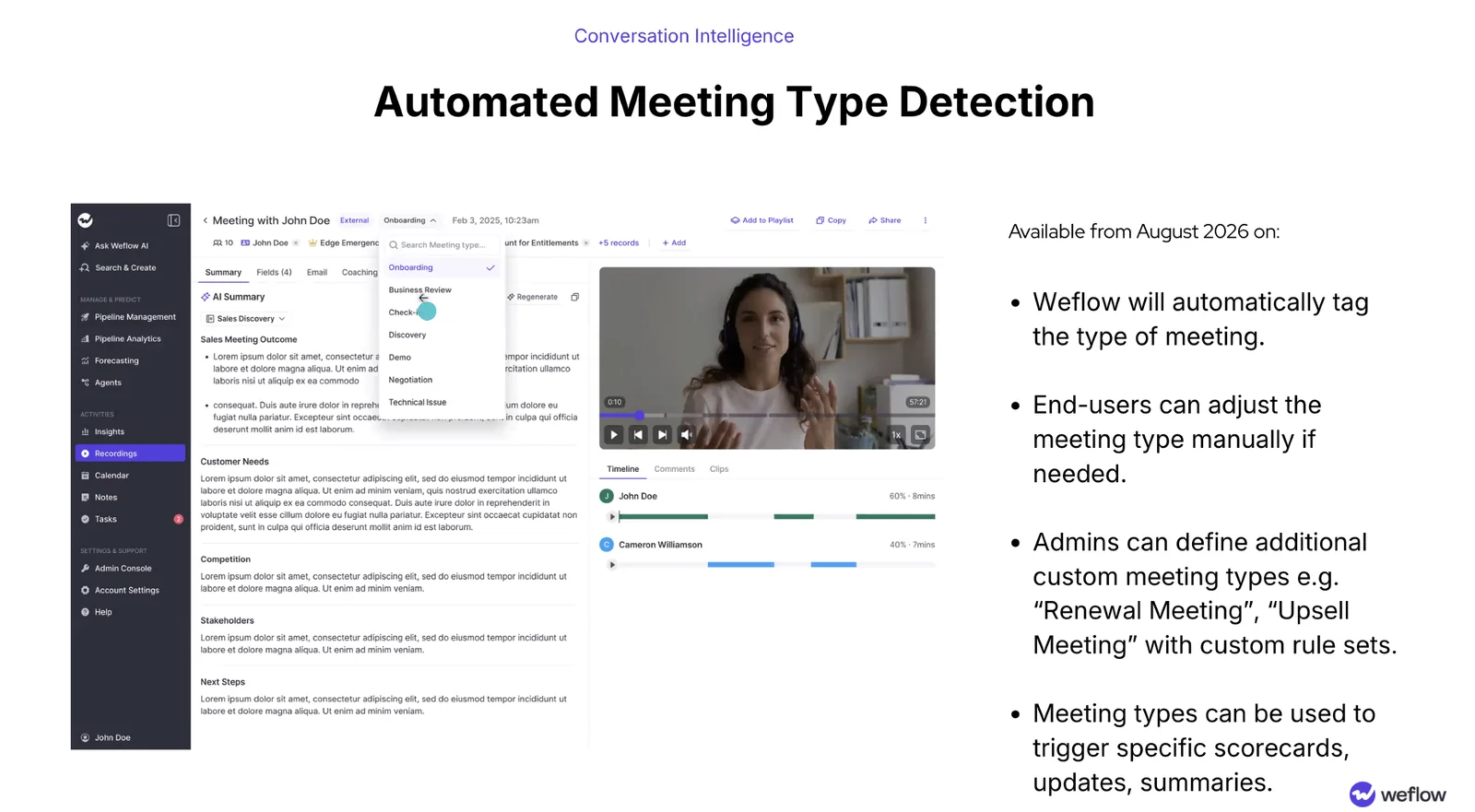
Weflow tags every recorded meeting with its type automatically, and the tag sits on the recording itself, next to the internal or external marker. Nothing depends on a rep picking a template before the call.
That tag is the thing the rest of this setup hangs off. If the type is unreliable, everything bound to it is unreliable, so it's worth understanding both the vocabulary and the correction path before you build templates on top.
Built-in meeting types and custom types like renewal
Yes, you can define renewal as a type. The built-in set covers the common motions across sales and post-sale:
- Discovery
- Demo
- Negotiation
- Onboarding
- Business review
- Check-in
- Technical issue
Admins define additional types with their own rule sets on top of that, a renewal meeting or an upsell meeting being the two we see most often. So the taxonomy is your company's, not a fixed vendor list, which matters if your motions are named QBR and expansion review rather than business review and check-in.
What happens when Weflow tags a meeting wrong
It happens. A check-in that turns into a renewal negotiation halfway through is a genuinely ambiguous call, and the AI will sometimes read it the wrong way.
The correction is a picker on the recording: the person who was on the call overrides the type in one click. Visible, and fixable by the one human who knows what the conversation actually was.
The more important question is whether a mis-tag writes bad data before anyone sees it. That's a configuration choice, not a fate. Auto-update to Salesforce is a per-prompt setting, so for interpretive fields you leave it off and the rep reviews the suggested value beside the current one before anything is written.
Unambiguous fields can go automatic on day one. Anything a human would argue about earns automation later.
How the meeting type drives the summary and field updates
The meeting type isn't a label for reporting. It's a trigger: a type can fire a specific summary template, a specific set of field updates, and a specific scorecard, so a renewal is never summarized or scored with the discovery rubric.
| Meeting type | What the summary carries | What gets updated | Scorecard |
| Discovery | Outcome, customer needs, competition, stakeholders, next steps | Qualification fields on the opportunity, next steps, stage where exit criteria were met | Discovery scorecard on the methodology you run |
| Handoff or business review | What was promised, constraints, owners, adoption state, what the next person needs on day one | Account-level fields, next steps, open commitments | Business review scorecard, or none |
| Renewal (custom type) | Usage and value discussion, budget cycle, signer, risks named on the call | Renewal opportunity or account fields, sentiment, risk | Renewal scorecard, not the discovery rubric |
Templates aren't rationed. A team can hold as many summary templates as it wants, and one is selectable from a dropdown on the call record, so the same meeting can be summarized differently for a sales, CS, or account management view when someone needs it.
Every AI output here is a prompt an admin can rewrite. Weflow ships more than 250 pre-built prompts for summaries and field updates covering MEDDIC, MEDDPICC, SPICED, BANT and the rest, and the accuracy you get depends on how well the prompt for your field is written. That's the honest tradeoff of owning the prompts: it's real work, and it's the work that decides whether the output is trusted.

Bleed between teams is handled at the assignment level rather than by hoping people pick correctly. Recording configuration is applied per team, so the sales team and the customer success team can be running different template sets against the same meeting types without anyone choosing anything on a call.
Where AI call summaries land in Salesforce
The summary writes back onto the Salesforce Event with a link to the recording, which puts it on the activity timeline where the next person already works. Nobody has to leave Salesforce to find out what happened on the call.
Here's what lands where:
- Salesforce Event: the summary, plus a link to the recording, on the meeting that actually happened.
- Weflow recording object (Weflow_Recording__c): the executive summary and the full transcript, as a native Salesforce record.
- Standard and custom fields: the field updates the meeting type triggered, written to the object you mapped them to.
Two consequences worth pulling out. The transcript sitting on a Salesforce object means your own reports, flows, and agents can read what was said, not just somebody's interpretation of it. And because it's native storage, the data is yours: if you stopped using Weflow tomorrow, the record stays.
One record, not two. A recorded meeting is the same meeting, so the summary attaches to the single Event rather than creating a second one. That's the difference between conversation data improving your meetings-per-rep reporting and quietly doubling it.
How to set up meeting-type summaries in Weflow
This is central admin configuration, an afternoon of work for one person, not per-rep training. Reps and CSMs change nothing about how they run meetings.
Prerequisites:
- Weflow Conversation Intelligence recording running on Zoom, Microsoft Teams, Google Meet, or WebEx
- The managed package installed, with the Salesforce REST API enabled and write access to the recording object
- Admin access in Weflow, and teams defined for the groups whose output should differ
Then, in order:
- Inventory the motions, not the teams. List every recurring customer meeting across sales and post-sale: discovery, demo, negotiation, kickoff, implementation review, QBR, escalation, renewal, expansion. This list is your type vocabulary.
- Define custom types for what the defaults don't cover. Renewal and upsell are usually the first two. Give each its own rule set.
- Write the summary template per type. Start from a pre-built prompt and cut, don't add. Over-specified prompts perform worse than simple ones, which is the opposite of what most teams expect.
- Bind field updates and scorecards to each type. For post-sale types, map the fields against the account object rather than the opportunity.
- Assign templates per team. Sales keeps the sales set; customer success gets the post-sale set, applied at team level so nothing depends on a person selecting the right thing mid-call.
- Scope post-sale capture before you switch post-sale templates on. This is the step people skip, and it's the next section.
- Verify on real calls with a human reading the output. Run a week with auto-update off for interpretive fields, read every summary, fix the prompts, then widen.

Pitfalls we watch for on rollouts:
- Turning on automation before verification. One wrong summary in front of a CSM costs more than a week of waiting.
- Prompts that try to specify everything. Say what the reader of this summary needs to know and stop.
- Assuming every eligible meeting gets recorded. Coverage typically runs 60 to 80 percent, with a listed reason per skipped meeting, and calendar systems that bolt a video link onto every internal event drag the denominator down. Read the reasons before reading the percentage.
How to keep post-sale calls off the wrong opportunity
A CS escalation lands on a renewal opportunity because someone on that call holds a contact role there. Capture built around opportunities has to resolve every activity to something, and a participant with a contact role is the strongest signal it has.
The precedence is fixed and worth knowing, because it makes the behavior predictable:
- A contact is preferred over a lead.
- A single open opportunity where that person holds a contact role wins.
- Anything unresolved falls back to the account.
Salesforce puts a hard limit under all of this: an activity carries one WhatId, so a meeting can relate to exactly one opportunity. Every capture tool inherits that, and it's why multi-deal and post-sale conversations belong on the account.
| Symptom | Cause | Fix |
| An implementation call shows up as evidence on a renewal opportunity | A participant holds a contact role on that open opportunity | Scope the CS team's capture to the account, or to renewal opportunities only |
| Post-sale field updates land on deal-level qualification fields | Field templates written for the opportunity object are applied to post-sale meeting types | Write post-sale templates against the account object and bind them to the post-sale types |
| One call already landed on the wrong record | Mapping resolved to the wrong open opportunity | Unlink it and re-log it, or re-map from the mail add-in |
Be straight with yourself about this one: scoping post-sale capture is a real setup step, not a default. Skip it and the post-sale team's first experience of the new summaries is a summary attached to a deal they've never worked on, which is exactly the moment trust breaks.
When renewals need account-level AI playbooks, not call summaries
A call summary describes one conversation. It will not give you the renewal picture, and any vendor telling you otherwise is selling you the thing you already have.
A renewal spans every call, every email, several opportunities, and data that only exists on the account: contract value, seat counts, usage, satisfaction. Weflow's AI playbooks can attach to the account object and score across everything related to the account rather than a single deal, which is the altitude post-sale work actually runs at.
| Weflow Per-call summary | Weflow Account-level AI playbook | |
| What it reads | One transcript, plus the linked Salesforce records | Every email, meeting, transcript, related record and field on the account |
| What it's for | What happened on this call, and what the next person needs from it | Where the account stands, scored consistently across everything on it |
| When it runs | Within about a minute of the meeting ending | On a schedule, keeping the field at the current best answer rather than the most recent one |
| Where it writes | Salesforce Event, recording object, mapped fields | Account fields |
One practical note on packaging: the per-call summaries and field updates are Weflow Conversation Intelligence, while AI playbooks sit with Weflow Deal Intelligence & Forecasting.
If you're on Conversation Intelligence alone, that's the one capability in this article that needs a bundle, and Revenue AI Business at $59 per user per month is where it lives.
For the ad-hoc version, Ask Weflow AI scoped to an account reads every call and email on it, which answers a renewal question in a chat without configuring anything.
Which meeting types and templates to set up first
Start where trust broke. Sales is getting output shaped roughly right already; post-sale is the half that stopped reading.
- Renewal and business review templates, bound to those types, for the post-sale team. Biggest gap between what the meeting is and what the summary says.
- Post-sale capture scoping, before those templates go live. A correct summary on the wrong record is still a wrong summary.
- The handoff template. Written for the person arriving, not the person leaving. This is the moment a customer either repeats themselves or doesn't.
- Leave the sales templates alone. Discovery and demo already work. Don't spend your first week rewriting prompts nobody complained about.
- Human in the loop on anything interpretive until it's earned automation. Sentiment, risk, stage: watch these before you let them write.
- Account-level playbooks for renewals last. Once the per-call output is trusted, move up an altitude.
FAQ: meeting-type summaries and Salesforce setup
How many summary templates can a team hold in Weflow?
There's no cap. A team can hold as many summary templates as it wants, and one is selectable from a dropdown on the call record, so the same meeting can be summarized in a sales format and a customer success format when both are needed.
Does covering customer success require a separate Weflow product?
No. Weflow Conversation Intelligence covers sales and post-sale teams in one product at $39 per user per month, billed annually, with a 10-user minimum. Pricing is published on our site rather than gated behind a demo, and free view-only licenses (up to one per recording license) are included, so people who only need to read summaries don't consume a paid seat.
How fast is the summary available after a meeting ends?
Within 30 to 60 seconds of the meeting ending, the person on the call gets the processed recording, the AI summary in its configured format, a drafted follow-up email, and the proposed Salesforce field updates. That speed is what makes the follow-up usable: it goes out minutes after the call rather than being reconstructed that evening.
Who can see call transcripts and summaries in Salesforce?
Access is governed by profile access to the Weflow recording object, which holds the executive summary and the full transcript. Granting a profile access to it grants access to what was said on every recorded conversation, not just the fact that a call happened, so treat it as a confidentiality decision set per profile rather than a step in the install.
Weflow also inherits Salesforce permission sets and role hierarchy, but not visibility you've enforced through list-view restrictions or Lightning component visibility. If that's how your org segregates access, you rebuild it in Weflow with centrally assigned views.
Which meeting platforms and languages does Weflow support?
Zoom, Microsoft Teams, Google Meet, and WebEx, with automatic language detection across 96+ languages. That matters for a global team where the sales calls are in English and the CS check-ins are in five other languages: the summary template is bound to the meeting type, not to the language of the call.
Walk through the product yourself, no call required: take the Weflow product tour.