
How Weflow Handles Sales Calls in Other Languages: Transcripts, Summaries and Follow-Up Emails
Learn how Weflow auto-detects call languages and routes transcripts, summaries, and follow-up emails.


Weflow treats the language a call is held in and the language your CRM is kept in as two separate things. Weflow Conversation Intelligence detects the spoken language automatically across 96 languages, so the rep sets nothing per call. Then each output goes out in the language its destination needs:
- The follow-up email is written in the language the meeting was held in.
- The summary written to Salesforce is in your workspace language.
A German discovery call gives your rep a German email they can send and gives headquarters an English record your reports can roll up. Conversation Intelligence costs $39 per user per month, billed annually.
You already know conversation intelligence transcribes. This article covers the part you still have to settle: what happens to a German, Swedish or Arabic call on its way into Salesforce. We walk one German call through to its three outputs and name where our language handling stops today, including dialects and translated transcripts. Then we give you a test plan for your own languages in a 14-day trial.
Weflow detects the language and routes each output by destination
Weflow is the Revenue AI Orchestration platform for sales, customer success, and RevOps teams. On every call it records, two independent things happen.
First, Weflow Conversation Intelligence identifies the spoken language on its own, across 96 languages, with no manual selection by the rep. Second, the language of each output follows where that output is going, not what was spoken.
Weflow writes the follow-up email in the meeting's language and the Salesforce summary in the workspace language, so the customer gets local output and the CRM stays in one language.
| Output | Language it's written in | Where it lands |
|---|---|---|
| Transcript | The language that was spoken | Weflow's recording object in Salesforce |
| AI summary | Your workspace language | The Salesforce Event for the meeting, with a link to the recording |
| Follow-up email | The language the meeting was held in | A draft for the rep, ready to send |
| Summary or follow-up on request | The language you ask for | Ask Weflow AI |
Why your CRM language and call language need separate settings
One language setting can't serve two destinations. Your customer needs the email in their language. Your CRM needs every record in one language, or nobody outside the region can read the account, and nothing rolls up.
So we treat this as a reporting problem first and a convenience problem second. Most English-first recorders fail it in one of a few predictable ways:
| How the tool picks a language | Where we see it | What breaks |
|---|---|---|
| No detection, transcript defaults to English | Microsoft Teams, unless someone changes the transcript language | A German meeting comes back as an unusable transcript, so there's no usable summary |
| Transcribes in a language the user set in advance | Chorus, which also always writes summaries and next steps in English | Any call outside the rep's default comes out jumbled until someone reprocesses it |
| Processes every call in English | Terret, even when its notetaker joins a call in another language | Summaries, sentiment, action items and field updates all come from English processing |
| Some features only work on English calls | Gong limits email labels, red flag alerts, recommended to-dos and example-based smart trackers to English; AI Builder searches English calls by default | The non-English region gets a thinner product than the one you bought |
| Output follows a per-user language setting | Attention, where each user sets a primary language | The rep's setting decides the language, not the customer's |
| Output follows the spoken language | Any tool that writes results in the language of the call | The CRM fragments into several languages, and roll-ups and search break |
| Language handling sits on another vendor's recorder | Momentum, whose 100+ languages apply only with its own recorder | You inherit the recorder underneath, dialect problems included |
When detection fails, the damage spreads. A garbled transcript produces a confidently wrong summary, wrong fields and a wrong coaching score. And a leader can't tell a badly run call from a badly captured one, in exactly the region that most needs oversight.
The requirement that falls out of this has three parts:
- The AI understands whatever language is spoken.
- The CRM language is pinned centrally.
- The customer-facing output stays local.
Follow one German call through Weflow to three outputs
Picture one of your DACH reps on a discovery call with a German customer. The call is in German. Your Salesforce workspace runs in English. Here's what comes out the other end.
The transcript stays in German, the language that was spoken
You don't tell Weflow the call is in German. Weflow detects the language and transcribes the call in German.
The transcript is stored in Weflow's recording object in Salesforce, beside the summary. It's a German transcript of a German call. Weflow doesn't translate it.
The summary lands in English on the Salesforce Event
Within 30 to 60 seconds of the call ending, Weflow writes the AI summary in your workspace language onto the Salesforce Event for that meeting, with a link to the recording. That's the one Event that actually happened, not a second meeting record created by the recorder.
This matters for your reports. When a capture tool and a notetaker each write the meeting, Salesforce counts it twice, and meetings per rep or per closed opportunity are inflated.
"If you record a meeting, it's not another meeting. It's the same meeting."
Because the English summary sits on the Event, it shows on the opportunity activity timeline where your team already looks. Headquarters reads the German deal without opening a second tool. Gong detects languages too, but its output lives in Gong's own data layer; ours lands in your Salesforce as data you own.
The summary format is a prompt your admin controls, structured into sections such as meeting outcome, customer needs, competition, stakeholders and next steps.

The follow-up email comes out in German, ready to send
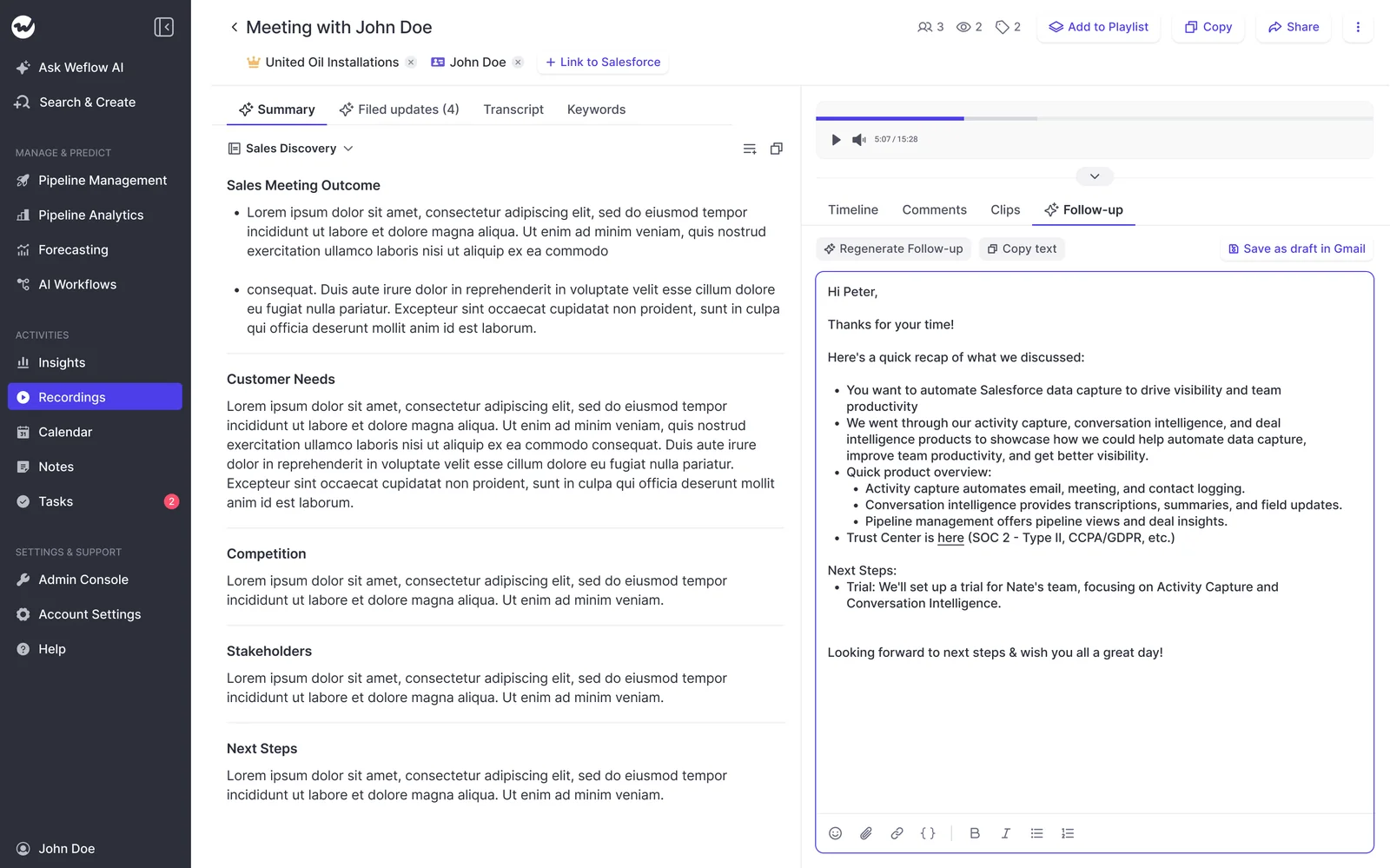
In the same 30 to 60 second window, the rep gets a drafted follow-up email. Weflow always writes it in the language of the meeting, so your German rep gets a German email they can send as is. Nobody translates or rewrites anything.
Admins define several prompt-based email templates per use case, so a discovery follow-up and a renewal follow-up don't read the same.
Which calls get Weflow's language detection
Language handling is only as good as the recorder underneath it. That's why the routing above applies cleanly to calls Weflow captures itself.
Calls Weflow records itself: notetaker, desktop app, Mobile Copilot
Every one of these capture routes feeds the same processing pipeline, so the same detection and routing applies:
- The notetaker auto-schedules onto external meetings on Zoom, Microsoft Teams, Google Meet and Webex from the calendar connection, so recorded is the default state.
- The Weflow desktop app for Windows and macOS records meetings without a notetaker joining, and it also records softphone calls that run through the computer, such as Aircall or RingCentral.
- Weflow Mobile Copilot records in-person meetings and processes them the same way.
Calls recorded elsewhere: imported libraries and the Outreach dialler
Two sources reach Weflow from other recorders:
- Imported libraries. Weflow imports recordings from most conversation intelligence tools, through the vendor's API or from exported files, at no extra cost and in about one to two weeks depending on volume.
- Outreach dialler calls. These arrive as recordings with audio, speaker separation, a transcript, a summary and coaching, labeled as outbound calls. There's no video.
The language routing we describe in this article comes from Weflow's own capture. If imported history and dialler calls matter to your non-English regions, include a sample of each in the trial.
Where Weflow's language handling stops today
Four things sit outside what we can describe to you today: dialects, mid-call language switching, translated transcripts for reviewers, and field-update language beyond the summary. Here's where each one stands.
Dialects like Swiss German and calls that switch language
Weflow detects one spoken language per call. We have no dialect-specific handling for Swiss German, and no mid-call re-detection for calls that move between languages. Salesloft and Clari Copilot both re-detect language within a call, at the segment level or every few minutes.
One thing works in your favor here. Large language models reconstruct meaning from an imperfect transcript, so summary quality degrades much more slowly than transcript quality. Judge Swiss German calls on the summary and the email they produce, not on the verbatim transcript alone.
Reviewing a call in a language you don't speak
This is the one where Gong is ahead. Gong translates transcripts, summaries and briefs into the viewer's preferred language. Weflow doesn't offer a translated transcript view.
Your CRO still gets real help in Weflow:
- The English summary on the Event tells them what was concluded.
- Automatic chapters split the call by topic, so they can jump straight to pricing or the objection.
- Ask Weflow AI, pointed at the call, answers their questions in English and produces summaries in the language they ask for.
None of that shows them line by line how the rep ran the conversation. If your CRO coaches German reps from the transcript itself, and that's the deciding need, Gong is the stronger fit for that use.
AI Field Updates and picklists beyond the summary
The workspace-language rule we've described covers the summary. AI Field Updates run on prompts your admin writes for each Salesforce field, so the prompt shapes what each field gets back.
Picklists and multi-picklists work when the allowed values are written into the prompt. A generic instruction against a picklist returns values the field can't store, whatever language the call was in.

How to set up Weflow for a multilingual sales team
Our implementation team does the setup during the trial, on your own Salesforce. For KORE Wireless, onboarding included live training with a real-time Portuguese translator for the Brazil team. These are the decisions you make along the way, in order:
- Set the workspace language. It's the language every Salesforce summary is written in, so pick the one headquarters reports in.
- Rename the notetaker and give it a default language where a region needs one.
- Build per-team summary templates. Weflow supports different templates per team, so a regional team can match its local note format. Every template is an admin-editable prompt.
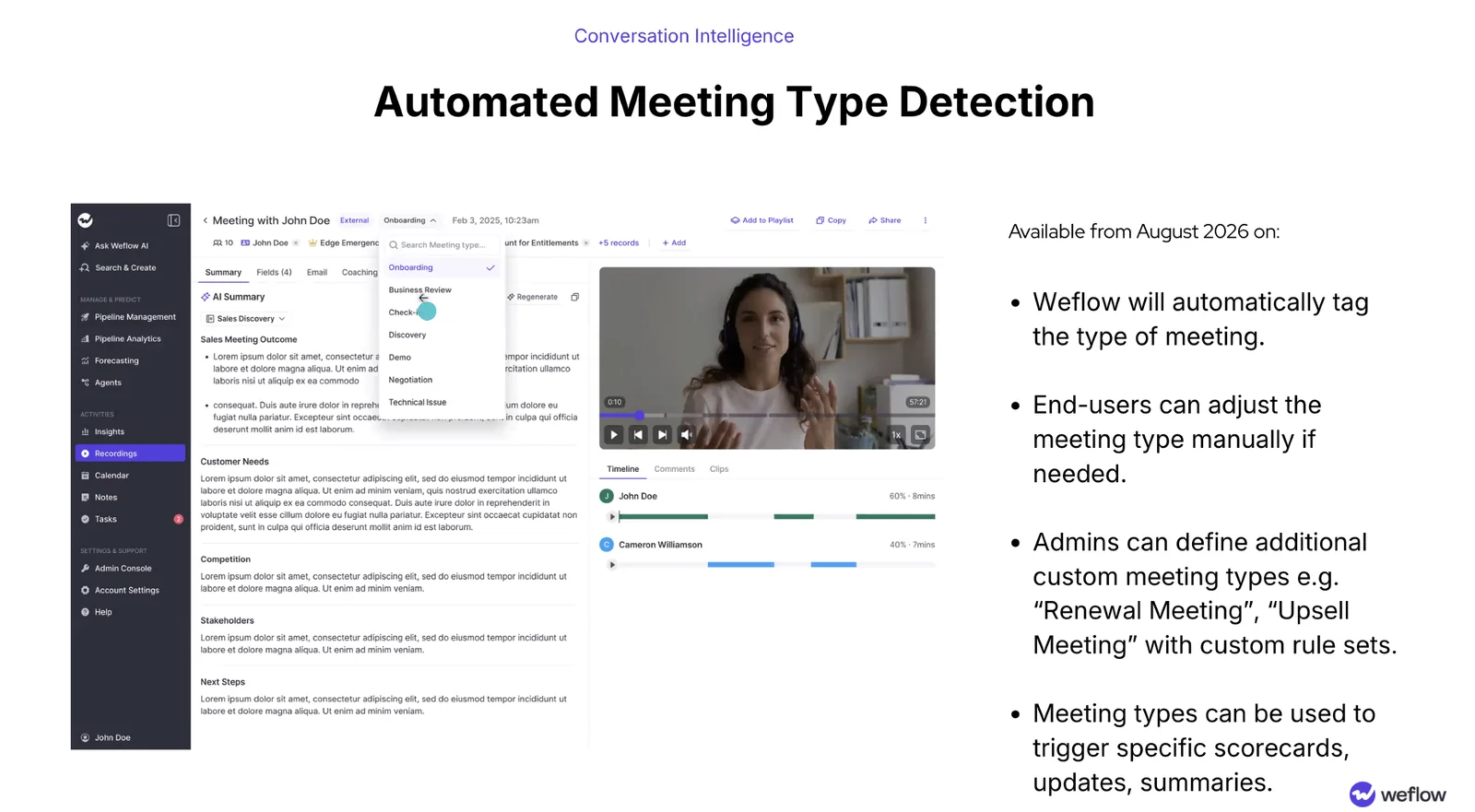
- Set your meeting types. You can run up to ten, managed in the Admin Console under Conversation Intelligence, Meeting types. Each type can drive its own summary, field updates and scorecard.
- Enable each conferencing platform. Webex is switched on per workspace. Zoom needs local recording enabled by your Zoom admin plus host approval. On Teams and Meet, the notetaker has to be admitted from the lobby.
- Have every licensed user sign in once. The notetaker won't join meetings for a user who has never logged in, even though their activity capture runs.
- Name an internal owner for the prompts. Per-team templates and field mappings go stale without one, and the output degrades until people stop trusting it.
How to test Weflow in your own languages in 14 days
Scope the trial so every language region is in it. A typical trial is one team of five to ten people, so draw that team from each region rather than from headquarters.
One thing to plan for: a small pilot group that has never been recorded can turn the trial into a referendum on being recorded. Decide on recording as a leadership call before the trial starts, and use the 14 days to test the product.
Also test summary and field writes against every Salesforce object your activities map to. A write fires once when the call ends and can't be replayed, so a permissions gap you find in week one costs nothing, while one you find in month three costs every write up to that day.
| Test | Which calls to use | What a pass looks like |
|---|---|---|
| Transcript quality per language | Real calls in Swedish, Danish, German, Arabic, Japanese and every other language you sell in | Each transcript is in the spoken language and a native speaker on your team can follow it |
| Summary language on the Event | One call per language | Every summary is in your workspace language, on the right Event, with a recording link |
| Follow-up email language | The same calls | Each draft is in the meeting's language and the rep would send it without rewriting |
| Field-update language and picklists | Calls that touch your key free-text and picklist fields | Free-text fields read in the language you want, and picklists return only allowed values |
| Regional spelling via prompt | UK-team calls with a UK-specific template | Summaries and emails come back in British spelling |
| Dialect and mixed-language calls | Swiss German calls and calls that switch language | The summary and email capture what was agreed, even where the transcript is imperfect |
| Imported recordings and dialler calls | A sample from your old library and Outreach dialler calls in each language | Summaries and fields land in the same language and shape as natively recorded calls |
| Non-speaking manager review | A German call reviewed by your CRO | The summary, chapters and Ask Weflow AI give them enough to coach, or show you they need more |
See how Weflow captures activity, updates Salesforce fields from calls, and rolls up your forecast. Book a 30-minute demo.
Weflow language support: questions RevOps leaders ask before buying
Does Weflow transcribe Swedish, Danish, Arabic and Japanese calls?
Yes. Weflow Conversation Intelligence transcribes 96 languages and detects the spoken language automatically, with no manual selection. The fastest way to judge quality in your Nordic, Arabic or APAC regions is the transcript test in the trial plan above, run on your own calls.
Can a manager read a German transcript in English in Weflow?
No. Weflow keeps the transcript in the language that was spoken and doesn't translate it. The manager reads the summary in the workspace language on the Salesforce Event, navigates by chapters, and asks Ask Weflow AI for a summary in the language they want.
Can UK and US teams get different summary spelling in Weflow?
Weflow supports different summary templates per team, and every template is an admin-editable prompt, so the UK team's template carries its own instructions, spelling included.
Put it in the trial as its own test, as listed in the plan above.
Does the Weflow follow-up email send itself or wait for the rep?
It waits for the rep. Weflow drafts the follow-up email in the meeting's language and delivers it to the rep within 30 to 60 seconds of the call ending. The rep reviews it, regenerates or copies it, or saves it as a draft and sends it.
Can we record calls in Germany without a bot joining?
Yes. The Weflow desktop app records meetings on the rep's machine without a notetaker joining, and the recording goes through the same pipeline: summaries, field updates, follow-up emails and scorecards.
There's a tradeoff. The notetaker carries the consent flow, with a chat notice and a link that stops the recording. The desktop app doesn't, so consent becomes the rep's responsibility. It also captures video where there is one. Our guidance is to review the consent requirements in your participants' countries with your legal team and works council before you roll it out.
Where does Weflow store recordings and transcripts for EU teams?
Weflow is a German company hosted in Frankfurt. Recordings sit in Weflow's storage in the region you choose: Frankfurt, New York or Sydney. Weflow spins up your instance where your Salesforce is hosted, and you can override that to keep data in the EU or UK.
Everything Weflow writes to Salesforce sits in your own org. On top of that:
- Weflow is SOC 2 Type II certified and GDPR compliant.
- We provide a Data Processing Agreement with EU Standard Contractual Clauses.
- AI processing runs under Zero Data Retention, and we never use your data to train models.
What does Weflow Conversation Intelligence cost per seat?
Weflow Conversation Intelligence is $39 per user per month, billed annually, with a minimum of 10 users. The seat includes:
- Ask Weflow AI Pro
- Agent Builder Free, with 25 agent actions per month
- Weflow Mobile Copilot
- The desktop app
View-only licenses are free, so a CRO who only reviews calls doesn't take a paid seat. Weflow Revenue AI Foundation bundles Conversation Intelligence with Weflow Activity & Contact Capture for $49 per user per month.


