How to Find the Week's Top Sales Objections Across Every Call: Manual Review, Keyword Trackers or an AI Agent
Decide when manual review, keyword trackers, or an AI agent best find weekly sales objections.


You already know the objections are in the recordings. Your team spends hours a day on calls, you can listen to a handful, and what reaches you in one-on-ones comes filtered through the rep, usually as "price."
You have three ways to get the week's real objections out of those calls. They don't compete, because each one answers a different question:
- Manual review gives you depth on a few calls.
- Keyword trackers count the objections you already know about.
- A scoped weekly AI agent finds the ones you don't.
The setup we recommend uses all three. A narrow weekly agent discovers the objection, a tracker trends it, and a clip teaches it to the team.
Discovery is the part most teams skip, and it's where the useful findings come from. When our co-founder Philipp Stelzer ran a weekly sweep over every transcript for an advertising customer, the biggest objection wasn't price. It was how their customers' accounting teams handled advertising budgets, and that's a blocker a team can fix.
Weflow is the Revenue AI Orchestration platform for sales, customer success, and RevOps teams. In Weflow Conversation Intelligence + AI Field Updates, trackers and scheduled agents run over the same recorded calls, so the whole setup lives in one place.
One condition holds for every path: it only works on calls that actually get recorded.
Manual review, trackers or an AI agent: what each tells you
Each path answers a different question, so the useful comparison is what each one catches, what it misses, and what it costs you in time.
| Manual call review | Keyword trackers | Scoped weekly AI agent | |
|---|---|---|---|
| The question it answers | What happened on this call, and how did the rep handle it? | How often did a known objection or competitor come up, and is it rising? | Which objections came up this week that nobody has named yet? |
| What it catches | Tone, hesitation, how the rep framed the answer, the exact coaching moment | Every mention of a term you defined, across every recorded call, rolled up by rep, team and region | Recurring patterns across every transcript in the segment you scoped, including ones you'd never think to search for |
| What it misses | Everything outside the calls you sampled | Any objection nobody put on the list, plus the line between a real objection and a passing mention when a tracker is too broad | Calls that aren't recorded or aren't linked to the records the agent looks up, and anything outside the scope you set |
| Manager time per week | Most of it, one call at a time | Minutes reading a dashboard | Reading one short report |
| Who sets it up | You | Whoever administers your call recording tool | An admin; in Weflow, only admins configure agents |
What you get from reviewing calls yourself
Listening is still the best coaching tool you have. It just can't rank a week's worth of objections, and it helps to be clear about why.
What manual call review still does better than any tool
Manual review gives you depth no summary carries. You hear the pause before the buyer answers, the way your rep rushed past the pricing question, the moment the champion went quiet.
That's the raw material for a good one-on-one. We'd never tell a manager to stop listening.
If your team is small and the objections are stable and well known, a disciplined weekly review of a few calls may be all you need. You already know what you're listening for.
Why your sample of calls can't rank the week's objections
The arithmetic doesn't work. Ten reps on calls three or four hours a day produce 30 to 40 hours of conversation a day, and you have maybe a few hours a week to listen.
The sample is also biased. You pick the deals you're already worried about, or the calls a rep chose to send you. Neither tells you what's coming up across the whole team.
Everything else reaches you through the rep. Objections get compressed into "price," closed-lost reasons say the same thing, and nobody in the room believes it.
A sample of calls can't answer "how often." Only something that reads every recorded call can.
What keyword trackers count well, and what they miss
Trackers are the first scale answer most managers reach for, and for known objections they're the right one.
How trackers turn competitor and price mentions into trends
A tracker on a known term counts every mention across every recorded call and rolls it up by rep, team and region over time. Anecdote becomes trend: a competitor whose mention rate is climbing in one region shows up as a number, not a rumor from one manager.
In Weflow, a new tracker also applies to past recordings, so you see the history of a term the day you create it.
Good tracker candidates look like this:
- Each competitor you lose deals to gets its own tracker, with its product names.
- Pricing language like "discount," "budget" or "too expensive" gets a tracker so you can see which teams hear it most.
- Each objection you already coach against gets a tracker, so you can see whether it's growing or fading.
- Key phrases from your sales methodology get tracked to see whether a rollout actually landed in the calls.
Why trackers can't find an objection nobody has named yet
A tracker only counts what someone thought to name. If the real blocker is a buyer's budget approval process and nobody wrote "budget process" into a tracker, the dashboard stays silent while the deals stall.
The second failure is noise. A tracker built to catch every variant of a topic fires on passing mentions, and because the output looks like data, nobody notices until a decision gets made on it.
- A useful tracker follows one thing, such as one competitor and its products. It misses a few mentions and produces a number you can trend.
- A noisy tracker bundles a dozen loose terms like "price, cost, budget, expensive, cheaper, money." It fires on small talk and can't tell a real objection from someone saying a word.
One tracker should follow one thing. That rule keeps the dashboard honest, but it also makes the blind spot sharper: trackers measure the list you have, never the list you're missing.
How a scheduled AI agent finds the objections you don't know
This is the discovery path. An agent reads every transcript in a defined set of deals each week and tells you what keeps coming up.
What reading every transcript found: the budget process, not price
The best evidence that discovery works is a finding nobody would have tracked. We built a system that went through all of the last week's transcripts and looked for the key objections. For an advertising customer, the answer wasn't any of the usual suspects:
"And then you get insights. Like, we had one customer in advertising and we found, hey, actually the biggest objection is not their price or whatever, like typical objections, like authority, like path to power, stuff like this. But it was actually just budget management, like how their accounting team dealt with advertising budgets. And that's obviously a huge insight for them because that's something they can fix."
Look at the shape of that finding. It's specific to one company's buyers, it's something a rep would report as "price," and it points at a fix: change how you help the buyer get budget approved.
The same sweep works over emails and over calls with existing customers, which is why we don't think conversation data should stop at outbound.
"GTM engineering focused only on outbound, I don't think is the right mindset because we're seeing so much value in unstructured data from call transcripts, from chats with customers, and you can make use of that throughout the entire customer journey."
Why pasting transcripts into ChatGPT or Gemini doesn't add up
Your reps are probably already doing this. They pull a transcript, paste it into Gemini or ChatGPT, ask what the objections were, and drop the answer into a Slack thread.
It works once. It doesn't compound. Three people run the same analysis on different calls, the results scatter across personal accounts and channels, and nobody can compare this week with last week.
| One-off chat paste | Scheduled agent | |
|---|---|---|
| Which calls it reads | Whichever transcripts someone pasted | Every transcript attached to the records in a defined segment |
| How often it runs | When someone remembers | On a fixed day and time each week |
| Where the result goes | A personal chat or a random thread | The same Slack channel, email or PDF every week |
| The follow-up question | The recipient has no access to the underlying data | The result links back into Ask Weflow AI against the same data |
That last row matters most. A manager sent a list of objections almost always has a second question, and a pasted report has nowhere to take it.
Why an unscoped agent gives you generic answers
If you've tried an AI objection summary and got back something true of every company, you're not alone.
The fix is scope, not a better model. In our experience, an agent that filters the records first and then runs the prompt produces sharply better output than the same prompt run against everything. Run unscoped, a prompt that looks strong in a chat window can return an empty or unusable report from an agent.
A scoped objection agent names four things:
- The records it reads, such as open and closed-lost opportunities rather than every deal in Salesforce.
- The period it covers, such as calls from the last seven days.
- The segment it's cut to, such as one product line, one team, one region or one stage range.
- The terms that mean something in your market: your competitors, your product names, what counts as an objection here versus small talk.
Scoping also answers the request we hear most from managers: they don't want an overall objection list.
How to decide which path fits your team
Five criteria decide it. Check your team against each one.
| Criterion | Points to manual review or trackers | Points to a weekly AI agent |
|---|---|---|
| Is your objection list known and stable? | Yes: the same few objections every quarter, already coached | No: deals stall for reasons you can't name, or "price" hides something |
| How much call volume do you have? | A few calls a week you can actually hear | Eight or more reps on calls for hours a day |
| Do you need cuts by product, team or market? | No: one team, one product, one view | Yes: an overall list is useless to you |
| Who receives the output? | Only you, in your own one-on-ones | Product, marketing, a supplier or your VP, who need a written weekly summary |
| How complete is your recording coverage? | Patchy: fix that first, whatever path you choose | Complete: the agent's view matches what your team actually hears |
When manual review or trackers alone will do
- A small team with a stable, known objection list is well served by a handful of tight trackers and a regular manual review.
- A team whose objections rarely change gets more from coaching against the known list than from searching for new ones.
- A team happy on Gong has the deepest conversation analytics in the category, and this use case alone isn't a reason to move.
When a weekly AI agent earns its place
- Your objections shift with the market, a new competitor or a new product, and last quarter's tracker list no longer matches what buyers say.
- "Price" keeps showing up in closed-lost reasons and you suspect it's masking a process, timing or approval problem.
- You need the objections cut by product, team or market, because the overall picture tells you nothing.
- Someone outside sales needs a clean weekly summary, whether that's product, marketing, a supplier you sell for, or your own leader.
The setup we recommend: discover, trend, then teach
The three paths combine. Weflow runs both automated paths over the same recorded calls, and manual review stays where it's strongest: the coaching conversation. Here's how the pieces fit.
Step 1: Scope a weekly Weflow Agent Builder sweep by segment
A Weflow Agent Builder sweep has four parts:
- A scheduled trigger sets the day, time and timezone, for example Friday afternoon before your Monday one-on-ones.
- A lookup reads Salesforce opportunities or accounts live, filtered by fields such as product, team, region, stage and date window.
- An AI step reads the activities, emails, calls and transcripts attached to those records, guided by your prompt and an uploaded document with your terminology.
- A delivery step sends the result to Slack or email, with an optional PDF report attached.
Starting from a Weflow template puts the lookup step in by default. The template prompts are deliberately basic, so rewrite them to name your competitors, your segment and what counts as an objection for your buyers.
Step 2: Turn each new objection into a Weflow tracker
Once the agent surfaces an objection you hadn't named, give it a name and add a tracker for it. The tracker then counts it across every recorded call and trends it by rep, team and region.
Because Weflow applies a new tracker to past recordings, you see right away whether the objection is new this month or has been there all quarter. Keep one tracker per objection, so the trend stays clean.
Step 3: Clip the objection so reps hear the customer say it
A summary tells reps what buyers said. A clip lets them hear it. Fifteen seconds of a buyer explaining their budget approval problem carries more conviction than any paraphrase you write in a coaching doc.
Weflow splits every recorded call into chapters by topic, and any chapter, timeline range or highlighted transcript passage becomes a clip. Save the strongest ones to a playlist for that objection, and use it in one-on-ones and onboarding.
Step 4: Take the follow-up question to Ask Weflow AI
The weekly report will raise a question. Which deals did this come up on? Did any rep handle it well? Is it only in one region?
A Weflow agent result carries a link back into Ask Weflow AI, so you ask that second question against the same data. Ask Weflow AI answers one question across many recordings at once and links to the exact call, transcript or email it drew on.

"I love being able to go right to the call, transcript or email and see where something was said that the AI is referencing."
— Scott Jones, SVP of GTM Revenue Intelligence & Enablement at KORE Wireless
What to sort out before your first weekly report
Three preconditions decide whether the report is trustworthy and whether anyone reads it.
Make sure every call you care about gets recorded
Gaps in recording sit exactly where the weakest calls are.
Close these gaps before you trust any weekly number:
- Reps who don't record leave holes in the data, so admins should add whole teams to recording in the Admin Console rather than leaving it to each rep.
- Phone calls on a softphone such as Aircall or RingCentral get recorded through the Weflow desktop app, which captures the computer's audio once the rep starts the recording.
- Calls from the Outreach dialer come in once you connect Outreach, and Weflow processes them like any other recording.
- Customer success calls belong in the sweep too, because renewal and expansion objections live there.
- Accounts excluded from recording for compliance reasons are often your largest, so know which ones are missing before you read the report.
- Calls not linked to the records in the agent's lookup fall outside the sweep, so activity mapping to the right opportunity and account matters.

Know what to ask RevOps or your Salesforce admin for
In Weflow, only admins configure agents today. That means your job is a clear request. Forward this list:
- The segment filters you need, using the actual Salesforce fields for product, team, region, stage and date window.
- The schedule, including day, time and timezone, timed so the report lands before your one-on-ones.
- The recipients, starting with only you.
- Your terminology document, listing competitors, product names and internal shorthand, uploaded as grounding for the agent.
- A prompt that names whose competitors, whose deals and which dates it means, because a prompt without them answers from the wrong context.
- A note that a test run shows the result in the app but doesn't send the email, so the first live runs should go to you alone before your VP joins the list.
Keep the report small enough that people act on it
The bigger risk with a weekly agent is noise, not inaccuracy. Every team has a report that was useful for a quarter and still runs, unread, two years later.
These rules keep it useful:
- Cut each report to one segment, so every finding belongs to a team you manage.
- Ask for the top few objections, not an exhaustive list.
- Tie each finding to an action: who needs coaching on what, and what to change in messaging.
- Start with few recipients and add people only once the report has held up for a few weeks.
- Retire any report nobody has acted on, because every ignored message teaches people to ignore the channel.
Where Weflow's objection workflow falls short today
Here's what Weflow doesn't do in this workflow, and what to do instead.
| The limit | What to do instead, or who does it better |
|---|---|
| Weflow trackers match keywords. Momentum Smart Tags, Salesloft Smart Topics and Aviso Smart Trackers use AI matching inside the tracker itself, and Chorus offers Boolean logic in its advanced trackers. | Weflow's route to meaning-based discovery is the agent or Ask Weflow AI. Use those to find the objection, then a tight keyword tracker to count it. |
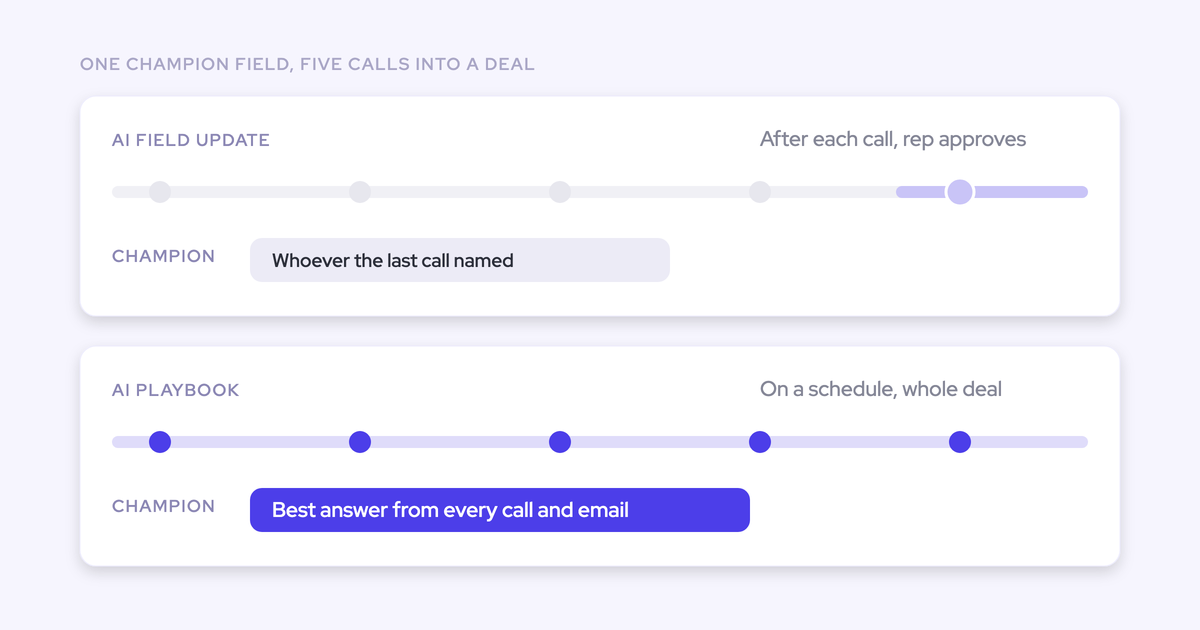
| Agent output can't write back to Salesforce fields. An insight stays in the report until a person puts it on the record. | Weflow AI field updates after each call and AI playbooks on a schedule write fields directly. Use those for anything that has to live on the opportunity. |
| Weflow has no live in-call assistant and no real-time battlecards. Tracker hits arrive after the call. | Clari Copilot shows battlecards during the call when a trigger word comes up. In Weflow, reps learn the objection before the call through clips and playlists. |
| Recording search shows which calls mention a term, not where in each call it was said. | Set up a tracker for the term and read its hits in Insights for mention-level results. Chapters jump you to the right part of a long call. |
| Agent Builder is our newest product and isn't as mature as Conversation Intelligence or Deal Intelligence & Forecasting. | Start from a template, keep the agent narrow, and run it to yourself for a few cycles before widening it. |
| Agent reports go to Slack and email. Microsoft Teams chat isn't a delivery destination today. | Teams-first companies receive the report by email. Teams meetings themselves record and process normally. |
What running a weekly objection sweep in Weflow costs
Trackers, recordings, transcripts and Ask Weflow AI prompts carry no usage caps. Agent runs are metered in actions per workspace, and one weekly transcript-reasoning agent sits close to the free allowance.
| Plan | Price | What it includes | What's metered |
|---|---|---|---|
| Weflow Conversation Intelligence | $39 per user per month | Recording, transcripts, AI field updates, trackers, clips and playlists, the desktop app, Mobile Copilot, Ask Weflow AI Pro and Agent Builder Free | Nothing on recordings, transcripts, trackers or Ask Weflow AI prompts |
| Weflow Revenue AI Foundation | $49 per user per month | Activity & Contact Capture plus Conversation Intelligence, Mobile Copilot, Ask Weflow AI Pro and Agent Builder Free | Same as above; emails and meetings also sync into Salesforce |
| Weflow Agent Builder Free | Included with every plan | 25 agent actions a month per workspace | Agent actions |
| Weflow Agent Builder Growth | $299 per month per workspace | 500 agent actions a month | Agent actions |
| Weflow Agent Builder Scale | $999 per month per workspace | 2,500 agent actions a month | Agent actions |
Here's the arithmetic. An agent reasoning across transcripts and activity uses about 5 actions per run, so one weekly sweep uses roughly 20 to 25 actions a month. That fits inside the free tier, as long as nothing else in your workspace is drawing on it.
Add a sweep per team or per product and you'll want Growth. At about 5 actions a run, 500 actions covers roughly 20 weekly segment agents.
Standard workflows such as call summaries, field updates and coaching scorecards don't draw on the allowance. Weflow plans bill annually with a 10-user minimum.
FAQ: finding sales objections across recorded calls
Can a sales manager build the objection agent without RevOps?
Not today. Only admins can configure agents in Weflow, because an agent can reach a lot of data at once. A permission that lets an individual non-admin build agents is coming but isn't available yet, so hand your admin the request list above.
Can one agent send a separate report to each team or manager?
You scope each agent with field filters on its lookup, so one agent covers one segment. A report per team means one agent per team, each with its own filter and recipients. Each one draws on your action allowance.
Does a Weflow agent read emails as well as call transcripts?
Yes. The agent reads the activities, emails, calls and transcripts attached to the records its lookup pulls. That matters for objections, because some of them, like a procurement or budget concern, only come up in email.
Does it cover phone calls and post-sale customer calls?
Yes, both. The Weflow desktop app records softphone calls that run through the computer, and the Outreach dialer connection pulls call recordings in after the call. For post-sale calls, point the agent's lookup at accounts instead of opportunities.
Can we feed the agent our competitor list and internal terminology?
Yes. Upload a document as grounding in the agent step and name your key terms in the prompt. This is the most direct fix for generic output, because the agent then knows who your competitors are and what your shorthand means.
Should reps see their own per-rep objection findings?
Use per-rep output as a coaching input in your one-on-ones, not as a score tied to pay. AI assessments vary between runs, and a wrong rating a rep argues over does more damage than it's worth. Team-level findings are safe to share widely.
Can product or marketing see the report and clips without a full license?
Yes. Agent reports go out by email, Slack or PDF, so recipients don't need a Weflow seat to read them. Every Weflow plan includes unlimited View-Only licenses for recordings, and clips can be shared on their own.
We already have Gong, Fireflies or Teams transcripts. Do we start over?
No. Weflow imports recordings from most conversation intelligence tools, through the vendor's API or from exported files, and re-links them to Salesforce records. Your existing tracker set carries over, so keyword reporting doesn't restart from zero. Teams meetings record and process in Weflow going forward.
How does Weflow handle consent and data for recorded customer calls?
- The Weflow notetaker carries the consent flow: opt-in, opt-out or none, a notice in the meeting chat with a link that stops the recording, and an optional pre-meeting email.
- When the desktop app records, nothing joins the meeting, so obtaining consent is the rep's responsibility.
- Retention is configurable, including deleting all recordings after a set period such as every 30 days.
- Weflow holds SOC 2 Type II and is GDPR compliant, and we spin up your instance in the region where your Salesforce is hosted, with an EU or UK override.
- Customer data is never used to train AI models.