How the Weflow Notetaker Decides Which Meetings to Join, and Why It Skips Some
Learn which meetings Weflow Notetaker joins, why it skips some, and recording limits by platform.


Weflow is the Revenue AI Orchestration platform for sales, customer success, and RevOps teams. We built it for Salesforce teams, so what it captures from a call lands in native Salesforce objects as data you own.
The notetaker in Weflow Conversation Intelligence schedules itself from your calendar connection onto every external meeting. Nobody invites it and nobody has to remember to press record. For your team, "recorded" is the default.
When a meeting has no recording, one of a short list of rules fired:
- The event had no attendees or no current meeting link.
- Nobody on the invite was external.
- A rep switched the notetaker off for that occurrence.
- The licensed user never signed in to Weflow.
- The meeting platform wasn't set up for recording.
- Nobody admitted the notetaker from the lobby.
The recording health dashboard logs a reason for every skip. By the end of this guide you'll be able to sort any gap into "by design" or "fix this" in a few minutes. You'll also have a coverage baseline you can defend to leadership.
Why a missing recording turns into "the tool doesn't work"
A missing recording turns into a verdict because the rep only sees the outcome, never the rule behind it. They finish a customer call, open their recordings, find nothing, and tell the team the tool is broken. By the time the ticket reaches you, the sales floor has already decided.
Each join rule makes sense on its own. Stacked together and invisible, they make designed behavior look like a failure:
| What the rep sees | What actually happened |
|---|---|
| "It skipped my customer call" | The customer booked the meeting, never joined, and nobody could admit the notetaker from the lobby |
| "It never even tried" | The meeting link changed after the invite went out |
| "It doesn't work for me at all" | The rep holds a license but has never signed in to Weflow |
| "It won't join our customer's Webex" | Webex isn't enabled for the workspace yet |
| "It recorded our internal standup" | One outside contractor sits on the invite, so the meeting counts as external |
The lobby rule isn't ours. It's how meeting platforms treat any participant, and every bot-based recorder lives with it:
- Gong's bot has to be admitted from a waiting room by the host.
- Outreach Kaia has to be admitted within 10 minutes, or 2 to 3 minutes on Google Meet.
- Salesloft's bot leaves a Zoom call after 10 minutes if local recording is off.
The difference between vendors is whether they tell you which rule fired.
If you've run a notetaker that depended on each rep connecting their own calendar, you know the worse version of this. A broken token looks exactly like a rep who had no meetings that week.
Weflow schedules the notetaker from the central calendar connection, not from per-rep tokens. A skip shows up with a reason attached instead of disappearing into silence.
How the Weflow notetaker schedules itself from your calendar
Weflow schedules the notetaker centrally from your calendar connection. It joins every external meeting as a visible participant on Zoom, Microsoft Teams, Google Meet or Webex, shortly before the start. If someone leaves it in the lobby, it drops out by itself.
Reps can still switch it off for a single meeting or add it to an internal one. Everything else records without anyone touching it. That's why the ratio of recorded meetings stays far higher than in tools where reps opt in per call.
Two things have to be connected for this to work:
- Your calendar, through Weflow Activity & Contact Capture. Weflow Conversation Intelligence reads meeting information from the connected calendar, so calendar access comes first.
- Recording configured by team. When you point recording at a team instead of a list of individuals, the team updates as its membership changes. Coverage follows your org chart and doesn't depend on someone remembering to add each new hire.

Which meetings count as external for the Weflow notetaker
The Weflow notetaker joins any meeting where at least one attendee sits outside your configured internal domains. That's the core eligibility rule.
Internal meetings are recorded only when a user switches recording on for that meeting from the Weflow calendar. Your internal domain list decides which side of the line every meeting falls on, so it's the first setting to look at when the notetaker joins or skips a meeting you didn't expect.
Why only one Weflow notetaker joins for your company
One Weflow notetaker joins per company, however many of your colleagues are on the call. Five people from your team on a customer meeting still means one notetaker.
When two companies that both use Weflow meet, each side brings its own notetaker. A third-party recorder such as Fireflies joins as a separate participant, and the host admits or declines it like any other guest.
The checks the Weflow notetaker runs before joining a meeting
Most skips trace back to one of these checks:
- Does the calendar event have attendees and a current meeting link?
- Does anyone on the invite sit outside your internal domains?
- Did a rep switch the notetaker off for this occurrence?
- Has the licensed user signed in to Weflow at least once?
- Is the meeting platform configured for recording?
- Did someone admit the notetaker from the lobby in time?
Walk your ticket down the list. The first "no" is your answer.
Does the calendar event have attendees and a current meeting link?
The notetaker can only join a meeting the calendar describes. Three situations stop it here:
- An entry with no other attendees and no meeting link gives the notetaker nothing to join. Lunch blocks and reminders fall into this bucket.
- Weflow skips events the user marks private, even when other people are invited. That's how a rep keeps a personal appointment out of Salesforce.
- A meeting link changed after the invite went out breaks the join. The dashboard logs this as a changed link.
Fallback: For meetings that were never on the calendar, or whose link changed at the last minute, the rep records with the Weflow desktop app. It doesn't need a meeting link at all.
Does anyone on the invite sit outside your internal domains?
External attendance decides eligibility, so one outside guest turns an internal meeting into an external one.
That's why a weekly team call with a single contractor or partner on the invite gets recorded every week. It's the rule working as designed.
The reverse case comes from the same setting. If a customer or partner domain ends up on your internal list, Weflow treats meetings with them as internal and skips them.
Fix: Review your internal domain configuration in the admin console. It should contain your own company's domains and nothing else.
Did a rep switch the notetaker off for this occurrence?
Reps can stop the notetaker for any single meeting from the Weflow calendar view. When a recording is missing and every other check passes, this is often the reason. The dashboard attributes opt-outs separately from other skips, so you can tell a rep's choice from a failure.
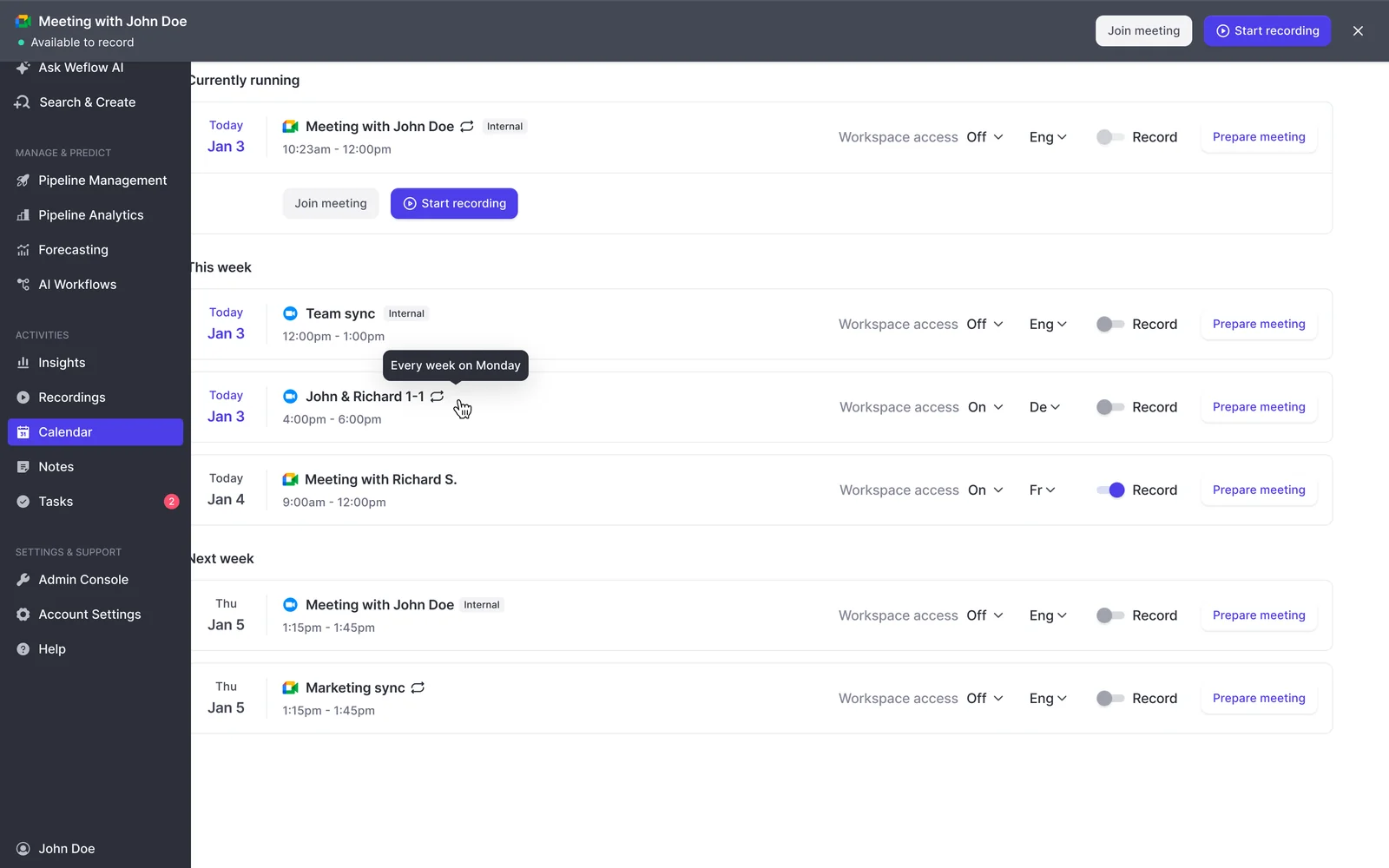
There's a limit here you should know before the contractor-call ticket arrives. No setting skips a whole recurring series today.
The calendar toggle applies to one occurrence, and Weflow doesn't remember the choice for the series. A rep who wants a standing meeting with an outside guest left unrecorded switches it off one occurrence at a time.
Has the licensed user signed in to Weflow at least once?
A licensed user who has never signed in to Weflow gets activity capture in the background but no notetaker. Conversation intelligence starts only after their first login.
This is the gap that hides best. The rollout assigns seats, skips the sign-in step, and ends up with a team whose emails and meetings are all in Salesforce while none of their calls were recorded. Nobody notices until someone goes looking for a recording.
The admin view doesn't make it obvious, and that one's on us. An assigned but unregistered user shows as external, and the license looks allocated.
How to spot it: Look for reps with plenty of meetings in Salesforce and zero recordings in Weflow, then check whether they show as external in the admin view.
Fix: Get every seat holder to sign in once. That single login switches the notetaker on for their meetings.
Are Zoom, Microsoft Teams, Google Meet and Webex configured for recording?
The Weflow notetaker needs no per-platform authentication, but it inherits each platform's rules for participants:
| Platform | What must be true | What the rep sees if it isn't |
|---|---|---|
| Zoom | Your Zoom admin has enabled local recording, and the host approves the recording | The meeting ends with no recording |
| Microsoft Teams | Someone admits the notetaker from the lobby | The notetaker waits in the lobby, then leaves after about ten minutes |
| Google Meet | A host admits the notetaker, which joins as an anonymous guest | The notetaker waits, then leaves after about ten minutes |
| Webex | Webex is enabled for the workspace | The notetaker never joins at all |
Webex catches teams out most often. It's off by default, so reps whose customers host on their own Webex bridge see the notetaker never show up and read it as a product failure. It's a configuration step at rollout, not a missing capability.
Did someone admit the notetaker from the lobby in time?
Lobby admission is the most common reason a meeting that should have been recorded wasn't, and it's almost never read as what it is.
On a platform with a lobby, only the organizer can admit a guest. If the customer booked the meeting and didn't join it themselves, nobody on the call can let the notetaker in. It waits outside for about ten minutes, leaves, and the rep discovers at the end of the call that nothing was captured.
When the customer organizer never arrives at all, no one can admit the notetaker. That's a platform rule, and no setting on our side changes it.
The recovery exists, and your reps need to know it. The Weflow calendar carries a start-recording control that sends the notetaker back in while the call is still running:
- Open the meeting in the Weflow calendar and click Start recording.
- Ask the customer to admit the notetaker from their lobby.
- Carry on with the call. Weflow records the rest of the conversation.

The same control stops the recording and removes the notetaker from the call, so reps can handle a customer objection without leaving the meeting.
How to read skip reasons in the Weflow recording health dashboard
The recording health dashboard in the Weflow admin console shows meetings recorded, recording attempts, meetings skipped and an error rate, with a CSV export for any time window.
It separates four causes of a failed recording. Only one of them is a product problem:
| Dashboard reason | By design or fix this | What to do next |
|---|---|---|
| Bot not admitted | By design: a meeting platform rule | Brief the rep on the mid-call start-recording control and on asking customer organizers to admit the notetaker |
| Link changed after the invite | By design: the calendar no longer pointed at the real meeting | Keep the link in the invite current, and record last-minute changes with the desktop app |
| Meeting never happened | By design: there was nothing to record | Nothing; take it out of your gap count |
| Platform error | Fix this | Raise it with Weflow support with the meeting details |
Opt-outs sit apart from all four. That separation is what stops a rep's choice or a lobby problem from showing up as a product failure in your numbers.
Export the CSV weekly and sort it by team. A team with a cluster of "bot not admitted" needs a ten-minute briefing, not a new tool.
The dashboard is pull, not push. Weflow doesn't send an alert when a recording fails, so the weekly export is how you find gaps before a rep does.
What to switch on before your Weflow Conversation Intelligence go-live
A short admin checklist closes most avoidable gaps before reps ever notice them. Steps 4 and 5 do the most work, so if you only get to two things this week, do those.
- Confirm every rep who needs recordings holds a Weflow Conversation Intelligence seat. Call recording lives in Weflow Conversation Intelligence, not in Weflow Activity & Contact Capture alone. The Revenue AI Foundation bundle pairs the two.
- Connect the calendar through Weflow Activity & Contact Capture. The notetaker schedules from these calendar events.
- Set your internal domains. List your own company's domains so the external rule sorts meetings correctly.
- Configure recording by team, not by individual user. Team membership updates on its own, so new joiners are covered without a manual step.
- Get every seat holder to sign in once. Until they do, Weflow captures their activity but the notetaker skips their meetings.
- Have your Zoom admin enable local recording. The notetaker needs it to record Zoom meetings.
- Enable Webex per workspace. Webex stays off until you switch it on.
- Brief reps on lobby admission and the start-recording control. Two minutes in a team meeting saves the customer-hosted calls that would otherwise go unrecorded.
How to record meetings the Weflow notetaker can't join
When the notetaker can't get in, each situation has a named route, and each route has a trade-off.
Record Zoom, Microsoft Teams and Google Meet with the Weflow desktop app
The Weflow desktop app for Windows and macOS records a meeting without a notetaker joining the call. It captures system audio, microphone and video on Zoom, Google Meet and Microsoft Teams.
There's no bot to admit and no lobby to wait in. The recording runs through the same pipeline as a notetaker recording: AI field updates to Salesforce, summaries and chapters, follow-up emails and scorecards. The app is included with a Weflow Conversation Intelligence seat.
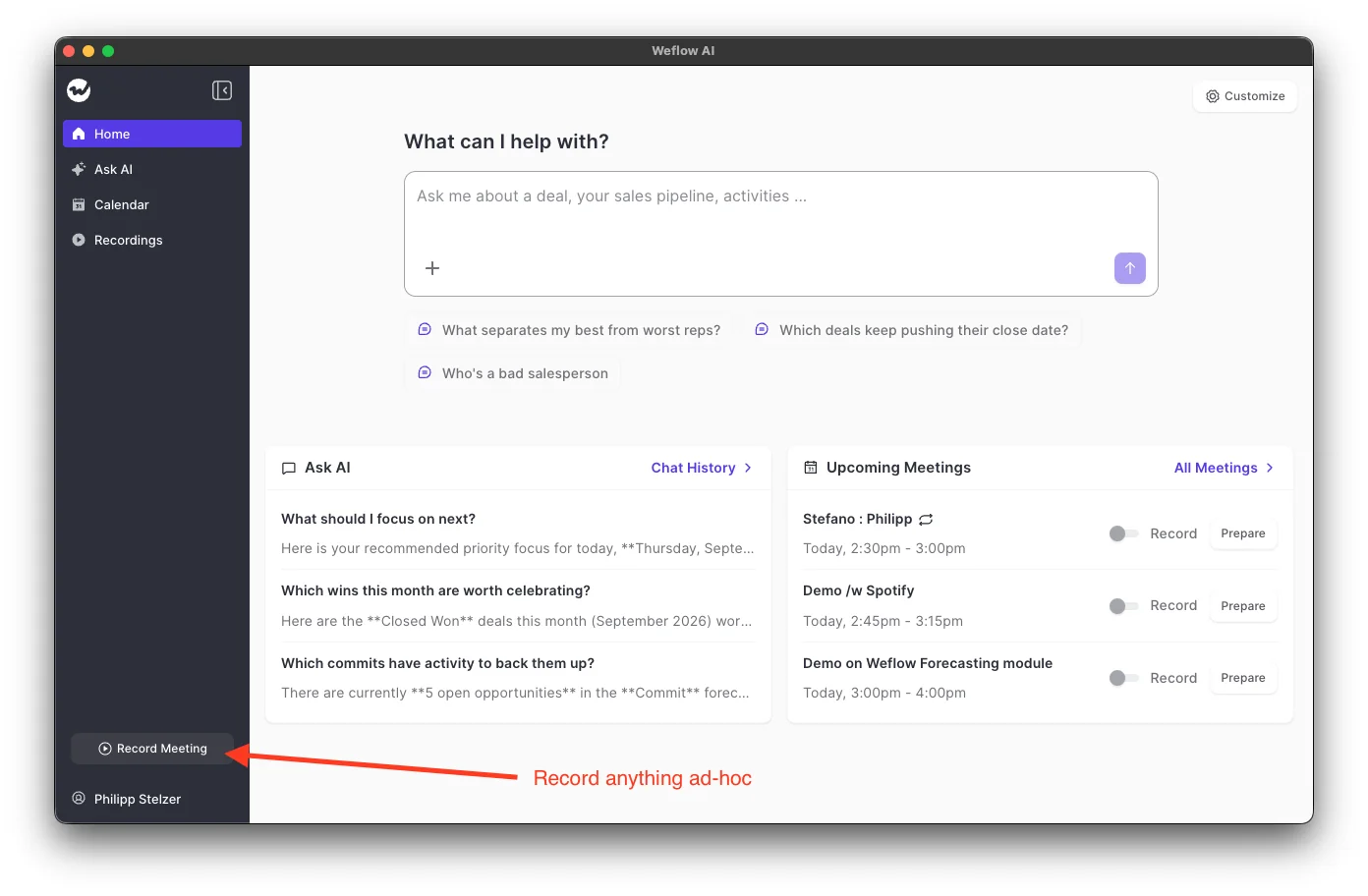
The trade-offs:
- The rep starts each recording, so coverage depends on the rep pressing Record meeting or accepting the prompt.
- The join prompt covers Zoom and Google Meet, not Microsoft Teams. On Teams the rep presses Record meeting themselves.
- Weflow's consent flow doesn't run, because nothing joins the meeting to post a notice. Obtaining consent becomes the rep's responsibility.
Capture phone, dialer, in-person and uploaded calls
Calls that never touch a meeting link need their own routes:
| Situation | Route | Trade-off |
|---|---|---|
| Outreach dialer calls | Connect Outreach on the Setup and Integrations page; Weflow pulls the calls in automatically with transcript, summary and coaching | Audio only, no video |
| Softphones on the computer, such as Aircall or RingCentral | Weflow desktop app records the system audio | The rep starts each recording |
| In-person meetings | Weflow Mobile Copilot records the conversation or a voice note afterwards | A voice note only holds what the rep remembers to say |
| Recordings from anywhere else | Manual upload up to 512MB, processed like any Weflow recording | Speakers show as Speaker A, B and C, with no way to name them |
| Calls on a rep's own mobile carrier line | Not captured | These reach Salesforce only if the rep logs them by hand |
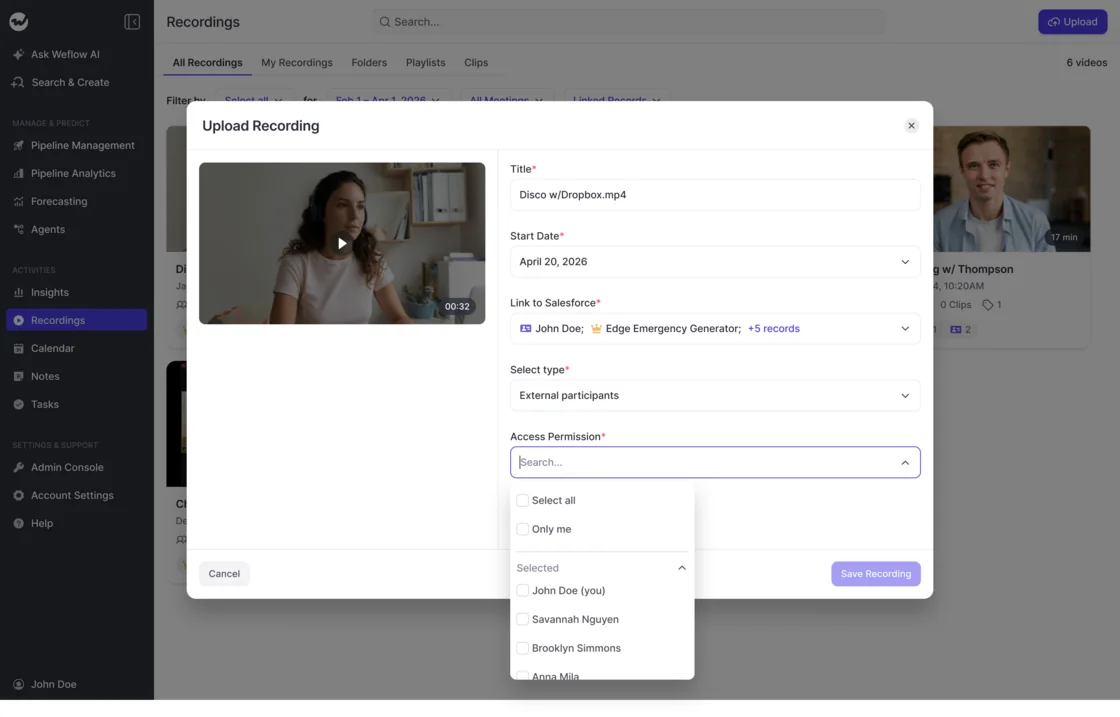
On upload, the rep links the recording to Salesforce records, sets the participant type and decides who can access it, down to themselves alone.
When importing native platform recordings suits you better than a notetaker
If most of your calls are customer-hosted behind strict lobbies and you don't need the recording right after the call, a native-recording import avoids the admission problem entirely.
Chorus Meeting Import and Momentum's Zoom integration both work this way. The meeting platform records the call itself and the tool imports the recording afterwards, with no bot joining. The cost is timing: the recording only arrives once the platform has processed it.
For teams whose calls mostly happen on the customer's side of the lobby, that's a fair trade, and it's the honest answer for that setup.
How to set a recording coverage baseline leadership will trust
The defensible coverage measure isn't a target percentage. It's whether every remaining gap has an explanation: a rep opted out, the notetaker wasn't admitted, the meeting was cancelled, or the platform threw an error.
Leadership asks whether reps can switch recording off because they want a census, not a sample. You can't promise them zero opt-outs. What you can show them is that every missing call has a cause, and that the unexplained gap is close to empty.
Your raw ratio also needs context. Some calendar systems attach a video link to every event, including in-person and internal meetings that were never going to be recorded, and those distort the denominator.
Track coverage per team. A low starting rate on one team is a rollout problem, usually unsigned seats or a lobby habit, not a ceiling in the product.
Bring three things to your VP:
- Explained versus unexplained gap, from the dashboard's skip reasons.
- Coverage by team, so the conversation lands on the teams that need retraining.
- The trend since go-live, so leadership sees the fixes working.
Want to see the calendar controls and the recording health view before your next coverage review? Walk through the product yourself, no call required.
Frequently asked questions about the Weflow notetaker
Does Weflow Conversation Intelligence need calendar access through Weflow Activity & Contact Capture?
Yes. The Weflow notetaker is scheduled from calendar events, so calendar access through Weflow Activity & Contact Capture has to be set up first. Weflow pulls meeting information from that connected calendar.
Which meeting platforms does the Weflow notetaker join?
The Weflow notetaker joins Zoom, Microsoft Teams, Google Meet and Webex. Webex is off by default and has to be enabled per workspace, and Zoom needs local recording enabled by your Zoom admin.
Can reps turn off the Weflow notetaker for their meetings?
Yes. Reps switch the notetaker off per meeting occurrence from the Weflow calendar. The recording health dashboard attributes opt-outs separately from other skips, so you can see exactly how much of your gap is rep choice.
Does Weflow alert me when a recording fails?
No. Weflow doesn't send a push alert on a failed recording. Failures show in the recording health dashboard and its CSV export. The Weflow Slack app notifies a channel when a recording and its summary are ready, not when one fails.
How does recording consent work on Zoom, Microsoft Teams and Google Meet?
Consent works differently by platform:
- Zoom shows its own built-in recording consent prompt.
- On Microsoft Teams and Google Meet, the Weflow notetaker posts a notice in the meeting chat with a link to stop the recording, and you can add an optional pre-meeting email.
- You set the consent flow to opt-in, opt-out or none.
- None of this runs when the Weflow desktop app records, because nothing joins the meeting.
What does the Weflow desktop app need on a managed Mac fleet?
The Weflow desktop app needs three macOS permissions: Microphone, Screen recording and Accessibility. Allow all three for the app through your MDM, or every rep sees the prompts themselves. On Windows, most permissions are granted automatically.
Do the Weflow desktop app and Weflow Mobile Copilot cost extra?
No. Both come with a Weflow Conversation Intelligence seat, whether it's standalone or inside a bundle. Weflow Conversation Intelligence is $39 per user per month, billed annually, and the Revenue AI Foundation bundle includes it at $49 per user per month.
Is there a lighter Weflow license for people who don't use Salesforce?
Yes. We sell a lightweight conversation intelligence license that gives people outside Salesforce the notetaker without the rest of the platform. Your whole company can then use one recorder, while only customer-facing teams carry full licenses.