
Why 100% Conversation Recording Coverage is The Wrong Target For Conversation Intelligence Tools
Learn the real recording coverage benchmark for Conversation Intelligence and why 100% is the wrong target


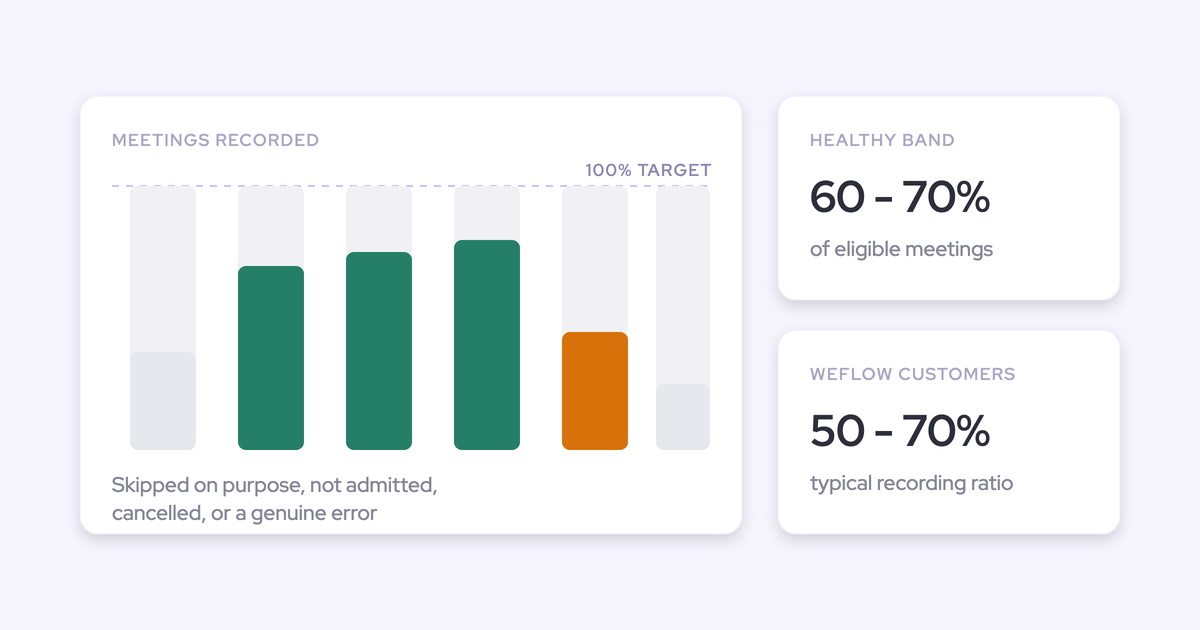

If your conversation intelligence tool is recording 65% of meetings, nothing is broken. That's roughly what healthy looks like.
The number that should worry you isn't the 65%, it's whether you can say what the other 35% was.
Most RevOps leaders inherit 100% as the implicit target because that's how the category sold coverage in the first place. Then reality arrives: guests decline, legal says no, a rep kills the recorder before a sensitive second half, and a handful of meetings just never get captured for reasons nobody can name.
So you're sitting in front of a CRO with a percentage that reads like failure and no way to decompose it.
This article gives you the honest benchmark, the structural reason the ceiling exists, and a metric you can actually defend upward.
We build Weflow Conversation Intelligence, and Weflow is the Revenue AI Orchestration platform for sales, customer success, and RevOps teams, so we have a commercial interest in coverage numbers looking good. We're publishing ours anyway, because the argument only works if the numbers are real.
What's a healthy call recording coverage rate?
A healthy call recording coverage rate is 50 to 70% of eligible meetings, and realistic recording tops out somewhere around 60 to 80% because a share of customers will always decline. Weflow Conversation Intelligence customers typically land in that 50 to 70% band, and that's the band where retention holds after implementation.
The band only means something if you agree on the denominator. "Eligible meetings" is not "meetings on the calendar."
What belongs in the denominator:
- External meetings with customers, prospects or partners that actually took place.
- Meetings held on a supported platform: Zoom, Microsoft Teams, Google Meet or Webex.
- Meetings owned by someone inside the recording configuration.
What doesn't:
- Internal meetings. Standups, pipeline reviews and one-to-ones aren't the target, and counting them drags a healthy rate into the forties for no reason.
- Cancelled meetings and no-shows. Nothing happened, so nothing was missed.
- Phone calls and in-person conversations. Those need a dialer or a mobile recorder, not a notetaker joining a video link.
Get the denominator right first. Half the "our coverage is terrible" conversations we have on calls turn out to be a denominator problem, not a recording problem.
Why no conversation intelligence tool records every meeting
The gap between a healthy rate and 100% is made of legitimate categories, and only one small slice of it is a defect. That's the whole reason 100% is the wrong target rather than a missed one.
- Deliberate skips. A rep turns the recorder off for a specific meeting because the conversation is sensitive, personal, or about something that has nothing to do with the deal.
- Guest declines. Someone on the other side objects to the notice and the recorder leaves. In Weflow that means the recording, transcript and notes are destroyed, which is what the guest was promised.
- Consent and legal limits. Works councils, two-party consent states, regulated buyers. These aren't edge cases in Europe, they're the default operating condition.
- Recorder not admitted. The bot sits in the lobby, nobody lets it in, it drops out by itself.
- Meeting link changed after the invite. The recorder went to the address on the calendar. The humans went somewhere else.
- Meetings that never happened. Cancelled late, quietly abandoned, still sitting on the calendar.
- Genuine platform errors. The residue. This is the only category that is actually a product failure.
Add those up and the arithmetic does the arguing for you. A team at 100% would be recording conversations it was asked not to record. That's not a coverage win, it's a compliance incident waiting for a security review to find it.
How the recording model sets your coverage ceiling
Coverage is decided by architecture before it's decided by rep discipline. The single biggest variable in your number is how a recording gets started: whether the rep has to make it happen, or whether it happens unless the rep stops it.
That's why the same team gets wildly different numbers on different tools, with the same people and the same meetings.
| Question | Per-rep opt-in model | Default-on model |
| Who starts the recording? | The rep, per call | Nobody. It's scheduled from the calendar connection |
| Where is the connection made? | Per rep, per calendar account | Once, at workspace level |
| What happens when someone new joins? | Unrecorded until an admin remembers | Covered if their team is in the config |
| What does failure look like? | A rep who appears to have had no meetings | A logged attempt with a reason attached |
| Which way does the number move over time? | Down, quietly | Flat, once the rollout lands |
Per-rep notetakers and calendar tokens rot coverage silently
When recording depends on each rep connecting their own calendar, coverage decays and nobody finds out. That's the failure mode buyers describe to us most often, and it's specific:
Out of a hundred reps, a handful never authenticate at all. A few more drop off every month as tokens expire. The failure doesn't announce itself, because a rep with a broken token looks exactly like a rep who had a quiet week.
Six months later you're making coaching and forecast calls on conversation data with holes in it that nobody can see or size.
Gong invented this category and still has the deepest conversation analytics in it, and that's not in dispute.
What we hear on rip and replace calls is narrower: the recorder failing to join, recorded meetings not landing in Salesforce, and the rep calendar in Gong disagreeing with both Google Calendar and Salesforce. Each one is small. Together they remove the thing the tool was bought for, which is being able to say the data is complete.
Gong does surface skipped and short calls in the Conversations list, and you can schedule a recording by hand when one is missing.
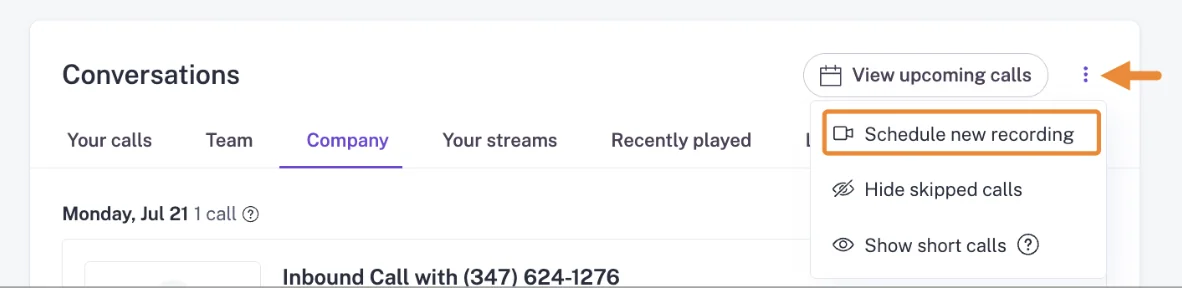
That's a list you can filter. It isn't a categorized error rate you can export and put in front of a CRO, and those are different jobs.
Auto-scheduled recording makes recorded the default state
Weflow auto-schedules the notetaker onto every external meeting from the calendar connection, so nobody starts it and nobody has to remember it. It joins as a visible participant on Zoom, Microsoft Teams, Google Meet and Webex, tries to join shortly before the start, and drops out by itself if it's left in the lobby.
Reps keep control. They can turn it off for a specific meeting, and they can add it to an internal meeting on demand.
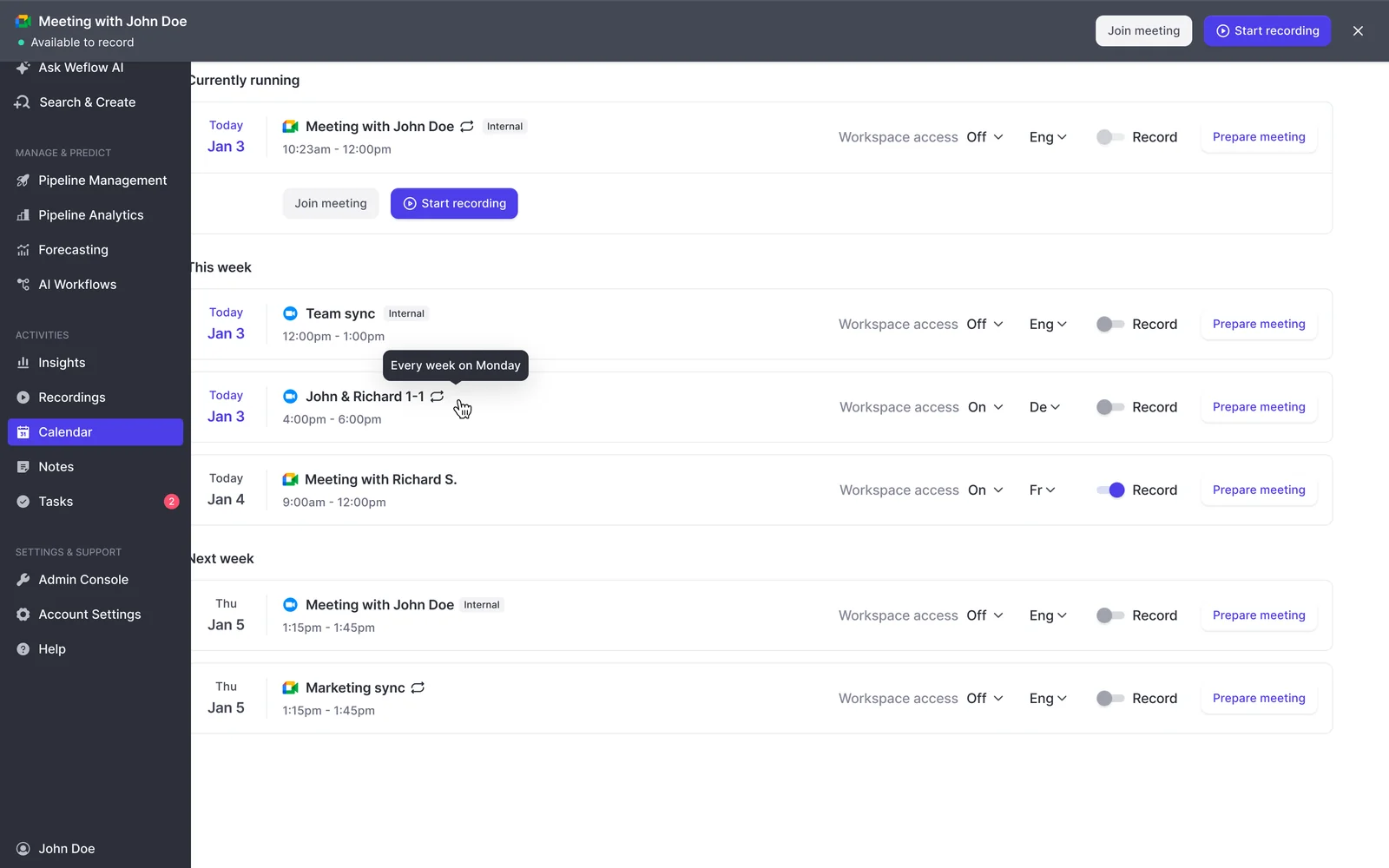
The difference is which way the default points. Opting out per meeting is a decision someone makes on purpose, and you can count it. Opting in per meeting is a decision someone forgets, and you can't.
This is the one architectural question worth carrying into every vendor conversation: is recording connected centrally at the workspace level, or one rep at a time?
Three ways to manage recording coverage below 100%
You have three coherent responses to a sub-100% number. They differ in what they cost you, and in what they let you say when leadership asks.
Option 1: mandate recording and chase 100%
Enforcement works on the part of the gap that's genuinely behavioral, and it caps out hard everywhere else. A mandate can't overrule a guest who declines, a works council, or a consent rule in a market you sell into. So you push, and you spend your credibility with the field without ever closing the gap.
- When it fits: your rate is low because reps aren't recording, and the meetings they're skipping have no consent or sensitivity reason behind them.
- Where it fails: reps read the mandate as surveillance, start declining more calls on the customer's behalf, and the number you fought for stops being trustworthy anyway.
Option 2: report the raw number and absorb the doubt
This is what most teams do today, and it's why the coverage conversation keeps going badly. You report 65%, someone asks what happened to the rest, and you don't have an answer, so every gap in the library reads as a product failure.
The damage isn't the number. It's that once a manager finds one missing call they can't explain, they stop trusting the whole conversation dataset, including the 65% that's sitting right there.
It fits exactly one situation: nothing downstream depends on the data yet. If coaching, deal reviews or forecast signals run on conversation content, this option is borrowing against trust you'll need later.
Option 3: target explained coverage instead
Hold the recorded rate in the healthy band, and categorize every meeting that wasn't recorded. The metric stops being "recorded versus 100%" and becomes "recorded plus explained versus everything else."
Every gap lands in one of these buckets:
- Skipped on purpose by the rep
- Declined by a participant under the consent flow
- Recorder not admitted or left in the lobby
- Meeting cancelled or never held
- Platform error
Four of those five are working as designed. The fifth is the one you chase.
| Option | Ceiling you can actually hit | Defensible upward? | Effect on rep trust | What it costs |
| Mandate 100% | Capped below the mandate by consent and declines | No. You're reporting against a target you can't reach | Negative. Reads as enforcement | Political capital, ongoing |
| Report the raw rate | Whatever you happen to get | No. Every gap looks like a defect | Neutral, then negative when trust erodes | Nothing up front, credibility later |
| Explained coverage | 50 to 70% recorded, close to all of it explained | Yes. The gap is decomposed and the residue is named | Positive. Skipping is legitimate, not a violation | Attribution tooling and a monthly review |
Explained coverage: the metric that beats a raw rate
Explained coverage is the share of eligible meetings that were either recorded or accounted for by a named, categorized reason. Recommend this one, and argue it from the criteria above.
It wins for three reasons.
It matches the actual ceiling. A metric whose target is unreachable trains everyone to ignore it, and 100% is unreachable by design, not by accident.
It survives decomposition. You already distrust any number you can't break apart, and so does your CRO. A raw 65% answers "how much." Explained coverage answers "why," and only the second one earns trust in the data below 100%.
It changes what you're accountable for. Under a raw rate, you own the whole 35%. Under explained coverage, you own the unexplained residue and the error rate trend, which are the only two things you can actually move.
Here's the position a smart RevOps leader can argue with, so argue with it if you disagree: a team at 60% recorded with every gap categorized has better conversation data than a team at 80% recorded with no attribution, because the first team knows what its silence means and the second team doesn't.
How Weflow makes every recording gap attributable
Explained coverage only works if attribution is a product surface, not a spreadsheet you maintain by hand. Three mechanics carry it.
The recording health dashboard: attempts, skips, and errors
The Weflow admin console carries a recording health dashboard showing meetings recorded, recording attempts, meetings skipped and an error rate, with a CSV export per time window.
That split is the whole point. Without it, a recorder that was never admitted, a meeting whose link changed after the invite, a meeting that never happened and a genuine platform error all look identical: a hole in the library.
| Gap category | What it means | Does it need action? |
| Skipped on purpose | The rep turned the recorder off for that meeting | No. Watch the trend by team, not the individual event |
| Participant declined | Someone used the decline route in the consent flow | No. The consent design worked |
| Recorder not admitted | The bot waited in the lobby and dropped out | Maybe. If it repeats for one rep, that's an enablement fix |
| Meeting not held | Cancelled or no-show | No. It shouldn't have been in the denominator |
| Platform error | The recording should have happened and didn't | Yes. This is the number you report and drive down |
The export matters more than it sounds. It's what lets you put a trend line in front of leadership instead of a screenshot.
Recording configuration that follows the org chart
Weflow Conversation Intelligence recording is configured by team rather than by individual user, and a team added that way updates as its membership changes.

Adding people one at a time is the usual way coverage decays. Someone joins in March, nobody adds them, and their meetings quietly don't exist until a manager goes looking for a call in July.
Pointing the configuration at a team makes coverage follow the org chart instead of an admin's memory. Teams can still be populated by hand where the dynamic definition doesn't fit.
The Salesforce activity trail stays complete without a recording
A meeting is logged as a Salesforce activity whether or not it was recorded. Recording only adds the summary and the AI field updates on top.
This is the part that defuses the fear underneath the whole coverage question. Below 100% you are not losing meetings. You're losing the conversation content on some of them.
So an activity can appear on a deal with no summary attached: the meeting happened, it was logged, the recorder wasn't admitted or the rep declined to record. Days-inactive warnings, engagement counts and multi-threading signals stay trustworthy at 60% recording, because they were never running on the recording in the first place.
How to report recording coverage to your CRO
Report the band and the decomposition together, never the raw percentage on its own. The goal is to move the conversation from "why isn't this 100%" to "the unexplained residue is X and it's shrinking."
What the upward report contains:
- The denominator, stated first. Eligible external meetings held on supported platforms. Say what you excluded and why, before anyone asks.
- Recorded rate against the healthy band. "We're at 64%. Healthy is 50 to 70%, and the practical ceiling is 60 to 80% because customers decline."
- The gap, broken into categories. Skips, declines, not admitted, not held, errors. With counts, not adjectives.
- Error rate and its trend. The one number that represents actual product failure, over the last three months.
- The unexplained residue. Meetings you can't put in a bucket. This is your real work item, and it should be small and getting smaller.
- One coverage-by-team line. Teams at the bottom of the range need enablement, not a new tool.
When the 100% question comes, answer it directly rather than defensively: getting to 100% would mean recording conversations participants asked us not to record. The number we're managing is explained coverage, and here's where it stands.
That's a conversation about operating discipline. A raw percentage is a conversation about whether you bought the right tool.
When a low recording rate is a rollout problem, not a ceiling
A team below roughly 40% doesn't have a product ceiling, it has a rollout problem, and the fix is usually fast. Teams that start below 40% typically reach 80 to 90% once the configuration and the rep habits are sorted out.
The diagnosis is different from the healthy-band case, and so is the playbook. Check these in order:
- Consent mode. If you launched on opt-in, that alone explains most of it. Opt-in collapses in group meetings where one person forgetting to accept kills the recording.
- The configuration scope. Are whole teams in the recording config, or a list of individuals from launch day that nobody has touched since?
- The denominator. Internal meetings and cancelled meetings sitting in the count will drag a healthy rate below 40% on their own.
- Rep-level distribution. Break the rate down by rep. A flat low rate is a config problem. Three reps at zero is an enablement problem.
- Whether anyone owns it. Conversation intelligence with per-team prompts, scorecards and field mappings needs a named internal owner. Without one, templates go stale, output degrades, and people stop recording because they stopped seeing the point.
Nothing on that list requires a new vendor. It requires a week of someone's attention and a decision about consent mode made with legal, ideally before rollout rather than after the first guest objects.
Walk through the product yourself, no call required.
FAQs on recording coverage and health
How does opt-out vs opt-in consent change the recording rate?
Consent mode is the largest compliance-side lever on your recording rate. Opt-out records by default, posts a notice in the meeting chat with a link that lets any participant stop the recording, and keeps the rate high. Opt-in requires every participant to actively accept before recording starts, which holds up one-to-one and breaks down in larger groups where one person forgetting kills the recording. Manual leaves the decision to the seller in the room. Weflow supports all three, the consent message and its language are customizable, and an optional pre-meeting email lets a guest decline in advance. Pick the mode with legal before rollout, not after.
Can a rep skip recording a specific meeting on purpose?
Yes, per meeting. A rep can turn the notetaker off for a specific call, and the host can also remove it mid-call, in which case everything up to that point is kept. That's how a call gets recorded for the working half and left unrecorded for a private second half. Under explained coverage, a deliberate skip is a categorized, legitimate gap rather than an error, which is exactly why the distinction has to exist in the reporting.
Do internal meetings count toward recording coverage?
No, and including them is one of the most common ways a healthy rate gets misread as a broken one. Weflow auto-schedules the notetaker onto external meetings; internal meetings are recorded on demand when a rep adds it. So standups, forecast calls and one-to-ones sit outside the denominator and don't drag the number down.
Does switching conversation intelligence tools reset your coverage history?
No. Weflow imports and reprocesses the recordings and transcripts held in the conversation intelligence platform you're leaving, pulling them through that platform's API, at no extra cost and typically in one to two weeks depending on volume, at libraries running into the thousands of recordings. Because the imported material is reprocessed rather than just stored, historical calls stay searchable and scoreable, so your measurement and your team's memory don't restart at zero on cutover day.
Can individual calls be kept private in Weflow?
Not at the individual call level today, and you should know that going in. Call visibility follows position in the Salesforce hierarchy, and sharing a single call outside that is done by tagging an individual user. Putting someone at the top of the hierarchy hides all of their calls from everyone below, which suits an executive whose calls should never sit in the shared library and fails the more common case of wanting nine calls shared and one kept private. If granular per-call privacy is a hard requirement for your team, that's a real gap on our side rather than a configuration you've missed.


