
What Weflow Cannot Capture, and Why That Is the Right Boundary
Learn what Weflow cannot capture, from personal phones to email, and why that privacy boundary matters


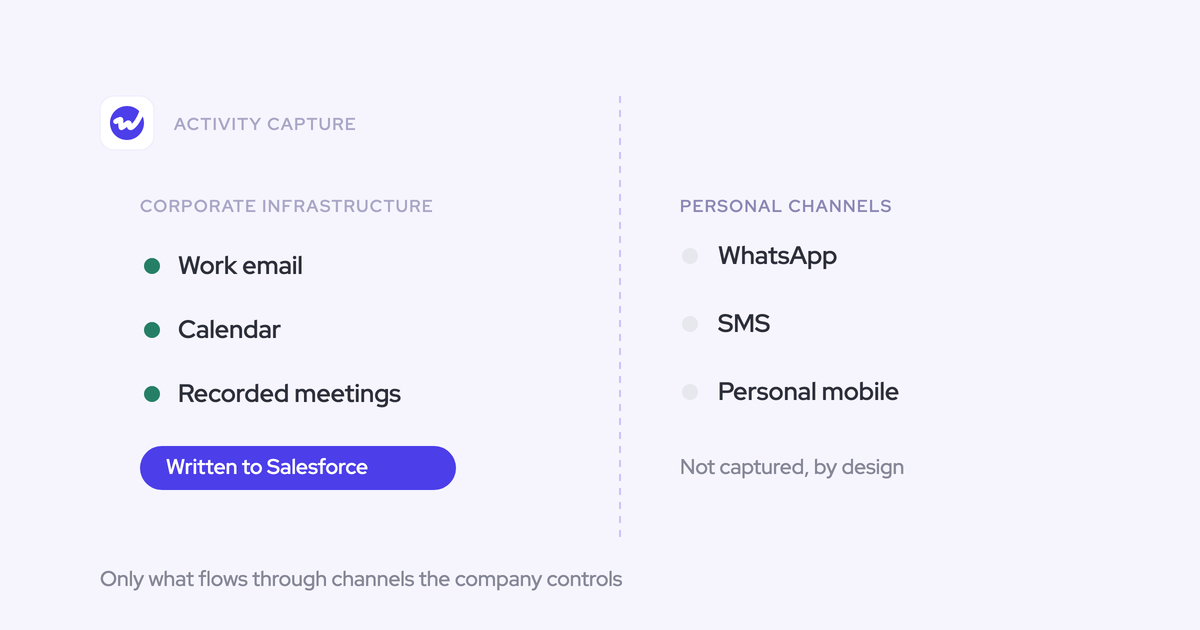

Automatic activity capture stops at the edge of your corporate infrastructure. The mail tenant, the calendar, video meetings: all capturable. A rep's personal phone, WhatsApp threads, iMessage, personal email: not capturable, by us or by anyone else selling you capture this quarter.
You already know your CRM data is incomplete. You're not here to be told that. You're here to find out exactly where the next tool will still leave holes, before you sign, because a blind spot you can name is one you can design a channel policy and a rollout around, and a silent one quietly poisons every number downstream.
So here's the map. Weflow is the Revenue AI Orchestration platform for sales, customer success, and RevOps teams, and Activity & Contact Capture is the product doing the capturing. This page covers what it structurally cannot reach, what it deliberately refuses to log, how it reports its own gaps, and the one certification we don't hold.
Where automatic activity capture stops: the corporate infrastructure boundary
Automatic activity capture covers exactly the channels the company controls, and nothing outside them. That line is the capture boundary.
In practice the controlled channels are the corporate mail tenant, the corporate calendar, and video meeting platforms. Weflow Activity & Contact Capture runs server side at the mail tenant level through a central app in Microsoft Entra or Google Workspace, so every email and meeting is logged regardless of which client or device the rep used. No plugin to install, no rep action.
Everything a rep does on a device the company doesn't administer sits outside that line permanently.
| Inside the boundary (captured) | Outside the boundary (not captured) |
| Corporate email in Microsoft 365 or Google Workspace, inbound and outbound | Personal email accounts a rep uses on the side |
| Corporate calendar events | SMS and iMessage threads with a buyer |
| Zoom, Microsoft Teams and Google Meet meetings, when the notetaker is admitted | WhatsApp and other consumer messaging apps |
| In-person meetings recorded with Mobile Copilot | Phone calls placed from a mobile handset, personal or company-issued |
| Telephony for Outreach and other dialers | Microsoft Teams chat and LinkedIn messages |
Why no capture vendor can honestly claim to capture everything
The boundary is set by consent and device ownership, not by engineering effort. A rep's personal phone is a private space that also carries their private life, so reading it isn't a feature waiting to be built. It's a thing you cannot ask for.
Every capture vendor lives with that exact limit. Most say nothing about it, which is why experienced RevOps leaders have learned to interrogate it themselves and treat "capture everything" as a claim that will turn out to have an asterisk they had to find on their own.
Saying it out loud does cost something. A prospect told us during a rollout:
I found that the transparency part of how much Weflow captures on their email was concerning a few people a little bit.
We'd still rather have that conversation before go-live than have someone discover the shape of it afterwards. Partial capture presented as complete is more dangerous than a gap you documented, because reports built on it look confident and are wrong in exactly the places that matter.
What no capture tool reaches: WhatsApp, iMessage, SMS, personal email
The channels where the strongest deal signal now lives are the ones no capture layer can see. Weflow included.
- SMS and iMessage: the thread runs on a handset, so there is no corporate system between the two people to read it. Weflow does not capture text messages and it is not on our roadmap.
- WhatsApp and similar apps: same problem, plus a regional split that makes it worse. WhatsApp dominates buyer conversation in Europe, iMessage in the US, so wherever you sell, some part of your pipeline is running through it.
- Personal email: outside the mail tenant, outside the admin grant, outside consent.
- Calls from a mobile handset: the call never touches a system the company administers. Weflow has no VoIP call capture today either; Zoom Phone is on the roadmap and not available yet.
- LinkedIn messages and Microsoft Teams chat: Weflow records Teams meetings like any other video platform, but Teams chat is not a surface it reads.
The painful part is that getting onto a buyer's phone is itself the signal. A manager inspecting pipeline sees a contact who has gone quiet for two weeks, challenges the rep, and hears that it's all fine, it's all on my phone. Every stale-deal alert and engagement score on your best deals is then quietly wrong.
The thing I haven't been able to sort out is the text messaging or iMessage. In a lot of businesses that I've been a part of, one of the best indicators of success is if you're on a text message basis with your buyer, especially in enterprise, I think that becomes really important. But I don't think that you can easily integrate that or measure it. It's like the one remaining black box that you just have to have some janky checkbox like, are you texting with them? Yes or no?
— Mallory Lee, VP Revenue Operations, PhoneBurner
The janky checkbox is still the honest answer. If your enterprise deals genuinely live in messaging, treat that as a manual field your managers ask about in review, and don't expect any vendor to close it for you.
What Weflow will not log: the Salesforce record-match rule
Weflow logs nothing that doesn't resolve to an existing Salesforce contact, lead, or account domain. That's the default, and it does most of the privacy work before any rule is written.
Which answers the fear behind the question everyone actually asks: no, a rep's dentist, their mortgage broker, and their weekend group thread were never candidates for the CRM. There is no record for them to attach to, so nothing is created.
That reframes what an exclusion list is for. You need exclusions for correspondence that does match a Salesforce record and must still stay out: the law firm, the board member, the consumer segment sitting inside a B2B instance.
How Weflow keeps confidential and personal email out of Salesforce
This is the part reps raise first, and they raise it in specifics:
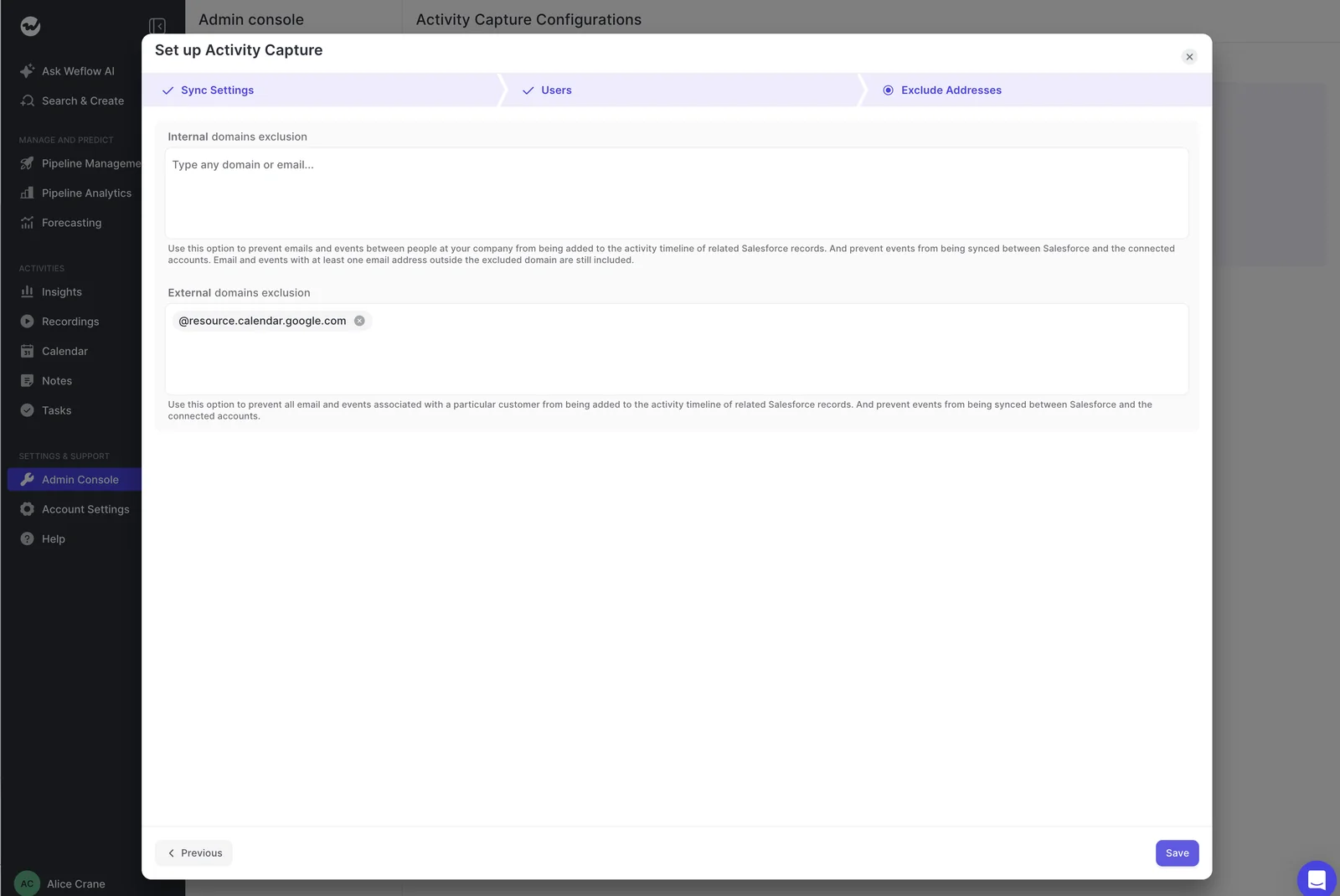
Exclusion in Weflow runs in three layers: rules an admin sets centrally, controls in the rep's hands, and scope decided before a single mailbox is read. All three are configuration you can show a security reviewer, not a promise from a datasheet.
Layered exclusions: domains, objects, keywords, and conditional rules
The reasons for excluding differ, so the layers do too.
| Layer | What it blocks | When you need it |
| Internal and external domain exclusion | All mail and events involving a listed domain or address | Your law firm, your auditor, your own internal traffic, resource calendars |
| Salesforce object exclusion | Logging to an entire object, for example Lead or Case | Teams that never work leads, or an object you don't want an activity trail on |
| Keyword exclusion | Any email whose body contains a listed term | Confidential subject matter your team can flag by wording |
| Conditional custom rules | Activity evaluated against fields on the Salesforce record | A consumer segment in a mixed B2C and B2B instance, or a named account that must never be logged |
One trap worth knowing before you build your list. Domain exclusion blocks records that don't already exist in Salesforce. A board member who is already sitting there as a contact will keep being logged no matter how many times you add their domain, and the control you actually need is a custom rule evaluated against the record.
Admins get caught by this because the two controls look interchangeable in the UI. They aren't.
Three capture modes and per-thread suppression for reps
Capture runs in one of three modes, set per team. Most customers run hybrid.
| Mode | What happens | Who it fits |
| Fully automated | Server-side capture with no rep-facing layer at all | Individual contributors, high volume, no appetite for a plugin |
| Hybrid | Server-side capture plus the mail add-in, which shows what is about to be logged and where | Most teams, and anyone who needs a rep to re-map or suppress |
| Fully manual | Nothing is logged unless a person chooses to log it | Leadership, whose mail is the most sensitive and the least useful to capture wholesale |
In hybrid, the rep sees the Salesforce record a message is about to land on, can change it, and can tick a control that switches logging off for that thread. You can also hand out the add-in with that control removed, so a team sees the mapping and cannot suppress it.
Now the honest limit. Nothing in Weflow detects that a message is sensitive. The rep-side control only works where the rep notices in the moment, which means a customer or a contact who must never be captured is an admin exclusion, not a judgement call you delegate to a seller having a bad Tuesday.
Scoping capture to a security group before anyone is enrolled
No mailbox is read until a user is enrolled in a capture configuration. Installing the managed package, connecting the integration user, and adding the workspace app all grant access without capturing anything.
That matters for two reasons: your scope is a configuration you set before go-live, and the technical setup can finish while legal review is still open. Admins are right to assume the default install is greedier than they want:
The controls you have before anyone is switched on:
- Enrolment: capture reads a mailbox only once that user is enrolled, so an unenrolled inbox is untouched rather than filtered later.
- Group scoping: connect a nominated security group instead of the whole tenant, so the mailboxes in scope are the ones you named.
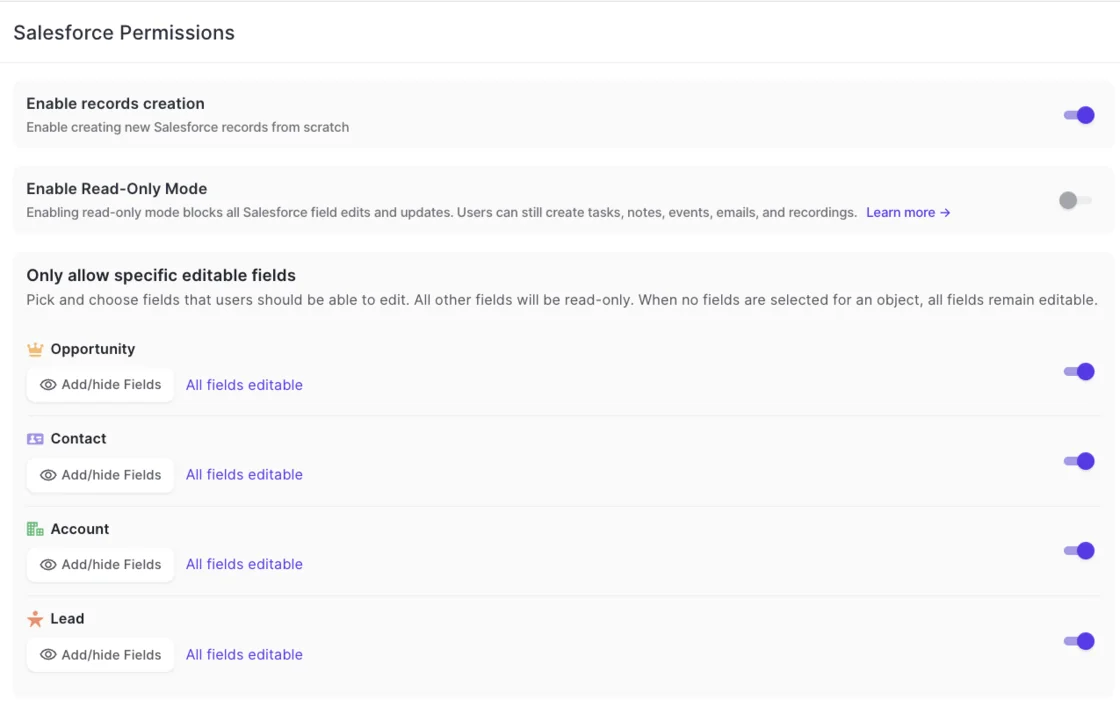
- Read-only mode: a single switch under Salesforce Permissions blocks every record creation and field update flowing from Weflow into Salesforce, while capture and conversation intelligence keep running.
How Weflow reports coverage gaps instead of hiding them
Inside the boundary, capture still misses things, and Weflow reports those misses as an operational metric instead of letting a setup look complete while being quietly wrong. That reporting is the part we'd argue matters more than any coverage percentage in a deck.
Start with the honest numbers. Recording coverage typically runs between 60 and 80 percent of eligible meetings, and measured across all of a customer's meetings the recording ratio usually lands between 50 and 70 percent. Some of that apparent gap was never a real meeting: calendar systems attach a video link to every event, including internal and in-person ones nobody intended to record.
What the reporting names:
- Per-meeting skip reasons. Someone opted out, or the notetaker wasn't admitted, or another recorded reason. These are attributed separately, so a lobby problem doesn't get read as a product failure.
- Opt-outs as a legitimate outcome. A rep or a customer declining to be recorded is a logged, respected reason, not an anomaly to chase down.
- The lobby case. The notetaker joins as a participant and has to be admitted, so a meeting the customer booked and never joined cannot be recorded by anyone. It leaves the lobby after about ten minutes, and a rep can send it back in mid-call from the Weflow calendar.
- Silent users. A user whose sending address doesn't match the address on their CRM user record falls out of capture with no error at all. Common after an acquisition, or where someone sends from a marketing subdomain. A health view names the users producing nothing so you find them without going person by person.
- Data quality blocking matches. Contacts with no email, accounts with no domain, duplicates: the things that quietly stop activity resolving to a record.
The same health view flags whether Einstein Activity Capture is still running, which matters because two capture layers writing the same emails and meetings produce duplicate and conflicting activity. Replacing Einstein Activity Capture is a cutover with a date, not a parallel trial.

Which certifications Weflow holds, and where FedRAMP stands
Here is the list you can paste into the vendor review, with nothing implied that isn't held.
| Certification or control | Status |
| SOC 2 Type II | Certified, held since 2021 |
| GDPR | Compliant. German company, Frankfurt infrastructure for European customers |
| HIPAA | Compliant. BAA available, US storage option |
| CCPA | Compliant |
| Zero Data Retention for AI processing | In place. Customer data is never used to train models |
| Encryption | TLS 1.2 or above in transit, AES-256 at rest |
| Penetration testing | Regular third-party tests |
| Data residency | Selectable EU, US or APAC region, following the customer's Salesforce region by default |
| ISO 27001 | Not held. In progress, target December 2026 |
| FedRAMP | Not certified |
On residency, Weflow spins up your instance in the region where your Salesforce org sits, which means you're answering the question with a location your own security team already approved. It can be overridden to keep data in the EU or UK. Video recordings are the exception: Weflow holds those and streams them back, because Salesforce is a poor place to store large files.
One more detail that shortens reviews: the only way to sign in to Weflow is through your Salesforce authentication, so there's no second identity to provision, no separate password, and deactivating a user in Salesforce removes their Weflow access immediately.
What the capture boundary means for your rollout
A named boundary is actionable. It becomes a channel policy and a fit decision, which is exactly what an unnamed one can never be.
Design a channel policy before switching capture on
- Decide which channels deal communication is supposed to run through, and say it out loud to the team. Capture ends at corporate infrastructure, so a team allowed to work customers from personal channels will carry holes no tool can close.
- Make the texting blind spot an explicit field your managers inspect, rather than letting "it's all on my phone" function as an answer in a deal review.
- Set the mode per team before enrolment: leadership on fully manual, individual contributors on automated or hybrid.
- Write the exclusions first, including the custom rules for contacts that already exist in Salesforce, then enrol.
- Scope the connection to a security group and confirm which mailboxes are in it before anyone is switched on.
- Plan the Einstein Activity Capture cutover as a date with an owner, since you can't run both against the same org, and run your parity check on the boring part: did it capture one for one.
When Weflow is not the right fit
If the real work of your deals happens in WhatsApp or over text, Weflow does not solve that and neither does anything else on your shortlist. Buy capture for the channels you control, and handle the messaging channel with process.
If FedRAMP is a hard requirement, Weflow is not a fit today. We hold SOC 2 Type II, GDPR, HIPAA and CCPA, and that is not a substitute for a certification a US government contractor is mandated to have.
And Weflow works exclusively with Salesforce. If your CRM is HubSpot or Dynamics, stop here.
FAQ: Weflow capture limits, privacy, and compliance
Does Weflow capture inbound emails or only outbound?
Both. Weflow captures server side at the mail tenant level through Microsoft Entra or Google Workspace, so inbound replies are logged the same as outbound sends, regardless of the client or device the rep used. This is worth checking with every vendor on your list, because add-in-based capture only sees mail that passes through the add-in, and that usually means outgoing only. The reply is the half of the record that proves a deal is alive.
Can an activity already logged to Salesforce be corrected?
Yes. An activity mapped to the wrong record can be unlinked and re-logged to the right one. Weflow maps to open opportunities in a fixed order, preferring a contact over a lead and a single open opportunity where the person holds a contact role, and falling back to the account when nothing resolves cleanly. The rep-facing add-in exists so the mapping gets fixed at the moment of capture rather than in a cleanup project later.
Does Weflow capture Slack messages or Microsoft Teams chat?
Microsoft Teams chat is not captured. Teams meetings are recorded and analyzed like Zoom or Google Meet. For Slack, Weflow reads only channels somebody has deliberately connected to a specific Salesforce record, by a command in Slack or from Weflow. Unconnected channels are not read at all, which is the same governance rule email capture follows: data enters only where it resolves to a record.
Is Weflow FedRAMP certified?
No. Weflow is not FedRAMP certified. Weflow holds SOC 2 Type II, and is GDPR, HIPAA and CCPA compliant, with Zero Data Retention for AI processing and ISO 27001 targeted for December 2026. If your organization requires FedRAMP, Weflow is not a fit.
Do I need the full Weflow platform for activity capture?
No. Weflow Activity & Contact Capture is sold standalone at $19 per user per month, billed annually, with a 10-user minimum. Pricing is published, not gated behind a call.
One thing to watch: call recording lives in Weflow Conversation Intelligence ($39 per user per month), not in Activity & Contact Capture. If you want emails, meetings, contacts and meeting recordings, the Revenue AI Foundation bundle pairs both products at $49 per user per month.
Walk through the product yourself, no call required. The exclusion layers, the capture modes, and the coverage health view described here are all things you can inspect rather than take our word for.


