Einstein Activity Capture Alternatives That Log Native, Reportable Salesforce Records
Learn which Einstein Activity Capture alternatives log native, reportable Salesforce records.



One question decides an activity capture evaluation, and it isn't whether the tool captures activity. It's whether the email lands in Salesforce as a record you can query, report on, and read inside a flow, attached to the right opportunity.
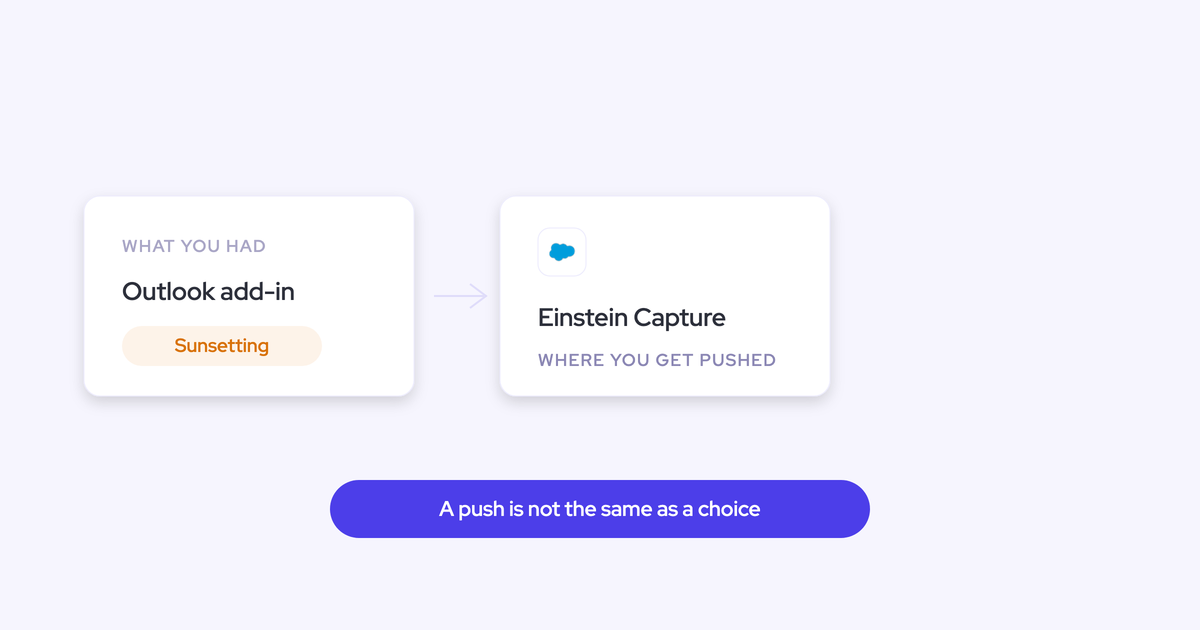
Most teams don't get to ask that question calmly. You're asking it because an Einstein for Sales contract is up, or because Salesforce is sunsetting the native Outlook add-in and retiring legacy Activity 360 reporting in Summer '26, and the migration path leads back to the tool you're already unhappy with.
So this is the field judged on one criterion: native, reportable, correctly-mapped records. Which tools pass, which ones are not real replacements, and when staying on Einstein Activity Capture is genuinely the right call. Weflow is the Revenue AI Orchestration platform for sales, customer success, and RevOps teams, built for Salesforce teams, and it's first on the list because it wins on exactly this test. We'll also tell you where it doesn't fit.
Why Salesforce teams replace Einstein Activity Capture
Almost every EAC complaint traces back to two decisions, not to bugs you can configure your way out of.
The first is architectural: activity was streamed into the timeline from an external store rather than written as records in the core Salesforce database. The second is a dependency: opportunity matching rides on opportunity contact roles, one of the least-maintained objects in any org.
Everything below is a downstream consequence of those two.
Activities aren't stored as native Salesforce records
With Einstein Activity Capture in its default configuration, activity shows up in the timeline and nowhere else. It isn't in the core Salesforce database, so you can't query it, can't use it in a flow, can't build a custom report on it, and can't export it to Tableau, Looker, or Power BI.
You get the one canned report Salesforce hands you. You can't adjust it, and there's no raw data underneath to go and get.
"We tried Einstein Activity Capture but faced several problems. As activities are not stored as records in Salesforce, we couldn't properly report on activities or use activities for automations"
Irina Smirnova, Senior Sales Operations Manager, Blacklane
The knock-on effects are the ones that hurt in a deal review. Blacklane found that EAC activities didn't update the standard Last Activity Date field, because externally stored activity isn't recognized as native Salesforce activity.
The conclusion buyers reach is sharper than a feature gap.
"With Einstein Activity Capture, I was trying to report on how many meetings we have. I got on a call with Salesforce support, who was just as confused as I was. I also learned that activities are just temporarily stored on Salesforce's side. It's actually not even my own data."
Alex Knechtl, Director of Revenue Operations, Blockaid
Salesforce did address this. The Summer '25 release introduced an opt-in "Sync Email as Salesforce Activity" setting that stores email as native records, and existing orgs have to actively migrate through Salesforce Support to get it. That's real progress, and it comes with a lesson we'll come back to.
Opportunity mapping breaks when an account has multiple open opportunities
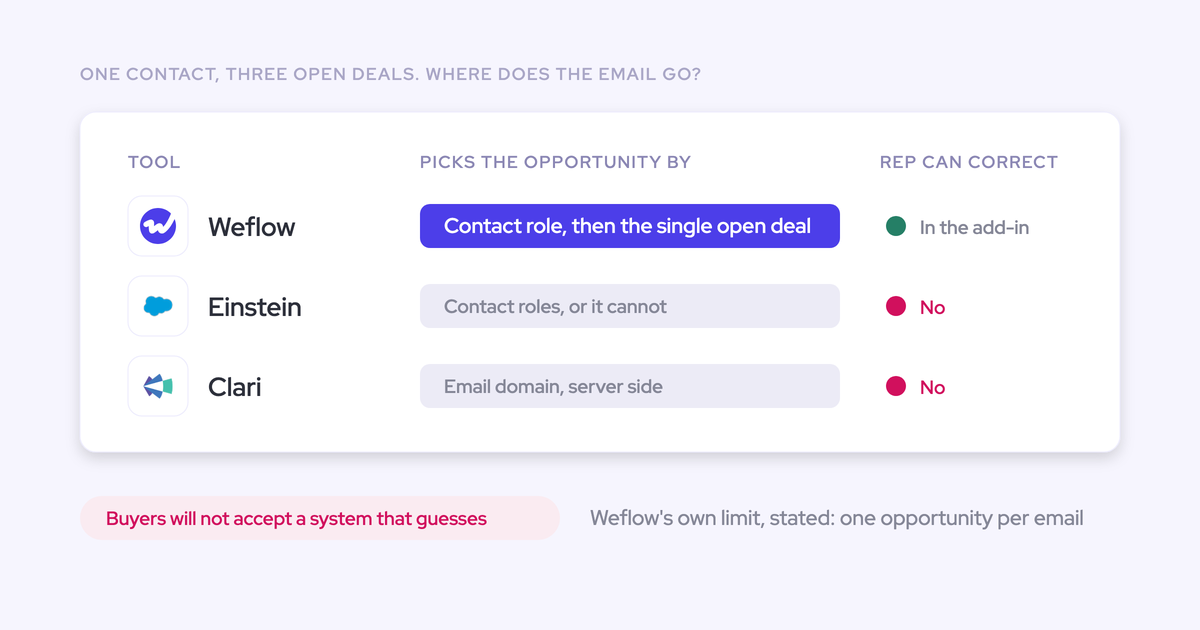
Einstein Activity Capture maps activity to an opportunity reliably when the account has exactly one. Add a renewal alongside the new business deal and it has no clear one-to-one link to follow.
The mechanism is opportunity contact roles. Where contact roles aren't maintained, and in most orgs they aren't, EAC has no way to attribute an email to any opportunity at all, so it falls back to the account.
Which means opportunity-level activity reporting, the whole reason you wanted capture, is the one thing you can't do. The account looks busy. The deal looks dead.
"I want to relate activities to the right contacts and opportunities reliably. Our solution is not doing that at this point."
Alex Knechtl, Director of Revenue Operations, Blockaid
And there's nowhere for a rep to fix it. EAC runs as background logging with no user interface, and the Salesforce Outlook and Gmail add-in is a separate service that isn't connected to it. Install the add-in and you get manual logging; Einstein keeps matching in the background with its own logic. A wrong mapping stays wrong, and the correction never feeds back.
Contact capture is weak, so the buying committee stays in the inbox
EAC's contact sync can create contacts from synced address books, but weak contact capture is one of the two gaps buyers name most consistently, alongside opportunity mapping.
The practical result: the people actually on the deal exist in someone's inbox and not in the CRM. Nobody has time to create them by hand.
Then multithreading reporting has nothing to hang off, engagement scoring has nothing to count, and marketing can't remarket to a buying committee that was never recorded.
Silent disconnects and per-user connections make capture unreliable
EAC requires each user to connect their email and calendar individually via OAuth. When a connection fails, it fails silently. The only symptom is missing data.
"We relied on Einstein Activity Capture for years - but the reliability was very inconsistent. It would work, but then it wouldn't. I got tired of being asked, 'Why isn't Salesforce working?'"
Leslie Phillips, Director of Operations, ADVISA
That's the ticket queue every Sales Ops person running EAC recognizes. Nobody reports "capture is broken." They report that Salesforce is broken.
"We looked into Einstein for a really long time. It was impossible to properly use it, and there were small things that continuously broke our setup or were unreliable."
Rugile Pudzevelyte, Senior Revenue Operations Manager, United Fintech
There are quieter failure modes too. Where the same email address exists as both a Salesforce user and a contact, which is routine in any org running a customer community, EAC can't resolve which one owns the activity and logs nothing at all. The record just looks dormant.
The cost step, the retention window, and the Summer '26 retirements
Three facts turn a background annoyance into a dated decision:
- The price step. Einstein Activity Capture is free up to 100 users and costs roughly $50 per user per month above that. You hit it at exactly the moment you scale, after all your reporting is already built on it.
- The retention window. EAC applies a retention window measured in months, after which captured activity is removed. That makes it a monitoring tool, not a system of record. Year-on-year engagement comparison and any long enterprise cycle runs past the edge of it.
- Summer '26. Legacy Activity 360 Reporting, Activity Metrics, and the Activities Dashboard retire. EAC activity becomes fully reportable only after you enable Sync Email as Salesforce Activity, and Salesforce begins auto-migrating legacy orgs from June 2026.
Add the sunset of the native Outlook add-in, which pushes those customers onto EAC, and you have an evaluation you didn't choose to run.
How to test an EAC replacement before you trust it
Every vendor in this category says it captures activity. That claim is worth nothing on its own, so write the requirements down first and test your current setup against them before you take a single vendor call.
Then run the same list against two or three tools in a sandbox. A two-week pilot settles it.
| What to test | How to verify it in a sandbox |
| Native record storage | Let the tool log an email, then run SOQL against EmailMessage, Task, and Event in the developer console. If the query returns nothing, you're looking at a timeline feed. |
| Flow access | Build a record-triggered flow on the object the tool writes to and see whether it fires and can read the record's fields. |
| Multi-opportunity mapping | Pick an account with two open opportunities sharing a contact. Send an email from that thread. Check whether it lands on an opportunity or falls back to the account. |
| Rep-side correction | Can a rep see which record the activity mapped to, change it from inside the mailbox, and does the choice hold for the rest of the thread? |
| Contact creation | Email someone who doesn't exist in Salesforce. Check for a new contact and whether an opportunity contact role was set. |
| Custom-object logging | Log an activity against the custom object your business actually runs on, not just Account and Opportunity. |
| Deployment path | Does one admin session cover the whole tenant, or does every rep have to authorize their own mailbox? Is there a sync service or middleware anywhere in the path? |
| Object choice and attachments | Can an admin decide whether an email lands as EmailMessage or Task, and can attachments be logged with a size cap? |
| Backfill depth | Ask how many months back and how many messages per user. Then backfill a pilot user and count what arrived. |
| Parallel run and deduplication | Can it run alongside EAC without writing every meeting twice, and does it skip activity your sequencer already logged? |
The best Einstein Activity Capture alternatives for Salesforce teams
The field splits cleanly. A few tools write native, correctly-mapped records into objects you own. The rest either log to the wrong place or aren't in this category at all, whatever their marketing page says.
Here's where each one actually lands.
Weflow Activity & Contact Capture: native records, rep-correctable mapping
Weflow Activity & Contact Capture auto-syncs emails, meetings, and contacts from Microsoft 365 or Google Workspace into native Salesforce objects, permanently. EmailMessage, Task, Event, and any standard or custom object you point it at.
That's the answer to the first switching reason. The activity is a record: queryable in SOQL, readable inside a flow, reportable in a custom report, exportable to Tableau, Looker, or Power BI. An admin decides per configuration whether an email lands as an EmailMessage or a Task, and whether attachments are stored and up to what size.

The second switching reason is harder, and worth being honest about. When one contact holds a role on two open opportunities, a renewal and an expansion, no algorithm can decide which one an email belongs to. The information isn't in the data.
So Weflow runs a hybrid model. Capture happens server-side and automatically, and an Outlook add-in and Chrome extension show the rep which Salesforce records the email is about to log to, and let them pick a different opportunity, account, or custom object. The choice is stored against the thread, so every later reply routes to the same record without anyone touching it again. A new thread resets it.
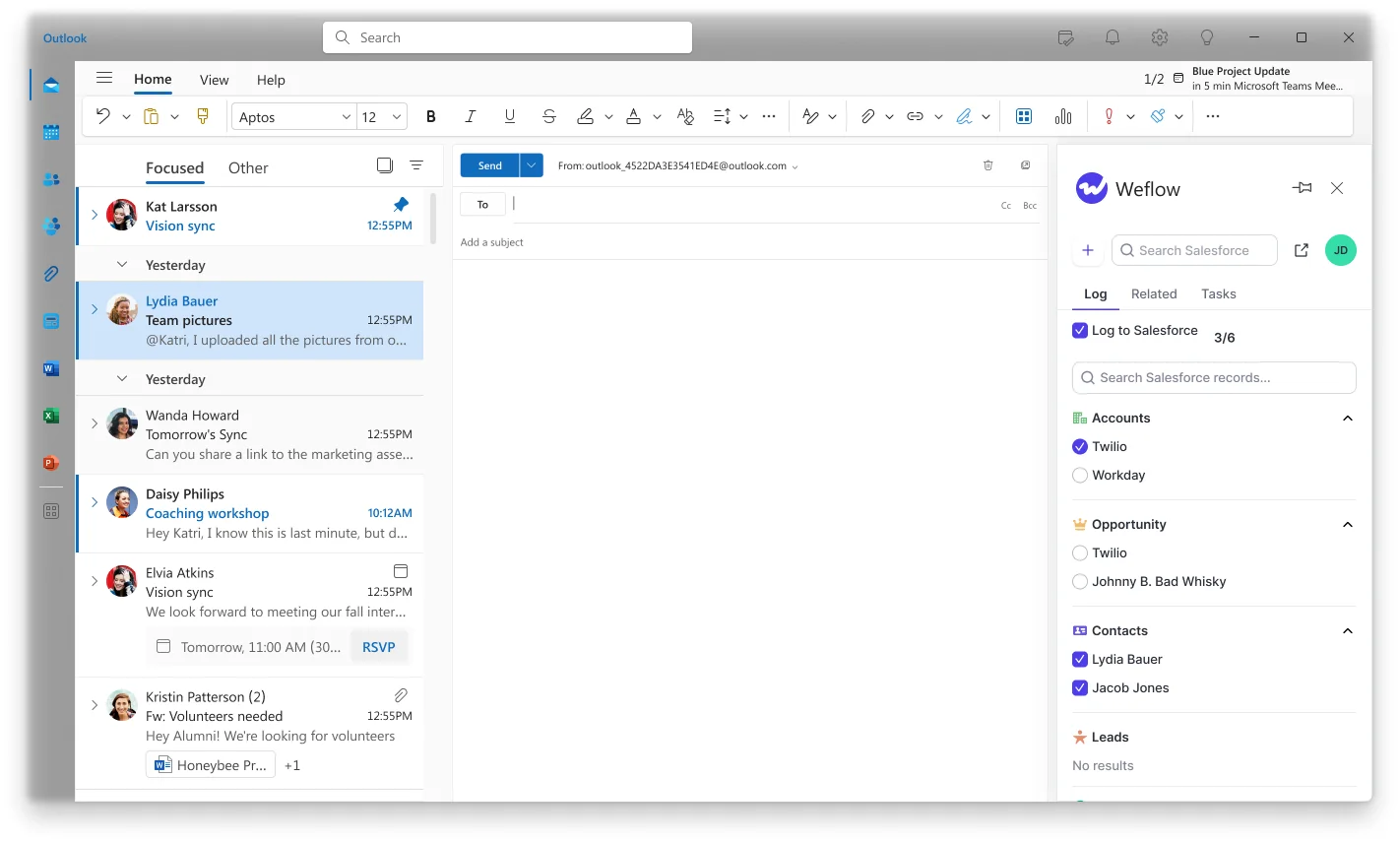
The rest of the switching reasons, in order:
- Contacts. Weflow creates missing contacts in Salesforce automatically and can set opportunity contact roles, so the buying committee lands on the deal instead of in the inbox.
- Custom objects. Roughly 20 to 30% of Weflow customers log activity to custom Salesforce objects. This is the single most common reason a capture evaluation fails on function rather than price, and it's why the browser add-in has to reach custom objects too, or the old extension never gets decommissioned.
- Deployment. Two managed packages, one integration user with a dedicated permission set, and one mail app installed centrally in Microsoft Entra or Google Workspace. About 45 minutes with a Salesforce admin and a mail admin in the room. No per-user OAuth, so no silent per-user disconnects, and no code deployment.
- Backfill. Up to 24 months of historical email and meeting sync-back, available as an add-on, against EAC's 50,000 emails per user from the past 180 days.
- Parallel run. Weflow runs alongside Einstein Activity Capture during migration, with one setting changed first (more on that below).
- Sequencer deduplication. Compatibility mode recognizes activity already logged by Outreach, Salesloft, Apollo, or Clay and skips it, so you don't inflate meeting counts by running both.
One design rule worth knowing before you pilot: Weflow only logs an activity when it can match it to an existing Salesforce record. Nothing gets written without a link to an account, opportunity, contact, or lead. That keeps the data set clean and means genuinely unmatched mail stays out of the CRM.
Teams that made this exact switch include Blockaid, Lendz Financial, Blacklane, ADVISA, and United Fintech.
"Einstein Activity Capture just doesn't have the reporting functionality we needed. We wanted to do more - especially with AI playing a bigger role."
Erick Mahle, VP of Revenue Operations & Digital Transformation, Lendz Financial
The change-management story matters as much as the architecture, because capture runs server-side and asks nothing of reps.
"Most of our team doesn't even know we have Weflow for activity capture. That was a big attraction for me: I didn't need them to set it up or learn anything new."
Leslie Phillips, Director of Operations, ADVISA
Pricing: Weflow Activity & Contact Capture is $19 per user per month, billed annually, with a 10-user minimum, unlimited view-only licenses, and no usage charges or platform fees. It doesn't step at 100 users. Bundles that add Conversation Intelligence and forecasting start at $49 per user per month.
Where it falls short. Three hard limits, stated plainly:
- Salesforce only. Weflow works exclusively with Salesforce and is built entirely on the Salesforce API. If you're on HubSpot, Dynamics, or Pipedrive, or if half your operating companies run something else, it's not a fit for that part of the business.
- Not FedRAMP certified. SOC 2 Type II, HIPAA, GDPR, CCPA and zero AI data retention are in place, ISO 27001 is in progress. US government contractors that require FedRAMP should stop here.
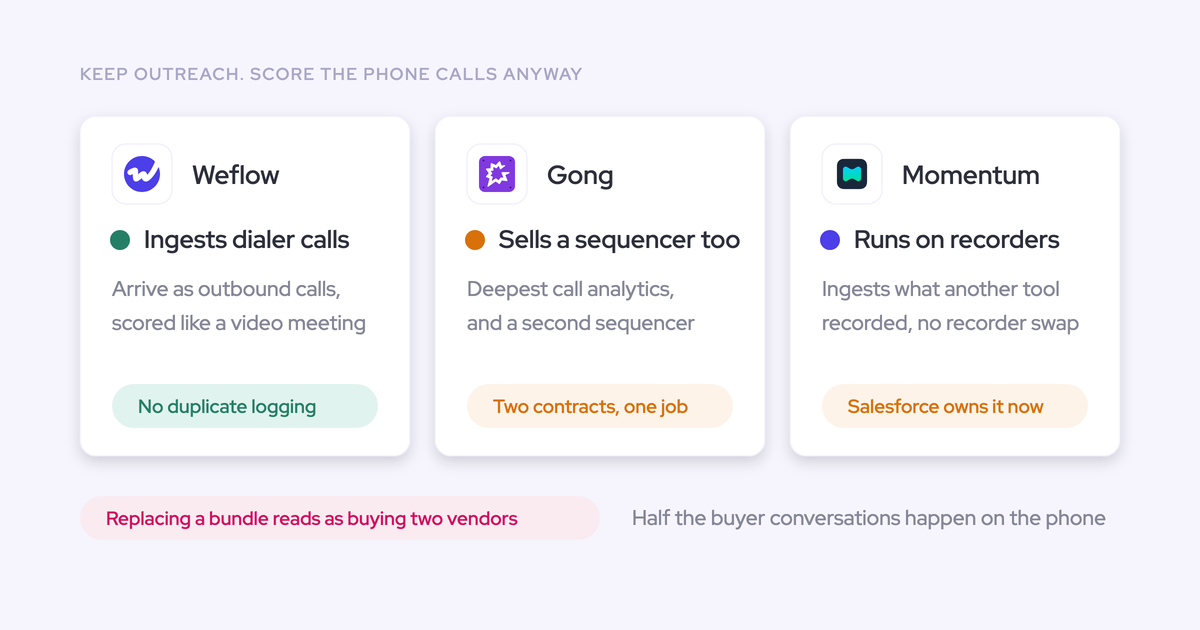
- Not a dialer. Weflow doesn't place or record phone calls. A connected telephony provider's recordings can be pulled in and written back, but a phone-heavy inside sales team has to solve the telephony layer separately.
Best for: Salesforce orgs, roughly 50 to 1,500 seats, that need activity reporting, flows and BI export on activity data, opportunity-level mapping they can trust, and contact creation, without asking reps to change how they work.
Revenue Grid: email and calendar sync for Salesforce teams
Revenue Grid is one of the two mid-market alternatives we meet most often on activity capture evaluations, alongside Cirrus Insight. It's an email and calendar sync layer for Salesforce with a sales engagement side attached.
Does well: it's a real Salesforce sync product rather than a bolt-on, and it's a familiar option for teams that want capture and engagement from one vendor.
Falls short: we're not going to guess at its current object model or its price, and neither should you. Run the sandbox tests: query the objects it writes to, build a flow on them, and send from a thread on an account with two open opportunities. Ask specifically whether a rep can correct a wrong mapping and whether the correction persists for the thread.
Best for: mid-market Salesforce teams that want capture and engagement bundled and are prepared to test the mapping behavior properly.
Cirrus Insight: inbox-side Salesforce logging for smaller teams
Cirrus Insight sits in the inbox and gives reps a Salesforce sidebar for logging email and syncing calendar. It's a lighter tool than the enterprise capture platforms and priced accordingly.
Does well: reps get Salesforce context where they work, and it's a straightforward upgrade from pure manual logging for a small team.
Falls short: anything centered on a per-user inbox plugin sees only what passes through the plugin. Mail sent from a phone or another client is where the gaps appear, and that's precisely where the coverage number goes to die. Test capture from a mobile device before you commit.
Best for: smaller Salesforce teams where the pain is rep visibility in the inbox rather than opportunity-level activity reporting.
Backstory.ai (People.ai): enterprise activity capture for revenue analytics
Backstory.ai, formerly People.ai, is an enterprise background capture platform. Its center of gravity is analytics: attribution, buying-group coverage, and activity-based insight across a large sales organization.
Does well: capture at scale, and an analytics layer built for organizations with thousands of reps and a dedicated data team to consume it.
Falls short: it isn't a drop-in EAC swap for a mid-market org. It's an enterprise analytics purchase with the implementation weight that implies. Apply the same test anyway: where does the activity live, and can your own flows and BI tools read it, or does the intelligence live in the vendor's layer?
Best for: large enterprises buying activity data as an analytics program, not teams replacing EAC to fix reporting next quarter.
Nektar: enterprise background capture and buying-committee data
Nektar is the other enterprise point solution in this segment, focused on background capture and reconstructing the buying committee from activity.
Does well: contact and buying-group discovery is the problem it's built around, which is the exact gap EAC leaves.
Falls short: same category of question as Backstory.ai. Enterprise-shaped, and you still need to verify what lands as a native record you own versus what stays in the vendor's data layer. And ask what happens to the mapping when the account has three open opportunities.
Best for: enterprise revenue teams whose primary problem is buying-committee visibility across a large install base.
Salesforce Inbox and Salesforce for Outlook: the sunsetting incumbents
These belong on the list because a lot of readers still run them, not because they're a destination. Salesforce for Outlook in particular is a common incumbent, and the migration path Salesforce offers leads to Einstein Activity Capture.
Falls short: logging depends on the rep clicking "log to Salesforce." Where capture works that way, only around 24 to 52% of activities actually reach the CRM. Up to three quarters of the interaction record is missing, and the gaps aren't random: the busiest reps in the busiest weeks log least.
Across RevOps practitioners we've surveyed on how they capture activity in Salesforce, about 30% named Einstein Activity Capture and about 30% named the Outlook or Gmail add-in. Two thirds of Salesforce orgs are running on the two approaches with the weakest coverage.
Best for: nobody, going forward. If this is your setup, the Summer '26 retirements have already made the decision for you.
Outreach, Salesloft, and Apollo: sequencing capture, not a replacement
This is the entry that saves the most evaluations, because plenty of teams believe they already have activity capture and actually have an inbox log.
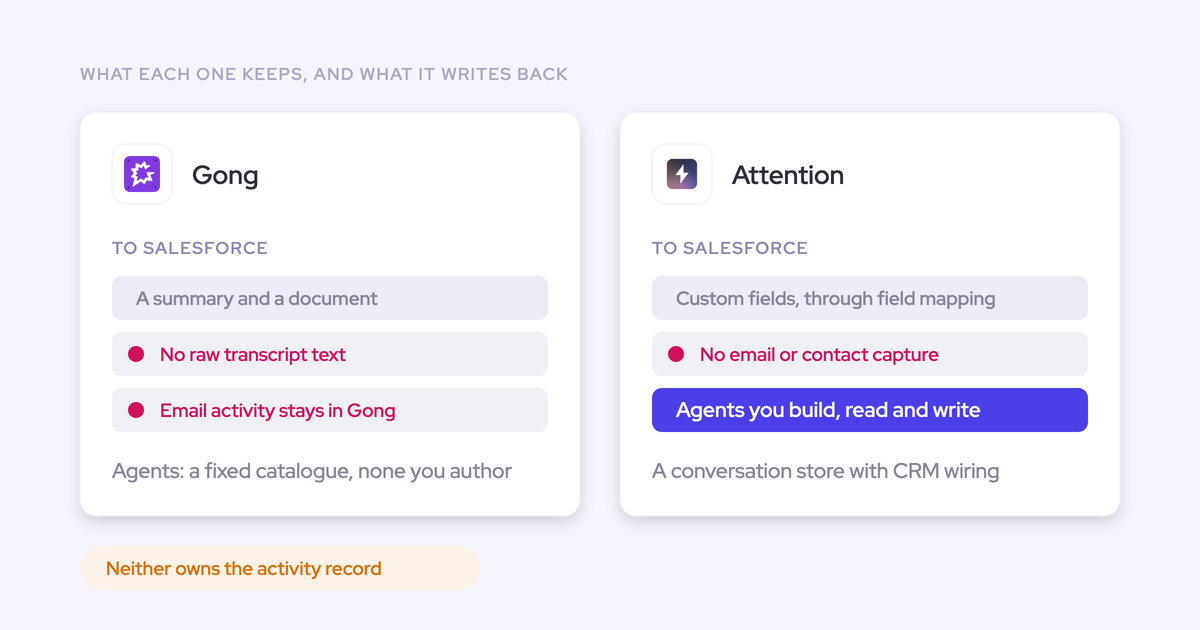
Sales engagement platforms log activity to the Salesforce Task object rather than to EmailMessage and Event. Task discards the from and to information, which means direction is gone, sent and received can't be separated, and reply rate is impossible to calculate. And the activity lands on the contact or the account, not the opportunity, because opportunity mapping isn't what these products were built to do.
"We use Outreach activity capture right now and it misses a lot. It has record misalignments that impact data quality."
Ask "when did we last touch this deal" or "how many touchpoints have we had on this opportunity" and there's nothing there to answer with.
None of that makes them bad products. Outreach, Salesloft and Apollo are sequencing tools and they should stay in the stack. What it means is that a real capture layer has to run alongside them and deduplicate what they already wrote, or your meeting counts per rep quietly inflate.
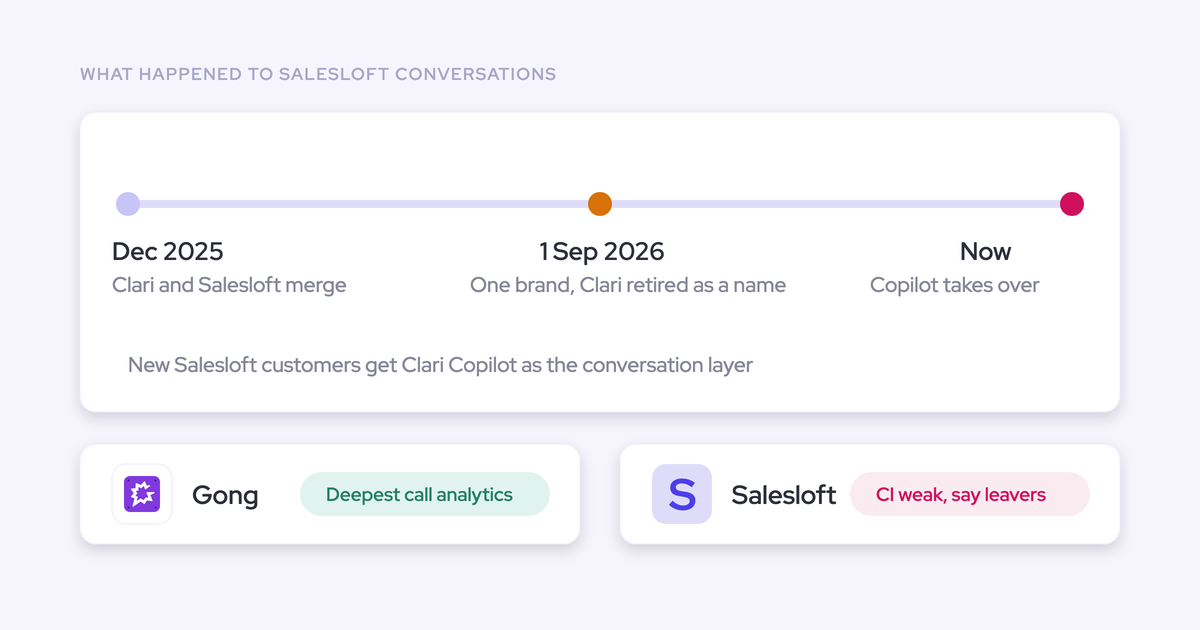
One consolidation note for anyone weighing vendor relationships: Clari and Salesloft completed their merger on 3 December 2025 and are now one company, running as separate applications. If you're already reconsidering Clari, you're probably deciding about both at once.
Best for: sequencing and outbound execution. Not for opportunity-level activity data.
When Einstein Activity Capture is still the right fit
Sometimes the honest answer is to stay. EAC is a reasonable choice if all of the following are true:
- You're under 100 users, so it's still free.
- You don't need custom reporting on activity, flows triggered by activity, or BI export.
- You don't need automatic contact creation or email attachments in Salesforce.
- Your accounts mostly carry one open opportunity at a time.
- Your reps work at a desk, not from a phone in the field.
And credit where it's due on reportability. The Summer '25 opt-in native sync genuinely addresses the core storage complaint for orgs that migrate to it. Custom-object matching is live too, though it requires admin Flow customization, and Salesforce warns that complex matching rules can slow the sync.
There's a lesson buried in that fix, though. When Salesforce moved activity from the external store to native records, customers who had built reporting against the old architecture had to rebuild it. Velocity reports, flows, and custom fields stopped matching.
Your reporting layer sits on someone else's architecture decisions. That's the argument for activity living in objects you control, and it's the one that survives the next release note.
Which EAC alternative fits your situation
Pick the row that matches what's actually forcing the move.
| What's forcing the move | Where to look |
| You can't report on activity, trigger flows from it, or export it to BI | Weflow Activity & Contact Capture, or migrate EAC to Sync Email as Salesforce Activity if you can accept rebuilding when Salesforce changes it again |
| Activity lands on the account because the account has several open opportunities | Weflow, for the rep-side thread correction. No fully automated tool solves this, so test the ambiguous case, never the clean one |
| The buying committee never becomes contacts in Salesforce | Weflow for automatic contact creation and opportunity contact roles; Nektar at enterprise scale where buying-group discovery is the whole project |
| Your reps work on custom objects and the old extension can't be decommissioned | Weflow, and test custom-object logging from the browser add-in during the pilot, not after |
| You need activity analytics across thousands of reps | Backstory.ai (People.ai) or Nektar, with the storage and ownership question asked anyway |
| You're under 100 users and just need to survive the Outlook add-in sunset | Einstein Activity Capture with native sync enabled. Revisit when you cross 100 seats |
| You're not on Salesforce, need FedRAMP, or run a phone-heavy inside sales motion | Not Weflow. Salesforce-only is a hard gate, FedRAMP isn't held, and call capture needs a telephony provider connection |
How to migrate off Einstein Activity Capture without duplicates
Switching capture layers doesn't have to be a rip-and-replace. It's a staged change, and there's one setting that decides whether it goes smoothly.
- Write the requirements down first. Use the criteria table above, then test your current EAC setup against it. That turns "our activity data is bad" into a case you can defend to leadership.
- Install the replacement in a sandbox and run every test: SOQL against the objects, a record-triggered flow, an email on an account with two open opportunities, an email to a person who isn't in Salesforce yet.
- Set Einstein's event sync to one direction before anything goes live in production: from the mail and calendar system into Salesforce. Leave it bidirectional and you get a loop, the event is written to Salesforce, pushed back to the calendar, and written again. Removing the Einstein permission from users does not stop it.
- Run both in parallel on a pilot team. With the sync setting corrected, the new capture layer adds to the events Einstein already creates rather than duplicating them, so you don't have to switch Einstein off to start.
- Backfill history for the pilot users and check what actually arrived against what you expected.
- Verify at the deal level. Open the multi-opportunity account and confirm activity is on the opportunity, not just the account. Confirm Last Activity Date is moving.
- Clean up duplicates you already created. They don't clean themselves up and they keep distorting activity metrics. A rep can show thirteen meetings in one view and eight in another until you deal with it.
- Disable Einstein Activity Capture once parity is proven on the pilot team, then roll out to the rest.
See how Weflow captures activity, updates Salesforce fields from calls, and rolls up your forecast. Book a 30-minute demo.
FAQ: replacing Einstein Activity Capture
Can a Salesforce flow read the activities Weflow logs?
Yes. Weflow writes activity into native Salesforce objects including EmailMessage, Task, and Event, so a record-triggered flow can fire on them and read their fields, and a custom report or a BI export can query them.
This is the test worth running yourself in a sandbox before you believe any vendor, including us.
Does Weflow log activity to custom Salesforce objects?
Yes. Weflow logs activity to custom Salesforce objects as well as standard ones, and configuration is set per team, per user, and per object.
Around 20 to 30% of Weflow customers need this, and it's the single most common reason a capture evaluation fails on function rather than price. Weflow can also log to the Case object, with regex matching on subject lines to detect the right case.
Does EAC's opt-in native sync fix the reporting problem?
Partly. Sync Email as Salesforce Activity stores email as native records, which addresses the core reportability complaint, but existing orgs have to actively migrate through Salesforce Support to get it and Salesforce begins auto-migrating legacy orgs from June 2026.
What it doesn't change is contact capture and opportunity mapping. Those remain EAC's two persistent gaps, and mapping still depends on opportunity contact roles.
Does activity capture depend on reps doing anything?
No, not with Weflow. Capture runs server-side at the mail tenant level through a central app installed in Microsoft Entra or Google Workspace, so every email and meeting is captured regardless of device or client and no rep has to grant anything or can opt out.
The Outlook add-in and Chrome extension are optional layers on top, there to show what's about to be logged and let a rep override it.
How far back can historical email activity be backfilled?
Weflow backfills up to 24 months of historical email and meeting activity, available as an add-on. Einstein Activity Capture caps historical email backfill at 50,000 emails per user from the past 180 days.
That difference matters most for year-on-year engagement analysis and for long enterprise cycles that started before you switched.
Will a Weflow evaluation pass a SOC 2 security review?
Weflow is SOC 2 Type II certified and HIPAA, GDPR, and CCPA compliant, with zero AI data retention and no customer data used to train models. There's a Data Processing Agreement with EU Standard Contractual Clauses, a public sub-processor list with advance change notification, and a 48-hour breach notification commitment.
Two things to state upfront to your security team: ISO 27001 is in progress, not achieved, and Weflow is not FedRAMP certified. If your procurement mandates either one today, that's a hard stop and worth knowing before the demo rather than after.