Weflow vs Gong for Rep Review of Logged Activity Before It Reaches Salesforce (2026)
Weflow vs Gong: which lets reps review and re-map logged email before it reaches Salesforce.


Weflow is the Revenue AI Orchestration platform for sales, customer success, and RevOps teams. Built for Salesforce teams, Weflow puts the record choice in the rep's inbox. In the Outlook add-in or Chrome extension, Weflow Activity & Contact Capture shows the rep which Salesforce contact, account and opportunity an email will log to, before it logs. The rep re-maps it once, the whole thread follows, and the rep can move an email that already landed from the same panel.
Gong maps email with rules an admin configures and lets users re-associate calls inside Gong, and reps get no point in the mailbox to see or change where an email lands. Choose Weflow when your reps know which deal an email belongs to and need to say so. Stay on Gong when your capture centers on recorded calls and admin-tuned matching already gives you the deal-level activity you need.
Weflow vs Gong at a glance: rep review, record matching, privacy and price
Weflow and Gong differ most on who can correct where an email lands, and on whether the email ends up in Salesforce or stays in Gong. Weflow puts the correction point in the rep's Outlook or Gmail and writes email as native Salesforce records you own. Gong keeps correction with admins and inside Gong, and holds email in its own store unless an admin turns on task export.
| Capability | Weflow | Gong |
|---|---|---|
| Rep review and correction | Reps see and re-map the record in the Outlook add-in or Chrome extension, once per thread, and move logged email | Users re-associate calls with accounts or opportunities inside Gong; no mailbox point for email mapping |
| Matching activity to the right records | Email address and Salesforce relationships, open opportunities only, account fallback when the deal is unclear | Admin-configured rules with simulation and a 30-day re-run; up to 20 deals when rules can't settle |
| Capture exclusions and privacy controls | Domains, objects, body keywords and custom rules on any Salesforce field; rep private flag; manual mode | Domain, address and subject keyword lists; ad hoc recordings and inbound BCC get past them |
| Integrations with other tools | Native Salesforce, Gmail, Google Calendar, Outlook, Zoom, Teams, Meet, Slack and the Outreach dialer | About 450 marketplace entries, about 30 dialers, 11 meeting platforms |
| Access from AI assistants (MCP) | Read-only connector with transcripts behind an admin toggle; no captured email content | 3 record-scoped tools returning AI insights only, on metered credits |
| Raw data access outside the tool | REST bulk export in JSON or CSV; no native warehouse connector | API capped at 3 calls a second and 10,000 a day; Data Cloud to warehouses as a paid add-on |
| Pricing | Public per-seat pricing, from $19 per user per month for capture, billed annually | No public pricing; figures come in a custom proposal |
| Best for | Salesforce teams that want reps fixing mappings in Outlook or Gmail and email stored as native Salesforce records | Call-centered teams that want admin-owned matching and broad integrations |
Why Sales Ops teams on Gong start asking who checks where activity lands
Sales Ops teams on Gong start asking who checks where activity lands once a wrong mapping costs them. We hear it surface in 2 ways.
A manager opens a deal before a review, sees no engagement and decides the rep hasn't worked it, while the rep's emails sit on the account. Or legal blocks email capture because executive mailboxes hold M&A and HR conversations nobody can separate from commercial mail.
The cause sits in Salesforce. An activity relates to one opportunity or to the account, never both. The field that tells a tool which deal is meant, the opportunity contact role, is empty in most orgs.
So when one contact sits on a renewal and an expansion at once, nothing in the CRM says which deal an email belongs to, so server-side logic can't work it out and only the rep knows. If you sell several product lines or by region, expect this case often, because several open deals per account are normal there.
Gong adds a second layer. Its capture is built around the meetings it records, so email goes into Gong first and reaches Salesforce only when an admin turns on export as tasks. Correction ends up with admins and inside Gong, away from the rep in the mailbox who knows the deal.
How Weflow Activity & Contact Capture lets reps check and fix the Salesforce record from their inbox
Weflow Activity & Contact Capture captures email and meetings server side and gives the rep a panel in Outlook or Gmail to see and change the Salesforce record. That way the person who knows the deal makes the call.
Reps see the matched record in Outlook or Gmail and re-map it once for the whole thread
In the Outlook add-in or Chrome extension, a rep sees the contact, account and open opportunities Weflow matched an email to. Before it logs, the rep can pick a different opportunity, account or custom object.
Weflow stores the choice against the thread, so later replies in both directions log to the same record, and a new thread starts fresh. We built it per thread because reps ignore a tool that makes them file every email, but accept one correction per thread.
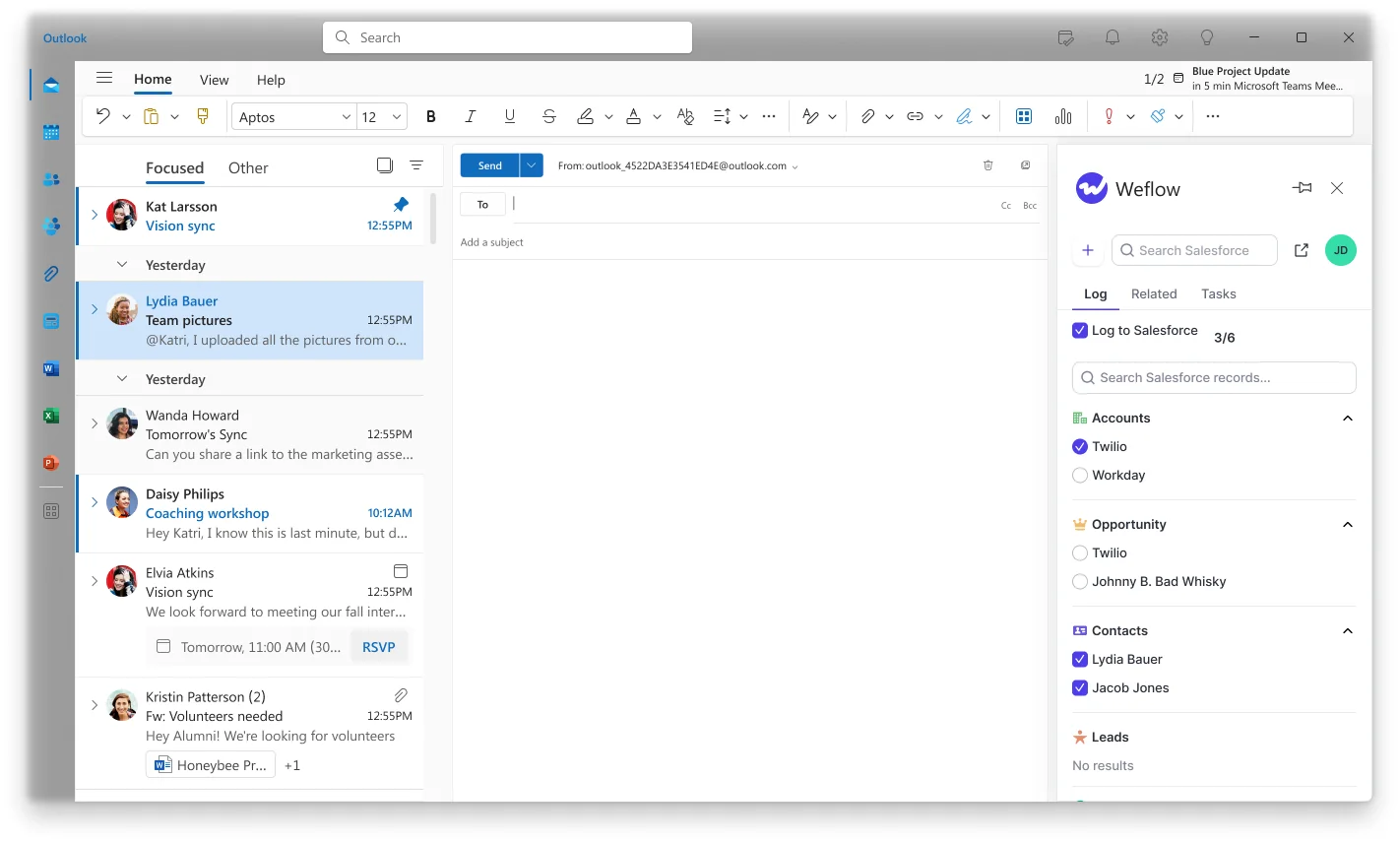
If an email already landed on the wrong record, the rep or an admin moves it from the same panel. The panel also tells the rep why an email did or didn't log.
How much a rep does depends on the capture mode an admin sets per team:
- Fully automated mode logs every matched email and meeting with no action from the rep.
- Hybrid mode, which most customers run, pairs automated capture with the add-in: the rep sees and re-maps the record, and a tick switches logging off for that thread.
- Fully manual mode logs nothing unless a person chooses to log it.
Admins can also hand out the add-in with that control removed, so a team sees the mapping and can't suppress it.
On a phone, the rep has no mapping control. Mail sent there is captured and matched automatically by address and domain, and a thread already mapped on the desktop keeps its mapping.
Weflow logs to the account when it cannot tell which deal an email belongs to
When the evidence doesn't settle which opportunity an email belongs to, Weflow logs it to the account instead of guessing. Weflow decides from the email address and the Salesforce relationships around it, in a fixed order:
- Find the address in the primary and secondary email fields and log to the contact, lead or custom object that holds it, preferring a contact over a lead.
- Pick the open opportunity where that person holds a contact role.
- Pick the only open opportunity when the account has exactly 1.
- Weigh the contact role, the opportunity owner, the mailbox owner, the account relationship and the stage when several are open.
- Log to the account when nothing settles it.
Weflow never writes to a closed opportunity and never reads the email's content. We tested matching on what an email says and left it out because it wasn't accurate enough.
We built the account fallback because an email on the account is easy to fix. An email on the wrong deal looks correct, so nobody notices it and reports get built on it.
Take one contact on a renewal and an expansion, both open, both owned by the same rep. Weflow can't tell the two deals apart, so the first email logs to the account. The rep picks the expansion once in the add-in, and every reply on that thread follows.
Weflow's matching has limits you should plan around:
- An email logs to only 1 opportunity, so a thread covering both deals lands on one of them or on the account.
- Whatever sits in the account's Website field counts as a matching domain, including a personal mailbox domain, which makes every personal message from that domain look like activity on that customer.
- Logged activity never moves on its own, so earlier email stays where it landed until a rep or admin moves it.

To catch the data problems that send email to the wrong account, check Weflow's Activity Capture Health view in Salesforce. It flags accounts with no website and duplicate accounts sharing a domain.
Admins exclude by any Salesforce field, and reps keep private mail out
Weflow lets admins exclude capture in 4 layers, down to any Salesforce field, and lets reps keep individual mail out themselves. Set them up before go-live, because a wrongly logged email looks like a correct record until someone reads it.
The admin layers work like this:
- Domain exclusions block internal and external domains, such as a law firm or a finance provider.
- Object exclusions switch off logging to an entire Salesforce object, such as leads.
- Keyword exclusions block emails whose body contains a set word.
- Custom rules read any account or contact field and block capture where it matches, so an account flagged confidential, a contact marked personal, or every account in one billing country stays out. Compliance rules describe who the customer is, and custom rules let you write them that way.
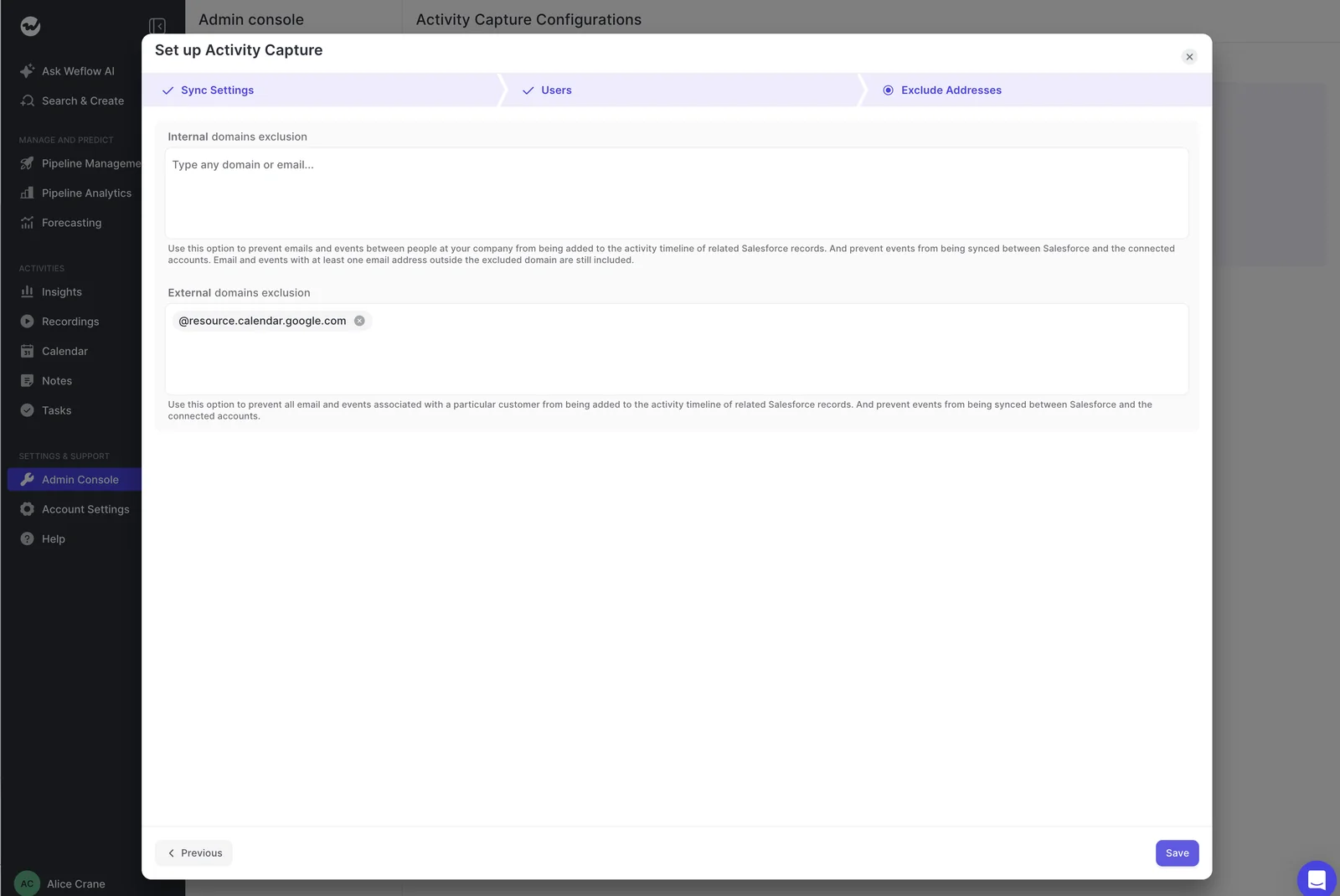
A domain exclusion only blocks records that don't exist yet, so a board member already in Salesforce as a contact needs a custom rule. The Log to Salesforce button in the add-in obeys every exclusion, so a rep can't log what a rule blocks.
Reps can mark an email or event private, and Weflow won't log it. A meeting logged before it was marked private stays in Salesforce.
None of these controls reads what a message means, so a sensitive email on a normal customer thread logs unless a body keyword catches it. The private flag only works when the rep notices, so we recommend a custom rule on the account for any customer that must never be captured.
For leadership mailboxes holding M&A and HR mail, put that team on fully manual mode, so nothing logs unless someone chooses to.
How Gong decides where activity lands, and what reps can change
Gong decides where activity lands with matching rules an admin configures. The main correction a rep can make is re-associating a call inside Gong.
Gong users can re-associate calls inside Gong, but email has no correction point in the mailbox
Any Gong user, on any plan, can change which account or opportunity a call is associated with. The manual association overrides Gong's automatic logic and freezes the call there. A later CRM change, such as a new opportunity or contact role, no longer moves it.
A manual association works for accounts and opportunities, not leads or participants, and a change can take up to an hour to appear.
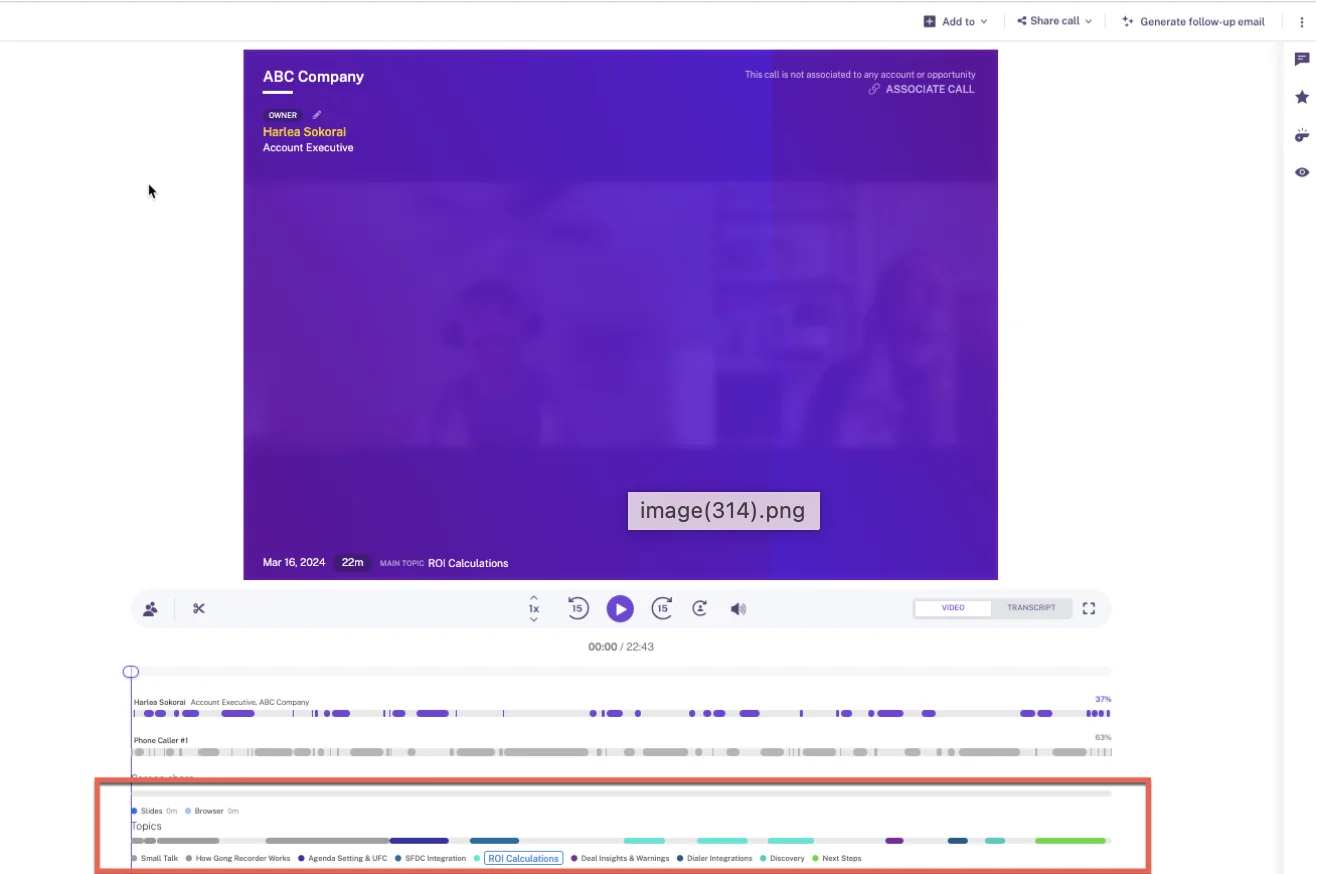
Gong's call page carries a banner when a call isn't associated with any account or opportunity.
Email gets no equivalent in the mailbox. Gong has no add-in there where a rep sees or corrects which Salesforce records an email maps to.
Gong's Chrome extension, Gong Anywhere, needs a Gong Engage licence and works in Gmail and the CRM. It tracks opens and clicks, flags which people are CRM contacts and lets the rep update CRM fields. Gong Anywhere doesn't show or change email-to-record mapping, so what a Gong rep can do with an unwanted email is delete it from Gong.
Gong admins configure, simulate and re-run matching rules across the last 30 days
Gong's matching is admin-owned, and its admin tooling is stronger than Weflow's for bulk correction. An admin can simulate new association settings before activating them, so the effect of a change shows before it goes live. The admin can then re-associate the last 30 days of activity under the new rules.
Gong's matching rules work on these inputs:
- Participants match to contacts and leads by phone number or email fields.
- The account comes through the contact, the email domain, contact roles on other accounts or related parent accounts.
- Several open deals narrow by deal filters, whether the deal owner, a deal contact role or a deal team member took part, the number of CRM contacts involved, and a chosen date field.
When the rules still leave several deals, Gong associates all of them, up to 20. One conversation then counts on every deal it touches, and each opportunity's activity count carries its siblings' work.
Salesforce gets the activity through an export a tech admin turns on. The export writes either one task per activity with context in custom fields, or separate tasks under several records. Email exports only from the day export is enabled, and only when an external participant matches a Salesforce contact or lead.
Account hierarchies work but take significant configuration, and Gong can't model one contact belonging to several accounts.
Gong's exclude lists miss ad hoc recordings and inbound BCC
Gong's exclude lists, set by domain, address and subject keyword, don't stop ad hoc recordings or inbound BCC. Gong admins use the lists to keep email and meetings out, and the lists behave in ways legal will ask about:
- Ad hoc recordings bypass the exclude lists and are always recorded, whether someone adds the Gong assistant, forwards the invite to it, or starts a recording from the homepage or the mobile recorder.
- Gong can't enforce an exclusion against a BCC recipient on incoming email, so that mail imports unless another exclusion catches it.
- Entries match on substrings: a domain also excludes its subdomains, and HR without quotation marks also excludes any meeting with three in the title.
- Adding an entry deletes matching emails already imported but leaves meetings already recorded or in progress in place.
- Removing an entry isn't retroactive for email, so messages blocked under the old rule stay absent.
How Weflow and Gong hand captured activity to other tools, AI assistants and your warehouse
Once activity is captured, Gong connects it to more tools and delivers it to warehouses natively for a fee. Weflow puts captured activity in Salesforce and opens transcripts to AI assistants through its MCP connector.
Gong connects to far more tools than Weflow's native integrations
Gong connects to far more of the stack. Its marketplace, the Gong Collective, lists about 450 integrations and partner solutions. Gong also imports calls from about 30 dialers and records on 11 meeting platforms. If your team has built around those connections, that breadth is a reason to stay.
Weflow's native integrations are Salesforce, Gmail, Google Calendar, Google Meet, Outlook, Microsoft Teams, Zoom and Slack, plus the Outreach dialer, and Weflow keeps adding more. Weflow reaches the rest of your stack through Salesforce rather than through a catalog of connectors. Because Weflow Activity & Contact Capture writes email and meetings into Salesforce as native records, every tool already connected to Salesforce reads them there.
Weflow's MCP connector returns transcripts, while Gong's returns AI insights on metered credits
Weflow's official MCP connector is read-only and gives Claude, ChatGPT and other assistants call summaries, transcripts, playbook results, forecast calls and pipeline metrics. An admin switches it on per workspace, and a separate toggle decides whether assistants read full transcripts or only summaries. Per-rep forecast breakdowns cap at 25 owners.
Weflow's connector doesn't return captured email content or Salesforce field values, so connect your assistant to Salesforce for those.
Gong's MCP server exposes 3 tools, each scoped to one account, deal or contact, and returns AI-generated insights, never raw transcripts or message bodies. Gong's server is read-only, draws metered credits, and needs a paid Gong seat plus a paid tier of the AI tool.
Both offer an API for raw data, and only Gong delivers to a warehouse natively, as a paid add-on
Weflow's REST API bulk-exports transcripts, metadata, scores and signals as JSON or CSV. Weflow has no native Snowflake, Databricks or BigQuery connector, so you use the API to land Weflow data in the warehouse alongside what you already sync from Salesforce.
Gong's API returns transcripts, participants, trackers and scorecards, capped at 3 calls a second and 10,000 a day. For delivery to Snowflake, Databricks, BigQuery or Redshift, Gong sells Data Cloud as a separate application at about $5,000 a year.
What rep-reviewed capture costs on Weflow and on Gong
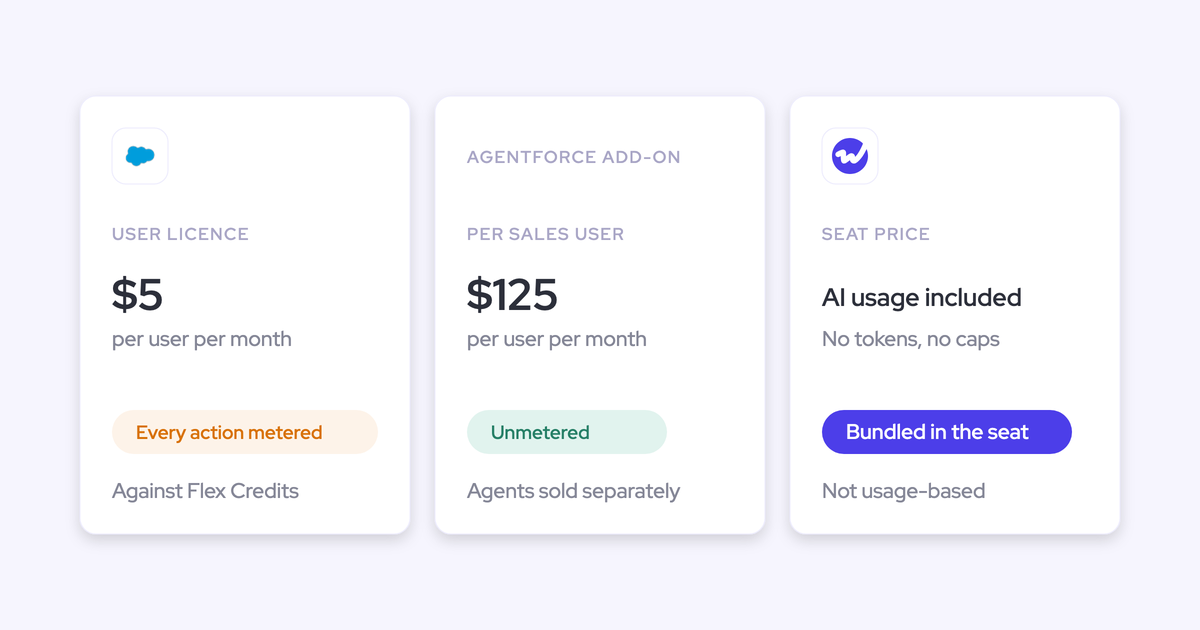
Weflow prices per seat with AI included. Gong sells a mandatory Gong Foundation licence, applications on top, a platform fee that scales with users and metered AI credits, all quoted through a custom proposal.
| Item | Weflow | Gong |
|---|---|---|
| Pricing model | Per seat with public prices; Agent Builder is the only consumption-priced product | Per-user licences per application on top of mandatory Gong Foundation, plus a platform fee by number of users |
| Entry point for capture | Weflow Activity & Contact Capture at $19 per user per month, billed annually; Revenue AI Foundation $49, Revenue AI Business $59, Revenue AI Enterprise $79 | No public pricing; figures come only in a custom proposal |
| AI usage | Ask Weflow AI, AI summaries and AI field updates included in the seat | Credits for AI Trackers, the MCP server and API workflows; each paid core seat adds 2,000 credits a year to a shared pool |
| Warehouse delivery | No native connector; data moves through the REST API | Data Cloud, a separate application at about $5,000 a year |
| Minimum and term | 10 users per product or bundle, 12-month contract | Set in the custom proposal |
Ask Gong to itemise the Foundation licence, applications, platform fee and credit allowance, so you can set each line against Weflow's seat price.
How to move rep review off Gong without losing call history
You can move rep review off Gong in 2 stages: run Weflow Activity & Contact Capture for email and calendar beside Gong, then move recordings across with Weflow's free migration.
Keep Gong for calls and run Weflow Activity & Contact Capture for email and calendar
You can keep Gong for recorded calls and hand email and calendar to Weflow Activity & Contact Capture, as long as each tool owns its own activity. In Gong, set email export to Gong composer emails only, Gong's own control for running beside another email logger.
Then decide which tool writes meeting events to Salesforce, because 2 tools creating the same event write the meeting twice.
On the Weflow side, Compatibility Mode holds the sync back by about 10 seconds so another tool can log an email first. Weflow then matches on the record ID so the same email isn't written twice, and tracking patterns keep a sequencer's tracked emails out entirely. These settings cut overlap, and a parallel test shows whether they cover your stack.
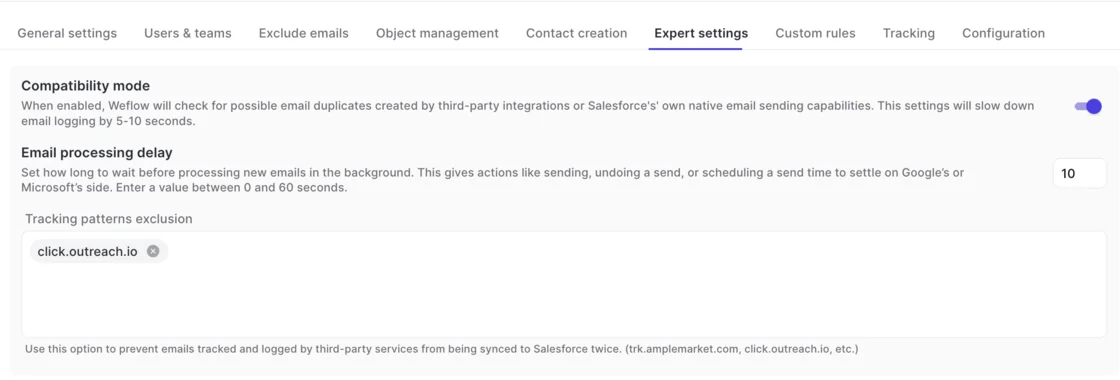
Test before renewal, so you know whether the two tools together log everything once before you commit. Work in this order:
- Run both tools in parallel, with Weflow left on its defaults, and check that nothing is lost against Gong.
- Send email to addresses outside the company, and create, move, reschedule and delete meetings, because those are where the failures that matter show up.
- Use production-like data with a unique domain per test company, not free-mail addresses. Free-mail addresses create ties between opportunities that real data rarely has, so the test would measure your test data instead of the tool.
Move recordings across with Weflow's free Gong migration
Weflow migrates Gong recordings at no charge, in 3 phases:
- Import Gong recordings through the Gong API or CSV, map them to Salesforce records and reprocess them through Weflow AI.
- Configure Weflow.
- Roll out with role-based trainings.
Moving recordings matters because Gong never exports call transcripts to Salesforce. Gong also exports email only from the day an admin enabled export, so that history lives in Gong until you move it. Weflow's historical sync-back brings up to 24 months of email, meetings and contacts from the mailboxes as standard.
Setup itself is quick: United Fintech had Weflow's activity capture up and running in less than an hour, rolled out centrally via OAuth.
Choose Weflow if reps need to fix mappings themselves, and stay on Gong if admins own matching
The choice comes down to who should fix a wrong mapping and where your activity data needs to live. Settle the first question first, because when an account has several open deals, only the rep knows which one an email belongs to.
Choose Weflow when any of these is true:
- Your reps work accounts with several open deals and need to set the right one from Outlook or Gmail, once per thread.
- Legal needs exclusions on Salesforce fields, such as accounts flagged confidential, plus manual mode for leadership mailboxes.
- You want email and meetings as native Salesforce records you own, with an account fallback instead of a guessed deal.
- You want public per-seat pricing with AI included, and transcripts open to AI assistants through MCP.
Stay on Gong when any of these is true:
- Your capture centers on recorded calls, and admin-owned matching rules, with simulation and a 30-day re-run, already give you the deal-level activity you need.
- Your stack depends on Gong's roughly 450 integrations, or on dialers and meeting platforms Weflow doesn't connect to natively.
- You need native warehouse delivery and are ready to pay for Data Cloud.
Questions Sales Ops teams ask about rep review in Weflow and Gong
Do reps have to click anything with Weflow?
No. In fully automated mode, Weflow logs every matched email and meeting with no rep action, and ADVISA runs Weflow that way with no Outlook add-in. In hybrid mode the add-in is optional, and one choice covers the whole thread.
Most of our team doesn't even know we have Weflow for activity capture. That was a big attraction for me: I didn't need them to set it up or learn anything new. - Leslie Phillips, Director of Operations, ADVISA
Can an admin see why an email did not log in Weflow?
Not in a report, because Weflow gives admins no report of emails that failed to log. The reason a single email did or didn't log shows to the rep in the Outlook add-in or Chrome extension.
Weflow support can read the logging decision for any message without seeing its content, so for a team-wide coverage check, ask support.
How do leadership mailboxes stay out of Weflow?
Put leadership on a team running fully manual mode, so nothing logs unless they choose to. Weflow reads no mailbox until a user is enrolled in an activity capture configuration.
On Microsoft 365, set the Entra app's Assignment required property to Yes, which keeps Weflow away from mailboxes outside the assigned group.
Does Gong write emails into Salesforce?
Only through export. Gong holds captured email in its own data structure and exports it to Salesforce as tasks once a tech admin turns export on. Export happens only when an external participant matches a Salesforce contact or lead, and only from the day email export was enabled.
How long does Weflow setup take?
United Fintech had Weflow's activity capture up and running in less than an hour, rolled out centrally via OAuth-based authentication. The technical install can finish while a legal review is still open, because Weflow reads nothing until users are enrolled.