Weflow vs Gong for Forecast Submissions, Roll-Ups and Manager Overrides (2026)
Weflow vs Gong for forecast roll-ups: how submissions and manager overrides differ, and which fits.


Weflow and Gong both collect rep forecast submissions and roll them up the management hierarchy, so the choice between them comes down to what the record keeps. Weflow ties every forecast call to named deals and keeps each manager override next to the rep's original, with who changed it, when and why.
If you need a roll-up you can audit and accuracy you can coach rep by rep, we'd run it in Weflow. If your managers submit from their phones, your hierarchy matches Salesforce and category totals are enough, Gong Forecast does the job.
Gong collects a number per forecast category with notes, shows the team's forecast and the manager's forecast as weekly trend lines, and lets reps submit from a phone.
Weflow is the Revenue AI Orchestration platform for sales, customer success, and RevOps teams. Built for Salesforce teams, it runs the roll-up in Weflow Deal Intelligence & Forecasting. Weflow's forecast lives in Weflow, not in Salesforce, which matters if your rule is that every number sits in the CRM.
Weflow vs Gong at a glance: how each runs the forecast roll-up
Weflow and Gong both run rep submissions and hierarchy roll-ups. They differ on what each call is tied to, where pipeline history comes from and how far the data travels.
| Capability | Weflow | Gong |
|---|---|---|
| Forecast submissions and roll-ups | Baseline and best case tied to named deals; overrides logged with who, when and why; web app only | Number per forecast category with notes; manager forecast line on the trend chart; phone submission |
| Multiple forecast types | Parallel setups, each with its own amount field, date field, stages, cadence and targets | Separate board per motion, each with its own filters, columns, metrics and targets |
| Opportunity snapshots | Own snapshots every few hours; 12 months imported; drillable waterfall | Weekly history read from CRM field history; backfill up to 5 quarters through the customer success manager |
| Integrations with other tools | Native core stack plus the Outreach dialer; not an integration platform | About 450 marketplace integrations; about 30 dialers |
| Access from AI assistants (MCP) | Read-only connector returning forecast calls, live pipeline and the gap | 3 single-record tools; AI insights only; draws credits |
| Raw data access outside the tool | REST API bulk export in JSON or CSV; no native warehouse connector | API capped at 10,000 calls a day; Data Cloud for warehouse delivery |
| Pricing | Public per-seat prices; 10-user minimum | No public prices; custom proposal |
| Best for | Salesforce teams that need an auditable, deal-tied roll-up | Teams deep in Gong that are fine with category-level calls |
Weflow's deciding facts are forecast calls tied to named deals and an override trail that records who changed a number, when and why. Together they let you trace a missed quarter back to the judgment behind it.
Gong's deciding facts are forecast submission from its iOS and Android app and an ecosystem of about 450 integrations. They weigh most when your managers are with customers on forecast day or your stack runs on many connected tools. Against Weflow for some teams, submitted forecast calls stay in Weflow and never land on a Salesforce object.
Why teams already on Gong compare it with Weflow for forecasting
Teams already on Gong compare it with Weflow because Gong already records their calls, and the forecast is the next thing they have to put somewhere. Gong invented the category and still has the deepest conversation analytics, so you're probably not rethinking your call archive. You're deciding where the weekly roll-up runs.
Gong Forecast is an application bought on top of Gong Foundation, and no Gong application can be bought without Foundation. Because forecasting sits on its own line, it has to justify itself at every renewal, and a module that only pays off after months of use is the first thing cut.
When Gong Forecast goes, the forecast falls back to Salesforce or a spreadsheet, and the spreadsheet is the real incumbent. We hear the same week described on calls again and again. RevOps pulls Salesforce reports into a sheet, chases managers for numbers that are stale on arrival, and takes a manual snapshot every Monday to see what moved.
That Monday snapshot exists because Salesforce stores only the current state of an opportunity. Nothing in the CRM records what was called last week, and a manager who edits a rep's number erases the rep's version.
Gong is also the safe purchase, so leaving it is a change management exercise rather than a feature swap. Our Head of Sales bought Gong twice before joining Weflow, and he puts it plainly:
I wasn't going to get fired for buying Gong. It wasn't going to happen, right? So it was a very safe choice. - Chris Nethercote, Head of Sales and former Gong enterprise customer, Weflow
Because you'll have to defend the move internally, we recommend judging both tools on mechanics you can watch in a demo:
- How a rep submits a forecast call.
- What a manager's override leaves behind.
- Whether last week's number still exists.
How reps submit, managers override and the forecast rolls up
Weflow and Gong both collect weekly submissions and roll them up the hierarchy. Weflow keeps the deals behind each call and every manager change beside the original, while Gong keeps a number per forecast category alongside a manager forecast line.
What a rep submits: named deals in Weflow, category numbers in Gong
In Weflow, each rep submits a baseline and a best case with a free-text comment, either as a total or by selecting the specific opportunities behind each figure. The baseline is what is very likely to close, and the best case is what closes if things go well.
A reminder email deep-links the rep straight into the submission, which answers most of the "another click" objection before it starts.
We recommend having reps select the deals rather than type a total. A number tied to named opportunities lets the forecast review run deal by deal instead of arguing about a total.
A manager submitting the team's call works the same way. They see the team's numbers and pick the deals behind the call, including opportunities owned by their reps.
In Gong Forecast, reps submit their own number per forecast category, with notes. Managers see the team total on top and each person below, with target and pipeline coverage beside each number. A clock icon marks a number due for update until it turns green on submission.
Reps will ask whether what they submit is weighted. In Weflow it isn't: the roll-up sums the chosen amount field on the selected deals, so 5 deals at 20 percent count at full value.
If you want likelihood inside the roll-up, build the forecast on a weighted Salesforce field as the foundation. You can also treat the raw sum as the best case and use the baseline for conviction.
Weflow's separate weighted forecast and AI projection do model likelihood, while the roll-up stays a judgment call. We'd read them side by side, because the gaps between the weighted forecast, the roll-up and the AI projection show you where to coach.
How each tool records a manager's call and an override
Weflow records a manager's call as its own number beside the reps' calls, and records every override with who made it, when and why. In any evaluation, we'd test whether a tool keeps 3 numbers visible together at every level, because that's how you tell whether a miss came from the reps' calls or from the manager's judgment:
- The team roll-up: what the reps' calls below the manager add up to.
- The manager's call: the number the manager commits for the team.
- The override: what a manager or CRO changed a number to, kept next to the number it replaced.
In Weflow, managers submit their own forecast call, independent of their reps' calls, and both numbers sit side by side in the roll-up. Whether a manager may also change a rep's call is a separate permission, used for example while a rep is on leave.
Weflow forecasting supports manager overrides at the deal or total level. Each override is timestamped, attributed, logged with its rationale and retained across quarters.
Weflow also versions every submission, so a manager can see whether a rep's call moved during the quarter or never moved at all. That versioning is what makes a miss ownable: after a short quarter you can say whose judgment was off, instead of looking at one number that four people edited.
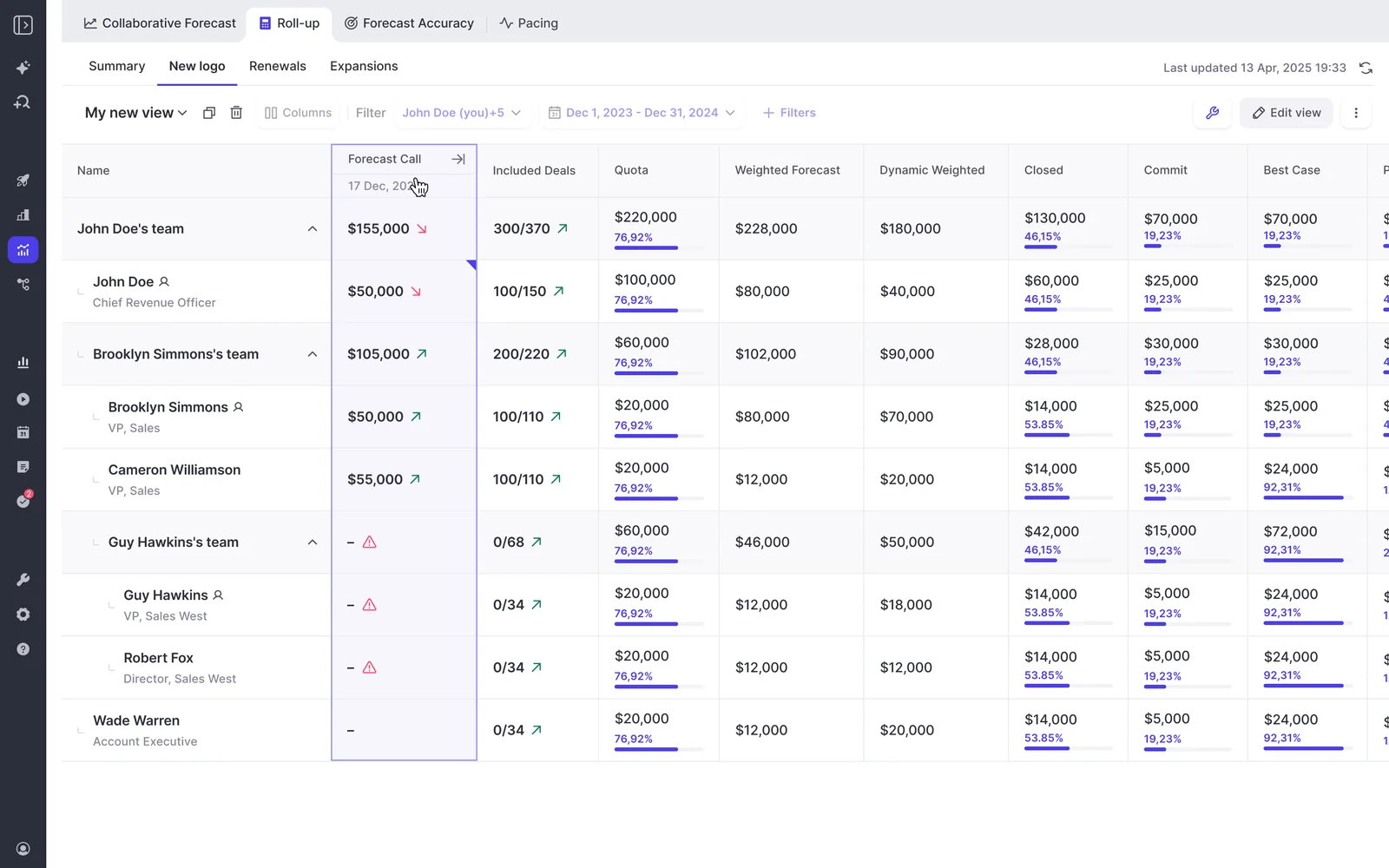
In Weflow's roll-up, each forecast call cell keeps its dated history, and hovering over it steps back through earlier calls.
Gong documents its side through the trend chart. Week by week, the chart shows the value of deals in a forecast category as they stood that week, against lines for the forecast projection, the team's forecast, the manager's forecast and the target.
When a rep's submission is missing for a week, Gong carries the last submitted number forward.
How the call follows your hierarchy, even when it doesn't match Salesforce
Weflow and Gong both roll the forecast up the Salesforce hierarchy by default, and Weflow lets an admin replace it with a custom hierarchy built in Weflow. In the Hierarchy tab, your admin arranges which team reports into which by drag and drop.
One person can belong to several teams, which covers the customer success manager who carries both an expansion and a renewal number. For a large org, Weflow's team can build the teams from a spreadsheet.
Weflow's roll-up expands each team down to its reps, with the submitted forecast call, included deals, quota and category totals side by side.
Gong's forecast roll-up follows the Salesforce hierarchy. If your reporting lines differ from the CRM manager field, you build a placeholder structure to make the forecast resolve, and from then on you make every reorg twice, once in Salesforce and once in the placeholder.
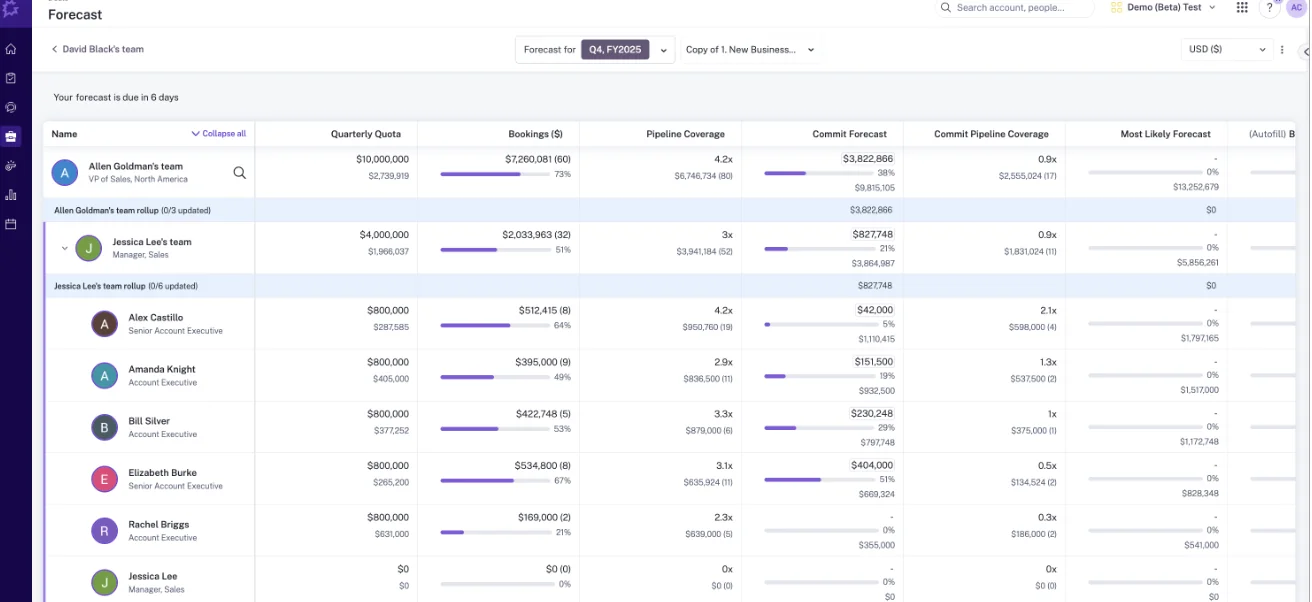
Gong's forecast board nests a VP team, manager teams and named account executives, and shows how many members of each team have updated.
Weflow's limit here is split credit. Weflow forecasting doesn't support Salesforce opportunity splits, so you can't forecast a deal whose amount is shared between sellers on each seller's share.
Deadlines, reminders and locks that make forecast accuracy measurable
Weflow makes accuracy measurable by letting an admin configure the cadence itself:
- Submission deadlines
- How often reps resubmit
- Who may submit and who may override
- How long an override stays open
- When the forecast locks
The adjustment window can stay open or close a few days either side of the deadline. The lock matters most, because a submission fixed at a point in time is one you can compare with the outcome.
Weflow's accuracy tracking comes with every Forecasting license without being switched on, and your admin picks the field accuracy is measured against, such as Closed Won.
Weflow reports accuracy per period by rep, manager and team, with manager and team averages on their own rows. You see who consistently sandbags and who is consistently optimistic, which tells you whose call to question in the next review.
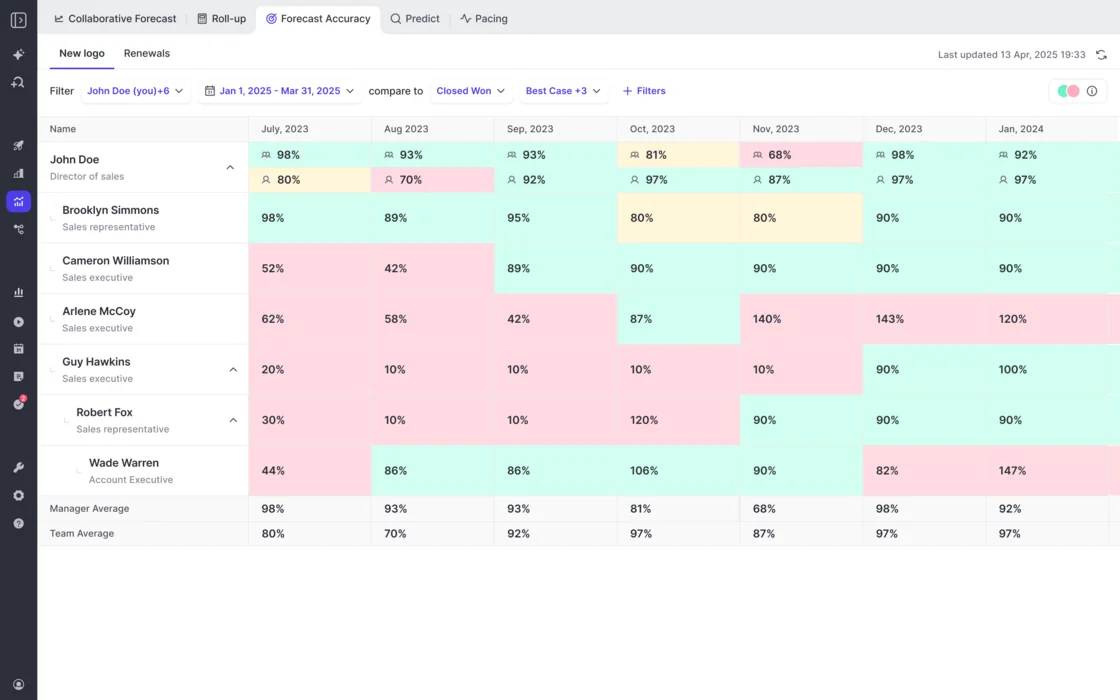
Gong Forecast's accuracy report divides the forecast submitted in a chosen week by actual sales at the end of the period, and shows the result for each person. It bands each result as high, medium or low:
- High: between 85 and 115 percent.
- Medium: between 70 and 84 or 116 and 130 percent.
- Low: outside those ranges.
Weflow's limit here is the monthly view. Reps can break a quarterly call down by month on submission, but the monthly split is visible only inside the edit dialog, and the collaborative forecast shows only the last submitted value of each call.
That limit matters if your managers check whether a rep is pacing the quarter evenly or back-loading it into the final month.
Where the forecast is submitted and where the data lives
Weflow takes forecast submissions only in the web app, while Gong reps can submit forecast numbers from Gong's iOS and Android app. Weflow emails a reminder when a forecast is due, posts the reminder to Slack and flags a missing submission as a warning.
Nobody submits or adjusts a Weflow call from a phone or a chat tool, though. First-line managers feel this most, because they're the ones with customers on the day the forecast locks.
Weflow keeps submitted calls, targets and roll-up data in the Weflow application and writes none of them to a Salesforce field, even though every other Weflow output lands in Salesforce objects. If your rule is that reps work only in Salesforce, you can't use roll-up submission without breaking that rule.
The weighted forecast and the AI projection still work for you, because both run on CRM data with no rep input. You can also read submitted calls over Weflow's MCP connector.
Running separate forecasts for new business, renewals and expansion
Weflow and Gong both run a separate forecast per revenue motion. Weflow builds each one on its own amount and date fields, and Gong builds each as its own forecast board.
Gong Forecast runs separate boards for new business, renewals, retention or any other motion, each with its own filters, columns, metrics and targets. Buyers report that it gets clunky when one module has to forecast several teams or products at once, such as enterprise, commercial and post-sale.
RevOps then ends up rebuilding the forecast in spreadsheets. Our Head of Sales lived that as a Gong Forecast customer:
Our RevOps team spent too many hours building it out and trying to get it to work super well. So we ended up actually doing most forecasting back in spreadsheets. - Chris Nethercote, Head of Sales and former Gong enterprise customer, Weflow
Weflow runs parallel forecast setups, each built on one chosen Salesforce amount field indexed on one chosen date field, with its own stages, cadence, targets and forecast calls. The amount can be any opportunity currency field, so new business can forecast on one revenue field and renewals on another.
Each opportunity record type keeps its own stage path, forecast-category mapping and roll-up. A rep can also carry one combined quota across all deal types and separate targets per type at the same time, with a roll-up tab per deal type plus a combined view.

Weflow's collaborative forecast filtered to existing business shows quota, closed, commit, pipeline and coverage for that motion alone.
Before you run several motions in Weflow, check its limits:
- Weflow doesn't offer consumption forecasting; it fits booking-based SaaS revenue best.
- Forecast targets are amounts only, so you can't set a target for the number of new logos or deals, and the live forecast view has no opportunity count.
- Forecasting is built on opportunities, with no account-level view that rolls renewal work up by customer.
Seeing what changed in the pipeline since last week
Weflow and Gong both answer "why did commit drop?". Gong reads its history from CRM field history, while Weflow takes its own snapshots of every opportunity every few hours.
We'd use that question as the test, because when commit falls, leaders want to be told which deals caused it, not to click through the pipeline deal by deal.
Gong's Trends report shows each week's deals as they stood that week. Its Changes report groups the movement in a forecast category into 16 reasons, such as new, pulled in, pushed out, closed-won, closed-lost and amount increased or decreased, and each bar opens the deals behind it.
The Changes report compares each deal's stage, close date and amount at the start and end of the period. A deal that moved and came back within the period doesn't appear.
Gong's Trends, Changes and Pacing reports read their history from CRM field history. Gong can backfill up to 5 quarters of it, on request through the customer success manager, in 3 to 5 business days.
You need a backfill after changing a business line's amount, date or owner fields or its forecast categories, so plan configuration changes around that turnaround.
Weflow doesn't depend on Salesforce to remember, because a Salesforce opportunity holds only the value it has now. Weflow's snapshots every few hours feed a waterfall that reconciles starting to ending pipeline through created, increased, moved in, moved out, lost, decreased and won.
Each bucket in the waterfall drills through to the opportunities, so you can name the deals behind a drop. Weflow also tracks days in stage and close-date push count on every opportunity without custom fields.
Weflow's opportunity sidebar keeps a timeline of field updates, such as close date, next step date and stage changes, beside the forecast pipeline table.
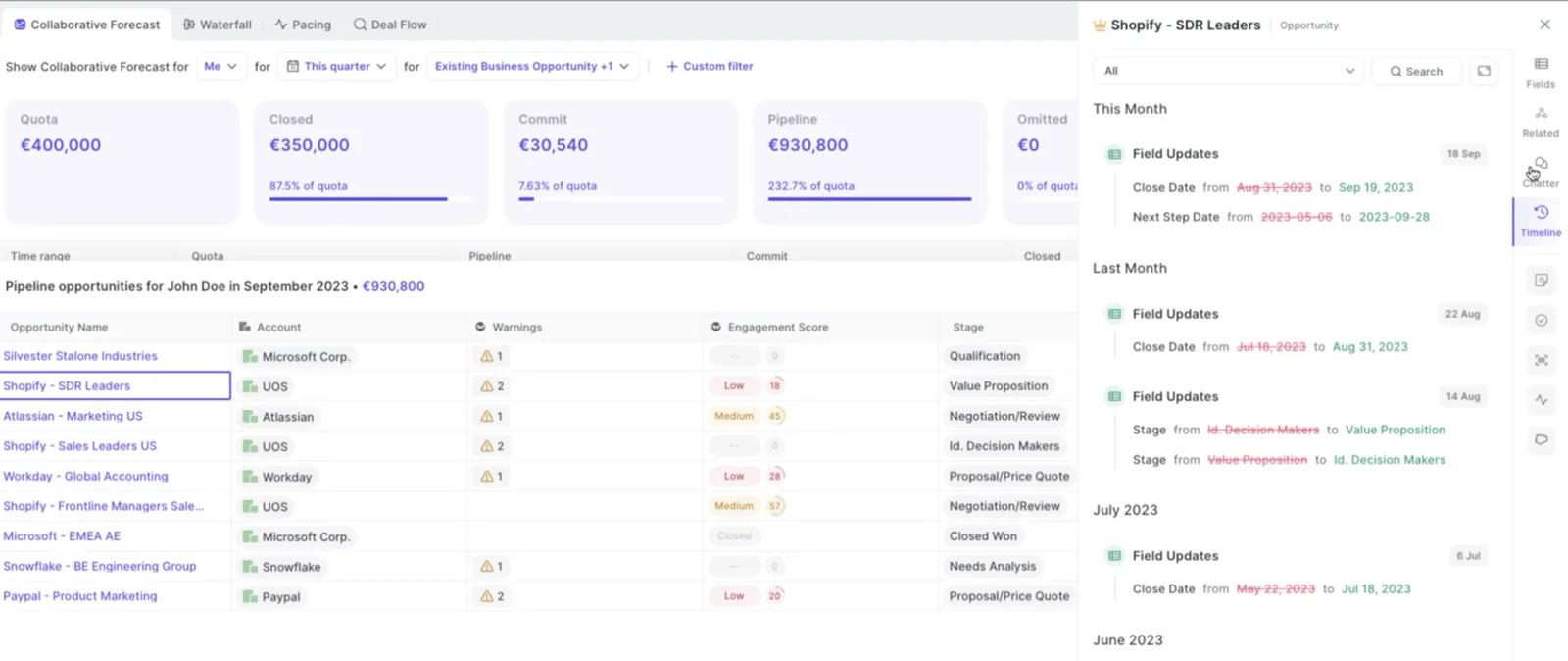
Weflow starts with history too. Forecasting and pipeline analytics import up to 12 months of Salesforce data by default, and history for custom fields depends on Salesforce field history tracking having been enabled.
Any change to a forecast configuration re-runs that import, so the waterfall and pacing views can show partial numbers for up to a day or two afterwards.
Getting forecast data into your stack, your AI assistant and your warehouse
Gong reaches further into the rest of the revenue stack, while Weflow's MCP connector is the route that returns forecast calls to an AI assistant.
How far each tool's integrations reach
Gong's integrations reach further than Weflow's. Gong's marketplace, the Gong Collective, lists about 450 integrations and partner solutions across CRM, telephony and dialers, web conferencing, email and calendar, BI and data, enrichment, workflow automation and MCP servers.
Gong imports calls from about 30 dialers and records meetings on 11 conferencing platforms.
Weflow integrates natively with Salesforce, Gmail, Google Calendar, Google Meet, Outlook, Microsoft Teams, Zoom and Slack, and pulls calls made through the Outreach dialer in as recordings.
Weflow isn't an integration platform with a catalog of connectors. If your team depends on a long tail of tools, you'll find more of them in Gong's marketplace.
Asking Claude or ChatGPT about this week's forecast over MCP
Weflow's official MCP connector lets Claude or ChatGPT read this week's forecast calls. That matters because those calls never reach Salesforce, so no Salesforce connector can see them.
For a close-date period you choose, the connector returns the most recently submitted forecast call alongside the live pipeline total and the gap between them. Where nobody submitted, it returns null.
Weflow's connector is read-only, and an admin switches it on per workspace. A separate toggle decides whether assistants may read full transcripts or only AI summaries.
The connector's scope is the requester's own opportunities or their team hierarchy, and a per-rep breakdown is capped at 25 owners. In a large org you get aggregate answers unless you narrow the question to a team.
Gong's MCP server exposes 3 tools, ask_account, ask_deal and generate_brief, and each works on one record at a time. It's read-only and returns AI-generated insights only, never raw transcripts.
MCP use draws Gong credits. Connecting requires a paid Gong seat on one side and a paid tier of the AI tool on the other.
Pulling raw data through the API or into a warehouse
Weflow's REST API bulk-exports transcripts, metadata, scores and signals as JSON or CSV, and feeds BI tools such as Tableau and Looker. Recordings export through the API to your own cloud storage.
Weflow has no native Snowflake, Databricks or BigQuery connector, so if you centralize data in a warehouse, you move it there through the API.
Gong's public API returns transcripts, participants, trackers and scorecards, capped at 3 calls a second and 10,000 a day. Warehouse delivery to Snowflake, Databricks, BigQuery and Redshift needs Data Cloud, a separately purchased application priced at about $5,000 a year.
What forecasting costs in Weflow and in Gong
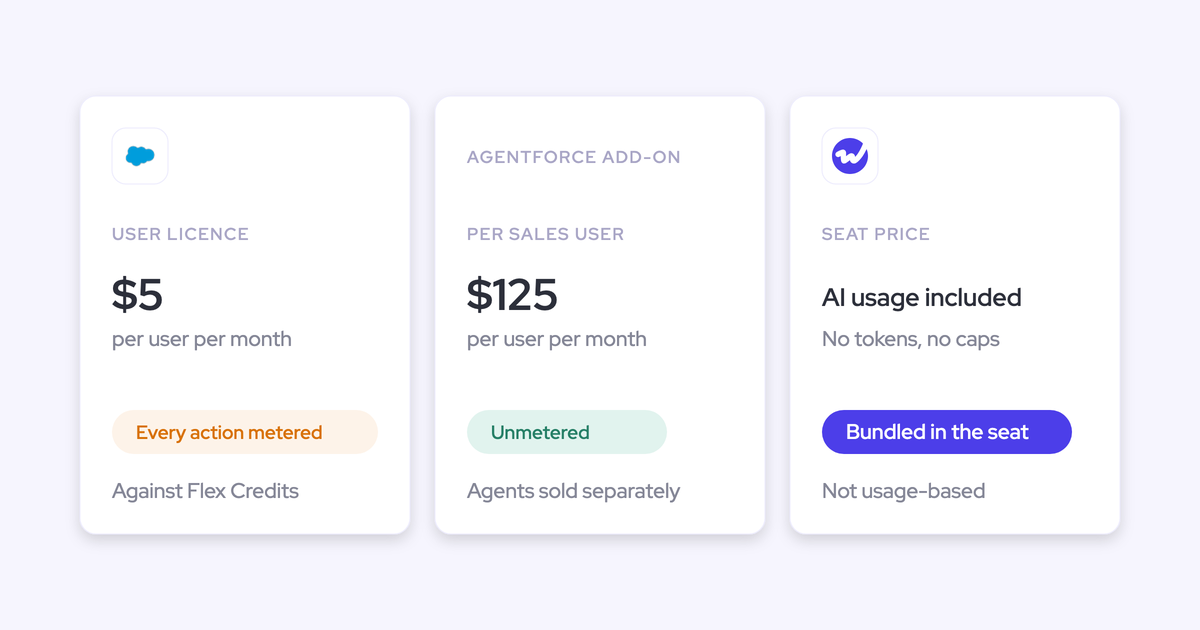
Weflow prices forecasting per seat with public prices, while Gong prices it through a custom proposal on top of a mandatory Gong Foundation license.
Weflow prices every product per seat, billed annually on a 12-month contract, with a 10-user minimum per product or bundle. AI is included in the seat, and only Agent Builder is consumption-priced.
Weflow sells Weflow Deal Intelligence & Forecasting standalone or inside Revenue AI Enterprise, and Revenue AI Business doesn't include the forecasting layer.
When you price it, weigh the bundle against standalone. Standalone forecasting produces weaker roll-up results without Weflow Activity & Contact Capture and Weflow Conversation Intelligence underneath, because forecast accuracy depends on that data layer.
Gong has no public pricing. Every buyer gets a custom proposal built from a per-user license per application, plus a platform fee that scales with the number of users. One person who touches Foundation and Forecast counts as a seat in each.
Gong credits meter MCP and API use, while forecasting itself draws none. Gong also sells the rollout of Gong Forecast as a professional services project of up to 22 hours, to be used within 60 days.
| Weflow cost line | Gong cost line |
|---|---|
| Weflow Deal Intelligence & Forecasting standalone: $39 per user per month, billed annually | Gong Foundation license, required before any application, priced in the proposal |
| Revenue AI Enterprise, with capture, conversation intelligence and forecasting: $79 per user per month | Gong Forecast seat per user, on top of the Foundation seat, priced in the proposal |
| AI included in the seat, with no credits | Platform fee scaled to the number of users |
| Minimum of 10 users per product or bundle | Credits for MCP and API use |
| Agent Builder priced per workspace, with a free tier of 25 actions a month | Professional services for the Gong Forecast rollout |
How we move a forecast roll-up from Gong to Weflow
We move a forecast roll-up from Gong to Weflow by settling the process first and the configuration second, then running a full forecast cycle before anyone judges the result.
- Run a process alignment session with the finance owner in the room before anything is configured, covering submissions, roll-up paths, commit criteria and the forecast call.
- Settle the amount field, the date field and the record types before sellers see anything, because every later configuration change re-runs the historical import.
- Import the hierarchy from Salesforce, or build a custom hierarchy in Weflow's Hierarchy tab where reporting lines differ.
- Run the historical import of up to 12 months of Salesforce data, with field history tracking enabled for any custom fields you forecast on.
- Set the cadence: submission deadlines, the lock, who submits and who holds override rights.
- Migrate your Gong call history, which Weflow does at no charge through the Gong API, restoring each call's link to its Salesforce account in about a week.
- Run a full forecast cycle in Weflow. Where a short trial can't cover it, use Weflow's 3-month paid pilot, written as the first 3 months of a multi-year agreement with an opt-out at the end.
We also sequence the products around the forecast. A 2-week proof of concept can prove capture and conversation intelligence but not forecasting, because forecasting changes how a team runs its week.
We land Weflow Activity & Contact Capture and Weflow Conversation Intelligence first, since reps adopt those. Then we bring forecasting in as a leadership motion, on data the team already trusts.
Which tool fits your forecast roll-up
Gong Forecast fits teams deep in Gong whose hierarchy matches Salesforce and who forecast by category. Weflow fits Salesforce teams that need every call tied to deals, with a manager override trail they can audit.
When Gong Forecast is the better fit
Gong Forecast is the better fit when its reach and its mobile app matter more than the evidence behind each call. Choose Gong if:
- Your reps and first-line managers need to submit forecast numbers from a phone, which Gong's iOS and Android app supports.
- Your reporting lines match the Salesforce hierarchy, so Gong's roll-up needs no placeholder structure.
- A number per forecast category with notes is enough for your forecast call.
- You need integration breadth or native warehouse delivery, from about 450 marketplace integrations to Data Cloud for Snowflake, Databricks, BigQuery and Redshift.
- Gong is deeply adopted, your managers are attached to it, and the change management of leaving outweighs what the roll-up costs you today.
If your quarter rests on about 10 material deals, you may not need a dedicated tool at all. Native Salesforce forecasting and pipeline inspection can carry a deal-by-deal judgment, and the case for a separate system grows with the number of deals, managers and roll-up layers.
When Weflow Deal Intelligence & Forecasting is the better fit
Weflow Deal Intelligence & Forecasting is the better fit when the roll-up has to stand up to an audit and you want to coach accuracy by name. Choose Weflow if:
- You want every forecast call tied to named deals, with each manager override timestamped, attributed and explained next to the rep's original.
- You run several motions, each on its own amount field, date field, stages, cadence and targets.
- Your forecast hierarchy differs from Salesforce and RevOps needs to own it, without placeholder structures.
- You want pipeline history from Weflow's own snapshots every few hours, with a waterfall you can drill into and no backfill request.
- You want to ask Claude or ChatGPT about this week's forecast calls against the live pipeline.
- You want public per-seat pricing with capture, conversation intelligence and forecasting on one platform.
Weflow helps us create predictability, accountability, and accuracy. Quarter after quarter. - Chris MacKinnon, VP Revenue Operations, Zeotap
Weflow isn't the right fit for every team. These are its limits for a forecast roll-up:
- If your rule is that everything, the forecast included, lives in Salesforce, Weflow is the wrong fit, because submitted calls, targets and roll-up data stay in Weflow.
- If you credit shared deals through Salesforce opportunity splits, Weflow is the wrong fit, because it can't forecast on split credit.
- If your revenue is consumption-based, Weflow is the wrong fit, because it doesn't offer consumption forecasting.
- Weflow takes forecast submissions only in the web app, with reminders by email and Slack, so nobody submits a call from a phone.
See how Weflow captures activity, updates Salesforce fields from calls, and rolls up your forecast. Book a 30-minute demo.
Questions RevOps leaders ask before moving the forecast off Gong
Can we keep Gong for calls and run the forecast in Weflow?
Yes. Weflow sells Weflow Deal Intelligence & Forecasting as a standalone product, so you can run it while Gong keeps recording your calls.
Weflow's forecast accuracy depends on the activity and conversation data underneath, though. Standalone forecasting produces weaker roll-up results than forecasting on top of Weflow Activity & Contact Capture and Weflow Conversation Intelligence.
What happens to our Gong call history if we move to Weflow?
Weflow migrates your existing Gong call history at no charge, re-importing recordings, metadata and transcripts through the Gong API in about a week.
The migration carries enough metadata to restore each call's link to its Salesforce account, so you can search imported calls on the same terms as calls Weflow records afterwards.
Who changes the forecast hierarchy and categories?
In Weflow, your admin does. The custom hierarchy is drag and drop in the Hierarchy tab, and your admin configures each record type's forecast-category mapping in Weflow, with a lag of up to a day or two in the analytics views while history re-imports.
In Gong, a named Gong administrator owns configuration. Changing a business line's amount, date or owner fields or its forecast categories needs a history backfill through the customer success manager.
Does a manager without adjust rights still submit a team call in Weflow?
Yes, a Weflow manager without adjust rights still submits a manager forecast for the team. Adjust rights only decide whether they can change a rep's call.
A first-line manager who also owns deals submits a number of their own and a number for their team, and Weflow keeps both.
Can a CRO see the roll-up, the manager's call and the override together?
Yes, in Weflow a CRO sees the reps' calls and the manager's own call side by side in the roll-up. Each override carries who made it, when and why, and Weflow keeps every version across quarters, while the collaborative forecast view shows only the latest value of each call.
In Gong, the trend chart shows the team's forecast and the manager's forecast as separate lines, week by week.