Weflow vs Momentum for MEDDPICC Field Updates in Salesforce (2026)
Weflow vs Momentum for MEDDPICC field updates: compare lookups, element grading and pricing.


Weflow is the Revenue AI Orchestration platform for sales, customer success, and RevOps teams. Momentum is the Salesforce-owned capture and conversation layer whose Autopilot writes call data into Salesforce.
Both fill MEDDPICC fields from your sales calls, and both let you set per field whether a value writes automatically or waits for a person, so review controls alone won't decide this. Choose Momentum when the champion has to be an AI-written contact lookup, or when you're keeping Gong or Clari Copilot as your recorder. Choose Weflow when you want every other field type filled and each element graded.
Weflow AI Field Updates write picklists, numbers, dates and Stage after every call. AI Playbooks then grade each MEDDPICC element across calls and captured email, on one platform with public seat prices.
What you give up with Weflow is lookups. AI Field Updates don't write lookup fields, so a champion named on a call isn't written as a contact record.
Weflow vs Momentum for MEDDPICC field updates at a glance
Weflow and Momentum match on the core job of writing MEDDPICC fields from calls, and differ on lookups, element grading, where email evidence comes from, data access and how you buy them.
| Capability | Weflow | Momentum |
|---|---|---|
| CRM field updates from conversations | Every field type except lookups, including picklists, multi-select, number, date and Stage; automatic or review per field | Opportunity, Account, Lead, Event and Contact fields, including contact lookups; write, confirm or write-if-empty per field |
| Qualification methodology capture | AI Playbooks fill and grade each element from calls, captured email and CRM fields; about 30 templates plus house frameworks | Autopilot writes each MEDDPICC element to its own field; call summaries list the elements each call covered |
| Rep review and correction | Outlook add-in and Chrome extension show where an email logs; re-map once per thread or move a logged email | Web app only: record or skip calls, make a call private, delete it, remap it to an account, lead or opportunity |
| Integrations with other tools | Narrower: Salesforce, Gmail, Google Calendar, Outlook, Zoom, Teams, Meet, Slack and the Outreach dialer; no native warehouse connector | Gong, Chorus, Clari Copilot, Attention, Salesloft Conversation Intelligence, 7 dialers, Slack or Teams, Outlook calendar in early beta |
| Access from AI assistants (MCP) | Official read-only MCP connector with a separate transcript toggle | No MCP server of its own; assistants go through Salesforce's Hosted MCP Server |
| Raw data access outside the tool | REST API bulk export of transcripts, metadata, scores and signals in JSON or CSV | API off by default, switched on through support, capped at 100 requests per 15 minutes |
| Pricing | Public per-seat prices, billed annually, 10-user minimum | Included in Salesforce's Max edition; standalone plans sold through a sales conversation |
| Best for | Salesforce teams that want every MEDDPICC element filled and graded across calls and captured email, with capture and forecasting on one platform | Teams on Salesforce Max, or keeping Gong or Clari Copilot, that need the champion written as a contact lookup |
Two differences decide most evaluations. Momentum writes the champion as a contact lookup. Weflow grades every element across calls and the email Weflow Activity & Contact Capture puts into Salesforce, while Momentum reads only email already logged as Salesforce Tasks.
Why RevOps teams weigh Weflow against Momentum for MEDDPICC
RevOps teams put Weflow and Momentum on one shortlist because both fill the MEDDPICC fields reps won't type. You built the fields and trained the team, and the fields still come in blank or get filled from memory the night before the forecast call.
Every push to make reps type has failed. Heavy stage gates just make reps park deals in an earlier stage.
Momentum's draw is ownership. Salesforce owns it, so it sits inside Salesforce with no separate integration to run, and it pairs with Agentforce. It counts as tool consolidation, which can put it ahead before anyone compares features. It also runs on top of the recorder you already pay for.
Weflow's draw is one platform for activity capture, conversation intelligence and forecasting. Weflow writes what it captures and generates into your own Salesforce, in the fields your deal review already reads, instead of a vendor scorecard.
With both tools filling the fields, you're choosing what those fields are made of: a champion that points at a contact record, or every other element graded across calls and email in typed fields you can report on.
Weflow fills MEDDPICC fields after every call and grades them across the whole deal
Weflow keeps MEDDPICC fields current in 2 ways. AI Field Updates write values after each call. AI Playbooks re-read the whole opportunity on a schedule and keep each element at the current best answer rather than the most recent one.
Weflow AI Field Updates write MEDDPICC values into typed Salesforce fields
Weflow AI Field Updates write MEDDPICC values from each call into the Salesforce fields you already have, one prompt per field. You start from a library of more than 250 pre-built prompts and adapt them to your definitions. We recommend spending time there, because the accuracy of a field update depends on how well its prompt is written.

On a MEDDPICC rollout, Weflow AI Field Updates handle these mechanics:
- Every field type except lookups. They write picklists, multi-select, number and date fields as well as text. Before writing a picklist, Weflow reads the field's allowed values and matches its output to them, so a 0-to-3 champion strength picklist never receives a value it doesn't accept.
- Stage itself. A field update can move a deal when the exit criteria in the prompt are met on the call, and can fill the fields a validation rule demands before a stage change. Keep Stage under review, because a wrong extraction there moves your forecast.
- Custom objects. They reach custom objects as well as standard ones, and Weflow support sets custom objects up for you.
- Automatic or review, per field. An unambiguous field writes itself, while Pain or Champion waits for the rep.
- A review view. Weflow's review view shows the current value beside the suggested one. The rep accepts, edits or rejects each value, or reassigns the call to a different deal, and the AI reanalyzes against that deal.
- Fast delivery. Weflow delivers the proposed field updates within 30 to 60 seconds of the meeting ending, alongside the summary and a drafted follow-up email.
- Internet search off by default. Each prompt starts without web search, so a field only draws on the public web when someone deliberately allows it, and values stay grounded in what the customer said.
Weflow AI Playbooks check whether each MEDDPICC element is actually established
Weflow AI Playbooks separate a filled MEDDPICC field from a qualified one by running 2 passes over each opportunity. The first pass fills every element from the deal's evidence. The second judges how well each element is established and shows 1 of 3 states:
- Fully established
- Partially established, with a note on what's missing
- Never discussed
The second pass also reads what reps typed. When a rep fills a MEDDPICC field with filler to get past a validation rule, that element shows as not assessed, not complete. That's how you catch a field that's filled and still worthless, like headcount sitting in Metrics.
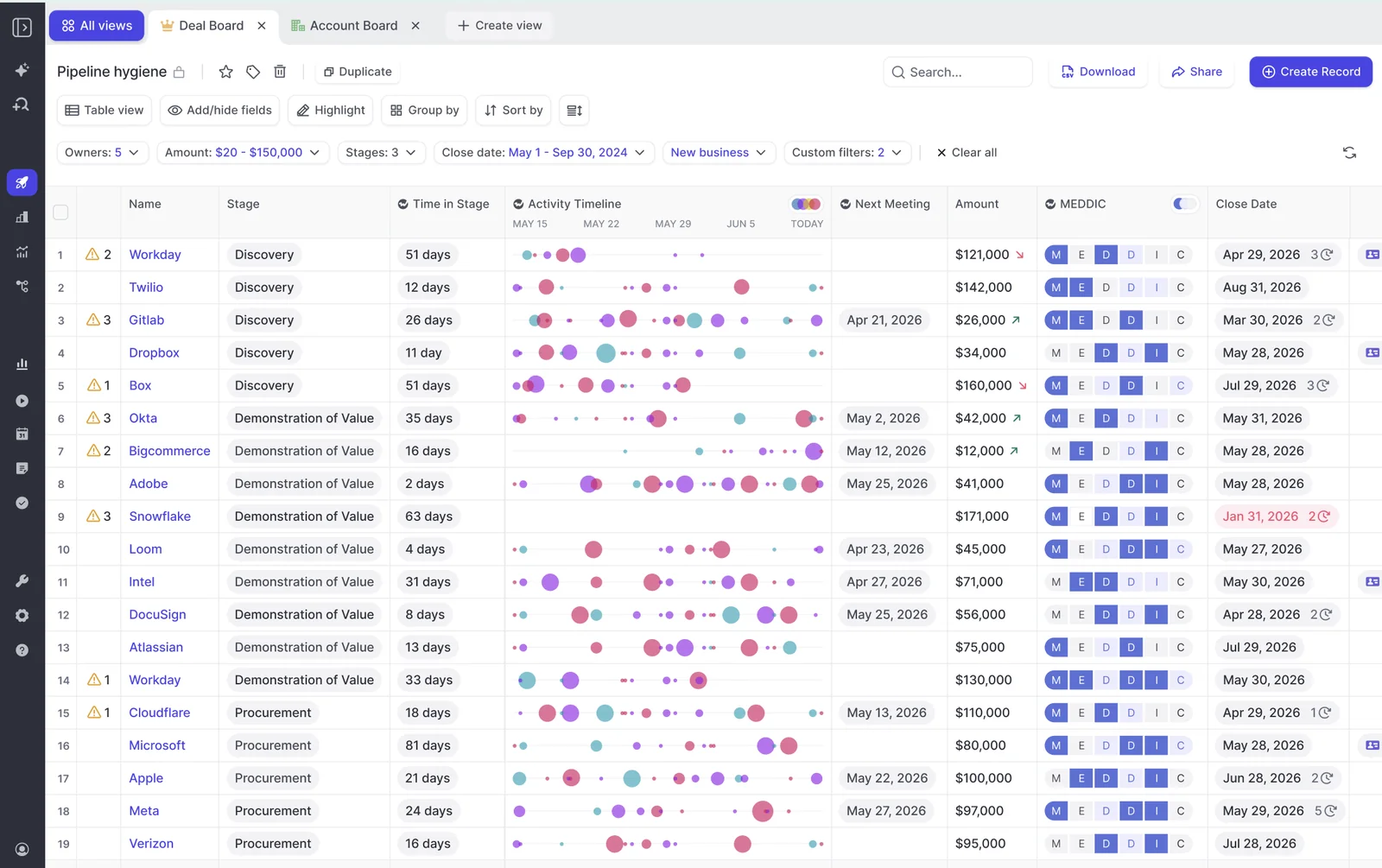
Weflow AI Playbooks read every email, meeting, transcript and CRM field on the opportunity, because an element settled on one call often isn't discussed again on the next. The email comes from Weflow Activity & Contact Capture, which syncs mail from Google Workspace or Microsoft 365 into native Salesforce objects. A champion who surfaces only in email still counts.
Email evidence only helps when it sits on the right deal. In the Outlook add-in or Chrome extension, your rep sees which records an email will log to, re-maps it once for the whole thread, and can move an email that's already logged.
Weflow AI Playbooks rerun whenever new activity lands on the opportunity, and otherwise every 3 hours. They write results back to the corresponding Salesforce fields. They also return a next step recommendation, such as flagging that the economic buyer is still unidentified on a deal forecast to close soon.
About 30 methodology templates ship with Weflow AI Playbooks. You encode a house framework the same way: name the fields and map your own prompt to each element.
Where Weflow stops: champion lookups, value sources and calls from other recorders
Weflow stops in 4 places on a MEDDPICC rollout, and each one has a workaround:
- Champion lookups. Weflow AI Field Updates don't write relationship lookup fields, so a champion named on a call isn't written as a contact record. Your rep sets Champion or Economic Buyer from the deal board sidebar by picking the contact. Weflow can attach a newly captured contact to the opportunity as a contact role, but it doesn't infer the role itself.
- Calls from other recorders. Weflow AI Playbooks read transcripts only from calls Weflow recorded. If you record with another tool, you get playbook results built from the CRM record, emails and meeting metadata.
- Existing pipeline. Weflow AI Playbooks evaluate only opportunities created or changed after setup, so older pipeline starts blank. Select those opportunities in a list and run Generate AI Playbooks in bulk.
- Value sources. Weflow doesn't mark a filled value with its source, conversation or web search, and the comparison view shows what changed rather than where it came from. To keep a field to the conversation, write that restriction into its prompt. When you need the evidence, ask Ask Weflow AI about the deal, because its answers list the sources it read.

I love being able to go right to the call, transcript or email and see where something was said that the AI is referencing.
- Scott Jones, SVP of GTM Revenue Intelligence & Enablement, KORE Wireless
Momentum writes MEDDPICC fields from calls inside Salesforce's own stack
Momentum is the Salesforce-owned capture and conversation layer that records or ingests calls and writes what was said into Salesforce. Its Autopilot does the MEDDPICC writing, one natural-language prompt per field.
Momentum Autopilot writes the champion as a real contact record
Momentum Autopilot writes Salesforce lookup fields from calls, so the champion points at a contact record instead of a name typed into a text field. That matters for reporting, because a champion stored as text can't be reported by contact, and for contact lookups Autopilot can suggest an external attendee from the call.
Around the lookup, Momentum Autopilot gives you these controls:
- Momentum Autopilot sets a save behavior per extraction: write automatically, confirm after a human reviews it in Slack or the web app, or write only when the field is empty. Momentum recommends starting on confirm while you test prompts, then moving most fields to write-if-empty.
- Momentum can append to a field instead of overwriting it, timestamping each entry so a rep's own text survives. The cost is a field that grows with every interaction.
- Momentum writes each MEDDPICC element to its own Salesforce field, so economic buyer, decision criteria and paper process become reportable columns.
- Momentum Autopilot can re-read a deal's whole history when a Salesforce event fires, not only the latest call.
- Momentum Autopilot Batch back-fills a newly created methodology field across past conversations.
- Momentum asks, when you delete an analyzed call, whether to revert the Salesforce fields it filled from that call.
Momentum runs on top of the recorder you already pay for
Momentum runs on top of the recorder you already pay for, which makes it the easier fit if you're keeping one. It integrates natively with 5 conversation intelligence tools, Gong, Chorus, Clari Copilot, Attention and Salesloft Conversation Intelligence, and with 7 dialers and contact centers: Aircall, CloudTalk, Dialpad, Orum, RingCentral, Vonage Contact Center and Zoom.
Calls from anywhere else arrive as uploads: an audio or video file up to 2 GB, or a transcript exported from Google Meet or Zoom, capped at 5 uploads per user per day.
The trade-off is that Momentum inherits your recorder's transcription quality, dialects included, and the recorder and the writing layer become 2 contracts. In one team's setup, a write that didn't happen meant checking Salesforce, Clari and Momentum in turn to find where it broke.
The consolidation case points the other way. Momentum sits inside Salesforce with no separate integration to run, and Momentum itself argues that moving recording onto Momentum is the simpler relationship.
Recording with Momentum has prerequisites. An admin assigns a CI seat to every user whose calls should be recorded, and on Zoom, Momentum records through Zoom's own cloud recording, which needs a Zoom Business, Education or Enterprise license with cloud recording and audio transcripts switched on.
Where Momentum stops: email evidence and corrections in a separate app
Momentum stops in 4 places that show up in a MEDDPICC rollout.
- Momentum reads email only from Salesforce Tasks: when your team already logs emails or SMS to Salesforce, Momentum picks them up once Momentum support sets up the ingestion. It doesn't capture email from Outlook or Google Workspace itself, so a champion named only in an unlogged thread never reaches Autopilot.
- Momentum's Outlook integration, which syncs external meetings from the Outlook calendar so they can be recorded, is labeled an early beta.
- Momentum handles recording control and remapping only in its web app. Reps switch recording on or off for the next 7 days of meetings, make a call private or delete it there, and a wrongly mapped call is remapped to an account, a lead or an opportunity under one of them, never to an opportunity alone and not from Slack.
- Momentum sells no forecast: nothing in its agents, its workflow automation or its Conversation Intelligence add-on takes forecast submissions or rolls up a number.
How AI assistants and your data warehouse reach MEDDPICC data in each tool
Weflow gives AI assistants and warehouses a route of its own to MEDDPICC data, while Momentum routes them through Salesforce. Weflow's official read-only MCP connector lets Claude or ChatGPT reach playbooks, call summaries, transcripts and forecast calls. An admin switches it on per workspace, with a separate toggle for full transcripts.
Weflow's connector doesn't return values stored on Salesforce records or the content of captured emails, so your assistant reads those through a Salesforce connector. We recommend running both connectors, because forecast calls and parts of the conversation layer never reach Salesforce.
For a warehouse, Weflow's REST API bulk-exports data as JSON or CSV. There's no native Snowflake, Databricks or BigQuery connector, so you run the export on a schedule or on demand.
Momentum ships no MCP server of its own. Your assistant reaches what Momentum captured through Salesforce's Hosted MCP Server, over the records Momentum wrote. Momentum's own API is off by default: support switches it on per workspace, and it's capped at 100 requests per 15 minutes.
The 3 routes to MEDDPICC data work differently in each tool:
| Route | Weflow | Momentum |
|---|---|---|
| AI assistant access | Official read-only MCP connector; Salesforce values through a Salesforce connector | Salesforce's Hosted MCP Server over the records Momentum writes |
| API availability | Public REST API with scheduled or on-demand bulk export | Off by default; switched on per workspace by support; 100 requests per 15 minutes |
| What the API returns | Transcripts, metadata, scores and signals; recordings export to your own storage | Meetings, attendees, full transcripts, linked Salesforce IDs, a 2-hour recording link, AI Signal executions; no endpoint for Autopilot extractions |
What MEDDPICC field updates cost on Weflow and on Momentum
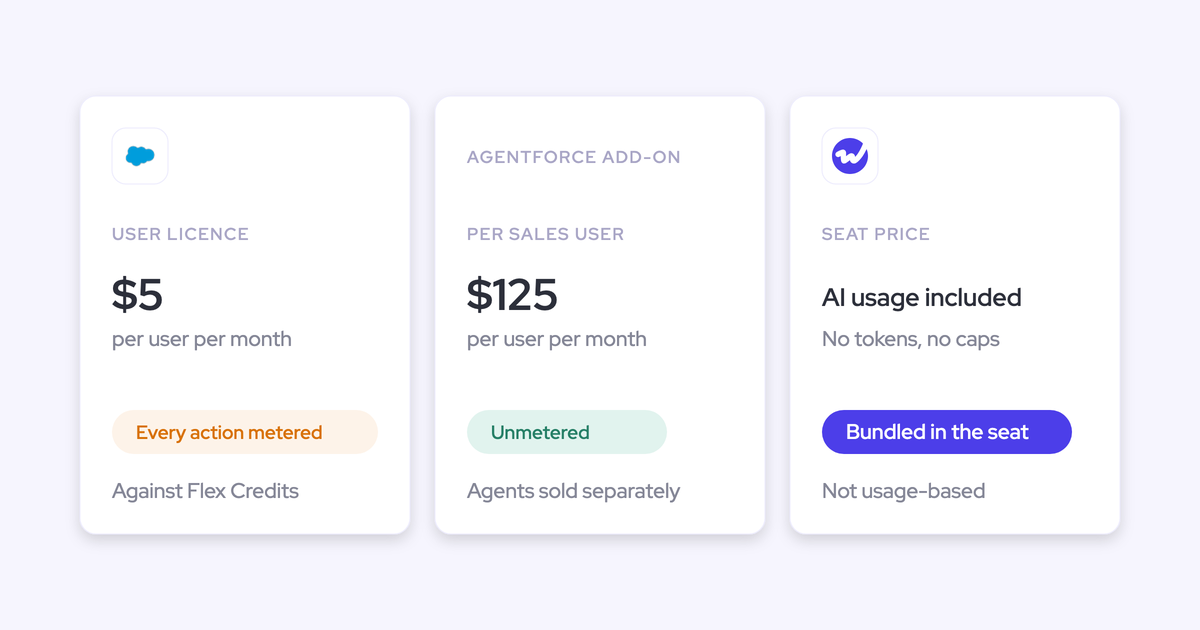
Weflow sells seats at public prices, while Momentum comes inside a Salesforce edition or through a sales conversation. Weflow AI Field Updates are included in the Weflow Conversation Intelligence seat, with AI usage bundled in and no token charge.
Weflow AI Playbooks come with Deal Intelligence. Revenue AI Business includes Deal Intelligence without pipeline analytics and forecasting. Revenue AI Enterprise, at $79 per user per month, adds the full forecasting layer.
Weflow bills every plan annually on a 12-month term, with a 10-user minimum per product or bundle.
Momentum is included in Salesforce's Max edition today. Salesforce has announced it for Core and Advanced, but its edition comparison still marks it as coming soon.
On Starter Suite and Pro Suite, Momentum is a paid add-on priced only in a quote. Legacy Enterprise and Unlimited customers reach bundled Momentum only by moving edition.
Holding Momentum doesn't buy the agents that act on its data. On Core and Advanced, Agentforce for Sales is an add-on from $125 per user per month. Momentum.io still lists standalone plans, each sold through a booking page rather than a checkout.
| Option | Price | Includes |
|---|---|---|
| Weflow Conversation Intelligence | $39 per user per month, billed annually | AI Field Updates, call recording, Ask Weflow AI Pro |
| Revenue AI Foundation | $49 per user per month, billed annually | Weflow Activity & Contact Capture plus Weflow Conversation Intelligence |
| Revenue AI Business | $59 per user per month, billed annually | Deal Intelligence with AI Playbooks, without pipeline analytics and forecasting |
| Momentum in Max | $550 per user per month for the Salesforce edition | Momentum, Agentforce for Sales and 2.75 million Flex Credits a year |
| Momentum in Core or Advanced | $195 or $395 per user per month for the Salesforce edition | Momentum announced and marked coming soon; agents are an add-on |
| Momentum standalone | Business $69 and Transformation $99 per user per month on annual plans; Enterprise on quote | Sold through sales; Conversation Intelligence add-on at $30 per user per month |
How to move MEDDPICC field updates from Momentum to Weflow
Moving MEDDPICC field updates from Momentum to Weflow takes 5 steps, and you can run both tools while you do it.
- Keep your existing MEDDPICC fields and map a Weflow prompt to each one. Your deal review keeps reading the same Salesforce fields, and the library of more than 250 pre-built prompts gives you a starting point per element.
- Import past recordings by API or from files. Weflow pulls recordings through a vendor's API, or imports exported recording files with a CSV of each call's participants, start and end time and title, then matches each call to Salesforce records. Momentum's API is off by default, so ask Momentum support to switch it on first. Supply audio or video, because Weflow can't import a call as a text transcript. Then add whole teams to Weflow Conversation Intelligence recording so new calls land in Weflow; a team added this way updates as its membership changes.
- Start interpretive fields on review. Set Pain, Champion and Decision Criteria to wait for the rep, and keep Stage under review. Reviewing each suggested value builds the evidence that the extraction is right, so move a field to automatic only once its output has earned it.
- Test writes on every object before go-live. Weflow fires a field update's write to Salesforce once, when the call ends, and can't replay a failed write, so a misconfiguration loses everything until someone notices.
- Bulk-generate AI Playbooks on existing opportunities. Select the open pipeline in a list and run Generate AI Playbooks; new opportunities are evaluated automatically.

While both tools run, Weflow shows the fields Momentum writes in its deal views and sidebar. Weflow AI Playbooks won't read Momentum's transcripts, so the methodology you see there is Momentum's, and playbook results come from the CRM record, emails and meeting metadata only.
When to choose Weflow and when to stay with Momentum
Choose by what your MEDDPICC fields have to be made of and what you already own, because both tools already fill those fields from calls with per-field review.
Choose Weflow if:
- You want every MEDDPICC element graded across the whole deal, with filler that reps typed marked not assessed.
- Your champion or decision maker often surfaces in email that isn't logged to Salesforce today. Weflow Activity & Contact Capture puts it there, and AI Playbooks read it.
- You need picklist, multi-select, number, date and Stage fields written for reporting, not only text.
- You want capture, conversation intelligence and forecasting on one platform at public seat prices.
Stay with Momentum if:
- The champion and economic buyer must be AI-written contact lookups you report on by contact.
- You're keeping Gong or Clari Copilot as your recorder and want a writing layer on top of it.
- You already hold Salesforce's Max edition, where Momentum is in the license.
- You want write-if-empty or timestamped append as the default protection for text reps typed.
Weflow vs Momentum questions RevOps leaders ask about MEDDPICC
Will Weflow's automatic writing erase what reps typed in MEDDPICC fields?
Weflow protects rep-typed MEDDPICC text in 3 ways:
- Keep the field on review, where the rep sees the current value beside the suggestion and accepts, edits or rejects it.
- Write into the prompt that the field stays unchanged when the call adds nothing new.
- Let AI Playbooks maintain cumulative elements across the deal.
Momentum offers write-if-empty and timestamped append as save behaviors.
Can Weflow carry our house qualification framework?
Weflow encodes a house framework exactly like a standard one: name the fields, map your own prompt to each element, and AI Playbooks fill and grade it. About 30 methodology templates ship if you'd rather start from a standard model.
Can we keep Momentum as our recorder and use Weflow?
Weflow runs alongside Momentum, but Weflow AI Playbooks won't read Momentum's transcripts. Weflow shows the fields Momentum writes in its deal views and sidebar, and its playbooks build from the CRM record, emails and meeting metadata instead.
Do Outlook teams see Weflow AI Playbooks?
Weflow AI Playbooks don't appear in the Outlook add-in. Outlook teams use them in the Weflow app, or run the Chrome extension next to the add-in to see them on Salesforce pages.
Do we need Salesforce Max to get Momentum?
Salesforce's Max edition is the only edition that includes Momentum today. Core and Advanced are announced and marked coming soon. Starter Suite and Pro Suite buy it as a quoted add-on, and momentum.io sells standalone plans through its sales team.
Can either tool fill MEDDPICC from email?
Weflow and Momentum both read email, from different places. Weflow AI Playbooks read the email Weflow Activity & Contact Capture syncs into Salesforce, while Weflow AI Field Updates run on calls. Momentum reads emails your team already logs as Salesforce Tasks, once Momentum support sets up the ingestion.