Automatic vs Rep-Reviewed AI Field Updates: Which Opportunity Fields Should Update Without Approval
Decide which Salesforce opportunity fields can update automatically vs need rep review for AI updates.


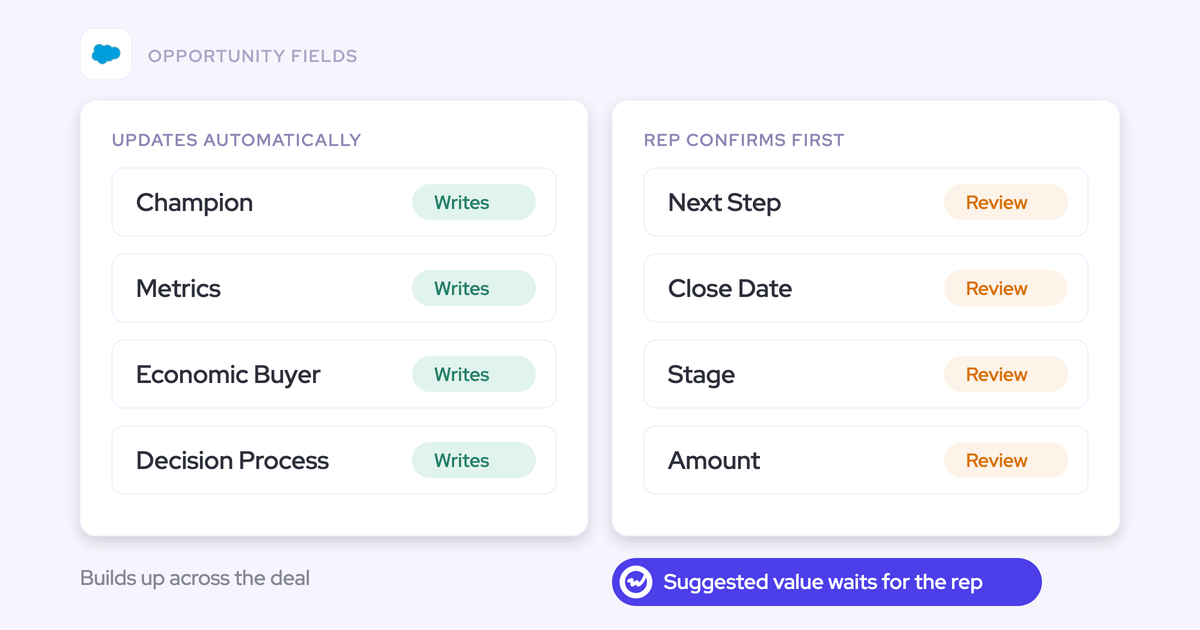

Stop sorting opportunity fields by how important they feel. Sort them by two things: how their truth builds up over a deal, and what a wrong write costs. Then give every field exactly one owner:
- Unambiguous facts, like website, address or competitors mentioned, write automatically after each call.
- Cumulative MEDDIC fields go to a deal-level route that reads every call and email on the opportunity.
- Stage, amount, close date and next step get a quick rep confirmation after each call.
- Forecast category and line items stay with the rep.
You've already stopped waiting for reps to fill these fields by hand, so we won't make that case again. One point matters before everything else. The honest benchmark for an AI-filled field is the empty field it replaces, not a perfect one.
The article ends in a field-by-field table you can paste into your rollout plan. It's the same logic behind how we approach deal execution: stage exit criteria and methodology fields filled from what buyers said, with a human where a mistake costs the forecast.
Four ways teams govern AI field updates in Salesforce
Vendors shipped two extremes first: approve every value, or write everything automatically. Each fails in its own way.
Per-field control came next, and it's now common.
Approve every AI value before it reaches Salesforce
Approval-only is the safe default, and it has a real upside. The rep reads what the AI drafted, which means they read their own deal notes.
Chorus works this way. Meeting-Based CRM Updates drafts MEDDIC, MEDDPICC, BANT or SPIN values from a call, and nothing reaches the opportunity until the rep clicks Approve Update. There's no option to write without approval.
Fireflies Autofill CRM follows the same model. A rep opens each meeting, reviews the values and sends them, so a meeting nobody reviews leaves Salesforce unchanged.
The catch is that fields fill only as fast as reps click. A review on every value brings back the chore that emptied the fields in the first place.
Approval-only is a sound place to start an interpretive field. It's a poor place to leave one.
Write every field automatically after each call
Full auto gives you the fastest fill. No human sees a value before it lands on the opportunity, so the whole accuracy question moves into how well each prompt was written.
Attention offers a manual Sync button or automatic sync configured once in a workflow, and recommends automatic. Credit where it's due: picklist values follow the field's existing format, and admins can test extraction against a real call before it runs.
Here's the failure we'd watch for. When a call had nothing for a field, Attention wrote prose explaining the absence into it.
Synced automatically and at volume, that sentence reads as populated data to every report and every AI that later reads the record. A misheard line on amount or close date does the same damage, straight to the forecast.
Set automatic or review separately for each field
Granular control is now standard across the category:
- Momentum Autopilot sets each extraction to write automatically, wait for confirmation in Slack or the web app, or write only when the field is empty.
- Scratchpad sets each field to wait for the rep or update Salesforce automatically, and drafts from both calls and emails.
- Jiminny's AI CRM Filling runs each automation automatically or after review, with fill-only-empty, overwrite or append behavior.
- Kaia's Deal Agent sets each field to update automatically, only when empty, or only after rep confirmation.
- Terret attaches a confidence score and its sources to each value.
- Salesforce Agentforce's Pipeline Management agent runs in autonomous or suggestive mode and shows the source behind each update.
Several of these go further than Weflow on specific controls, especially write-if-empty modes and source display. Every one of them hands you the switches and leaves the hard part to you: deciding which field gets which setting.
Keep forecast fields manual and automate everything else
This is the instinct most RevOps leaders already have, and it's a good one.
So you hold reps to a small set (products, close date, forecast category) and automate the rest. The split is right.
It breaks in the second half. "Automate everything else" treats a website field and a champion field identically. The website has one checkable answer from one call. The champion builds across a dozen calls and emails, and a per-call write only ever sees one of them.
What decides whether a field can update without approval
Importance is the wrong axis. A field can matter enormously and still be safe on auto, while a minor-looking one does real damage when it's wrong. Run these four tests on each field instead:
- How its truth accumulates. One call settles some answers; others build across the deal. Ask whether a rep could check the value against a single call.
- What a wrong write costs. Some fields move the forecast the instant they change. Ask whether your forecast, coverage or weighted pipeline reads the field directly.
- Where the evidence lives. Some answers come up on calls, others only in email. Read a few closed deals and note where the champion and decision process first appeared.
- Whether it's the rep's own judgment. Some fields record what the buyer said; others record what the rep commits to. Ask who you'd hold accountable if the value is wrong.
Which opportunity fields should update without approval
Every opportunity field belongs to one class, and each class has exactly one owner. This is the table for your rollout plan.
| Field class | Example fields | Why | Owner and mode |
|---|---|---|---|
| Unambiguous factual | Website, billing address, competitor multi-select | One checkable answer, no forecast impact if wrong | Automatic per call, from day one |
| Cumulative qualification | MEDDIC elements: metrics, economic buyer, champion, decision process | Builds across calls and email, with no single call to check it against | Deal-level route that reads calls, email and CRM fields |
| Single-value, forecast-moving | Stage, amount, close date, next step | One value that moves the forecast the moment it changes | Per call, in review: rep confirms after each call |
| Rep judgment | Forecast category, line items | A commitment the rep makes, not a fact the buyer stated | The rep |
| Interpretive, not yet proven | Pain, use case, any new custom field | Plausible-but-wrong values until the prompt is tuned | Review first, then graduate to automatic |
Interpretive fields don't stay in review forever. The graduation section below covers when to switch them.
Automate unambiguous fields like website and competitors from day one
A field is safe on automatic from the first call when it has one answer you could check in seconds and a wrong value doesn't touch the forecast. Typical examples:
- Website and company domain
- Billing or office address
- Competitors mentioned, as a multi-select
- Picklists with a clear answer, such as region or product line discussed
Picklists only belong here if the write respects the field's allowed values. A model asked to fill a picklist will invent a value if nothing stops it, and the write then fails or pollutes the field.
The competitor multi-select is the best early win. You get a field you can chart and group in a dashboard, filled from what buyers actually said.
Give MEDDIC fields to a route that reads calls and email
Qualification builds across a deal. A per-call write treats it like a snapshot, and that snapshot often misses half the picture.
That's not an edge case. Some teams we talk to record calls on only about half their opportunities, and the rest of the deal happens in email. A per-call update never sees any of it.
There's also nothing for a rep to review against. A champion discussed differently on five calls has no single call that holds the right answer.
So the right owner for cumulative MEDDIC fields is a deal-level route that reads every call, email and field on the opportunity and keeps each element at the current best answer.
Have reps confirm amount, close date and next step
These fields hold one value and move the forecast the instant they change. One misheard sentence can overwrite the number your forecast reads, and nobody re-checks it until the quarter slips.
A post-call confirmation costs the rep seconds. They see the current value beside the suggestion, accept or edit it, and the number stays theirs.
Stage belongs in this group too. It gets its own section next because it's the hardest single field to govern.
Leave forecast category and line items to the rep
Some fields are the rep's call by design. Forecast category is a commitment, and line items are what the rep says they're selling. These are the small set you already hold reps to.
Automating them removes accountability, not admin. Mallory Lee describes the trade well:
"It kind of puts the trust back in the rep's hands to say, I trust you to tell me if you're gonna win this or not and let the robots take care of everything else."
Mallory Lee, VP Revenue Operations at PhoneBurner
Should AI move opportunity Stage when exit criteria are met?
AI can move Stage, and for most teams Stage should still stay in review. An AI field update treats Stage as another field with a prompt: you write down what has to be true to leave stage two, and the move happens from the conversation instead of a rep remembering.
The bigger win is the stage gate. Where a validation rule blocks the stage change until certain fields are filled, those fields can be filled the same way. The gate is satisfied by what the buyer said, not by a form filled in afterwards.
That matters because heavy gates make reps leave deals in earlier stages to avoid the qualification questions. Your pipeline then reads less advanced than it is, and every number built on stage is off in the same direction.
Validation rules still apply. A move blocked by a rule stays blocked until its fields are filled. And because a wrong Stage write ripples straight into the forecast, we'd keep Stage under review.
| What automating Stage fixes | Why Stage stays in review |
|---|---|
| Reps stop parking deals in earlier stages to dodge gate forms | A wrong stage moves coverage and weighted pipeline the moment it lands |
| Gate fields fill from what the buyer said on the call | One upbeat call can sound further along than the deal is |
| Stage reflects written exit criteria instead of a rep's memory | The rep's confirmation is a cheap check that the exit criteria were really met |
When to switch an interpretive field from review to automatic
Switch a field when its output has earned it, judged by the people who read that output every day. There's no universal number of weeks. This is the sequence we see work:
- Start every interpretive field in review. The evidence you're building is a record of what reps accept, edit and reject on that field.
- Tune the prompt with the people reading it. Vendor prompts are a starting point, and most fixes are a sentence added or a few words removed. You're ready to move on when edits on that field become rare.
- Write down what doesn't count. A champion prompt named an internal employee until it was told to exclude internal people, and a metrics prompt returned company headcount. The evidence you need is that those plausible-but-wrong values stop appearing.
- Keep prompts simple. Over-specified prompts perform worse than simple ones, which is the opposite of what most teams expect. Accuracy should hold, or improve, after you cut.
- Compare against the empty field, then switch. The bar is that the value is right often enough that you'd rather have it than nothing.
How to stop AI field updates overwriting what reps wrote
Overwrite risk comes from two places: AI writing onto content a rep already typed, and two AI routes writing the same field. Each has a configuration fix.
Protect methodology fields that already hold rep notes
This is the first question reps ask before rollout, and the stakes are trust. Once a rep watches their own note disappear, they stop maintaining the field.
Three protections cover it:
- Review mode shows the current value beside the AI's suggestion, so the rep removes what shouldn't change and syncs only the rest.
- A prompt instruction not to update the field when the call adds nothing new stops an empty call from wiping it.
- Cumulative fields go on the deal-level route, which reads the whole deal instead of one transcript.
Use all three on any methodology field that already holds rep content, rather than leaning on per-call automatic mode alone.
Give each field exactly one AI route
When a per-call update and a deal-level job can both write a field, they overwrite each other unless you decide ownership in advance. Pick one owner per field before you switch anything on.
| Field class | Owning route |
|---|---|
| Unambiguous factual | Per-call AI field update, automatic |
| Cumulative qualification (MEDDIC) | Deal-level route only |
| Single-value, forecast-moving | Per-call AI field update, in review |
| Interpretive, not yet proven | Per-call AI field update, in review until it graduates |
| Rep judgment | No AI route |
How to keep reps thinking when MEDDIC fields fill themselves
Automation removes the typing, and if you're careless it removes the thinking too. The value of a qualification question was always the rep confronting what they don't know about the deal. Julien Cerutti names the tension directly:
"In an agentic workflow, like I said, you don't have to fill out anything. The score automatically comes from conversations and activities logged in Salesforce, and your champion's a three or it's a two. But there is that deal inspection thing where there are questions, and I do want them to reflect."
Julien Cerutti, VP of Global Revenue Strategy at Meltwater
The fix is to change what you ask of reps. When fields fill themselves, the rep's job moves from typing answers to judging the AI's assessment, deciding the next step and explaining any disagreement. Enablement on the framework matters more, not less.
The gap between the rep's view and the evidence becomes the deal-review agenda. Where they agree, the manager asks about the next step from that point in the methodology. Where they differ, the rep explains why.
"If you disagree with what the AI is saying, give me a clear answer on why."
Kelly Lewis, RevOps and sales leadership coach and co-host of The Revenue Insiders podcast
Review mode does part of this work for you. A rep who has to accept or edit the AI's champion has to think about the champion.
How Weflow AI Field Updates and AI Playbooks split the work
Weflow is the Revenue AI Orchestration platform for sales, customer success, and RevOps teams. Built for Salesforce teams, it maps onto the field-class rule with two routes: AI Field Updates handle per-call writes, and AI Playbooks keep deal-level methodology fields current. Each per-call field also carries its own automatic or review setting.
Set automatic or review per field in one Weflow template
In Weflow Conversation Intelligence, automatic or review is a setting on each field inside one template, for the same rep. Website writes itself while pain and Stage wait for the rep, in the same post-call flow.
In review, the rep sees the current value beside the suggestion. They accept it, edit it, or reassign the call to a different deal, and Weflow reanalyzes for the deal they picked. Only what they keep syncs to Salesforce.

The configuration details that matter for governance:
- Required fields stay locked.
- Picklist and multi-picklist writes match the field's allowed values, so Weflow never writes a value the field doesn't accept.
- Number, date, picklist and multi-select fields are supported, not only free text.
- Each prompt can take up to three PDFs as context, and internet search is off by default until someone switches it on for that prompt.
- Meeting type detection applies a different update set to discovery and closing calls, so a closing call isn't scored on discovery questions.
- Proposed field updates reach the rep within 30 to 60 seconds of the meeting ending.
Keep MEDDIC fields current with Weflow AI Playbooks
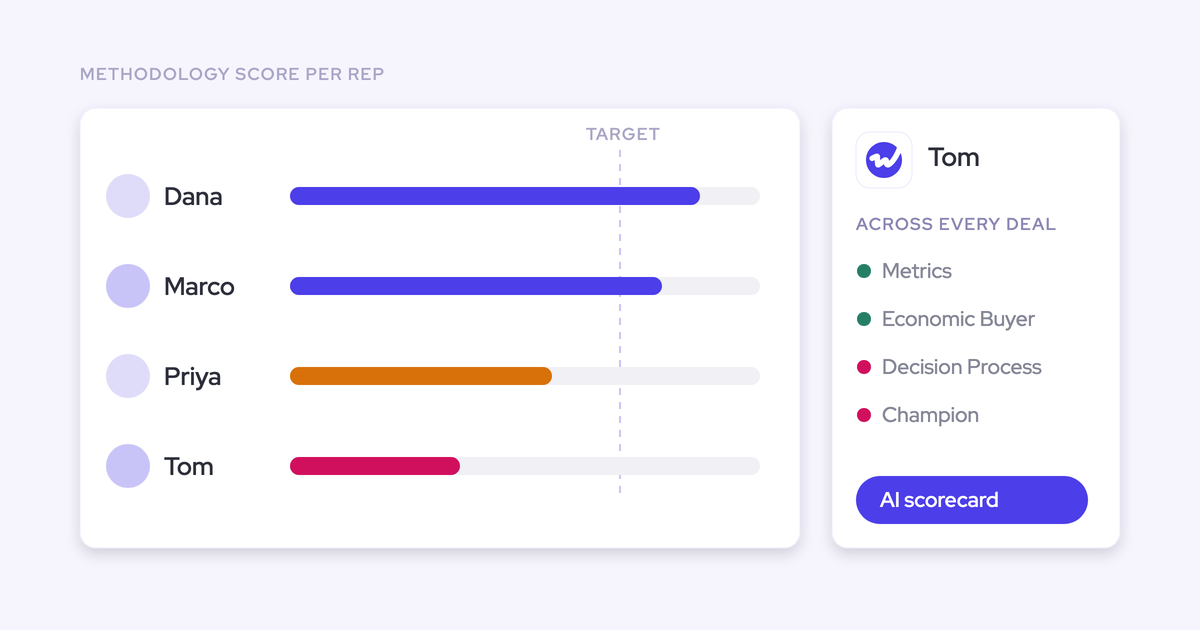
Weflow AI Playbooks are the deal-level route. A Playbook reads every email, meeting, transcript and CRM field on the opportunity and keeps each methodology element at the current best answer, not the most recent one.
Playbooks rerun whenever new activity lands on the record, and otherwise every three hours. The methodology field values write back to the corresponding Salesforce fields. Weflow ships around thirty methodology templates, and you can map your own prompts to encode a house framework.
Playbooks also check what reps type. A rep who fills a MEDDIC field with filler to get past a validation rule gets that element marked "not assessed", not complete. Each element shows one of three states:
- Fully established
- Partially established, with a note on what's missing
- Never discussed
A rep can override any field, and Weflow evaluates the override for plausibility against the deal. That keeps the rep in the loop on judgment without letting a typed answer pass as evidence.
Where Weflow AI Field Updates fall short today
- Lookup fields aren't writable. A champion or economic buyer stored as a Contact lookup can't be filled by AI.
- The field update view shows what changed, not where it came from. It doesn't mark a value as coming from the call or a web search. Agentforce and Terret show sources on each update, and that's a genuine strength of theirs.
- AI Playbook results don't cite the emails, calls or fields behind each answer. Ask Weflow AI does show its sources when you ask about the deal.
- Playbook scores stay in Weflow and aren't reportable in Salesforce. Only the methodology field values write back.
- There's no confidence threshold or write-only-if-empty mode. Each field is either automatic or review.
- Playbooks read transcripts of meetings Weflow recorded. If you record with another tool, Playbook results build from the CRM record, emails and meeting metadata.
What Weflow Conversation Intelligence and AI Field Updates cost
Weflow Conversation Intelligence is $39 per user per month, billed annually. It includes AI Field Updates, Ask Weflow AI, Agent Builder and Mobile Copilot.
There are no usage-based charges on top of the seat. Weflow carries the token cost of AI processing, including Playbook generation, so it's never billed to you.
If you want more of the platform, the bundles are:
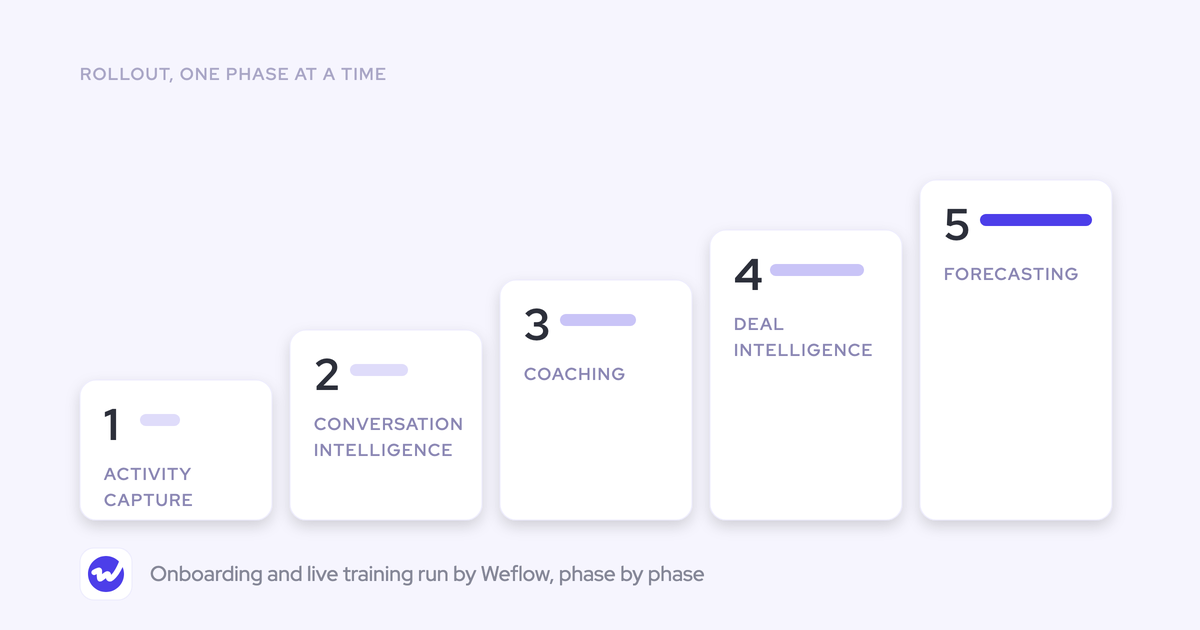
- Revenue AI Foundation at $49 per user per month: Weflow Activity & Contact Capture plus Conversation Intelligence.
- Revenue AI Business at $59 per user per month: Foundation plus Weflow Deal Intelligence.
- Revenue AI Enterprise at $79 per user per month: Business plus Forecasting.
All plans have a 10-user minimum. Everything AI Field Updates and Playbooks write lands in your own Salesforce, in fields your own reports, flows and AI can use.
If you'd like to see the per-field review screen and the Playbook panel before talking to anyone: Walk through the product yourself, no call required.
FAQ: automatic vs rep-reviewed AI field updates
Can I see which call, email or web search produced an AI value?
Not in the Weflow field update view. It shows the previous value beside the new one, but not which source produced it.
Internet search is off by default for every prompt, so a field stays on conversation data unless someone allows search for it. You can also write the restriction into the field's prompt. Ask Weflow AI does list the sources behind its answers, so it's the place to trace the evidence on a deal.

Does Weflow offer a confidence threshold or write-only-if-empty mode?
No. Each Weflow AI field update is either automatic or in review.
To protect existing content, use review mode on that field and add a prompt instruction not to update when the call adds nothing new. Momentum, Kaia and Jiminny offer write-if-empty modes, and Terret attaches a confidence score to each value.
Can AI fill a champion or economic buyer stored as a Contact lookup?
No. Weflow AI Field Updates write every Salesforce field type except relationship lookups.
If you want champion and economic buyer filled by AI, store them in a text or picklist field. Momentum can suggest an external attendee from the call for Contact lookups.
What happens to opportunities that never had a recorded call?
Per-call AI Field Updates need a call, so those opportunities get nothing from that route. Weflow AI Playbooks read emails, meetings and CRM fields on the deal as well as transcripts, so cumulative MEDDIC fields still fill on deals that run mostly in email.
Will switching this on fill fields on my existing pipeline?
New and changed opportunities are evaluated by AI Playbooks automatically. Opportunities that predate the Playbook stay empty until they're generated.
To fill them, select the older opportunities in a list and run Generate AI Playbooks in bulk.
Can sales and customer success run different auto and review rules?
Yes. Weflow supports a separate AI field update template per team, so sales, onboarding and customer success each run their own fields and write to different Salesforce objects.
The update pop-up appears only for users whose team has a template assigned. Custom objects need setup by Weflow support.
Is there an audit trail of what the AI changed?
For fields in review, the rep sees the previous value beside the new one before anything syncs. Because AI Field Updates write into native Salesforce fields, Salesforce field history tracks those changes the same way it tracks any other edit on fields where you've turned it on.
Can we approve capture in security review and turn AI on later?
Yes. Weflow Activity & Contact Capture is a standalone product, so you can bring capture in first and add Weflow Conversation Intelligence after a second review.
Weflow is SOC 2 Type II certified and GDPR compliant, runs Zero Data Retention for AI processing, and never uses customer data to train AI models. ISO 27001 is in progress, not yet certified.
Is there a token or usage charge on top of the seat?
No. Weflow has no usage-based charges, and Weflow bears the token cost of AI Playbook generation itself. You pay the seat price and nothing scales with how many calls or deals the AI reads.