Weflow Trackers: Counting Competitor, Product and Pricing Mentions Across Sales Calls
Learn how Weflow trackers count competitor, product and pricing mentions across recorded sales calls.


Weflow trackers count how often a competitor, a pricing topic or a product comes up on your recorded calls. Insights shows that count by rep, team and region over time.
You define the terms. Weflow logs every time someone says one of them and adds the hits up. Your competitive picture stops depending on what a rep picked from the closed-lost picklist.
If you've tried transcript search, you already know where it stops. Search finds calls. Trackers count mentions.
Two things to know up front:
- Counts cover recorded calls only.
- Hits arrive after each call is processed, not during it.
Trackers are part of Weflow Conversation Intelligence. If your team already records in Weflow, you already have them. This guide shows how to build trackers whose numbers hold up, how to read them each week, and how to get from a rising count to the moment a buyer said it.
What a Weflow tracker counts on your recorded calls
Weflow is the Revenue AI Orchestration platform for sales, customer success, and RevOps teams, and trackers live inside its Conversation Intelligence product.
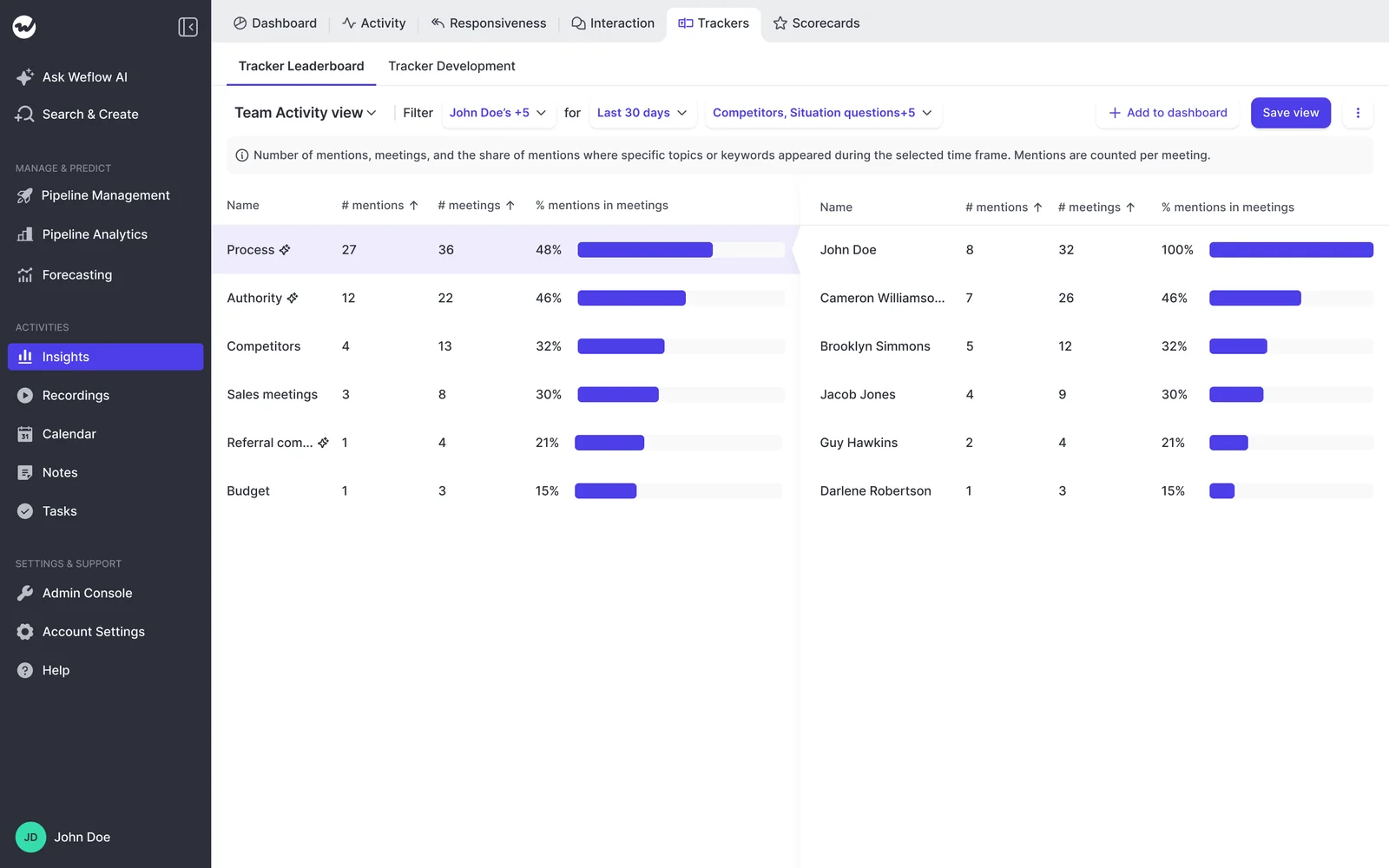
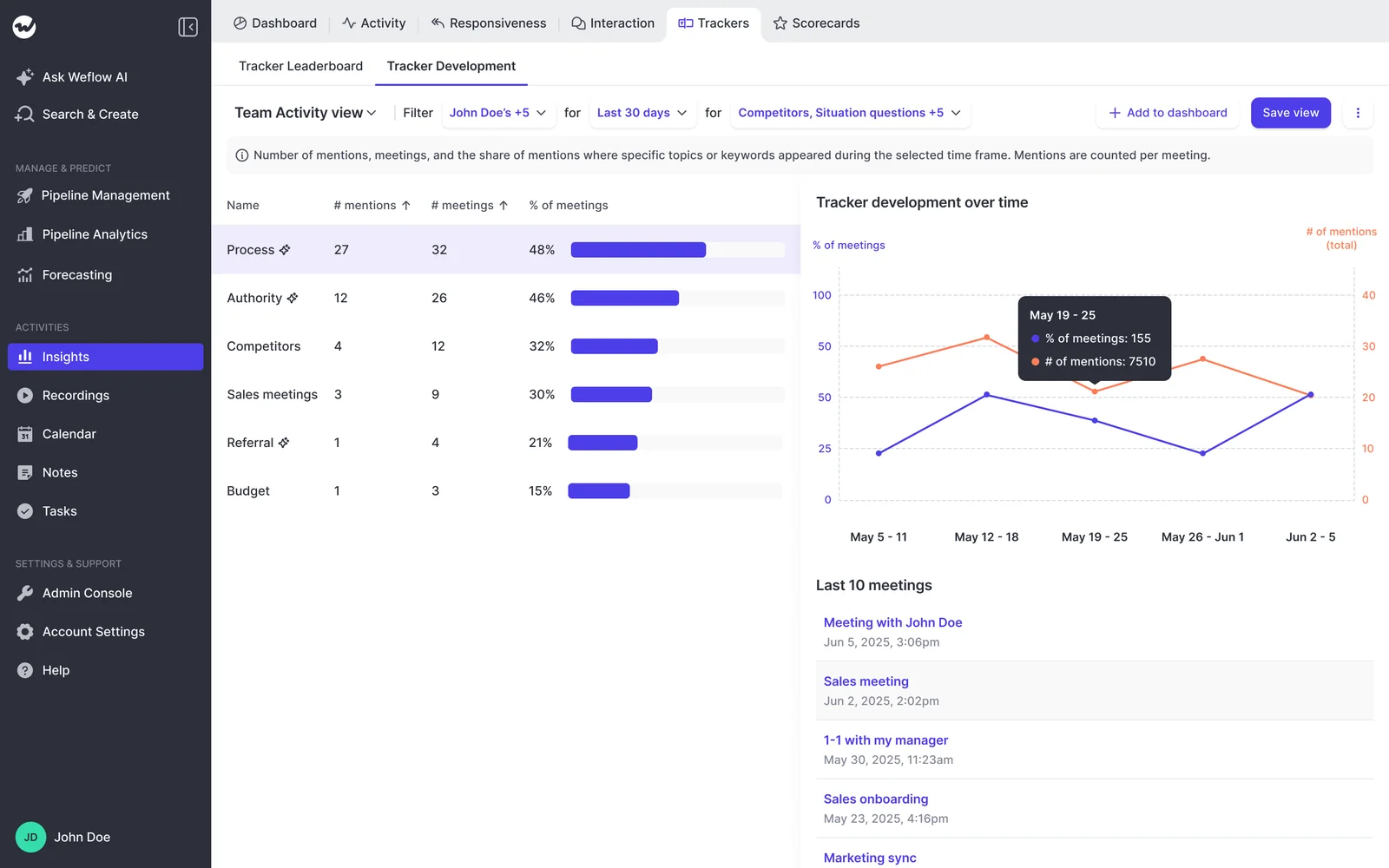
A Weflow tracker is a named list of terms, such as a competitor's name and its product names. Weflow Conversation Intelligence records a hit every time one of those terms is said on a recorded call. Insights then adds the hits up across calls, so you can see how often a topic comes up for each rep, team and region, and how that changes week to week.
Why closed-lost reasons and search never give you a count
Neither source you're working from today produces a number you can trend. One arrives too late. The other stops at the call.
Closed-lost reasons tell you a story after the deal dies
Competitor context reaches your CRM once, at the end, through a picklist a rep fills in under time pressure. More often than not it says "price."
That isn't a discipline problem with your reps. It's a capture problem. The competitor came up on a call six weeks earlier, and nothing wrote it down. The mentions that do get logged are the ones reps happen to remember, so you end up with a story instead of a count.
When product or marketing asks what customers are saying about a competitor, you end up interviewing reps. The answer you hand over is a handful of anecdotes.
Transcript search finds the calls, not the mentions
Weflow's recording search matches the words inside transcripts. It returns a ranked list of recordings where a term was said, with title matches first. Recordings where the topic was discussed at length rank above ones where it came up once.
That's useful when you need one call. It falls short when you need a number. You still have to open each recording and hunt for the moment, and search gives you no total across your team.
| Question | Recording search | A Weflow tracker |
|---|---|---|
| What it returns | A ranked list of recordings that contain the term | Every hit on the term, added up in Insights |
| Unit it counts | The call | The mention |
| Across reps and regions | No roll-up | Hits by rep, team and region |
| Over time | No trend | Hits trended week over week |
| Where in the call | You open the recording and search inside it | The hit is tied to the call it came from |
How Weflow turns tracker hits into a trend in Insights
Here's the full path from a word on a call to a number on your screen:
- You define a tracker and the terms it should match.
- Someone says one of those terms on a recorded call.
- Weflow logs the hit when the call is processed.
- Insights rolls the hits up by rep, team, region and over time.
The count sits in the same Insights view as the call metrics you already use: talk ratio, interaction, longest monologue, meeting volume and average meeting duration. You can read a pricing spike next to how much your rep talked on those calls.
The bigger advantage is legibility. A Weflow tracker matches only the terms you gave it, so you always know exactly what it counted.
When you take a number to your CRO or your marketing lead, you can explain exactly how you got it.
Which calls Weflow includes in your tracker counts
Weflow tracker counts reflect recorded calls only. How complete your number is depends on how much of your team's conversation actually gets recorded.
| Call type | Counted? | What has to be true |
|---|---|---|
| External-attendee meetings via the notetaker | Yes | The notetaker is admitted to the meeting, and the rep has signed in to Weflow at least once |
| Internal-only meetings | Not by the notetaker | The notetaker joins only meetings with at least one attendee outside your internal domains |
| Outreach dialer calls | Yes | Calls come in through the Outreach connection as audio recordings with a transcript |
| Softphone calls through the desktop app | Yes | The rep starts the recording in the Weflow desktop app, for example on Aircall or RingCentral |
| Meetings recorded with the desktop app | Yes | The rep records the meeting from the desktop app instead of using the notetaker |
| Mobile Copilot recordings | Yes | The rep records the in-person meeting in Mobile Copilot |
Our Conversation Intelligence customers typically record 50 to 70% of their meetings. When Insights shows a competitor in a share of meetings, read it as a share of your recorded meetings.
Why each Weflow tracker should follow one thing
This is the rule that decides whether your number means anything.
A tracker built to catch every variant of a topic fires on passing mentions. The report then can't tell a real competitive conversation apart from someone saying a word in passing. Because the output looks like data, the noise stays invisible until someone makes a decision on it.
Give each competitor or topic its own tracker. Keep its terms to the names buyers actually use for that one thing, and accept that you'll miss a few mentions. In return you get a count you can trend, and a rise in that count reflects a change in what buyers are talking about.
| Aspect | Catch-all "Competitors" tracker | One-thing tracker per competitor |
|---|---|---|
| What it holds | Every rival's name, generic words like "alternative" and "other vendor" | One competitor's name, its product names and the short forms buyers use |
| What it fires on | Real evaluations plus passing remarks and small talk | Conversations where that competitor came up |
| What a rise tells you | Something went up, but you can't say what | That specific competitor is showing up more |
| What you can do with it | Open every call to find out | Take it straight to pricing, messaging or a battle plan |
How to set up Weflow trackers step by step
Setup is a short sequence of decisions. Whoever owns Weflow Conversation Intelligence configuration at your company can build these with you.
- Write the question the tracker answers. "How often does our main competitor come up in new-logo calls?" makes a good tracker. "Competition" doesn't.
- Create one tracker per competitor or topic. Name it after the thing it follows, so the leaderboard reads clearly at a glance.
- Add the names, product names and short forms buyers actually say. Buyers rarely use a competitor's full legal name. They use the product name or a nickname.
- Leave out words that fire on unrelated talk. A generic word that also shows up in small talk inflates the count without adding signal.
- Open the first handful of hits before you trust the count. Jump into the transcripts and make sure each hit is a real conversation about that topic. If it isn't, tighten the terms.
- Bring your existing tracker set over if you're replacing another recorder. Weflow carries existing trackers across, so your keyword reporting doesn't restart from zero.
Which competitor, pricing and product trackers to build first
Start with three groups:
- one tracker per top competitor,
- one pricing tracker,
- one tracker per product or feature line.
Methodology key phrases are an optional fourth group. They show whether a rollout actually landed in the calls.
| Tracker | What goes in it | The question it answers, and who needs it |
|---|---|---|
| One per top competitor | The competitor's name, its product names and buyer shorthand | Is this competitor showing up more, and where? Sales and marketing |
| Pricing | The words your buyers use when they talk about cost, discounts and budget | Is pricing pushback rising, and on which team? Sales leadership and product |
| One per product or feature line | Product and feature names as customers say them | Which products are buyers asking about, and did a launch move the needle? Product and marketing |
| Methodology key phrases (optional) | The phrases your methodology trains reps to use | Are reps actually using the framework on calls? Enablement |
Pricing is usually the one your CRO asks about first. Scott Jones at KORE Wireless put it in the same list as messaging and product gaps:
"This wasn't just about sales and pipeline. This was also about understanding our market – are we putting the right messages through marketing? Are we attracting the right customers? What product gaps are we hearing in calls? Where are we getting pushback on pricing for different products?"
— Scott Jones, SVP of GTM Revenue Intelligence & Enablement, KORE Wireless
How to read your Weflow tracker counts each week
Trackers pay off as a weekly read, not a one-off investigation. Spend a short session each week on rep, team, region and trend, and look for what changed.
Pay more attention to movement than to the absolute level. Counts reflect recorded calls only, so a competitor climbing from last month tells you more than the raw total does.
It's the rhythm managers ask us for:
"essentially I want to get a recap weekly of all the calls through both teams. Like trying to just get the key signals of things."
| What you look at | What it tells you | What you do next |
|---|---|---|
| A competitor rising in one region | That competitor is getting traction with buyers there | Open the recent calls from that region, listen to how the competitor comes up, and take it to marketing and pricing |
| Pricing hits concentrated on one rep | This rep's buyers raise cost more often than the rest of the team's | Listen to that rep's pricing moments and coach the conversation before the next deal review |
| A product term climbing after a launch | Buyers are bringing the launch up on their own | Clip the best moments and send them to product and marketing |
| Methodology phrases flat after a rollout | The framework hasn't reached the calls yet | Take it to enablement and coach on the specific stage where the phrases are missing |
What you see follows your place in the Salesforce hierarchy. As a manager, you see your reports' recordings and the counts built on them.
How to go from a rising count to the call itself
A count moves you only when you can hear the moment and act on it. Scott Jones described what that's like:
"I love being able to go right to the call, transcript or email and see where something was said that the AI is referencing."
— Scott Jones, SVP of GTM Revenue Intelligence & Enablement, KORE Wireless
Jump straight to the pricing or competitor chapter
Weflow splits every recorded call into chapters by topic automatically. Chapters sit next to the transcript and the timeline.
When a pricing count jumps, you don't have to sit through a 45-minute call. Scan the chapters, click into the pricing discussion and hear what the buyer said.
Clip the moment into a playlist your team can use
Once you've found the moment, turn it into a clip. You can start a clip from:
- an automatic chapter,
- a range you drag on the call timeline,
- a passage you highlight in the transcript.
Share each clip on its own or save it to a playlist. A playlist of competitor objections becomes coaching material for your next team meeting. When product asks what customers are saying, you can send them fifteen seconds of a customer saying it instead of your summary.
Ask Weflow AI what happened when the competitor came up
The count tells you how often. It can't tell you what happened next. Ask Weflow AI answers that across many recordings in a single question, so you don't have to ask about each call one at a time.
Questions managers ask it:
- "Which competitors came up in the last six months, and what happened in the deals when they did?"
- "On the calls where pricing came up this month, what did the buyer push back on?"
- "How did my reps respond when this competitor was mentioned?"

What Weflow trackers won't do for you
Weflow trackers are deliberately literal, and they work after the call. Here's what that means in practice.
Weflow trackers match your terms, not paraphrases
A Weflow tracker catches only the terms you list. If a buyer describes a competitor without naming it, the tracker won't count it.
Some tools use AI to catch the same idea phrased differently, for example Aviso Smart Trackers, Salesloft Smart Topics and Momentum Smart Tags. If paraphrase matching is what you need most, those tools do it.
The tradeoff runs the other way too. A Weflow tracker tells you exactly what it counted, so the number holds up when someone questions it.
Weflow tracker hits arrive after the call, not during it
Weflow has no live in-call assistant and no real-time battlecards. When a buyer names a competitor, the tracker hit lands once the call is processed, not as a prompt on the rep's screen.
Clari Copilot does ship live battlecards that appear when a call hits a trigger word. If real-time prompts are what your reps need, that's a real difference.
Our view is that a rep reading a battlecard mid-call isn't listening to the buyer. We put the effort into making the post-call count, chapter and clip fast to reach.
What Weflow trackers cost on a Conversation Intelligence seat
Trackers come with the Weflow Conversation Intelligence seat. That's $39 per user per month, billed annually, with a 10-user minimum. You get the same trackers inside any bundle that includes Conversation Intelligence, such as Weflow Revenue AI Foundation at $49 per user per month.
There's no consumption meter on how many trackers you run. That's a deliberate contrast with credit-based models. In Gong, AI tracker configuration has the largest effect on credit consumption, and Gong's remedy is to unpublish trackers or narrow them by team, user, account type or deal stage. On a Weflow seat, how broadly you track is a quality decision, not a budget one.
| What you use | Where it comes from | Extra cost |
|---|---|---|
| Trackers and tracker counts in Insights | Conversation Intelligence seat, standalone or in a bundle | None |
| Chapters, clips and playlists | Conversation Intelligence seat | None |
| Ask Weflow AI Pro | Included with every Weflow plan and bundle | None |
| Desktop app and Mobile Copilot | Conversation Intelligence seat | None |
| Viewer seats for people who only read dashboards | Free view-only licenses | None |
Walk through the product yourself, no call required.
Questions sales managers ask about Weflow trackers
Does Weflow show whether the customer or my rep said the term?
Weflow labels every speaker as internal or external, using Salesforce and calendar data. When you open a hit in the transcript, you can see whether your rep or the buyer said it.
Why is a call I expected missing from my tracker counts?
A call that wasn't recorded can't produce a hit. The usual causes:
- The notetaker waited in the lobby and was never admitted. It leaves after about ten minutes. Your rep can send it back in mid-call from the Weflow calendar.
- The rep has a license but never signed in to Weflow. The notetaker doesn't join meetings for that user until they log in once.
- It was a desktop-app call the rep didn't start. Desktop-app recordings begin only when the rep starts them.
Can I see tracker counts for teams outside my own?
Visibility follows the Salesforce hierarchy by default, so you see your reports' recordings. Admins can widen that in three ways:
- set up a custom Weflow hierarchy,
- grant access through Teams,
- give people outside Salesforce a View-Only license.
How many terms should one Weflow tracker hold?
One tracker should follow one thing: a single competitor and its products, or a single topic. Add the terms buyers actually use for that thing and stop there. Once a tracker starts catching passing mentions, the count stops meaning anything.
Do managers who only read Insights need a paid Weflow seat?
No. Weflow includes free viewer seats for leaders and managers who only read dashboards. Paid seats are for people who record calls.
Do our trackers and recordings come with us from another recorder?
Yes. Weflow carries your existing tracker set over, so keyword reporting doesn't restart from zero.
We import recordings and transcripts through your old vendor's API, or from files you've exported. There's no extra cost, and it takes about one to two weeks depending on volume.