How to Score Account Health With Weflow AI Playbooks on the Account Object
Learn how to score account health with Weflow AI Playbooks on the Salesforce Account object.


Yes, you can attach the AI Playbook your sales team runs on opportunities to the Salesforce Account object and use it as an account health read. On the account, the playbook reads every related opportunity, email, meeting, Weflow-recorded transcript and account field. It then marks each element as established, partial or never discussed. That gives you a read built from months of conversations, not a picklist someone fills in from memory after the last pleasant call.
This guide covers three things: writing the playbook around what churn looks like for your accounts, setting it up for a customer success team, and tracing any red flag back to the call or email it came from. Your CSMs need Weflow Conversation Intelligence seats, at $39 per user per month, for their calls to count. Think of it as the evidence-first inspection your sales leaders already run in Weflow Deal Reviews, pointed at the customer instead of the deal.
There's an edge you should know about before you start. The account playbook evaluates one account at a time, and its score lives in Weflow. It won't sort your whole base by churn risk for a Friday one-on-one, and it won't feed a Salesforce report or your BI tool. We cover both limits in their own section near the end.
What a Weflow AI Playbook does on the Salesforce Account object
Weflow is the Revenue AI Orchestration platform for sales, customer success, and RevOps teams. A Weflow AI Playbook attached to the Account object evaluates everything related to that account, not one deal. That matters for health, because retention work spans several opportunities at once, and the data that predicts renewal lives on the account: contract value, seats, usage and satisfaction.
Why your monthly health score misses the churn signals
A health score built from a CSM's memory runs on the last pleasant call. The signals that predict churn were said out loud on calls and never reached the account record.
Here's what that gap looks like in practice:
| What the health picklist says | What the calls actually said |
|---|---|
| Green: the last business review was friendly | The champion who signed has moved on, and the new contact hasn't engaged |
| Green: the relationship feels warm | The tone cooled across the last three calls |
| Green: no complaints this quarter | Usage questions turned into pricing questions |
| Green: lots of activity on the account | Most of those calls were escalations |
| Green: CSAT and NPS look fine | The people answering surveys are the happy ones |
The cost is that churn arrives as a surprise, with no intervention window. A CSM carrying 30 or 40 accounts gets to the red ones too late, and by then it's a rescue mission.
Two structural reasons make it worse:
- Capture and conversation licenses usually went to the people who sell, so post-sale calls never reached Salesforce.
- Most scoring is built around the opportunity, so retention work outside an open deal makes CS look like it's doing nothing.
How the account playbook turns conversations into a health read
Four mechanics decide whether the read is worth trusting: what it reads, how it judges evidence, how fresh it stays, and what the score actually is.
What the playbook reads across every account
The account playbook reads everything Weflow can relate to the account in Salesforce:
- Every opportunity on the account, including renewals and expansions.
- Every email captured against the account and its contacts.
- Every meeting on the account's timeline.
- The transcript of every call Weflow recorded on the account.
- The account's own fields, such as contract value, seat count, usage and satisfaction scores.
Transcripts count only if Weflow recorded them. A team that records with another tool gets a read built from the CRM record, emails and meeting metadata, which is why Step 1 of the setup starts with recording.
How Weflow separates real evidence from filler and silence
Weflow runs two passes over the account. The first fills in each element from the evidence. The second judges how well each element is actually established, and it marks filler, including text a person typed, as not assessed instead of complete.
The results show in three states:
| State | What it means and what you do with it |
|---|---|
| Established | The evidence clearly supports the element. You treat it as real signal and move on. |
| Partial | Some evidence exists, with a note on what's missing. You know exactly what the CSM needs to find out on the next call. |
| Never discussed | Nothing on the account supports the element. On a churn element, that's a question nobody has asked yet. |
"Never discussed" is the honest output on a quiet account. Where your CSM's gut says green and the playbook says there's no evidence either way, you've found the happy ears.
How often the account health read refreshes
The account playbook re-evaluates whenever new activity lands on the account, and otherwise every three hours. That holds for accounts created or changed after you configure the playbook.
Accounts that existed before setup stay blank until someone regenerates them. Step 6 covers that.
What the account health score is, and what it isn't
The account playbook score is a per-account, per-element evidence read with completeness states, stored as a Weflow field. Be clear on what you're getting before you plan a rollout around it:
| It is | It isn't |
|---|---|
| A read across every record related to one account | A single health number across your whole base |
| Scored per element, as established, partial or never discussed | A sortable column you can rank 1,500 accounts by |
| A Weflow field, marked with a W in the interface | A Salesforce field your dashboards or BI tool can read |
| Re-evaluated on new activity and every three hours | A monthly snapshot |
How to write an AI Playbook as a churn playbook
A sales playbook describes a deal that's ready to close. For account health, you turn it upside down. You describe what a perfect churn looks like, and the same scoring machinery measures how close each account has come to it.
This is the part that makes the read useful. A generic "relationship strength" element gives you happy ears with extra steps. Named churn mechanisms give you signals you can act on.
Describe what a perfect churn looks like for your accounts
Write the failure state as the goal, broken into mechanisms the playbook can detect separately. Weflow supports custom elements and your own prompts per element, so you build this exactly like a house methodology.
These are the six mechanisms we see most, with the kind of criteria you'd write for each:
| Churn mechanism | What the element asks the playbook to look for |
|---|---|
| Suite consolidation | The customer mentions a suite vendor they already pay for that covers the same job, or an IT or procurement push to cut overlapping tools |
| Adoption going quiet | Fewer meetings with end users, the champion slowing down on replies, falling usage fields, or questions about reducing seats |
| Implementation never live | A go-live date that keeps moving, project calls still about setup months after the contract started, or integration work stuck on the customer's side |
| Subscription treated as a one-off project | The customer talks about the rollout as finished, with no owner and no plans beyond the first use case |
| Support responsiveness | Complaints about how long issues take to resolve, or repeat escalations on the same problem |
| Sold versus delivered gap | The customer references something promised during the sale that the product doesn't do, or that they haven't been able to make work |
Keep escalation calls from counting as healthy engagement
A raw engagement count points the wrong way. The CS teams we talk to treat the frequency of real human engagements as the strongest renewal signal they have, but only once proactive engagement is separated from reactive engagement.
| Engagement | How to treat it |
|---|---|
| Business reviews | Proactive. Counts toward healthy engagement. |
| Adoption calls | Proactive. Counts toward healthy engagement. |
| Onsite visits | Proactive. Counts toward healthy engagement. |
| Escalations | Reactive. A cluster of them is a warning sign. |
| Emails, tickets and chats | Not a human engagement. Leave them out of the frequency count. |
Phrase the element so it weighs the two differently. For example: "Count business reviews, adoption calls and onsite visits as healthy engagement. Treat escalation calls as a risk signal, never as engagement."
If your CSMs visit customers in person, Weflow Mobile Copilot records those meetings, so onsite visits show up as evidence too.
Tell each element what doesn't count as evidence
An element fills with something plausible and wrong unless the prompt states its exclusions. On the sales side, we've seen a metrics field return a customer's headcount, which is a number but tells you nothing. The CS version of that mistake is just as easy to make.
Writing the churn playbook is partly writing down what your team means by each term. Here's what that looks like for "adoption going quiet":
| Counts | Doesn't count |
|---|---|
| The customer says fewer people are using the product | The number of seats in the contract, which is purchase, not adoption |
| The champion asks how to remove seats | Your own team's internal calls about the account |
| Business reviews cancelled or pushed repeatedly | A meeting moved once for scheduling |
| A falling active-users field on the account | A low active-users number on an account that's still onboarding |
Point the playbook at your usage, NPS and contract fields
The account fields your team already stores can feed the read. In Context and Sources, you decide which Salesforce objects the AI may read, custom objects included, and you describe what each field means so the AI doesn't have to guess.
Field context is plain language. A few examples of what you'd write:
- Active users field: "Customer users active in the last 30 days. Compare it against seats purchased. A falling number matters more than a low one."
- NPS field: "Score from the last survey. Only a minority of users respond, so treat it as a weak signal next to what's said on calls."
- Seats field: "Seats purchased under the current contract. This is not adoption."
- Renewal date field: "Date the current subscription ends. Risk closer to this date needs action sooner."
Step 3 walks through the configuration.
How to set up an account health playbook in Weflow
By the end of these six steps, every account your CS team touches carries a churn read built from its calls, emails and fields.
Step 1: Give CSMs Weflow Conversation Intelligence and a first sign-in
Transcripts count only if Weflow recorded them, so each CSM who runs customer calls needs a Weflow Conversation Intelligence seat. In the Conversation Intelligence Users tab, you can add your Customer Success team as a whole instead of user by user.

Each licensed CSM then has to sign in to Weflow once. The note taker won't join their meetings until they do. It joins meetings where at least one attendee is outside your internal domains, so customer calls qualify.
Quick check: an assigned user who hasn't signed in shows as external in the admin view.
Step 2: Record CS calls against the account, not a renewal deal
A recorded call doesn't need an opportunity for Weflow to transcribe it and extract from it. That's what fixes the misfiling that made your team distrust automation in the first place.
Weflow supports different summary and field-update templates per team. Give customer success its own template that writes to the account, and escalations and project calls stop landing as evidence on a renewal opportunity.
Step 3: Let the AI read your account fields in Context and Sources
In the admin console's AI section, open Context and Sources:
- Select the Account object, plus any custom objects that hold health data, such as usage or survey records.
- In Object Context, describe what each object represents for your business.
- In Field Context, describe what your key health fields mean, using the kind of language shown in the previous section.
Step 4: Build the playbook on the Account object
In AI Playbooks, create a custom playbook on the Account object. Each churn mechanism from your design becomes an element, with its own prompt.
Put the exclusions directly into each element's prompt, and phrase the engagement element so escalations read as risk. The design work you did above is the playbook. This step is where you type it in.
Step 5: Assign the playbook to your customer success team
Playbooks are assigned per team. Assign the churn playbook to customer success, and CS runs its own criteria without touching the MEDDPICC or SPICED scoring your sales team uses on opportunities.
Step 6: Generate the playbook on accounts that existed before setup
Only accounts created or changed after you configure the playbook evaluate automatically. Every account that already existed stays blank until someone regenerates the playbook on it.
Start with the accounts that matter most: renewals in the next two quarters, or your largest contracts. After that, new activity keeps those accounts current.
When you read the results, look for the W. It marks Weflow fields, so you can see at a glance which values live in Weflow and which sit in Salesforce.
Which settings to start with on your first account playbook
Start narrow, so the read earns your team's trust before it replaces anything:
- Assign the playbook to one CS team first. Assignment is per team, so you can prove it on one book before rolling it out.
- Start with the two or three churn mechanisms you actually lose accounts to, not all six.
- Write exclusions into every element from day one. A confidently wrong answer costs you more trust than a blank one.
- Keep your existing health field running in parallel. The playbook score won't reach Salesforce reports, and comparing the two shows you where your CSMs' instincts and the evidence disagree.
How Ask Weflow AI shows where a red flag came from
Playbook elements are synthesized across many calls, emails and fields at once, so they show as a filled element with a completeness state, not as a quote with a link. When you want the evidence behind a partial or red element, ask Ask Weflow AI on the account.
Ask Weflow AI scoped to an account reads every email, event and transcript on it and lists the sources it used. Questions CS leaders ask:
- "Who is our champion on this account today, and when did we last hear from them?"
- "List every escalation on this account this year and what triggered each one."
- "Which contact is actually the decision maker, based on the email history?"

That's what lets you walk into a renewal conversation with what the customer said, not what someone remembered.
I love being able to go right to the call, transcript or email and see where something was said that the AI is referencing.
Scott Jones, SVP of GTM Revenue Intelligence & Enablement, KORE Wireless
What extending account playbooks to your CS team costs
The main cost is Weflow Conversation Intelligence seats for the CSMs who record customer calls:
| Item | Cost | What's included |
|---|---|---|
| Weflow Conversation Intelligence seat | $39 per user per month, billed annually | Recording and transcription, AI field updates, Ask Weflow AI Pro, Weflow Agent Builder free tier (25 agent actions per month), Weflow Mobile Copilot, desktop app |
| Weflow Activity & Contact Capture seat | $19 per user per month, billed annually | Needed only if your CSMs' emails and meetings don't reach Salesforce today |
| Account playbook evaluation | No charge | Weflow bears the AI cost, so adding accounts adds no token charges |
| View-only licenses | No charge | Unlimited, for leaders who review recordings, summaries and transcripts without recording |
Your bill tracks the number of CSMs who record, not the number of accounts in your book.
What the account playbook won't do for you yet
Two limits matter most for a CS leader, and you should weigh them before you commit.
It won't rank your whole account base by churn risk
The account playbook evaluates one account at a time. It doesn't run across your whole book in one pass, and Weflow has no account board today.
A ranked, descending churn list across 1,500 accounts isn't something the account playbook produces. Clari's account module does give account managers a view of the customer as a whole, and if ranked account views are your main requirement, Clari does that better today.
The route that works now is to generate the playbook on the accounts you're reviewing and read across them, while your existing health field stays the column you sort on.
Its score won't appear in Salesforce reports or BI
The account playbook score is a Weflow field, marked with a W, so it can't go into a Salesforce dashboard or be pulled into Power BI or another BI tool. If your leadership health readout runs out of Salesforce reports, the playbook read sits next to that readout, not inside it.
If either limit decides it for your team, bring your CS setup to a call and we'll walk through where the account playbook fits and where it doesn't.
See how Weflow captures activity, updates Salesforce fields from calls, and rolls up your forecast. Book a 30-minute demo.
Questions CS leaders ask about Weflow account playbooks
Is recording required for the account playbook to be useful?
No, but it's a much thinner read without it. With no Weflow recordings, the account playbook works from the CRM record, emails and meeting metadata only. The churn signals CS leaders care about, such as cooling tone or a sold versus delivered gap, are usually said on calls, so recording is where most of the value comes from.
Can the account playbook write to our existing health field?
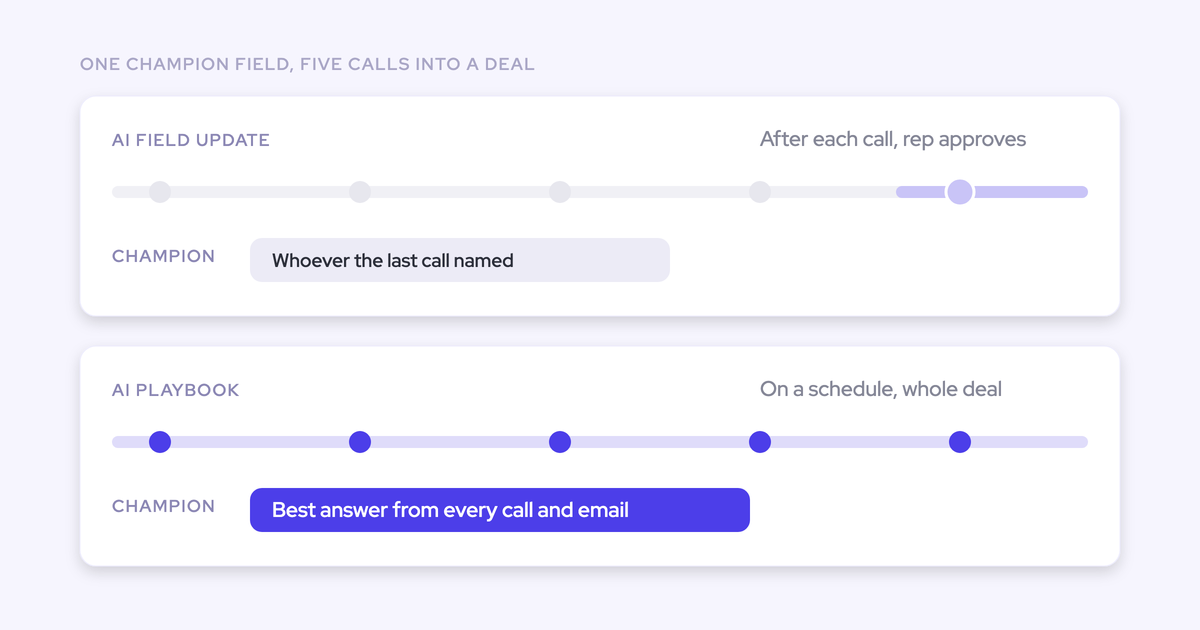
The playbook score can't. It's a Weflow field, marked with a W, and it doesn't reach Salesforce fields or reports. What does write to Salesforce is a per-call AI field update from your CS template, which can fill a field on the account after each call. Keep in mind that it reflects that one call, while the playbook reads the account's whole history.
Why are our existing accounts blank after setup?
The playbook evaluates automatically only for accounts created or changed after you configured it. Older accounts stay blank until someone regenerates the playbook on them. Start with upcoming renewals and your largest contracts.
Does it work alongside ChurnZero or another CS platform?
Weflow reads what lives in Salesforce. If usage or health data from your CS platform lands in Salesforce fields or custom objects, expose those in Context and Sources and the playbook reads them. Activity your CSMs log only in the CS platform stays invisible to Weflow, which is why capturing their emails and meetings into Salesforce matters.
Does the playbook read Salesforce cases and support tickets?
Weflow reads Salesforce cases. It isn't a helpdesk and doesn't replace Zendesk or Intercom, so tickets that live only in those tools aren't part of the read. Ticket handling stays in your support tool.
Can customer success run a different playbook from sales?
Yes. AI Playbooks, summary templates and field-update templates are all assigned per team. Customer success runs its churn playbook on accounts while sales keeps its methodology scoring on opportunities.
How do we handle recording consent and GDPR on customer calls?
Weflow is SOC 2 Type II certified and GDPR compliant, processes AI with Zero Data Retention, and never uses customer data to train AI models. We provide a Data Processing Agreement with EU Standard Contractual Clauses and host in EU, US or APAC regions. You can set recordings to delete after a fixed period, such as every 30 days.
Consent expectations differ by region, and European customers tend to expect a visible notice. Weflow's consent flows include a pre-meeting email with an opt-out link for Microsoft Teams, and an in-call chat message that lets a participant remove the recording, which permanently deletes it.
What happens to our account data if we stop using Weflow?
Activity, contacts, summaries and AI field updates that Weflow writes to Salesforce stay in your org, on native and custom objects. The playbook score is a Weflow field, so it doesn't stay behind in Salesforce.
If you ever stop using Weflow, the data persists. It is your data.