Leaving Chorus at the ZoomInfo Renewal: Unbundling, Call History and Cutover
Decide how to leave Chorus at ZoomInfo renewal: save call history, unbundle data, and cut over in Salesforce


Leaving Chorus at a ZoomInfo renewal is a contract-and-data project before it's a tool choice. You've probably already decided Chorus goes. Whether it actually goes this year depends on three things: whether your call history is still retrievable, what Chorus feeds inside your Salesforce org, and what ZoomInfo charges for the data platform once Chorus is out.
Two checks belong on this week's list:
- Does your Chorus package include API access?
- Is 180-day auto-delete switched on?
Together they decide how much history you can still move.
If the history is there, it can move into Salesforce with an API key through Weflow Conversation Intelligence, relinked to the accounts, opportunities and contacts each call belongs to. Weflow is the Revenue AI Orchestration platform for sales, customer success, and RevOps teams.
What follows is the project plan you can defend to your CFO and your EVP:
- Inventory what Chorus feeds.
- Secure the history.
- Take a specific question list into the ZoomInfo renegotiation.
- Get finance and security sign-off.
- Cut over with a team-scoped pilot.
If you bought Chorus standalone rather than inside ZoomInfo, the unbundling step shrinks to a cancellation. Everything else applies unchanged.
When you should keep Chorus instead of switching
Some teams should stay on Chorus. You're one of them if any of these apply:
- Coaching is the core use. Chorus scorecards, Smart Playlists and peer review are strong. If your managers run their coaching program out of them, switching means rebuilding that program, not just moving data.
- You depend on Chorus's capture breadth. Chorus integrates with 19 web-conferencing and screen-share providers and more than 30 dialers. Weflow Conversation Intelligence records Zoom, Google Meet, Microsoft Teams and WebEx, and it doesn't capture VoIP phone calls today.
- ISO 27001 is a hard procurement gate. ZoomInfo's ISO 27001 certification covers Chorus. Weflow holds SOC 2 Type II, and our ISO 27001 is in progress, not certified.
- Your managers rely on ZoomInfo enrichment inside calls. Chorus shows ZoomInfo's profile and org chart for every participant and recommends unengaged buying-committee contacts. That comes from ZoomInfo's own database.
- You're not on Salesforce. Weflow works only with Salesforce.
If none of these apply, the plan below is yours.
What you need ready before the ZoomInfo renewal talks
The renewal date sets the whole timeline backwards, so gather these five things before Step 1:
- The renewal date and your internal decision deadline. The decision deadline usually sits weeks ahead of the renewal, and it's the date that actually matters.
- A copy of your ZoomInfo order form. You need it to see whether Chorus appears as its own line and what the term says about termination.
- Your Chorus package tier. Basic, Revenue Intelligence or Enterprise decides which export paths are open to you.
- A Salesforce admin and a mail or IT admin. Both need to be in the room for the install session.
- A named owner for every team that consumes Chorus data. Sales, CS, marketing and enablement each need someone who'll tell you what they lose and sign off on the replacement.
Step 1: Map everything that depends on Chorus today
Chorus is wired into more than the sales team's call library. List every dependency before you switch anything off, because the inventory is what keeps RevOps from finding out about a broken Flow from a VP.
Chorus objects, reports and Flows inside your Salesforce org
The Chorus managed package leaves several reportable artifacts in your org, and each one needs a decision:
- Engagement and Moment objects. Chorus writes calls to Engagement records and tracker hits to Moment records. Once Chorus stops, both stop updating, and every report built on them freezes at the cutover date.
- Transcripts on Engagement records. With Push Transcript on, Chorus writes each recording's full transcript to the Engagement object in Salesforce. Anyone searching or reporting on those transcripts loses new data the day Chorus stops.
- Six pre-built Chorus reports. They cover the following:
- Closing opportunities with or without leaders
- Competitive mentions over time
- Early-stage pricing mentions
- Single-threaded opportunities
- Opportunities with next steps
- Win rate with competitive mentions
- Custom report types. Any report type joining opportunities, engagements and moments needs a new data source.
- Flows triggered by Moment records. If an admin built a Flow that alerts a manager when a risk tracker fires, that alert goes silent with no error.
- "Chorus -" Tasks in activity reporting. Chorus writes a Task, of type Call by default, named "Chorus -" plus the meeting title, or an Event if your admin chose that. Activity reports that filter on that naming will show a sudden drop in meetings.
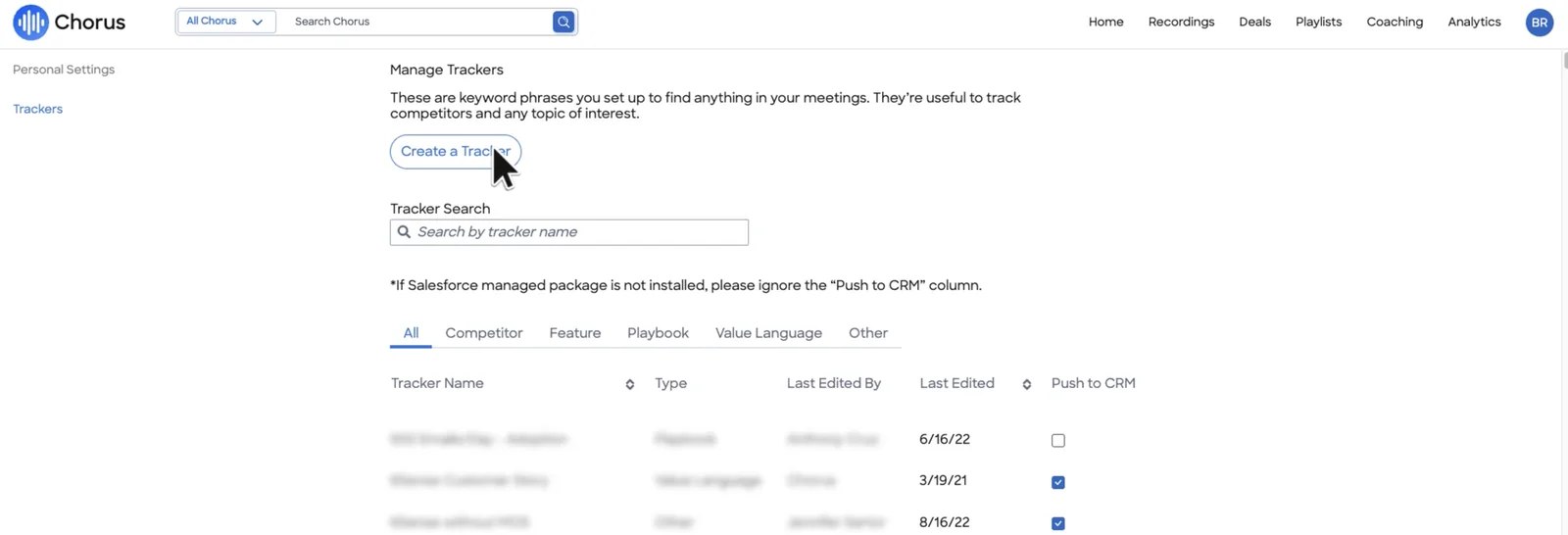
The trackers feeding those Moment records are set in Chorus's Manage Trackers screen. Its Push to CRM column marks which trackers write to Salesforce through the managed package:
Integrations, AI tools and teams that read Chorus data
Other systems and teams have their own access path to Chorus data, and each path needs a replacement:
- Gainsight (CS operations). Chorus creates a Gainsight timeline activity per call with the recording link, attendees, trackers and duration, plus the summary and action items on Enterprise.
- Clari (sales operations or whoever runs forecasting). Clari shows Momentum by Chorus inside Clari deal and account views.
- The ZoomInfo managed package (Salesforce admin). Chorus uses the ZoomInfo company ID from this package for domain matching. If you keep ZoomInfo for data, the package stays. It just stops serving Chorus.
- ZoomInfo's MCP server (whoever connected the AI assistants). Since July 2026, its conversation_intelligence tool answers account questions from Chorus recordings, emails and transcripts. That answer disappears with Chorus.
- Marketing and CS (their own ops leads). These teams read transcripts directly, and none of them bought the tool.
Use this table as your inventory. Fill in the owner and replacement columns per row:
| Dependency | Where it lives | Owner | What breaks | Replacement path |
|---|---|---|---|---|
| Engagement and Moment records | Salesforce, Chorus managed package | Salesforce admin | Reports freeze at cutover | Weflow recording record |
| Six pre-built Chorus reports and custom report types | Salesforce | RevOps analyst | No new data | Rebuild on Weflow data |
| Flows on Moment records | Salesforce | Salesforce admin | Alerts stop silently | Rebuild on Weflow trigger |
| "Chorus -" Tasks | Salesforce activity reporting | RevOps analyst | Meeting counts drop | Update report filters |
| Gainsight timeline activities | Gainsight | CS ops | No new call activity | To decide |
| Momentum in Clari | Clari | Forecast owner | No call context in deals | To decide |
| ZoomInfo MCP conversation tool | AI assistants | Whoever connected them | Call answers stop | Weflow MCP connector |
| Transcript reading by marketing and CS | Chorus app | Team leads | Access path disappears | To decide |
Step 2: Secure your Chorus call history before the contract ends
Four checks decide which migration path applies and how much history survives. Run them in this order, before you commit to anything.
Confirm your Chorus package includes API access
Chorus comes in three packages: Basic, Revenue Intelligence and Enterprise. ZoomInfo notes that API access may be limited to Revenue Intelligence or Enterprise, and it points users to their Chorus admin for what their package includes.
This check decides whether the API-key import path is open to you:
- If you have API access: the import runs on an API key. Ask ZoomInfo in Step 3 whether that access lasts through your contract's final day.
- If you don't: the raw file export path applies, and the question for ZoomInfo becomes what export rights you hold at termination.
Check whether 180-day auto-delete has already removed calls
Chorus keeps recordings until an admin or the recording owner deletes them, unless automatic deletion after 180 days is switched on. That's the only automatic deletion period Chorus offers.
If someone turned it on during a privacy review two years ago, everything older than six months is already gone. Look at your Chorus retention settings this week, before you promise leadership a full archive.
Find out if Chorus recordings sit in your own cloud bucket
On the Enterprise package, Chorus can store recordings in your own AWS S3 or Google Cloud bucket through a Custom Media Bucket. Your admin would have added it on the Chorus Integrations page.
If you have one, the video already sits in your storage, and the raw-file path is open for the media. Transcripts and the rest of the Chorus data don't move with the bucket, so you still need the API or an export for those.
Decide what must come across: transcripts first, video second
Transcripts and their metadata carry the usable history. Summaries, field updates and search are all built from them. Video matters mainly for clip libraries. When the window is short, secure the transcripts first and treat video as the part you recover if you can.
| Data | Priority | Why |
|---|---|---|
| Transcripts | Must migrate | Every summary, search and field update is rebuilt from them |
| Participants and dates | Must migrate | Without them you can't tell who said what, or when |
| Salesforce record association | Must migrate | It ties each call to the right account, opportunity or contact |
| Video files | Recover if possible | Needed for watching calls back, rarely for analysis |
| Clips and playlists | Recover if possible | They matter for onboarding libraries, and enablement can rebuild the best ones |
How Weflow brings your Chorus history into Salesforce
Weflow imports your Chorus recordings and transcripts with an API key, reprocesses them, and relinks each call to the Salesforce record it belongs to. Here's the mechanism, and where each part of the data lives afterwards.
How the Weflow import relinks Chorus calls to Salesforce records
The import runs in this order:
- You share an API key for Chorus. There's no manual export or file upload on your side.
- We pull your recordings and transcripts through the Chorus API.
- Where the Chorus API returns the Salesforce association, we use it directly to map each recording to its account, opportunity or contact.
- Where the association isn't in the API, our own lookup service matches each recording to the right Salesforce records.
- We reprocess the library rather than just storing it. Libraries in the thousands of recordings become searchable and scoreable in Weflow, so the switch doesn't reset your team's memory.
If no API key is available, a raw file export can also work. Our team evaluates the export before the import starts. This is the path for teams on a package without API access, or with video in a Custom Media Bucket.
Chorus's own backfill solves a different problem. It re-links meetings Chorus already holds after a broken CRM connection. You request it from support and ZoomInfo engineering runs it. It doesn't move anything out of Chorus.
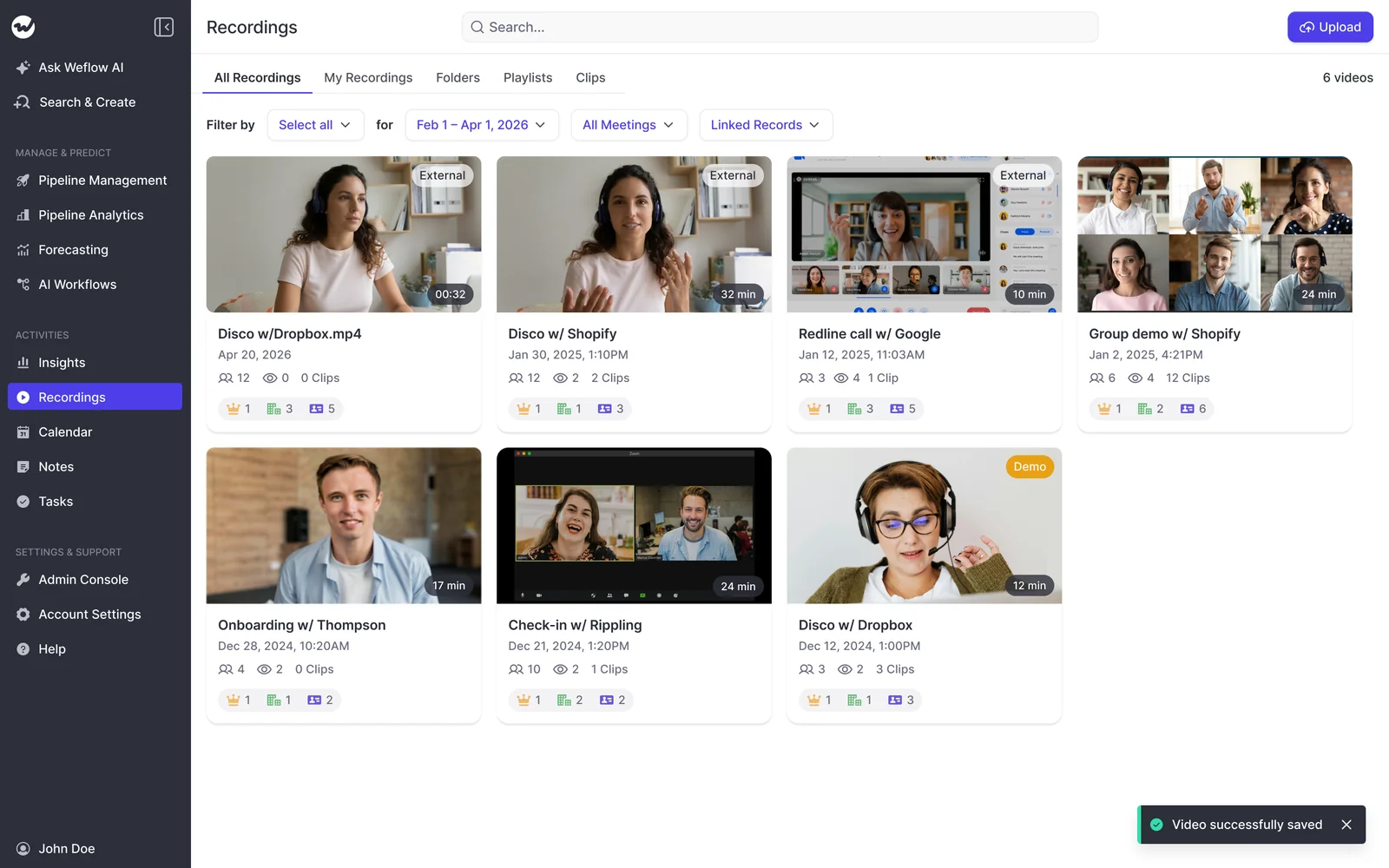
Once imported, your Chorus history sits in the same recordings library as every new call:
What lands in Salesforce and what stays in Weflow storage
Weflow writes each transcript and its summary to a recording record in Salesforce, alongside an indexing object. The transcript is reportable, permissioned and queryable with the rest of your CRM.
Video is different. Storing video in Salesforce file storage is expensive, so recordings stay in Weflow's storage and are available over our API.
On your security call, someone will ask the question one prospect put to us directly:
"Do we own like the underlying data that's been pushed in Salesforce, but will we also own like the phone calls in that transcription too? If we say we use your platform but then we decided to move on, would we own those calls?"
Here's the precise answer. Our commitment that data stays in your Salesforce after cancellation covers the activity and contact layer. It doesn't cover recordings or pipeline history, so you'd pull those through the API before you leave.
| Data type | Where it lives | If you leave Weflow |
|---|---|---|
| Emails, meetings and contacts | Native Salesforce objects | Stays in your Salesforce |
| AI field updates | Your own Salesforce fields | Stays in your Salesforce |
| Transcripts and summaries | Salesforce recording record | Export through the API before you leave |
| Video recordings | Weflow storage, in your chosen region | Export through the API before you leave |
| Pipeline snapshots | Weflow storage | Export through the API before you leave |
By default Weflow keeps recordings for as long as you subscribe, with no storage cap under fair use. If your security team treats retention as a control, you can have recordings deleted after a set period, such as every 30 days.
Step 3: Ask ZoomInfo these questions before you renew
ZoomInfo publishes no Chorus prices. Chorus sells on custom plans and is often bought inside a wider ZoomInfo subscription, so unbundling starts with questions, not assumptions. Paste these into an email to your ZoomInfo rep.
If you bought Chorus standalone, skip the unbundling questions and send the termination questions with your cancellation notice.
Questions on unbundling Chorus from your ZoomInfo contract
- Is Chorus a separate line item in our contract? If it isn't, you can't see what dropping it saves, and neither can your CFO.
- What does our data platform cost without Chorus? This is the number that decides whether the switch saves money or just moves it.
- Does removing Chorus change our credits, tier or plan? Your credits and feature availability are tied to your plan, and you need to know if they move.
- What happens to the conversation_intelligence tool in your MCP server once Chorus is gone? Anyone using AI assistants on call data needs this answer before cutover.
Questions on recording access and export rights at termination
- How long do our recordings and transcripts stay accessible after Chorus ends?
- What export rights do we hold at termination, and in what format?
- Does our API access remain active through the contract's final day?
- Can we export video from a Custom Media Bucket and transcripts separately?
Step 4: Get the switch past your CFO and security team
The switch survives finance and security when you answer three things with specifics: optics, cost visibility and data posture.
Answer the "one vendor out, one vendor in" objection
Keeping ZoomInfo and adding Weflow looks like one more vendor, which is the opposite of the consolidation story most companies are telling themselves.
Frame the move as swapping an unpriced bundled feature for a published seat. Then look at your stack for lines Weflow covers:
- Weflow Activity & Contact Capture syncs emails, meetings and contacts into Salesforce. Some teams on Salesforce Unlimited Edition already hold Einstein Activity Capture through the edition and still bought extra capture licenses on top. If that describes you, that redundant license line is a saving.
- Weflow Deal Intelligence & Forecasting covers pipeline analytics, roll-ups and forecast submissions. If your forecasting contract renews later, it's the next line to consolidate.
Revenue AI Foundation bundles Activity & Contact Capture and Conversation Intelligence at $49 per user per month. Revenue AI Enterprise adds Deal Intelligence and Forecasting at $79.
Starting with conversation intelligence now and expanding into forecasting at the next renewal keeps you clear of the "two forecasting tools" block finance will raise.
Weflow Conversation Intelligence pricing next to a bundled Chorus line
Weflow Conversation Intelligence is $39 per user per month, billed annually. The Chorus number is whatever ZoomInfo's answer to Step 3 reveals.
| Weflow Conversation Intelligence | Chorus inside ZoomInfo | |
|---|---|---|
| Published price | $39 per user per month | No published price. Custom plans |
| Billing | Annual, 10-user minimum | Part of your ZoomInfo contract terms |
| Recording and storage | Unlimited recordings and transcripts | Unlimited recordings, transcription and storage |
| Included in the seat | Weflow Mobile Copilot, Ask Weflow AI Pro, Agent Builder (free tier, 25 agent actions per month), desktop app | Depends on package tier |
| AI and MCP usage | No usage-based charges for recordings, transcripts or AI processing | MCP enrichment spends bulk data credits, research agents spend AI action credits |
| Viewers | Unlimited view-only licenses | Depends on package tier |
Unlimited view-only licenses matter here because they give marketing and CS their access path back without paid seats.
Compare model training, data residency and certifications for security
Give your security reviewer a side-by-side they can work from, including the ISO 27001 gap:
| Weflow | Chorus via ZoomInfo | |
|---|---|---|
| Customer data used for model training | Never. Zero Data Retention for AI processing | ZoomInfo's privacy policy lists model training among its uses and makes no Chorus exclusion |
| Data regions | Selectable EU, US or APAC (Frankfurt, New York, Sydney) | U.S. data centres |
| SOC 2 Type II | Yes, since 2021 | Yes |
| ISO 27001 | In progress, not certified | Yes |
| GDPR | Compliant | TRUSTe GDPR validation |
| DPA and sub-processors | DPA with EU Standard Contractual Clauses, public sub-processor list with advance notice of changes | OpenAI and Anthropic (USA) listed as generative AI sub-processors |
Step 5: Cut over to Weflow with a team-scoped pilot
The cutover fits inside a renewal window because you install once and record one team before you touch the rest. The sequence:
- Install Weflow in one admin session.
- Start the Chorus history import.
- Turn on Weflow recording for one pilot team.
- Take that same team out of Chorus recording on the same day.
- Rebuild reports, Flows and AI access from your Step 1 inventory.
- Expand team by team, then switch Chorus off before the contract ends.
Install Weflow in one 45-minute Salesforce admin session
The install takes about 45 minutes with no code deployment:
- Install the core Weflow managed package. It carries the capture objects and fields.
- Install the optional second package if you want email open tracking.
- Create one integration user with the dedicated Weflow permission set.
- Relax IP restrictions on the connected app for the install.
- Install the mail app once in Microsoft Entra or Google Workspace, scoped to an organizational unit so only licensed users are captured.
Who must attend: your Salesforce admin and your mail or IT admin.
Plan for one to three weeks to full time-to-value. Most of that time goes into business logic like AI templates, pipeline views and permissions, not the technical install.
Point Weflow recording at one pilot team first
Weflow Conversation Intelligence recording is configured by team rather than by individual user. A pilot subset is a configuration choice, not a project. A team added this way updates as its membership changes, so a new joiner is recorded without anyone remembering to add them.

This matters most when the renewal lands next to your biggest quarter. One prospect put it this way:
"We can't make any changes to the sales guys process in Q3 because our Q3 is by far the most important quarter of the year. So I sort of have to leave the sales guys alone. But in Q4 I would like to test out a solution with a subset of users."
Pick a pilot team that meets these criteria:
- It isn't carrying the quarter's biggest number.
- It meets on Zoom, Google Meet, Microsoft Teams or WebEx.
- Its manager will give you honest feedback within two weeks.
- It consumes at least one dependency from your inventory, so you test a rebuild, not just recording.
Switch off Chorus recording without double bots or gaps
Chorus captures meetings in different ways, and each switches off differently. The Chorus bot joins live. The Chorus app for Zoom runs on Zoom. Chorus Meeting Import records natively in Zoom, Teams or Google Meet and pulls the recording in after the call, with no bot joining. On Zoom, Meeting Import disables the Chorus app for Zoom, and on Teams it replaces the bot integration.
Plan the order per team:
- Map which Chorus capture method the pilot team uses on each platform.
- Turn on Weflow recording for the team.
- On the same day, exclude the team's Google or Microsoft group from Chorus calendar sync. Chorus admins can grant or exclude sync per group.
- If the team uses Meeting Import, switch it off as a separate step. It sends no bot, so it can keep capturing alongside Weflow without anyone noticing.
- Watch the team's first week of recordings in Weflow for meetings with no recording.
Rebuild Chorus reports, Flows and AI access on Weflow data
Work through your Step 1 inventory row by row:
- Reports and Flows: rebuild them on the Weflow recording record.
- AI access: replace the Chorus-backed tool in ZoomInfo's MCP server with Weflow's read-only MCP connector. It gives Claude, ChatGPT and other assistants call summaries, playbook output and forecast data.
- Transcripts in AI assistants: a separate admin toggle decides whether connected assistants can read full transcripts or only summaries. The admin console lists every connected user and when they connected.
| Chorus dependency | Weflow replacement | Owner |
|---|---|---|
| Engagement-based reports and custom report types | Reports on the Weflow recording record | RevOps analyst |
| Flows on Moment records | Flows on Weflow data and AI field updates | Salesforce admin |
| "Chorus -" Tasks in activity reports | Native Event and Task records Weflow writes. Update report filters | RevOps analyst |
| Tracker moments | Weflow topics and trackers, applied retroactively to imported calls | Enablement |
| ZoomInfo MCP conversation tool | Weflow MCP connector with the transcript toggle | Whoever owns AI assistants |
| Marketing and CS transcript access | Unlimited Weflow view-only licenses | Team leads |
| ZoomInfo package for domain matching | Weflow's own activity matching. The ZoomInfo package stays for data | Salesforce admin |
Mistakes that stall a Chorus exit at renewal
Most Chorus exits stall on things discovered too late, not on the new tool:
- Finding out about auto-delete or missing API access after signing. Run the Step 2 checks before you send the ZoomInfo questions, so the answers shape the negotiation.
- Forgetting Flows on Moment records. They fail silently. Every Flow with a Moment trigger goes on the inventory, even if nobody remembers building it.
- Leaving Gainsight or Clari pointed at Chorus. CS and forecasting lose call context with no error message. Name an owner for each integration before cutover.
- Starting after the internal decision deadline. Miss the window and you renew another year of a tool you've already decided against. Work backwards from the decision date, not the renewal date.
- Rolling out to all reps at once. One bad week in the biggest quarter turns the sales floor against the switch. Run one team first.
- Promising leadership that every byte stays in Salesforce. Activity and contacts do. Video and pipeline history live in Weflow storage. Say that up front, and your security review goes faster.
If you want to scope your Chorus import and pilot against your actual renewal date, that's a conversation we have every week. See how Weflow captures activity, updates Salesforce fields from calls, and rolls up your forecast. Book a 30-minute demo.
Frequently asked questions about leaving Chorus at renewal
Can we keep ZoomInfo for data and drop only Chorus?
That depends on your contract, so ask ZoomInfo directly. The questions to send are whether Chorus is a separate line item, what the data platform costs without it, and whether removing Chorus changes your credits or tier. The ZoomInfo managed package used for domain matching can stay for your prospect data either way.
Does Weflow need a Chorus API key to import our calls?
The standard path runs on a Chorus API key. Weflow handles the import and relinks each call to Salesforce records, using Chorus's association where its API returns it and our own lookup matching where it doesn't. If no API key is available, a raw file export can work after our team evaluates it.
When should we start the Chorus migration relative to renewal?
Start from your internal decision deadline, not the renewal date. Run the API access and auto-delete checks first, then send ZoomInfo your questions, because the answers decide which migration path you're on. Weflow's technical install takes about 45 minutes, and full time-to-value takes one to three weeks, mostly spent on templates and team rollout.
Can we run Chorus and Weflow in parallel during the pilot?
Yes. Weflow recording is configured by team, so the pilot team runs on Weflow while everyone else stays on Chorus. Take the pilot team out of Chorus calendar sync on the same day Weflow recording starts, so nobody gets two bots. If the team uses Chorus Meeting Import, switch it off separately, because it captures without a bot.
What happens to our recordings if we later leave Weflow?
Emails, meetings and contacts Weflow writes to native Salesforce objects stay in your Salesforce after cancellation. Video recordings live in Weflow storage, and transcripts sit on the Weflow recording record in Salesforce. You'd export recordings, transcripts and pipeline history through the Weflow API before you leave.
What replaces the Chorus data we lose from ZoomInfo's MCP server?
Weflow's read-only MCP connector gives Claude, ChatGPT and other assistants call summaries, playbook output and forecast data. An admin switches it on per workspace and decides with a separate toggle whether assistants can read full transcripts. ZoomInfo's MCP server keeps serving your ZoomInfo B2B data if you keep that license.
Which meeting platforms does Weflow Conversation Intelligence record?
Weflow Conversation Intelligence records Zoom, Google Meet, Microsoft Teams and WebEx. Weflow Mobile Copilot records in-person meetings. Weflow doesn't capture VoIP phone calls today, so teams that rely on Chorus's dialer integrations should weigh that before switching.
Does Weflow use our call recordings to train AI models?
No. Weflow never uses customer data to train AI models, and AI processing runs under Zero Data Retention. ZoomInfo's privacy policy lists model training among the uses of the information it collects and makes no exclusion for Chorus recordings.
Does this plan work if we bought Chorus standalone?
Yes. The unbundling questions fall away and Step 3 becomes a cancellation, with the termination questions on recording access and export rights still worth sending. The package tier, API access and auto-delete checks apply exactly as they do for ZoomInfo customers.