Call Recording Rollout Checklist for European Sales Teams: Works Councils, Consent Modes and Data Residency
Decide call recording consent, works council approval, and EU data residency for European sales teams.


Rolling out call recording in Europe means getting sign-off from three approvers, and each one cares about something different. In Germany and Austria, the works council wants to know who is recorded and who can hear it.
Legal or your DPO asks about the consent model, retention and how deletion works. IT and security ask where the data is stored, where it's processed, and whether your Teams tenant allows a third-party bot at all.
Most rollouts that stall after signature have one thing in common: the tool was picked before four decisions were settled with each approver:
- The consent mode
- Recorder visibility
- The retention window
- Where data is stored and processed
The fix is getting the order right. The checklist below goes approver by approver, and treats "prospects only" and "not yet" as legitimate outcomes. At the end, you'll see how Weflow Conversation Intelligence answers each approver, and where it isn't the right fit.
Settle four decisions with three approvers before picking a tool
Every decision in a recording rollout has an owner, and it's rarely you. You own the rollout, but the approvals belong to three other groups, each looking at the same tool through a different lens.
RevOps leaders often tell us something like this:
Our team in Europe is a little like unsure about like you know, the call recording, the meeting recording. They have a big issue with that.
That unease usually comes down to a handful of specific questions, and you can predict who'll ask each one:
| Decision | Approver | The question they ask |
|---|---|---|
| Consent mode | Works council (Germany, Austria) | Does every recorded session carry its own notice, rather than a line in the employment contract? |
| Consent mode | Legal / DPO | Which mode do we use, and does it cover consent to process as well as consent to record? |
| Consent mode | IT / security | Can consent actually be collected on our meeting platform? |
| Recorder visibility | Works council | Is there a visible video recorder in the call? |
| Recorder visibility | Legal / DPO | Does the recorder ask participants and log their answer? |
| Recorder visibility | IT / security | Does our Teams tenant allow third-party bots, or only Copilot? |
| Retention window | Works council | Who can hear the recordings, and for how long? |
| Retention window | Legal / DPO | Can we hold it to 30 or 90 days, and how is a deletion request executed? |
| Storage and processing | Works council | Where is the conversation processed? |
| Storage and processing | Legal / DPO | Which sub-processors touch it, and are they in the DPA? |
| Storage and processing | IT / security | Which region is it stored in, where is it processed, and does any model train on it? |
The works councils with this kind of blocking power are the ones we see in Germany and Austria, so don't assume the same body exists in every European market you sell into. In France or the Nordics, the same questions tend to land with legal and IT instead.
Opt-in, opt-out or no prompt: What each consent mode costs you
Every consent mode trades consent quality against coverage and rep time, so legal should pick the mode before rollout, not after the first guest objects.
| Opt-in | Opt-out | None or manual | |
|---|---|---|---|
| How recording starts | Only after participants actively accept | Immediately, with a notice and a way to decline | Immediately (none), or after the rep asks in the room (manual) |
| Who carries the burden | The participant, who has to act to allow it | The participant who wants to object | The rep |
| Group meetings | Break down, because one person forgetting to accept kills the recording | Work as normal | Depend on the rep remembering to ask |
| Effect on coverage | Thin | Near-complete | Inconsistent |
| Cost in rep call time | None in the call | None in the call | The first few minutes of every external meeting |
| How legal tends to read it | The cleanest consent record | Acceptable with a clear notice and decline route, but the burden sits with the guest | Rests on rep conduct, so it's the hardest to evidence |
Most teams land on opt-out because it keeps coverage high without asking reps to remember anything, and a visible notice plus a working decline route meets the notice obligation.
The tradeoff is that the guest has to act to say no, and some legal teams won't accept that for every market.
Manual consent looks like the polite choice, but in practice it costs the rep the opening of every call, before any rapport exists.
A pre-meeting email solves this by moving the notice upstream. The guest arrives having already decided, and the call starts on what it was booked for.
Why Teams and Google Meet need consent outside the meeting
Only Zoom has a built-in recording consent prompt. On Microsoft Teams and Google Meet, consent has to live outside the meeting itself, usually in a pre-meeting email and a chat notice with a link to consent or leave.
| Platform | How consent can be collected |
|---|---|
| Zoom | A built-in consent prompt in the meeting, alongside any notice the recorder posts |
| Microsoft Teams | A pre-meeting email and a chat notice from the recorder, or Teams' own participant agreement and pre-meeting consent, which a tenant admin has to configure |
| Google Meet | A pre-meeting email and a chat notice from the recorder |
This is a platform constraint, not a vendor choice, which is why every recording tool behaves differently on Zoom than on Teams. So if a vendor shows you its consent flow, ask which platform the demo is running on.
Teams has three gaps that are easy to miss:
- Late joiners can miss the chat notice: Depending on your Teams chat settings, someone who joins after the recorder may not see chat history. They'll still see the recorder in the participant list, but not the written notice.
- Tenant policy can block third-party bots: Some IT teams are moving to Copilot-only recording.
- The native route needs a tenant admin: Teams' participant agreement keeps people muted, with camera and screen sharing off, until they consent, and it logs each choice in the attendance report and audit log. Its pre-meeting consent message allows up to 1,500 characters in up to five languages, and it was in public preview when we last checked. Both cover Teams' own recording and transcription, and both are set in the tenant, not by your recording vendor.
Visible bot vs botless recorder: Why legal and works councils disagree
No recorder type wins both approvers by default. Legal often prefers a visible bot that asks for consent and logs it, while a German works council may reject a visible video recorder outright.
And a botless desktop recorder removes the prompt legal relies on and moves consent onto the rep.
Botless recording is often sold as the low-friction option. But for a legal team that treats the consent prompt as the control, removing the prompt removes the approval.
| Visible bot | Botless desktop recorder | Transcript-only (no audio) | Teams Copilot | |
|---|---|---|---|---|
| What participants see | A named recorder in the participant list, plus a chat notice | No extra attendee, only whatever the platform itself shows | No audio or video recorder; notice depends on the tool | Teams' own recording or transcription indicator |
| Who handles consent | The tool: prompt, notice and log | The rep | The tool or the rep, depending on vendor | Your tenant admin, through Teams policy |
| How legal tends to read it | Often preferred, because consent is asked and logged | Some counsel read it as a compliance exposure | Some cautious customers, such as law firms, accept notes when they won't accept a recording | Stays inside Microsoft's environment |
| How a works council tends to read it | A visible video recorder may be rejected outright | Removes the visible recorder, but not the question of what's captured and who can hear it | Some councils have already approved it | Follows whatever your council agreed for Teams |
| What you lose | Nothing on coverage; you accept a visible recorder | Automated consent, and coverage depends on reps starting each recording | Audio and video, and everything built on them | Sync, mapping and analysis: transcripts sit in Teams unused |
Start by deciding which approver is the binding constraint in your company. If your works council has already approved a transcript-only tool, it's the council.
If you're heading toward a formal security posture, it's usually legal. Then pick the recorder type that clears that approver, and win over the other one with scope and notice.
Agree the retention window and deletion procedure with legal
Legal wants to see the working procedure, not the certification pack. The SOC 2 report, the DPA and the trust center are necessary, but none of them tells the person fielding a request what to do when it arrives.
Match recording retention to your 30- or 90-day rule
Recordings, transcripts and summaries are separate data, and each needs its own retention decision. French legal teams in particular are setting hard limits:
French law has some specific regulations and we have a lot of people in France. So they are kind of concerned about keeping customer data longer than 90 days, or 30 days even.
Before you sign, decide what survives deletion. Here's what to ask about each data type:
| Data type | What to ask the vendor about retention | What deleting it breaks downstream |
|---|---|---|
| Video and audio | Can it auto-delete after a set period, such as 30 or 90 days, across every recording? | Playback, clips and any review that depends on hearing the call |
| Transcript | Can it be kept or deleted separately from the recording? | Summaries can't be regenerated, and AI answers about that call get thinner |
| AI summary | Can it stay after the transcript goes? | The written record of what was agreed on the call |
| CRM fields written from the call | Do they live in your CRM as your data, under your CRM's rules? | Deal fields, next steps and the forecast inputs built on them |
Show legal how erasure, consent logs and litigation recovery work
An erasure request, a consent log read-out and a litigation recovery each need a named step and a named owner. "We're compliant" doesn't answer any of them.
Ask every vendor to walk you through an erasure request in this order:
- How you find every call a specific person appeared in.
- Who in your team can execute the deletion, and whether reps can delete on their own.
- What gets deleted: recording, transcript, summary, clips and anything written to the CRM.
- How long the deletion takes to reach backups and sub-processors.
- What record exists afterwards that the deletion happened, and who did it.
Then ask about the rest:
- Consent log: Where it lives, who can read it, and whether you can export it for an audit.
- Deletion rights: Which roles can delete a recording, so a missing call always traces to a person.
- Litigation recovery: How a specific conversation is found and preserved if it's called for, and how that interacts with your retention window.
- Consent to process: Whether the consent flow covers processing and analysis, not just the act of recording.
Where are call recordings stored, and where are they processed?
Storage location and processing location are separate questions, and "EU storage" only answers the first one. If you can't say where processing happens, you'll be the one who put customer conversations on a server nobody can point to.
Gong shows why the second question matters. New Gong customers choose US or EU storage at onboarding, and the default is the US.
Even with EU storage selected, Gong processes data in the United States, Israel and Ireland, and uses sub-processors in the US, the UK and EMEA.
Gong covers those transfers with standard contractual clauses, which is a legitimate approach, but it's a different answer from "it stays in the EU."
Other tools in the category are either US-hosted outright or have gaps in their EU coverage:
- Granola stores all customer data on AWS in the United States, with no EU residency option.
- ZoomInfo, which owns Chorus, hosts its services in US data centers.
- Microsoft Copilot is an EU Data Boundary service, but Anthropic models used as a Microsoft sub-processor sit outside that boundary.
AI training can now kill a deal on its own. In German-speaking markets, buyers often require that no customer data is used for model training, including by any sub-processed LLM providers.
If a vendor can't confirm that in writing for the whole chain, they won't make it to the pilot.
Ask for these answers in writing before the demo:
- The storage region for recordings, transcripts and summaries, and who chose it.
- Every location where the data is processed, including temporary processing.
- The full sub-processor list, with the jurisdiction of each one.
- Whether any LLM provider is involved, and in which region it runs.
- A written commitment that no conversation data trains any model, sub-processors included.
Decide who gets recorded before you decide how
Recording scope is a decision you control, and it's often what gets approval over the line. You don't need to record everyone on day one to prove the case. Each of these levers reassures a specific approver:
- Pilot on prospects only: Recording existing customers is more sensitive than recording prospects, and many security-conscious companies start there. This reassures legal and security.
- Exclude risk-averse customers centrally: Some clients treat a new recorder as a new sub-processor and trigger their own vendor review. An admin-set exclusion at the account level keeps them out without relying on reps. This reassures legal and account owners.
- Let leaders watch without being recorded: Managers and executives can review the team's calls while their own meetings stay out of scope. This reassures the works council.
- Record external meetings only: Internal meetings between colleagues stay out of the library entirely. This reassures the works council and employees.
- Give hosts a way to stop mid-call: An executive with one sensitive call a week shouldn't have to opt out of every call. If the host can remove the recorder partway through, the working half is kept and the private half stays unrecorded. This reassures leadership.
Where this gets tense is between sales leadership and the managers being recorded. Leadership wants mandatory coverage, because a dataset reps can opt out of has holes exactly where the weakest calls are. But privacy-minded managers push back:
We have quite a few sales managers who are very addicted to their privacy, especially in Germany.
Central join rules, set by an admin and agreed with the works council, are what keep the dataset whole. Rep discretion is what breaks it.
When not recording yet is the right call
Sometimes the honest answer is that you shouldn't roll out yet, and it's fine to tell leadership that.
That's the case if you legally can't record or transcribe customer calls at all, or if your works council will only accept transcript-only capture with no audio.
If that agreement is already in place, reopening it for a video recorder risks the whole conversation intelligence business case. Here's the sensible path in each case, plus two situations where a partial rollout works:
| Situation | The sensible path |
|---|---|
| You legally can't record or transcribe customer calls | Wait, and revisit when policy changes |
| Your works council only accepts transcript-only capture with no audio | Keep the transcript-only tool you already have |
| Legal will approve prospects but not existing clients | Run a prospects-only pilot and expand after the review |
| IT is moving to a Copilot-only Teams policy | Settle the tenant policy first, then choose a recorder that fits it |
The rollout order we recommend for European sales teams
Settle the decisions in this order, and only then pick the tool:
- Name the binding approver: You do this with the works council and legal. It comes first because no recorder type satisfies both by default, so you need to know whose constraint wins.
- Choose the recorder type: The binding approver owns this. Visible bot, botless, transcript-only or Copilot decides everything downstream, including whether a consent prompt exists at all.
- Choose the consent mode: Legal owns this. It depends on the recorder: a botless recorder has no product prompt to configure, and Teams and Meet need consent outside the meeting.
- Get retention and residency in writing: Legal and IT own this. Both are configuration questions you can put to any vendor, and both can quietly kill a deal after signature if you skip them.
- Set the scope: The works council and sales leadership own this. Prospects only, customer exclusions and who gets recorded are what make approval possible.
- Pick the tool and pilot: You own this, with legal writing deletion terms into the pilot agreement.
Also, plan for the timeline: in security-sensitive companies, approval can take months before a single call gets recorded. Following this order protects that timeline, because you never send a signed tool back through an approval it didn't pass.
Once you're live, treat recording coverage as the first milestone and coaching as the second, since scorecards measure nothing until most calls are recorded.
One team we spoke with was a year into Gong with just under 80 percent of meetings recorded, and was only then putting coaching on its agenda.
Call recording rollout checklist, approver by approver
Copy each list into the briefing document for that approver. Every item is vendor-neutral.
Works council checklist for Germany and Austria
- ☐ We've documented what is captured: audio, video, transcript, AI summary and CRM fields.
- ☐ We've listed which employees and teams are recorded, and who is out of scope.
- ☐ We've listed who can watch or read recordings, by role, including leaders with view-only access.
- ☐ We've stated where recordings are stored and where they're processed.
- ☐ Every recorded session carries its own notice, not a clause in the employment contract.
- ☐ We've stated whether a visible recorder joins the call, or how recording is shown instead.
- ☐ We've agreed whether reps can switch recording off, and how coverage is reported.
- ☐ We've stated the retention period for each data type.
- ☐ We've agreed whether coaching scorecards are in scope for phase one.
- ☐ We've built the documentation pack from vendor answers, because no vendor supplies an approved works council pack.
Legal and DPO checklist for recording consent and retention
- ☐ We've chosen a consent mode (opt-in, opt-out or none) and recorded why.
- ☐ The consent flow covers consent to process and analyze, not only consent to record.
- ☐ The consent notice is written in each participant's language.
- ☐ We've set a retention window for recordings, transcripts and summaries separately.
- ☐ We have a step-by-step erasure procedure with a named owner.
- ☐ We know where the consent log lives and how to export it.
- ☐ Only named roles can delete a recording.
- ☐ We know how to recover a specific call for litigation.
- ☐ We have the DPA and the sub-processor list.
- ☐ Risk-averse customers are excluded centrally by an admin.
- ☐ The pilot agreement includes a contractual deletion clause for trial data.
IT and security checklist for residency and platform policy
- ☐ We have the storage region for recordings, transcripts and summaries in writing.
- ☐ We have every processing location in writing, including temporary processing.
- ☐ We have the sub-processor list with the jurisdiction of each one.
- ☐ We know which LLM providers are involved and where they run.
- ☐ We have a written commitment that no conversation data trains any model, sub-processors included.
- ☐ We have the SOC 2 Type II report under NDA, and the ISO 27001 status.
- ☐ We have recent penetration test results.
- ☐ Login runs through our existing SSO, and deactivating a user removes access.
- ☐ Our Teams tenant policy on third-party bots is settled.
- ☐ We know whether a Copilot-only recording policy is planned, and when.
- ☐ We've decided whether botless desktop recorders are allowed on managed machines.
How Weflow Conversation Intelligence handles consent, residency and retention
Weflow Conversation Intelligence records and transcribes customer conversations and turns them into structured Salesforce data.
It answers the four rollout decisions with configuration rather than policy, but it also has a few limits you should know about if you sell across several jurisdictions.
HolidayCheck chose Weflow over Gong as an EU-made, GDPR-safe alternative:
Weflow ticked all the boxes: GDPR-compliant, tightly integrated with Salesforce, simple to use - and without the heavy price tag of U.S. vendors.
— Bastian Stosic, Head of Media Sales Operations, HolidayCheck
Weflow runs recording consent in the product, one mode for all regions
Weflow handles consent in the notetaker, so reps don't have to remember it. Admins set the consent mode and write the consent messages in the Consent & Logs tab.
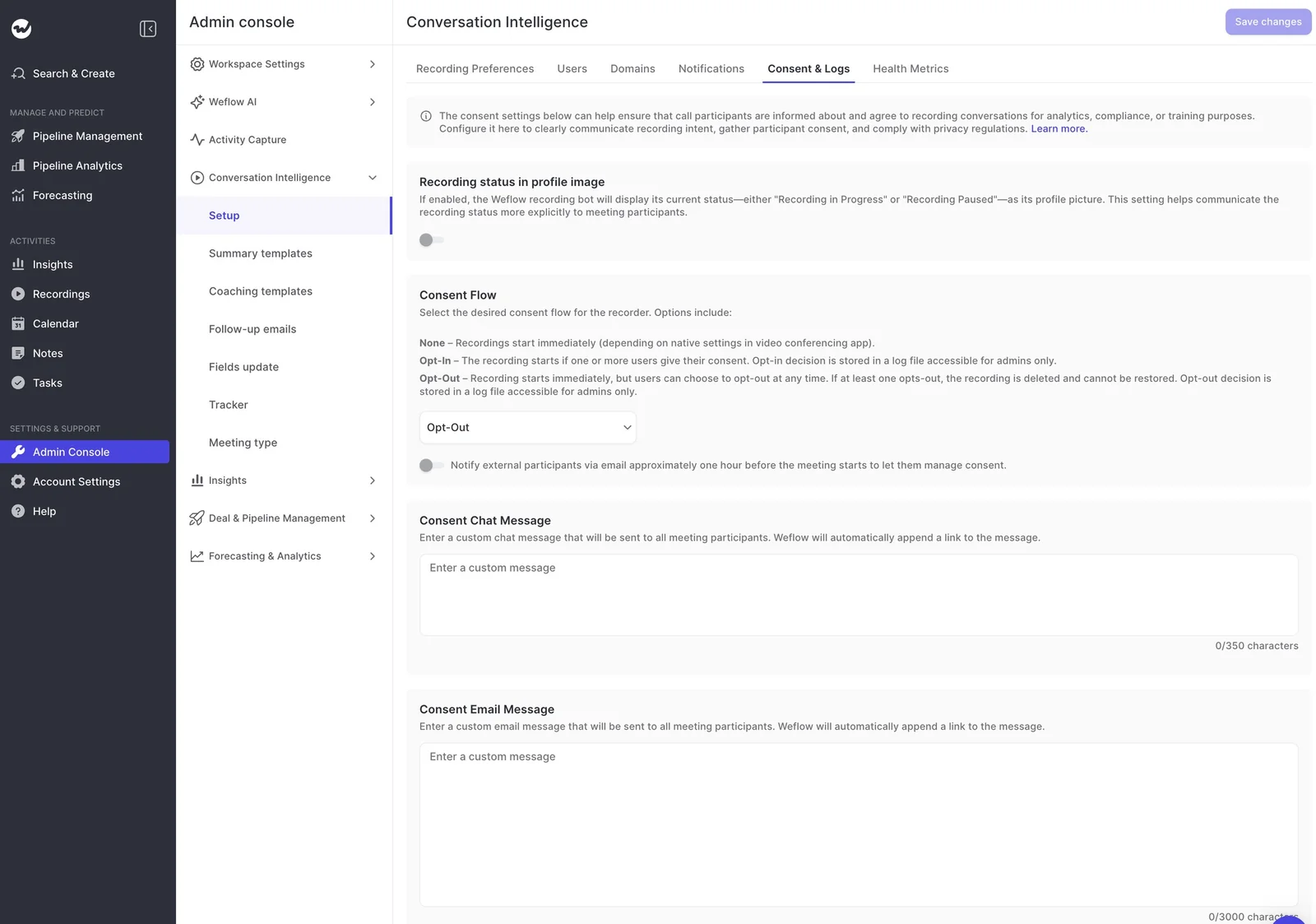
- Three consent modes: None, Opt-In and Opt-Out. Opt-Out is the one most of our customers pick.
- Chat notice with a stop link: The notetaker posts a notice in the meeting chat, with a link any participant can use to stop the recording.
- Pre-meeting email: An optional email goes to external participants about an hour before the meeting, so guests can decline in advance and reps don't spend the opening minutes asking.
- Your text, your language: Admins write the chat message (up to 350 characters) and the email (up to 3,000 characters) in any language. Weflow appends the consent link to both automatically, so a custom message can't leave it out.
- Lobby grace: A 10-minute lobby grace period applies when the notetaker joins.
- Recording status on screen: The notetaker can show Recording in Progress or Recording Paused as its profile picture. It stays visible for the whole call, so Teams late joiners who miss the chat notice still see it.
- Final opt-out: When a participant opts out, the notetaker leaves and the recording, transcript and notes are deleted.
- Consent log: Every opt-in and opt-out decision goes into a log only admins can access, and you can download the full history as a CSV.

One consent mode applies to every region and team in your workspace. Weflow doesn't vary consent by country, so a team selling into Germany, France and the US runs the same behavior everywhere.
Weflow keeps conversation data in your Salesforce org's region
Weflow stores your data in the region where your Salesforce org sits. A European Salesforce org keeps its Weflow data in Europe by default, so the residency answer follows a decision your security team has already approved.
Weflow is a German company. Recordings and transcripts sit in AWS in Frankfurt, US East (Northern Virginia) or Sydney, and you choose the region.
| Data type | Where it lives |
|---|---|
| Activities, contacts and Weflow fields synced to Salesforce | Your own Salesforce org |
| Call recordings, transcripts and Weflow-native fields | AWS in Frankfurt, US East (Northern Virginia) or Sydney, matching your Salesforce region by default |
| Video recordings | Held by Weflow and streamed back, because Salesforce is a poor place to store large files |
| Temporary processing data | Same tenant isolation, deleted after processing |
As for AI, Weflow applies Zero Data Retention to AI processing, and customer data is never used to train AI models.
Our public sub-processor list names six services: AWS, which hosts the product and stores personal data, plus Vanta, Jira, Bitbucket, Slack and Google Workspace.
Weflow retention and deletion follow your legal team's rule
Weflow lets you set retention to match a hard deletion rule, like the 30- or 90-day limits French legal teams are setting:
- By default, Weflow keeps recordings for your full contract term plus 90 days.
- You can have all recordings auto-deleted after a set period, such as every 30 days.
- You can delete recordings and keep transcripts, delete both, or delete transcripts and keep the AI summaries.
- Only admins can delete a recording, and reps can't remove their own calls. Every missing call traces to a named admin action, which is what makes the library defensible in an audit.
Weflow records only enrolled teams and external meetings
Weflow gives you a precise answer to the works council's "who is recorded, and who can hear it":
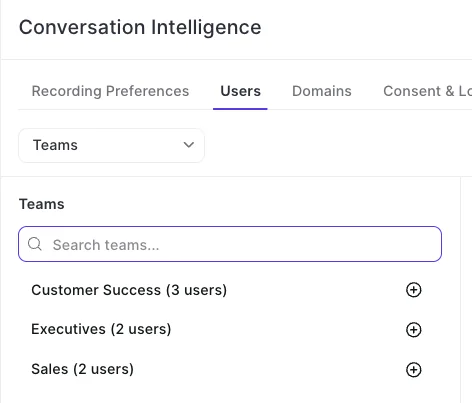
- Recording follows enrollment in a Conversation Intelligence configuration, not access to the app.
- You can enroll whole teams, and a team updates as its membership changes, so new joiners don't silently fall out of coverage.
- Leaders can get a view-only license, or admin rights without enrollment, and watch the team's recordings without being recorded themselves.
- The notetaker only joins meetings with at least one attendee outside your internal domains.
- The notetaker starts joining a user's meetings only after that user signs in to Weflow for the first time, so make sign-in part of your rollout plan.
- In Activity & Contact Capture, admins can block capture for any account flagged on a Salesforce field, which keeps a confidential or risk-averse account out centrally.
Where Weflow is not the right fit for your rollout
Here are the limits to weigh before choosing Weflow for a European rollout:
| Limit | Who it rules Weflow out for |
|---|---|
| Consent can't vary by region or team | Teams that need different consent per market. Gong consent profiles, Salesloft's team-scoped consent and Chorus's location-adaptive landing page all do this. |
| The botless desktop app has no consent flow | Teams whose legal department needs product-handled consent on every recording, including botless ones. With the desktop app, the rep is responsible for consent. |
| No transcript-only, no-audio mode | Teams whose works council only approves transcript-only capture. Weflow builds notes from the call audio, so a meeting has to be recorded. |
| An opt-out deletes everything, including internal notes | Teams that want a written recap on calls where the customer declined. |
| ISO 27001 isn't held today | Procurement processes that require ISO 27001 now. Weflow holds SOC 2 Type II, and ISO 27001 is in progress. |
| No approved works council documentation pack | Teams expecting the vendor to hand over a ready pack. You build it from our answers. |
What Weflow Conversation Intelligence costs per seat
Weflow Conversation Intelligence costs $39 per user per month, billed annually, with a 10-user minimum. The desktop app, Weflow Mobile Copilot and Ask Weflow AI Pro are all included at no extra cost.
| Plan | Price | What's included |
|---|---|---|
| Weflow Conversation Intelligence | $39 per user per month | Recording, transcription, summaries, AI field updates, desktop app, Mobile Copilot, Ask Weflow AI Pro |
| Revenue AI Foundation | $49 per user per month | Conversation Intelligence plus Weflow Activity & Contact Capture |
| Revenue AI Business | $59 per user per month | Foundation plus Deal Intelligence |
| Revenue AI Enterprise | $79 per user per month | All Weflow products, including Forecasting |
| View-only license | Free | Watching recordings, summaries and transcripts, without being recorded |
You can check the consent settings, logs and recording controls yourself before you talk to anyone. Walk through the product yourself, no call required.
FAQ: European call recording rollouts
Who handles the recording announcement on dialer and phone calls?
The dialer records the call, so the dialer owns the recording announcement that some countries require. Weflow pulls the dialer's recording, transcribes and analyzes it, and writes it to Salesforce as a call activity.
Reps who record through the dialer don't need to be on Weflow's recording list for those calls.
Can the consent notice go out in German or French?
Yes. Admins write the chat message and the pre-meeting email in any language, and Weflow appends the consent link automatically. Transcription detects the spoken language on its own, across 96 languages.
Can a rep or host stop recording partway through a call?
Yes. The host can remove the notetaker mid-call, and Weflow keeps everything recorded up to that point. But a participant who opts out is different: that deletes the whole recording.
What happens to internal notes when a customer opts out?
They're deleted along with everything else. If the rep needs a record, they can dictate a voice note in Mobile Copilot after the meeting.
What if IT only allows Microsoft Copilot to record on Teams?
The Weflow desktop app records Teams meetings without a bot joining, so it still works under a third-party bot block. Just keep in mind that with the desktop app, consent moves to the rep, so legal needs to sign off on that first.
Can legal approve a pilot on real customer calls?
Yes, if you handle it in the contract. Write clauses into the pilot agreement saying captured data isn't retained and is permanently deleted when the trial ends, and agree them between both legal teams before the pilot starts.
Pair that with a prospects-only scope. Since Weflow's notetaker only records enrolled users, you can finish the technical setup while that review is still open.
Does Weflow hold ISO 27001, and where are the SOC 2 reports?
Not yet. Weflow holds SOC 2 Type II, and ISO 27001 is in progress. You can request access to our SOC 2 Type II reports, penetration test results and sub-processor list in our trust center at trust.weflow.ai, and send security questions to [email protected].