How to Keep Internal, Sensitive, and Non-Customer Email Out of Salesforce When You Turn On Activity Capture
Learn how EAC and Weflow exclude internal, sensitive, and non-customer email from Salesforce.


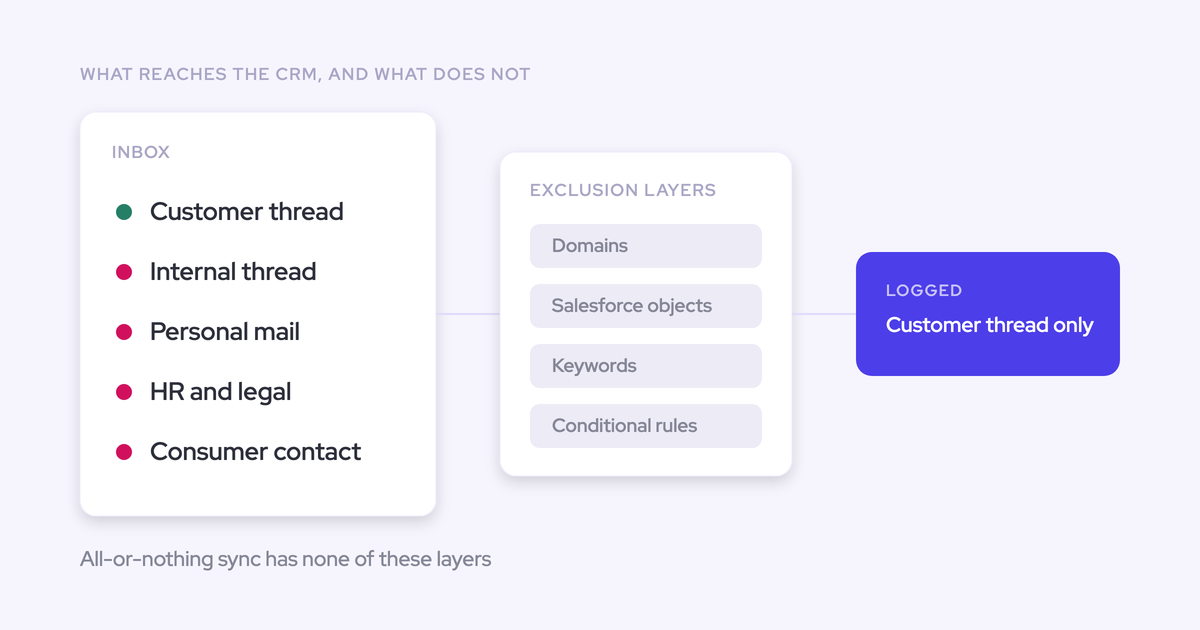

The fear that shows up first when a team switches on automated email capture isn't about mapping or coverage. It's that the wrong message lands in the CRM.
Internal threads, an HR note, a lawyer's email, an offer to a candidate: all of it moves through the same mailbox as customer mail, and once it's on the account, everyone with CRM access can read it. No cleanup undoes that.
If you're on Einstein Activity Capture today, you already know the shape of the problem: you can exclude an address or a domain, and that's the end of the control panel. Nothing looks at what a message contains.
Weflow is the Revenue AI Orchestration platform for sales, customer success, and RevOps teams, and its exclusion model starts one step earlier than a filter list. Nothing is logged without a matching Salesforce record, internal-only threads never sync, and four admin-controlled layers sit on top of that for the correspondence that does match a record and should still stay out.
This walkthrough covers what reaches Salesforce, what never does, how to configure each layer, and, stated plainly, what no filter can catch and which control to use instead. If your wider goal is keeping Salesforce data clean and under your control, this is the gate you have to clear first.
Why Einstein Activity Capture can't filter email by content
Einstein Activity Capture filters email by address and domain only. There is no way to filter which emails sync based on what they contain, which is repeatedly the specific reason teams start looking for a replacement.
Give EAC its due: the excluded-addresses setting works for what it covers. Name a sender, name a domain, and that traffic stops. If your entire problem is "don't log anything from our own domain" or "stop logging our payroll provider," EAC handles it.
The gap is structural. The message you're most worried about usually isn't on an internal domain at all. It's on a live customer thread, from a real contact, on an account you need captured.
| What you need to keep out | Can address or domain filtering reach it? |
| An internal thread between colleagues | Yes, if you exclude your own domain |
| An offer letter sent to a candidate's personal address | Only if you've listed that domain, and you can't blanket-ban gmail.com when real customers use it |
| A sensitive message sitting on a legitimate customer thread | No. It's a customer domain you need captured |
| A board member or investor who already exists as a contact | No. They match a record, and a domain rule doesn't unmatch them |
| An entire confidential account, excluded centrally by an admin | No. There's no record-level condition to write |
What makes this urgent rather than academic is that the migration is being forced. Teams running the long-standing Salesforce mail plugin are being moved off it as support ends, and the default destination is EAC.
So a change nobody asked for arrives with a deadline attached, and the privacy problem is still unsolved when it lands.
What Weflow never logs to Salesforce by default
Before you configure a single rule, capture is already scoped. Weflow only logs an activity when it can match it to an existing Salesforce record, and any thread where every participant sits on your own domain is excluded before a write ever happens.
That changes what the exclusion list is for. It isn't there to keep personal mail out; personal mail was never going to be logged.
The default guarantees, stated as behavior:
- Weflow logs nothing when there is no matching contact, lead, or account domain in Salesforce, so mail unrelated to the business never reaches the CRM whether or not it appears on an exclusion list.
- Weflow does not log internal emails or meetings: every participant on your own domain means no log, and that rule is part of the default capture configuration.
- Recording an internal meeting is possible, but it's an explicit per-meeting opt-in rather than a default.
- Direction doesn't change the rules. Inbound mail from a buyer is evaluated exactly like a rep's outbound.
- Meetings follow the same matching and exclusion logic as email, so you're not configuring two separate privacy models.
Exclusion rules exist for the narrower and harder case: correspondence that does resolve to a Salesforce record and should still be kept out.
The same settings screen is where you choose whether emails land as EmailMessage or Task records, whether attachments are stored at all, and whether internal meetings can be logged.

What you need before configuring exclusion rules
Weflow reads no mailbox until a user is enrolled in an activity capture configuration. Installing the managed packages, connecting the integration user, and adding the workspace application in Microsoft Entra or Google Workspace grant access without capturing anything.
Enrolment is the switch. That means the technical setup can be finished while a legal review is still open, which is how you stop a security queue from holding up a rollout that's otherwise ready.
What to have in hand before you start:
- Salesforce admin access, plus a Google Workspace or Microsoft admin for the tenant-level app.
- Your capture configurations mapped to teams. Configuration is per team, per user, and per object, and one workspace can run as many configurations as it has teams or regions.
- One configuration per mail tenant if you've grown by acquisition, with every sibling entity's domain listed in each one.
- Your exclusion list drafted in advance: internal domains, supplier and partner domains, the objects you never want logged, and the named accounts that must stay out entirely.
- A decision on capture mode per team: automated, hybrid, or manual.
Draft the list before you enrol anyone. Retrofitting exclusions after the first week of capture means auditing what already landed.
How to set up email exclusion rules in Weflow
Weflow filters email capture through four layers plus a capture mode, all set by an admin and all scoped per team, user, and object. Each layer answers a different exposure, and knowing which one answers which case is the whole job.
Step 1: exclude internal and external email domains
Start with domains. Internal-domain exclusion is on by default, so a thread where everyone sits on your own domain never logs. On top of that you add named external domains: suppliers, partners, your payroll provider, and noisy free-mail or system domains that produce activity nobody wants on a record.
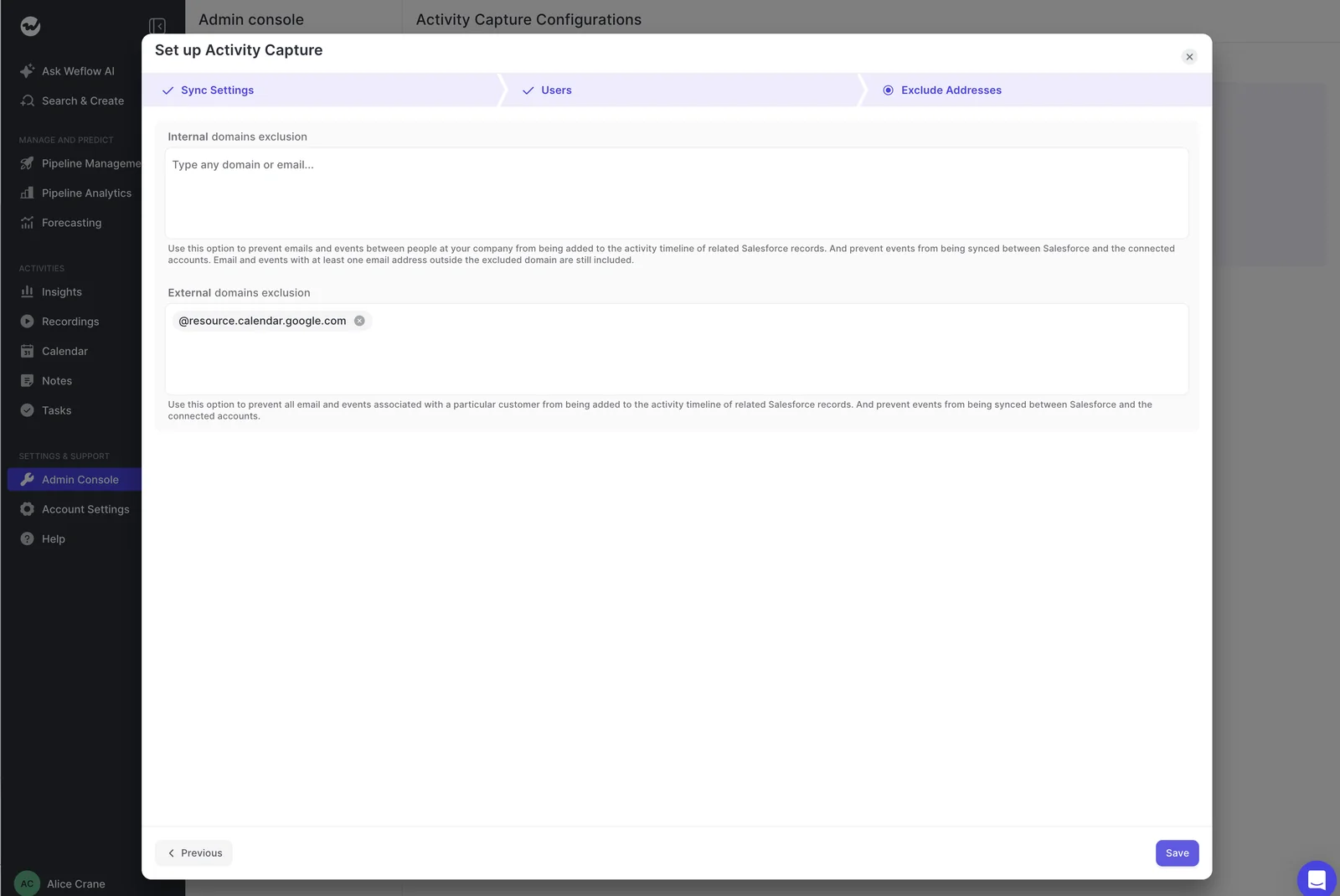
The honest caveat: you cannot blanket-ban gmail.com when real customers sell and buy from Gmail addresses. Free-mail exclusion is a blunt tool, and the individual people or accounts behind those addresses are what the later layers are for.
Step 2: exclude whole Salesforce objects from logging
The second layer works at the object level: switch logging off for an object entirely, so nothing ever writes there. Leads are the common one, but the same control covers Case, Contact, custom objects, and opportunity-level rules like only logging when the opportunity owner is on the thread.
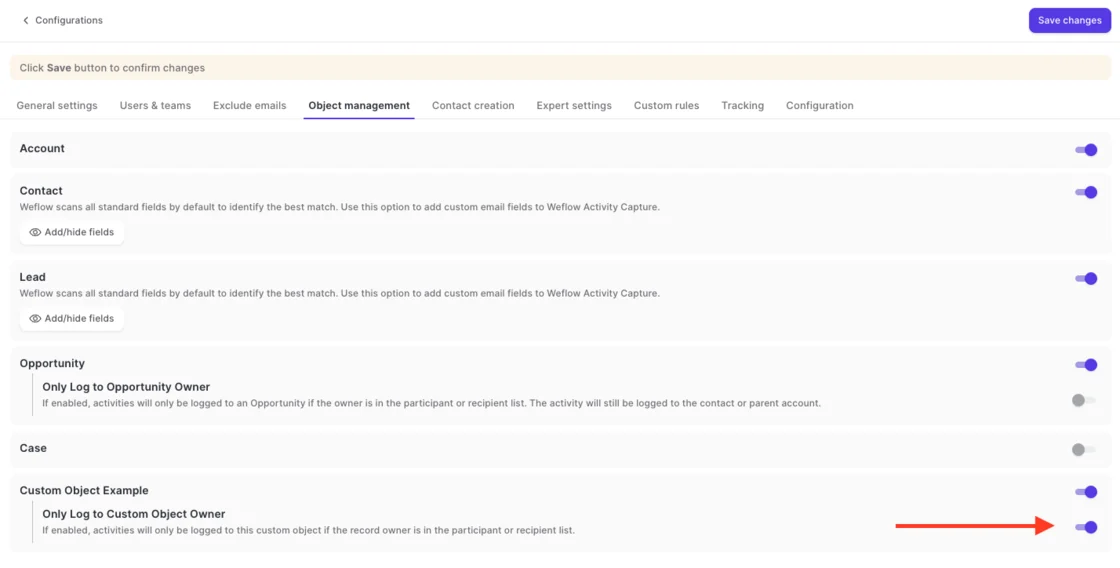
The recognizable shape is a B2B2C motion. The B2B side of the business wants full capture; the consumer side, sitting on its own record type, should never have email logged against it at all. Object-level exclusion is how you draw that line once instead of writing hundreds of rules.
Step 3: block emails by keyword in the body
The third layer matches keywords against the email body, and it's the only layer that looks at content at all. Add the strings that reliably mark correspondence you never want captured, and a message containing one of them is skipped.
Be precise about what this is: a literal string match. It catches known patterns, like a legal footer, a specific project codename, or a recruiting subject line your team always uses. It does not catch a sensitive message written in ordinary language.
Step 4: write custom rules against Salesforce record fields
Custom rules sit above everything else. A condition evaluated against any field on the account, opportunity, contact, or case blocks logging against that entire record, and this is the layer regulated customers use to keep confidential accounts out of the captured data set completely.
This is also where the control most admins reach for first turns out to be the wrong one. Domain exclusion in Weflow blocks records that don't already exist in Salesforce. A board member who is already a contact will keep being logged however many times you add their domain to the list; a custom rule against a Salesforce field is what stops it.
Two cases where the custom rule is the only correct answer:
- The confidential or NDA account. Flag it on the account record, write the rule against that field, and no email or meeting on that account ever logs, regardless of who's on the thread.
- The risk-averse customer who treats capture as a new sub-processor. An admin excludes their account centrally. Nobody has to remember anything on any thread.
That request comes up constantly, and it's an admin setting, not a conversation with the account team.
Step 5: set the capture mode for each team
Capture runs in one of three modes, assigned per team: fully automated, hybrid, or fully manual. Most customers run hybrid.
In hybrid, capture still happens server-side, and the Outlook add-in or Gmail extension shows the rep which Salesforce records a message is about to log to, lets them re-map it, and carries a control to switch logging off for that thread. The choice is remembered for the rest of the thread.
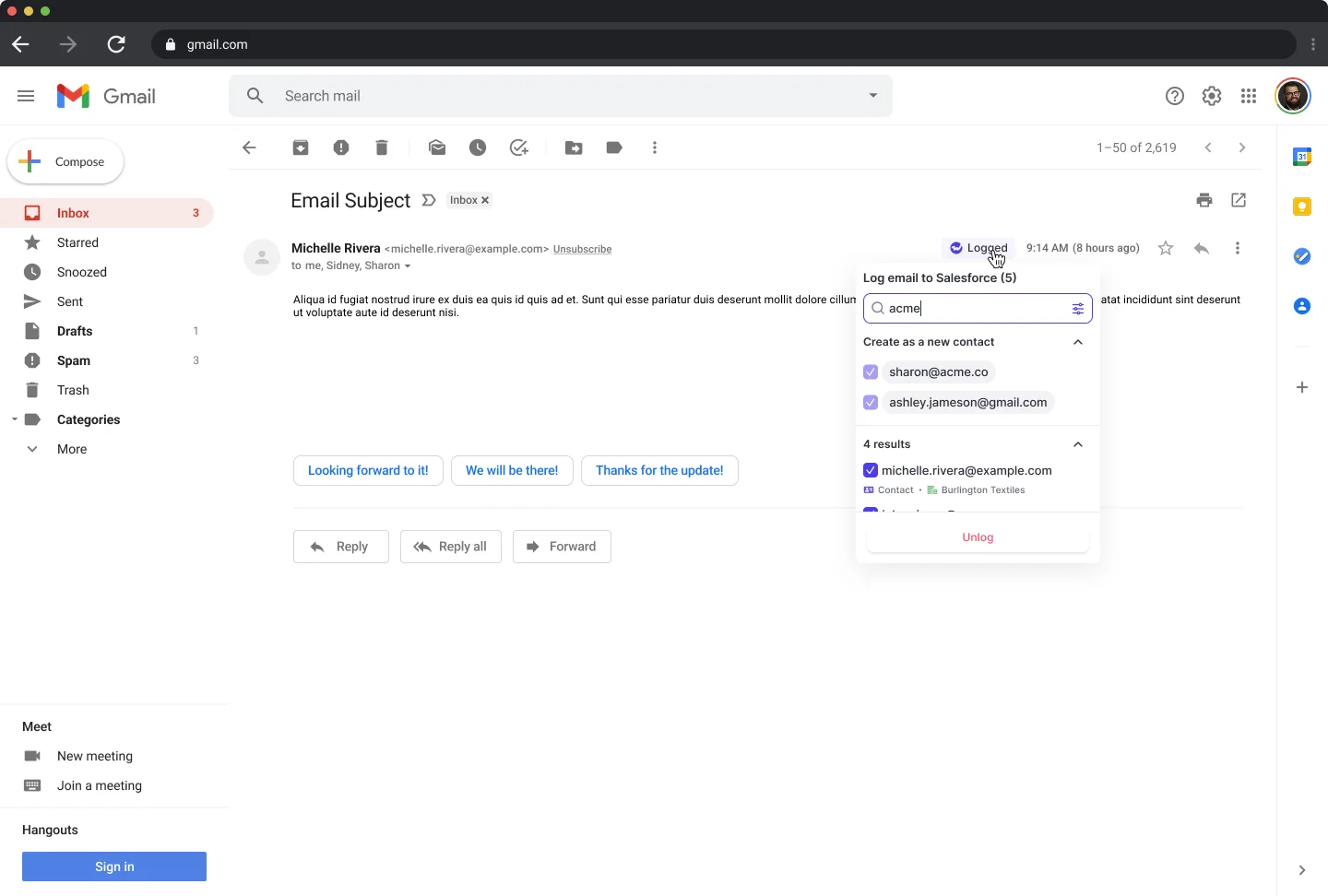
You can also hand out the add-in with the suppression control removed, so a team sees the mapping and cannot switch it off.
Fully manual inverts the default: nothing is logged unless a person chooses to log it. That's the standard assignment for leadership, whose mail is the most sensitive in the company and the least useful to capture wholesale.
For the roughly one deal in ten that looks like that, hybrid gives the two people on it a way to hold a thread back. Read the next section before you treat that as the control.
What Weflow's exclusion filters can't do
None of the four layers reads what a message means. Every one of them decides from the sender, the record, or a literal string, and there is no contextual assessment of whether an email is sensitive.
Which means a sensitive mail on an otherwise legitimate customer thread clears all four filters unless a keyword happens to catch it. A rep and a customer are on a real thread about a real deal, someone mentions something that shouldn't be in the CRM, and the domain is a customer domain, the record is a live opportunity, and the wording matches nothing on your list. It logs.
We'd rather say that plainly than let you find it in month two. Nothing in the system detects that a message is sensitive.
The consequence for how you configure this is direct: anything that must never be captured belongs on a central admin exclusion, not on rep vigilance. Rep-side suppression only works where the rep notices, and on a busy thread they won't. So the confidential account gets a custom rule on the record, and the person whose mail is inherently sensitive gets manual mode.
Use the rep controls for the case they're good at, which is correcting a wrong mapping or holding back one thread the rep is actively thinking about. Don't use them as the guarantee.
Common exclusion mistakes that let the wrong email through
The failures we see are predictable, and each one has a specific fix.
| The mistake | What to do instead |
| Adding a domain to the exclusion list to block someone who already exists as a contact in Salesforce | Write a custom rule against a field on that contact or account. Domain exclusion only blocks records that don't already exist |
| Forgetting sibling-company domains after an acquisition, so mail between two group entities is external to each tenant and lands in the CRM | List every other entity's domain in every tenant's configuration, and re-check it each time a new entity joins |
| Treating rep-level suppression as the control for confidential deals | Exclude the account centrally with a custom rule, or put the person on manual mode. Rep vigilance is not a control |
| Writing dozens of rules to keep personal and unrelated mail out | Skip them. Mail that matches no Salesforce record was never going to be logged. Spend the effort on records that do match |
| Blanket-banning free-mail domains because a candidate's address slipped through once | Exclude only genuinely noisy free-mail or system domains, and handle specific people and accounts with custom rules |
| Enrolling users before the exclusion list is drafted | Finish the technical setup, keep enrolment as the last step, and switch it on once the rules are in place |
FAQ: excluding email from Salesforce activity capture
Can I run Weflow alongside Einstein Activity Capture to test it?
No. Two capture layers writing the same emails and meetings produce duplicate and conflicting activity, so replacing Einstein Activity Capture is a cutover rather than a parallel trial.
That removes the evaluation design most teams want, and it means your rollout plan needs two things written down: when EAC is switched off, and who confirms nothing stopped being captured in the gap.
Weflow Analytics runs a Settings Health check inside Salesforce that reports whether EAC is detected alongside the Shared Activities and Enhanced Email settings Weflow needs enabled, so you can confirm the state of your own org rather than taking anyone's word for it.

Do exclusion rules apply to inbound email and meetings too?
Yes. Inbound mail from a buyer is evaluated exactly like a rep's outbound, and meetings follow the same matching and exclusion logic as email. You configure the model once and it holds across direction and object type.
How does exclusion work across multiple mail tenants after an acquisition?
Weflow is configured per mail tenant: one capture configuration per tenant, with users assignable only within their own domain. Adding an entity means a new configuration, not a new team.
The maintenance sits with the admin, and it's worth naming honestly. Mail between two sibling companies is internal to the group but external to each tenant, so every configuration has to list every other entity's domain or the group's own internal traffic lands in the CRM. There's also no single administrative view across tenants today.
Where does captured email data physically live?
In your own Salesforce, as native records on objects like EmailMessage, Task, Event, and Contact. Weflow spins up your instance in the region where your Salesforce org sits, and that can be overridden to keep data in the EU or UK.
Weflow is a German company with Frankfurt infrastructure for European customers, so residency is a configuration choice rather than a migration project, and it's usually an answer your security team has already approved for Salesforce itself.
What happens to emails from free-mail domains like gmail.com?
They log only when they match an existing Salesforce record. A message from a personal Gmail address that resolves to nothing in your CRM is never written.
Genuinely noisy free-mail or system domains can be excluded outright. Specific people and specific accounts on free-mail addresses are handled with custom rules, which is the right tool when banning the whole domain would cost you real customer activity.
How much does Weflow Activity & Contact Capture cost on its own?
Weflow Activity & Contact Capture is $19 per user per month, billed annually, with a 10-user minimum. It's sold standalone, and the price is published on our site rather than gated behind a call.
The one thing to know before you scope seats: call recording sits in Weflow Conversation Intelligence, not in capture, so if you want meeting recordings you're looking at the Revenue AI Foundation bundle instead.
If you want to see the four exclusion layers, the object toggles, and the capture modes for yourself before you talk to anyone, that's the right way to judge whether this control model is real.