How Weflow Login and Access Control Work When There Is No Weflow Password
Learn how Weflow login, access control, and provisioning work through Salesforce without a Weflow password.



Weflow is the Revenue AI Orchestration platform for sales, customer success, and RevOps teams, built for Salesforce teams, and everything it does, from capturing activity to automated deal hygiene, runs inside the permission model your admins already built.
Below is the whole model, precisely: sign-in, provisioning, the three permission levels, what data each person can see, who can watch which recordings, what the integration user itself needs, and the one place this model constrains you. Written so you can lift it straight into the review.
How users sign in to Weflow without a password
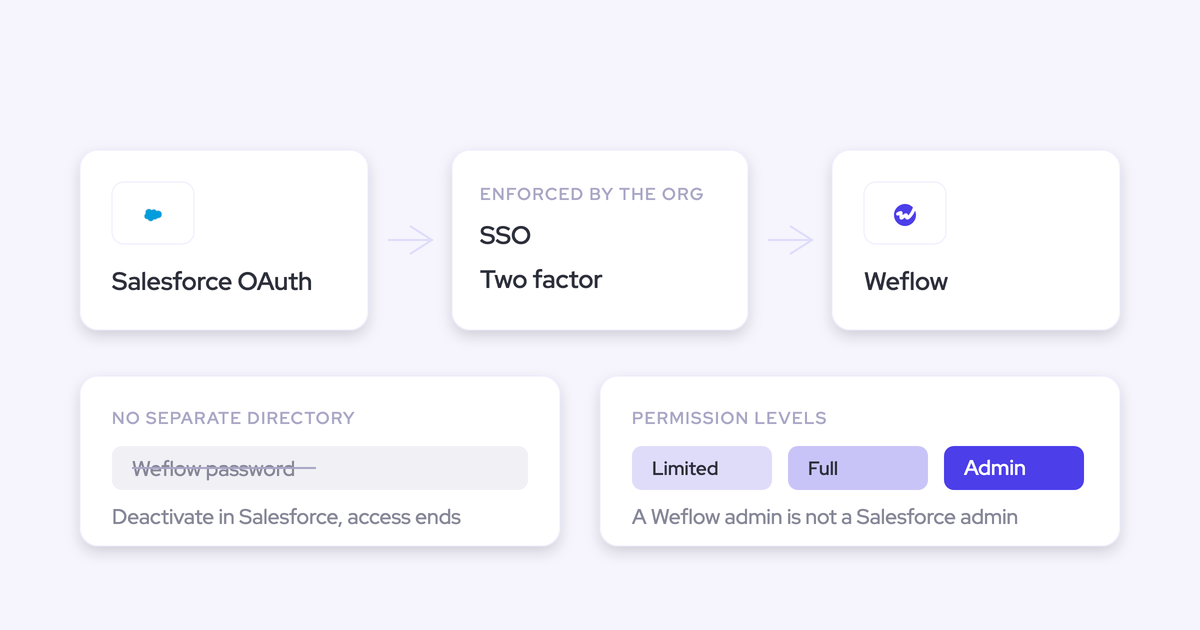
The only way to sign in to Weflow is through your Salesforce authentication, using Salesforce OAuth. Email and password login is not supported, so there is no Weflow credential to phish, reset, rotate, or audit.
Whatever your Salesforce org enforces is what governs Weflow access. If your org sits behind Okta or Entra ID, Weflow sits behind Okta or Entra ID. If you enforce Salesforce two-factor, users hit that same second factor on the way in.
This is why "does Weflow support SSO?" is the wrong question. Weflow doesn't support your SSO as an option you configure in our settings. It has no way to let anyone in except through the identity provider your Salesforce org already trusts.
Why Weflow has no separate user directory
Weflow works exclusively with Salesforce as a CRM of choice, but it's not own or built by Salesforce. That's a hard product gate, and identity falls out of it. There's no user store to sync because there's no user store.
| Question your reviewer asks | Tool with its own directory | Weflow |
|---|---|---|
| Where are users defined? | In the vendor's cloud, synced or created by hand | In Salesforce, nowhere else |
| What enforces MFA? | The vendor's own MFA settings | Your Salesforce SSO and 2FA policy |
| What happens at offboarding? | A separate deprovisioning step someone has to remember | The Salesforce deactivation you already do |
| What goes into the quarterly access review? | A second user list to reconcile | The Salesforce user list you already review |
The point isn't that we manage a directory better. It's that there isn't one to manage.
How Weflow user provisioning and deprovisioning work
Provisioning rides the Salesforce user logic your identity and HR systems already feed. There is no separate place to add anyone, move anyone, or remove anyone.
United Fintech rolled Weflow activity capture out centrally through OAuth-based authentication and had it running in under an hour, with no per-rep setup step. That's the shape of the rollout when identity is inherited rather than rebuilt.
Joiners and team moves follow your Salesforce user logic
Weflow teams are built dynamically from Salesforce, and those teams drive product enrolment. A rep who moves team in Salesforce moves in Weflow automatically.
You define a team by pulling users on:
- Manager, so a team follows the reporting line in Salesforce
- Role, so the Salesforce role hierarchy defines who belongs where
- A field condition, for the cases where neither manager nor role is the right cut
So the weekly RevOps chore of adding and removing people in a second tool doesn't exist. Your Salesforce user record changes, and enrolment follows it.
Capture-only users need no Weflow seat and no sign-in
A user starts capturing activity the moment an admin adds them to a capture configuration, whether or not they have ever signed in. Signing in to Weflow is only needed to see the insights.
That matters for rollout scoping. Users who are only on Activity & Contact Capture need no Weflow seat and are asked to do nothing at all, which is usually the largest group in a first phase.
Deactivating a user in Salesforce removes Weflow access immediately
Deactivating a user in Salesforce removes their Weflow access immediately. That's the deprovisioning step, and it's one you already perform.
Weflow users are deactivated, never deleted, so the historical record of what they captured and what they did stays intact for reporting and audit. What goes away is the ability to sign in.
Weflow's three permission levels: Limited, Full, and Admin
Weflow has three permission levels, and this is the one piece of access configuration that lives inside Weflow rather than in Salesforce. A Weflow admin does not need to be a Salesforce admin.
| Level | What the user sees | What they can change | Who typically holds it |
|---|---|---|---|
| Limited Access | Their own data, plus the data of their direct reports as defined in Salesforce | Nothing in the workspace configuration | Reps and frontline managers |
| Full Access | Everything their Salesforce permissions and place in the role hierarchy allow | Nothing in the workspace configuration | Second-line managers, enablement, analysts |
| Admin | Everything in the workspace, plus the admin console | Templates, capture configuration, teams, permissions | Sales Ops and RevOps |
The separation of duty is the part worth quoting to your reviewer: running the Weflow workspace does not require anyone to hold Salesforce admin. Your ops person can own capture configuration, AI templates, and team structure without you inflating their rights in the CRM to do it.
How Weflow respects field-level security and role hierarchy
Weflow inherits your existing Salesforce setup rather than imposing its own. An overlay that reads with a service account and renders whatever it finds is a data leak with a dashboard on it, and admins who have spent years building field-level security and territory rules are right to test for it before anything else.
What Weflow inherits, as-is:
- Field-level security and permission sets, so a user sees the fields their profile allows and nothing more
- The Salesforce role hierarchy, so who sees whose records is decided where you already decided it
- Your standard and custom objects and fields, so nothing gets migrated into a vendor record type
- Validation rules and field dependencies, so a write that your org would reject from a rep is rejected from Weflow too
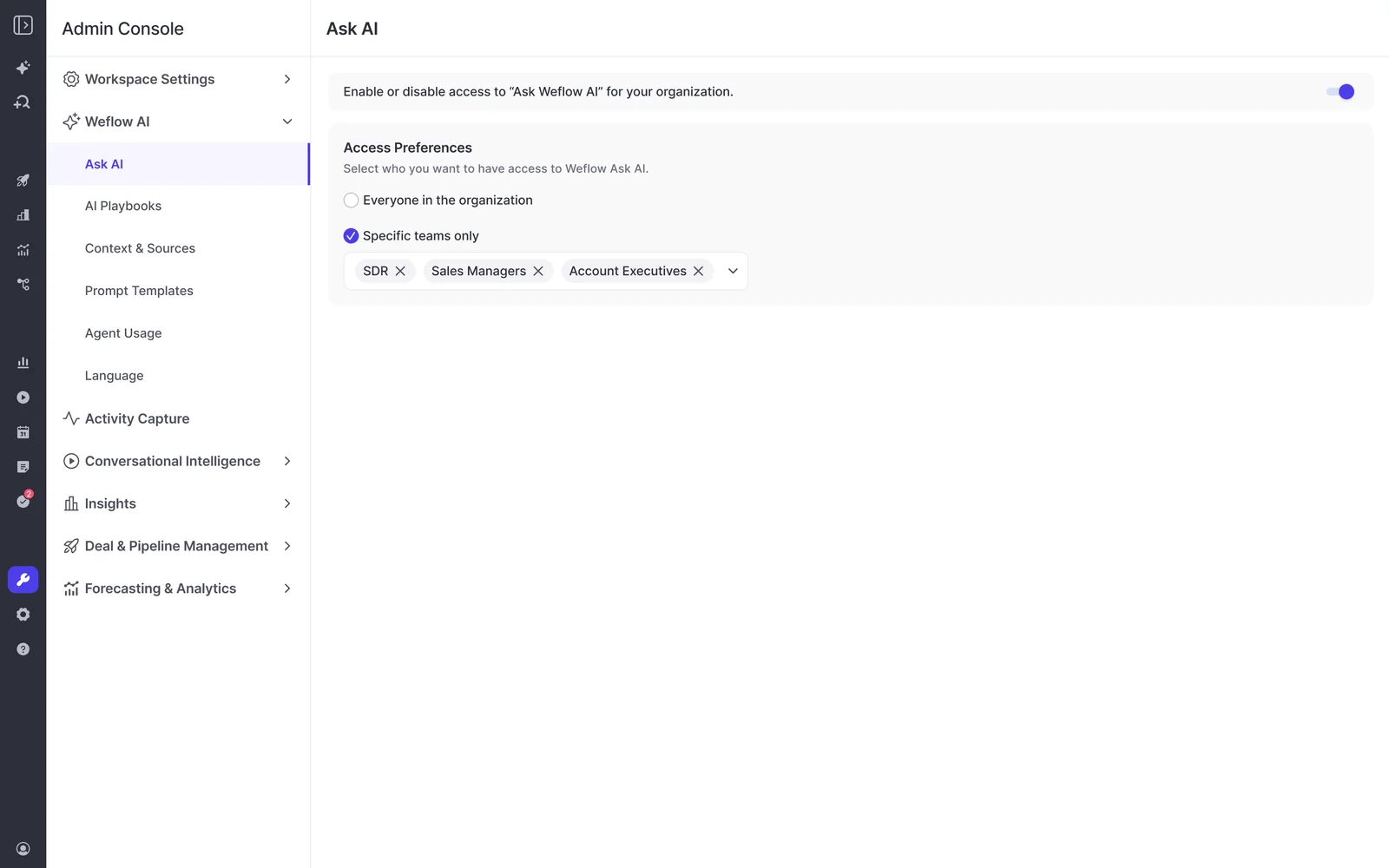
Ask Weflow AI authenticates with the user's own Salesforce token and only returns data that user can already see in Salesforce. A rep asking a question about the pipeline gets an answer bounded by their own access, not by the AI's.
Admins can go one step tighter and decide which teams get Ask Weflow AI at all, from the admin console.
Who can see call recordings in Weflow
Recording access follows the Salesforce hierarchy by default. Managers see their reports' recordings, and end users see the meetings they were invited to.
Three ways an admin can change that:
- Define a custom Weflow hierarchy, for the cases where the Salesforce role hierarchy doesn't describe who should be reviewing whose calls
- Grant access through Teams, so a group like enablement or a deal desk can see a defined set of recordings
- Issue a View-Only license to people who aren't Salesforce users at all
Worth being straight with your works council or your legal reviewer about the default: visibility is hierarchical, so a manager sees the calls of the people who report to them, and that follows the reporting line you maintain in Salesforce.
Weflow's one constraint: no read-only admin role
There is no read-only administrator role in Weflow today. Seeing everything in the workspace requires full Admin, and full Admin also carries the power to change the configuration.
The people who most want the complete view are revenue leaders and analysts who read across every deal. They are exactly the people an operations owner does not want able to edit templates and permission sets. Today you either grant that risk or withhold the view.
A View-Only license is not the workaround. It covers watching recordings and reviewing summaries, transcripts, pipeline views and analytics. It does not extend to the admin console or to querying across the whole dataset.
You'll find this yourself in the trial, so we'd rather you find it here. It's the one place where our access model asks you to make a trade-off instead of removing one.
What Salesforce permissions the Weflow integration user needs
The Weflow integration user needs the Salesforce API Integration permission set license plus a purpose-built permission set with a defined, auditable footprint. It is a scoped surface, not blanket admin.
The permission set covers:
- Read and edit on Account, Contact, Opportunity, Lead, and Opportunity Contact Role
- Full access to Event, including delete, because a calendar deletion has to propagate
- Edit rights on the three Weflow custom objects
- The system permissions to update email messages, edit tasks, access activities, and edit events
Create a separate permission set rather than editing an existing one. It costs you five minutes and it means the access is auditable later, by you or by anyone reviewing the org.
Two failures to know about before they happen. Missing Opportunity Contact Role is the usual reason emails land on the account instead of the deal. Missing full access to the Event object is the single most common cause of a day-one sync failure, where meetings appear to log from the extension and then never arrive in Salesforce.
One more, from the Salesforce side: since the 2026 policy change, the integration user can't also be a normal platform user, and a full user license pressed into service as an integration user tends to time out.
If you're scoping field-level edit access rather than granting it broadly, Weflow writes eight fields when it creates or enriches a contact: first name, last name, email, account, website, LinkedIn URL, title, and phone. Nothing else.
Answering the IT security questionnaire about Weflow access
Because Weflow holds no identity of its own, the identity half of the questionnaire resolves to controls your org already operates. Each answer below stands on its own.
| Questionnaire line | Answer |
|---|---|
| Authentication mechanism | Users authenticate to Weflow through Salesforce OAuth. Weflow does not support email and password login. |
| Separate user directory | Weflow maintains no user directory of its own. Users are defined in Salesforce. |
| SSO and MFA | Weflow inherits whatever SSO and two-factor policy the Salesforce org enforces, because Salesforce is the only path in. |
| User provisioning | Weflow teams are built dynamically from Salesforce by manager, role, or field condition, and those teams drive product enrolment. |
| Deprovisioning | Deactivating a user in Salesforce removes their Weflow access immediately. Weflow users are deactivated, never deleted, so historical data is retained. |
| Access control model | Weflow respects Salesforce field-level security, permission sets, and role hierarchy, and Ask Weflow AI only returns data the user can already see in Salesforce. |
| Administrative rights | Weflow has three permission levels (Limited Access, Full Access, Admin), and a Weflow admin does not need to hold Salesforce admin. |
| Known limitation | Weflow has no read-only administrator role. Full visibility of the workspace requires Admin, which also permits configuration changes. |
FAQ: Weflow login, access control, and provisioning
Can non-Salesforce users get access to Weflow recordings?
Yes, through a View-Only license, and those are unlimited and included in every plan. It's the right answer for a product manager, a CS lead, or an exec who needs to watch calls and read summaries, transcripts, pipeline views, and analytics without a Salesforce seat. It does not cover the admin console or cross-data querying.
Can we limit which mailboxes and domains Weflow connects?
Yes. Capture is scoped by configuration: you nominate the users or groups whose mailboxes and calendars are connected, and you can exclude whole domains outright. Nothing is connected because it exists in your tenant.
Admins almost always tighten this before go-live, and they're right to:
One thing to check while you're scoping: Weflow matches activity to an account on the account's Website field, so any value sitting in that field behaves as a matching domain. If a personal mailbox domain ended up in there, exclude it, and fix the field.
Can individual call recordings be made private in Weflow?
No. Recording visibility follows the configured hierarchy, and there is no per-recording private flag. If a group of conversations needs to be walled off, the lever is which users are in a recording configuration and which hierarchy or Team governs access, not a switch on the individual call.
Where does Weflow store customer data?
Weflow spins up your instance in the region where your Salesforce org is hosted, so a Salesforce org in Europe keeps its Weflow data in Europe. That can be overridden to keep data in the EU or the UK.
Weflow is a German company hosted in Frankfurt. Video recordings are the exception to CRM-region storage: they're held by Weflow and streamed back, because Salesforce is a poor place to store large files.
Which security certifications does Weflow hold?
Weflow is SOC 2 Type II certified and GDPR, CCPA, and HIPAA compliant, with Zero Data Retention for AI processing and no customer data used to train models. ISO 27001 is in progress with a target of December 2026, which is a commitment rather than a certification we hold today. Weflow is not FedRAMP certified, so US government contractors requiring FedRAMP aren't a fit.
Does Weflow require a specific Salesforce edition?
Weflow requires a Salesforce edition with API access. It works exclusively with Salesforce, so there's no HubSpot, Dynamics, or Pipedrive path.