Does your AI assistant respect Salesforce permissions? Ask-AI and field-level security
Learn whether Ask Weflow AI inherits Salesforce field-level security or uses service-account access.


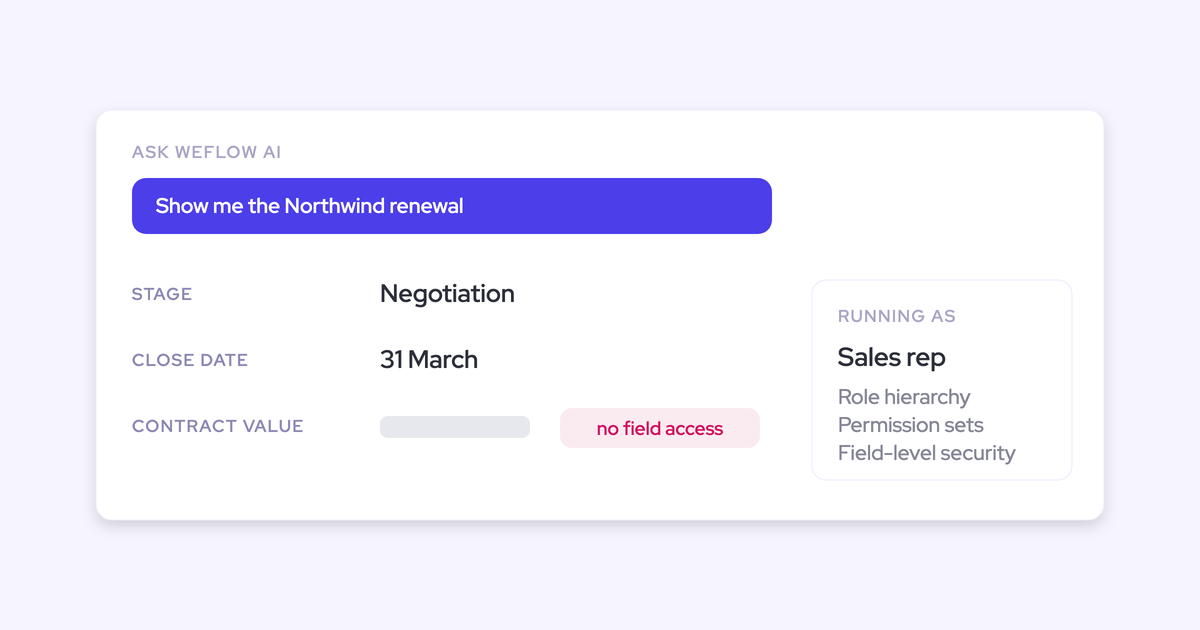

"What will this AI see, and for whom" is an architecture question with a checkable answer. Either the assistant runs each query as the logged-in user and inherits the permission model you already built, or it reads with a service account that sees the whole org and trims the answer afterward. Those are two very different blast radii, and only one of them is provable.
You've already settled the risk part. You know an AI overlay that ignores field-level security is a data-leak surface, and you know the demo won't tell you which pattern you're looking at, because the demo org has four users and no role hierarchy.
So this piece does the other half: it defines permission inheritance, lays the two access patterns side by side, gives you the exact questions to put to any vendor, and uses Ask Weflow AI as the worked example of the inheriting pattern. Written so you can hand it to whoever runs your security review.
What permission inheritance means for an AI assistant
Permission inheritance means the AI assistant can only ever return data the asking user could already open in Salesforce, because the query executes under that user's credentials instead of the vendor's.
The whole idea sits in where enforcement happens. If the query runs as the user, Salesforce itself decides what comes back: field-level security, permission sets, role hierarchy, sharing and territory all apply before a single row reaches the AI.
If the query runs as a service account, Salesforce returns everything that account can see, and the vendor's application code decides what to show. That's a policy promise wearing the costume of a permission model.
One is enforced at the query. The other is enforced in someone else's codebase, on a release cycle you don't control.
Why AI assistants became a Salesforce security review problem
Because one prompt now touches surface area that used to take fifty report runs, and most overlays were wired for developer convenience rather than for your permission model.
Three things converged:
- Natural language collapses scope. "Which deals went quiet in EMEA and what did the buyer say?" spans opportunities, accounts, activity history and call content in a single request. There's no object filter in a sentence.
- Service-account authentication is the default build. One integration identity is simpler to develop against than per-user OAuth, and it works fine right up until someone asks what that identity can read.
- First-generation revenue AI keeps its own data layer. When activity and conversation content is mirrored into a vendor cloud, the access model that governs it is the vendor's, not yours. Gong logs activity to Salesforce, but the captured emails and meetings it builds on are mapped into Gong's own data structure. Einstein Activity Capture stores activity outside the core Salesforce database, which is why those activities don't even update the standard Last Activity Date field.
Add an AI governance regime designed for SaaS, not for assistants that can read across an org in one sentence, and the review got heavier exactly as the tools got more capable. Which is why "it's enterprise-grade secure" now reads as a dodge rather than an answer.
Service account vs logged-in user: the two access patterns
Classify every tool you're shown into one of these two, and most of the security conversation resolves itself.
| Dimension | Service account pattern | Logged-in user pattern |
| Who the query executes as | The vendor's integration identity, which by construction can read everything it's been granted | The asking user, under their own Salesforce OAuth token |
| Where permissions are enforced | In the vendor's application, as a filter applied after retrieval | In Salesforce, at query time, before anything reaches the AI |
| When you change access in Salesforce | Takes effect whenever the vendor re-syncs or you update its own roles too | Takes effect on the next query, no re-sync, no second system to maintain |
| Blast radius of a bug or misconfiguration | The full scope of the service account, across every user | That one user's existing access, and nothing wider |
| Offboarding a leaver | Depends on the vendor's own user list being kept current | Deactivate the Salesforce user and access is gone |
The answer you'll hear from service-account vendors is that their app has its own roles and teams. That's not equivalence. It's a second permission model you now have to keep in sync with the first one, forever, and every drift between them is a leak you won't find until someone shows you a field value they shouldn't have.
What full permission inheritance covers, from FLS to role hierarchy
Inheritance is only real if it spans the whole model. Partial inheritance is where vendors hide, so check each of these on its own:
- Field-level security, at the field. A field hidden from that user's profile has to be absent from their answers, not just absent from the UI. Object-level read is the easy half.
- Permission sets and profiles. The same question asked by an AE and by a CRO should return different data, without anyone configuring that twice.
- Role hierarchy and sharing. A manager sees down their branch, a rep sees their own book. That's already encoded. The AI should ride it, not reimplement it.
- Territory assignment. Territory rules are the control most often skipped, because they're the hardest to fake at the app layer.
- Validation rules and field dependencies on the write path. A read-only assistant that also writes fields can push data your rules would have rejected. Inheritance on reads and a bypass on writes is not inheritance.
- Your objects, fields and record types. The tool should adopt the data model you have, including custom objects and custom fields, rather than arriving with its own record types.
That last one is where a permission review turns into a migration project. A tool that imposes its own record types has effectively asked you to change the data model, and every sharing rule, validation rule and report built on the old shape becomes your problem to re-derive.
One honest wrinkle: a background sync that writes activity into Salesforce does need its own integration identity. That's unavoidable, and it's fine, as long as it's a separate purpose-built permission set scoped to the objects it touches rather than a full user licence with god-mode. What matters is that the read path for the AI and the write path for the sync are different identities with different scopes, and both are auditable in your org.
The permission questions to put to any revenue AI vendor
These eight questions separate the two architectures faster than any demo. Send them before the call, and read the shape of the answer as carefully as the answer itself. Vagueness here is a finding.
- Does an AI query authenticate as the logged-in user or as an integration account? Good: the user's own OAuth token, per query. Disqualifying: "our integration user, and we apply your permissions in the app."
- Is field-level security enforced at field level or object level? Good: field level, because Salesforce runs the query. Disqualifying: object-level read plus an app-side field allowlist you'd have to maintain.
- What happens to a question that spans records the user can't see? Good: those records never enter the result set, because retrieval happens under the user's credentials. Disqualifying: retrieved wide, then filtered, then summarized.
- Do writes respect validation rules and field dependencies? Good: writes go through the same rules a rep's edit does, and required fields stay locked. Disqualifying: "we write via the API so rules don't apply."
- Does the tool create its own record types or objects? Good: it reads and writes your standard and custom objects, with a small managed-package footprint. Disqualifying: a parallel data model you're expected to adopt.
- How is access removed when a Salesforce user is deactivated? Good: there's no second identity, so deactivation is the whole offboarding step. Disqualifying: a separate user list in the vendor's admin panel.
- Where does the data the AI queries actually live? Good: in your Salesforce objects, governed by your sharing model. Disqualifying: mirrored into the vendor's cloud, governed by the vendor's permissions.
- What can you show me rather than tell me? Good: a trust center with current certificates, a sub-processor list, a DPA, a breach-notification commitment. Disqualifying: a security one-pager and an offer to "get you time with our CISO."
How Ask Weflow AI inherits your Salesforce permission model
Weflow is the Revenue AI Orchestration platform for sales, customer success, and RevOps teams, and Ask Weflow AI is built as the logged-in-user pattern end to end: authentication, identity and storage all defer to your Salesforce. Held against the eight questions above, here's the mechanism.
Ask AI queries run on the user's own Salesforce token
Each Ask Weflow AI query authenticates with the asking user's Salesforce token, so it inherits field-level security, permission sets, role hierarchy, territory, field dependencies and validation rules as you've configured them. Ask AI returns only data that user can already access in Salesforce.
Two consequences worth putting in front of a reviewer. There's no second permission model to keep in sync, because there's no second permission model at all. And when you change someone's access in Salesforce, the change applies on their next query, with no re-sync and no vendor-side step.
Admins can also switch Ask Weflow AI on for the whole org or restrict it to named teams, so the pilot can be as narrow as your governance process wants it.
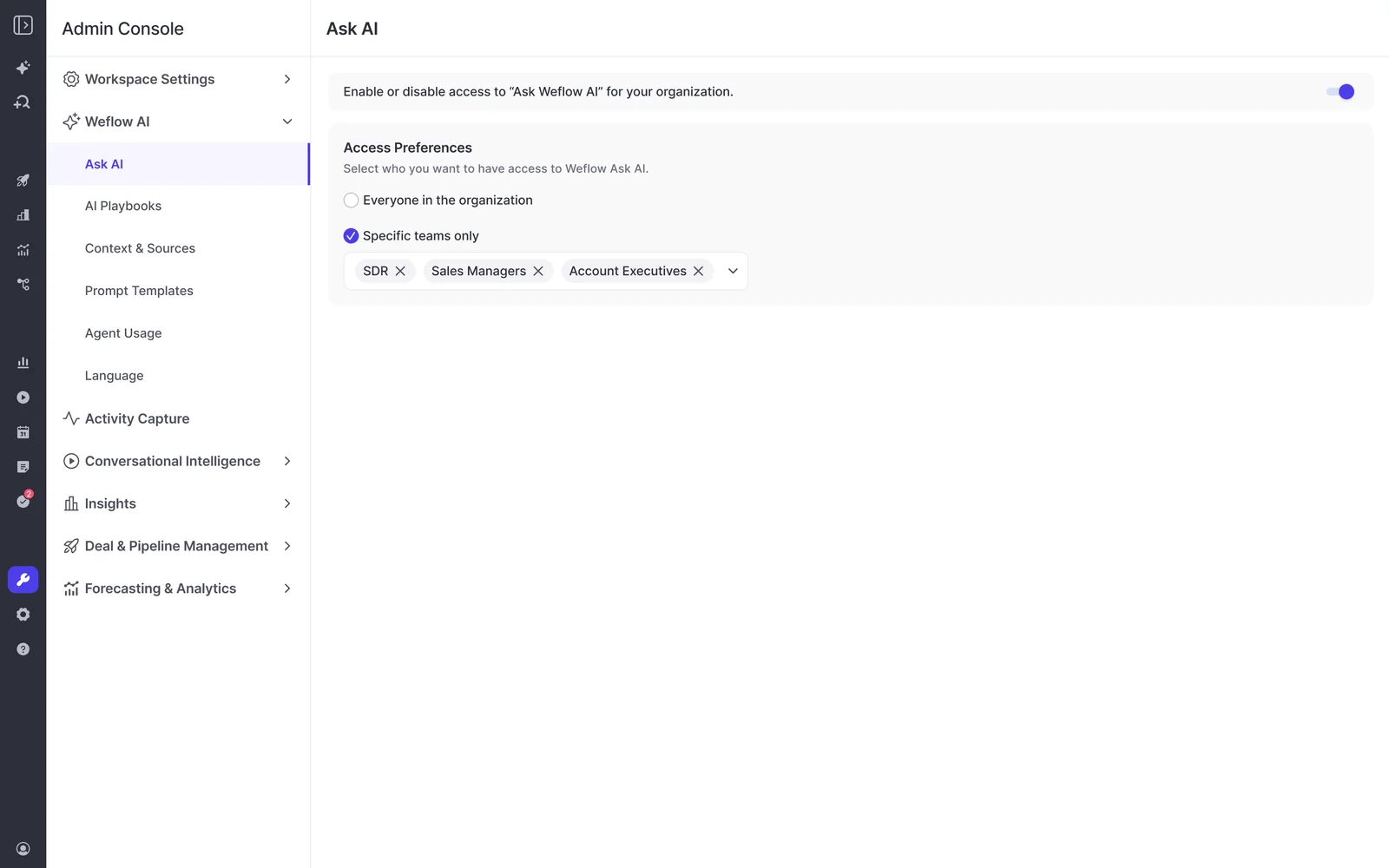
No separate Weflow identity to manage or deprovision
The only way into Weflow is through your Salesforce authentication: OAuth, whatever SSO your org already enforces, or Salesforce two-factor. There is no email and password login, so there's no second credential to phish, no shadow user list, and nothing to reconcile at audit time.
Deactivate the user in Salesforce and their Weflow access is gone immediately. Joiner-leaver becomes one action in one system, which is usually the shortest answer you'll ever give IT.
Answers come from your Salesforce objects, not a vendor schema
Everything Weflow captures, emails, meetings, contacts, call summaries and AI field updates, lands in native Salesforce objects you own. So when Ask Weflow AI answers a question, it's querying your permissioned records, not a mirrored copy governed by someone else's access model. Answers cite the records they came from, which means a reviewer can trace any output back to the opportunity, email or recording behind it.

The trust posture behind it is specific rather than adjectival:
- SOC 2 Type II certified, with regular third-party penetration testing
- GDPR, CCPA and HIPAA compliant
- Zero Data Retention for AI processing
- Customer data is never used to train AI models
What permission inheritance does not settle
Inheritance answers what the AI reads. It doesn't answer what data flows in, and it doesn't answer whether your governance process approves. Three boundaries, stated plainly:
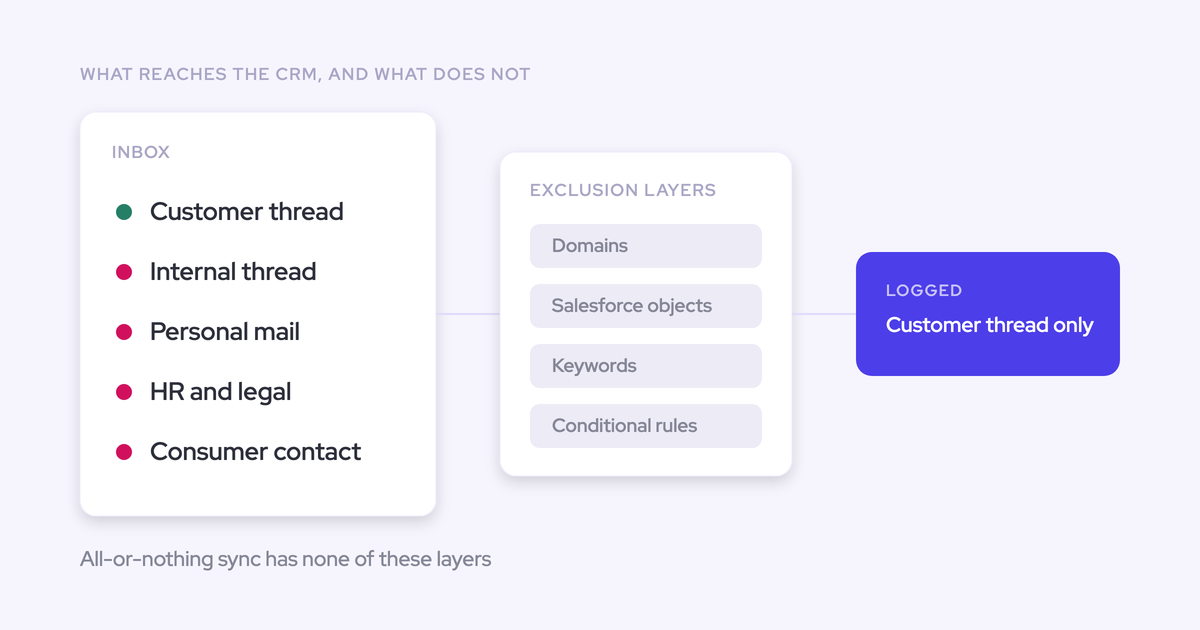
- Capture scope is a separate admin decision. Connecting every mailbox in the tenant is not a call an IT admin makes on behalf of legal, HR and finance. Capture can be restricted to nominated mailboxes or a security group, and domains and account types can be excluded, but somebody has to decide that deliberately.
- Custom objects need setup help. AI Field Updates cover the standard objects out of the box, and custom objects require configuration by Weflow support rather than self-service in the admin console.
- No architecture skips the committee. Weflow holds SOC 2 Type II, ISO 27001 is in progress rather than achieved, and Weflow is not FedRAMP certified. If you're a US government contractor with a FedRAMP mandate, we're not a fit today.
On capture scope, this is exactly the intervention we want admins to make, and they do:
And when the AI review runs on its own clock, there's a route that doesn't require you to wait. Weflow's products sell standalone, so plenty of teams buy the capture layer first, fix the thing that's actually urgent, and switch the intelligence on once governance clears it.
FAQ: AI assistants and Salesforce permissions
Does Ask Weflow AI enforce field-level security or only object access?
Field level. Ask Weflow AI runs as the logged-in user, so a field hidden from that user in Salesforce is absent from their Ask AI answers. There's no separate app-layer permission model to configure or keep in sync.
Can Weflow email capture be limited to specific mailboxes or groups?
Yes, and it should be. Capture scope is an explicit admin decision: connect nominated mailboxes or a single security group rather than the whole tenant, and exclude domains or account types such as partners and internal test accounts. Set it before anyone is switched on.
Where is Weflow data hosted, and can it stay in the EU?
Weflow is a German company with Frankfurt-hosted infrastructure, and a customer instance spins up in the region where that customer's Salesforce is hosted. That can be overridden to keep data in the EU or UK, so residency is a configuration choice rather than a migration project.
What happens to Weflow access when a user leaves?
It dies with their Salesforce access. Sign-in exists only through your Salesforce OAuth and SSO or Salesforce two-factor, so deactivating the Salesforce user removes Weflow access immediately. There's no separate account for anyone to remember.
Which security certifications does Weflow hold, and which is it missing?
Weflow holds SOC 2 Type II, is GDPR, CCPA and HIPAA compliant, runs Zero Data Retention for AI processing, never trains models on customer data, and runs regular third-party penetration tests, with certificates and controls published in a trust center. For procurement: breach notification within 48 hours, a DPA incorporating EU Standard Contractual Clauses, and a public sub-processor list with advance change notification. ISO 27001 is in progress and not yet certified, and Weflow is not FedRAMP certified.
Can we deploy activity capture first and enable Ask AI later?
Yes. Weflow Activity & Contact Capture, Conversation Intelligence, and Deal Intelligence & Forecasting all sell standalone, so a team whose AI governance runs on its own timeline can put the capture layer in now and add the intelligence after approval.
Does Weflow consume our Salesforce API allowance?
Weflow is built on the Salesforce API, so yes, and we manage the budget deliberately because that allowance is org-wide and shared with every other integration you run. Activity reporting in the Weflow Analytics package runs inside Salesforce and consumes no API calls, and heavy one-off operations like historical backfill are batched over days or weeks rather than run in one pass.
If you'd rather verify than take any of this on trust, that's the right instinct. Walk through the product yourself, no call required.