3 AI Orchestration Layers RevOps Teams Build to Automate Salesforce Workflows
Learn the 3 AI orchestration layers RevOps teams use to automate Salesforce workflows.


.webp)

RevOps teams are moving from maintaining systems to designing how the revenue engine runs. The shift is straightforward: instead of waiting for reps to update Salesforce, ops teams can now define which tasks agents handle automatically, which actions need human review, and which data keeps the whole system accurate.
This article breaks down the three orchestration layers behind that shift. You’ll see how to structure native Salesforce data, deploy agents with clear triggers and actions, and design workflows that improve data completeness, forecast accuracy, and pipeline health—without turning your GTM stack into another set of disconnected tools.
[banner type="download" url="https://www.weflow.ai/cheat-sheets/revops-ai-orchestrator-cheatsheet" text="RevOps AI Orchestration Cheatsheet" subtitle="Frameworks, routing templates, and decision checklists for managing humans and AI agents." button="Download now"]
AI orchestration: shift from system admin to system architect
AI orchestration is the practice of managing humans and agents across your GTM org. In practical terms, it means deciding what should happen automatically, what should route to a rep or manager, and what data needs to exist in Salesforce for those decisions to work.
That matters now because the capability gap has closed. Two years ago, a lot of GTM data lived in emails, call recordings, meeting notes, or rep memory. It was unstructured, hard to query, and hard to turn into workflow logic. Now transcripts, summaries, MEDDIC signals, next steps, and deal risk indicators can be extracted and written back into Salesforce fields that Flows, reports, validation rules, and downstream systems can actually use.
RevOps is the team best positioned to own that logic. Marketing sees top-of-funnel activity. Sales sees the active deal. Customer Success sees post-sale risk and expansion. RevOps sees the full motion, owns the field mapping, and already manages the process dependencies between teams. The job is changing from reactive admin work to resource allocation: deciding where people spend time, where agents absorb repetitive work, and where Salesforce should enforce the process.
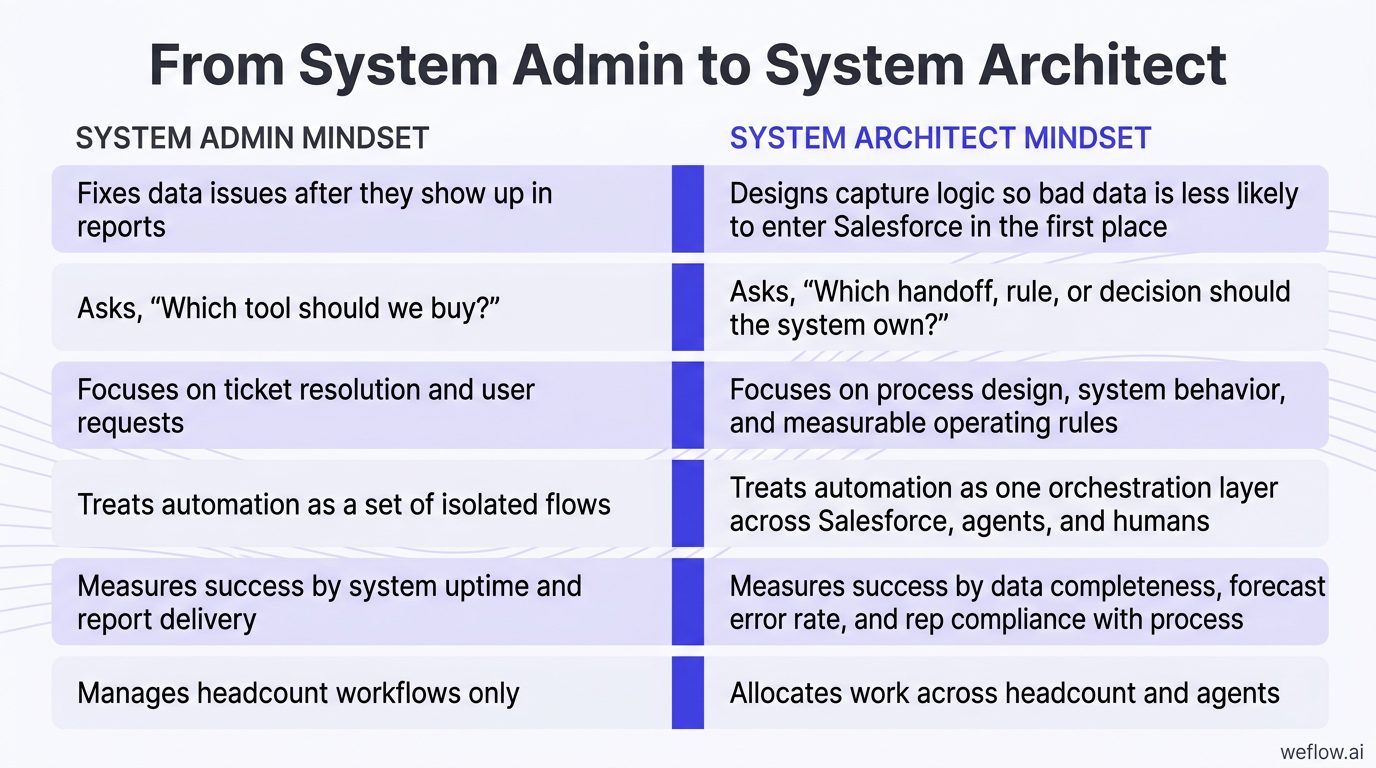
System admin mindset | System architect mindset |
|---|---|
Fixes data issues after they show up in reports | Designs capture logic so bad data is less likely to enter Salesforce in the first place |
Asks, “Which tool should we buy?” | Asks, “Which handoff, rule, or decision should the system own?” |
Focuses on ticket resolution and user requests | Focuses on process design, system behavior, and measurable operating rules |
Treats automation as a set of isolated flows | Treats automation as one orchestration layer across Salesforce, agents, and humans |
Measures success by system uptime and report delivery | Measures success by data completeness, forecast error rate, and rep compliance with process |
Manages headcount workflows only | Allocates work across headcount and agents |
The key shift is this: AI agents are just a new type of resource. RevOps already decides where SDRs, AEs, managers, and admins spend time. Orchestration extends that same discipline to agents—what they watch for, what they update, and when they hand work back to a human.
Map human and agent handoffs across the GTM org
The cleanest orchestration designs start with division of labor. Agents should handle high-volume, rules-driven work inside Salesforce. Humans should handle judgment, coaching, and strategic decisions.
Agents handle volume work: logging emails and meetings, updating fields from transcripts, creating missing Contacts, attaching Opportunity Contact Roles, routing leads, flagging inactivity, and pushing alerts when thresholds are met.
Humans handle judgment work: deciding whether a deal should move to Commit, coaching a rep on a weak discovery call, choosing an account strategy, approving a reassignment, or overriding a risk flag based on deal context.
The goal is absorption, not replacement: a good orchestration layer removes repetitive admin work so sellers and managers can spend more time on inspection, coaching, and decision-making.
A simple example: an agent logs a recorded meeting to the right Opportunity, writes the summary into the Event Description, extracts MEDDIC fields, and flags that the Economic Buyer is still blank at Stage 3. The AE or manager then decides the next move—schedule a multithreaded follow-up, hold stage progression, or adjust the close plan.
Ask system design questions instead of tool questions
Most AI projects go sideways because the buying process starts too low in the stack. If the first question is “Which tool solves this?” you usually end up with another UI, another data silo, and another set of partial write-backs your Salesforce admin has to clean up later.
Ask these four system design questions first:
Where are the gaps in our GTM motion that AI can fill? Look for latency, manual work, missed routing, low field completeness, or blind spots in inspection and forecasting.
Where does a human need to stay in the loop? High-stakes actions like forecast changes, account reassignment, pricing changes, and late-stage progression should not auto-fire without review.
What data does each workflow need to run reliably? If the workflow depends on Opportunity Contact Roles, stage history, transcript data, or owner maps, those dependencies need to be reliable first.
How should our tools connect, and what workflows does that enable? This is where you define Salesforce write-back, API dependencies, and which system owns each field update.
That framing keeps the conversation at the system level. It also helps RevOps avoid a common trap: buying point products that read from Salesforce but don’t write meaningful data back to standard objects, custom objects, or the fields your reports already depend on.
The 3 AI orchestration layers: build a reliable revenue engine
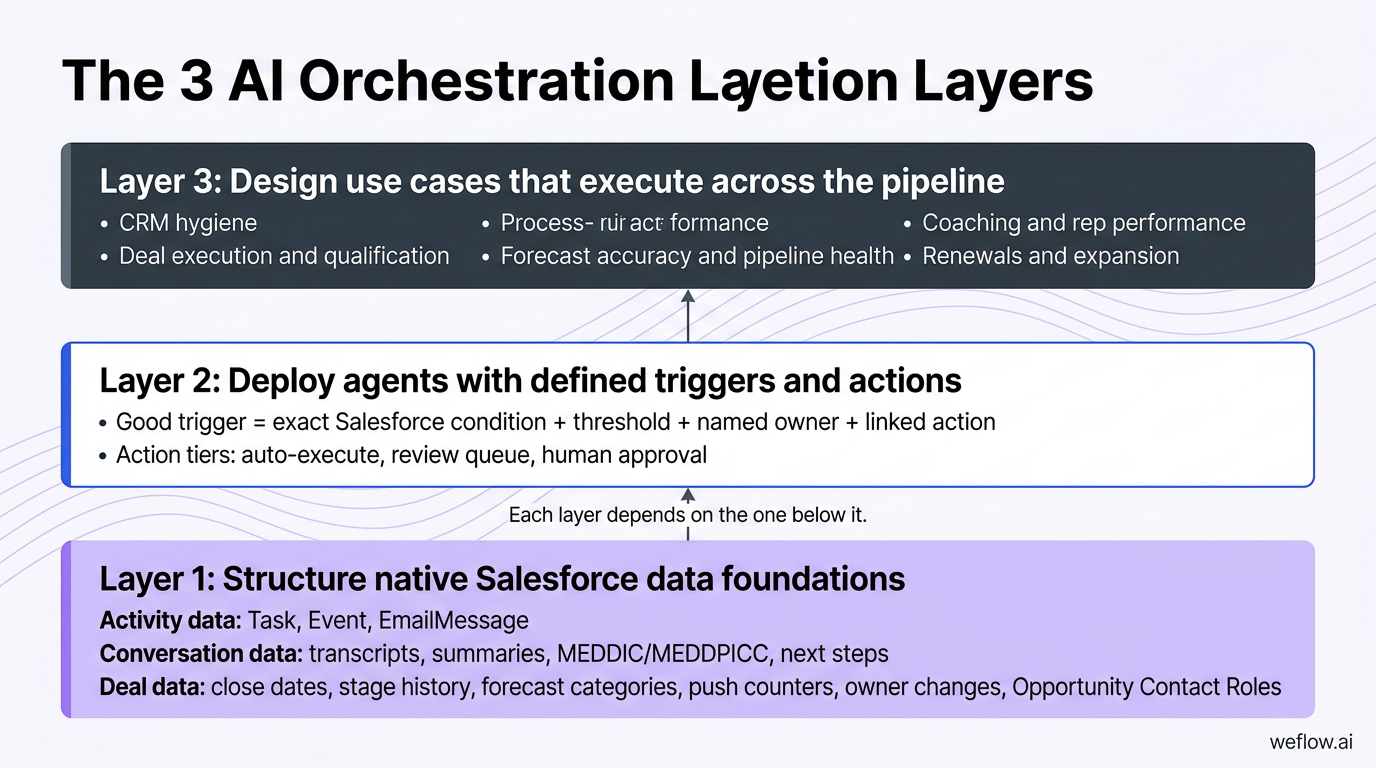
Orchestration doesn’t happen at the tool level. It happens at the system level, and each layer depends on the one below it. If your data layer is weak, your triggers misfire. If your triggers are vague, your use cases become noise. AI does not fix broken process design—it runs the existing process faster, including the broken parts.
Layer 1: Structure native Salesforce data foundations
Every trigger and action reads from data. If the data is incomplete, lives in virtual storage, or sits inside a third-party application without usable Salesforce write-back, the orchestration layer will be unreliable from day one.
Activity data: emails, calls, and meetings should be captured into native Salesforce objects such as Task, Event, and EmailMessage, with the correct Account, Contact, and Opportunity relationships.
Conversation data: transcripts, summaries, next steps, MEDDIC or MEDDPICC extraction, sentiment, and talk-to-listen signals should write back to the Opportunity, related activities, or purpose-built custom objects that reporting and automation can reference.
Deal data: close dates, stage history, forecast categories, push counters, amount changes, owner changes, and Opportunity Contact Roles need to be complete enough for risk logic and pipeline inspection to work.
Native Salesforce objects matter because that’s where the rest of your operating system already lives: validation rules, Flow, reports, dashboards, permissions, and downstream integrations. Virtual storage—most notably Salesforce Einstein Activity Capture (EAC)—creates limits because the data often isn’t available in the same way for reporting, automation, or field-level logic. If an email or meeting isn’t queryable in your normal Salesforce model, it can’t reliably trigger the workflow you want.
Layer 2: Deploy agents with defined triggers and actions
Agents are the operating layer. They watch Salesforce for conditions that mean something, then execute a defined response. This is where GTM knowledge becomes system logic.
The anatomy of a good trigger:
An exact Salesforce condition: for example, “Opportunity is Stage 3 and Economic Buyer field is blank,” or “Close Date has been pushed 3 times.”
A threshold: define what counts as meaningful—14 days with no activity, fewer than 3 Contact Roles on a deal above $50K, or a forecast deviation above 20%.
A named owner: every trigger needs a person in RevOps or revenue management who owns tuning, exceptions, and break/fix work.
A linked action: the system should know exactly what happens next—field update, queue assignment, stage block, or review request.
Start with 3 to 5 triggers only. That constraint matters more than most teams expect. If every edge case becomes an alert, reps stop distinguishing signal from noise, managers ignore prompts, and the trust curve collapses before the system has a chance to prove itself.
Action tiers:
Auto-execute: low-risk updates such as logging activities, creating a missing Contact, updating a transcript summary field, or sending a Slack alert.
Review queue: medium-risk actions such as stage progression checks, forecast changes, or manager inspection tasks that should be seen before they hit the record.
Human approval: high-stakes actions such as Commit changes, account reassignment, price changes, or anything touching Closed Won.
Layer 3: Design use cases that execute across the pipeline
Once the data model and trigger logic are in place, use cases become the visible output of orchestration. This is the point where RevOps stops looking like a support team and starts acting like the architect of the revenue engine.
Data capture and CRM hygiene: agents capture activities, create missing records, update contact roles, and prevent incomplete data from rolling into pipeline reporting.
Deal execution and qualification: agents detect stalled deals, missing MEDDIC fields, weak multithreading, and stage progression risk, then route the right follow-up to a rep or manager.
Forecast accuracy and pipeline health: agents track pushed close dates, forecast category drift, coverage gaps, and deal inactivity before the weekly call turns into a cleanup exercise.
Coaching and rep performance: agents flag talk-to-listen imbalances, weak next steps, or inconsistent methodology use so managers can coach against real call and pipeline data.
Renewals and expansion: agents monitor health score drops, CSM activity gaps, renewal windows, and expansion signals pulled from customer conversations.
Foundation audit: fix data debt before deploying AI agents
Before you deploy any agent, audit the foundation. Orchestration scales what already exists. If the Salesforce layer is messy, AI just makes the errors arrive faster and look more convincing. Dirty owner maps route work to the wrong people.
Missing Contact Roles make healthy deals look single-threaded or vice versa. Weak validation rules let bad stage data flow straight into forecast calls.
Audit data completeness and process definitions
Start with the records and rules your workflows depend on most. Missing Opportunity Contact Roles are a good example: they break deal risk logic, distort multithreading analysis, and cause routing errors when follow-up tasks or alerts need to go to the right contacts.
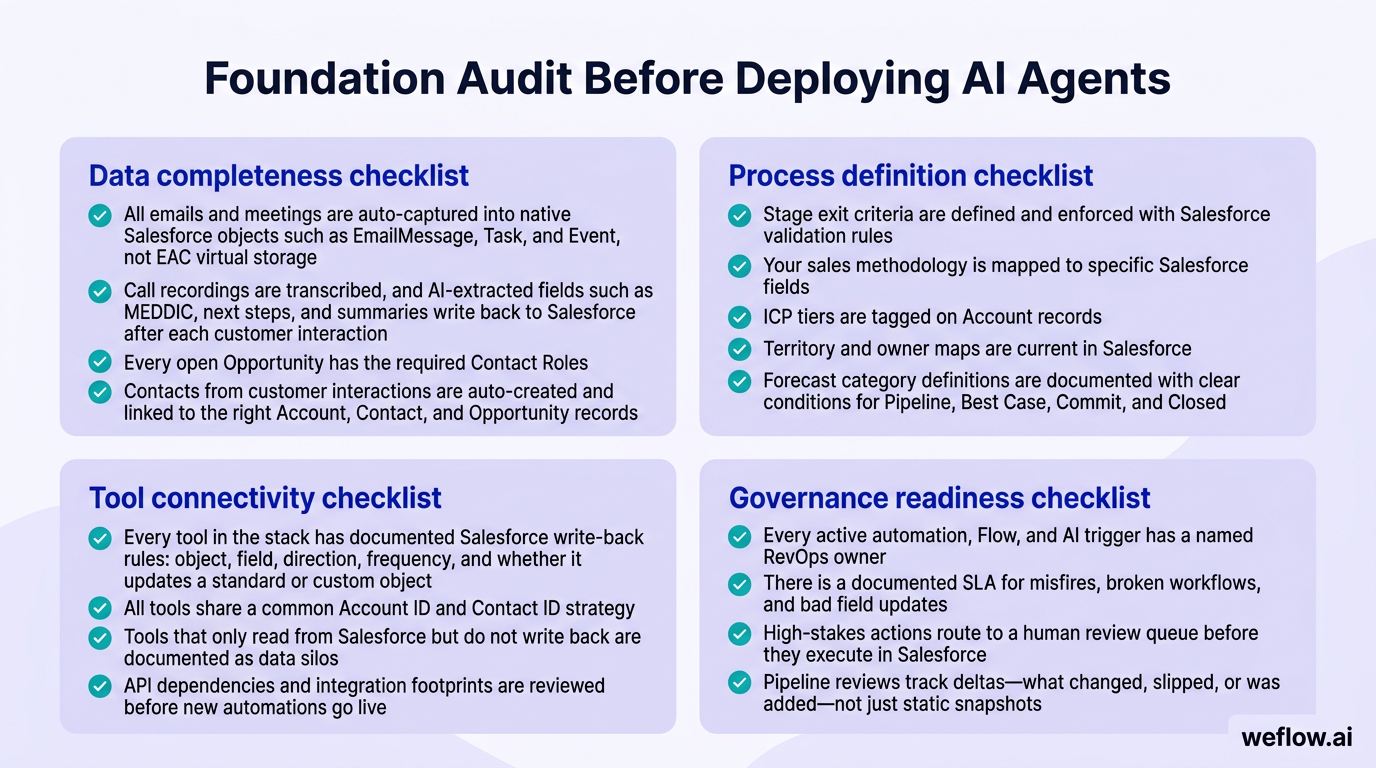
Data completeness checklist
[ ] All emails and meetings are auto-captured into native Salesforce objects such as EmailMessage, Task, and Event, not EAC virtual storage.
[ ] Call recordings are transcribed, and AI-extracted fields such as MEDDIC, next steps, and summaries write back to Salesforce after each customer interaction.
[ ] Every open Opportunity has the required Contact Roles, and single-threaded deals above your risk threshold are flagged automatically.
[ ] Contacts from customer interactions are auto-created and linked to the right Account, Contact, and Opportunity records.
[ ] Key Opportunity fields are required at the correct stage, including methodology fields, next steps, and any push counter logic.
[ ] Forecast category logic is documented and mapped to stage and field conditions.
Process definition checklist
[ ] Stage exit criteria are defined and enforced with Salesforce validation rules.
[ ] Your sales methodology is mapped to specific Salesforce fields, not handled only through training and manager inspection.
[ ] ICP tiers are tagged on Account records and kept current enough to support routing and scoring logic.
[ ] Territory and owner maps are current in Salesforce.
[ ] Forecast category definitions are documented with clear conditions for Pipeline, Best Case, Commit, and Closed.
Map tool connectivity and governance readiness
The next audit is about system behavior, not just field completeness. When multiple tools touch Salesforce, shared identifiers and clear write-back rules are what keep your data model from drifting.
Tool connectivity checklist
[ ] Every tool in the stack has documented Salesforce write-back rules: object, field, direction, frequency, and whether it updates a standard or custom object.
[ ] All tools share a common Account ID and Contact ID strategy so records can be matched correctly across enrichment, activity sync, conversation intelligence, and forecasting layers.
[ ] Tools that only read from Salesforce but do not write back are documented as data silos.
[ ] API dependencies and integration footprints are reviewed before new automations go live.
Governance readiness checklist
[ ] Every active automation, Flow, and AI trigger has a named RevOps owner.
[ ] There is a documented SLA for misfires, broken workflows, and bad field updates.
[ ] High-stakes actions route to a human review queue before they execute in Salesforce.
[ ] Pipeline reviews track deltas—what changed, slipped, or was added—not just static snapshots.
Shared identifiers are the quiet dependency that saves a lot of cleanup work. If enrichment, activity capture, sequencing, and conversation tools all reference Accounts and Contacts differently, you get duplicates, broken relationships, and field updates landing on the wrong records. Once that happens, every trigger built on top of those records becomes less reliable.
Orchestration playbook: automate workflows by GTM function
These are practical starting points for building your first orchestration layer. RevOps designs the logic, but the end users are the teams working the pipeline every day. Each use case follows the same loop: a trigger fires, the system takes an action, and a human stays in the loop where judgment matters.
Route leads and trigger sequences for SDR teams
Inbound routing by ICP and territory: route new leads to the correct owner based on Account tier, territory rules, and account ownership within a defined SLA window.
Sequence enrollment by intent and score: trigger an outbound sequence once a lead or target account crosses the minimum score threshold you trust.
Auto-enrichment before queue assignment: append firmographic data such as industry, employee count, and HQ location before the rep touches the record.
Sequence suppression on open pipeline: remove contacts from active sequences when they’re already attached to an open Opportunity.
Re-engagement after Closed Lost: trigger a re-engage sequence when a previously lost account shows new intent after a set cooling period.
Auto-enrichment alone can save SDR teams hours of manual research each week, but only if the appended data writes back cleanly to the Account, Lead, or Contact objects your routing logic already uses.
Capture activity and extract MEDDIC fields for AEs
Activity auto-capture: log emails, meetings, and calls to the right Opportunity and Contact records without AE manual entry.
Transcript-to-field updates: extract MEDDIC or MEDDPICC fields from call transcripts and write them back to the Opportunity after every customer meeting.
Summary and next-step generation: create structured call summaries and next steps on the related Event or custom activity object.
Contact and Contact Role creation: create missing Contacts from meeting participants and set Opportunity Contact Roles automatically.
Stage gating: block stage progression when required methodology fields are blank or when next steps haven’t been captured.
Inactivity and push alerts: flag deals with no activity in 14+ days or close dates pushed beyond your threshold.
When AEs don’t have to choose between updating Salesforce and working the deal, methodology adoption usually improves. The process stops feeling like admin overhead and starts showing up as the default way the record gets maintained.
Flag deal risks and forecast deviations for managers
Pushed close date review queues: surface all Opportunities with repeated close date pushes for weekly inspection.
Single-threaded deal alerts: flag larger deals with too few Contact Roles so managers can intervene before the risk shows up in win rate.
Conversation-based coaching tasks: trigger manager follow-up when talk-to-listen ratio, discovery depth, or next-step clarity falls below your standard.
Commit inactivity alerts: notify managers when a Commit deal has no recent customer activity.
AI forecast corridors: generate a predicted range alongside rep submissions and highlight material gaps between the two.
Manager review on deviation: route deals or rep-level forecast submissions to inspection when variance exceeds the threshold you’ve set.
Forecast corridors are useful because they show direction, not just one predicted number. A manager can see when a rep’s commit pattern consistently lands outside the expected band, which is often the first sign of sandbagging or end-of-quarter optimism.
Monitor pipeline health and renewals for leadership
Weekly pipeline delta reports: generate a report that shows what was added, what slipped, and what changed in amount or close date across the org.
Coverage and territory alerts: trigger alerts when pipeline coverage drops below target or when opportunity distribution across reps drifts from plan.
Forecast trend monitoring: track forecast category distribution changes week over week to catch pipeline manipulation or late-stage inflation early.
Renewal risk workflows: flag accounts entering the renewal window with health score declines or low CSM activity.
Expansion signal routing: pull product, budget, or headcount signals from customer conversations and route them to the AE or account team.
Leadership should care more about pipeline deltas than snapshots. A static snapshot tells you what the pipeline looks like today. A delta view tells you what changed, which is what actually explains forecast movement and execution risk.
Governance rules: prevent automated mistakes and system decay
Governance is what keeps the orchestration layer trustworthy after launch. If reps don’t know why a flag fired, they’ll ignore it. If managers don’t know who owns a trigger, they’ll stop reporting bad outputs. If high-stakes actions happen without review, one bad update can damage trust faster than weeks of good performance can rebuild it.
Rule | Why it exists | Who owns it | When it applies |
|---|---|---|---|
AI proposes, humans approve on high-stakes actions | Prevents changes that are hard to reverse, such as Commit updates, stage changes, or account reassignment | Revenue manager and RevOps | Every high-impact workflow |
Set confidence thresholds for automated actions | Low-confidence updates create noise and false positives | RevOps | During setup and tuning |
Every trigger has a named owner | Someone needs to fix misfires fast and review performance over time | RevOps | At build time and in ongoing operations |
Every AI flag shows reasoning | Black-box scores get ignored because reps can’t act on them | RevOps | Always on |
Run new automations in monitor mode first | Catches bad logic before it writes to production records | RevOps | Every new use case |
Review system deltas weekly | Drift shows up in changes over time, not static status views | RevOps | Weekly operating cadence |
Document triggers, thresholds, and actions in one place | Undocumented orchestration breaks silently and is hard to maintain during team changes | RevOps | Ongoing |
Agents do not update Commit or Closed Won without sign-off | Late-stage forecast and revenue recognition require human judgment | Revenue manager and RevOps | Always on |
Avoid common orchestration anti-patterns and design flaws
Most failures come from weak design choices, not from AI itself. Alert fatigue is a good example: once reps learn that most prompts are low-value, they stop reading all of them—including the ones that actually matter. That’s why starting small is not a nice-to-have. It’s how you build trust with the sales floor.
Anti-pattern | Root cause | Consequence | Fix |
|---|---|---|---|
Buying tools before defining the process | Pressure to add AI quickly | Outputs exist, but nobody acts on them | Define stage exits, owner maps, and methodology fields before tool selection |
Layering AI on dirty Salesforce data | Skipping the data audit | Fast, confident, wrong outputs | Fix activity capture, field completeness, and record relationships first |
Too many triggers | No prioritization of what actually matters | Alert fatigue and low rep action rates | Start with 3 to 5 high-value triggers and review them quarterly |
Using tools that do not write back to Salesforce | Weak vendor evaluation criteria | Data silos and broken downstream automation | Make native Salesforce write-back a non-negotiable requirement |
Automating without human checkpoints | Overconfidence in AI outputs | High-stakes mistakes in pipeline and forecast data | Map every action to auto-execute, review queue, or human approval |
Black-box scoring with no explanation | Default vendor scoring logic | Reps and managers ignore the signal | Require every score or flag to show the top reasons behind it |
No named owner for active triggers | Orchestration treated as a one-time project | System decay and slow break/fix response | Assign a RevOps owner to every trigger and action |
Undocumented logic held by one admin | Speed over governance | Silent failures when that person leaves or changes roles | Keep a shared system record of every trigger, threshold, object, and action |
The RevOps tech stack: connect tools that write to Salesforce
The stack matters, but only after the system design is clear. Salesforce remains the system of record. Everything else should improve data completeness, inspection, and execution by writing back to the Salesforce objects your process already runs on. If a tool can’t do that, it’s a silo, not part of the orchestration layer.
Tool category | What it does | What it writes back |
|---|---|---|
CRM | Stores the operating data model and supports reporting, validation rules, Flow, and permissions | Accounts, Contacts, Leads, Opportunities, activities, forecasts, and custom objects |
Activity capture | Syncs emails, meetings, and related contacts to the right Salesforce records | Task, Event, EmailMessage, Contact records, and Opportunity Contact Roles |
Conversation intelligence | Records, transcribes, and summarizes calls, then extracts sales methodology fields and next steps | Event Description, transcript objects, Opportunity fields, and custom objects |
Pipeline intelligence and forecasting | Tracks deal risk, forecast movement, pipeline deltas, and AI prediction fields | Risk flags, forecast fields, push counters, corridor fields, and inspection summaries |
Data enrichment | Appends and refreshes firmographic and account data used in routing and scoring | Account and Contact fields such as industry, employee count, and HQ location |
Sales engagement | Runs sequences, task creation, and SDR workflow execution | Lead status, task records, and sequence-related field updates |
CS health and renewal tooling | Tracks customer health, renewal timing, and expansion signals | Health scores, renewal risk flags, and account-level expansion indicators |
Agent builders and workflow tools | Connect systems and execute multi-step workflows across APIs | Salesforce records updated through API calls or managed package write-back |
General AI | Generates summaries, classifications, or content that feeds workflow execution | Usually none directly unless routed through a workflow layer that writes to Salesforce |
Evaluate tools based on native CRM writeback capabilities
Your vendor criteria should be strict. RevOps pays the total cost of ownership when write-back is weak, field mapping is shallow, or the integration footprint forces manual workarounds in Salesforce.
It must update standard and custom Salesforce objects. If your methodology, health, or process logic lives in custom fields or custom objects, the tool has to support that natively.
It must avoid virtual storage for activity data. EAC-style storage limits reporting and makes trigger logic harder to build and maintain.
It must support reliable API connectivity for multi-step workflows. That includes outbound actions, downstream updates, and orchestration across multiple systems.
It must support Salesforce Enterprise and Unlimited editions. Enterprise buyers need to know the integration model fits governance, permissioning, and scale requirements.
It must meet security requirements such as SOC 2 Type II. If conversation and customer data are in scope, security review will be part of the buying process.
If you’re migrating from Gong, focus the evaluation on Salesforce write-back depth, not just call recording quality. Gong is strong in conversation intelligence, but many RevOps teams still run into shallow field mapping, manual workarounds for custom Salesforce workflows, and activity gaps when they try to build orchestration on top of the data. The better choice is the platform that writes more of the right data into Salesforce with less admin effort.
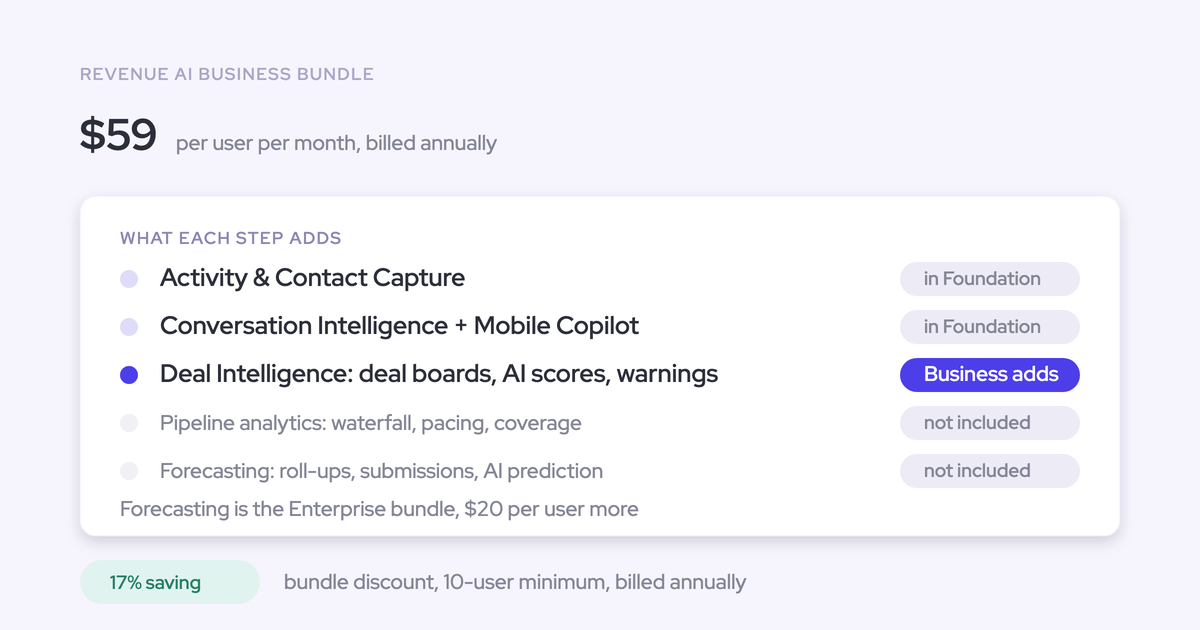
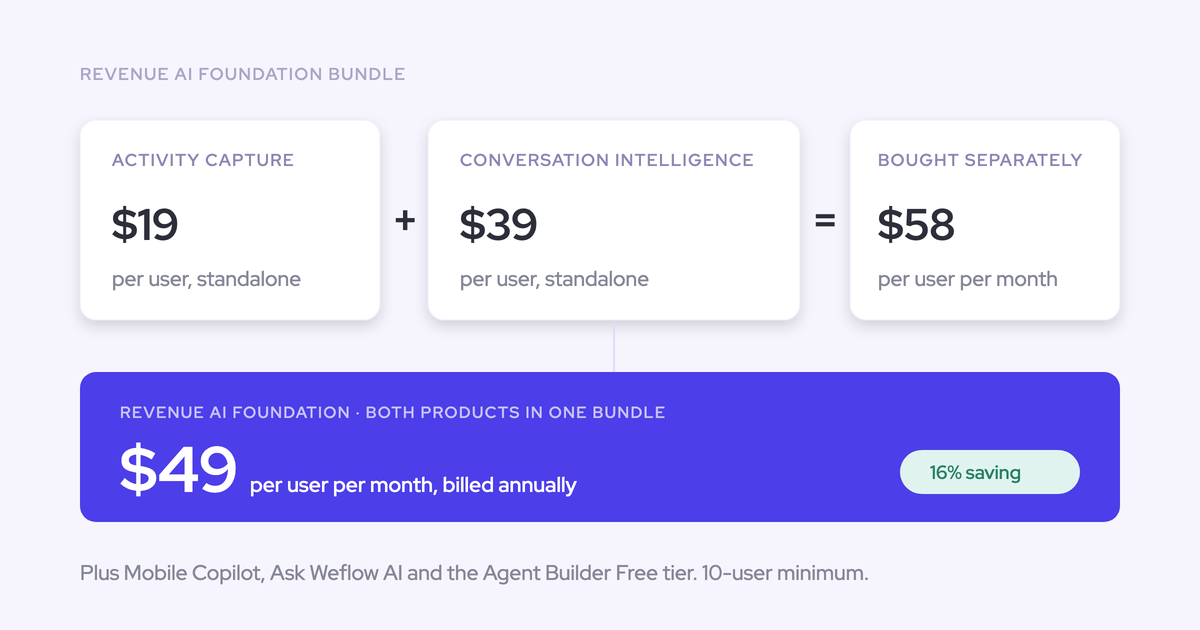
Weflow, a Salesforce-native revenue AI platform, is built around that model. Teams moving off Gong typically care about three things: lower implementation effort, broader Salesforce write-back across activity and deal data, and faster time to value. When the field mapping is documented, that migration is usually a weeks-not-quarters project—not a long replatform.
FAQ
What is the difference between AI orchestration and automation?
Automation usually means a fixed rule inside one system: if field X changes, do Y. AI orchestration is broader. It manages how Salesforce data, AI agents, and human review work together across multiple steps and systems. An automated Flow might block stage movement when a field is blank. An orchestration layer decides how that field gets populated from transcript data, when a manager should review the update, and what happens downstream if the condition persists.
Why should RevOps own AI orchestration instead of IT?
IT can support architecture, security review, and integration standards, but RevOps should own the operating logic because it understands the GTM motion in detail. RevOps knows which stage exits matter, how forecast categories are defined, which fields support MEDDIC enforcement, and where judgment still needs to sit with managers or reps. Without that context, you get technically correct automation that doesn’t match how pipeline actually moves.
How many triggers should we start with when deploying agents?
Start with 3 to 5 triggers tied to measurable problems such as missing stage-critical fields, no activity on open opportunities, repeated close date pushes, single-threaded larger deals, or commit inactivity. That gives you enough signal to prove value without flooding the sales org. Once action rates are high and the logic is stable, add more triggers in quarterly reviews rather than all at once.
What happens when an AI agent makes a mistake in Salesforce?
The operating model should assume mistakes will happen. Low-risk actions can auto-execute, but high-stakes actions should route to a human review queue first. Every trigger needs a named owner in RevOps, a documented rollback path, and a response SLA for misfires. In practice, that means you can trace which condition fired, which fields were updated, who approved the action if approval was required, and how to reverse the change without guessing.