Claude Prompts RevOps Teams Run to Automate Forecasting and CRM Hygiene [With Template]
Learn Claude prompts RevOps teams use to automate forecasting and CRM hygiene, with templates.


.webp)

RevOps teams don’t need more AI theory. They need faster ways to review pipeline, clean Salesforce data, write validation logic, and turn raw numbers into updates a CRO or CFO will actually read.
This guide repurposes a 60+ prompt cheat sheet into the workflows behind it. You’ll see how to set up Claude with the right company context, which mode to use for each job, and the prompt templates RevOps teams can copy into Chat, Projects, Cowork, Code, or the API.
[banner type="download" url="https://www.weflow.ai/resources/cheat-sheets/claude-for-revops-cheat-sheet" text="Claude for RevOps Tactical Cheatsheet" subtitle="Prompts, SOQL examples, scoring models, SOP templates, and deal review frameworks." button="Download now"]
RevOps AI foundations: set context for accurate outputs
If you paste a raw Salesforce export into Claude with no business context, you’ll usually get a clean-looking answer that still misses your actual operating rules. It won’t know your stage exit criteria, forecast category definitions, territory carve, custom objects, or how your team uses MEDDIC unless you tell it.
That setup work is what separates useful output from generic output that needs 20 minutes of manual editing. Start there first.
Required context type | Brief example |
|---|---|
Company and ICP | B2B SaaS selling to VP RevOps and Sales Ops leaders at 100–1,000 employee companies |
Segments | SMB = under 100 employees, Mid-Market = 100–999, Enterprise = 1,000+ |
Sales stages and exit criteria | Stage 3 requires confirmed pain, mutual next step, and identified champion |
Forecast categories | Commit = rep will stand behind the number, Best Case = plausible but missing one approval step |
Qualification framework | MEDDIC with Economic Buyer and Champion required before late-stage progression |
Key metrics and targets | Pipeline coverage target = 3.5x, forecast error target = under 5% |
Territory and handoff logic | Enterprise routed by geo, MQL becomes SAL at score 80+, SDR to AE handoff within 24 hours |
Fiscal calendar | Q1 starts February 1 |
Salesforce schema notes | Custom fields include MEDDIC_Champion__c and Next_Step_Date__c on Opportunity |
Output audience | CRO wants numbers first in 3 bullets, Salesforce admin wants field names and formula logic |
There are two practical ways to give Claude this data. The fast path is manual: export a Salesforce report as CSV, keep the column headers, remove fields the task doesn’t need, and paste the data into Chat or a Project. The scalable path is API access with MCP, where Claude can query live Salesforce records and work from current data instead of snapshots.
For recurring work, store this business context once in Claude Projects or pass it as a system prompt in every API call. That single prompt becomes the operating layer for every forecast summary, MEDDIC score, SOQL draft, and executive update that follows.
Define company context and sales methodology
Before you run any prompt, document the business rules Claude needs to apply. At minimum, include these context categories:
Stage definitions and exit criteria: what each Opportunity stage means in your Salesforce process, and what must be true before a deal can move forward
Forecast category rules: how your team defines Commit, Best Case, Upside, and Omit
Qualification method: whether you use MEDDIC, MEDDPICC, SPICED, or an internal variant
Territory structure: geo, segment, vertical, named account rules, and exceptions
Lead and opportunity handoffs: MQL, SAL, SQL, SDR to AE, AE to CS, or AE to Deal Desk definitions
Metric logic: pipeline coverage, ARR, win rate, forecast error rate, stage conversion, and any board-facing KPI formulas
Salesforce data model notes: custom objects, custom fields, required fields, validation rules, and fields that are populated by integration write-back
This context is the brain behind every later prompt. Without it, Claude can summarize text and tables. With it, Claude can reason the way your RevOps team actually does.
Choose the right Claude model and operating mode
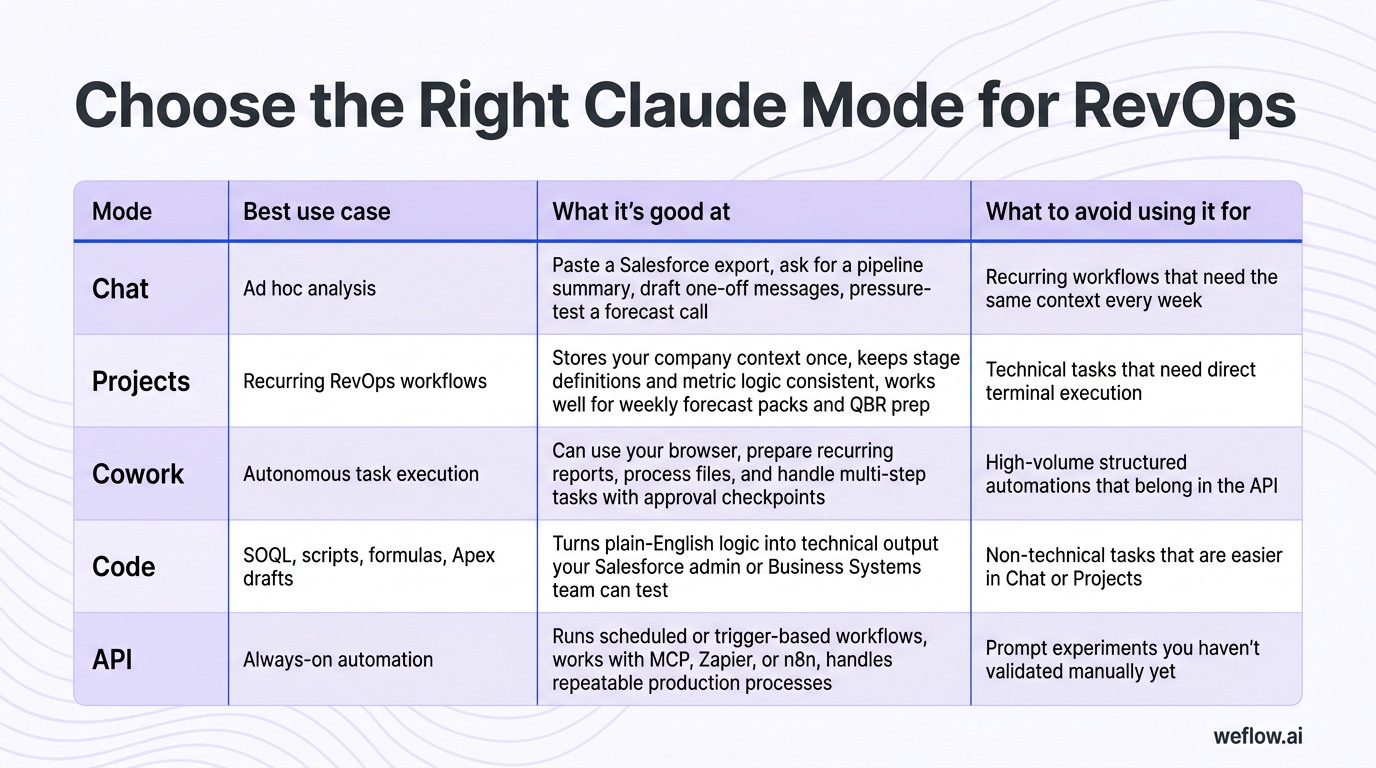
For most RevOps tasks, Sonnet is the winner because it’s faster and cheaper for pipeline summaries, CRM audits, MEDDIC scoring, and prompt iteration. For complex multi-deal reasoning or board-ready narratives, Opus is the winner because it handles deeper synthesis across larger inputs.
Mode | Best use case | What it’s good at | What to avoid using it for |
|---|---|---|---|
Chat | Ad hoc analysis | Paste a Salesforce export, ask for a pipeline summary, draft one-off messages, pressure-test a forecast call | Recurring workflows that need the same context every week |
Projects | Recurring RevOps workflows | Stores your company context once, keeps stage definitions and metric logic consistent, works well for weekly forecast packs and QBR prep | Technical tasks that need direct terminal execution |
Cowork | Autonomous task execution | Can use your browser, prepare recurring reports, process files, and handle multi-step tasks with approval checkpoints | High-volume structured automations that belong in the API |
Code | SOQL, scripts, formulas, Apex drafts | Turns plain-English logic into technical output your Salesforce admin or Business Systems team can test | Non-technical tasks that are easier in Chat or Projects |
API | Always-on automation | Runs scheduled or trigger-based workflows, works with MCP, Zapier, or n8n, handles repeatable production processes | Prompt experiments you haven’t validated manually yet |
For a RevOps Analyst, Chat is the best starting point because it gets you to a working prompt in minutes before you invest time in Code or API setup. For a VP of RevOps, Projects is the best starting point because it keeps recurring executive output consistent without re-pasting company context every time.
Pipeline management: automate weekly forecast analysis
Weekly forecast work is one of the cleanest places to start with Claude because the inputs are already structured. Most RevOps teams already have a Salesforce report with Opportunity Name, Account Name, Stage, Amount, Close Date, Forecast Category, Owner, Segment, Last Activity Date, and Created Date. That’s enough to get useful output quickly.
Before you paste the export, clean the file first. Keep the column headers, include the snapshot date in your prompt, remove unrelated fields, and add a one-line key if headers are abbreviated. If you want stage-age analysis, include either Days in Stage or a last stage change date. If you want activity risk, include Last Activity Date or a recent activity count.
Done right, this replaces the worst part of weekly pipeline review: filtering a spreadsheet five different ways just to find the same stalled deals you already suspected were at risk.
Summarize weekly pipeline movement and deal risk
A good pipeline summary prompt should ask for four outputs in one pass:
Total pipeline value and deal count by stage so you can see whether coverage is healthy or just concentrated in late-stage assumptions
Stalled deals with no recent activity so managers know where inspection is needed before the forecast call
Top at-risk deals with reasoning so the output isn’t just a list of names without context
Recommended actions for this week’s forecast call so the summary turns into next steps instead of passive reporting
Prompt template: pipeline review summary
You are a RevOps analyst. Below is our [SEGMENT] pipeline export as of [DATE].

Summarize:
1. Total pipeline value and deal count by stage
2. Deals with no activity in [X] days
3. Top 3 deals at risk with reasoning
4. Recommended actions for this week's forecast call

Use bullet points. Be concise. Flag stage-age risk where relevant.

[PASTE CSV OR TABLE]
If you want week-over-week movement, paste last week’s and this week’s exports together, label them clearly, and ask Claude to isolate changes in amount, stage, close date, owner, and forecast category. That usually saves one to two hours of spreadsheet work before the leadership review.
Draft executive-ready forecast variance narratives
The math in forecast variance is usually easy. The hard part is explaining why the number moved in a way leadership trusts. RevOps teams often know the root cause, but turning that into a short narrative for a CRO, VP Sales, or CFO takes longer than it should.
Explain anomalies from trend data: why commit dropped, why pipeline coverage widened, or why stage conversion fell in one region
Pressure-test rep forecast calls: ask Claude to argue against the current commit number using stage age, slipped close dates, and missing activity
Build week-over-week change summaries: what moved, what slipped, and what changed in the forecast composition
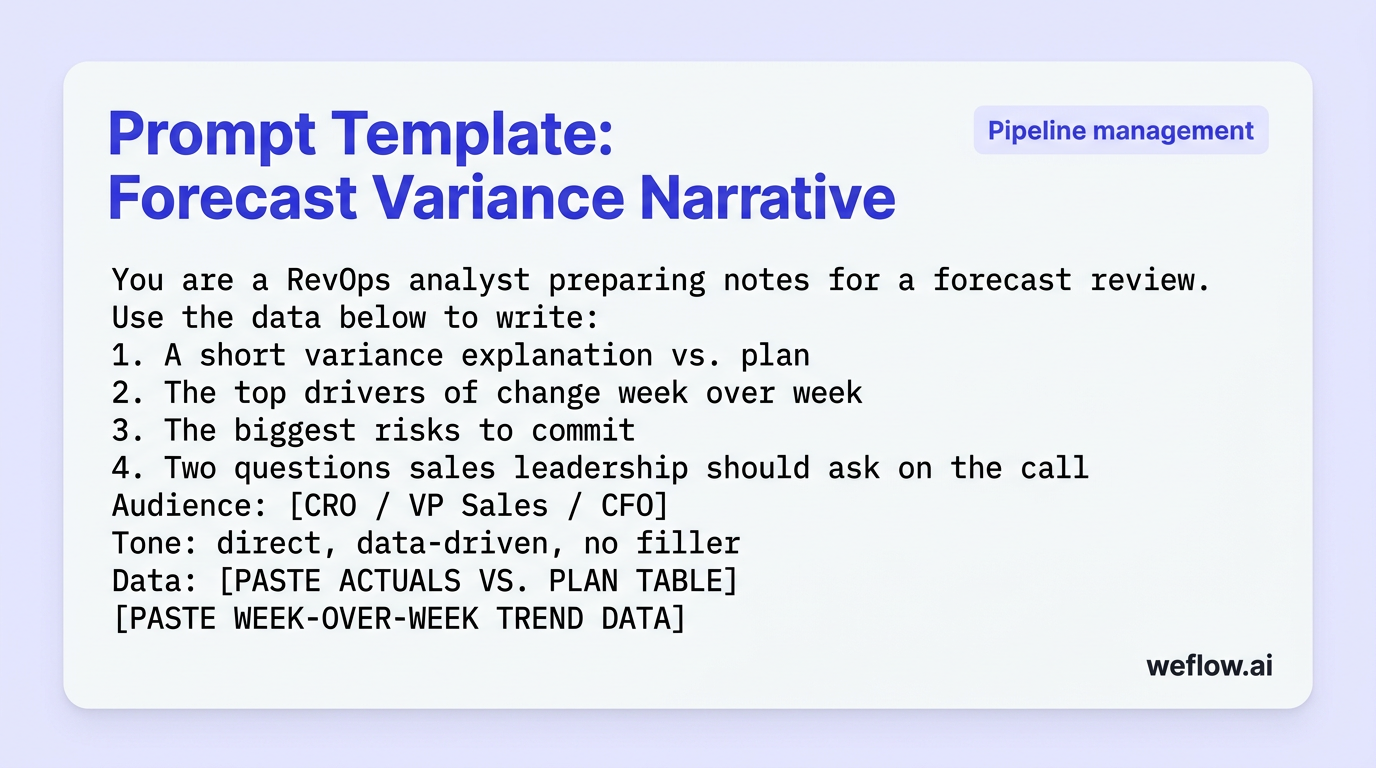
Prompt template: forecast variance narrative
You are a RevOps analyst preparing notes for a forecast review.

Use the data below to write:
1. A short variance explanation vs. plan
2. The top drivers of change week over week
3. The biggest risks to commit
4. Two questions sales leadership should ask on the call

Audience: [CRO / VP Sales / CFO]
Tone: direct, data-driven, no filler

Data:
[PASTE ACTUALS VS. PLAN TABLE]
[PASTE WEEK-OVER-WEEK TREND DATA]
For one-off forecast work, Chat is the winner. For a Monday or Friday rhythm that repeats every week, Projects is the winner because it keeps your metric definitions and output format stable.
CRM hygiene: clean data and build Salesforce logic
CRM hygiene work has two parts: finding the data issue, and turning the fix into Salesforce logic someone can actually deploy. Claude helps with both. It can inspect a pasted export, classify data quality gaps, draft field mapping tables, score record completeness, and write the first draft of a validation rule or SOQL query.
It does not deploy any of that for you. That line matters. Claude writes the logic, but a Salesforce admin, Business Systems lead, or developer still needs to test and publish it.
Weekly CRM hygiene tasks Claude can automate
Identify open Opportunities missing required MEDDIC fields
Find records with no activity sync in the last 14, 21, or 30 days
Score Opportunity, Account, or Contact completeness against a defined field schema
Build field mapping tables between Salesforce and another system
Draft SOPs for Opportunity hygiene, Account ownership, or contact role updates
Write rep-facing field descriptions that explain what to enter and why
Draft validation rules that block stage progression when required fields are blank
Generate SQL queries for automated data audits
SQL generation is one of the highest-ROI uses for Claude because most RevOps people know what they want to audit but don’t want to build every query from scratch. Plain-English prompts work well here, especially if you include your custom field names and object notes.
If your org uses custom activity fields, custom Opportunity objects, or non-standard naming, include that in the prompt. Otherwise Claude will generate syntactically valid logic against the wrong schema.
Write a Salesforce SOQL query that returns all [OBJECT] records where [CONDITION].

Include fields:
[FIELDS]

Limit to [N] records.

Add an inline comment explaining each WHERE clause.

Our org uses these custom field notes:
[ANY CUSTOM FIELD NOTES]
A common starting prompt is: open Opportunities where LastActivityDate is more than 30 days ago, including Opportunity Name, Account Name, StageName, Amount, CloseDate, LastActivityDate, OwnerId, and ForecastCategoryName. If you use Claude Code, you can generate the query in your terminal, then run it in Salesforce Developer Console, Workbench, or your preferred query editor.
Write Salesforce validation rules in plain English
Validation rules often fail at the handoff between RevOps intent and admin execution. The business rule is clear in conversation, but fuzzy by the time it becomes a Salesforce formula. Claude is useful because it can bridge that translation step.
Write the business rule in plain English. Example: “Prevent stage progression to Proposal unless MEDDIC Champion, Decision Process, and Next Step Date are populated.”
Name the object and exact fields. Include API names, picklist values, and whether any field is a formula or custom object lookup.
Ask Claude for the formula and a plain-English explanation. That explanation helps admins validate the logic before testing.
Ask Claude to draft the user-facing error message and field descriptions. This is the part reps actually see.
Test in before deployment. Check whether the logic conflicts with existing validation rules, flows, or stage automation.
Prompt template: validation rule draft
Write a Salesforce validation rule for the Opportunity object.

Business requirement:
[DESCRIBE THE RULE]

Fields involved:
[LIST FIELD API NAMES]

Requirements:
1. Return the validation formula
2. Explain the formula in plain English
3. Draft the error message a rep should see
4. Suggest one shorter field description for each required field
This is where Claude helps RevOps move from process policy to deployable Salesforce logic without losing the operational intent on the way.
Deal qualification: score opportunities against MEDDIC
Claude is good at turning unstructured deal notes into a structured qualification view. That makes it useful for MEDDIC scorecards, gap analysis, coaching questions, and pre-meeting prep. It is not a substitute for a manager’s judgment on whether a deal is actually real.
Prompt template: MEDDIC gap analysis
Act as a sales coach. Score each MEDDIC element
(Metrics, Economic Buyer, Decision Criteria, Decision Process, Identify Pain, Champion)
on a 1-3 scale where 1 = missing, 2 = partial, 3 = confirmed.

Then provide:
1. The top qualification gaps
2. The top 2 next-best actions per missing element
3. A recommendation to stay in stage, advance, or flag at risk

Deal:
[COMPANY], [STAGE], [ARR], [CLOSE DATE]

Notes:
[PASTE CALL NOTES OR ACTIVITY LOG]
That prompt works well in Chat for one deal, or in Projects for a repeated deal review workflow.
Score deal gaps from pasted call transcripts
Call transcripts are messy, but they contain the raw inputs RevOps usually wants in Salesforce: pain, stakeholders, timing, buying process, and next steps. Claude can turn that into a usable Opportunity update.
Extraction targets from a call transcript
MEDDIC progress: what’s newly confirmed, still partial, or still missing
Pain points and business impact: not just what the prospect said, but why it matters
Stakeholders and roles: champion, evaluator, blocker, Economic Buyer, procurement, security
Next steps and owners: mutual action plan detail if it exists
Risk signals: vague timing, weak champion language, unconfirmed decision process, no agreed next step
Recommended stage progression: stay, advance, or flag at risk based on the evidence in the transcript
Prompt template: call transcript to Salesforce Opportunity update
You are a RevOps analyst. Summarize this call transcript into a structured Salesforce opportunity update.

Extract:
1. Progress on MEDDIC elements
2. Key pain points and business impact
3. Stakeholders identified and their roles
4. Next steps agreed and who owns them
5. Risk or objection signals
6. Recommended stage progression (stay / advance / flag at risk)

Output in bullets under 250 words.

[PASTE TRANSCRIPT]
If you process a large volume of call recordings, Cowork is the winner because you can point it at a transcript folder and have it run the same extraction workflow after every completed call.
Draft pre-meeting briefs for account executives
Pre-call prep is one of the few AI workflows that can affect win rate directly because it changes rep behavior before the meeting happens. A good brief gives the AE context fast: account basics, open deal status, what happened last time, and what still needs to be qualified.
Prompt template: pre-meeting brief
You are a RevOps analyst. Generate a pre-meeting brief for an AE preparing for a call with [COMPANY].

Include:
1. Account summary (segment, industry, size)
2. Open opportunity status (stage, ARR, close date, days in stage)
3. MEDDIC gaps to address
4. Last activity summary and key context from previous calls
5. Recommended talking points and questions for this call

Be concise. Output in bullets under 300 words.

[ACCOUNT AND OPPORTUNITY DATA]
[PREVIOUS CALL NOTES]
That brief is useful because it cuts context switching. The rep doesn’t have to scan Salesforce notes, a transcript, and calendar history just to remember what to ask next.
Stakeholder reporting: translate metrics for executives
RevOps already knows the numbers. The harder part is packaging them for different readers. A CRO wants a short read with the answer first. A VP Sales wants deal-level detail and actions. A CFO wants a precise variance explanation tied back to plan. Same source data, different output.
Audience | Required output format |
|---|---|
CRO | Number first, 3–5 bullets max, clear view of commit risk and what changed week over week |
VP Sales | Deal-level risk table, rep-specific actions, stage and close-date detail |
CFO | Variance table with target, actual, delta, and root-cause explanation tied to plan assumptions |
Formatting matters because leadership rarely has time to decode your output. If the structure is wrong, the analysis might be correct and still fail.
Build QBR narratives from raw KPI data tables
QBR writing is a good fit for Claude because the structure repeats every quarter even when the numbers change. The model can take a KPI table and turn it into a clean narrative around performance, wins, headwinds, and next-quarter priorities.
Prompt template: QBR narrative builder
Write a QBR executive summary for [TEAM] for [QUARTER].

Audience: CRO and CFO
Tone: direct, data-driven, no filler

Structure:
1. Performance vs. plan
2. Key wins
3. Headwinds and root causes
4. Q[NEXT] priorities and commitments

Data:
[PASTE KPI TABLE]
Always specify the tone in the prompt. If you don’t say “direct, data-driven, no filler,” you’ll usually get a longer narrative than an executive audience wants.
Format data outputs for specific leadership roles
Claude usually follows formatting instructions closely, so be explicit about the reader.
For CROs: ask for numbers first, 3–5 bullets maximum, and no methodology explanation unless a number is contested
For VP Sales: ask for deal names, stages, amounts, close dates, specific risk reasons, and one action item per deal or rep
For CFOs: ask for exact target vs. actual values, stated assumptions, and root-cause explanations that tie back to plan
Save these formatting rules in Claude Projects so the output stays consistent across weekly pipeline emails, forecast notes, and QBR packs.
RevOps integrations: connect Claude to your tech stack
Manual copy-paste is the right starting point for most RevOps teams. It’s faster to validate the workflow with a CSV export in Chat than to spend a week setting up an API process for a prompt you haven’t proven yet.
Once the output is good, you can decide whether the task should stay manual or move into an automated workflow.
Manual exports: fastest setup, lowest risk, ideal for ad hoc analysis and early prompt testing
Projects with manual inputs: best for recurring analysis where the context stays stable but the data changes each week
Cowork: useful when the task includes browser work, file handling, or a report preparation step
API plus MCP: best for live querying, structured write-back, and trigger-based workflows at scale
Connect Salesforce for live data querying
When the manual workflow is stable, you can connect Claude to Salesforce for live record access.
Confirm API access. In practice, this usually means Salesforce Enterprise or Unlimited Edition with API access enabled.
Set up Anthropic’s MCP connector. Your technical resource will configure the connection and permission scope.
Define what Claude can read and write. Respect field-level security, object permissions, validation rules, and any custom object dependencies.
Start with read-only workflows. Query live Opportunities, Accounts, Tasks, or custom objects before you allow structured write-back.
Test structured updates carefully. If Claude writes back risk flags, summaries, or scoring fields, confirm the target fields, automation interactions, and approval path first.
This setup is useful because it removes stale snapshot risk. Claude can reason over current pipeline data without waiting for someone to export a report. It does require API access and a technical owner to configure it correctly.
Automate workflows with Zapier and n8n triggers
Once the prompt is working, third-party workflow tools make it repeatable.
New Opportunity created in Salesforce: send the record to Claude, score ICP fit, identify early risk, and post the summary to Slack
New inbound lead: classify fit and route by segment, geography, or named account rules
Completed sales call: summarize the transcript into a structured Opportunity note and propose MEDDIC field updates
Every Monday morning: pull pipeline records, generate a weekly digest, and deliver it to sales leadership in Slack or email
Every Friday: run a CRM hygiene audit for missing required fields, stale activities, or stage compliance issues
In every API workflow, include the same system prompt with your stage definitions, forecast category logic, metric formulas, and Salesforce schema notes. If you skip that, the automation will drift toward generic output fast.
AI limitations: verify outputs before updating systems
Claude is useful for RevOps work because it can reason over text, tables, and process rules in one place. It still has hard limits that matter in a production Salesforce environment.
Warning: Claude cannot invent missing Salesforce data, infer company-specific logic you never provided, or guarantee correct arithmetic on complex multi-step calculations.
Missing data stays missing: if your export lacks Last Activity Date, you won’t get a reliable no-activity audit
Unstated business rules cause wrong answers: if your custom forecast logic differs from standard Salesforce categories, Claude will default to assumptions
Training cutoffs matter: Claude won’t know your latest packaging change, comp plan update, or Salesforce process change unless you include it
Deal judgment still needs a human: AI can score qualification gaps, but it can’t replace the rep or manager who knows the political reality of the account
Use Claude as a co-pilot for analysis, drafting, and first-pass logic. Don’t treat it as the final approver for data or code.
Cross-reference calculations against source data
Math errors are rare enough to be dangerous because the output often looks polished. That’s why verification is non-negotiable.
Check one number against Salesforce first. Validate a single deal amount, stage total, or variance output against the source report.
Recalculate multi-step formulas independently. This matters for coverage ratio, conversion cascades, and comp plan math.
Confirm assumptions are stated correctly. A forecast narrative tied to the wrong plan value is still wrong even if the math is clean.
Verify any write-back field value before updating Salesforce. Don’t let a generated score or summary overwrite a live field without review.
Audit the first few runs of any automation manually. Once a workflow is stable, then scale it.
LLMs can structure arithmetic logic well, but they’re still not the right system of record for final calculations. Salesforce, your warehouse, or your finance model should remain the source of truth.
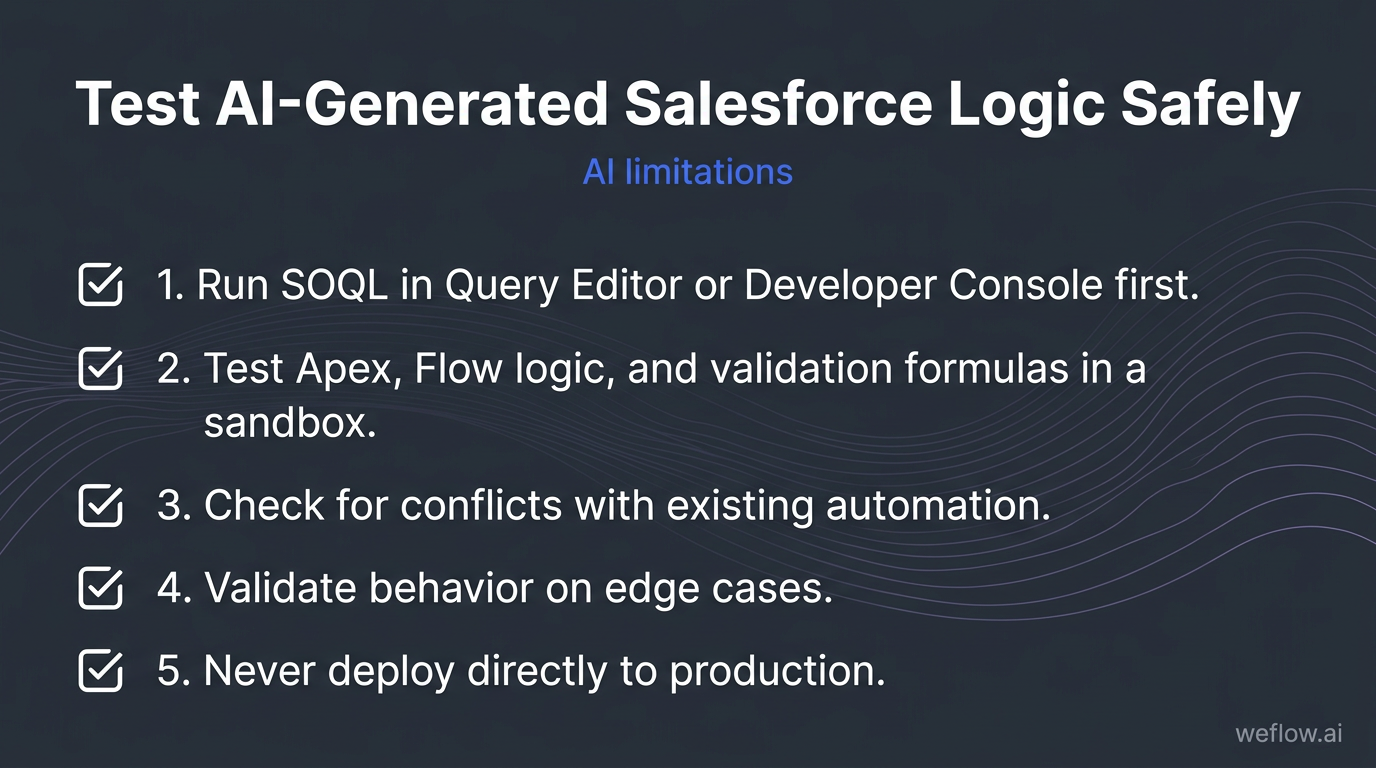
Test generated code in a Salesforce sandbox first
Run SOQL in Query Editor or Developer Console first. Confirm the object names, field names, and filter logic against real records.
Test Apex, Flow logic, and validation formulas in a sandbox. Never treat generated code as production-ready on first pass.
Check for conflicts with existing automation. One new validation rule can break stage updates, integrations, or approval flows if it overlaps with current logic.
Validate behavior on edge cases. Test null values, picklist exceptions, record types, and custom object relationships.
Never deploy directly to production. A bad rule or trigger in a live Salesforce org can block pipeline updates, break write-back processes, and create cleanup work during the forecast window.
That last point isn’t theoretical. Untested automation in production can freeze rep workflows, stop activity sync, and corrupt reporting at the exact moment leadership needs clean numbers.
FAQ
Can Claude update Salesforce fields automatically?
Yes, but the method matters. Cowork can update fields through your browser with your approval on individual record changes, which is useful for supervised work like cleaning a handful of Opportunities after a deal review. For bulk, repeatable updates, API plus MCP is the better path because it can query live records, apply structured logic, and write back at scale. If the update touches forecast fields, stage changes, or any field behind validation rules, route it through a human review step first.
How do I protect customer PII in Claude prompts?
For manual Chat or Project use, replace names, emails, phone numbers, and company identifiers with placeholders while you test the prompt structure. Once the prompt is stable, move sensitive production workflows into the API under your company’s enterprise data processing agreement and internal security controls. RevOps should also decide which Salesforce fields are safe for prompt input, especially if transcripts, custom objects, or support notes can include regulated data.
Which Claude model is best for RevOps workflows?
Sonnet is the best default for most RevOps work because it handles pipeline summaries, CRM audits, SOQL generation, MEDDIC scoring, and stakeholder drafts with lower latency and cost. Opus is the better choice when the task needs deeper reasoning across many deals or when the output is headed to the board, the CFO, or a high-stakes planning review. A simple operating rule works well: start in Sonnet, and move to Opus only when the reasoning depth is the bottleneck.
Does Claude replace dedicated GTM AI tools?
No. Claude is strongest for ops builders who are comfortable with prompt design, workflow setup, and Salesforce-specific context management. Sales reps and front-line managers usually get more value from a purpose-built Revenue AI platform that already has activity capture, Salesforce write-back, and forecast workflows built in. If you’re also migrating off Gong because activity data completeness or Salesforce field mapping is breaking down, Claude can help document the migration, field mappings, and validation logic—but it won’t replace the need for a Salesforce-native system such as Weflow, a Salesforce-native revenue AI platform, to handle production-grade activity sync, forecasting, and low-effort operational rollout.