AI Agent Ops for RevOps: Build, Flag, and Audit Revenue Agents [Step-by-Step]
Learn when RevOps should use AI agents vs workflows, and how to build, flag, and audit them.


.webp)

Most RevOps teams don’t need more automation. They need the right split between fixed Salesforce workflows and context-driven agents that can read a deal, judge risk, and write back something useful.
This guide shows how to do that step by step: when to use an agent instead of a workflow, how to build one, how to trigger it safely, and how to audit it so bad outputs don’t pollute Salesforce. If you’re moving off Gong to Weflow, a Salesforce-native revenue AI platform, the same rule applies: clean Salesforce context first, agent logic second.
[banner type="download" url="https://www.weflow.ai/cheat-sheets/revops-agent-ops-cheatsheet" text="AI Agent Ops Cheat Sheet for RevOps" subtitle="Includes agent-vs-workflow framework, build criteria, trigger models, and RevOps checklists." button="Download now"]
AI agents vs workflows: stop automating the wrong RevOps tasks
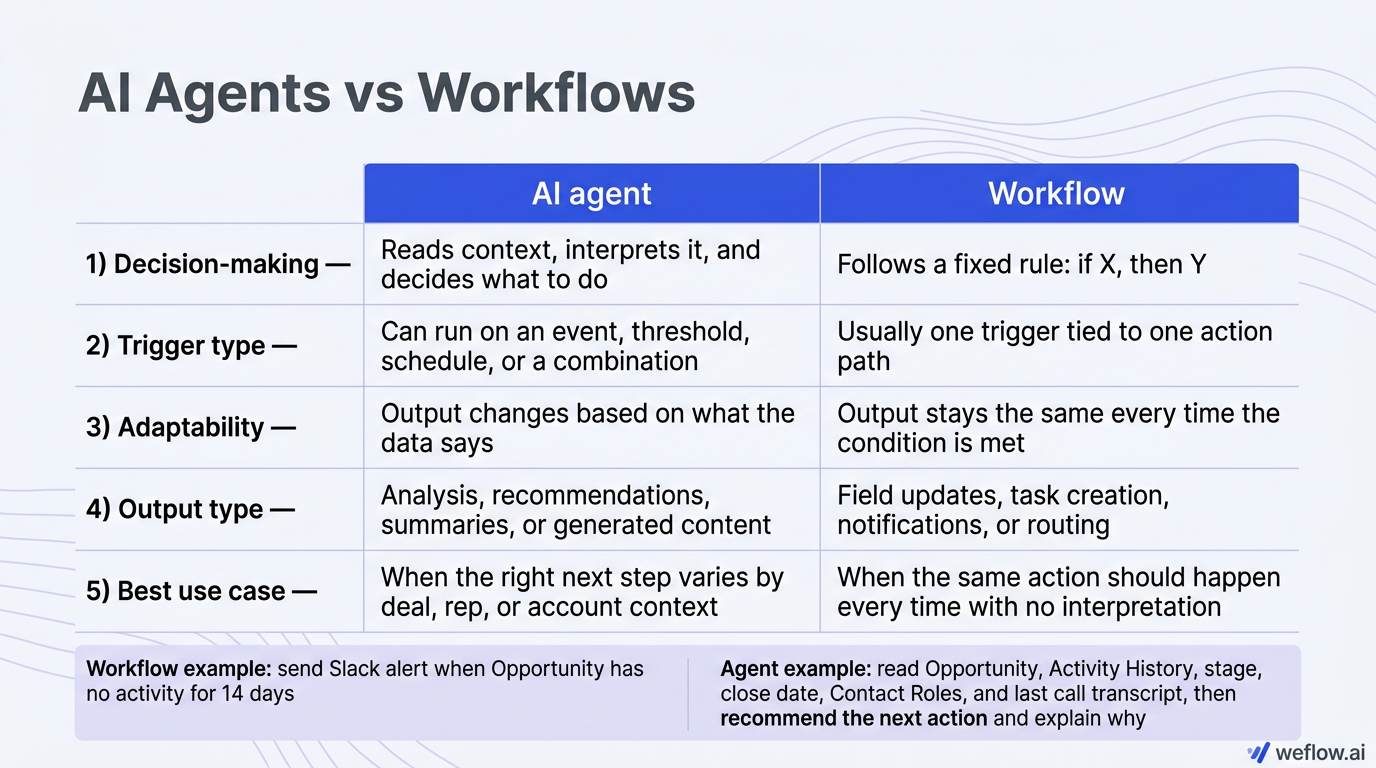
A workflow is for deterministic work. An agent is for judgment. If the action should be identical every time, use Salesforce Flow or another workflow layer. If the right action depends on deal context, use an agent.
Criteria | AI agent | Workflow |
|---|---|---|
Decision-making | Reads context, interprets it, and decides what to do | Follows a fixed rule: if X, then Y |
Trigger type | Can run on an event, threshold, schedule, or a combination | Usually one trigger tied to one action path |
Adaptability | Output changes based on what the data says | Output stays the same every time the condition is met |
Output type | Analysis, recommendations, summaries, or generated content | Field updates, task creation, notifications, or routing |
Best use case | When the right next step varies by deal, rep, or account context | When the same action should happen every time with no interpretation |
Example: a workflow sends a Slack alert when an Opportunity has no activity for 14 days. An agent reads the Opportunity record, Activity History, stage, close date, Contact Roles, and the last call transcript, then recommends the next action for that specific deal and explains why.
Confusing the two creates bad process design. Teams try to make workflows “smart” with layers of brittle logic, or they ask agents to do work that should stay deterministic. The result is the same either way: broken automations, noisy alerts, false risk flags, and reps who stop trusting the system.
Map the five components of a revenue agent
Every revenue agent has five parts. If one part is weak, the whole build gets weaker.
Component | What it is | Example: Flag deals at risk |
|---|---|---|
Trigger | The condition that starts the agent | Runs every morning at 7:00 AM on open Opportunities with a close date in the next 30 days |
Context | The Salesforce data the agent reads before acting | Opportunity fields, Activity History, Tasks, Events, EmailMessage records, Contact Roles, forecast category, and call transcripts |
Action | The reasoning step | Checks for risk signals such as no activity in 14 days, no next step, stage stalled for 21 days, or no executive contact |
Output | What gets written back or surfaced | Writes a risk flag and two-sentence summary to custom fields on Opportunity, then sends a digest to the owner and manager |
Feedback loop | How humans correct the agent | Manager marks the flag as confirmed risk or false positive, and RevOps uses that signal to recalibrate the prompt or threshold |
One rule: if the context is incomplete, the output is wrong.
That sounds obvious, but it’s the main reason revenue agents miss the mark. Missing Contact Roles, stale Last Activity Date values, poor email sync, or weak transcript coverage all show up as agent error later. In practice, gaps in CRM hygiene become gaps in agent accuracy.
This is also where teams migrating from Gong usually hit trouble first. Gong’s Salesforce integration often leaves shallow field mapping, manual write-back workarounds, and activity gaps that look small in reporting but become a real problem when an agent depends on those fields to make a call.
Agent construction framework: build reliable revenue agents
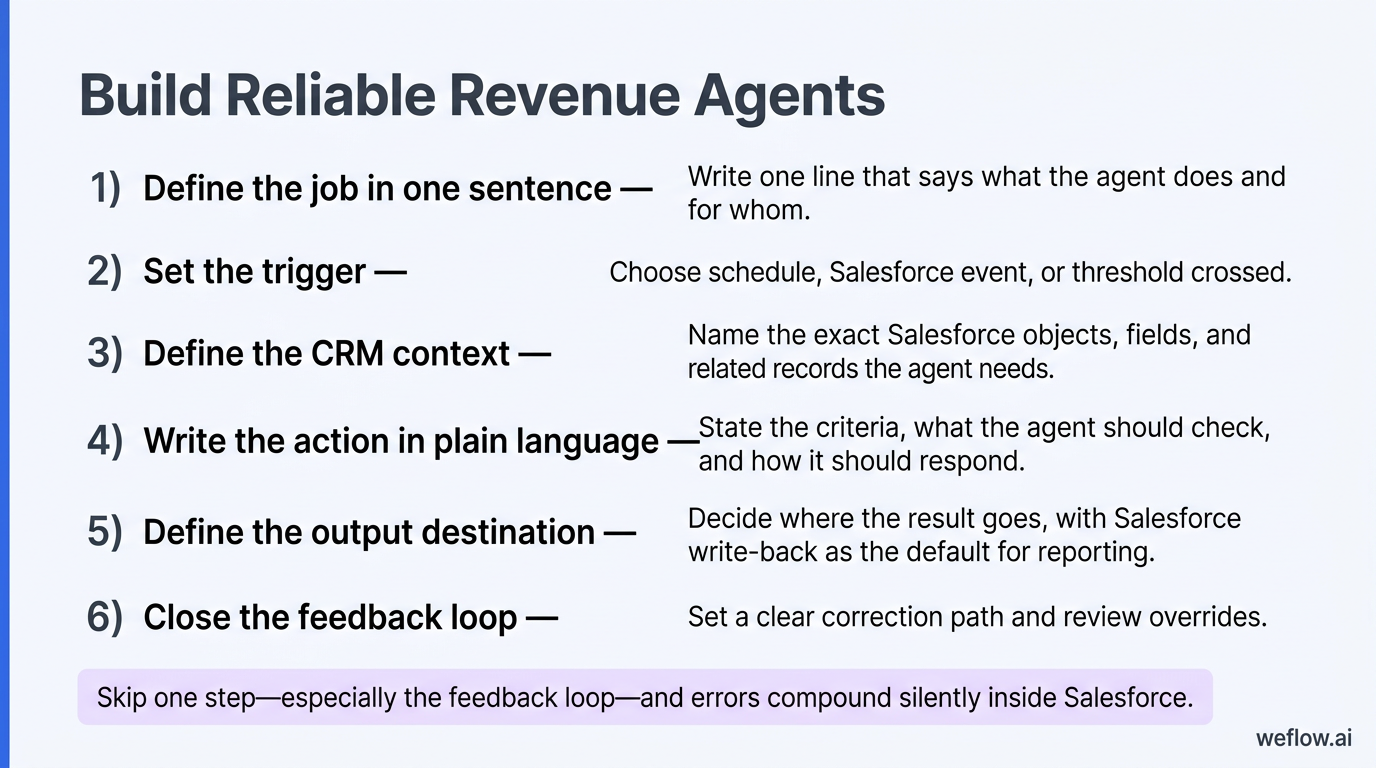
The cleanest way to build revenue agents is to use the same construction pattern every time: job, trigger, context, action, output, feedback. Skip one step—especially the feedback loop—and errors compound silently inside Salesforce until someone notices a forecast number is off.
Define the job in one sentence.
Write one line that says what the agent does and for whom. If you can’t do that, the job is too broad. “Flag open Opportunities with no activity in 14 days and notify the deal owner” is a usable job definition. “Help reps manage pipeline” is not.
Set the trigger.
Choose whether the job should start on a schedule, on a Salesforce event, or when a threshold is crossed. Scheduled triggers fit recurring analysis like Monday forecast risk reviews. Event-based triggers fit near-real-time actions like meeting prep. Threshold triggers fit stage or activity conditions like inactivity for seven days.
Define the CRM context.
Name the exact Salesforce objects, fields, and related records the agent needs. That usually means Opportunity, Contact, Contact Role, Task, Event, EmailMessage, Activity History, stage history, and any custom objects tied to your sales process. If you’re in Salesforce Enterprise or Unlimited edition, use field history tracking anywhere the agent depends on change over time.
Write the action in plain language.
This is the reasoning instruction. State the criteria, what the agent should check, and how it should respond. Keep it tied to the available data. If Salesforce doesn’t have executive sponsor status or next-step quality, don’t ask the agent to evaluate either one as if it does.
Define the output destination.
Decide where the result goes. For anything RevOps needs to report on, the default should be Salesforce write-back to a standard or custom field. For anything a rep or manager needs to act on quickly, add a second output like email, Slack, or task creation. Label agent-generated fields clearly and protect them with field-level security and validation rules where needed.
Close the feedback loop.
Set a clear correction path. Who reviews the output? Where do they mark false positives? How often does RevOps review overrides and update the prompt or trigger logic? This is the part most teams skip, and it’s why weak agents stay weak.
Write Claude prompts that return structured data
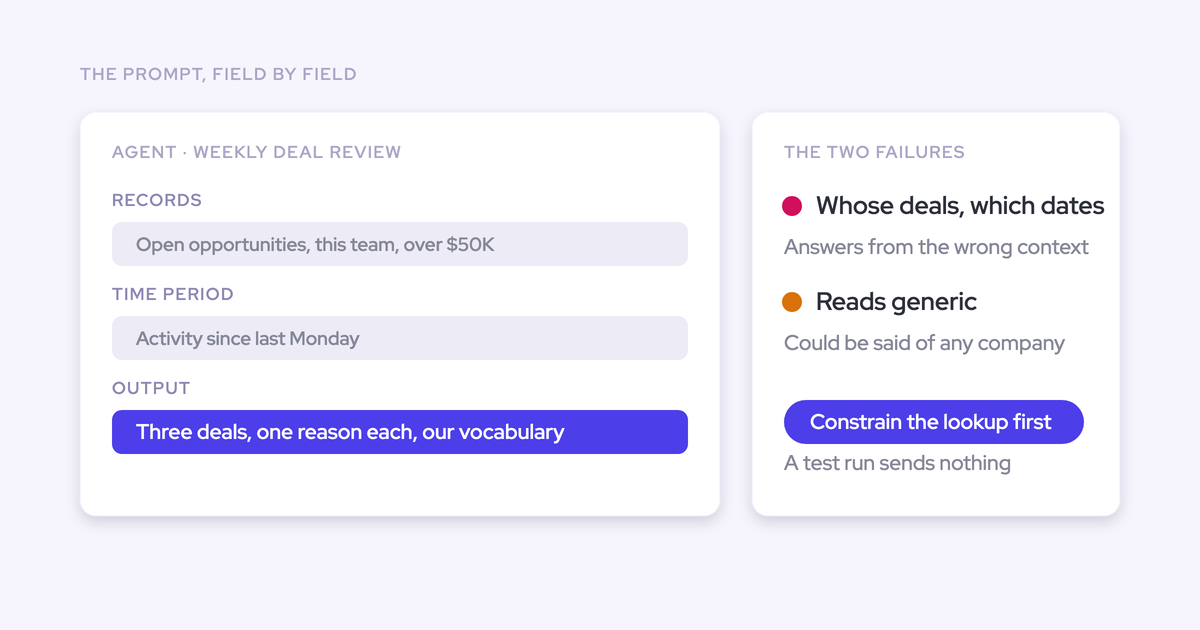
Claude should handle reasoning, not orchestration. Your workflow layer handles the trigger, record lookup, and Salesforce write-back. Claude reads the context block you pass in and returns a structured output that Flow, Weflow, or another orchestration layer can map into fields safely.
Every good revenue-agent prompt needs three inputs: a system prompt, a user prompt, and a context block. If one is missing, output quality drops. If the context block is empty or stale, Claude won’t “figure it out.” It will fill the gap with pattern-matching and give you an answer that sounds plausible but isn’t grounded in Salesforce data.
Use this prompt structure for every revenue agent
Role: tell Claude who it is. Example: “You are a pipeline analyst reviewing open deals for risk signals.”
Task: define the job for this run. Example: “Review the following deal and return a risk assessment.”
Constraints: tell it what not to do. Example: “Use only the data provided. Do not infer missing information.”
Format: force a predictable response structure. For Salesforce write-back, use named outputs such as risk_level, risk_reason, recommended_next_step, or JSON if your workflow can parse it reliably.
Standard layout
SYSTEM: role, criteria, constraints, and output schema
USER: one instruction for this run
CONTEXT: structured Salesforce data block
Four prompt patterns show up in most revenue teams:
Meeting brief: best for event-based prep before a call or demo.
Win-loss: best for monthly pattern analysis across closed Opportunities.
Rep nudge: best for threshold-based follow-up suggestions when activity stalls.
Forecast intelligence: best for scheduled weekly checks on Commit and Best Case deals.
The practical rule is simple: make the workflow fetch data and enforce structure, then let Claude reason inside those boundaries. Don’t ask the model to compensate for empty Salesforce fields, missing transcripts, or weak activity sync.
Trigger logic and safety controls: prevent silent CRM errors
The trigger decides when the agent runs and which records it touches. Misconfigure that layer, and even a good prompt produces bad CRM output.
Trigger type | Definition | Revenue example | Salesforce objects read | Risk if misconfigured |
|---|---|---|---|---|
Scheduled | Runs at a fixed time on a recurring basis | Monthly win-loss analysis on deals closed in the last 30 days | Opportunity, Opportunity Field History, Activity History | Reads stale or incomplete data if it runs before activity sync finishes |
Event-based | Runs when a specific Salesforce event occurs | Meeting brief runs when a new Event is created for an Opportunity contact | Event, Opportunity, Contact, Contact Role | Fires on the wrong records if the event filter is too broad |
Threshold-based | Runs when a field crosses a defined limit | Rep nudge runs when Last Activity Date is more than seven days old | Opportunity, Task, Event, Activity History | Misses real risk if the threshold is too high, or floods reps if it’s too low |
Match the trigger to the urgency of the job. Scheduled analysis is fine for weekly or monthly patterns. Meeting prep, inactivity alerts, and stage-change checks usually need event-based or threshold-based triggers.
Always filter by record status. Add stage, record type, business unit, or status filters so the agent doesn’t touch closed, inactive, or irrelevant records.
Account for data latency. Schedule the run after your activity sync window closes, not before. This is the most common reason scheduled agents fail in Salesforce.
Data latency deserves extra attention because it hides in plain sight. If email or calendar activity lands late, your Monday 7:00 AM forecast agent may flag half the quarter as inactive before the day’s sync completes. This gets worse if your team still relies on delayed sync patterns or virtual activity layers like EAC instead of native object write-back.
Common trigger mistakes are usually easy to fix once you isolate them:
Triggering on a field reps rarely populate: use a field with real adoption, such as Last Activity Date or Next Step, not a custom field no one updates.
Firing on every Opportunity update: narrow the event to a specific field change, such as stage movement or forecast category change.
Running before sync completes: add a one-hour buffer after your nightly activity sync window.
Missing stage filters: exclude Closed Won and Closed Lost so the agent stays on active pipeline only.
Set human-in-the-loop checkpoints by deal value
Human review should scale with risk. The higher the deal value, the closer the output is to a forecast field, and the more external the action becomes, the more control you need.
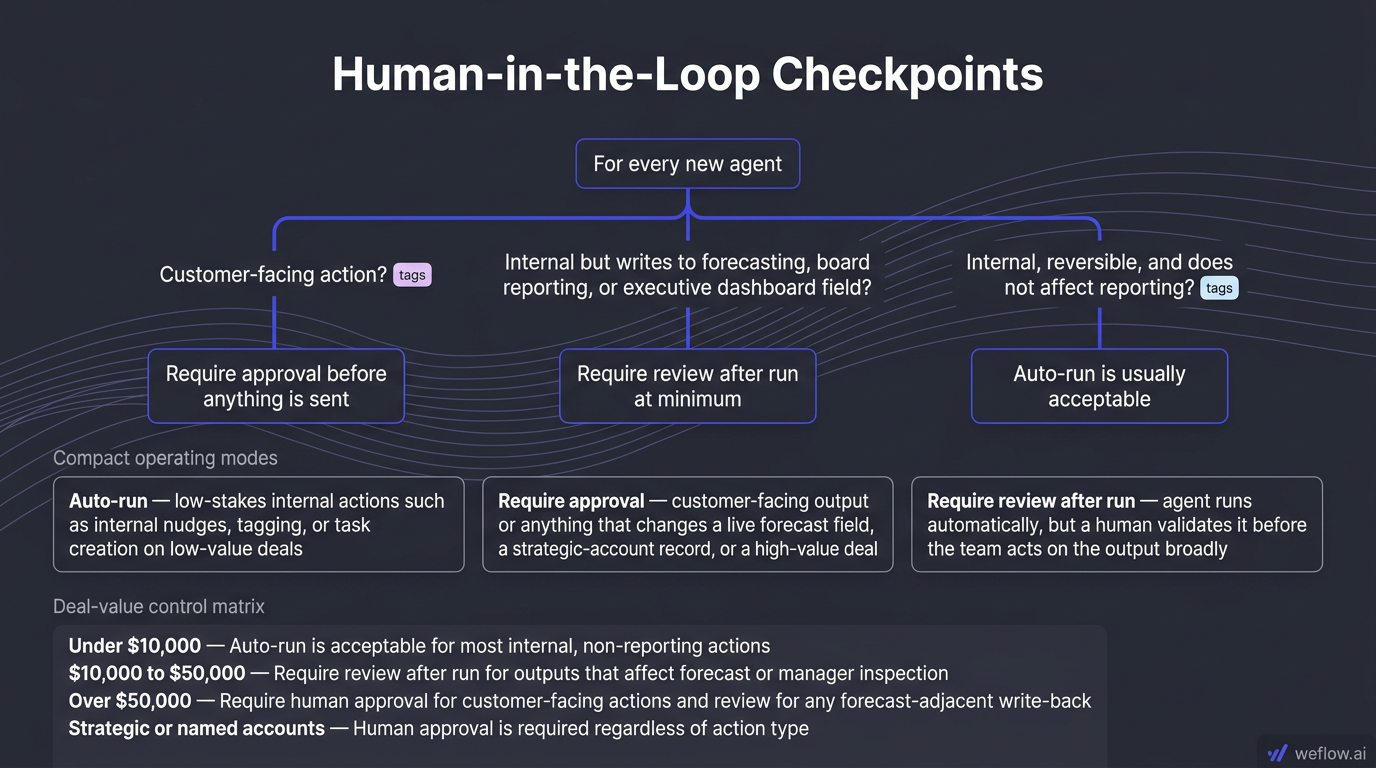
Use this decision path for every new agent
If the action is customer-facing, require human approval before anything is sent.
If the action is internal but writes to a Salesforce field used in forecasting, board reporting, or executive dashboards, require review after run at minimum.
If the action is internal, reversible, and doesn’t affect reporting, auto-run is usually acceptable.
That creates three operating modes:
Auto-run: low-stakes internal actions such as internal nudges, tagging, or task creation on low-value deals.
Require approval: customer-facing output or anything that changes a live forecast field, a strategic-account record, or a high-value deal.
Require review after run: the agent runs automatically, but a human validates it before the team acts on the output broadly.
Deal value | Recommended control |
|---|---|
Under $10,000 | Auto-run is acceptable for most internal, non-reporting actions |
$10,000 to $50,000 | Require review after run for outputs that affect forecast or manager inspection |
Over $50,000 | Require human approval for customer-facing actions and review for any forecast-adjacent write-back |
Strategic or named accounts | Human approval is required regardless of action type |
Any agent touching a live forecast field, Commit category logic, or a strategic account should have human oversight. That’s not caution for its own sake. It’s basic control design.
Pre-launch checklist before any agent moves to auto-run
Test the trigger and output on at least 20 real records in a sandbox.
Confirm the agent can’t fire on closed, inactive, or archived records.
Label agent-generated fields clearly on the Salesforce object.
Give reps and managers a way to flag incorrect output back to RevOps.
Keep the agent off live forecast and executive reporting fields until it proves accuracy.
Review field-level security, validation rules, and write permissions before launch.
Revenue agent use cases: scale operations across your team
The best agent use cases move teams away from data chasing and toward higher-value decisions. The job changes by role, but the architecture stays the same.
SDR agents
For SDRs, agents should reduce list triage and improve meeting quality, not auto-send risky outbound at scale.
Agent | Trigger | Context | Action | Output | Who reviews |
|---|---|---|---|---|---|
ICP scoring | New Lead created | Lead fields such as company size, industry, title, source, and country | Scores the lead against ICP criteria and returns Strong, Weak, or Disqualified with a reason | Writes score and reason to Lead, routes Strong leads to the SDR queue | SDR team lead |
Outreach personalization | Lead assigned to SDR | Lead fields, related Account data, recent activity, and approved enrichment fields | Drafts a three-sentence first-touch email tailored to role and company context | Creates an email draft in Salesforce for manual send | SDR before sending |
Meeting qualification | New Event created by SDR | Lead or Contact fields, company data, ICP score, and SDR notes | Checks whether the booked meeting fits ICP and flags low-conversion meetings | Writes a qualification flag to the related Lead or Opportunity and notifies the SDR manager | SDR manager |
AE agents
For AEs, agents should reduce inspection prep and highlight deal gaps before they show up in forecast calls.
Agent | Trigger | Context | Action | Output | Who reviews |
|---|---|---|---|---|---|
MEDDIC gap analysis | Opportunity reaches a defined stage | Opportunity fields, MEDDIC fields, call transcripts, and notes | Checks which MEDDIC elements are missing, weak, or unsupported by the record | Writes a gap summary to Opportunity and creates a follow-up task | AE and manager |
Stakeholder map gap | Opportunity crosses a deal-value threshold | Contact Roles, transcript mentions, org-chart data if available, and account notes | Identifies whether champion, economic buyer, and technical buyer are engaged | Writes a stakeholder gap flag and suggests targeted outreach | AE |
Proposal readiness | Opportunity moves to Proposal stage | Opportunity fields, last activity, open tasks, MEDDIC completeness, and next step | Evaluates whether the deal is ready for a proposal or still has avoidable risk | Writes a readiness score and gap list to the record | AE before proposal goes out |
CSM agents
For CSMs, agents should pull attention toward retention and expansion signals before accounts go quiet.
Agent | Trigger | Context | Action | Output | Who reviews |
|---|---|---|---|---|---|
Churn risk | Scheduled every Monday | Account health score, product usage, support tickets, NPS, last CSM activity date | Flags accounts showing multiple negative signals and prioritizes by ARR at risk | Writes a churn risk flag to Account and sends a weekly digest | CSM team lead |
Expansion signal | Usage or conversation threshold crossed | Usage data, call transcripts, contract terms, active-user counts, Account fields | Detects signs that a team or business unit is ready for expansion | Writes an expansion flag and creates a task for follow-up | CSM |
QBR preparation | Scheduled two weeks before QBR date | Account health, usage trends, ticket history, last three call summaries, renewals | Builds a QBR brief with wins, risks, usage highlights, and suggested talking points | Emails the brief to the CSM and writes a summary to Account | CSM before QBR |
RevOps agents
For RevOps, agents should improve data completeness, forecast confidence, and inspection speed across the whole sales system.
Agent | Trigger | Context | Action | Output | Who reviews |
|---|---|---|---|---|---|
Pipeline coverage | Scheduled every Monday | Open Opportunities by rep and segment, quota by rep, close dates, forecast categories | Calculates coverage ratio and flags reps below target coverage | Writes coverage ratio to Salesforce and sends a digest to managers and RevOps | RevOps lead and managers |
CRM data quality | Scheduled daily | Open Opportunities, required field lists, last modified date, completeness rate by rep | Finds missing required fields and groups gaps by rep and field | Writes completeness score to the record and sends a data-quality digest | RevOps |
Quota attainment tracker | Scheduled every Friday | Closed Won in current quarter, quota targets, average deal size, remaining pipeline | Calculates attainment and flags reps at risk of missing quota | Writes attainment status to a custom object or sends leadership digest | RevOps and CRO |
Agent governance and auditing: maintain trust in CRM data
If your team can build agents faster than it can govern them, Salesforce becomes harder to trust, not easier. Every agent needs an owner, a change process, and a standing audit routine.
Responsibility | Owner |
|---|---|
Approve new agents before go-live | RevOps lead |
Write and version prompts | RevOps lead or Revenue Systems Manager |
Monitor agent health and false positive rates | RevOps |
Review customer-facing outputs | Sales manager or CSM manager |
Escalate agent failures | Deal owner or frontline manager |
Run quarterly agent audit | RevOps lead and CRO |
Minimum data-quality prerequisites by Salesforce object
Object | Required before any agent reads it |
|---|---|
Opportunity | Stage, close date, amount, owner, forecast category, and field history tracking populated on open records |
Contact / Contact Role | At least one Contact Role per active Opportunity, with economic buyer role defined where applicable |
Activity History | Email and calendar sync writing to native Salesforce objects, not just a virtual layer |
Lead | Source, status, owner, and routing fields populated on active records |
Account | ARR or contract value populated for CS use cases, plus health score if used in context |
Prompt governance matters because prompts are business logic. If a prompt changes, output behavior changes. Treat prompts like code, with version history, approval, and rollback. That’s what keeps agent behavior stable as your sales process changes.
Store the current prompt for every active agent in one controlled location.
Log every change with date, owner, reason for change, and the metric that triggered it.
Never overwrite a working prompt without preserving the previous version.
Set a rollback plan before pushing a new prompt into production.
Review prompts quarterly, especially after stage redesigns, forecast-category changes, or territory changes.
Approve a new agent only if these conditions are true
The job is defined in one sentence and doesn’t overlap with another active agent.
The trigger has been tested in a sandbox on at least 20 records.
The context fields are populated on more than 80% of active records.
The output field is labeled as agent-generated in Salesforce.
The first 30 days include human review.
Run per-agent audits and weekly health checks
Audit routines should be light enough to run consistently and strict enough to catch silent failures before pipeline review.
Per-agent audit checklist
Confirm the agent fired on the correct records by checking actual record count against expected filter logic.
Confirm every targeted record received an output value where expected.
Sample at least five records and compare the output against the raw Salesforce context the agent read.
Check that write-back happened on the intended object and field with no unintended overwrites.
Review send logs for any customer-facing drafts, emails, or notifications.
Inspect run logs for failures tied to permissions, parsing, or missing fields.
Weekly health check routine
Volume check: did each agent run the expected number of times last week?
Output quality check: sample 10 outputs from high-stakes agents and review for accuracy and specificity.
False positive rate check: measure how many outputs were dismissed or overridden by reps or managers.
Field hygiene check: inspect population rates on the fields each agent depends on.
Feedback loop check: confirm managers and reps are actually submitting corrections.
In this context, false positive rate means the share of agent flags or recommendations that a human reviewer says were wrong. If 25 of 100 risk flags were dismissed, the false positive rate is 25%. Anything above 20% needs immediate recalibration because the team will stop trusting the output long before the model “improves” on its own.
Establish break protocols and pause triggers
Agents will break as sales motions, fields, ownership rules, and sync behavior change. That’s normal. What matters is whether you have a controlled way to pause, diagnose, test, and relaunch them.
Pause the agent immediately. An agent is broken if it stops firing, runs on the wrong records, output quality drops sharply, or false positive rate passes 20%.
Check the trigger. Verify schedule timing, event filters, threshold values, object access, and whether validation rules or field changes blocked execution.
Check the context. Review field population rates, activity sync status, transcript coverage, Contact Role completeness, and whether any field mapping changed.
Check the action. Run the prompt manually on five known records and compare the output to expected results.
Check the output layer. Confirm write-back mapping, field permissions, record type compatibility, and parsing logic if the model returns structured data.
Check the feedback loop. Make sure reviewers are still confirming or dismissing outputs in the place RevOps expects.
Fix one component at a time. Don’t change the trigger, prompt, and output mapping all at once or you won’t know what solved the issue.
Retest in sandbox on 20 records. Use a mix of clean records, messy records, and edge cases before relaunch.
Relaunch with human review for two weeks. Don’t send it straight back to auto-run.
Next steps: launch your first revenue agent this week
Start with an internal agent where a wrong answer is easy to catch and easy to reverse. If your Salesforce activity sync and field mapping are already in decent shape, you can get the first build live in weeks, not quarters.
Pick one low-stakes internal use case, such as a rep nudge or meeting brief.
Audit the context fields first, especially Opportunity, Activity History, Contact Role, and next-step completeness.
Run the agent in review-after-run mode for the first two weeks before you consider auto-run.
FAQ
What is the exact difference between an AI agent and a workflow?
A workflow follows fixed logic and produces the same output every time the rule is met. An AI agent reads Salesforce context and makes a judgment that can change from record to record. In practice, workflows are the right fit for routing, notifications, validation, and field updates. Agents are the right fit for deal-risk assessment, meeting prep, win-loss synthesis, and forecast inspection where the answer depends on stage history, activity patterns, transcript content, or stakeholder coverage.
Which CRM data sources do AI agents need to function?
Most revenue agents need a base layer of Opportunity, Contact, Contact Role, Activity History, Task, Event, and EmailMessage data. Higher-accuracy agents also need stage history, close-date change history, forecast category, transcript summaries, and any sales-methodology fields your team uses, such as MEDDIC or qualification status. The requirement isn’t just object access. The fields have to be populated consistently enough to support the job. If the agent depends on next-step quality, executive contact presence, or meeting notes, those fields need real adoption or the agent will guess poorly.
How do you prevent AI agents from sending bad emails to prospects?
Keep customer-facing actions in draft mode by default. The agent can generate suggested copy, but a rep or manager should approve it before send. You can also reduce risk by restricting agents to internal outputs only: draft the email in Salesforce, create a task, or attach suggested talking points to the Opportunity instead of auto-sending through an email provider. For extra control, require approval on any external message tied to a deal over your ACV threshold or any strategic account.
How often should RevOps audit AI agent outputs?
Use a two-tier audit cadence. For the first 30 days of any new agent, review every run and sample individual records after each execution. Once the agent is stable, run a 15-minute weekly health check before pipeline review across all active agents. For anything writing to forecast-adjacent fields, add a monthly deeper audit that compares agent output against actual outcome trends, such as whether flagged deals slipped, closed, or were dismissed incorrectly.
What happens when an AI agent breaks in Salesforce?
Pause it first so it stops writing bad data. Then trace the failure through the five-component model: trigger, context, action, output, and feedback. Fix the broken component, retest on 20 sandbox records, and relaunch with human review turned on. If the issue came from a field mapping change, permission change, or validation rule update, document that root cause in the agent runbook so the same failure doesn’t show up again after the next Salesforce release or process change.