How Meeting Recording Consent Works: Bots, Consent Pages and Bot-Free Capture Explained
Learn how meeting recording consent works across bots, consent pages, and bot-free capture.


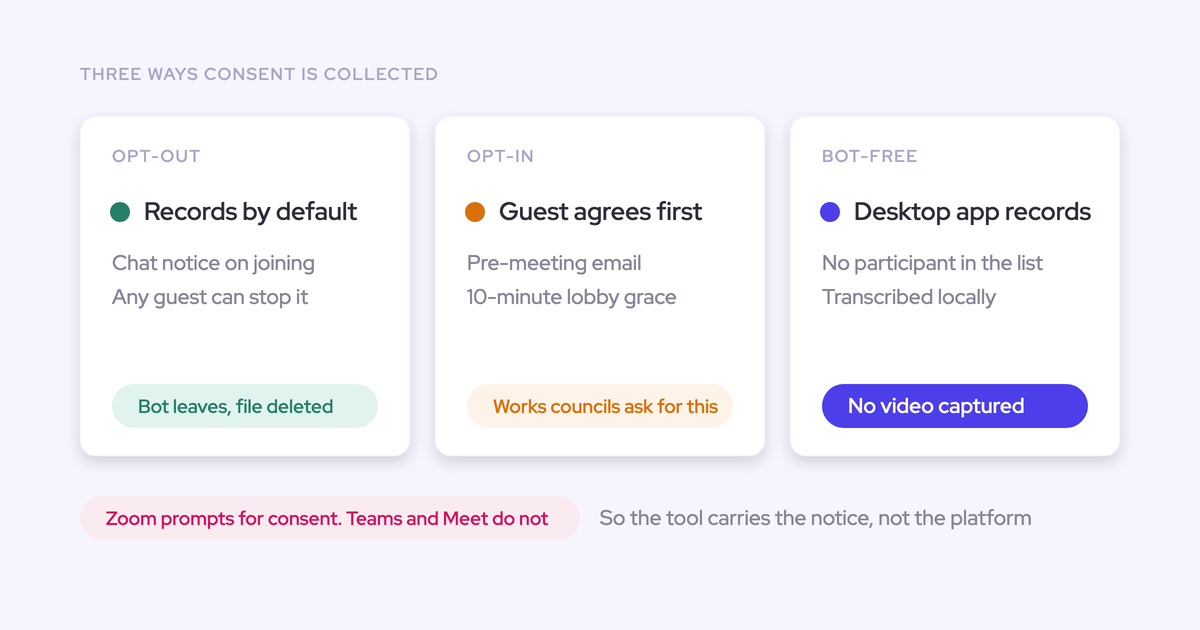

Meeting recording consent is the governance system that determines how you capture a meeting, notify participants, obtain permission, and handle the data afterward.
A recording bot, a consent page, and bot-free capture address different parts of that system. None settles the whole question.
You feel the difference during rollout. Legal wants evidence of acceptance. Sales wants fewer recording conversations. A customer or works council objects to a visible recorder.
Meanwhile, Zoom, Microsoft Teams, and Google Meet create different participant experiences. Choosing whichever method causes the least seller friction won’t resolve those competing requirements. Choose the policy first, then the capture method.
Weflow is the Revenue AI Orchestration platform for sales, customer success, and RevOps teams. With Weflow Conversation Intelligence, consent design determines which conversations can become summaries and structured Salesforce field updates. That makes permissioned capture a data-quality decision as well as a governance decision.
What does meeting recording consent actually govern?
Meeting recording consent governs four connected layers: capture, disclosure, participant action, and post-recording controls. Evaluate each separately with legal and IT before approving the complete flow.
How is the meeting captured?
Meeting capture describes the technical route: a bot joins as a participant, a conferencing integration captures the meeting, or a desktop app captures it from an endpoint.
The capture method determines admission requirements, device permissions, and available audio or video. It doesn’t determine whether your policy requires opt-in.
Where and when are participants notified?
Disclosure tells participants what you intend to capture and how you intend to use it. The participant journey can include several notice points:
- Before the meeting: An invitation, email, or consent page explains the proposed recording and response options.
- On joining: A supported conferencing prompt presents the recording notice.
- During the meeting: A chat notice or spoken disclosure reaches participants inside the call.
Pre-meeting disclosure gives customers time to decide. An in-meeting fallback covers people who never received the invitation.
Is the consent standard opt-in, opt-out, or manual?
The consent configuration determines the default behavior and who must act:
- Opt-in: Recording waits for the required participants to actively accept.
- Opt-out: Recording proceeds under the approved policy, with notice and a way to decline.
- Manual: The seller handles the permission process rather than an automated consent flow.
Manual is an operating method, not a separate legal basis. Ask counsel which actions meet your requirements; a vendor setting can’t answer that question.
Why consent design shapes call intelligence coverage
Consent design determines which customer calls enter your conversation intelligence dataset.
- Everyone-must-accept opt-in: One missing response can prevent a group meeting from recording.
- Admission failure: The bot waits outside while the conversation continues.
- Selective exclusions: Downstream analysis reflects the customers you can record, not the entire customer base.
Respecting a decline is a successful control.
Bots, consent pages, and bot-free capture solve different jobs
A bot and a desktop app capture the conversation; a consent page handles disclosure and participant response. You can combine a consent page with either capture method.
| Dimension | Visible recording bot | Consent page | Bot-free desktop capture |
|---|---|---|---|
| Primary job | Capture as a meeting participant | Present notice and collect a response | Capture from the seller’s device |
| Timing | Joins during the meeting | Usually before entry or capture | Runs during the meeting |
| Participant visibility | Appears in the participant list | Visible to people who reach the page | No bot in the participant list |
| Required action | Admission or recording approval, depending on the platform | Acceptance or rejection, depending on the flow | Device setup and an approved disclosure process |
| Evidence to inspect | Consent decisions, admission outcomes, stopping behavior | Response, identity matching, and enforcement | Disclosure evidence and capture outcomes |
| Operational dependency | Meeting access and platform settings | Participants following the intended entry route | Supported devices, permissions, and meeting detection |
A consent page deserves scrutiny at its edges. Ask what happens when someone forwards the original meeting URL and the new attendee bypasses the page entirely.
How do opt-in, opt-out, and manual consent differ?
Opt-in changes the recording gate, opt-out changes the objection path, and manual handling puts enforcement work on the seller. Choose among them according to the approved policy, not the recording rate you want.
| Dimension | Opt-in | Opt-out | Manual |
|---|---|---|---|
| Default state | Wait for acceptance | Proceed with notice and a decline route | Seller follows the approved procedure |
| Who acts | Required participants | Participants who object | Seller and participants |
| Timing | Acceptance before capture | Notice and objection route according to policy | Permission before capture where required |
| Coverage effect | Missing responses reduce coverage, especially in groups | Fewer missing-response failures | Depends on consistent seller execution |
| Operational burden | Collect acceptance and handle late arrivals | Make objections accessible and enforce them | Train sellers and document the outcome |
| Best-fit context | Affirmative acceptance requirements | Flows counsel has approved for opt-out | Approved exceptions requiring human judgment |
Weflow’s opt-in flow requires every participant to accept before recording starts. That gives RevOps a concrete group-meeting test: leave one response unanswered and inspect what happens.
When should teams use bot or bot-free capture?
Choose the capture method that supports your approved disclosure, acceptance, and evidence requirements. Seller convenience matters within those boundaries.
Visible bots fit explicit acceptance requirements
Visible bots fit teams that want participants to see the recorder and encounter an explicit acceptance flow. Visibility helps disclosure, but the bot’s presence alone doesn’t prove consent.
Some buyers’ legal teams prefer the Gong-and-Zoom acceptance experience over background desktop capture. If counsel already approves that flow, don’t remove it just to avoid an opening conversation.
- Legal requires an observable acceptance event.
- Customers accept a named recording participant.
- Hosts can reliably admit and control the recorder.
Bot-free capture fits visible-recorder objections
Bot-free capture fits situations where the extra meeting participant creates the blocker. It removes the bot admission dependency and gives teams another architecture to discuss with IT and a works council.
- Customers object specifically to a recorder joining the call.
- A works council will consider a no-video capture path.
- IT can approve the desktop application and its required permissions.
Weflow offers bot-free desktop capture without video. That creates another deployment option, not a promise that a works council will approve it.
Bot-free capture does not remove disclosure duties
Removing the visible participant shifts disclosure and proof elsewhere. It doesn’t establish that recording or transcription can happen without notice.
For every desktop capture path, verify:
- What other participants see before capture begins.
- How an objection stops capture.
- What evidence proves the approved process occurred.
- Which endpoint permissions IT must grant.
- Whether speaker attribution remains usable.
Attention illustrates why the scheduling route matters. Its pre-meeting consent page depends on participants using an Attention meeting link created through the calendar add-on. Test bypassed links and ad hoc meetings separately.
How should RevOps design the consent operating model?
RevOps should turn the approved policy into centrally enforced defaults, explicit exceptions, and measurable outcomes. Work through the following decisions in order with legal, IT, and sales.
Set the policy before selecting capture technology
Start by specifying the participant experience and required evidence, without naming a vendor. Legal should settle the requirements for each relevant population.
- Which meetings may you capture?
- What disclosure must participants receive, and when?
- What action permits recording to start?
- How should the flow handle late arrivals and objections?
Have counsel review the applicable recording and data-protection requirements. This framework defines operational questions, not jurisdiction-specific legal advice.
Separate recording consent from AI processing approval
Permission to record doesn’t automatically settle permission for every downstream use. Review recording and subsequent processing as separate questions, even if one notice ultimately addresses both.
| Decision | What legal should review | What RevOps should demonstrate |
|---|---|---|
| Recording | Whether and how the company may capture the conversation | Notice, participant action, start and stop behavior |
| Processing and analysis | Lawful basis, purposes, recipients, and safeguards for transcription and AI use | Where transcripts go, who accesses outputs, and what automation follows |
Don’t assume consent is the applicable lawful basis for every processing activity. Ask counsel to document the basis and the approved purposes.
Enforce defaults without relying on rep memory
The approved recording behavior should follow central configuration rather than individual seller habits. Require controls you can test:
- Team-level enrollment and recording preferences.
- Consistent notice text and response options.
- Defined host, seller, and participant stopping rights.
- Onboarding checks that confirm capture actually starts.
- Visible reasons for skipped recordings.
Mandatory seller adoption must still respect participant objections. Those controls serve different people and shouldn’t cancel each other out.
Centralize exceptions for sensitive customers and teams
Exceptions need an owner and an enforceable configuration. An account note saying “don’t record” leaves every meeting dependent on rep memory.
| Exception | Required treatment | Accountable owner |
|---|---|---|
| Sensitive customer | Central exclusion or an approved stricter flow | RevOps, with legal approval |
| Existing customers versus prospects | Separate policy populations where required | Sales and customer success operations |
| Team serving different jurisdictions | Deliberate policy assignment or a common approved standard | Legal and RevOps |
| Sensitive meeting | Defined no-capture or stop procedure | Meeting owner under central policy |
Define post-recording data governance before rollout
Approve the data lifecycle before collecting real customer conversations. A certification pack won’t tell your admin how to execute a deletion request.
- Storage: Identify where recordings, transcripts, consent records, and CRM outputs live.
- Access: Test hierarchy rules, sharing links, downloads, and cross-functional access.
- Retention: Confirm the retention window, who sets it, and how expiration works.
- Deletion: Demonstrate the request workflow, downstream handling, and retained proof.
- Portability: Confirm export formats and whether consent records can migrate alongside recordings.
- AI processing: Document subprocessors, training restrictions, and processing retention.
- Pilot terms: Agree what happens to trial data before the pilot begins.
Weflow stores recordings outside Salesforce while writing transcripts and structured outputs into Salesforce records. Don’t treat a Salesforce integration as proof that every copy lives in your CRM.
Measure consent outcomes and recording coverage separately
Separate participant decisions from technical failures so low coverage leads to the right fix. An opt-out needs respect; a lobby failure needs an operational response.
| Measure | Denominator | Reason category | Owner |
|---|---|---|---|
| Recording coverage | Eligible meetings that occurred | Usable recording versus no usable recording | RevOps |
| Opt-out rate | Eligible meetings exposed to the consent flow | Participant objection | RevOps and legal |
| Incomplete opt-in rate | Meetings requiring affirmative acceptance | Missing acceptance, separate from explicit decline | RevOps |
| Admission failure rate | Bot join attempts | Not admitted | IT and meeting owners |
| Setup or technical failure rate | Meetings expected to capture | Enrollment, permissions, detection, or capture error | RevOps and IT |
Define eligibility before counting. A calendar event with a video link isn’t necessarily an external meeting that occurred or a meeting your policy permits you to record.
How Weflow governs recording consent before AI Field Updates
Weflow connects configurable recording consent to the conversation data that drives AI Field Updates. The operational test is whether the configured flow permits the right capture, enforces objections, and leaves an outcome you can inspect.
Set team-level recording and consent policies
Weflow supports opt-in, opt-out, and a None setting for teams handling consent manually. Admins apply configurations to teams, and recording enrollment follows changes in team membership.

Check activation during onboarding. A user must sign in to Weflow once before the notetaker starts joining their meetings; assigning a license alone doesn’t complete that step.
Keep participant and customer exceptions enforceable
Weflow gives admins customer-domain exclusions and gives participants an objection path in the visible-bot flow.
| Before the meeting | During the meeting |
|---|---|
| Admins can exclude a specific customer domain from notetaker capture. | A chat notice includes a participant-controlled stop link. |
| An optional, customizable email lets guests respond before joining. | A participant opt-out makes the notetaker leave and destroys the recording, transcript, and notes. |
Host removal behaves differently from participant opt-out. If the host removes the notetaker, Weflow keeps the content captured up to that point. Teach that distinction before someone uses removal as a substitute for deletion.
Preserve recording outcomes for review and audit
Weflow retains consent outcomes per meeting and provides a downloadable CSV log. Admins can distinguish objections from admission failures and errors.
| Outcome | What it tells RevOps |
|---|---|
| Participant opted out | The consent flow encountered an objection. |
| Notetaker wasn’t admitted | The meeting access path prevented capture. |
| Error occurred | The team needs to investigate a capture failure. |
Weflow doesn’t record who removed the notetaker. If your audit requirements include remover identity, account for that gap rather than assuming the meeting outcome supplies it.
Turn approved conversations into Salesforce field updates
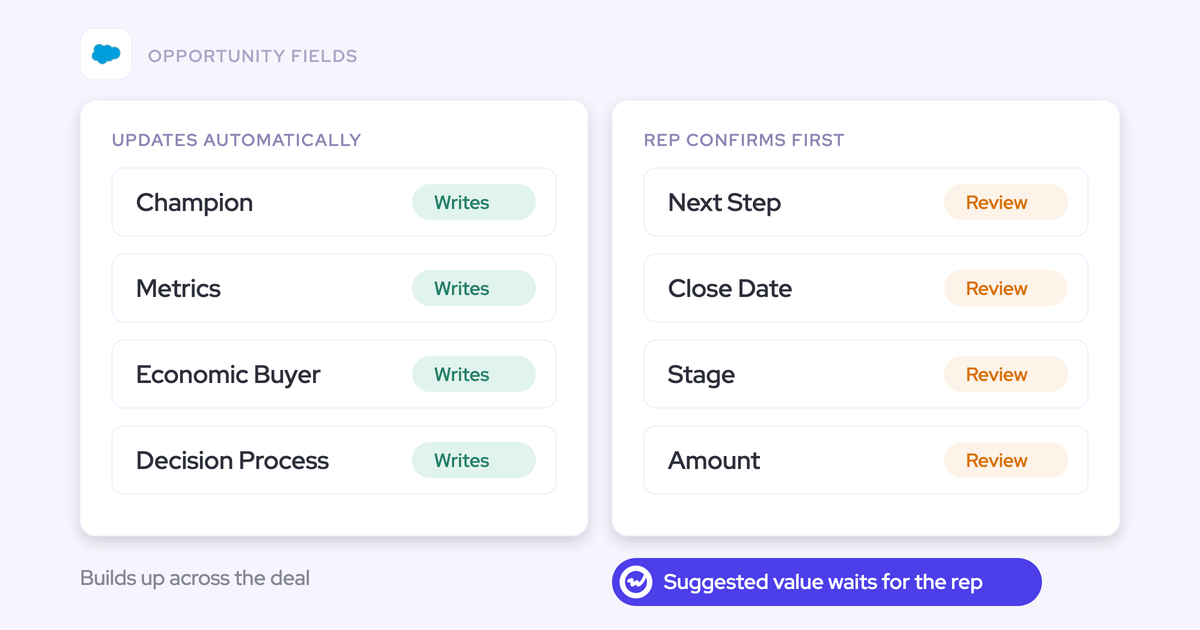
Weflow Conversation Intelligence turns approved conversations into summaries and structured Salesforce field updates. Admins define extraction prompts, map fields, and choose review or automatic updates.
- Capture the conversation under the configured policy.
- Process the transcript through the relevant AI templates.
- Review or write extracted values into Salesforce fields.
Keep consequential changes, such as opportunity stage updates, under human review until you trust the extraction. Weflow’s prompt editor exposes the Auto-update Salesforce control alongside the extraction instructions.

Know where jurisdiction logic remains manual
Weflow doesn’t automatically change recording consent according to the customer’s jurisdiction. Consent follows the team configuration.
If one team sells into several jurisdictions, define a common approved policy or create separate teams with separate configurations. Customer-domain exclusion provides a no-capture exception, not automatic jurisdiction routing.
Meeting recording consent FAQ
Test consent edge cases during the pilot, before they happen on a sensitive customer call. The answers below identify the behavior to verify.
Is bot-free meeting recording GDPR compliant?
Bot-free architecture alone doesn’t establish GDPR compliance. Legal must review the lawful basis, transparency, processing purposes, access, retention, and participant rights. Removing video or the visible bot doesn’t settle those questions.
Can one participant stop recording for everyone?
In Weflow’s visible-bot consent flow, a participant can use the notice’s stop link to opt out. The notetaker leaves, and Weflow destroys the recording, transcript, and notes. Test stopping behavior separately for any desktop capture path.
What if an attendee was not invited?
An uninvited attendee may miss pre-meeting disclosure. Your operating model needs an in-meeting notice and a response path that works for that person. Test forwarded links, late arrivals, and guests whose email address doesn’t match the invitation.
What if the organizer never admits the bot?
The bot can’t capture a meeting it never enters. Weflow’s notetaker leaves the lobby after about ten minutes; a rep can retry from the Weflow calendar while the meeting continues.
Someone with admission authority still needs to let the bot in. Classify the missed recording as an admission failure, not a participant decline.
Does bot-free recording require endpoint permissions?
Desktop capture requires IT to review device permissions and supported operating systems. The exact requirements depend on the application.
Can existing customers follow stricter consent rules?
Yes, but you need enforceable segmentation. Weflow supports separate team configurations and customer-domain exclusions. It doesn’t automatically select a stricter flow because an account is an existing customer.
What should a recording consent audit log show?
A useful audit log distinguishes participant decisions from operational failures. Ask the vendor to demonstrate:
- The meeting and applicable consent flow.
- Acceptance, explicit decline, and incomplete acceptance.
- Admission failures and technical errors.
- Stopping and deletion outcomes.
- Available timestamps and actor identity, including any gaps.
These are evaluation requirements, not a claim that every vendor logs every item. Weflow’s log includes meeting outcomes and reasons, but not who removed the notetaker.
What should happen after a participant declines?
The decline workflow should enforce the approved policy across capture and subsequent processing. Test the complete sequence:
- Prevent or stop capture.
- Handle already-captured content under the agreed deletion policy.
- Stop further processing where required and address downstream copies or outputs.
- Retain the permitted evidence of the decision and its handling.
Weflow’s participant opt-out destroys the recording, transcript, and notes. Verify the separate deletion procedure for requests involving previously processed conversations and Salesforce outputs.
How should a pilot measure recording coverage?
Calculate recording coverage as usable recordings divided by eligible meetings that occurred. Break the result down by team, platform, capture method, and customer segment.
| Pilot measure | What to inspect |
|---|---|
| Eligible meetings | Exclude canceled events and meetings outside the approved capture policy. |
| Usable recordings | Check completeness, transcript availability, and speaker attribution. |
| Consent outcomes | Separate explicit declines from missing acceptance. |
| Capture failures | Separate lobby, setup, and technical problems. |
| Excluded populations | Show which customer groups remain absent from downstream analysis. |
Before expanding the rollout, have legal inspect a decline, IT reproduce a capture failure, and RevOps trace an approved conversation into Salesforce. That proves more than a high recording count.