How to Record In-Person Sales Meetings and Update Salesforce With Weflow Mobile Copilot
Learn how to record in-person sales meetings with Weflow Mobile Copilot and write updates to Salesforce



A field meeting should leave Salesforce with enough context to review the deal: what the customer needs, who’s involved, and what happens next.
An audio file alone doesn’t get you there.
Someone still has to connect the conversation to the right record and turn the discussion into usable fields.
For a sales manager, the test is whether you can review the deal without chasing the rep.
That means checking the full workflow, from phone recording to Salesforce write-back, including meetings that cover several opportunities and customers who decline recording. Those cases determine whether reps trust the process enough to keep using it.
What Weflow Mobile Copilot does for field sales
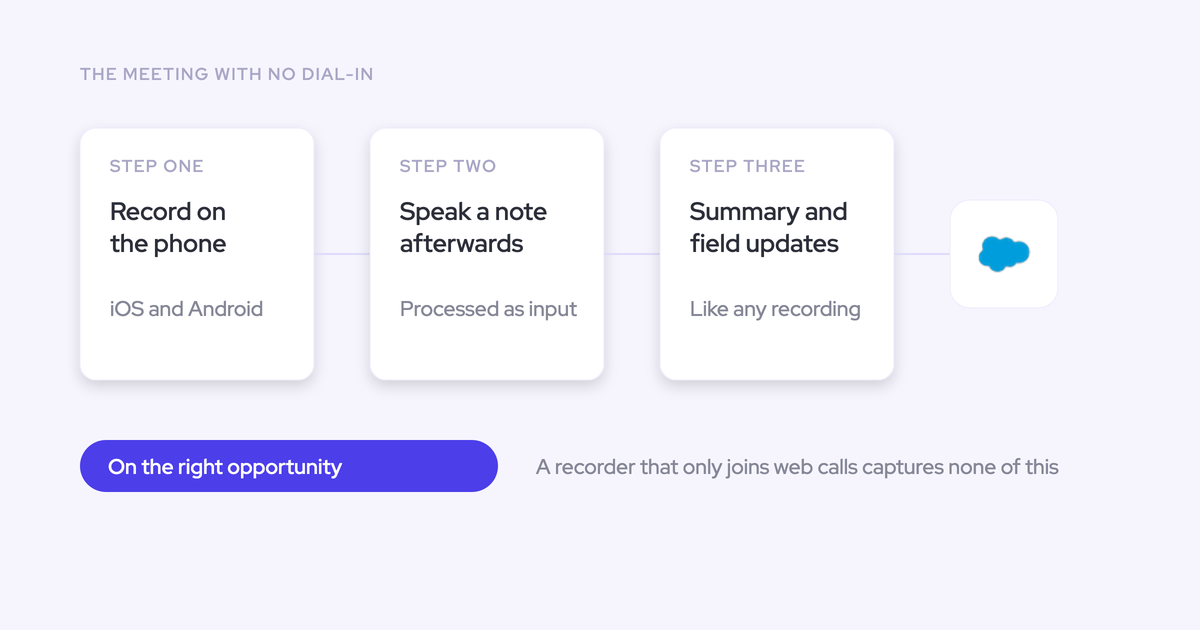
Weflow Mobile Copilot records in-person meetings on iOS and Android and sends them through Weflow Conversation Intelligence for summaries, follow-up drafts, and Salesforce field updates.
Weflow is the Revenue AI Orchestration platform for sales, customer success, and RevOps teams. It’s built for Salesforce teams, with Mobile Copilot providing the input for conversations that happen away from a video call.
A rep can also dictate a voice note after a visit. Weflow processes that note like a recorded conversation, so a meeting without customer audio can still produce structured Salesforce updates.
The outputs arrive after processing. Weflow doesn’t provide live answers or coaching while the meeting is running.
Follow one field meeting from phone to Salesforce
The complete Mobile Copilot workflow ends with a manager inspecting Salesforce, not a rep opening a transcript archive.
Consider a field visit about an expansion opportunity. The rep needs to capture the customer’s budget constraints, buying stakeholders, and agreed next step. We’ll follow that same visit through four stages.
Before the visit: select Weflow and Salesforce context
1. Select the meeting and check its customer context. In Mobile Copilot, start from the scheduled meeting rather than treating the visit as an anonymous recording.
Check that the attendee and customer context match the expansion discussion. An account name alone doesn’t establish which opportunity the meeting concerns.
Weflow can also prepare a briefing from Salesforce records and previous communications. Read it before entering the customer’s office, and verify any detail you plan to use.
Completion check: You recognize the meeting, the customer, and the deal you’re there to discuss.
During the visit: record the field meeting in Mobile Copilot
2. Obtain consent, then start recording. Select the meeting, press record, and place the phone where it can capture the conversation.
The rep’s job is to listen and run the meeting. Summaries and field extraction happen afterward.
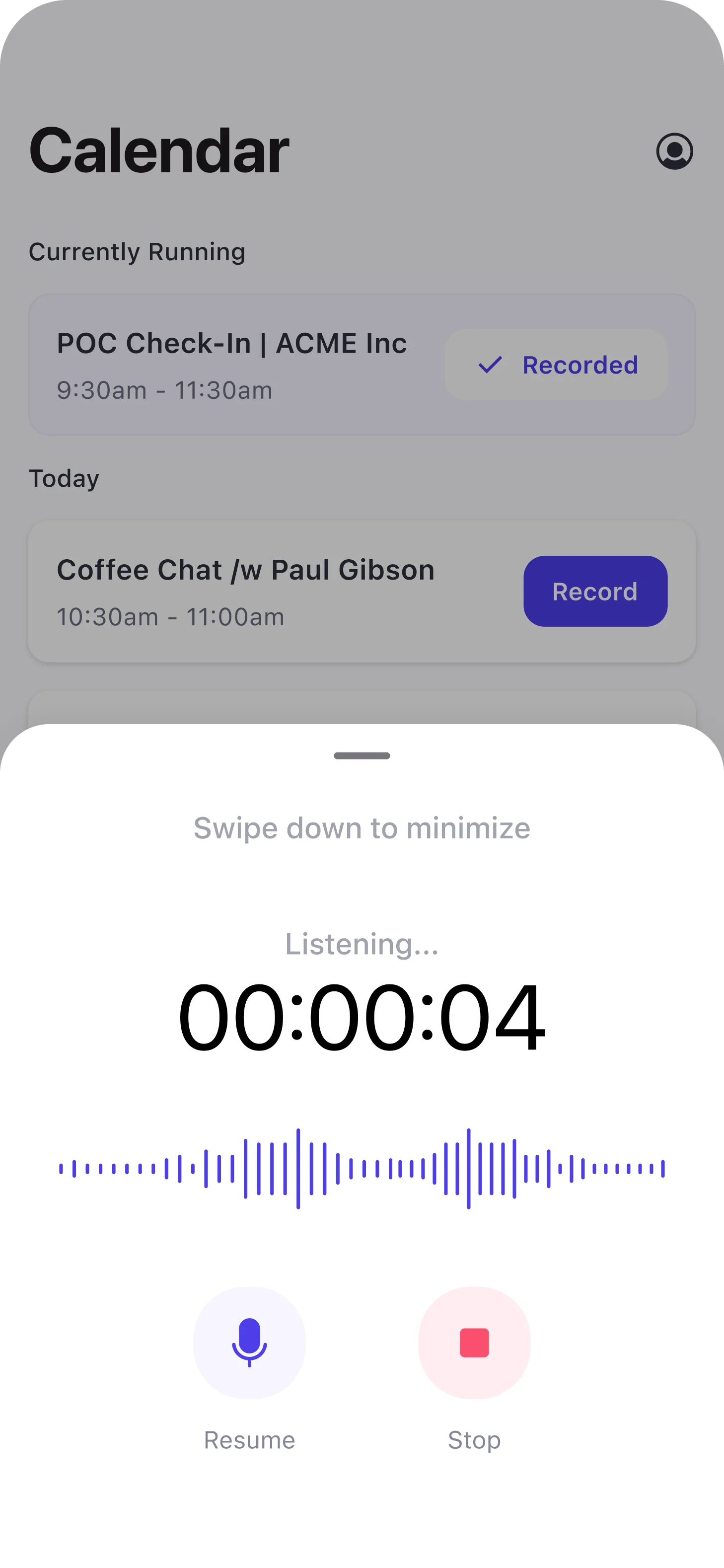
Stop recording when the meeting ends. If the customer declines recording, use the post-meeting voice-note workflow instead.
After the visit: review Weflow’s proposed Salesforce updates
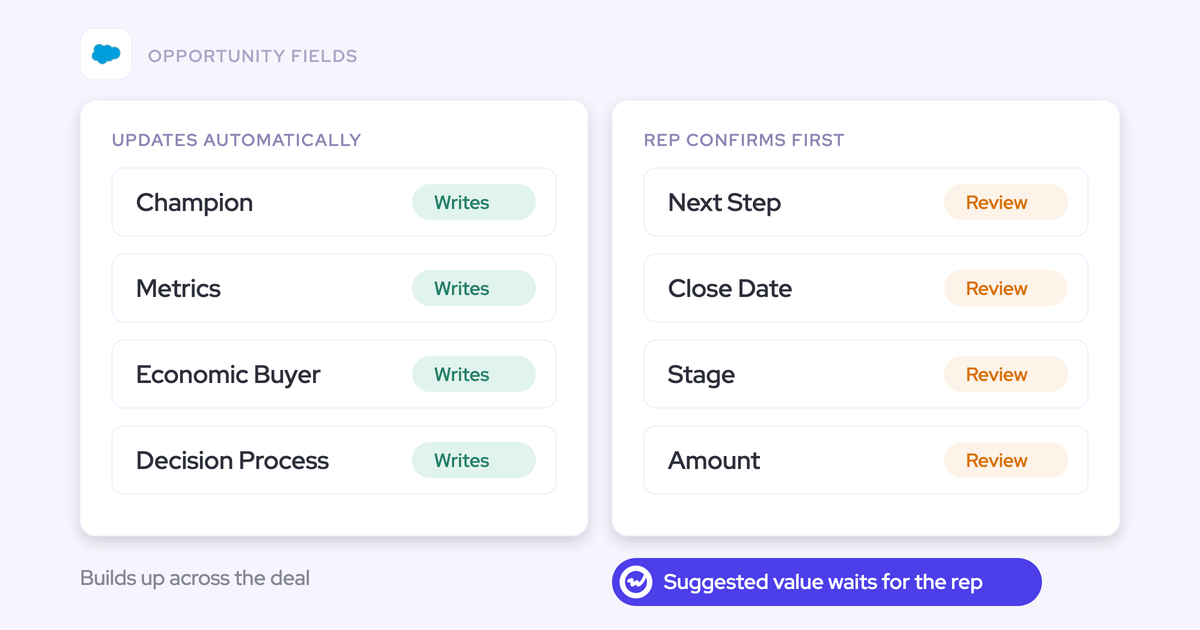
3. Review the extracted values before writing them. Weflow AI Field Updates shows the current Salesforce value beside the suggested value, so the rep can accept, edit, or reject each change.
For the expansion visit, review these outputs:
- Check that the summary separates confirmed budget from a budget still awaiting approval.
- Verify that the stakeholder detail reflects who attended and who actually decides.
- Confirm that the next step includes the agreed action, owner, and timing where the conversation established them.
- Review the follow-up draft before sending it.
Don’t treat the latest conversation as permission to overwrite everything. A customer mentioning an expansion budget doesn’t necessarily mean the opportunity Amount should change.
In Salesforce: inspect the synced meeting and deal
4. Open Salesforce and check the result as the manager. Weflow writes the meeting summary to the related Salesforce Event and stores the transcript and summary in its Salesforce recording record.
Inspect the expansion opportunity without asking the rep for a briefing:
- Does the meeting appear against the intended deal?
- Does the Event summary explain what changed?
- Do the approved fields reflect the customer’s actual commitments?
- Can you identify the next action and the remaining qualification gaps?
If the meeting falls back to the account, inspect it there. Don’t read an empty opportunity timeline as proof that the visit never happened.
How does Weflow map field meetings to Salesforce?
Weflow uses Salesforce relationships to map activity, with a unique open opportunity contact-role match taking precedence and unresolved opportunity mapping falling back to a matched account.
The decision path starts with the people and records, not an AI guess about the deal:
- Resolve the participant against Salesforce, preferring a Contact over a Lead.
- Check whether an opportunity contact role identifies one open opportunity.
- If the opportunity remains ambiguous, use the matched account as the fallback.
- If no usable Salesforce relationship exists, resolve the context before expecting opportunity-level write-back.
When one opportunity contact role identifies one deal
A single open opportunity connected through the attendee’s opportunity contact role gives Weflow a clear mapping destination.
In the expansion example, the attendee’s contact role links them to that expansion opportunity. That relationship supports opportunity-level assignment even if the account has other deals.
Still check the meeting’s purpose. A valid contact role doesn’t prove that every conversation with that person concerns the same opportunity.
When several open opportunities make mapping ambiguous
Weflow falls back to the account when its relationship checks can’t resolve one open opportunity.
| Salesforce situation | Mapping outcome | What to verify |
|---|---|---|
| Several open deals, but one unique contact-role match | The matching open opportunity takes precedence. | The visit actually concerns that deal. |
| Several open deals without a unique contact-role match | The activity falls back to the matched account. | The account is correct and the intended deal needs clarification. |
| The conversation covers several deals | One Salesforce Event can’t relate to all of them through its activity relationship. | The account-level summary preserves the broader discussion. |
A Salesforce activity has one WhatId, so one Event can relate to only one opportunity through that field. Linking a recording to several records doesn’t change this Event constraint.
When no Salesforce contact or deal can be resolved
Weflow can process a recording without an opportunity, but Salesforce write-back still needs valid record context.
- An account exists: Account-level context can preserve the conversation before an opportunity exists.
- The attendee is missing: Resolve or create the appropriate Contact and check its account relationship.
- No usable match exists: Don’t assume the recording will automatically produce a correctly related Salesforce activity.
Weflow Activity & Contact Capture can populate opportunity contact roles from captured correspondence. That improves the relationship data available for future mapping; it doesn’t remove the need to check unfamiliar attendees.
Can reps correct an incorrect Salesforce mapping?
Reps can inspect and change a recording’s Salesforce links. Mobile Copilot’s recording details include a record selector for that purpose.
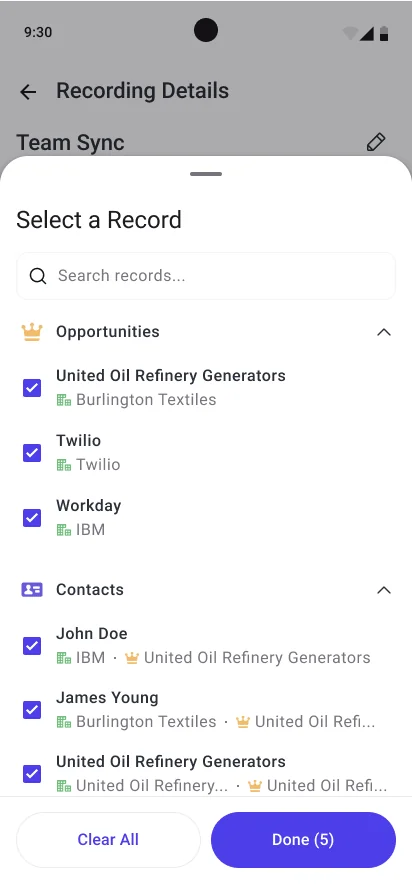
- Open the recording and inspect its linked Salesforce records.
- Correct the links to reflect the meeting’s actual subject.
- Check the related Event and any fields that already received updates.
Don’t assume changing a recording link reverses earlier field writes. Verify both the intended record and the incorrectly updated record before calling the correction complete.
How should reps handle consent and recording refusals?
Give reps two approved workflows: record with consent, or capture a permitted voice note after the customer meeting.
Recording should never become a condition of having usable deal context.
How should reps obtain and document recording consent?
Reps should follow a company-approved consent process that reflects applicable recording and privacy requirements.
- Explain the recording purpose before the visit where practical, using the invitation or a separate message.
- Confirm permission before starting the phone recording.
- Document the decision in the place your company specifies.
- Stop recording if a participant withdraws permission, and follow your company’s handling requirements.
Have legal or privacy owners approve the process. A phone on the table, an invitation notice, or a product notification doesn’t establish that every legal requirement has been met.
What if a customer declines meeting recording?
A rep can dictate a post-meeting voice note in Mobile Copilot instead of recording the customer.
- After leaving the meeting, capture the permitted business context while it’s fresh.
- State the customer, meeting purpose, confirmed facts, unresolved questions, and next steps.
- Review the resulting summary and proposed Salesforce updates through the normal workflow.
Weflow processes voice notes like call recordings. But a dictated recollection remains the rep’s account of the conversation, not a verbatim customer transcript.
A recording refusal may also reflect restrictions on storing sensitive information. The voice-note fallback must respect those restrictions.
What Weflow writes back to Salesforce
Weflow stores the transcript, summary, and configured field outputs in Salesforce, while keeping the original media outside Salesforce.
| Asset | Destination | Record relationship | Access consideration | Operational use |
|---|---|---|---|---|
| Meeting summary | Salesforce Event | Related meeting activity | Event visibility | Read what happened from the activity timeline. |
| Transcript and summary | Weflow_Recording__c | Salesforce recording record | Recording-object permissions and record access | Inspect the detailed conversation context. |
| Approved or automated field outputs | Configured Salesforce fields | Target record | Field permissions and validation rules | Use the values in deal reviews and downstream processes. |
| Original media | Outside Salesforce | Linked recording | Media access and retention controls | Play back the conversation. |
What appears on the Salesforce Event?
Weflow writes the summary and a recording link to the related Salesforce Event. That keeps the recap on the meeting activity managers already inspect.
Record location: The related Event’s Description.
What lives in Weflow’s Salesforce recording record?
Weflow_Recording__c holds the full transcript and meeting summary inside Salesforce.
- The summary provides a shorter view of the discussion.
- The transcript preserves the fuller conversation text for authorized users.
Granting access to this object is a confidentiality decision. It exposes conversation content, not just evidence that a meeting occurred.
Where does Weflow keep the original media file?
Weflow keeps original recordings outside Salesforce and links to the media. Weflow also supports exporting video through its public API to customer cloud storage.
This avoids putting large media files into Salesforce storage. Transcripts and other Salesforce-resident outputs still consume storage, so include them in your retention planning.
How to set up Weflow Mobile Copilot
Set up Mobile Copilot by proving Salesforce access first, configuring a narrow set of outputs, and testing the full workflow before expanding the rollout.
Install Weflow’s Salesforce package and grant access
1. Have the Salesforce admin establish the integration. The managed package provides the Salesforce recording object, and logging requires Salesforce REST API access.
- Package: Install the required Weflow managed package.
- API: Confirm that the Salesforce org and integration user have the required API access.
- Permissions: Grant the necessary object and field access for the records the workflow reads and updates.
- Mobile access: Have pilot users install Mobile Copilot and sign in through Salesforce authentication.
If the rollout includes Weflow Activity & Contact Capture, Contact-only access won’t support its mapping. Account and Opportunity access also matter.
Completion check: An approved test recording produces the expected Salesforce recording record, Event summary, and permitted field write.
Configure field summaries and Salesforce field updates
2. Configure only the outputs managers use. Weflow lets admins edit summary prompts and map extraction prompts to Salesforce fields.
| Output | Salesforce destination | Owner | Test case |
|---|---|---|---|
| Field-visit summary | Event and recording record | Sales manager | Confirmed facts remain distinct from open questions. |
| Next step | Opportunity Next Step | Sales manager | The output preserves the agreed action and timing. |
| Qualification detail | Existing methodology fields | RevOps | The prompt doesn’t invent an answer when the meeting lacks evidence. |
| Stage recommendation | Opportunity Stage | Sales operations | The conversation satisfies the written exit criteria. |
Reuse existing fields before creating new ones. Every extra field adds another configuration and review obligation.
Set transcript access and field update approvals
3. Start with human review and deliberate transcript access. Weflow supports reviewable suggestions and automatic field updates; choose the mode per workflow risk.
| Role | Recommended pilot access | Verification |
|---|---|---|
| Field rep | Relevant recordings and permitted field edits | The rep can review outputs without seeing unrelated sensitive conversations. |
| Sales manager | Required team meeting and deal context | The manager can inspect the pilot meetings. |
| Other stakeholders | Only the conversation access their work requires | Broad recording-object access doesn’t expose unnecessary content. |
Leave automatic updates off for interpretive fields during the pilot, especially Stage and Amount. Automate only after the extraction has earned your trust.
Weflow’s prompt editor includes an Auto-update Salesforce option, making the write decision explicit.

Pilot Mobile Copilot with a field-sales group
4. Test the exceptions alongside a straightforward visit. A pilot passes when the manager can trust the Salesforce result, not just when the audio sounds clear.
- One clear opportunity: Pass when the meeting and approved fields reach the intended record.
- Several open opportunities: Pass when ambiguity produces a defensible fallback rather than an unsupported assignment.
- A missing attendee record: Pass when the team understands the resolution path.
- A recording refusal: Pass when a permitted voice note produces useful, reviewable context.
- A mapping correction: Pass when the team verifies links and earlier writes.
- An overlapping capture tool: Pass when the meeting count reflects one meeting.
Test weak connectivity and the languages your field team uses before rollout. Don’t promise offline operation without verifying the mobile behavior your reps need.
Which Mobile Copilot settings should teams use first?
Start Mobile Copilot with a short summary template, a few reviewable fields, and restricted transcript access.
| Setting | Starting choice | Risk controlled | Revisit trigger |
|---|---|---|---|
| Summary template | Customer needs, stakeholders, decisions, next steps | Long recaps that managers won’t read | Managers repeatedly need missing context. |
| Field updates | Human review | Unsupported values entering Salesforce | Repeated review demonstrates consistent extraction. |
| Stage and Amount | Keep approval | A misread statement changes the pipeline. | The team agrees on explicit automation criteria. |
| Transcript access | Limit to required roles | Unnecessary exposure of customer discussions | A defined use case requires broader access. |
| Mapping verification | Check every pilot meeting | Correct content on the wrong deal | The team has tested ambiguous cases successfully. |
Will Weflow duplicate existing Salesforce meeting records?
Duplicate risk depends on which systems create the Salesforce Event. Weflow writes its summary to a related Event, but you should test coexistence with your current capture setup.
| Salesforce output | Ownership decision | Pilot check |
|---|---|---|
| Meeting Event | Choose one system to create the activity. | One real meeting produces one counted Event. |
| Meeting summary | Choose the summary-writing system. | The summary reaches the intended Event. |
| Structured fields | Assign ownership for each field. | Two systems don’t overwrite one another. |
| Recording record | Distinguish the conversation asset from the meeting activity. | Reports don’t count the recording as another meeting. |
Audit the same visit by attendee, start time, account, and opportunity. Then inspect the activity report your manager actually uses.
Weflow’s Compatibility Mode handles specific engagement-tool logging overlaps. Don’t assume it guarantees Event deduplication with every conversation intelligence product.
When should field teams choose Weflow Mobile Copilot?
Choose Weflow Mobile Copilot when the missing capability is a dependable post-meeting Salesforce workflow, not simply mobile recording.
Choose Weflow when Salesforce write-back is the gap
Weflow fits field teams that need recorded or dictated conversations to become reviewable Salesforce data.
- Your reps already capture audio, but managers still chase next steps and qualification detail.
- Your current summaries stay outside the Salesforce meeting activity.
- You need configurable field extraction with rep review.
- You need a voice-note fallback for visits that can’t be recorded.
Keep your incumbent when its field workflow already works
Gong and Clari also support mobile recording of in-person meetings. Recording on a phone alone isn’t a reason to switch.
Keep your current workflow if it already passes these checks:
- It captures the field meetings your team runs.
- It maps them to the correct Salesforce context.
- It writes the structured fields your managers need.
- It handles access, corrections, and duplicate activities acceptably.
Choose another tool for live meeting assistance
Weflow doesn’t provide a live in-meeting assistant, real-time battlecards, or answers about a conversation while it’s running.
If live guidance is a requirement, evaluate that separately. Mobile Copilot’s value comes after the meeting, when the conversation becomes Salesforce context.
Walk through the product yourself, no call required.
Frequently asked questions
These are the remaining setup and purchasing checks to settle before a field-sales rollout.
Can reps record scheduled and ad hoc field meetings?
Weflow supports selecting a scheduled meeting for mobile recording and dictating a post-meeting voice note. For an unscheduled visit, confirm the ad hoc meeting-start flow during your mobile pilot rather than assuming it behaves exactly like a calendar-linked recording.
How quickly are meeting outputs available after recording?
Weflow normally produces the processed recording, summary, follow-up draft, and suggested fields within 30 to 60 seconds of a meeting ending. Treat that as a normal processing expectation, not a mobile upload guarantee.
Measure the time from stopping the phone recording to seeing the Salesforce result under your field team’s actual connection conditions.
Can reps upload externally recorded field meetings?
Yes. Weflow users can manually upload recordings up to 512 MB, and Weflow processes them through the same conversation workflow.
- Set the recording title and start date.
- Link the appropriate Salesforce records.
- Select the participant type.
- Choose who can access the recording.
Weflow supports manual uploads from version 3.18 onward. Confirm file compatibility before planning a historical migration.
Can Weflow update custom Salesforce objects?
Yes. Weflow supports conversation outputs on custom Salesforce objects with the appropriate configuration and permissions.
AI Field Updates doesn’t update lookup relationship fields. Establish the target record relationship separately rather than expecting extraction to create it.
How do validation rules affect Salesforce write-back?
Salesforce validation rules still apply to Weflow’s writes. Weflow checks allowed picklist and multi-select picklist values before write-back, but that doesn’t bypass your business rules.
- Test required fields and field dependencies.
- Check stage-gating rules before enabling Stage updates.
- Verify the writing user’s field access.
- If you enable automatic contact creation, check required Contact fields beyond the values Weflow supplies.
When a write fails, have the admin identify the blocking rule, correct the configuration or permitted input, and verify the saved value.
Who can access field meeting transcripts in Salesforce?
Salesforce access to Weflow_Recording__c and its records determines who can read transcripts in Salesforce. Test the configuration with representative user roles before capturing sensitive meetings.
Weflow respects Salesforce permission sets, field-level security, and role hierarchy. List-view restrictions and Lightning component visibility aren’t substitutes for data permissions.
Is Mobile Copilot included with Conversation Intelligence?
Yes. Weflow Conversation Intelligence includes Mobile Copilot. Weflow Activity & Contact Capture alone doesn’t include meeting recording.
What does Weflow Mobile Copilot cost?
Weflow includes Mobile Copilot in Weflow Conversation Intelligence at $39 per user per month, billed annually, with a 10-user minimum.
- Unlimited recordings and transcripts are included.
- Free view-only licenses (up to one per recording license) are included.
- Weflow offers a 14-day free trial with guided onboarding.
If you also need email, calendar, and contact capture, Revenue AI Foundation combines Weflow Activity & Contact Capture and Weflow Conversation Intelligence for $49 per user per month, billed annually.
What security controls cover mobile meeting data?
Weflow’s security controls cover authentication, AI processing, and access to the resulting customer data.
- Authentication: Weflow uses Salesforce OAuth and the authentication requirements your Salesforce org enforces.
- Compliance: Weflow holds SOC 2 Type II certification and complies with GDPR.
- AI processing: Weflow uses Zero Data Retention for AI processing and never uses customer data to train AI models.
- Residency: Weflow configures customer instances around Salesforce hosting regions. Confirm the original media’s location separately.
- Certification boundary: Weflow isn’t FedRAMP certified.
Before expanding the pilot, have your admin inspect one recorded visit and one voice note in Salesforce. Verify the record links, field values, transcript access, and meeting count. That’s the proof your field team needs.