
Running Sales Calls in German, French and Nordic Languages Into One English-Language CRM
Learn how to route German, French and Nordic sales calls into an English Salesforce CRM.


Your reps run meetings in German, French, Swedish and Danish. Salesforce has to stay in English, because HQ reads it, rolls it up and searches it in one language.
Most multilingual teams end up in one of two places. One region gets usable summaries and field updates while the others get garbled transcripts. Or the CRM splits into five languages that nobody outside each region can read.
The fix is a language rule for each output. Every output from a call has a reader, and its language should follow that reader, not the call:
- The transcript stays in the spoken language, because it's the evidence.
- The follow-up email goes out in the customer's language.
- The Salesforce summary and fields are written in your workspace language.
- Review output reaches the leader in their language, on demand.
This guide covers how to configure each rule, how to test it on your own Swedish and Danish calls before you commit, and what the free paths fix and leave broken. We use Weflow Conversation Intelligence + AI Field Updates as the worked example and state its limits. Weflow is the Revenue AI Orchestration platform for sales, customer success, and RevOps teams. It's built for Salesforce teams.
Which language each call output should be written in
One German call should produce five outputs in two languages. Each output follows its reader:
| Output | Who reads it | Language | Where it lands |
|---|---|---|---|
| Transcript | Anyone checking what was actually said | Spoken language (German) | The recording record |
| Follow-up email | The customer | Customer's language (German) | The rep's outbox, after review |
| Call summary | Anyone opening the account, including HQ | Workspace language (English) | The Salesforce Event and activity timeline |
| Reportable fields | Roll-up reports and dashboards | Language-neutral picklist values | Opportunity fields |
| Review output | The leader coaching the rep | The reviewer's language, on request | Wherever the leader asks for it |
Most teams have never written this rule down, so their tool is configured by accident. Copy the table into your design doc, and your configuration has a spec to follow.
Why your current setup writes the wrong language into Salesforce
The failure comes from tool defaults, not from your reps. Three mechanisms cause most of what we see on calls, and each one needs a different fix.
Recorders that preset English garble calls in other languages
Several recorders never detect the spoken language. They process the call as English, or in whatever language the user picked in settings. So a Swedish call comes back as a jumbled transcript.
- Microsoft Teams defaults the transcript to English. Someone has to change the transcript language during the meeting to match what's being spoken.
- Chorus transcribes in each user's preset language. A call held in another language stays jumbled until someone reprocesses it, and Chorus summaries and next steps are always in English.
- Terret processes every call in English, even when the meeting runs in another language.
A per-user preset is wrong for part of your reps' week by design. Your Nordic AE who covers UK accounts takes calls in Danish on Monday and in English on Tuesday.
One output language breaks either the CRM or the customer email
Detection fixes the transcript. It doesn't decide where each output goes. Most tools that detect the language still apply one output language to everything, and every option breaks something:
| If every output is written in… | Salesforce gets | The customer gets |
|---|---|---|
| The spoken language | German, French, Swedish and Danish records that HQ can't read, search or roll up | A follow-up in their language |
| English | A readable, consistent record | An English follow-up the rep has to rewrite before sending |
| The rep's preset language | A jumbled summary whenever the call ran in a different language | A follow-up in the wrong language |
| The reader's language, per output | English records that roll up | A follow-up in their language |
A garbled transcript passes its errors into summaries, fields and scores
The summary, the fields and the coaching score are all built from the transcript, so they inherit its errors. Gong documents this for its own briefs: a call transcribed in the wrong language produces a poor brief until someone retranscribes it and regenerates the AI content.
The harder case is the one that fails quietly. Language models rebuild meaning well from an imperfect transcript, so the summary often reads fine.
The field values and scores underneath can still be wrong, and they sound just as confident. A leader who sees a low score in the Nordic region can't tell whether the rep ran a bad call or the transcript never captured it.
That's why nobody noticed. The output looked finished.
Four ways to get English into Salesforce from non-English calls
Each path fixes part of the problem. Only routing each output by its destination fixes the CRM and the customer email together.
| Path | What it fixes | What stays broken | Who carries the ongoing work |
|---|---|---|---|
| Reps write English notes by hand | CRM language | Notes arrive late and thin, there's no transcript to check, and the follow-up is still written from memory | Every rep, after every call |
| Reconfigure Teams: set the transcript language per meeting | The transcript for that meeting | Someone has to remember on every call, and the transcript never reaches Salesforce on its own | Whoever is in the meeting |
| Reconfigure Chorus: reprocess calls in the right language | The transcript, after the fact | Every wrong-language call needs a manual reprocess, and the summary is English-only | Reps or an admin, per call |
| Layer a conversation intelligence tool on your existing recorder | Writing one language into Salesforce | Transcript quality is whatever your recorder produces, including on the languages it handles badly | You, managing two vendors |
| Use a recorder with auto-detection and output routing by destination | Transcript, CRM language and customer email together | Templates still need an owner, and writes need testing before rollout | A named template owner per region |
Which path fits depends on your situation:
- Rep-written English notes fit a small team with few calls that mainly needs a readable account record.
- Reconfiguring your current tool fits when one region has a language problem and you aren't buying this year. It becomes a habit you have to enforce on every meeting.
- Layering fits if you're locked into a recorder whose transcripts are already good in every language you sell in.
- Detection with routing fits when several regions sell in different languages and HQ reports from Salesforce.
If you keep your recorder and only fix the CRM side, you keep its transcript quality. Momentum, which layers onto other vendors' recorders, says so openly: its language coverage applies to its own recorder, and with another recorder as the source, coverage is whatever that recorder produces.
So if your Swedish calls are garbled today, the new layer writes that garbled Swedish into Salesforce in tidy English. You can also end up with two systems writing the same meeting, which double-counts every meetings-per-rep report until someone deduplicates.
What you need in place before you set output languages
Decide the rules and the ownership before you touch any settings:
- You've decided the workspace language, and it's the one HQ reports in.
- You've listed the selling languages per region, including which reps sell in more than one.
- You know the Salesforce destinations: the Event, the recording custom object and the opportunity fields your reports read.
- The Salesforce REST API is enabled, and your users have write access to the recording object.
- Every reportable field is marked as either a picklist or free text.
- You've listed every recording source: video meetings, desktop-app calls, dialer calls, in-person meetings and recordings imported from a previous tool.
- Each region has a named template owner. Without one, templates go stale and the output degrades until people stop trusting it.
How to set up language rules for each call output
Configure each output separately, in this order. The later steps depend on the system-of-record language being fixed first.
Step 1: Pin the Salesforce workspace language to English
Pick one language for everything that lands in Salesforce, and set it as your workspace language. Roll-up reporting, global search and every account page read outside the region depend on it.
Check: open one account per region. Could someone at HQ read the last month of activity without a translator?
In Weflow: the summary Weflow writes to Salesforce follows the workspace language, whatever was spoken on the call. A German meeting lands on the Event in English.
Step 2: Turn on spoken-language auto-detection instead of a user preset
Drop the per-user language preset and detect the language on every call. Your reps don't take calls in only one language, so any fixed preset will be wrong some of the time.
Check: after a week, open the transcripts of a rep who works in two languages. Look for any call processed in the wrong one.
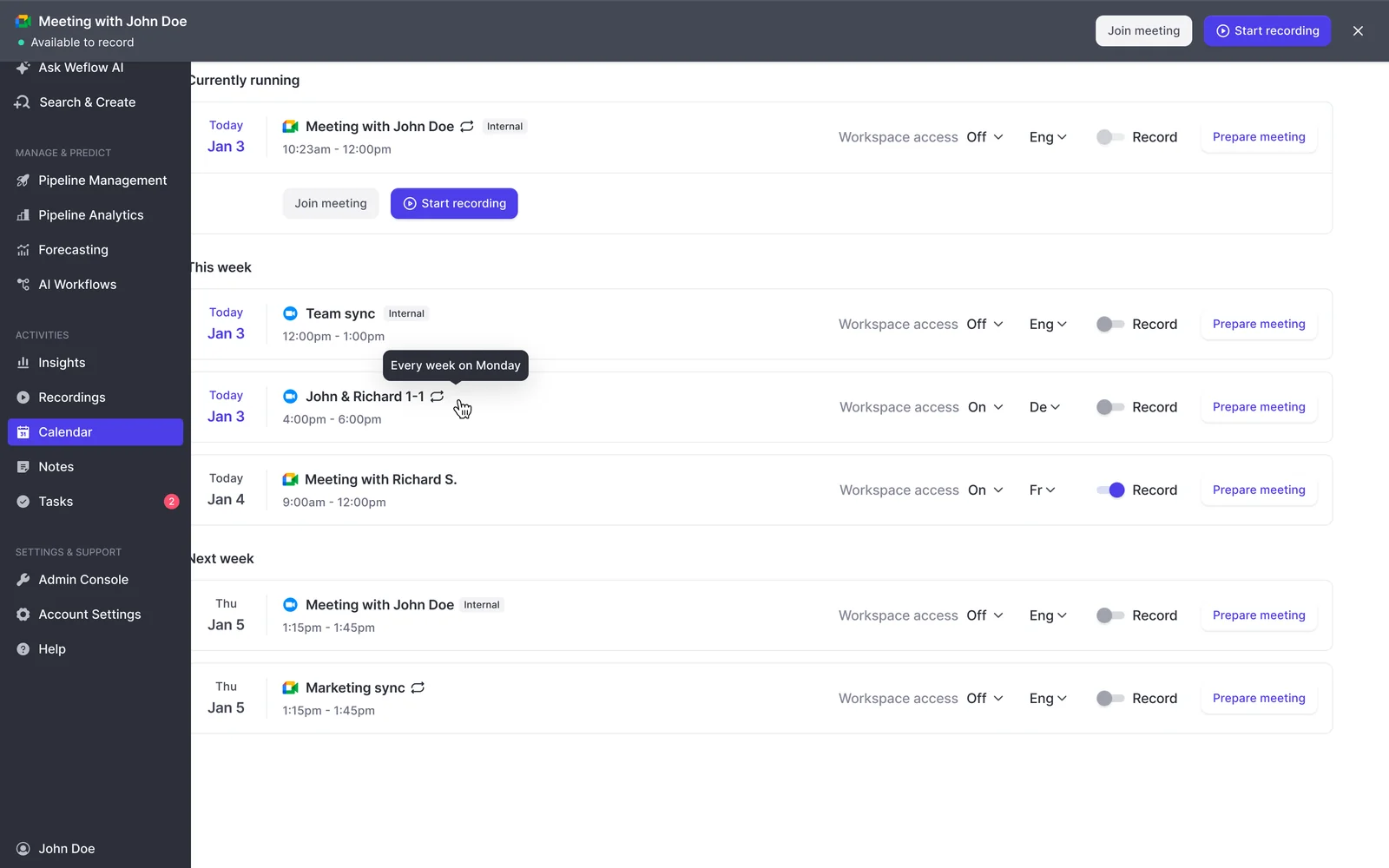
In Weflow: Weflow detects the spoken language automatically across 96 languages, with no manual selection per call or per user. You can also give the notetaker a default language. The count tells you what's listed. The test section below shows you how to prove what works for your team.
Step 3: Keep the follow-up email in the customer's language
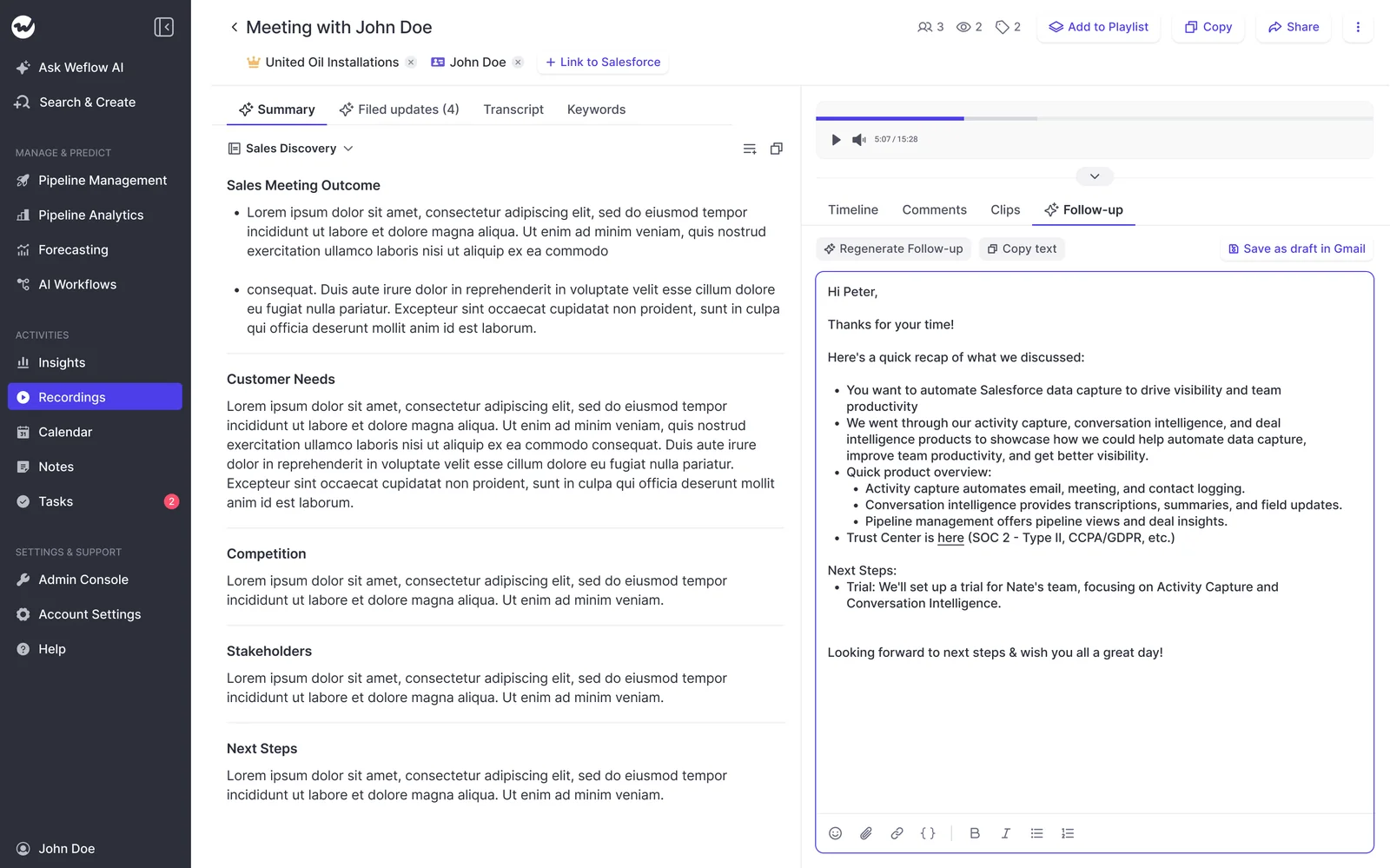
Send the customer-facing follow-up in the meeting language, and keep it separate from the CRM output. Here's the difference on one German call:
- Before: one output language for everything. You get either a German email plus a German Salesforce record, or an English email the rep rewrites before sending.
- After: a German email ready to send, plus an English summary on the Event.
Check: on each test call, the follow-up matches the meeting language and the Salesforce record is in English.
In Weflow: Weflow always writes the follow-up email in the language the meeting was held in, from templates your admins define. Weflow drafts the email for the rep to review. It doesn't send it or fill in the recipients.
Step 4: Move reportable answers into picklists so they roll up
Move every answer you need to roll up into a picklist, and write its allowed values into the field's prompt. A picklist stores the same value whether the call ran in Swedish or French. A free-text field stores whatever sentences the model wrote, and you can't group a report by sentences.
| Criterion | Free-text field | Picklist with values in the prompt |
|---|---|---|
| Language risk | Wording varies with the call and the prompt | One stored value, whatever was spoken |
| Roll-up across regions | Can't be grouped or counted | Groups and counts like any picklist |
| Filtering in reports | Only by keyword search | Standard report filters |
| Who controls the vocabulary | The model | You, through the allowed values |
The prompt is what makes this work.
Prompt quality plays a big role, right, if you have multi pick lists and you don't incorporate that into the prompts. It just doesn't really work.
— Janis Zech, Co-founder and CEO, Weflow
Use free text for context a person reads, like why the champion cares. Use picklists for anything that ends up in a report.
In Weflow: AI Field Updates map each Salesforce field to its own prompt. You choose per field whether the value writes automatically after the call or waits for the rep to approve it. In a multilingual org, picklists with their values written into the prompt are where we'd start.

Step 5: Set UK or US English and note formats per team
Put regional spelling and note format into the summary prompt, and give each team its own template.
It's a small error that lands on every call. If only one central admin can change the prompt, the UK team carries that rework permanently.
Check: run one call through each team's template. Read the result for spelling and format.
In Weflow: every Weflow summary is a prompt an admin can rewrite, and templates can differ per team. Your UK team gets UK spelling and its required note format without any change to the DACH template.
The fact that we've been able to edit templates so easily, group the teams and manage users, and have different settings for different users — that editability has been hugely beneficial.
— Louisa Winnik, VP Business Systems, Argus Media
Step 6: Give leaders a review path in their own language
Treat the reviewing leader as a separate destination.
The English summary tells your CRO what was concluded. It doesn't show how the rep handled pricing pushback. For that, the leader needs to ask questions about the call in their own language and jump to the right moment in the recording.
In Weflow: Ask Weflow AI produces a summary in a specific language on request. One question can cover a single call or a whole set of calls. Chapters split each call by topic, and timestamped links take the leader straight to the moment. Weflow doesn't translate the full transcript into the reviewer's language. The Weflow section below covers that limit.
How to test Swedish and Danish transcription during a trial
Test on your own calls, from every source you'll use, and judge the output in Salesforce rather than in the vendor's interface.
Pick test calls that cover every language and recording source
Build a sample that covers each of these:
- Swedish and Danish calls from the Nordic team, from more than one rep.
- German and French calls from your DACH and France teams.
- English calls with UK accounts, to catch the regional variant.
- One call from each recording source: video meeting, desktop-app call (including softphone), dialer call, in-person recording, and a recording imported from your previous tool.
- Calls from your incumbent recorder, if you plan to keep it. Its transcript quality becomes yours.
- Dialect calls, if any region sells in dialect.
Check each output where it lands in Salesforce
Run five checks on every call:
| Output | Where to look | Pass condition |
|---|---|---|
| Transcript | The recording record | A native speaker on the team can read it and follow who said what |
| Summary | The Event on the activity timeline | Written in English, in the team's template and regional spelling |
| Picklist values | Opportunity fields | An allowed value, and the same value a Swedish and an English call on the same topic would get |
| Follow-up email | The draft the rep receives | In the meeting language and ready to send |
| Writes | Every object and record type your activities map to | Each write landed, for every user profile in the trial |
Run the write check before rollout, not after. A failed write of a summary or field update to Salesforce isn't replayed. It fires once, when the call ends.
The content survives on the recording object. But the write to the Event or the opportunity field stays missing unless someone copies it across by hand. Because the failure is silent, the affected period is usually everything up to the day someone notices.
Mistakes that break a multilingual setup after rollout
Most failures after rollout come from configuration ownership and field design, not from transcription:
- Writing prose where a picklist should be, so the cross-region report has nothing comparable to group.
- Leaving templates editable only by a central admin, so a regional error repeats on every call until HQ finds time for it.
- Layering a new tool on top of a recorder that's weak in your Nordic languages, which writes the weakness into Salesforce.
- Testing writes against one object only, when a failed write is silent and never replayed.
- Rolling out without a named template owner per region, so templates drift and the output stops being trusted.
- Treating a well-written summary as proof that the transcript is right, when summaries hold up far longer than transcripts do.
- Assigning seats without having each rep sign in once. In Weflow, the notetaker won't join meetings for a licensed user who has never signed in. A region can look rolled out and still have no recordings.
How Weflow Conversation Intelligence and AI Field Updates handle multilingual calls
Weflow Conversation Intelligence + AI Field Updates routes each output by destination by design. Everything it writes for the CRM lands in your Salesforce.
Weflow writes the English output into your Salesforce
Within 30 to 60 seconds of a meeting ending, Weflow writes the summary to the Salesforce Event with a link to the recording, so it shows on the activity timeline. The summary and transcript are also stored on Weflow_Recording__c, a custom object our managed package adds.
Both are reportable in Salesforce like any other record. Your data stays in your Salesforce, not translated inside a vendor UI.
| Output | Where it lands |
|---|---|
| English summary | The Salesforce Event |
| Summary and transcript | Weflow_Recording__c |
| AI Field Update values | The Salesforce field each prompt maps to |
| Follow-up email, in the meeting language | A draft in Weflow for the rep to send |

Our CPO puts the point of this simply:
It's great if you have those recordings, but, like, the real challenge is to make sure that, you know, the next steps that are discussed in that meeting, sort of, like, the the discussion points that would have an impact on the projected amount, the stage that the opportunity is currently in, the happiness of the account that you're talking to, and so on. So I think it's, you know, part one, capture that conversation. Part two, turn that transcript data that you're able to create from that into actual updates and information that is, you know, structured in your CRM so you can retrieve it and again, use it for reporting automations, flows, tactical reviews, strategic reviews.
— Philipp Stelzer, CPO & Co-founder, Weflow
Weflow records every source itself, so no third-party recorder sets quality
Weflow captures calls through its own channels:
- The notetaker, scheduled automatically onto every external meeting on Zoom, Microsoft Teams, Google Meet and Webex.
- The desktop app for Windows and macOS. It records system audio, so it also covers softphone calls on Aircall or RingCentral.
- Weflow Mobile Copilot, for in-person meetings.
Calls made through the Outreach dialer come into Weflow as recordings with a transcript and summary. Language handling for your meetings and calls doesn't depend on another vendor's recorder.
Where Weflow stops: full transcript translation and dialect
Weflow doesn't translate the full transcript into a reviewer's language. Gong does: it translates transcripts, summaries and briefs into the viewer's preferred language.
If your CRO needs to read German calls word for word in English, Gong serves that better today. Our route is on-request summaries in the leader's language through Ask Weflow AI, plus chapters and timestamped links into the recording.
We make no accuracy claim for Swiss German or other dialects. If your DACH team sells in dialect, those calls belong in your trial sample.
What Weflow Conversation Intelligence costs per seat
- $39 per user per month, billed annually, with a 10-user minimum.
- Ask Weflow AI Pro, Agent Builder Free (25 agent actions per month), the desktop app and Weflow Mobile Copilot are included.
- Viewer seats are free for leaders who only review recordings, summaries and transcripts.
- No platform fee and no usage charges: recordings and transcripts are unlimited.
Walk through the product yourself, no call required.
Questions RevOps teams ask about multilingual calls in Salesforce
Does language auto-detection cover imported, dialer and desktop-app calls?
Desktop-app recordings go through the same processing as notetaker recordings: field updates, summaries, chapters, follow-ups and scorecards. Outreach dialer calls arrive in Weflow with audio, speaker separation, a transcript, a summary and coaching. Recordings imported from your previous tool come over with their transcripts and get re-linked to Salesforce records. Include one call from each source in your trial sample.
How do AI Field Updates keep fields comparable across languages?
Through picklists. When the allowed values are written into the field's prompt, the stored value is the same whatever language was spoken, so the field rolls up across regions. That's the main reason to put reportable answers in picklists rather than free text in a multilingual org.
Can a CRO who doesn't speak German review a German rep's call?
Yes, through a free viewer seat. The CRO can ask Ask Weflow AI for a summary in English, ask follow-up questions about the call, and use chapters and timestamped links to jump to specific moments. Weflow doesn't translate the full transcript, so word-for-word review still needs a German speaker.
Where is call data hosted for teams selling in Europe?
Weflow is a German company hosted in Frankfurt. We set up your instance in the region where your Salesforce is hosted, and you can override that to keep data in the EU or UK. Weflow is SOC 2 Type II certified and GDPR compliant.
How does recording consent work across countries with different rules?
The Weflow notetaker carries a configurable consent flow: opt-in, opt-out or none, a notice in the meeting chat with a link that stops the recording, and an optional pre-meeting email. The desktop app doesn't run that flow, because nothing joins the meeting to post a notice, so consent rests with the rep. Your legal team owns the rules for each country you sell into.
How do we trial on real customer calls when legal objects?
Legal's concern is real customer data in a proof of concept, and a sandbox trial without real calls proves nothing. The way through is contractual: your legal team and ours agree deletion terms for trial data before the pilot starts. Weflow can also delete all of your recordings after a set period, such as every 30 days.


