.webp)


Free Conversation Intelligence & AI Cheat Sheet
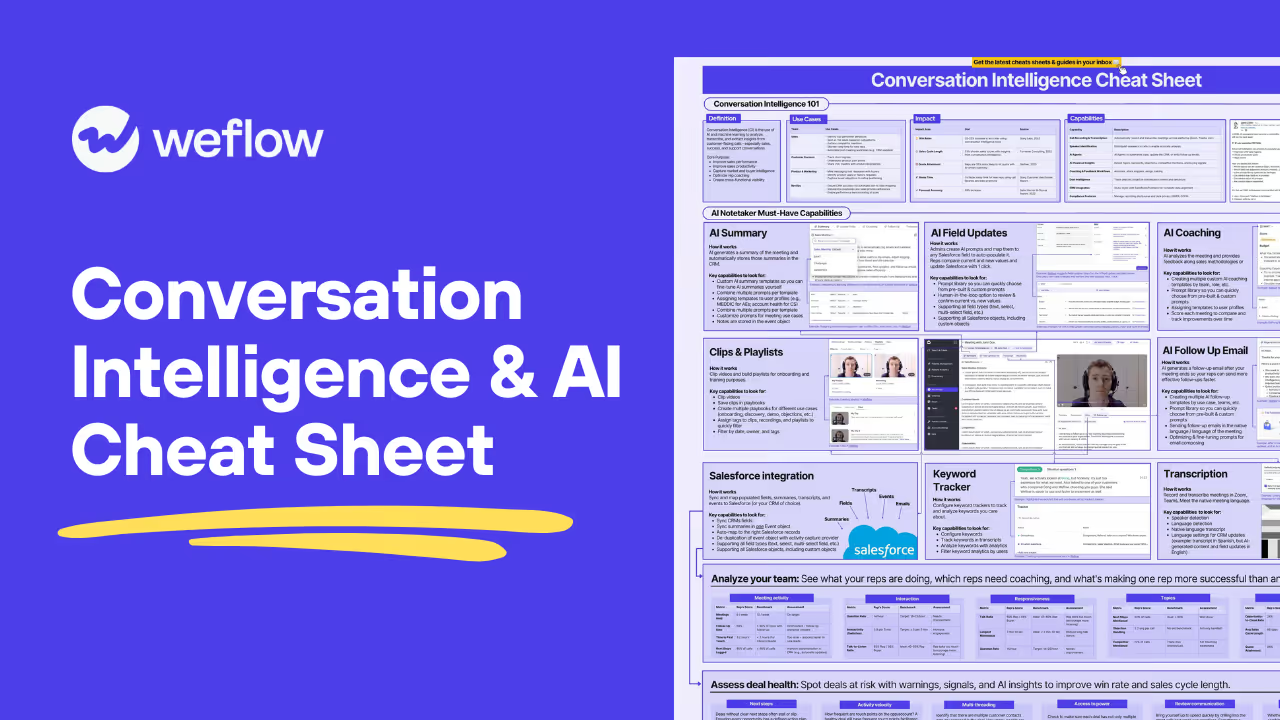
Here is our cheat sheet covering 4 topics:
- CI 101
- Must-have AI capabilities
- Coaching & team analytics
- Deal insights to drive revenue outcomes

"With Weflow, we’re now capturing all relevant activities and have full transparency into the performance of each sales rep. It’s a game changer."

.svg)
%201.svg)
"Weflow gives us better visibility and predictability of our business."




"Weflow eliminated the need for our VP to ask, ‘Did you follow up with that deal?’. It tracks customer interactions automatically, creating a framework that drives accountability across the team."



"None of the other tools gave us a solution like Weflow. From the beginning, we had a really smooth process."
.webp)


"I had a first introductory call with Weflow. I think I was sold after 15 minutes. There’s no question that the people at Weflow understood the problems that we were trying to solve."


"I’ve worked with Gong before, but Weflow’s simplicity and real-time sync are game-changing."
.webp)



"We use Weflow to auto-capture activity data, run deal reviews, and analyze our pipeline to inform our forecast. Being able to spot deal risks early has improved win rates and pipeline health."



.svg)
.svg)


.svg)

.svg)

.svg)
What's Inside
AI notetaker evaluation criteria
- Seven capability areas to score vendors on: summaries, field updates, coaching, clips, follow-up emails, Salesforce sync, and keyword tracking
- Admin-level requirements that decide rollout success, including custom prompt libraries, template assignment by profile, and human-in-the-loop field updates
- Multilingual handling and data structure details like native transcription, separate CRM output languages, event-object storage, and activity de-duplication
Rep performance benchmarks
- A concrete scorecard across meeting activity, interaction, responsiveness, topics, and performance instead of vague coaching guidance
- Benchmark ranges to apply immediately: 80%+ follow-up rate, sub-2-hour first touch, 18–25 questions per hour, 40–50% rep talk ratio
- How to tie each metric to an operational fix, from automatic CRM updates to cutting monologues over 2 minutes 30 seconds
Deal risk frameworks
- A deal health model covering next steps, activity velocity, multi-threading, access to power, communication review, and MEDD(P)ICC, SPICED, or BANT coverage
- The warnings and signals to configure, including ghosted, stalled in stage, single threaded, no access to power, engagement score, and closed date pushed
- How to operationalize risk indicators in pipeline views for swing deals, hygiene, renewals, expansions, and rep-level deal reviews

Philipp Stelzer
Philipp Stelzer is the co-founder and CPO of Weflow, the modular Revenue AI Orchestration platform. He co-hosts the RevOps Lab podcast alongside Janis Zech, bringing the product and systems lens to conversations with RevOps leaders and sales operators. At Weflow, Philipp leads product and spends his time close to how revenue teams actually work day-to-day — activity capture, deal inspection, forecasting workflows, and the operational details that make or break a RevOps motion. On the podcast and blog, he digs into the mechanics: the workflows, tools, and process design behind teams that hit their number.


Go Deeper
Conversation Intelligence Workflows for Call Scoring, Deal Risk, and Salesforce Updates
#111 Build or Buy? How AI Changes the RevOps Tech Stack
Free AI Pipeline Visibility & Reporting Cheat Sheet
Frequently asked questions
What's the difference between Conversation Intelligence and an AI notetaker — aren't they the same thing?
An AI notetaker is one capability within Conversation Intelligence — it handles transcription, summaries, and follow-up drafts. Full CI goes further: it analyzes talk-to-listen ratios, flags competitor mentions, tracks keyword patterns across your entire team, scores deal health, and feeds structured data back into Salesforce fields automatically. Think of the notetaker as the data capture layer; CI is what you build on top of it.
Do I need Salesforce to get value from the AI field update and summary features covered in this cheat sheet?
The cheat sheet is written with Salesforce as the primary CRM — it specifically covers syncing to Event objects, supporting custom Salesforce objects, and auto-mapping to the right records. If you're on HubSpot, some tools support it, but the depth of field-level control described here (multi-select fields, custom objects, de-duplication with activity capture) is largely Salesforce-native functionality. Check whether your CI vendor supports your CRM at the same level before assuming feature parity.
Which parts of the rep coaching process should stay human-led versus handed off to AI?
AI handles the consistent, scalable parts well — scoring meetings against a methodology like MEDDIC, flagging a 65/35 talk-to-listen ratio, or surfacing that a rep's question rate is 14/hour against a 18–25 target. The human conversation still matters for context: why the rep talked too much on that specific call, what was happening in the deal, and how to adjust their approach going forward. Use AI to surface the pattern; use the manager to interpret it.
What data or setup do I need in place before the deal health signals in this cheat sheet are actually reliable?
You need clean, consistently updated opportunity records in Salesforce — stage, close date, and contact roles at minimum. If reps aren't logging next steps or the CRM is missing key contacts, warnings like "single threaded" or "no access to power" will either fire incorrectly or not fire at all. The cheat sheet flags this directly: methodology fields need to be auto-updated from call data to give you accurate deal context, not just rep-entered guesses.
How do I know if the AI summaries and field updates being generated are actually accurate enough to trust?
The human-in-the-loop review step is the quality gate — the cheat sheet specifically calls out comparing current versus AI-suggested field values before a rep confirms with one click. For summaries, the signal is whether your team stops correcting them; if reps are editing every output, your prompt templates need tuning. Build a review cadence into your first 30 days: spot-check 10–15 calls per week against what the AI logged in Salesforce.
How often should I revisit the keyword trackers and AI coaching templates once they're set up?
Keyword trackers should be reviewed quarterly at minimum — competitor names change, new objections emerge, and messaging shifts after campaigns launch. AI coaching templates tied to a methodology like MEDDIC are more stable, but if you change your sales process or add a new team segment, those templates need to be updated and reassigned to the right user profiles. Set a calendar reminder; these configs go stale faster than most ops teams expect.