How to Show Weflow Call Recordings and Transcripts on Salesforce Account and Opportunity Records
Learn how to show Weflow call recordings and transcripts on Salesforce Account and Opportunity pages



Your reps say they can't find the call recordings. The recordings exist. They're sitting in your Salesforce org right now, as records you own, on pages nobody has put them on yet.
Two admin jobs are usually missing: the recording object was never opened up to end users, and the Lightning component that shows recording summaries on a record was never added to the Account and Opportunity pages. That's an afternoon of work, not a failed rollout.
Below are the exact object, the two packages, the permission steps, the component, and the honest limits, so you can fix it today and prove to your reps that Weflow Conversation Intelligence has been capturing their calls the whole time.
Why reps can't find call recordings already sitting in Salesforce
Because the data landed and the visibility never got switched on. The technical install and the capture configuration are one project; enabling the recording object for end users is a second one, and nothing in the setup flow forces it.
So transcripts accumulate in Salesforce, reps see nothing new on their records, and the complaint reaches you as an adoption problem.
| What the rep says | What's actually true |
| "Weflow isn't recording my calls." | The calls are stored as Weflow_Recording__c records. The object isn't on the page the rep opens. |
| "I can't find the transcript anywhere." | Their permission set has no read access to the object, or field-level security hides the transcript field. |
| "There's nothing on the opportunity." | The component went onto the Account page only, or the recording is linked to the account and not the deal. |
| "The tool doesn't work." | One configuration gap, and no way to demonstrate that yet. |
That last row is the one that stings.
The way out is diagnosis per user rather than reassurance: open one rep, look at what was captured, then look at what that user can actually see. The gap between those two answers is your fix list.
None of this changes if the team went live last month or bought a year ago and quietly stopped opening it. The steps are the same.
Where Weflow stores call recordings and transcripts in Salesforce
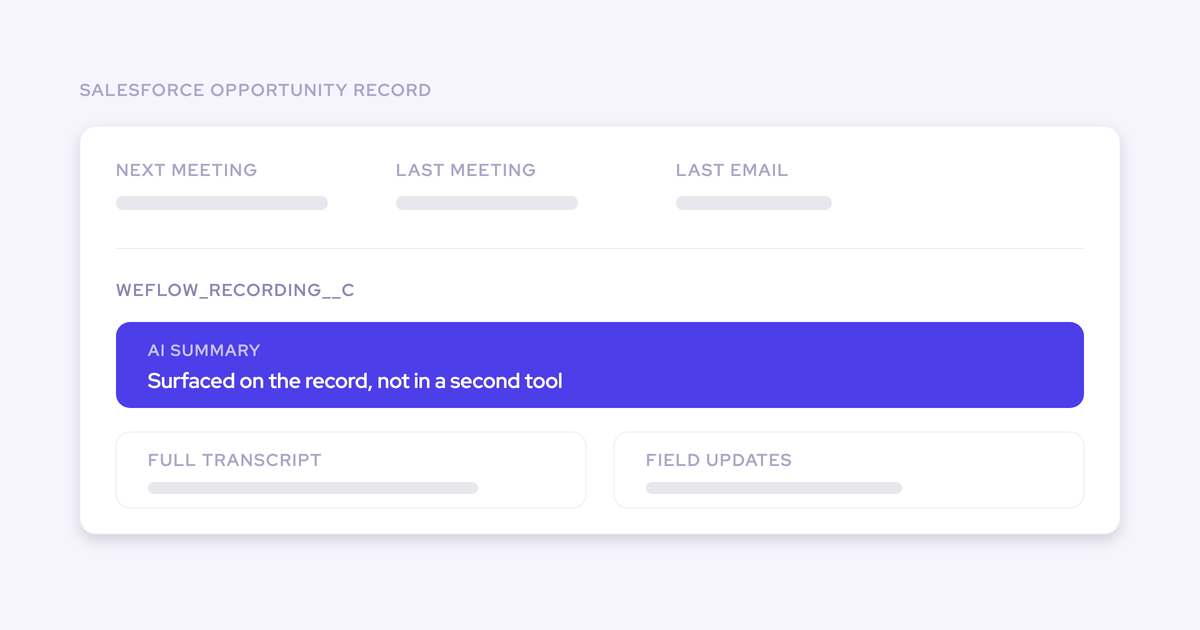
In your own Salesforce database. Weflow is the Revenue AI Orchestration platform for sales, customer success, and RevOps teams, and Weflow Conversation Intelligence writes conversation data into two native Salesforce objects: Weflow_Recording__c, which holds the meeting summary and the full transcript, and an indexing object alongside it.
The summary also writes to the related Event, so the call outcome sits on the standard activity record too. Weflow logs through the Salesforce REST API, which has to be enabled for the write path to work.
What that buys you as an admin:
- You can query the transcript in SOQL and build reports on it, without an export.
- Flows can read it, so a summary can trigger a task or an alert.
- Field-level security, sharing rules and role hierarchy govern it, because it's your object.
- It stays in the org if the subscription ends.
And that's exactly why this page-layout step exists at all. A real Salesforce record has to be surfaced by someone. A vendor-cloud tool skips the step by keeping the data on its own side and dropping an iframe onto your page.
| Native object storage (Weflow) | Vendor-cloud embed | |
| Where the transcript lives | Weflow_Recording__c in your org | The vendor's cloud, displayed through an embedded component |
| Reportable and queryable | Yes, like any custom object | Only inside the vendor's product |
| Who controls access | Your permission sets, FLS and sharing rules | The vendor's own permission model |
| After cancellation | The records stay | Access goes with the subscription |
| Admin work to surface it | Page layout plus object access, once | None, and that's the tradeoff |
Credit where it's due: Gong's embedded components mean no admin ever has to do the work you're about to do. Gong keeps recordings, transcripts and intelligence in its own cloud, and lose the subscription and you lose access to all of it. That's the deal. We'd rather hand you an object you own and ask you for twenty minutes in the Lightning App Builder.
One honest limit before you start: the video file is not stored in Salesforce. Video lives in Weflow's cloud and streams back through a link, and it can be exported through the public API to your own cloud storage. Salesforce is an expensive and heavy place to keep large media. The transcript and the structured outputs of the call do land natively.

What you need before surfacing the Weflow recording object
- Admin rights in Salesforce: permission sets, field-level security, Setup, and Edit Page on Lightning record pages.
- The Weflow managed package installed: it's what created Weflow_Recording__c in the first place, so if the object exists, this box is ticked.
- The Advanced Analytics package: separate from the main tracking package, and the one that carries the Weflow Activity Timeline Lightning component. Base-package orgs don't have the component at all.
- The Salesforce REST API enabled: it's how Weflow writes the recording records, and the write path needs write access to the object. Reps who only read the summary need Read.
- A decision on who may see recordings: customer calls can be sensitive, and this is your call to make rather than a default we impose. More on that in step 1.
How to add Weflow recordings to account and opportunity pages
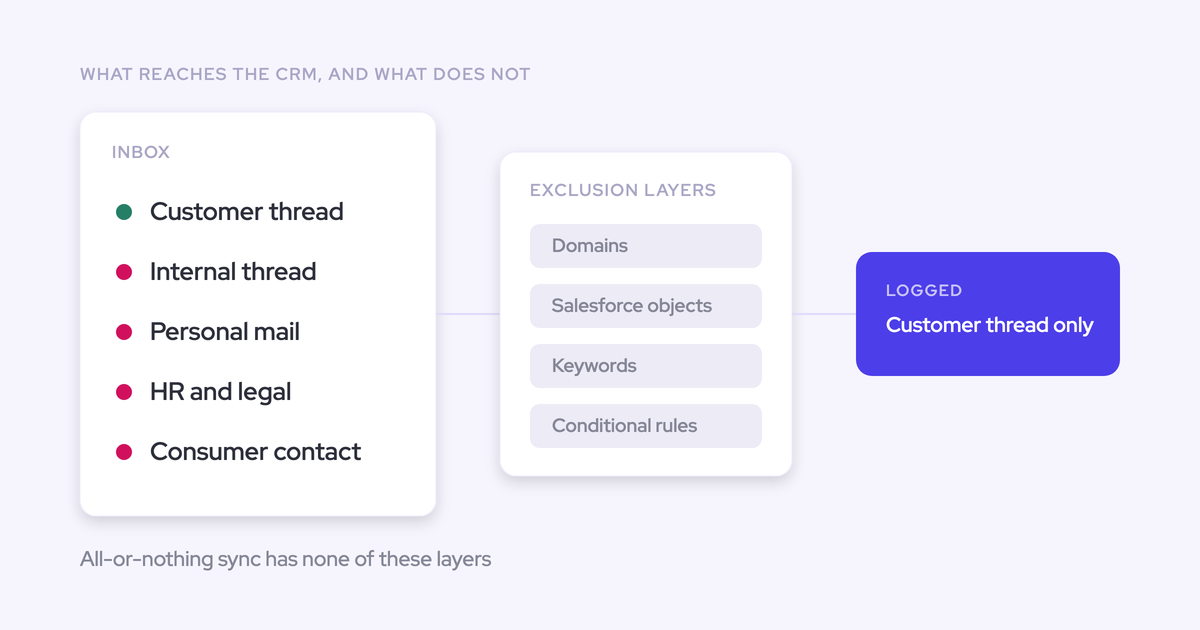
Five steps. When you're done, a rep opens an account or an opportunity and sees the last meeting, the last email and the recording summary on the record, having configured nothing.
That last part matters more than the sequence. Every step below is pushed centrally, because we've watched what happens when it isn't:
Step 1: Decide who should see call recordings
Settle this before you touch Setup, because it decides how the next step is scoped. Recording a customer conversation is one permission question; letting the whole revenue org read the transcript is a different one.
Questions to answer with whoever owns the policy:
- Can any rep read any recording, or only recordings on records they already have access to?
- Are post-sales conversations treated differently from prospect calls? Teams tell us customer calls feel more sensitive than new-business ones.
- Do managers see their team's recordings through role hierarchy, or through an explicit grant?
- Does anyone outside sales need read access: CS, enablement, product?
The levers are the ones you already run: object access via permission set, the org-wide default and sharing model on the object, field-level security on the transcript field, and record types. Nothing new to learn.
Step 2: Grant end users read access to Weflow_Recording__c
This is the single most common missing piece. The object exists, the admin can see it, and no rep profile has been given anything.
- Go to Setup, then Permission Sets. Open the set your reps already carry, or create one for this.
- Under Object Settings, find the Weflow recording object and grant Read.
- In the same screen, set field-level security on the fields carrying the summary and the transcript. Field access is separate from object access, and this is where transcripts go missing while the record itself renders fine.
- Assign the permission set to the rep profiles or groups. Don't assign it user by user unless you enjoy doing it again for every new starter.
- Check record-level access: the org-wide default and sharing settings on the object decide which recordings a given user sees, exactly as they would for any custom object. Confirm how it's configured in your org rather than assuming reps see everything.
Step 3: Confirm the Advanced Analytics package is installed
If you go straight to Edit Page and the Weflow Activity Timeline isn't in the component list, this is why. The component ships in the Advanced Analytics package, not the main tracking package, so teams that installed only the base package won't find it.
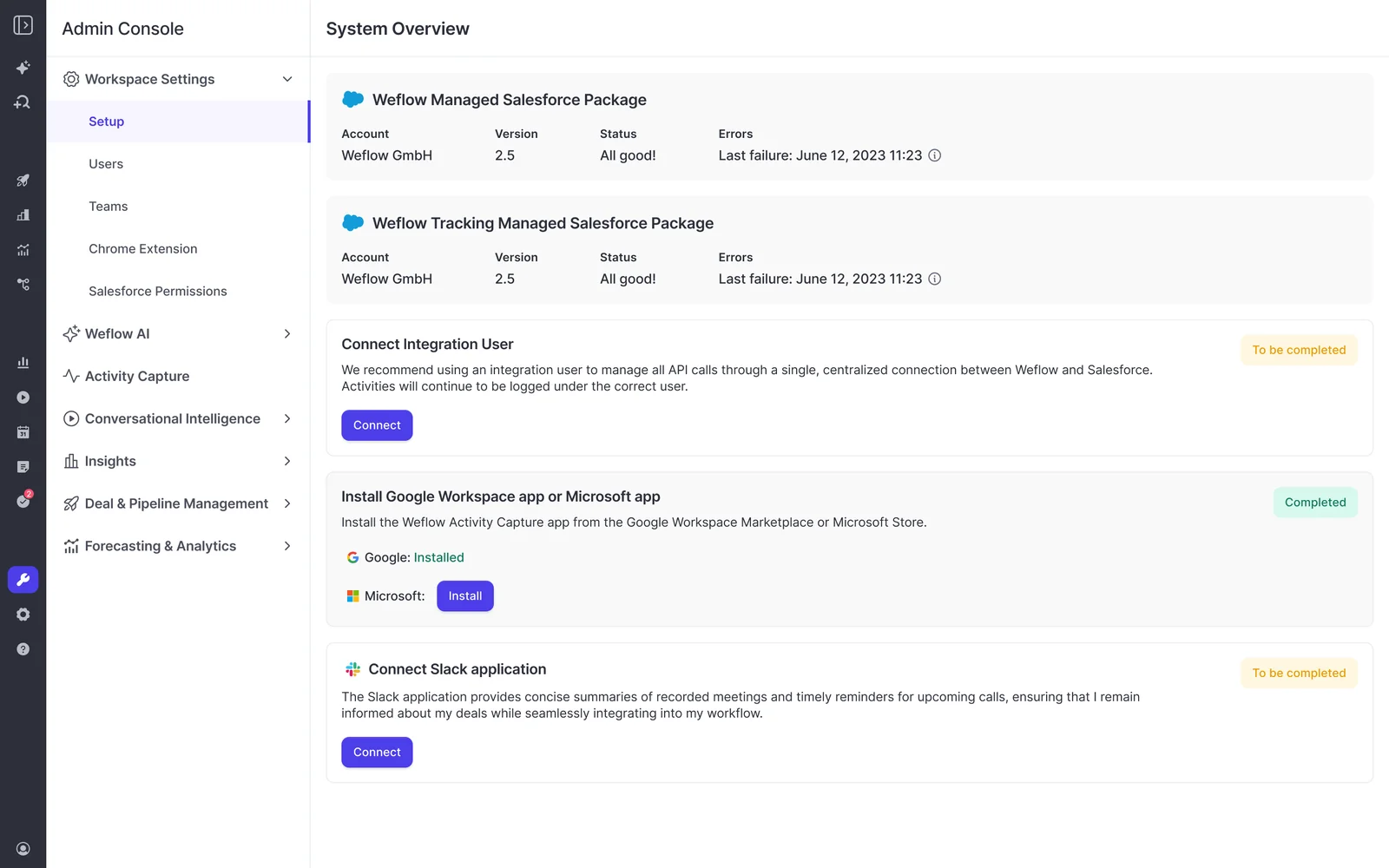
- Open the Weflow admin console and look at System Overview. It lists the managed packages and whether each one is current.
- Cross-check in Salesforce under Setup, then Installed Packages, so you're reading the org rather than the console.
- If Advanced Analytics isn't there, install it from the admin console. It shows up as a Salesforce app, and the activity reports it brings run natively in Salesforce.
- If your change process says sandbox first, install there first. It's a package install like any other.
Step 4: Add the Weflow Activity Timeline component to record pages
- Open any Account record, hit the gear icon, then Edit Page.
- Find Weflow Activity Timeline in the component list on the left.
- Drag it into the space the standard activity timeline occupies. It's built as a replacement for that timeline rather than a second panel underneath, so give it the same real estate and demote or remove the standard Activity component.
- Save, then Activation. Set it as org default and check the app, record type and profile assignments. A fix that reaches one app and not the others looks identical to no fix at all from a rep's seat.
- Repeat on Opportunity, and on Contact and Lead if your reps work those records.
What lands on the record once it's there:
- Next meeting, last meeting and last email at a glance
- A trend line of activity over time
- Email threads grouped by conversation, so a six-email thread reads as one row instead of six
- Summaries of call and meeting recordings
Step 5: Verify the page as a rep sees it
Verifying as yourself proves nothing. Your admin profile hides every gap you're hunting for.
- Pick an account with a recorded call in the last week.
- Use login access to that rep, or a test user sitting on the rep profile.
- Confirm three things: the recording summary appears in the timeline, the transcript opens and is readable, and next meeting and last meeting are populated.
- Click into the video. It opens in Weflow and streams from there, because the file isn't a Salesforce attachment. Tell your reps that before they file it as a bug.
- Repeat on an Opportunity, since that's where the pipeline conversation actually happens.
Screenshot that page. It's the evidence that closes the escalation.
Configuration gaps that keep recordings invisible after setup
When a rep still says they can't find anything, the fault sits in one of a handful of places. Work down this list against the live complaint.
| Symptom | Cause and fix |
| Weflow Activity Timeline isn't in the Lightning App Builder component list | The Advanced Analytics package isn't installed. Install it from the Weflow admin console, then reload the App Builder. |
| You can see recordings, reps can't | Object access exists on your profile only. Grant Read on the recording object through a permission set assigned to rep profiles. |
| The record renders but the transcript area is empty | Field-level security on the summary or transcript field. Object access and field access are two separate grants. |
| Works on Account, nothing on Opportunity | The component was added to one Lightning page, or activation was scoped to one app or record type. Repeat step 4 per object and check assignments. |
| Some reps see it, others don't, same profile | Record-level access. Check the org-wide default and sharing model on the object before blaming the component. |
| Video doesn't play inside the record | Expected. Video streams from Weflow's cloud through a link. Say so up front so it doesn't come back as a defect. |
| The recording is on the account, not the deal | The call was linked to the account. Relink it to the opportunity in Weflow, and check how meetings map when an account carries several open opportunities. |
| Calls from before go-live are missing | Capture starts when a user is enabled. Historical recordings from a previous conversation intelligence tool can be imported through that tool's API. |
That relinking point deserves a second look if your accounts carry new business, renewal and upsell opportunities at the same time. A recording sitting on the parent account while the deal page looks quiet is the most common reason a correct install still reads as broken.
FAQ: Weflow recordings on Salesforce records
Do reps need a Weflow license to see recordings in Salesforce?
No. The summary and the transcript are Salesforce records, so Salesforce object and field access is all it takes to read them on an Account or Opportunity page. Opening the video means going into Weflow, and view-only licenses are unlimited and included, so that isn't a seat cost either. Sign-in to Weflow runs only through your Salesforce authentication, using OAuth and whatever SSO your org enforces, so there's no second password to distribute and deactivating a user in Salesforce removes their Weflow access immediately.
Does the call recording video play inside Salesforce?
No, and that's deliberate. Weflow doesn't store video files in Salesforce. They live in Weflow's cloud, stream back through a link, and can be exported through the public API into your own cloud storage. Salesforce is an expensive place to hold large media, so what lands natively is the transcript, the summary and the structured outputs of the call.
Does the Weflow Activity Timeline respect field-level security and sharing rules?
Yes, because it reads your own object rather than overlaying a view of its own. Field-level security, sharing rules and role hierarchy decide what each user sees, and Weflow's writes back into Salesforce respect validation rules, field dependencies and permissions the same way. If a rep shouldn't see a field, adding the component doesn't change that.
Can the Weflow Activity Timeline go on custom objects?
The documented targets are Account, Opportunity, Contact and Lead pages. Weflow can log activity to any Salesforce object, including custom objects, so the data side of a custom data model is covered. If your selling motion runs on a custom object and you want the timeline component there, ask us before you design the page around it rather than assuming it.
Does surfacing recordings consume Salesforce API calls?
Rendering records your org already stores has little impact on your daily API allowance. The write side does use the REST API, which is why historical syncs get batched over days rather than run in one pass. The Weflow analytics app reports on activity natively inside Salesforce and consumes no API calls, which matters because that allowance is org-wide and every integration you run is drawing on the same pool.
Where does the meeting summary appear besides the recording object?
On the related Event. That's worth knowing if the Advanced Analytics package install is stuck behind a change window this week: the summary is already on the Event, so reps can read it in the standard Salesforce activity timeline today while you get the component approved. It also means a recorded meeting stays one meeting on the record, with the summary attached, rather than a duplicate row that inflates every meetings-per-rep report you build.
Walk through the product yourself, no call required: take a Weflow product tour.