What Happens When AI Field Updates Meet Validation Rules, Flows and Existing Field Values
Learn how AI field updates interact with Salesforce validation rules, flows, and existing field values.


AI field updates read a call transcript, pull out a value for each Salesforce field based on that field's prompt, and write it into your org's own fields, either automatically or after a rep reviews it. That makes them one more writer in an org you built for humans.
Your org's rules still win, but there are a few places where you'll need to plan ahead:
- Where your rules hold: Validation rules still block the write, picklists only receive values the field accepts, and required fields stay locked.
- Where you need to plan: Updates replace the field's content unless review mode or prompt design protects it, lookup fields are out of scope, and a failed automatic write sends an error email that doesn't say which field failed or why.
We'll use Weflow AI Field Updates, part of Weflow Conversation Intelligence, as the example throughout.
Weflow is the Revenue AI Orchestration platform for sales, customer success, and RevOps teams, and AI Field Updates is the part of Weflow Conversation Intelligence that writes call outcomes into your Salesforce fields.
Whether you want everything automatic, everything reviewed, or just a handful of fields, the sections below give you what you need to decide.
How AI field updates behave against each Salesforce guardrail
Here's a quick look at how Weflow handles each guardrail, which setting controls it, and what it looks like when something goes wrong.
| Guardrail | What happens | The setting that controls it | What failure looks like |
|---|---|---|---|
| Existing field values | Each update replaces the field's current content. | Review mode per field, plus a prompt instruction not to update when the call adds nothing new. | On an automatic field with no protecting prompt, a thin follow-up call overwrites earlier qualification. |
| Two writers on one field | Per-call updates and AI Playbooks can both write the same field. | You assign each field to one route. Playbook write-back stays off until you switch it on. | The two routes overwrite each other's values. |
| Validation rules and required fields | The rule applies to AI writes exactly as it does to reps, and required fields stay locked. | Your existing rules, unchanged. | An automatic write sends an error email. A reviewed write fails in front of the rep. |
| Stage gates | A blocked stage change stays blocked until the fields the rule depends on are filled, and those fields can be filled from the call. | A prompt on Stage and on each gate field. Stage stays in review. | The stage doesn't move until the gate is satisfied. |
| Picklists and multi-selects | Weflow reads the field's allowed values and matches its output against them. | Your picklist definition in Salesforce. | Weflow never writes a value the field doesn't accept. |
| Lookup fields | Not writable. | None. Lookups are out of scope. | Any process that depends on an AI-written lookup can't be built. |
| Record-triggered Flows and automation | Writes land in your own Salesforce fields, so reporting and automation can be built on them. | Your automation, built on those fields. | A rejected write never reaches the field, so nothing downstream acts on it. |
| Failed writes | Automatic fields send an error email. Reviewed fields fail on screen. | Automatic versus review, per field. | The email names neither the field nor the reason, so you forward it to Weflow support. |
Why Salesforce guardrails assume a human is typing
Your validation rules, required fields and stage gates were all built for human input, mostly because reps kept leaving methodology fields empty.
"what we typically see is that the sales methodology fields in Salesforce, they're almost always empty. So even the data capture doesn't work."
The rules got fields filled in, but not with anything useful. Reps typed whatever cleared the rule, so you ended up with full fields that said nothing.
Now that AI can reliably pull values from call transcripts, a new kind of writer is showing up in your org, and vendors don't agree on how it should behave.
Some require rep approval on every write, some append, some write only when the field is empty, and at least one writes a sentence explaining what wasn't discussed straight into the empty field.
Most don't document how their writes interact with your rules, so holding off until you know isn't being difficult. It's doing your job.
What you control per field in Weflow AI Field Updates
In Weflow, the admin controls everything field by field from the Admin Console, under Conversation Intelligence. Reps don't see any of these settings.
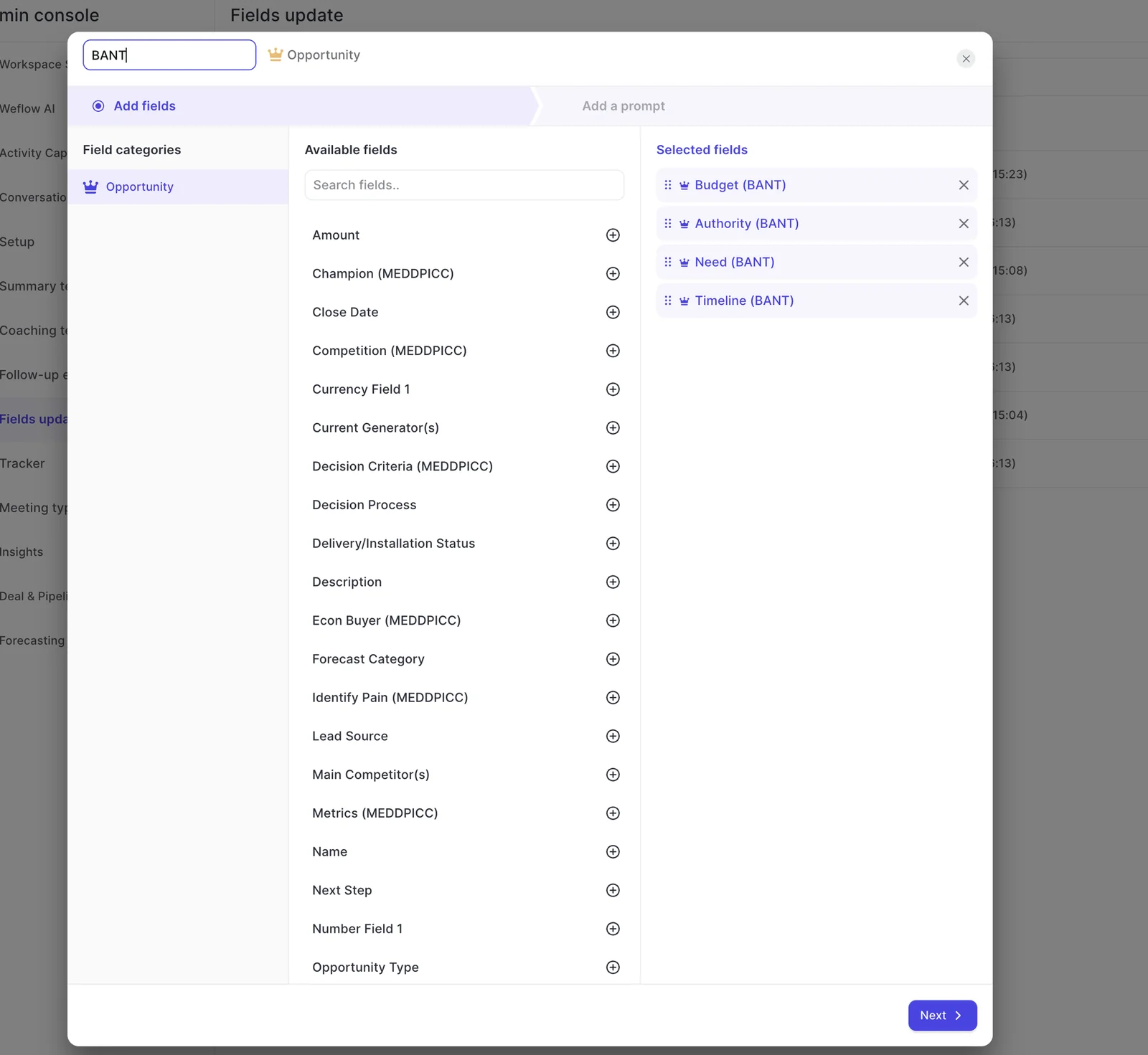
- Which fields get written: You build templates per Salesforce object and pick the exact fields each one fills. AI Field Updates only run for users whose team has a template assigned.
- Automatic or review, per field: Each field either writes on its own or waits for the rep, and you set this per field rather than per team or workspace.
- Templates per team: Sales, onboarding and customer success can each run their own qualification structure and write to different objects.
- Field sets per meeting type: Weflow detects whether a call was a discovery, a demo or a closing conversation, so you can apply a different set of field updates to each.
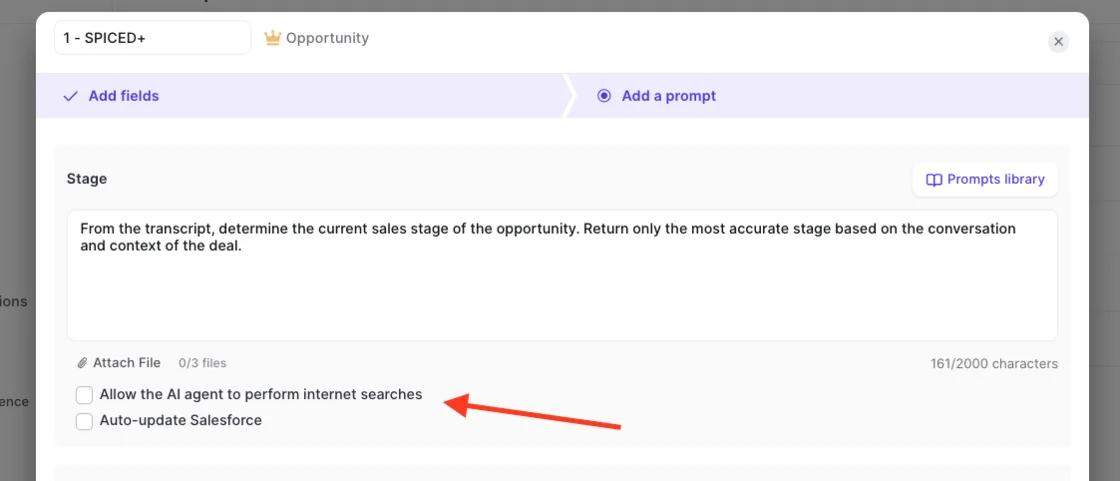
- The prompt behind each field: Every field has its own prompt, up to 2,000 characters, with up to three PDFs attached as context. You can also turn on internet search per prompt (it's off by default).
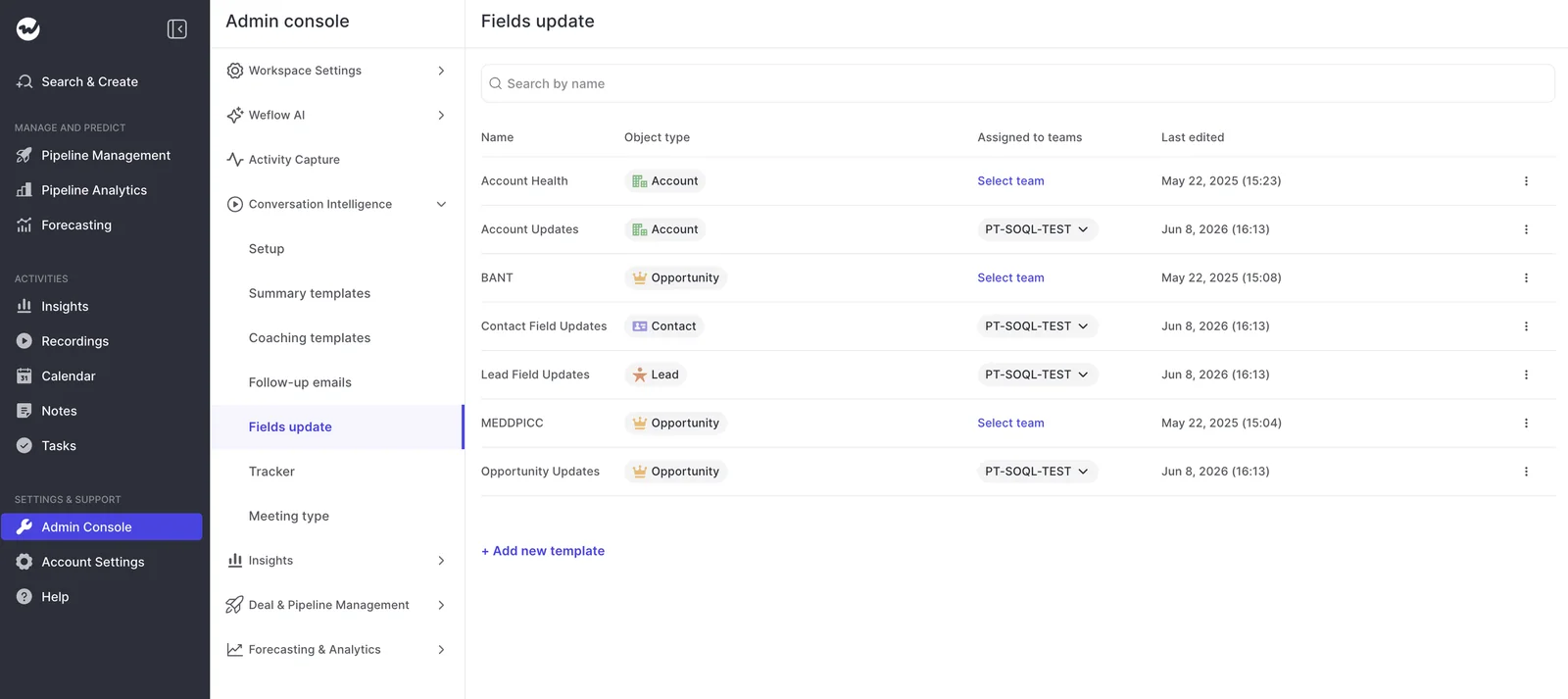
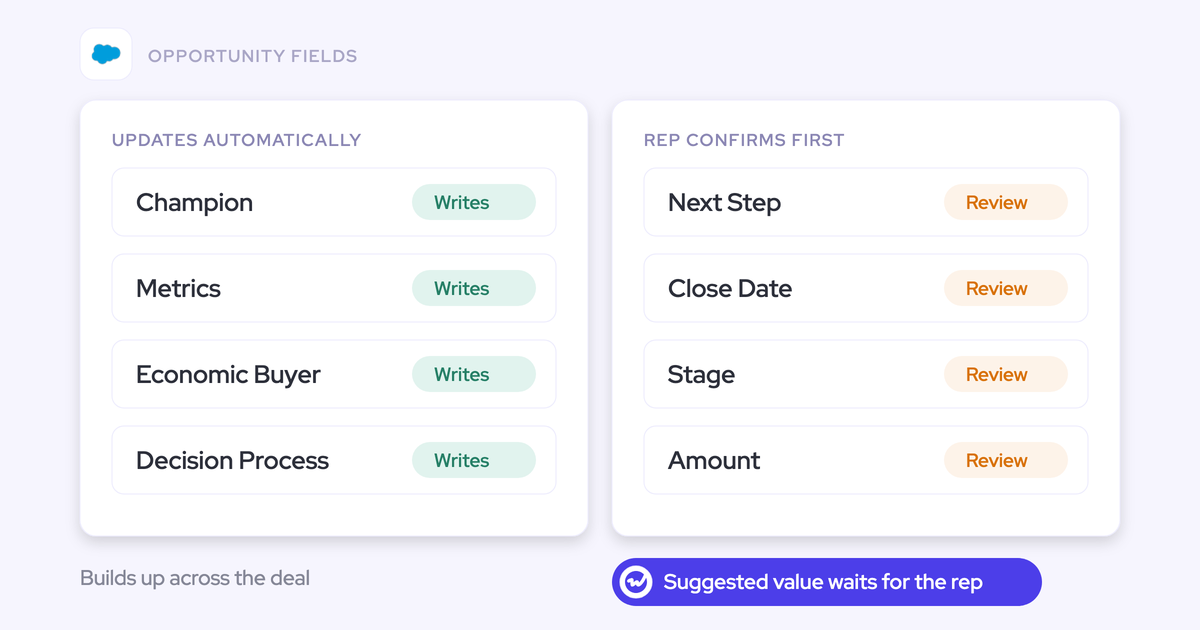
This per-field control is what makes a mixed setup work. Unambiguous fields like address and website can write automatically, while interpretive fields like champion and pain wait for review, all in the same configuration for the same rep.
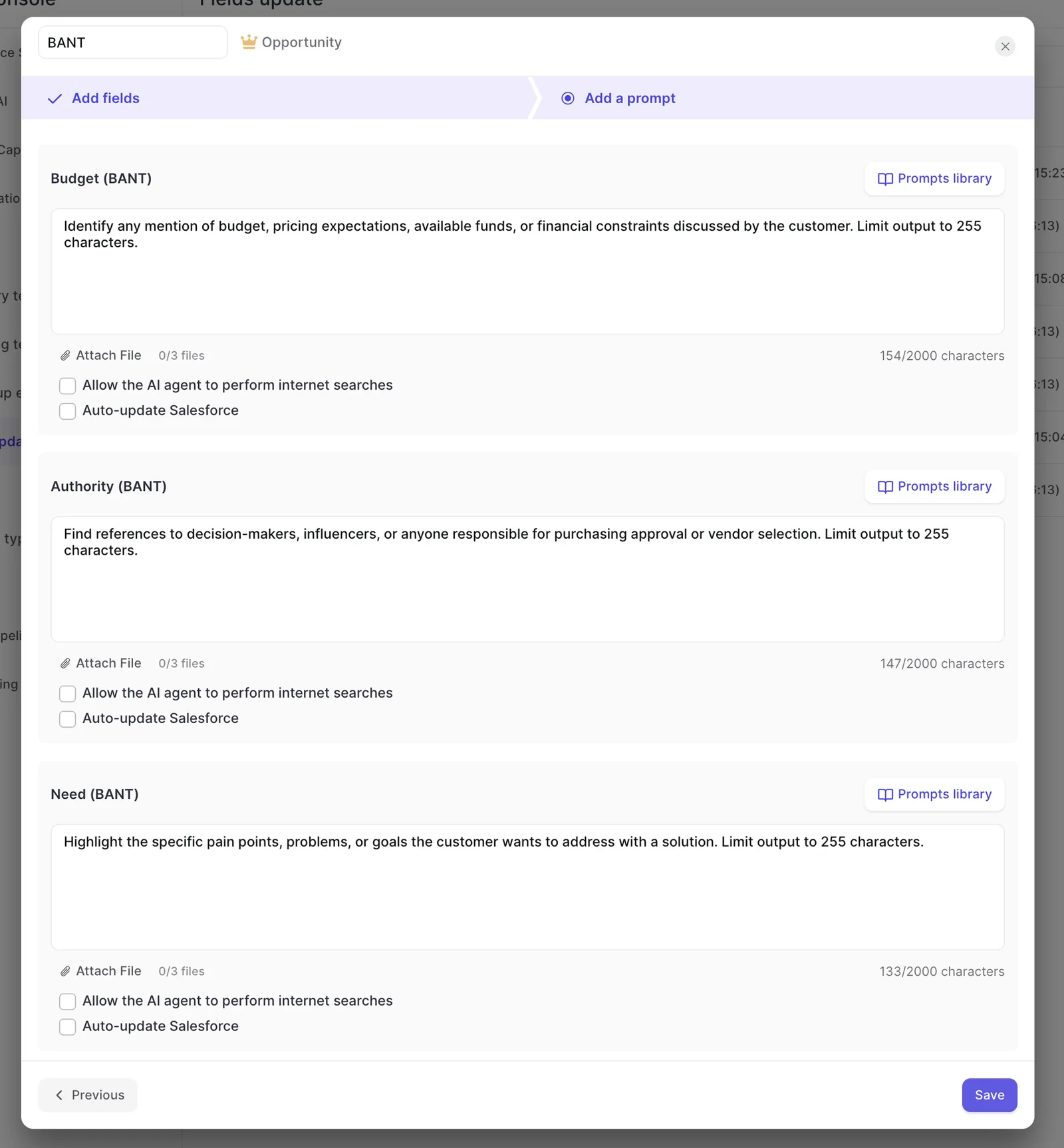
Will AI field updates overwrite what a rep already typed?
Yes, unless you protect the field. Each update replaces what's already there, and there's no append toggle, so you protect rep input with review mode and prompt design instead.
And the lost note isn't the real cost. Once reps watch their own notes disappear, they stop maintaining the field, and you're left with an automated field nobody corrects or trusts.
Each AI field update replaces the field's existing content
In automatic mode without a protecting prompt, each update writes the latest call's output over whatever the field held.
Single-value fields like amount can only ever be overwritten anyway, which is why automating them needs more care than automating text fields.
If you need a per-field append or write-if-empty toggle today, Airspeed and Momentum both offer one.
Airspeed lets you set each mapped field to overwrite, append, merge or leave an existing value alone, and Momentum has a write-only-when-empty mode per extraction.
Review mode and a "nothing new" prompt keep earlier qualification
Three things protect what a rep already wrote:
| Protection | What it stops |
|---|---|
| Review mode on the field | Silent replacement. The rep sees the current and proposed values side by side, removes what shouldn't change, and syncs the rest with one click. |
| Only changed fields are proposed | Review fatigue. A quiet follow-up call proposes two fields, such as use case and competitor notes, not twenty, so the review takes seconds. |
| A "don't update if nothing new" prompt instruction | A thin call wiping a full field. If the call adds nothing, the field stays as it is, even on automatic. |
And the review shows up fast. Within 30 to 60 seconds of the meeting ending, the rep gets the summary, a drafted follow-up email and the proposed field updates, with a Review fields link into the Weflow app.
Map per-call values to the meeting record to keep history
If you'd rather see how the deal evolved than just its latest state, map the updates to fields on the meeting or recording object instead of the opportunity, so every call keeps its own values.
Either way, nothing about the call itself is lost when an opportunity field gets replaced. The full transcript and summary live in Salesforce on the Weflow recording object, and the summary is also written to the related Event.
The whole-deal view is a different job, and it belongs to AI Playbooks.
Product tour
Weflow Conversation Intelligence, step by step
Per-call updates and AI Playbooks can both write to the same field, so decide upfront which one owns each field. Otherwise, they'll keep overwriting each other.
Who owns a field: Per-call updates or AI Playbooks
Per-call updates and AI Playbooks can both write to the same field, so decide upfront which one owns each field. Otherwise, they'll keep overwriting each other.
| Per-call AI field updates | AI Playbooks | |
|---|---|---|
| What it reads | One call transcript, compared with what the field holds | Every email, meeting, transcript, related record and field on the deal |
| When it runs | After each recorded call | When new activity lands on the record, and otherwise every three hours |
| Approval step | Review by default, unless you set the field to automatic | None once write-back is on. Values land as they're generated |
| Starting state | Writes to the fields in the assigned template | Reference only. Results show in the Signals tab and nothing gets written until you switch on write-back |
| Best-fit fields | Single-value commercial fields: next step, close date, stage, amount | Cumulative methodology fields: champion, metrics, economic buyer |
As a rule of thumb, let the field type decide. Methodology fields build up evidence over the whole deal, so no single call should settle them, and a scheduled whole-deal pass keeps them current.
Next step, close date, stage and amount, on the other hand, move the forecast the moment they change, and one misheard sentence can overwrite them. A quick rep check after the call takes seconds and protects the number.
Keep in mind that playbook write-back needs Weflow's integration user to have edit rights on the target fields. If you'd like to watch a new playbook's output before it touches live fields, point it at test fields first.
Do AI field updates respect validation rules and stage gates?
Yes. Your validation rules always win, and the fields they need can be filled from the conversation.
A write your validation rule rejects stays rejected
If a validation rule rejects a Weflow write, the write simply doesn't happen.
Weflow doesn't try to guess around the rule or retry with a different value. Instead, the rejection shows up as a failure (more on that below).
Fill stage-gate fields from the conversation, keep stage under review
Stage is just another field with a prompt, so if you've defined what has to be true to leave stage two, the move can come from the conversation instead of a rep's memory.
The same goes for the gate. If your rule needs five specific fields filled before the stage can change, those fields can come from what the buyer actually said, so the gate gets real content instead of filler. Here's how it plays out.
- The call ends and Weflow proposes values for the gate fields and the stage.
- The rep reviews them side by side with the current values and approves.
- The gate fields land, so the validation rule passes.
- The stage moves.
We recommend keeping Stage in review mode. A wrong extraction here has real consequences for your pipeline, and a few seconds of rep review is cheap insurance.
What AI field updates mean for your Flows and automation
Weflow writes call outcomes into your own Salesforce fields, not into a scorecard in a vendor portal, so your reports, Flows and other automation can run off them like any other field in your org.
For most teams, that's the whole point. One prospect put it this way:
"if we're wanting to look at calls that the rep scored lowly on and a specific competitor was named on, is there a way to report on that in Salesforce? And can we create Salesforce flows and automation off of that data?"
Because the values sit in standard and custom fields on your records, the answer is yes.
A competitor mention written to a multi-select, a qualification score written to a picklist, or a next step written to the opportunity can all drive reports and automation you already know how to build.
"Part two, turn that transcript data that you're able to create from that into actual updates and information that is, you know, structured in your CRM so you can retrieve it and again, use it for reporting automations, flows, tactical reviews, strategic reviews."
And because rejected writes never reach the field, your automation will never act on a value your org didn't accept.
Which Salesforce field types AI field updates can and can't write
Weflow AI Field Updates write text, picklist, multi-select, number and date fields on standard objects (Account, Contact, Opportunity, Lead) and custom objects, which Weflow support sets up for you.
Picklists only get values the field already accepts
Before writing to a picklist or multi-picklist, Weflow reads the field's allowed values and matches its output against them, so it never writes a value the field doesn't accept.
Left to itself, a model will happily invent a picklist value, and teams building this in-house tend to find out late, when the write fails or the field fills with junk.
Picklists are also what make call content reportable. You can't group or chart a narrative in a text field, but a zero-to-three qualification score in a picklist, or the competitors mentioned in a multi-select, gives you something to build a dashboard on.
Lookup fields and opportunity products stay out of scope
Weflow doesn't write relationship lookup fields, so any automation that depends on an AI-written lookup can't be built on it.
Opportunity line items are out too. Since they're child records rather than fields, Weflow won't create them from a call, either automatically or for approval, though reps can still add products by hand in Weflow.
If AI-suggested lookups are central to your process, Momentum can suggest an external attendee from the call for lookup fields that point to Contacts.
How you'll know when an AI write goes wrong
A write can go wrong in two ways. It either gets rejected, which you'll see but with little detail, or it succeeds with a useless value, which is a prompt-design problem rather than a rules problem.
Failed automatic writes arrive as a thin error email
Only automatic fields send an error email when a write fails. Reviewed updates fail right in front of the rep instead.
| Cause | What you see |
|---|---|
| Server timeout during the write (automatic field) | An error email that names neither the field nor the reason |
| Validation rule rejects the value (automatic field) | The same email, with no field and no cause |
| Any failure on a reviewed field | The failure shows on screen while the rep is syncing |
This is our weakest point here, and we'd rather say it plainly. Because the email doesn't name a field or a cause, you can't triage it yourself. You forward it to Weflow support, and we read the failure.
These are rare, though. Across dozens of users over many weeks, you can expect a handful of timeouts.
Valid but useless values need tighter prompts, not rules
A field can pass every validation rule and still tell a seller nothing.
"If the metrics comes back and says they have 50,000 staff, that is a metric, but it's not relevant to what we're looking at in our sales process."
We've also seen a champion field name the customer's own employee until the prompt excluded internal people. In both cases, the model didn't fail.
The requirement just wasn't stated. Your prompt needs to carry your team's definition, including what doesn't count, and that definition usually lives in someone's head until you write it down.
It also helps to add business context rather than long lists of don'ts. Product terms and naming you add to the AI context in the Admin Console apply to every AI output, so you don't have to repeat them in each prompt.
The other confidence question is source.
You'll also want to know where a value came from. Weflow doesn't mark whether a value came from the call or a web search, and the review view shows what changed, not its source.
To keep a field to conversation data, leave internet search off for that prompt (it's off by default) and write the restriction into the prompt itself.
And say the accuracy bar out loud, because most teams already hold one.
Roughly 90% accurate beats an empty field, and as your validation rules already showed, mandates alone just produce filler.
A rollout order that keeps your guardrails in charge
The safest approach is to start everything in review, automate the unambiguous fields first, and hand over interpretive fields only once they've earned it:
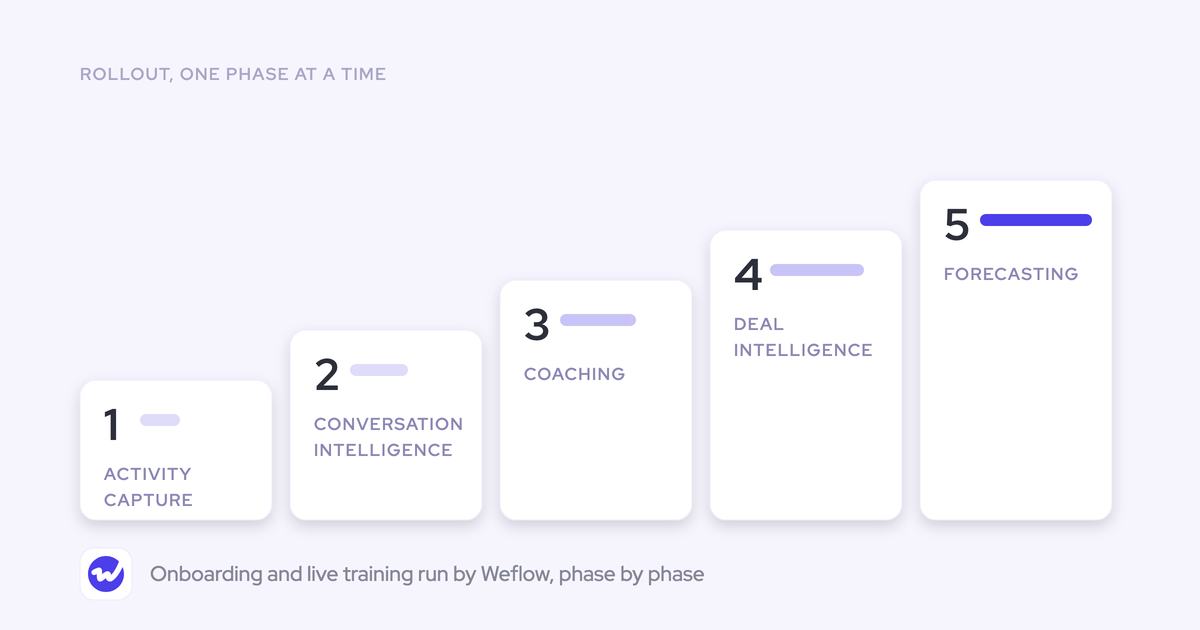
- Assign a template to one team with every field in review mode: Reps see each proposed value next to the current one, so you can confirm the extraction is right before anything writes on its own.
- Move unambiguous fields to automatic first: Address and website have one correct answer, so they can write immediately and take load off the review.
- Tighten prompts on interpretive fields using what reps edit: The fix is usually a sentence added or a few words removed, plus exclusions for what doesn't count as a champion or a metric.
- Keep Stage, amount, close date and next step in review: These single-value fields move the forecast, and one misheard sentence can overwrite them.
- Give cumulative methodology fields to AI Playbooks: Start the playbook reference only, point write-back at test fields, then switch to live fields once the output holds up.
- Move remaining interpretive fields to automatic once you trust them: That way, even reps who ignore the post-call email stop leaving fields empty.
If you want to see the review screen and the per-field settings before you decide on any of this, walk through the product yourself.
FAQ: AI field updates in your Salesforce org
If I change a prompt, do older calls update?
No. A prompt change only applies to new calls. Older calls keep their original output unless you open and regenerate each one, and in review mode, the new values only reach Salesforce when the rep presses Update.
What happens on deals that never have a recorded call?
Per-call updates need a transcript, so they leave those deals alone. AI Playbooks cover them instead, since they read emails, meetings and CRM fields across the whole deal.
Can reps review AI field updates from Slack?
No. Reps review updates in the Weflow app, which they reach from the post-call email or notification. If your reps avoid new apps, set unambiguous fields to automatic so they fill in without a review.
What Salesforce access do AI field updates need?
- The Salesforce REST API must be enabled.
- Users need write access to the Weflow recording object, where summaries and transcripts are stored.
Which security certifications cover Weflow's call data?
Weflow is SOC 2 Type II certified and GDPR compliant, uses Zero Data Retention for AI processing, and never uses customer data to train AI models.
How much does Weflow Conversation Intelligence cost?
Weflow Conversation Intelligence, which includes AI Field Updates, costs $39 per user per month, billed annually. It's also part of the Revenue AI Foundation bundle at $49 per user per month, alongside Activity & Contact Capture.