Real-Time Call Coaching vs Post-Call Scoring: How Each Works and When Each Fits
Real-time call coaching vs post-call scoring: how each works and which one fits your team



Real-time call coaching and post-call scoring solve different people's problems. Real-time coaching helps the rep: it puts prompts on their screen while the call runs, so that one conversation goes better.
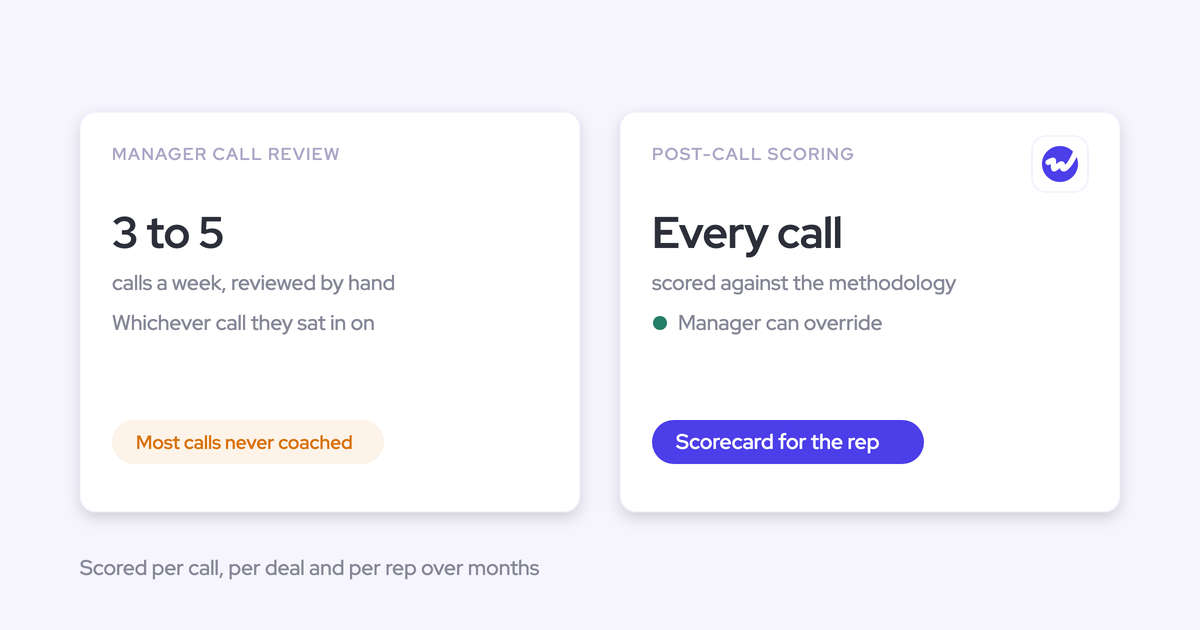
Post-call scoring helps you, the manager. It grades every recorded call against your team's methodology after the call ends, so you get a consistent score for every rep and a trend over months.
So pick by whose problem you're solving. If a rep freezes on a competitor question mid-call, live prompts help that rep on that call. If your coaching lands on whichever 3 to 5 calls you reviewed this week, and you can't say whether anyone improved over a quarter, you need post-call scoring. Most of what sales managers tell us about coaching is the second problem.
Weflow is the Revenue AI Orchestration platform for sales, customer success, and RevOps teams. It's built for Salesforce teams, and it does only the second job. Weflow Conversation Intelligence scores every recorded call after it ends and has no live in-meeting assistant. We have no live prompts to sell you, so read the comparison with that in mind.
How real-time call coaching works during a live call
Real-time call coaching shows the rep prompts, a live transcript or alerts while the sales call is still running. The point is to let the rep change course before the call ends.
What the rep sees on screen while the call runs
A live coaching tool puts a transcript and cues on the rep's own screen. Each tool needs its own setup before anything appears:
- Attention: the desktop app has shown live talk-track and battlecard prompts during the call since its 12 June 2026 release, next to a live transcript and live recording status. Attention positions the battlecards as help with prospect questions and objections while the call is live. The desktop app runs only on Apple Silicon Macs, with no Windows or Intel Mac build, so reps on Windows laptops can't use it.
- Gong: live features run through the Gong app for Zoom. The rep gets a live transcript, an alert after talking continuously for 2.5 minutes, and notes and bookmarks colleagues can see. The app works only on calls scheduled in advance and recorded with the native Zoom app. Before that, someone has to approve the Gong app on your organization's Zoom account, and an admin has to enable live streaming. The app stays hidden from the customer during screen share, and it's available on any Gong plan.
Where live prompts stop helping
Live prompts stop helping when the call ends. They can rescue one answer in the moment, but they leave no record of whether the rep handles that objection better next month. So they can't tell you who needs coaching on what.
Live prompts also help only on the calls they run on. Attention's live prompts need an Apple Silicon Mac, and Gong's live view needs a scheduled call in the native Zoom app. A rep on a Windows laptop, a Microsoft Teams meeting or an unscheduled call gets nothing, so count how many of your team's calls fit those setups before you judge the demo.
Prompts carry a cost inside the call, too. Our view at Weflow is that a rep reading battlecards is not listening. We haven't seen evidence that shows whether live prompts improve outcomes, so weigh the demo against what your reps actually get wrong on their calls.
How post-call scoring works once the call ends
Post-call scoring automatically grades every recorded sales call against your team's methodology once the call ends. Each criterion gets a score, and the scores roll up into a trend for each rep, which is the record live prompts don't leave.
What gets scored, and who sees the result
Post-call scoring turns a recording into feedback for the rep and a trend for you. A scoring tool runs the same chain on every call, in this order:
- It records the call, with a bot in the meeting or a desktop app on the rep's computer.
- It transcribes the recording.
- It matches the call to the scorecard for its call type and team, so a discovery call gets that team's discovery rubric and a renewal gets its own.
- It scores each criterion, best rated 1 to 5 with a reason, so the rep can see why.
- It sends the rep the scorecard as feedback, without waiting for a manager to listen.
- It gives you a structured agenda built from the scores instead of a recording to sit through.
- It lets you override any score the AI got wrong.
- It rolls scores up per rep over months, which shows the element of the methodology that rep keeps missing.
Gong, Attention and Weflow all run this chain, each with different gates:
- Gong runs it with AI Call Reviewer, which needs an Enable Essentials or Enable licence and auto-scores at most 3 team members per call.
- Attention scores calls against criteria written in plain language, targeted to teams and call tags such as Discovery. An admin can test a criterion on a past call before saving it.
- Weflow scores every recorded meeting against the team's methodology, with templates per team.
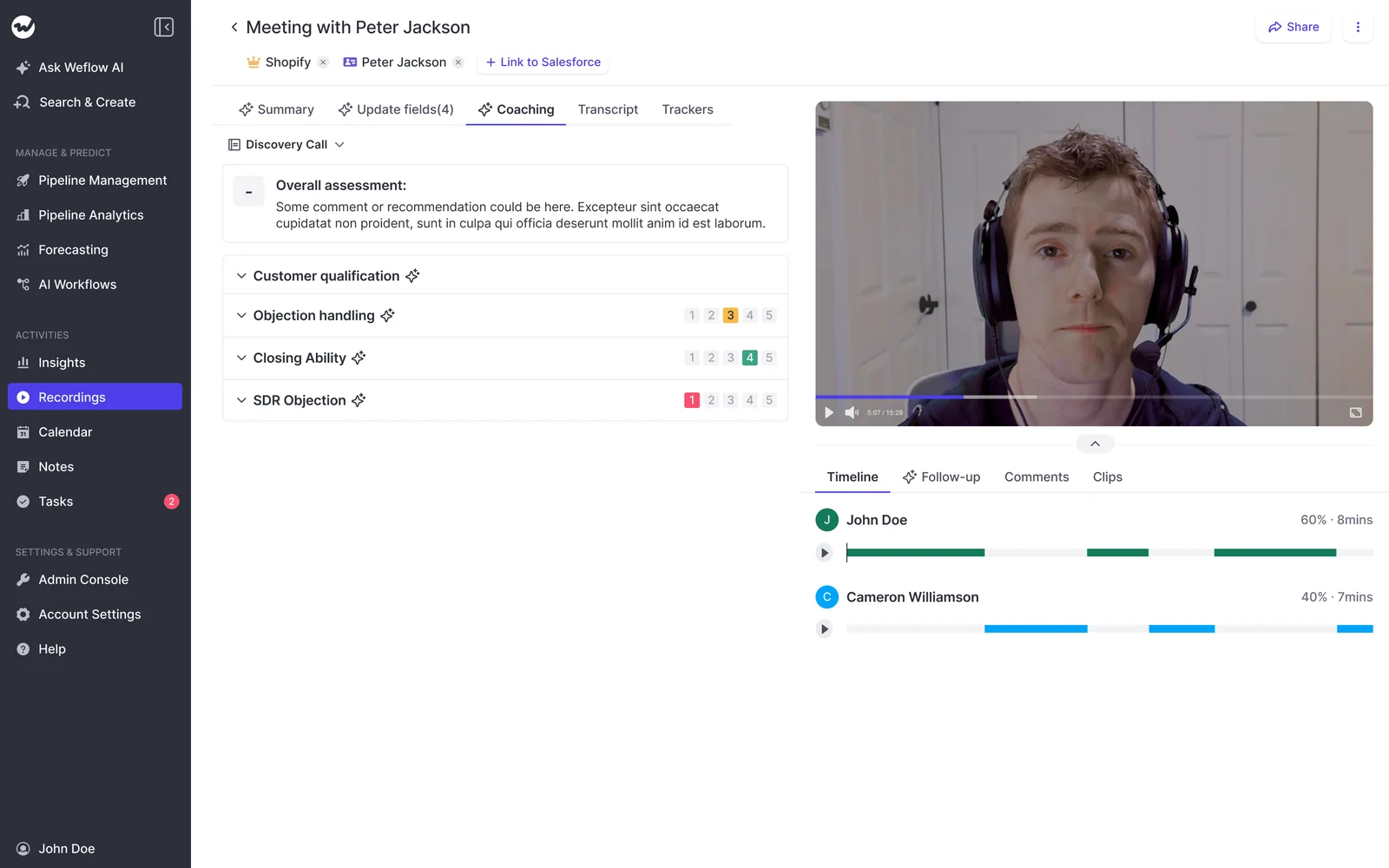
In Weflow's coaching scorecard for a discovery call, each rubric section, such as customer qualification or objection handling, carries its own 1 to 5 rating.
There is no manual call review anymore. The AI scores every call against your methodology. - Janis Zech, CEO and Co-founder, Weflow
Where post-call scoring stops helping
Post-call scoring has 3 limits you can plan for, and each one has a fix:
- It can't rescue the call in progress. A rep who blanks on a competitor question finds out afterwards. The fix is to coach the recurring question from the scores before the next call, and to add live prompts only if the gap keeps costing deals mid-call.
- Per-call methodology scores misjudge reps in long sales cycles. An element settled on the first call scores low on the second because nobody discussed it again. The score then reflects which calls were sampled rather than how well the rep qualifies. The fix the evidence supports is an explicit rule that an element not discussed on the call scores neutral rather than low, plus scoring the methodology across the whole opportunity, since any one conversation reaches only part of it.
- Scoring depends on recording coverage and on a named owner. If reps can opt out of recording, the gaps sit exactly where the weakest calls are. Without someone inside your team who owns the templates, the templates go stale until people stop trusting the scores. The fix is mandatory recording set centrally and one named template owner.
Which format fits your team: the 5 questions that decide it
The coaching format that fits your team follows from 5 questions about who needs the help and where your reps actually slip.
| Question | Real-time coaching fits when | Post-call scoring fits when |
|---|---|---|
| Whose problem is it, the rep mid-call or the manager? | One rep needs help inside one conversation | The manager needs a fair read of every rep |
| What does the rep get wrong: knowing the answer, or methodology discipline? | Reps blank on objections and competitor questions | Reps skip methodology steps they already know |
| Do you need proof of improvement over 90 days? | No, the help ends with the call | Yes, scores trend per rep across months |
| How long is the sales cycle? | Any length, but help covers the live call only | Long cycles, scored per opportunity with a neutral rule |
| Which desktop and meeting setups do reps use? | Apple Silicon Macs or scheduled native Zoom calls | Any meeting your recorder captures |
Three answers decide most cases:
- If the problem is yours, a fair read of every rep rather than one rescued conversation, post-call scoring is the format, because live prompts leave no trend behind.
- If you need to show that a rep improved over 90 days, you need post-call scoring, because only scores collected on every call give you the before and after.
- If your reps work on Windows laptops or take calls outside scheduled Zoom meetings, today's live tools miss a large share of their calls, so live coaching can't carry your team on its own.
Our recommendation: score every call first, then add live prompts where reps need answers mid-call
We recommend scoring every call first and adding live prompts only where reps need answers mid-call. That order follows from what sales managers say they're short of:
- Coverage: a manager reviews roughly 3 to 5 calls a week, so most calls get no coaching.
- Consistency: scorecards that depend on a manager filling them in go unused.
- Trend: nobody can show whether a rep improved at a skill over 3 months.
Post-call scoring answers all 3. Live prompts answer none of them, because they help inside one call and keep nothing for the next.
Before either format, get recording coverage in place. Until most customer meetings are recorded, a scorecard measures a sample the rep chose, and scorecards and coaching features stay largely unused until reps record routinely. Treat recording coverage as your first milestone and scoring as the second.
Add live prompts once the scores name an in-call gap you can't coach away between calls. The sign is the same objection or competitor question coming back across reps and getting answered badly in the moment. Live battlecards are built for that job, and it's narrower than the demo suggests.
Running both formats doesn't have to mean 2 vendors. Gong offers a live transcript and talk-ratio alert in its Zoom app, plus AI Call Reviewer after the call. Attention offers live prompts in its desktop app, plus automatic scorecards. If you want both formats from one vendor, those are the 2 to look at, because Weflow covers only the scoring side.
How Weflow Conversation Intelligence scores calls, and why it has no live assistant
Weflow Conversation Intelligence scores every recorded call once it ends and has no live assistant during it. Our case against a live surface is that a rep reading battlecards isn't listening.
What Weflow scores, and at which level
Weflow scores every recorded meeting automatically against your team's methodology, and you read the result at the call, deal and rep level:
- You assign coaching templates per team, so different teams work to different frameworks. The meeting type Weflow tags on each recording, such as discovery, demo or negotiation, can trigger its own scorecard.
- Each criterion is a prompt that checks whether the rep did something, such as uncovering pain and need before describing the product. A keyword tracker would credit any rep who said a word.
- Each criterion is rated on a 1 to 5 scale or as free text, and you can override any AI score.
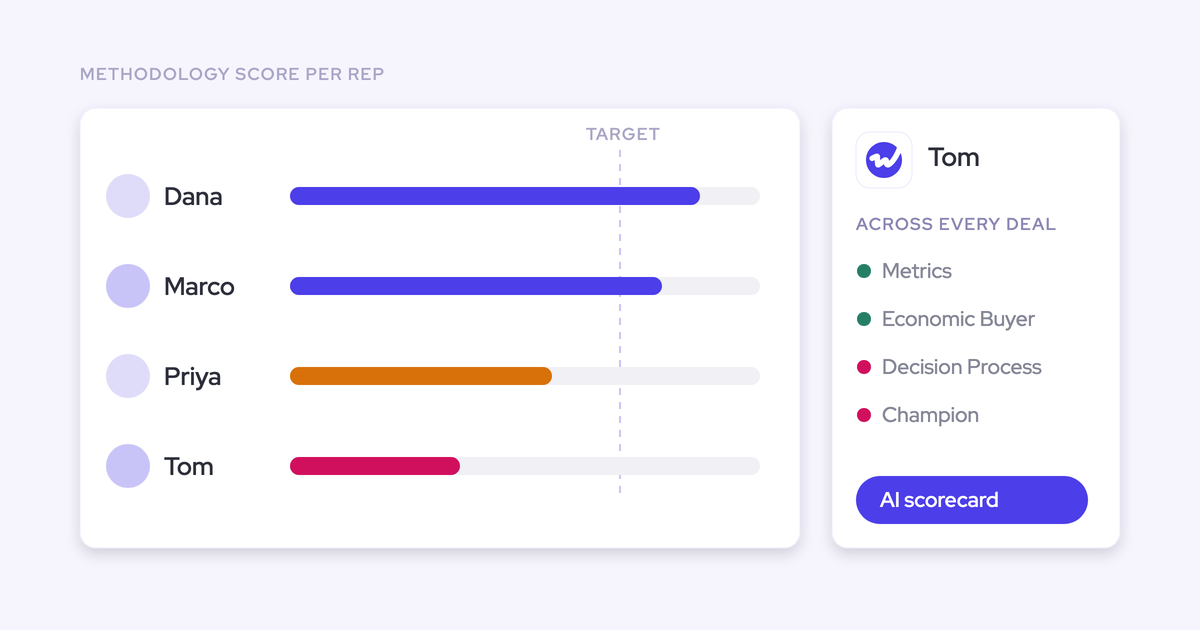
- Methodology scoring runs at 3 levels: a single call, a whole opportunity, and a rep across every deal they've worked over months.
- The rep-level trend shows what a rep is consistently weak at. A seller can score well on metrics and economic buyer and consistently poorly on decision process and champion identification, and that weakness is what you coach. From the trend, you can open the specific calls behind the score.
- The Weflow desktop app records meetings on Windows and macOS without a bot joining the call, and those recordings get scorecards like any other.
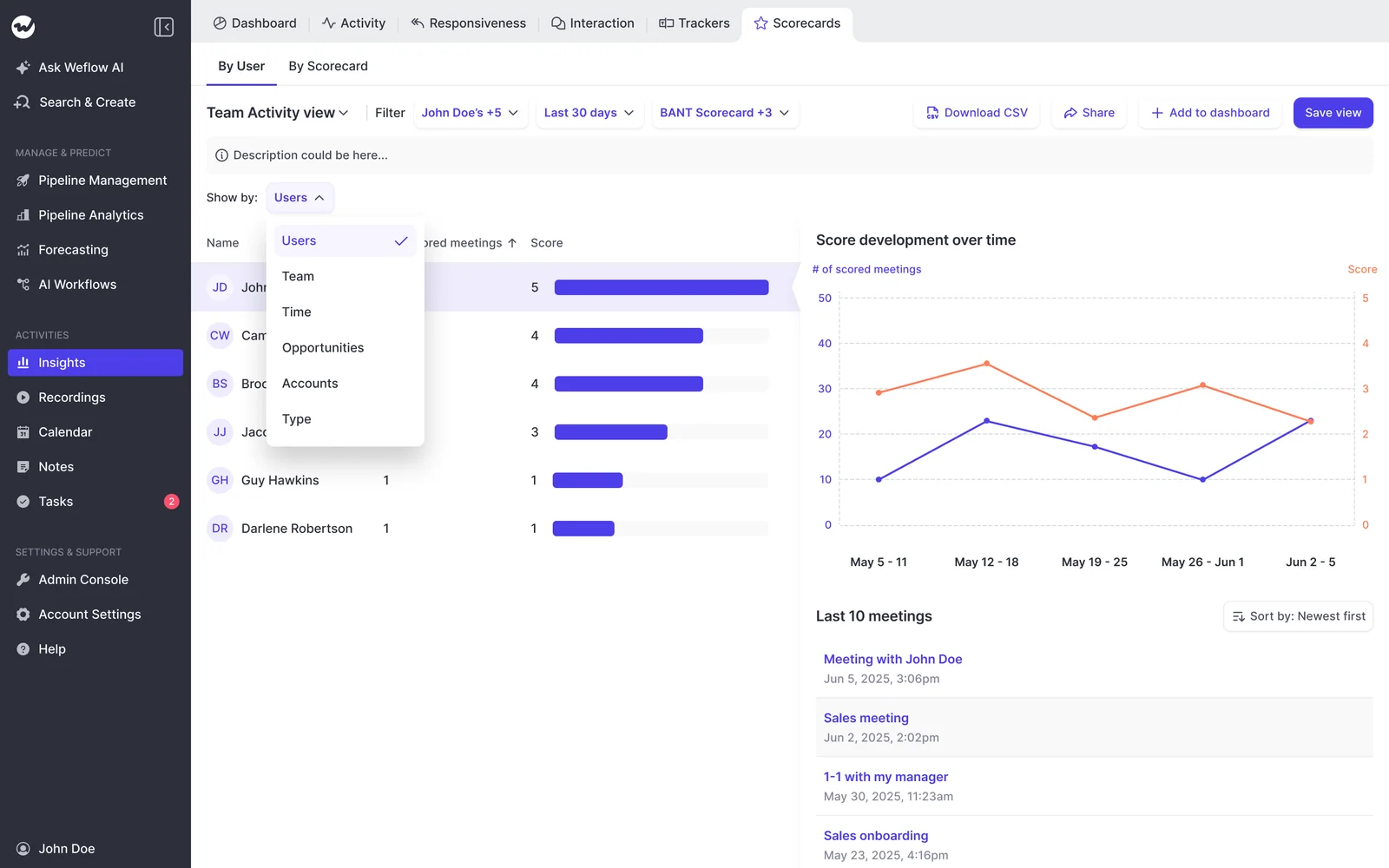
Weflow's Insights scorecards view lists each rep's scorecard count and average score beside a line chart of score development over time.
What Weflow does before and after a call instead of during it
Weflow helps the rep on either side of the call rather than during it.
Before the call, the Prepare meeting button on a Weflow calendar entry hands the meeting to Ask Weflow AI. Ask Weflow AI assembles a brief from prior emails, meetings, previous recordings and Salesforce.
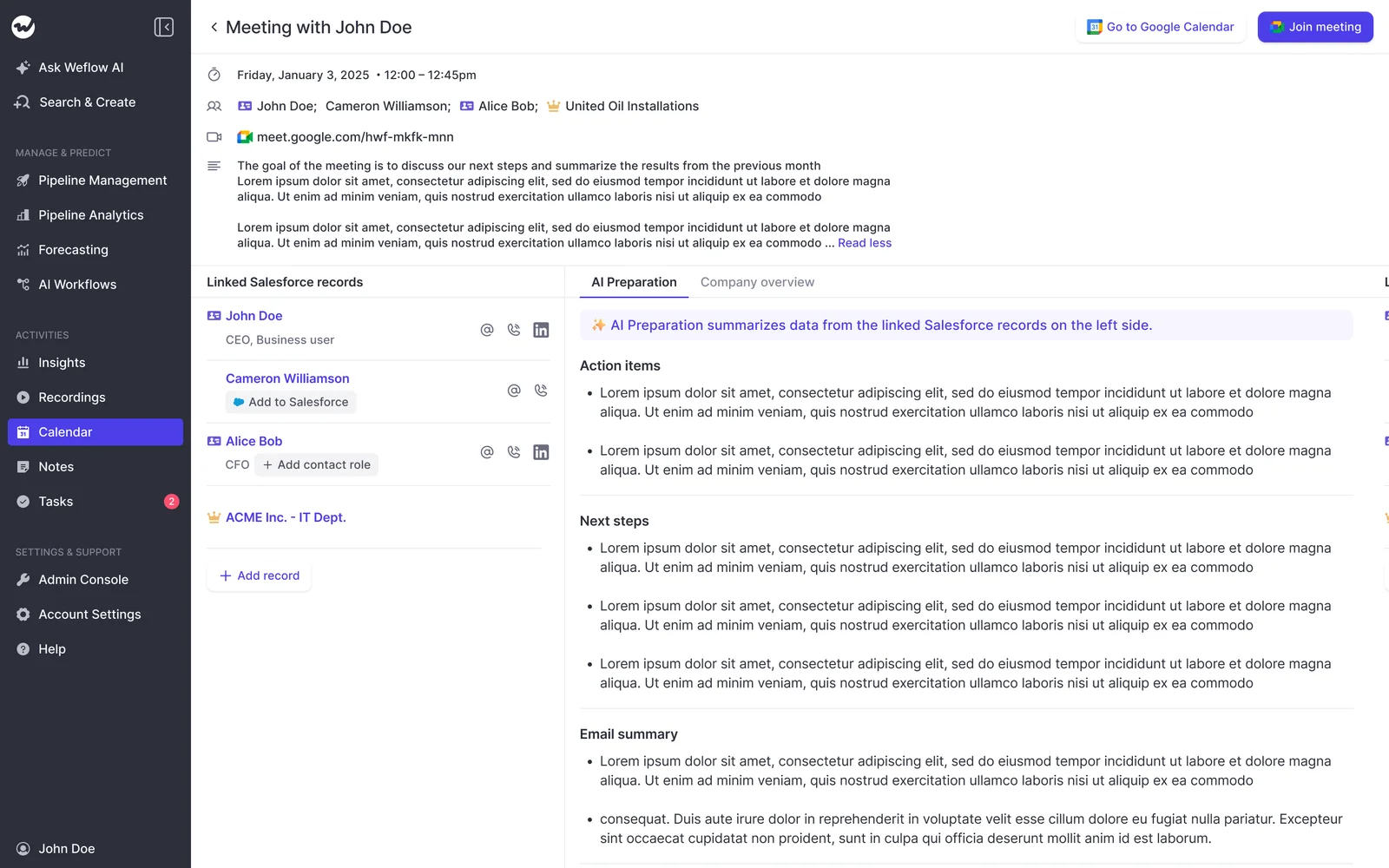
After the call, within 30 to 60 seconds of it ending, the rep gets the processed recording, an AI summary, a drafted follow-up email and the proposed Salesforce field updates.

Weflow isn't the right fit for every team. These are its limits:
- Weflow has no live in-meeting assistant, so you can't ask anything of the call while it runs, and no battlecards appear when a competitor or objection comes up. If your reps need prompts during the call, Weflow is the wrong fit, and Attention or Gong is where to look.
- Weflow has no role-play or training simulation product.
What call scoring costs in Weflow and in Gong
Call scoring in Weflow comes with the Weflow Conversation Intelligence seat at $39 per user per month, billed annually. The same seat covers recording and the desktop app, so scoring costs nothing on top of recording.
In Gong, automatic call scoring needs a paid Enable Essentials or Enable licence on top of the core licence. A tech admin also has to switch automatic scoring on at company level. Gong has no public pricing: it charges per-user licences plus a platform fee based on the number of users, and you get a figure through a custom proposal. Ask for the Enable licence in that proposal, so you compare scoring cost like for like.
How to set up post-call scoring that managers and reps trust
Post-call scoring earns trust when it covers every call, judges only what was relevant on that call and stays out of pay. Set it up in this order:
- Make recording routine and mandatory before you switch scoring on. Set join rules centrally, so reps can't opt out of their weakest calls. Pass: most customer meetings are recorded for every rep, not only for volunteers.
- Build one scorecard per call type and team from the methodology you already run, so a renewal call is never scored on the discovery rubric. Pass: every call type your team runs maps to exactly one scorecard.
- Write one block per methodology element, each rated 1 to 5 with a reason. Add an explicit rule that an element not discussed scores neutral rather than low, so no rep loses points for something that call didn't need. State the scale in every prompt that reports it, including summaries an agent sends, or the output drifts to another scale such as 1 to 10. In Weflow, a done-or-not-done criterion maps onto the scale as 1 for not done, 3 for partly done with an explanation, and 5 for done. Pass: a discovery call that never reached the economic buyer or the paper process loses no points for it.
- Test the criteria on past calls you've already heard before scores reach reps, because you already know what those calls deserve. In Weflow, you upload a past call as an audio or video file, and Weflow scores it like any recording. Pass: the AI's scores land where you'd have put them, and each reason names what happened on the call.
- Name an internal owner for the templates. Per-team prompts and scorecards don't run themselves, and without an owner they go stale until people stop trusting the output. Pass: one named person approves every scorecard change.
- Put the per-rep trend into the meeting you already hold, with 10 minutes on one skill. A separate coaching session is the one that gets cancelled when the quarter tightens. Weflow's Insights charts can't be emailed on a schedule, but an agent can send a written summary instead, which suits managers who won't open a tool to review call by call. Pass: each rep has one named skill, and next month's trend shows whether it moved.
- Keep AI scores out of comp. AI assessments vary between runs, and a wrong rating tied to pay does damage. Pass: no MBO or variable pay line references a coaching score.
If you're planning the rollout now, start with our Free Conversation Intelligence & AI Cheat Sheet.
Questions sales managers ask about real-time coaching and post-call scoring
Do live coaching prompts show up for the customer?
No. Live prompts appear on the rep's own screen. Gong's Zoom app stays hidden from the customer during screen share, and Attention's prompts sit in its desktop app on the rep's Mac. The customer sees the shared window, not the cues.
Can a manager override a score the AI got wrong?
Yes. In Weflow every criterion carries a 1 to 5 rating with the reason behind it, and a manager can override any AI score. The rep sees the corrected score and the reason, so one wrong rating does not stand.
Can post-call scoring cover calls my team recorded with another tool?
Yes, with a migration. Weflow imports recordings from most conversation intelligence tools, through the vendor's API or from exported files, and reprocesses them with transcripts, summaries and scorecards, at no extra cost and in about one to two weeks. A single past call is uploaded as an audio or video file and scored like any recording; a text transcript cannot be imported.
How soon after the call does the rep see the result?
Within 30 to 60 seconds of the meeting ending, the rep gets the processed recording, an AI summary, a drafted follow-up email and the proposed Salesforce field updates. Every recorded meeting is scored automatically against the team's methodology, so the rep reads the scorecard without waiting for a manager to listen to the call.
Can I see whether a rep improved over 90 days?
Yes. Weflow scores the methodology at three levels, a single call, a whole opportunity and a rep across every deal over months, and the Insights scorecards view charts each rep's score development over time. Comparing a rep's calls from three months ago with this month's is the trend a manager reads to see whether a development plan is working.
Can different teams score calls against different scorecards?
Yes. Weflow assigns coaching templates per team, so sales, onboarding and customer success each run their own framework, and the meeting type Weflow tags on each recording, such as discovery, demo or negotiation, can trigger its own scorecard. Admins choose which meeting types the company uses, up to ten.