Which Deal Risks AI Can Detect From Sales Calls, and Which Need Email and CRM Data
Learn which deal risks AI can detect from sales calls vs which require email and CRM data.


Look back at the deal that slipped last quarter. The warning was probably there five weeks early. Some of it came up on a call: the budget freeze, the new VP, the buyer who stopped asking questions. The rest never reached a call at all. The champion stopped replying, nobody booked the next meeting, and the close date moved for the third time.
AI reading sales calls catches why a deal is dying. It can't see that the deal has gone quiet between calls, narrowed to one person replying, or been pushed again, because those signals live in email, calendar and CRM history. Call analysis, like the kind we built into Weflow Conversation Intelligence + AI Field Updates, covers the first half. Behavioral data covers the second.
A third group of risks needs both streams, or a direct question in the deal review:
- whether the economic buyer is actually engaged
- whether the champion is real
Call-only detection gives you half the picture. Here's which risks sit where, the four ways teams try to catch them earlier, and how to judge any approach before you buy.
Why deal risk shows up in calls and in buyer behavior
Deal risk shows up in two places because buyers signal trouble in two ways: what they say, and what they stop doing. Spoken risk lives in the conversation. Behavioral risk lives in email, calendar and CRM history.
Most tools were built to read one of those streams.
The first generation of conversation intelligence was built around the recording. It scores and flags call by call. A per-call view measures the rep, not the deal, and it can't see the deal going quiet between calls.
Activity-based tools have the opposite problem. They see the silence but not the reason. Activity with no content tells you a deal is busy, not whether it's qualified.
Joining the two streams was manual work before AI, so most teams only ever inspected one half. And because reps don't log activity or call notes reliably, the CRM often held neither.
They asked to assess every call and then aggregate at the deal level. That second half of the request matters more than the first. The warning was visible in the data, but the data sat in separate tools and got read one call at a time.
| Spoken risk | Behavioral risk | |
|---|---|---|
| What it is | What the buyer says, and how they say it | What the buyer does, or stops doing |
| Examples | Budget freeze, new VP, competitor named, vague next steps | Silence, one person replying, no next meeting, repeated pushes |
| Where it lives | Call recordings and transcripts | Email threads, calendar invites, opportunity field history |
| What reads it | Conversation intelligence, call by call | Activity capture and pipeline warnings |
| What it misses | Everything that happens between calls | The reason behind the silence |
Which deal risks can AI detect from sales calls?
AI detects the risks a buyer says out loud, or signals in how they say it, more reliably from calls than from any other source. These are the six to check against your last slipped deal.
| Risk | What it sounds like on the call | Why it predicts a slip |
|---|---|---|
| Budget freeze | The buyer mentions paused spend, a budget review or money moving to another owner | The rep hears it and moves the close date instead of flagging it, so the CRM finds out a month later |
| Leadership change | A new VP, a reorg, a sponsor "settling in" | A new owner re-sets priorities, and your champion's mandate can disappear with the old org chart |
| Competitor in the evaluation | Another vendor named, side-by-side questions, references to "the other option" | It changes timing and pressure, and a deal lost to a competitor you never knew about is one where you forfeited every counter-move |
| Pain never quantified | The problem gets described, but nobody puts a number or a cost of inaction on it | Without pain there's no urgency, and without urgency the deal drags and won't forecast reliably |
| Vague next steps | "Let's reconnect in a few weeks" with no date, owner or outcome | A real next step names what happens, by when and with whom, and a deal in legal needs to know when the redlines come back |
| Falling sentiment | The buyer goes flat, stops asking questions, gives shorter answers | Engagement drops on the call before the stage or close date moves in the CRM |
A competitor in the evaluation isn't automatically bad news. Treat it as context to establish early in discovery. Most prospects tell you openly when you ask, and a buyer comparing vendors has usually committed to solving the problem.
Having competition was a plus, not a minus.
Everything in this table depends on a call happening and being recorded. When the buyer stops taking meetings, the call stream goes silent at exactly the moment the risk peaks.
Deal risks only email, calendar and CRM data reveal
The risks that kill quiet deals are behavioral, and no call recording can see them, because they happen between calls or instead of them. This is the half most answers on AI deal risk detection skip.
| Risk | Where the signal lives | What a call-only tool sees instead |
|---|---|---|
| Going quiet | Days since the last buyer email or meeting | The last recorded call, which may have gone well |
| Single-threading by actual engagement | Who sends, replies and attends across threads and invites | Who spoke on the calls that got recorded |
| No next meeting booked | The calendar | A next step mentioned on the call that may never have been scheduled |
| Close-date push count | Opportunity field history | Nothing, unless the rep brings it up on a call |
| Time in stage against your benchmark | Stage history compared with your closed-won average | Nothing |
| Reply rate | Emails sent against emails received on the opportunity | Nothing |
Two Salesforce traps make these risks hard to see even when the data exists.
Why Salesforce Last Modified makes a quiet deal look alive
Salesforce's Last Modified date moves whenever anyone touches the record, so a deal that gets edited every week can look active with no buyer contact at all. Only buyer interaction, meaning emails and meetings, should count as activity.
It's so hard to effectively manage deals in Salesforce because you can't see a deal might be closing this week or this month or whatever, but it might have had no activity on it for two months. And it's very difficult to track that in Salesforce.
Here's how that plays out. A rep updates the next step field every Friday before the forecast call. A manager tweaks the amount. RevOps runs a bulk cleanup on close dates.
Last Modified never shows more than seven days. The last email from the buyer, though, arrived nine weeks ago, and nobody has met them since.
Your pipeline report calls that deal active. Count buyer emails and meetings instead, and the same deal shows nine weeks inactive.
Why contacts on the record don't prove a deal is multi-threaded
A populated contact list isn't a live buying committee. Measure multi-threading by who sends, replies and attends, not by how many names sit on the opportunity.
Take a deal with six contact roles. The email history shows one operations manager replying. The CFO received four emails, answered none and joined no meetings. On the record, the deal looks multi-threaded. In practice, it hangs on one person.
The opposite failure happens too. New people join a thread or get forwarded an invite, and nobody adds them to the CRM. A deal that has grown to five stakeholders still shows one contact.
That's why contacts have to come from threads and invites automatically. Reps don't add them by hand, and asking them to try harder hasn't worked for anyone we've spoken to.
One nuance for your thresholds: procurement and legal join near the decision, not at stage three. Read multi-threading benchmarks stage by stage, or you'll push reps to chase stakeholders the buyer would never involve that early.
Which deal risks need both data streams or a conversation?
Two of the highest-stakes risks can't be read from a single stream. Economic buyer access needs calls and email together. Champion validity can't be confirmed from data at all.
Economic buyer access: named on the record, absent from the conversation
Economic buyer access needs both streams because each one answers half the question. The email and meeting graph shows whether the economic buyer is engaged. The calls and emails show whether anyone identified them and discussed the decision with them.
Some of those qualification facts never come up on a call.
Now picture a deal in commit:
- Three discovery calls with the champion, each one positive. On one, the champion says their VP signs off.
- The VP sits on the opportunity as a contact.
- The calendar shows the VP never attended a meeting.
- The only email from the VP's side came from an assistant.
A per-call view rates every call as healthy. An activity view shows the VP isn't engaged, but can't tell you the VP is the person who decides.
Only a deal-level read across both streams surfaces the actual risk: forecast to close this quarter, no economic buyer identified or engaged.
Champion validity: the deal risk no data can confirm
Champion validity is the one deal risk no tool can confirm from data. A real champion runs the buying process internally, owns the pain, sees the cost of inaction and can open the door to the economic buyer. None of that shows up as an email count.
Engagement data narrows the question. Useful signs:
- how fast the person responds
- whether the relationship has moved to direct channels or the phone
- whether they pick up when the rep calls
A busy contact with no real champion behind them is the deal that quietly slips at quarter end. So treat any tool that claims to score the relationship with suspicion. What you want from software is the engagement facts. The confirmation comes from asking.
Questions a manager should ask out loud in the deal review:
- Will this person take your call today?
- Have they introduced you to the economic buyer, or offered to?
- What does it cost them personally if this project doesn't happen?
- Who else inside the company have they sold this to without you in the room?
- What did they do the last time an internal blocker came up?
Four ways revenue teams try to catch deal risk earlier
Each of the four realistic paths catches a different part of the signal map, and none of them is wrong for every team. Two of them cost you little or nothing to start.
Buy a call recorder that flags risk language
A call recorder that flags risk language is strong on spoken risk. It's blind to silence between calls and to facts that only appear in email.
The better call-first tools have grown deal-level warnings, and they deserve credit for it:
- Gong's AI Deal Monitor ships eight warnings, including ghosted, no activity, no power and stalled in stage. You can switch each on or off and adjust when it triggers, but you can't define a new one.
- Jiminny's Deal Insights has eight triggers, six of them with numeric thresholds each team sets.
- Momentum lets admins write their own AI Signals as prompts with CRM conditions, routed to Slack, Microsoft Teams or email. Those signals run call by call.
The fixed sets work well when your risks look like everyone else's. A risk specific to your motion, such as a compliance step or a required partner sign-off, has no way to become a Gong warning.
- When it fits: phone-led teams whose reps send pre-approved email templates. Templated email says the same thing on every deal, so the calls carry the signal, and a call-first tool may be enough.
- When it doesn't: multi-stakeholder deals where the champion and decision maker show up in email, and long cycles where deals die between meetings.
- To start: recording coverage is the prerequisite. Set join rules centrally and make recording the default, or the gaps will sit exactly where the weakest calls are.
Configure activity-based warnings on email, calendar and CRM history
Activity-based warnings are strong on behavioral risk. They tell you a deal is busy or quiet, but not why, and not whether it's qualified.
The prerequisite is thresholds that match your own sales cycle. On a 60-day cycle, 14 days of silence is a warning. On a 12-month cycle, it's a normal Tuesday. Your benchmarks should come from deals that actually closed won.
So you need to have those benchmarks. Otherwise, you won't know what is good and what is bad, basically.
- When it fits: email-heavy, multi-stakeholder deals and longer cycles, where silence is the earliest signal you get.
- When it doesn't: phone-led teams with templated email, and any team whose activity and contacts don't reach the CRM reliably. Warnings on missing data fire on the wrong deals.
- To start: get the sales leader in the room, because every threshold is a judgement about the business. Begin with three: push count above a threshold, a single contact on the deal, and no buyer activity within a window set by your cycle length. A warning that fires on everything gets ignored within a week.
Change the deal review to ask what data can't answer
Changing the deal review costs nothing, and it's the only path that tests champion validity. Its limit is that it runs on the rep's account of the deal, and a manager only has time to open a handful of deals per week.
- When it fits: every team, as a complement to any tool.
- When it doesn't: as your only method across a pipeline of hundreds of deals.
- To start: define late stages by buyer-verified exit criteria, meaning what the buyer has shown or proven rather than what the rep reports doing. Then ask the champion questions above out loud, every week, on every commit deal.
Combine call, email and CRM signals in one deal-level read
A combined deal-level read covers all three groups on the map: spoken risk, behavioral risk, and the economic buyer question that needs both. Weflow isn't the only vendor doing this. Avoma gives each opportunity a risk score drawn from meetings, emails and CRM updates, with a written assessment behind it, and Chorus's twelve risk alerts span activity, CRM data and conversations.
The real cost sits in two places:
- Configuration ownership. Someone inside your team has to own the warning rules, thresholds, prompts and field mappings. Without a named owner, templates go stale and people stop trusting the output.
- The data foundation underneath. A combined read on incomplete capture just combines the gaps. Activity and contacts have to land in the CRM automatically first.
- When it fits: mid-market B2B teams on multi-stakeholder deals, where facts arrive through calls and email alike.
- When it doesn't: teams with nobody to own the configuration, or phone-led teams where email adds little.
Five questions to ask before you pick a deal risk approach
Judge any deal risk approach, ours included, on five questions. Take them into every demo.
- Does it read the whole deal or only the last call? A deal can look qualified on the last call and be hollow overall. Your forecast is about the deal.
- Does it encode your slippage patterns and thresholds? Generic risk models judge every deal the same way. Your 60-day motion and someone else's 12-month motion shouldn't share a silence threshold.
- Does it show the reason and source behind each flag? A score nobody can explain gets ignored after the first time it's wrong in front of a manager.
- Does the flag appear where the commit decision is made? If you have to open a dashboard to find the risk, you won't, and neither will your managers.
- Can the flag reach the report the board reads? A risk you can see in a tool but can't put in the board deck solves half your problem.
| Criterion | Call recorder with risk flags | Activity-based warnings | Deal review change | Combined deal-level read |
|---|---|---|---|---|
| Whole deal or last call | Call by call by default; some add deal-level warnings | Whole deal history, behavior only | Whole deal, as the rep remembers it | Whole deal: every call, email, meeting and field |
| Your own patterns | Fixed sets you can tune but not extend, or custom prompts that run per call | Yes, once you set thresholds from your own benchmarks | Yes, through exit criteria the manager enforces | Yes, when the rules are authored by your team rather than the vendor |
| Reason and source | Points to the moment on the call | Shows the metric, such as days inactive, not the cause | The rep's explanation, without evidence | Varies by vendor; look for a written explanation and evidence per element |
| Where the flag appears | In the recorder's own views or as an alert | On the pipeline view, if you build it there | In the weekly meeting | At best, inside the forecast submission itself |
| Reaches the board report | Only if the tool writes the flag into a CRM field | Yes, when built as Salesforce fields and reports | Only as the manager's own notes | Depends on whether flags are CRM fields or vendor fields |
| Biggest blind spot | Deals that go quiet between calls | Why a deal stalled, and whether it's qualified | Scale, and the rep's optimism | Champion validity, plus the configuration work it needs |
Our recommendation: read the whole deal, keep the human question
Call-only detection catches why a deal is dying but not that it has gone quiet. For most mid-market B2B teams, that gap is where last quarter's slipped deal lived.
So pick an approach that reads calls, email and CRM history at the deal level and runs on thresholds you set. That's the only path that answers the first two criteria without caveats, and it's the only one that can surface "commit, no economic buyer engaged" before the forecast call.
Then keep the champion question in the deal review. No data stream answers it, and a vendor that says otherwise is selling you a number.
The exception: phone-led teams whose reps send templated email. Your calls carry the signal, and a call-first tool with good deal warnings may be all you need.
For everyone else, the order matters:
- Capture both streams. Activity, contacts and calls land in the CRM automatically, or nothing downstream works.
- Encode your patterns. Warnings built on your own benchmarks, cycle length and stage timing.
- Reserve the human question. Champion validity gets asked out loud, every week, on every commit deal.
How Weflow reads call and email risk on the same deal
Weflow is the Revenue AI Orchestration platform for sales, customer success, and RevOps teams. Built for Salesforce teams, it captures activity, contacts and conversations into one unified data layer, then reads spoken and behavioral risk on the same opportunity and puts the result in front of the person making the commit decision.
We built it this way because our customers kept describing the same problem: the calls lived in one tool, the emails in another, and someone joined them by hand.
Weflow AI Playbooks score the whole opportunity, not the last call
Weflow AI Playbooks read every email, meeting, transcript and CRM field on the deal, so a deal can't pass a methodology check because the last call went well. They refresh on a schedule, write values back to the mapped Salesforce fields, and return a next-step recommendation.
We maintain fields in two ways, and the difference matters for risk:
- A field update runs after a single call and reflects that call.
- A playbook runs across the whole opportunity and keeps the field at the current best answer, not the most recent one.
Go back to the commit deal with the absent VP. Every call reads as positive. The playbook panel, sitting next to amount, time in stage and reply rate on the deal board, shows the economic buyer element as missing and states that it found no relevant data on the economic buyer. The recommendation tells the rep to identify and engage them.
Reps can override any field, and Weflow evaluates the override for plausibility against the deal. Typing "VP confirmed" into a field doesn't make the gap disappear.
It's no longer third-party hearsay from reps or sales leaders. It's now proof in front of us – AI summaries that tell us we're not talking to the economic buyer, that we're single-threaded, whatever it might be.
— Scott Jones, SVP of GTM Revenue Intelligence & Enablement, KORE Wireless
Weflow deal summaries put every meeting beside email velocity
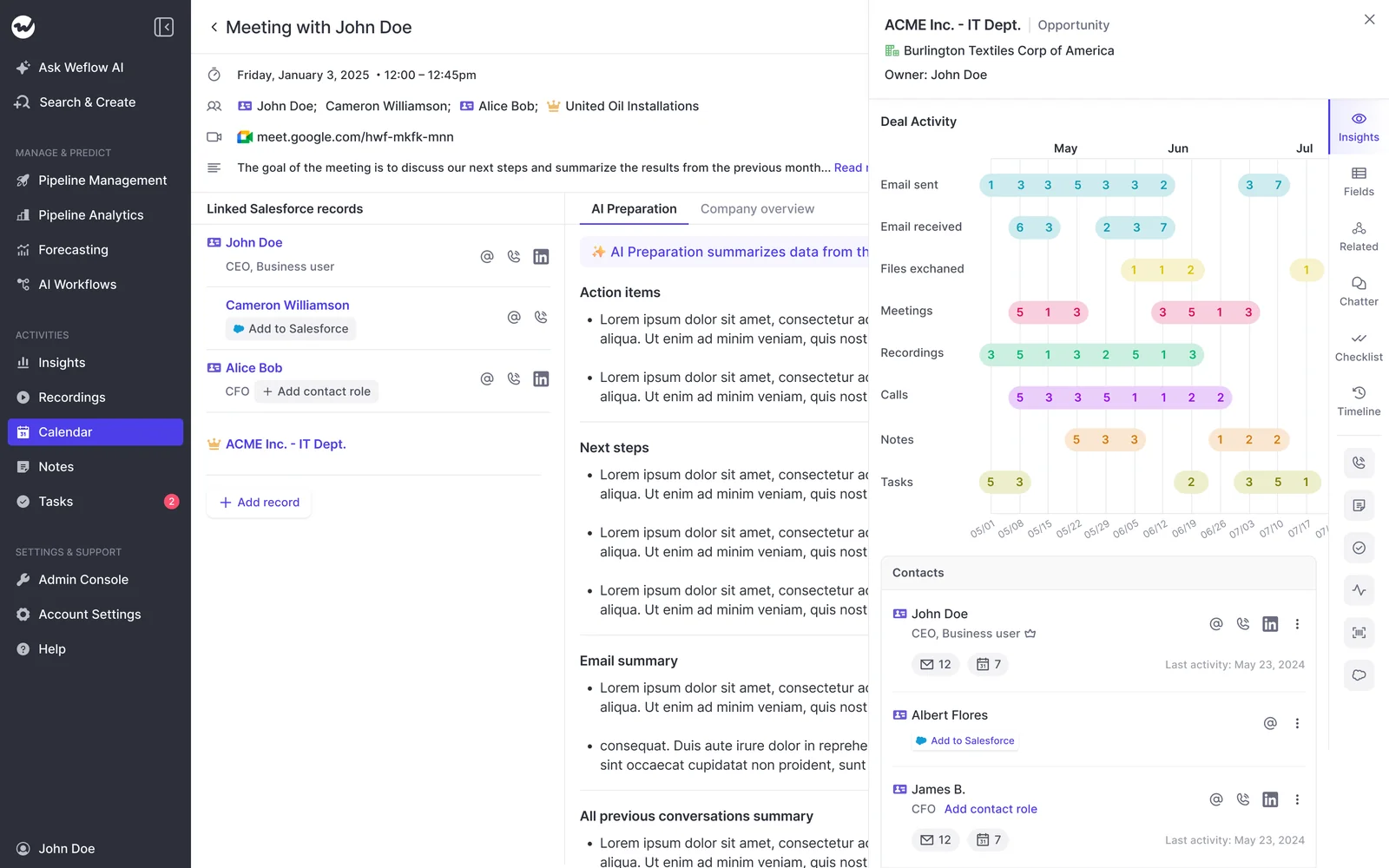
The Weflow deal-level AI summary reasons across every meeting on the opportunity and returns pros, cons, next steps and risks. It sits next to communication velocity, computed from the emails actually sent and received, and next to everyone involved in the deal.
That list of people is accurate because Weflow Activity & Contact Capture creates Salesforce contacts automatically from email threads and calendar invites and attaches them to the matched account and opportunity. It never creates accounts, leads or opportunities, and it caps how many contacts one event can create, so a webinar doesn't flood your CRM.
A manager sees multi-threading and momentum without opening a single call. The velocity figure reflects the relationship, not the rep's account of it.
Weflow deal warnings run on your rules and your thresholds
Weflow deal warnings are rules your team writes, not a fixed set we ship. You pick from 50+ signals and combine them with AND/OR logic on any opportunity field except text fields, or on computed fields Salesforce doesn't have:
- Days inactive, which counts only emails and meetings, so record edits don't make a deal look alive
- Close-date push count and days in stage, tracked automatically without custom fields
- Multi-threading, measured from who is actually on the threads and invites
- Next meeting, read from the calendar
A rule can be as specific as your motion: in commit, no next meeting booked, and more than 14 days without a buyer email or meeting. Thresholds are set per team, so your new-business and renewal teams don't share a definition of silence.
That's the contrast with a fixed alert set. Gong's eight warnings can be tuned but not added to. In Weflow, a missing methodology field or a partner sign-off can become a warning.
IDnow reduced slipped deals by 60% using Weflow AI deal warnings. And reps see the same warnings managers see, on the deal board they work from every day.
The visibility alone changed behavior. Reps come into meetings already aware of what's overdue or inactive. They're more proactive now, because they can actually see what needs attention.
— Bastian Stosic, Head of Media Sales Operations, HolidayCheck
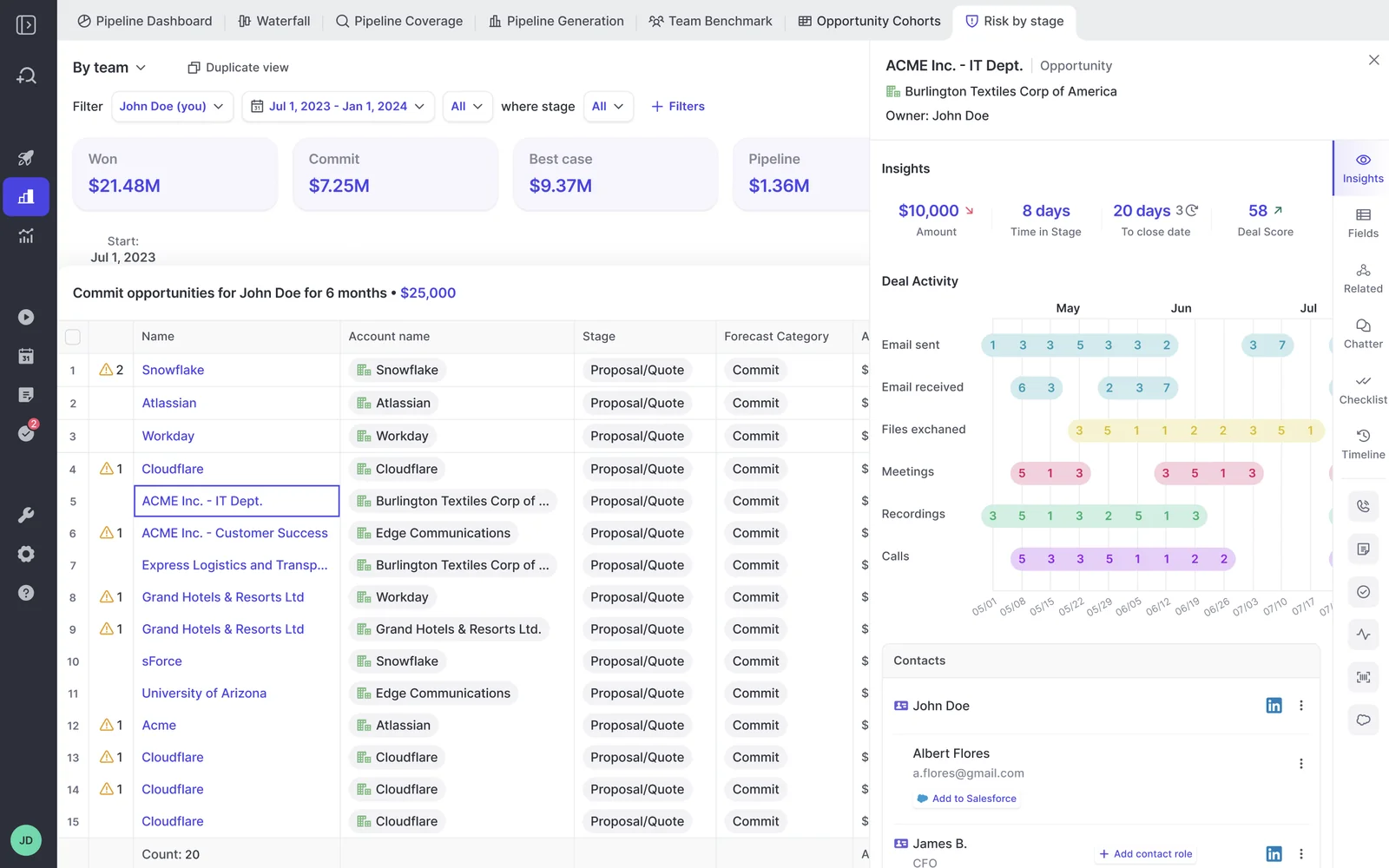
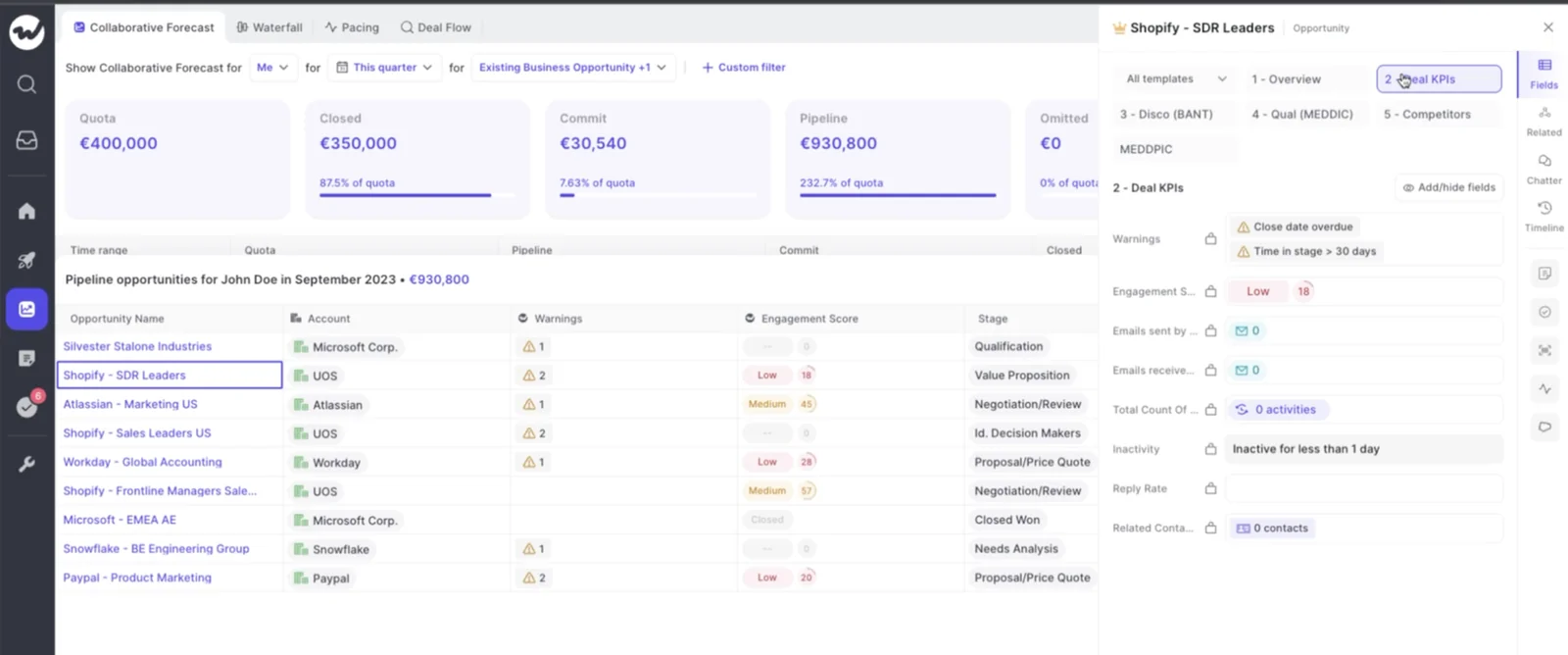
Weflow puts deal warnings in the forecast submission screen
Weflow shows deal warnings inside the forecast submission screen, at the moment the rep chooses which deals to commit. Unhealthy pipeline gets caught before it enters the forecast, not in a report after the number is already wrong.
The rep opens the submission, sees "close date overdue" and "time in stage over 30 days" next to the deal, and decides with that in front of them. The manager sees the same flags on review.
Where Weflow's deal risk detection stops today
Here's what you'll run into after signing, and what to do about each one.
| What Weflow doesn't do today | What that means for you |
|---|---|
| Deal warnings and playbook scores are Weflow fields, not Salesforce fields | You can't report on them in Salesforce or pull them into Power BI. The workaround is an agent that writes the assessment into a Salesforce field you create. Weflow fields carry a W marker, so you can see which ones won't reach a report. |
| No live in-call alert | Spoken risk reaches the opportunity after the call is processed. Your managers act in the days after the call, not during it. |
| Playbooks read only transcripts Weflow recorded | If you keep another recorder, playbooks run on the CRM record, emails and meeting metadata. Weflow shows the fields your other recorder writes in its deal views. |
| The deal summary is generated on demand | The summary stays empty until someone asks for it, then reads the latest emails, meetings and transcripts. Playbooks and warnings refresh themselves. |
| Contact roles such as champion aren't inferred | Weflow creates contacts and attaches them to the deal, so coverage improves. Naming someone champion or economic buyer stays a human or playbook step. |
| Existing pipeline needs a bulk regenerate | Playbooks fill in automatically only for opportunities created or changed after setup. Run Generate AI Playbooks in bulk on older deals at rollout. |
| The deal score needs closed history | The score needs about six months of closed deals before it's accurate. Until then, run on warnings and playbooks. |
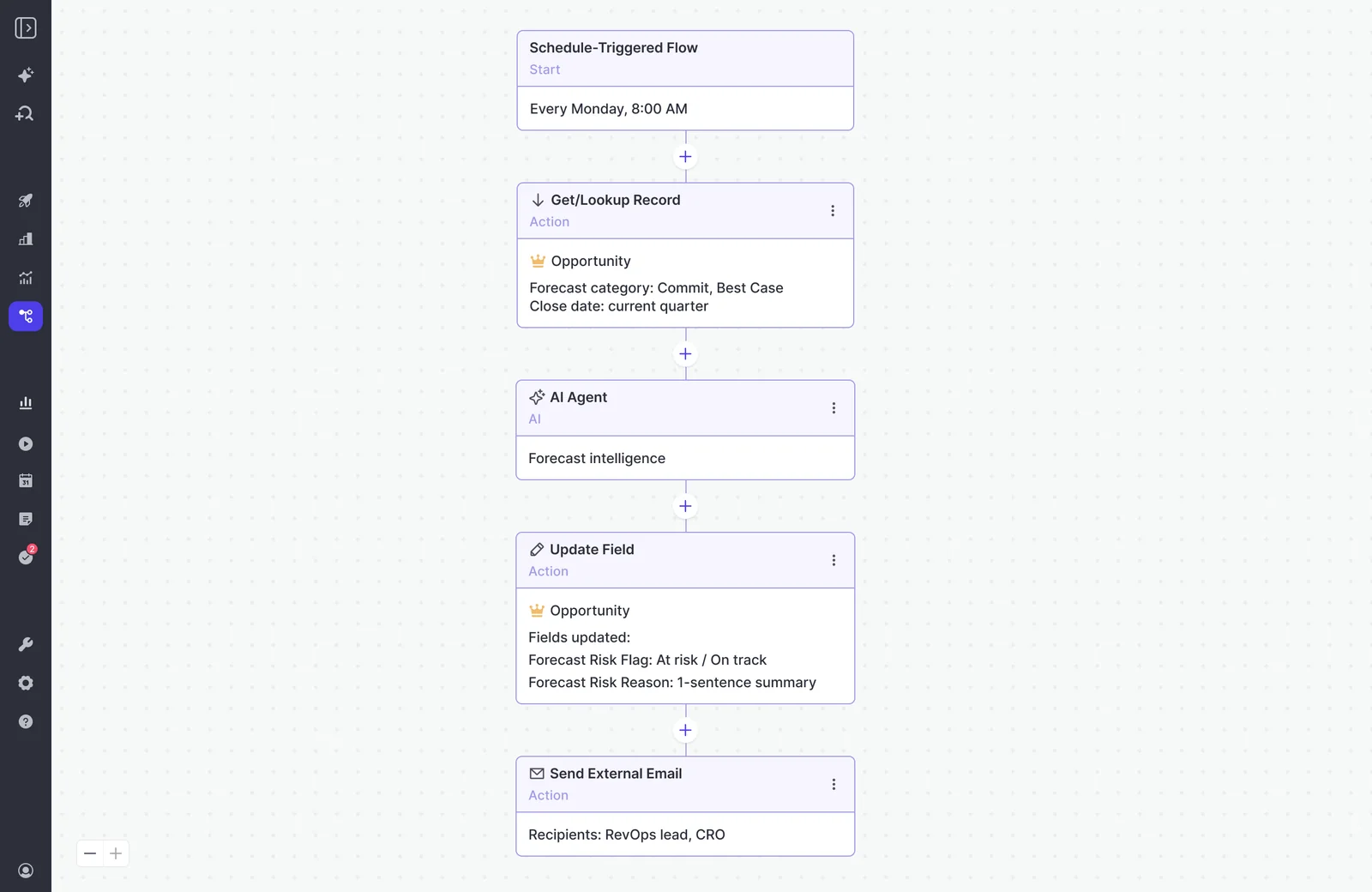
The agent workaround for board reporting looks like this: a scheduled flow pulls commit and best-case opportunities each Monday, an AI agent assesses forecast risk, and the result lands in a Forecast Risk Flag field in Salesforce, with an email to RevOps and the CRO.
Which Weflow bundle covers deal warnings and deal scoring
Weflow Revenue AI Business at $59 per user per month is the smallest bundle that covers both streams: call signals through Weflow Conversation Intelligence and deal warnings and scoring through Deal Intelligence. Weflow Revenue AI Enterprise at $79 adds the full forecasting layer, including warnings inside the forecast submission screen.
Call-based signals need Weflow Conversation Intelligence, because recording lives there. Weflow Activity & Contact Capture doesn't record calls.
| Bundle or product | Price per user/month | Covers deal warnings | Covers call signals | Covers forecasting |
|---|---|---|---|---|
| Weflow Activity & Contact Capture | $19 | No; it captures the emails, meetings and contacts behavioral signals read | No; recording isn't included | No |
| Weflow Conversation Intelligence | $39 | No | Yes: recording, transcripts and AI field updates | No |
| Weflow Deal Intelligence & Forecasting | $39 | Yes: 50+ signals, configurable warnings and deal scoring | No; recording isn't included | Yes |
| Weflow Revenue AI Foundation | $49 | No | Yes, with Activity & Contact Capture | No |
| Weflow Revenue AI Business | $59 | Yes: warnings, AI deal and account scoring, buying committee and deal board views | Yes | No; pipeline analytics and forecasting aren't included |
| Weflow Revenue AI Enterprise | $79 | Yes, including warnings in the forecast submission screen | Yes | Yes: the full forecasting layer |
A few details that shape the business case:
- Every bundle includes Ask Weflow AI Pro and Agent Builder Free with 25 agent actions.
- Pricing is billed annually, with a 10-user minimum.
- You can mix plans. At roughly 62 seats, the full platform lands around $58K per year. Putting most reps on a smaller bundle and only managers on the full platform brings the same 62 seats to roughly $45K.
Walk through the product yourself, no call required.
FAQ: deal risk detection from calls, email and CRM
Can I see Weflow deal risk flags in Salesforce reports or Power BI?
Not natively today. Weflow deal warnings and playbook scores are Weflow fields, so they don't reach Salesforce reports or BI tools on their own. The workaround is an Agent Builder agent that writes the assessment into a Salesforce field you create. Fields marked with a W in Weflow are the ones that won't reach a report.
How soon after a call does a spoken risk reach the opportunity?
After the call, not during it. Weflow has no live in-call alert. AI field updates write to Salesforce once the recording is processed, and predefined AI Playbooks pick up the new transcript on their next refresh, every three hours.
Who sets the deal warning thresholds: our team or the vendor?
Your team sets them, per team, in the Weflow admin console. Signals take effect once you assign them to a team, and the three default signals can be switched off but not deleted. Bring the sales leader into that session, because every threshold is a judgement about how your business slips.
Will Weflow score the deals already in my pipeline?
Yes, with one step at rollout. Predefined AI Playbooks fill in automatically only for opportunities created or changed after you configure them. Select your older opportunities and run Generate AI Playbooks in bulk, and the existing pipeline gets scored too.
How much closed history does the Weflow deal score need?
About six months of closed deals. The Weflow deal score runs from 0 to 100, recalculates nightly and trains on your own closed history, usually up to two years back. Each score comes with an explanation of what drives it, such as time in stage or communication cadence.
Can I see which call or email a deal flag came from?
Yes. Every Weflow deal score comes with its drivers, and playbooks show what's evidenced and what's missing per methodology element. The activity timeline clicks through to the emails and meetings themselves, and rep overrides get checked for plausibility against the deal.
Will reps see the same deal warnings as their managers?
Yes. The Weflow deal board works as the rep's own task view, with last email, last meeting, next meeting and the activity timeline on every deal. Reps see a warning before a manager raises it, so it reads as help rather than surveillance.
Do we have to replace our current call recorder?
No. If you keep another recorder, Weflow AI Playbooks run on CRM, email and meeting metadata only, and Weflow shows the fields your recorder writes into Salesforce. If you switch, Weflow imports recordings and transcripts from most conversation intelligence tools through their API or exported files, at no extra cost, in about one to two weeks.
How long does it take to get deal warnings live, and who owns it?
Typical time to live is two to four weeks, or four to six for a large org, and Weflow doesn't charge for implementation. The technical session takes 30 to 45 minutes with your Salesforce admin and mail admin. Configuration and internal alignment take the rest, so name one internal owner for warning rules, playbooks and field mappings before you start.
Does recording consent in Europe affect call-based risk detection?
It affects coverage, and coverage drives call signals. The Weflow notetaker carries the consent flow: opt-in, opt-out or none, a notice in the meeting chat with a link that stops recording, and an optional pre-meeting email. The desktop app records without a bot and without that flow, so consent becomes the rep's responsibility under the participants' local law.
Weflow is GDPR compliant and hosted in Frankfurt, and your instance runs in your Salesforce region, which you can override to keep data in the EU or UK. Where recording coverage drops, email, calendar and CRM warnings keep running.