

Weflow Deal Warnings: 7 Signals to Configure Before Your Next Pipeline Review
Learn which 7 Weflow deal warnings to configure before your next pipeline review.


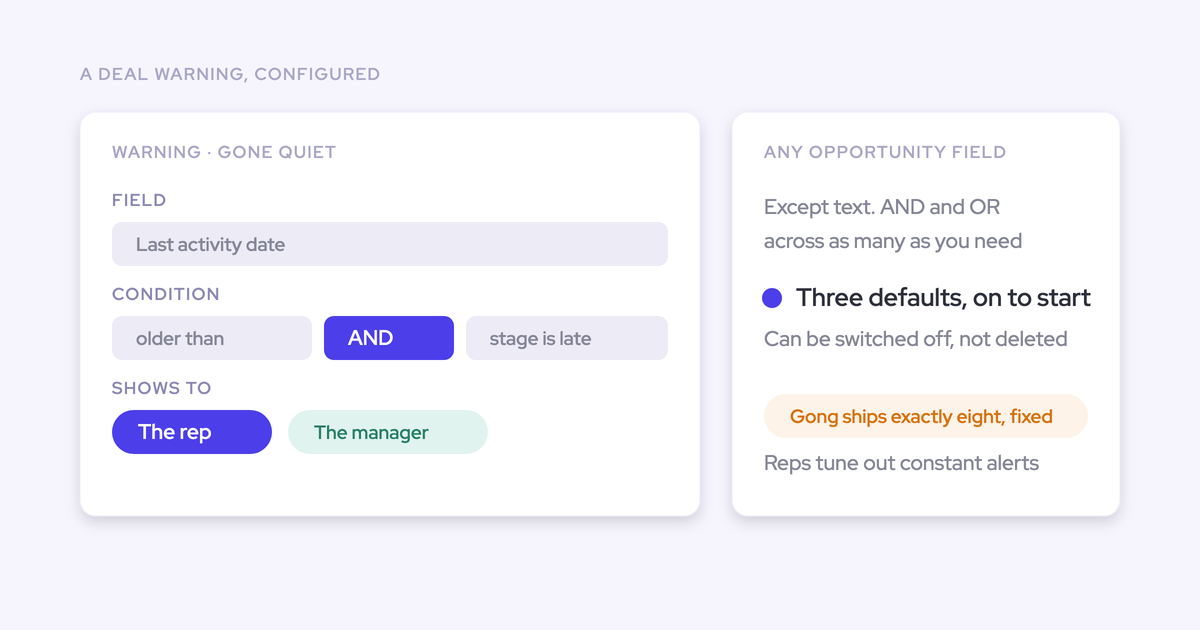

Weflow deal warnings are rules your team writes in its own terms. They run on signals your reps never have to type: days inactive, close-date pushes, days in stage, next meeting booked, and contacts engaged.
Warnings are part of Weflow Deal Intelligence & Forecasting. They show up on the deal board and in the forecast submission screen, so your rep sees the risk before you ask about it.
Weflow is the Revenue AI Orchestration platform for sales, customer success, and RevOps teams. Warnings are the part of it that decides whether your next pipeline review changes or just gets another alert. IDnow cut slipped deals by 60% with Weflow deal warnings.
These are the seven warnings we'd switch on first:
- No activity for longer than your cycle allows
- No next meeting booked
- Only one contact engaged
- Close date pushed more than twice
- Days in stage beyond your closed-won benchmark
- Late-stage deal with a missing methodology field
- Close date passed, or amount decreased
For each one, you get the failure it catches, how to set the threshold from your own cycle, and the rule shape to hand your RevOps admin. The goal is a board that's empty when your pipeline is healthy.
What Weflow Deal Intelligence warnings are, and what they aren't
A Weflow deal warning is a rule. It works in four steps:
- You pick opportunity fields or Weflow's computed fields.
- You combine the conditions with AND/OR logic.
- You assign the rule to a team.
- From then on, it flags every deal on that team that matches.
Nobody trains a model. Nobody scores anything by hand.
Weflow comes with three default signals. You can deactivate them, but you can't delete them. Everything beyond that is yours to write, drawing on the 50+ deal signals Weflow already computes.
| Aspect | What a Weflow deal warning is | What it isn't |
|---|---|---|
| Logic | A rule you define with AND/OR conditions | A fixed vendor risk model |
| Inputs | Any opportunity-related field, plus computed fields such as days inactive and push count | A text field. Long-text fields can't trigger a warning |
| Scope | Assigned to a team, so each team runs the rules that fit its motion | Live for anyone until someone assigns it |
| Storage | A Weflow field, marked with a W in the interface | A Salesforce field you can drop into a Salesforce report |
| Defaults | Three default signals you can switch off | Something you can delete |
Why your pipeline report makes stalled deals look healthy
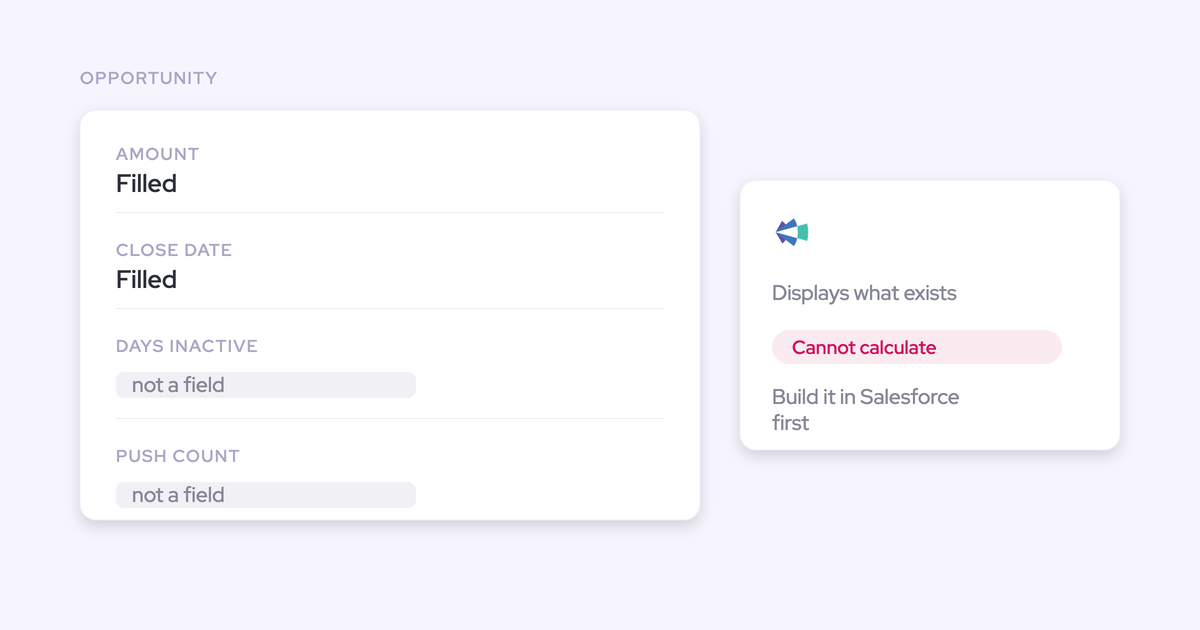
Salesforce stores the current state of a deal: stage, amount, close date, owner. It doesn't store the history around it:
- how long the deal has sat in its stage,
- how many times the close date moved,
- when anyone last heard from the buyer.
Reps don't type those, so they don't exist on a standard report unless someone builds custom fields and the automation to fill them.
So a dying deal and a live one look the same. Same stage, same amount, a close date that still sounds plausible. One prospect put it to us like this:
"It's so hard to effectively manage deals in Salesforce because you can't see a deal might be closing this week or this month or whatever, but it might have had no activity on it for two months. And it's very difficult to track that in Salesforce."
That's why the prep before every review looks the same. You pull one report for stage time and another for last activity, then take the rep's word for the rest. It costs about an hour per team per week, and you still end up trusting the rep's story.
| What the report shows | What the deal is actually doing |
|---|---|
| Stage: Proposal | Sitting in Proposal twice as long as your won deals did |
| Close date: end of this month | Pushed for the fourth month running |
| One contact role | Five people on the thread, or one person who stopped replying |
| Next step: "Follow up" | Nothing on the calendar with the buyer |
The cost shows up late in the quarter, when there's nothing left to do about it.
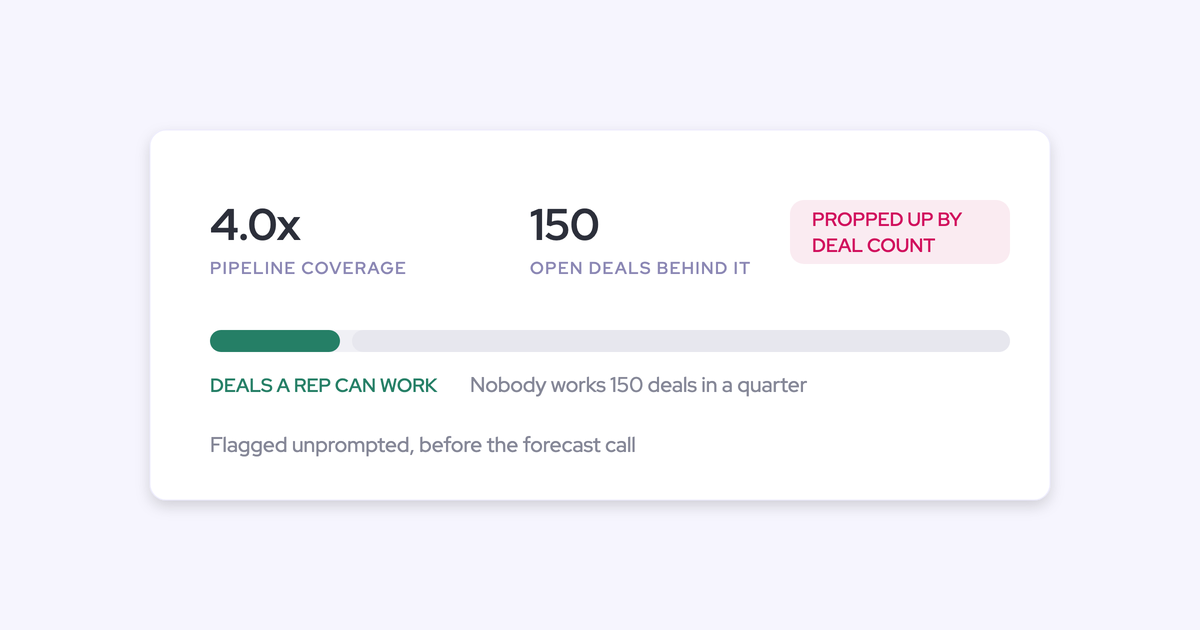
"We've all lived through this reality where your pipeline coverage looks pretty good, and then in week five, six, seven, it starts to slip and stall. And suddenly, your pipeline coverage evaporates"
Most teams answer that with more alerts: an email per risk, a task per risk, then a dashboard on top. Reps already ignore emails and tasks, so the whole setup gets tuned out within a week.
That's the bar this article sets for your warnings.
How Weflow computes the deal signals your reps never type
Weflow computes deal signals from captured emails, meetings and contacts, not from fields a rep fills in. Weflow Activity & Contact Capture syncs that activity to the right Salesforce records. Weflow then derives the signals your warnings run on.
That has two consequences:
- A rep can't game the signals, because nobody types them.
- Your admin doesn't have to build and maintain custom fields for days in stage or push count, because Weflow tracks both on every opportunity automatically.
| Signal | Where it comes from | What it tells you |
|---|---|---|
| Days inactive | Captured emails and meetings on the opportunity | How long since anyone touched the deal |
| Last and next meeting | Calendar events synced to the opportunity | Whether the deal has a path forward on the calendar |
| Days in stage | Tracked automatically on every opportunity | Whether the deal is running long against your benchmark |
| Close-date push count | Tracked automatically on every opportunity | Whether the date keeps moving |
| Per-contact engagement | Emails and meetings with each contact | Who is actually in the deal, not just attached to it |
| Activity velocity | Emails sent and received on the opportunity | Whether the buyer replies, or the rep is talking to a wall |
| Four-week activity timeline | Sent mail, received mail, meetings and tasks | Momentum at a glance, clickable through to the messages |
Single-threading needs one more piece: contacts. Reps almost never add the new people who show up on a thread. So the CRM shows one champion on a deal that has five people on it, or the reverse.
Weflow creates Salesforce contacts from email threads and calendar invites, attaches them to the matched account and opportunity, and can add them as contact roles. That's why a one-contact warning in Weflow reflects the real deal and not missing data entry.
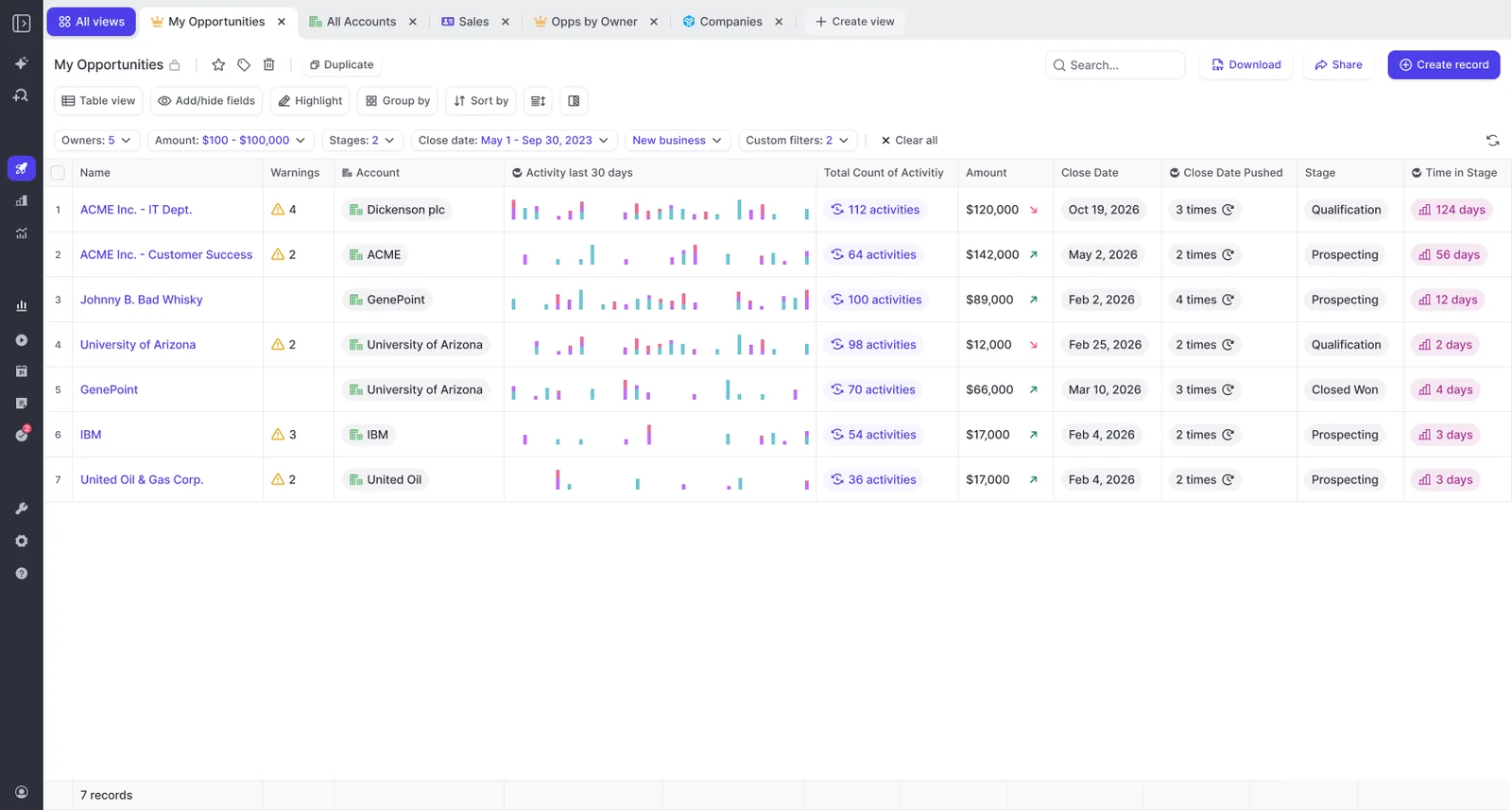
Where your reps see a Weflow deal warning first
Your rep should see a warning before you do. When the first sign of risk is a manager's email saying "this is red, chase it," a signal turns into a performance conversation. Reps tell us plainly that they'd rather see it and fix it themselves.
We built Weflow so warnings show up where the rep already works and at the moment they commit.
On the Weflow deal board your reps already work from
The Weflow deal board doubles as the AE's task board. Each deal shows the last email, last meeting, next meeting and the full activity timeline, and AI prompts the rep to follow up.
When a warning sits next to that context, the rep sees what's wrong and what to do about it in the same row. That makes the warning something to act on, not a verdict.
Your admin can also lock the pipeline template per team. That puts the Warnings column on every rep's view without depending on each rep to add it.
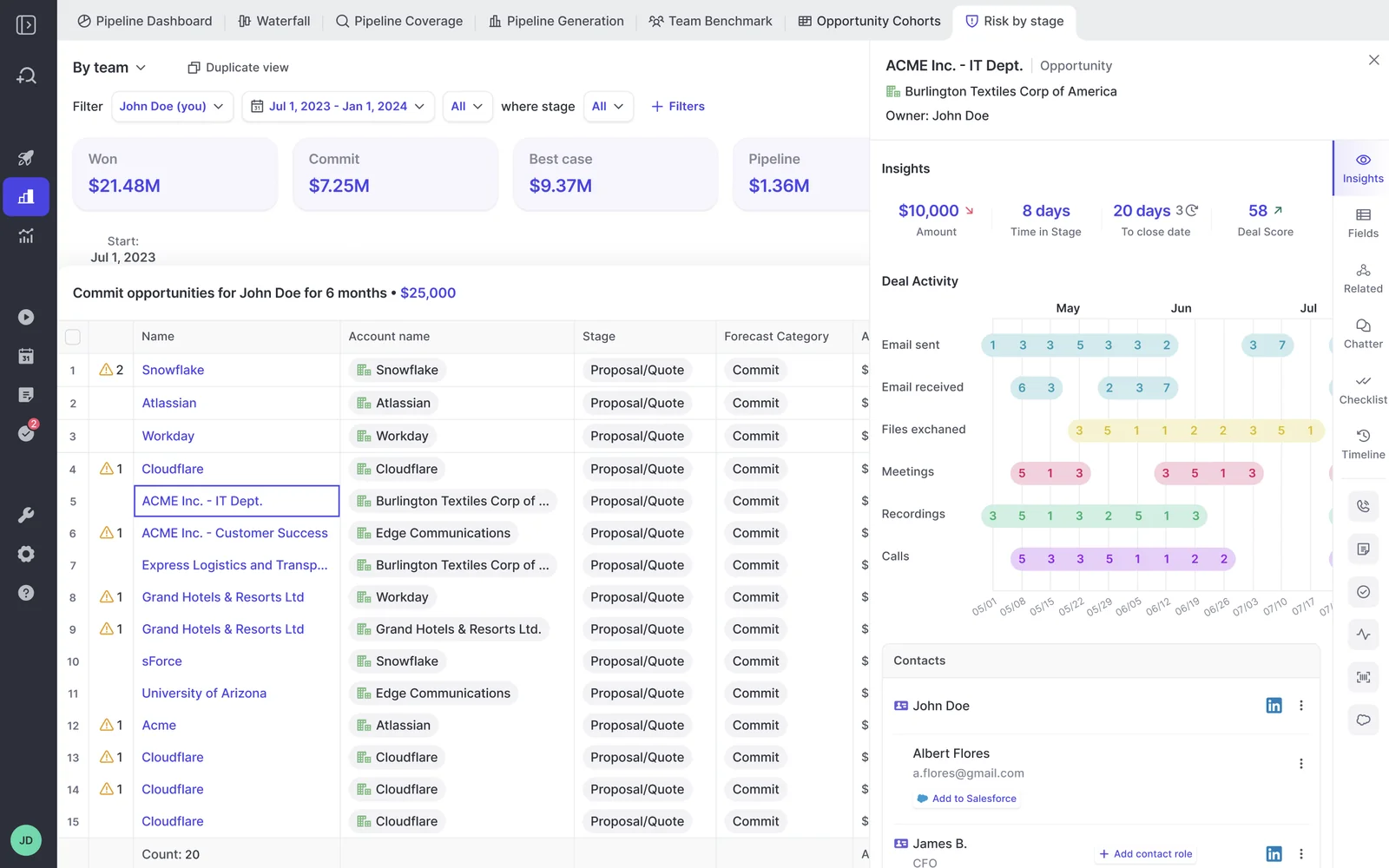
Inside the forecast submission screen, before a deal gets committed
Weflow shows deal warnings inside the forecast submission screen, at the moment the rep picks which deals to commit. That's the point where an unhealthy deal either enters your number or doesn't.
Catching it there keeps bad pipeline out of the forecast. The alternative is finding it in a report after the number is already wrong.
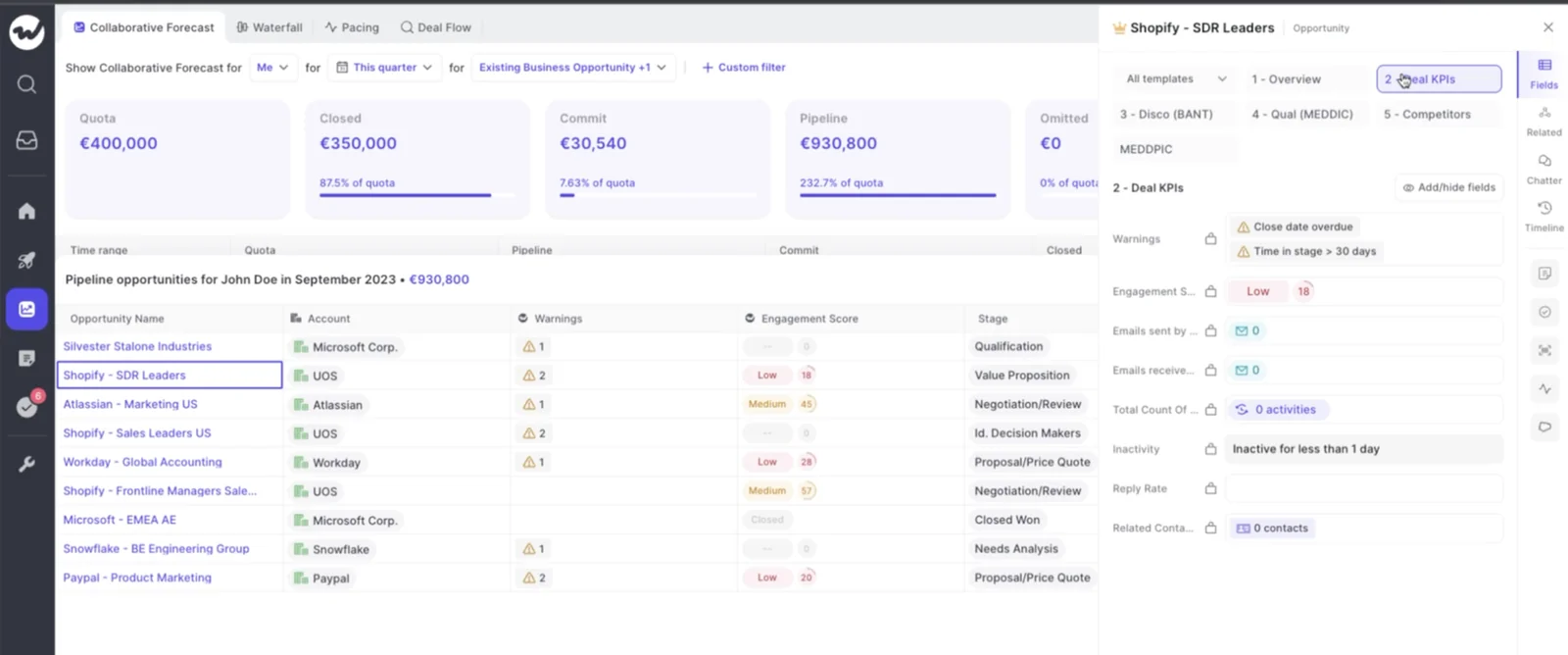
In a Slack or email risk briefing, only if you ask for one
If you want a digest, Weflow Agent Builder can run a scheduled pipeline risk briefing and post it to Slack or email. For example, every Monday at 9am it can list the open deals that need attention.
Warnings don't generate that briefing on their own. You decide whether it exists.
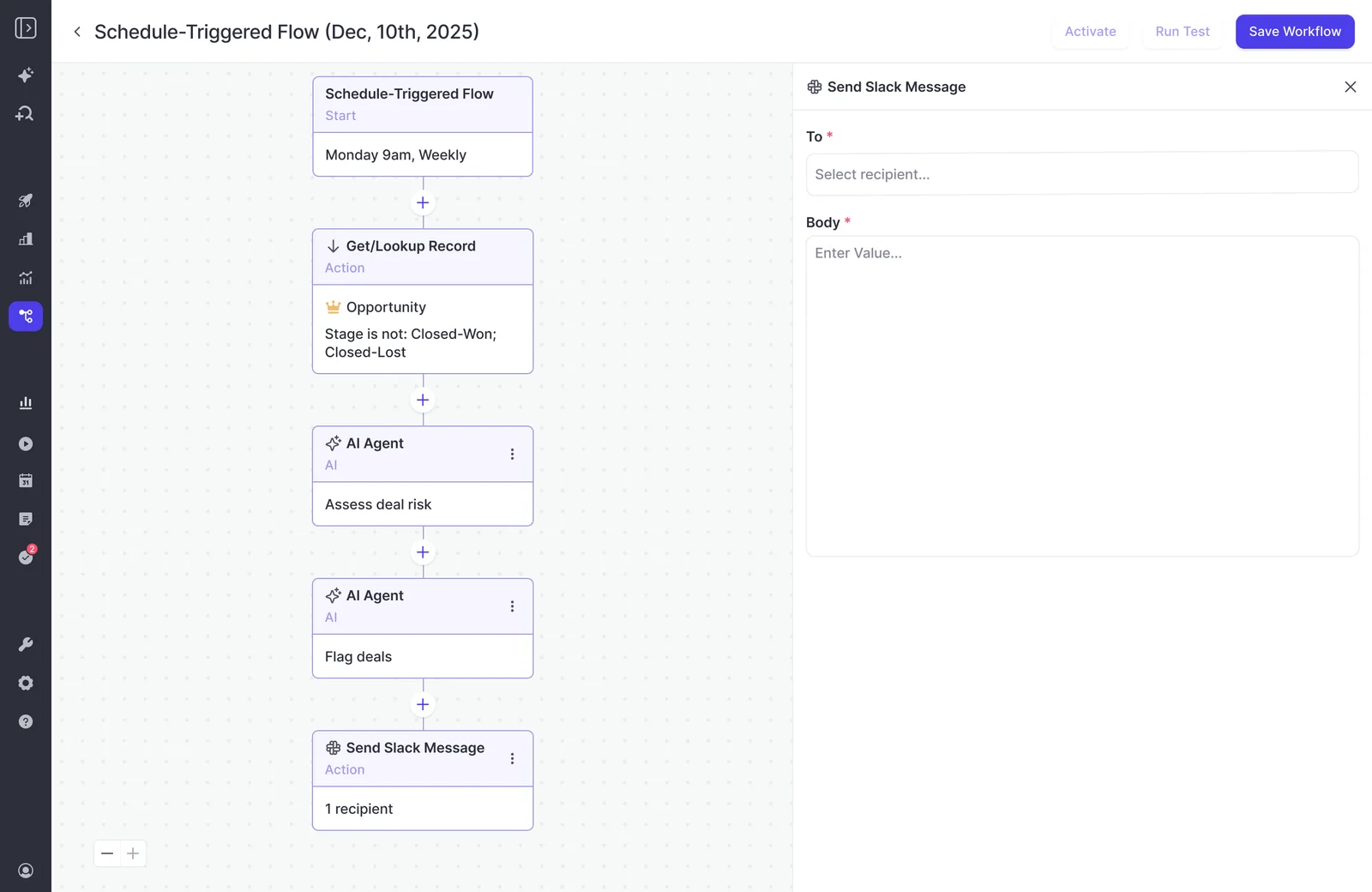
Here's what that change looks like from the manager's side of the review:
"The visibility alone changed behavior. Reps come into meetings already aware of what's overdue or inactive. They're more proactive now, because they can actually see what needs attention."
Bastian Stosic, Head of Media Sales Operations, HolidayCheck
How to set warning thresholds from your own sales cycle
Every threshold is a judgement about your business, so you set it, not your admin and not us. Two numbers you already have do most of the work: your cycle length and the stage times of your closed-won deals.
Silence for 14 days means a lot on a 60-day cycle. On a 12-month cycle, it means almost nothing. "Stuck in stage" only means something against how long your winning deals took.
"Days in stage is also important because what you wanna do is you actually wanna track what's the average time and stage for an opportunity, you know, for those that actually move to close one at some point in the future. That allows you to create internal benchmarks, and you can then use these benchmarks and to then create, you know, signals and warnings and so on."
We'd start with these principles:
- Scale silence windows to your cycle. Fourteen days on a 60-day cycle is roughly a quarter of the cycle, and that ratio is a sensible first setting.
- Set stage limits per stage, from deals that went on to close won, because a long Discovery and a long Negotiation are different problems.
- Start strict enough that a segment you know is healthy shows almost nothing. A rule that fires on half your pipeline is set wrong.
- Retune after your first review. Loosen the rules that fired on deals you had no concerns about, and tighten any rule that missed a deal that slipped.
Weflow tracks days in stage and push count natively, so warnings built on them work from the day Weflow goes live. If you've never measured stage time, start from your cycle length and swap in the closed-won benchmark as it builds.
The 7 deal warnings to switch on first
These seven are our editorial pick from the 50+ signals Weflow watches. Weflow doesn't ship them as a list; you author each one. Together they catch the failures that break forecasts: silence, no path forward, one thread, chronic slippage, stall, hollow qualification and dead dates.
| Warning | Deal failure it catches | Where the threshold comes from |
|---|---|---|
| 1. No activity for longer than your cycle allows | The deal went quiet | Your cycle length |
| 2. No next meeting booked | No path forward | The stage where every deal should have a meeting booked |
| 3. Only one contact engaged | Single-threaded deal | How many contacts your won deals had at that stage |
| 4. Close date pushed more than twice | Chronic slippage | Start at two pushes |
| 5. Days in stage beyond your closed-won benchmark | Stalled deal | Average stage time of your won deals |
| 6. Late-stage deal with a missing methodology field | Hollow qualification | Your stage exit criteria |
| 7. Close date passed, or amount decreased | Dead date or shrinking deal still in the number | None, it's binary |
1. No activity on the deal for longer than your cycle allows
Silence is the earliest sign a deal is dying. It shows up weeks before the close date moves, which is exactly when you can still do something about it.
Set the window from your cycle length. A 60-day cycle can justify 14 days. A longer enterprise cycle needs a longer window, or the board fills with deals that are simply between steps.
Rule shape: Days inactive is greater than [X] AND Stage is not Closed Won or Closed Lost
2. No next meeting booked on an open opportunity
A deal with nothing on the calendar has no path forward. This warning keys on Weflow's computed next-meeting signal, taken from synced calendar events. It doesn't read the rep's next-step text, which can say "follow up" for three months.
"And I'm not talking about the next step field here. It's about really understanding what are the next steps of the deal."
Set the threshold by stage, not by days. Early prospecting deals often have no meeting yet, and that's fine. From the first stage after qualification, every open deal should have something booked with the buyer.
Rule shape: Next meeting is empty AND Stage is [first stage after qualification] or later AND Stage is not closed
3. Only one contact engaged on the opportunity
Few deals get bought single-threaded. When the one contact goes quiet or leaves, the deal goes with them, and nobody saw it coming because the CRM never showed a second relationship.
This warning is only trustworthy because Weflow creates contacts from threads and invites automatically. Set the minimum from what your won deals looked like at that stage. Start it at the stage where you expect a buying committee to form.
Rule shape: Contacts on the opportunity is less than [2] AND Stage is [X] or later AND Stage is not closed
4. Close date pushed more than twice
Repeated pushes are a qualification problem, not a calendar problem. A deal whose date keeps moving usually has no real compelling event behind it.
Weflow counts the pushes on every opportunity, so nobody maintains the count by hand. Start at more than two. If you find deals with dozens of pushes, the problem is how your team sets close dates, and that's worth raising in its own right.
Rule shape: Close date push count is greater than 2 AND Stage is not closed
5. Days in stage beyond your closed-won benchmark
"Stuck" only means something against how long your winning deals took in the same stage. A single global number either buries early-stage deals in flags or misses the late-stage ones that stall in legal.
Use one threshold per stage and combine them with OR in a single rule. That's where AND/OR logic earns its keep.
Rule shape: (Stage is Discovery AND Days in stage is greater than [A]) OR (Stage is Proposal AND Days in stage is greater than [B]) OR (Stage is Negotiation AND Days in stage is greater than [C])
6. Late-stage deal with a missing methodology field
A late-stage deal with an empty qualification element is a red flag, however good the rep's story sounds.
"If you are in the last stage of the opportunity but get a CRM score of forty or fifty percent, then there are big red flags of, okay, is it really happening, or is it just a hygiene topic, or did you miss key parts."
The field has to be a non-text field, because text fields can't trigger a warning. If your MEDDIC or MEDDPICC answers live in long-text fields, add a companion picklist or checkbox for each element you gate on, such as "Economic buyer confirmed."
Reps can fill that companion field themselves. With Weflow Conversation Intelligence, AI Field Updates or an AI Playbook can write it from the deal's calls and emails.
Rule shape: Stage is [Negotiation] or later AND [Economic buyer confirmed] is not Yes
7. Close date already passed, or deal amount decreased
Two kinds of deal quietly inflate a forecast:
- the deal with a close date in the past that nobody moved or closed lost,
- the deal that shrank but still sits in the number at its old size.
One OR rule catches both. There's no threshold to tune. Either the date passed or it didn't, either the amount went down or it didn't.
Rule shape: Stage is not closed AND (Close date is before today OR Amount has decreased)
Why we keep champion strength out of deal warnings
We'd leave champion strength out of your warnings. Email and meeting volume tells you someone is engaged. It doesn't tell you they're fighting for you internally, and a busy contact with no real champion behind them is the deal that slips at quarter end.
Weflow shows you the engagement facts: who's on the thread, how often they reply, when you last met. It doesn't infer contact roles like champion or economic buyer, and it doesn't pretend to score the relationship.
That question belongs in the review, asked out loud:
- Will this person take your call today?
- Will they get you to the economic buyer?
- Do they own the pain, and can they say what inaction costs them?
Moving from Gong: how AI Deal Monitor's eight warnings map over
Gong's AI Deal Monitor has exactly eight warnings, all defined by Gong. You can switch each one on or off and adjust how long before it triggers, but you can't define a new one. In Weflow you write the rule, so you can rebuild most of Gong's field-based warnings and add the slippage patterns specific to your motion.
Credit where it's due: Gong's deal board is strong, and managers get attached to it.
"Like the deal board specifically, the reason why I stuck with it was like the bubbles, like, you sort of get like addicted to the bubbles."
Chris Nethercote, Head of Sales at Weflow, former Gong enterprise customer
This is Gong's pipeline board, with scores, warning counts and the activity timeline on each deal:
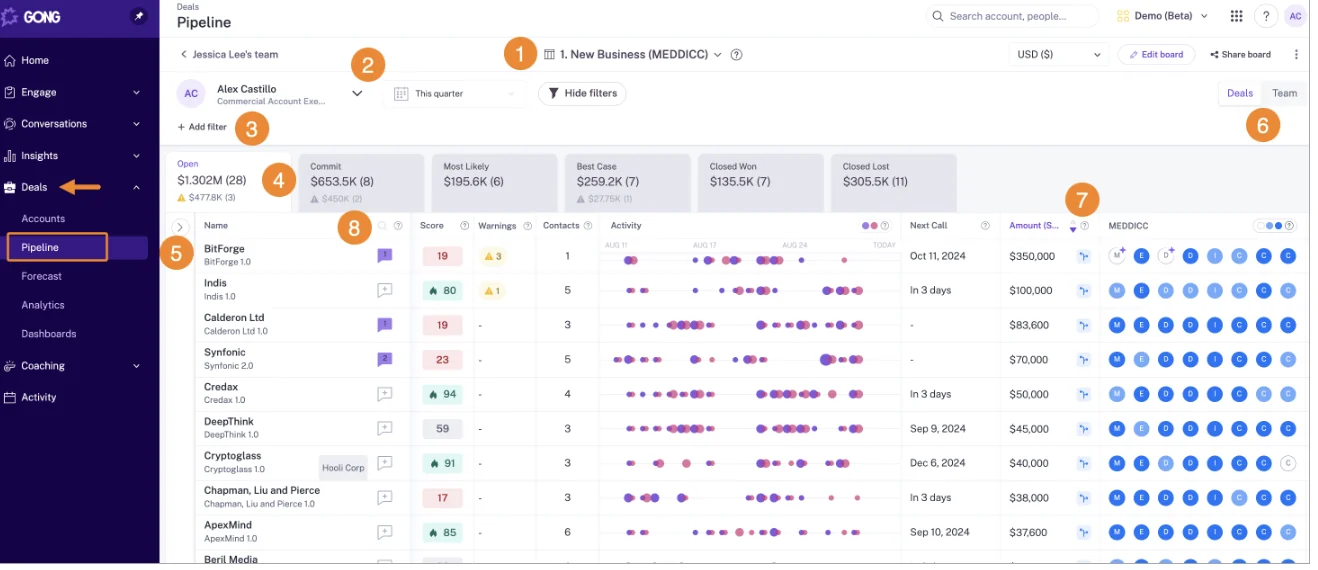
Gong's warnings also read call content, such as whether pricing came up. Weflow warnings key on fields, and that difference shows in the mapping.
| Gong AI Deal Monitor warning | Closest Weflow rule | What's different |
|---|---|---|
| No activity | Warning 1 | You set the window from your cycle length |
| Ghosted | No direct one-to-one rule | Warning 1 catches the silence, and activity velocity shows whether the buyer replies |
| Overdue | Warning 7 | You write the condition on the close date yourself |
| Not enough contacts | Warning 3 | You set the minimum, and the count comes from auto-created contacts |
| No power | No direct equivalent | Weflow doesn't infer contact roles like economic buyer |
| Pricing not mentioned | No direct equivalent | Weflow warnings don't read transcripts |
| Red flag | No direct equivalent | Weflow warnings don't read transcripts |
| Stalled in stage | Warning 5 | You set a limit per stage from your closed-won benchmark |
This matters when your risk patterns are specific to your business, like a compliance step, a required stakeholder or a methodology gate that Gong's eight can't express. If your team is happy with Gong's eight defaults and has no custom risk pattern to encode, warnings alone are a thin reason to move.
How to hand your warning spec to your RevOps admin
You decide which warnings exist and where the thresholds sit. Your admin builds them centrally and assigns them to your team. Nothing gets installed per rep.
- Agree your thresholds from cycle length and closed-won stage times, using the principles above.
- Write the list: each warning you want, with its rule shape and the stages it applies to.
- Your admin builds each rule with AND/OR conditions on opportunity fields or Weflow's computed fields.
- Your admin assigns the rules to your team, because a rule does nothing until it's assigned.
- Your admin deactivates any of the three default signals you don't need.
- Check the board on a segment you know is healthy. It should be close to empty, and if it isn't, tighten the rule that's firing.
- Walk your reps through where warnings appear, on the deal board and in forecast submission, before your first review.
- Retune after the first review, based on what fired and what slipped through.
Configuring the workspace takes about an hour after the 30 to 45 minute technical setup. Agreeing the thresholds with your team usually takes longer than the build.
Before you send the spec, see the deal board and the forecast submission screen for yourself. Walk through the product yourself.
Questions managers ask before switching on Weflow deal warnings
Who builds Weflow deal warnings, the manager or a RevOps admin?
Your RevOps or Sales Ops admin builds and assigns the rules in Weflow. You own which warnings exist and where the thresholds sit.
"Assigned to a team" means a rule only runs on the teams it's attached to. Your enterprise team and your SMB team can each run the set that fits their cycle.
Can I turn off the default warnings that come with Weflow?
Yes. Weflow's three default signals can be deactivated, but they can't be deleted. If they don't fit your motion, your admin switches them off and builds your own rules alongside.
Do Weflow deal warnings work from the first week of a trial?
Yes. Weflow tracks days in stage and push count natively, and it computes activity signals from captured emails and meetings as soon as capture is live.
Weflow also backfills up to 24 months of emails, meetings and contacts, so activity-based warnings don't start from an empty history. Rules on fields like close date, amount and stage apply to your existing pipeline straight away.
Can a deal warning fire on something a buyer said on a call?
Not directly. Weflow warnings key on fields, not transcripts, and text fields can't trigger them. This is where Gong's call-reading warnings, like "pricing not mentioned," differ.
The route in Weflow is a structured field. With Weflow Conversation Intelligence, AI Field Updates write what was said into a picklist or checkbox, and a warning fires on that field.
Can I build a warning on MEDDIC fields that are text fields?
No, text fields can't trigger a Weflow warning. Add a non-text companion field for each element you want to gate on, such as a "Champion identified" checkbox or an "Economic buyer status" picklist, and build the warning on that. Reps, AI Field Updates or an AI Playbook can keep it filled.
Can Weflow deal warnings show up in Salesforce reports or BI dashboards?
Not directly. Deal warnings are Weflow fields, marked with a W in the interface, so they don't appear in Salesforce reports or BI tools. The workaround is a Weflow Agent Builder agent that writes the risk assessment into a custom Salesforce field you create, which your reports can then read.
Will Weflow email my reps every time a warning fires?
No. Warnings appear on the deal board and in the forecast submission screen, where reps already work. If you want a digest, Weflow Agent Builder runs a scheduled risk briefing to Slack or email, and it runs only when you set it up.
How are deal warnings different from the Weflow AI deal score?
The Weflow AI deal score is a model trained on your own closed deals. It scores every opportunity from 0 to 100 nightly and explains what drives each score. It needs about six months of closed history to score accurately.
Warnings are rules you write in your own terms and use from day one. Many teams run both: the score to rank the pipeline, the warnings to name the specific thing that's wrong.
Which Weflow plan includes deal warnings?
Deal warnings are part of Weflow Deal Intelligence. You can get them in three ways:
- Weflow Deal Intelligence & Forecasting at $39 per user per month, billed annually, which also includes forecasting.
- Weflow Revenue AI Business at $59 per user per month, which bundles Weflow Activity & Contact Capture, Weflow Conversation Intelligence and Deal Intelligence. It includes deal views, AI scoring, warnings and buying committee intelligence, but not pipeline analytics or forecasting.
- Weflow Revenue AI Enterprise at $79 per user per month, which adds forecasting to Business.
All plans have a 10-user minimum. The forecast submission screen comes with forecasting, so on Business your reps see warnings on the deal board.
One naming note, because it trips people up. Pipeline Management is its own product. Pipeline Analytics comes with the Forecasting package, since it's built from your forecast configurations. The analytics upsell appears in the app even when you don't have that license.



.webp)