How to Investigate a Deal That Keeps Slipping Using Weflow
Learn how to investigate a deal that keeps slipping in Weflow using snapshots, signals, and Salesforce.


Close-date pushes and long stretches in the same stage are reasons to investigate, not proof that a deal is dead.
Before your next rep conversation, reconstruct what changed, check whether the buyer is participating, and identify what still needs an explanation.
The useful outcome is a decision: advance the opportunity, correct its timing or stage, agree on a recovery action, or close it out.
A busy activity timeline doesn’t settle that decision. Neither does a confident rep. You need to connect the opportunity’s history with buyer responses and the commitments people made on calls, while leaving room for context the system couldn’t capture.
Weflow is the Revenue AI Orchestration platform for sales, customer success, and RevOps teams. Weflow Deal Intelligence & Forecasting brings the signals and opportunity history into the investigation workflow below.
What you need before investigating the slipping deal
Start with access to the opportunity, available history, and a relevant closed-won benchmark. Missing evidence shouldn’t become a conclusion about the buyer.
- Confirm that you can open the opportunity in Weflow and access its relevant Salesforce fields.
- Choose one slipping opportunity and identify the close-date change you want to investigate.
- Check whether Weflow’s available snapshots cover the period before and after that change.
- Confirm that the relevant sellers have activity capture running and that you can access the associated recordings and transcripts.
- Have comparable closed-won deals available for benchmarking stage duration and push count.
- Bring your team’s stage exit criteria and confirm who can edit the opportunity after the review.
We’ll follow a hypothetical opportunity throughout: its close date has moved again, its stage hasn’t changed, and the rep expects procurement to finish. The question is whether procurement is progressing or whether the deal lacks a buyer-owned next step.
How to investigate a slipping deal in Weflow
Use Weflow to move from the slippage signal to historical changes, buyer engagement, and verified call context. Then bring the unresolved question to the rep.
Step 1: Check push count and days in stage
Find the opportunity in your Weflow pipeline table and inspect its close-date push count and time in stage. Weflow tracks both automatically without requiring custom Salesforce fields and automation.
- Open your opportunity view in Pipeline Management and locate the deal.
- Check the “Close Date Pushed” and “Time in Stage” columns. If your shared view doesn’t show them, ask the view owner to include them.
- Read those values alongside the current stage and close date.
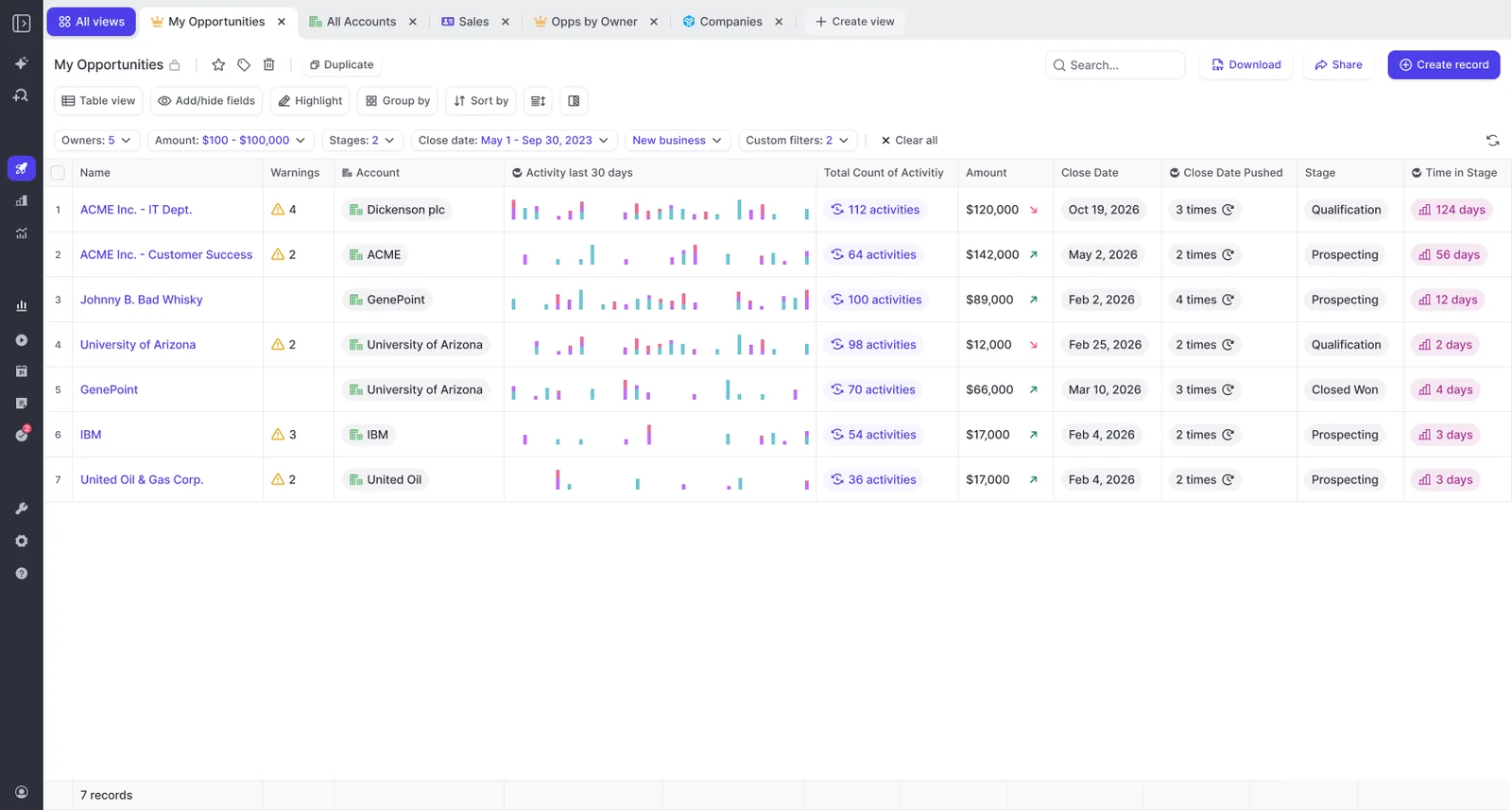
Record these values before interpreting them:
- The total close-date push count Weflow shows.
- The current stage and days in that stage.
- The current close date and the date of your review.
Checkpoint: For our example, repeated pushes and an unchanged stage explain why the opportunity needs attention. They don’t yet explain why it slipped.
Step 2: Benchmark both signals against won deals
Compare the opportunity with closed-won deals from the same sales motion. Weflow’s days-in-stage and push-count signals need an internal benchmark before you call a deal abnormal.
Keep new business separate from renewals and expansion. Within that motion, use a comparable segment and deal-size range, with consistent stage definitions.
Ask RevOps for the average time in the relevant stage and total push count among those won deals. Check that the underlying history covers the comparison period. An average from incomplete history can look credible and still mislead you.
| Signal | Observed value | Internal benchmark | Investigation implication |
|---|---|---|---|
| Days in stage | Record the opportunity’s current duration. | Average duration in the same stage among comparable won deals. | A longer duration warrants checking which buying milestone hasn’t happened. |
| Total close-date push count | Record the displayed count. | Average total pushes among comparable won deals. | Repeated movement beyond the baseline warrants checking how the rep chose each new date. |
Checkpoint: Suppose our example sits above both internal averages. That makes it an outlier worth investigating, not an automatic closed-lost decision. If you don’t have reliable benchmarks, record that limitation rather than borrowing an industry threshold.
Step 3: Choose snapshots around the latest slip
Choose the closest available Weflow snapshots before and after the close-date move. A narrow window keeps unrelated changes out of the comparison.
- Locate the available snapshot history for the opportunity.
- Select the last available snapshot showing the previous close date.
- Select the first available snapshot showing the new close date.
- Record both snapshot timestamps so you know the window you’re investigating.
Weflow takes opportunity snapshots every few hours. That gives you periodic states, not a transaction-by-transaction audit of every edit between them.
Checkpoint: For our example, the window is: snapshot with the previous close date → close-date movement → snapshot with the later close date. If no snapshot predates the slip, you can’t establish the before-state from Weflow snapshots alone.
Step 4: Compare what changed between those snapshots
Use the Weflow snapshot comparison to separate a timing change from a broader change in the opportunity. Start with close date, stage, and amount where the comparison exposes those fields.
For our hypothetical deal, the change record looks like this:
| Opportunity field | Before the slip | After the slip | What to investigate |
|---|---|---|---|
| Close date | Previous expected close date. | A later expected close date. | Which buyer milestone supports the new date? |
| Stage | Current recorded stage. | Unchanged. | Does the buyer’s progress still support that stage? |
| Amount | Previous opportunity amount. | Unchanged. | Timing moved without a recorded scope reduction. |
Only include fields you can actually inspect. Don’t treat an absent field as unchanged or assume a snapshot contains historical email and call content.
Checkpoint: Our example shows a timing-only edit: the close date moved while stage and amount stayed put. Carry one question forward: what changed in the buying process to justify the new date?
Step 5: Check whether buyer engagement matches deal activity
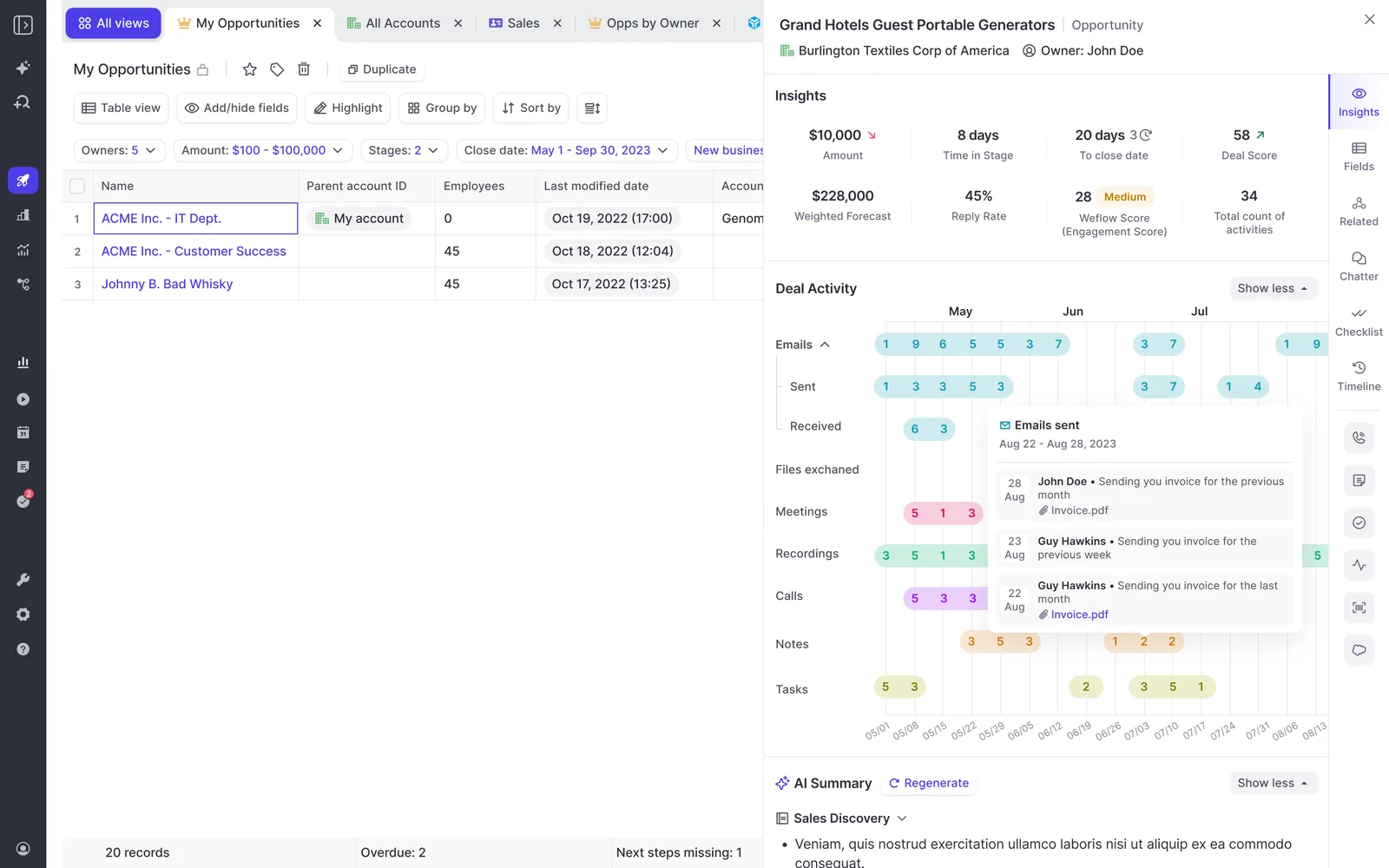
Separate seller effort from buyer participation. Weflow’s opportunity activity timeline distinguishes sent and received email and lets you inspect the underlying messages.
Review activity around the slip, then check the current position. Use days inactive, last and next meeting, contact engagement, and activity velocity to find the exchanges that deserve a closer look.
| Seller activity | Buyer response to verify |
|---|---|
| The rep sends procurement follow-ups. | Does procurement reply with an owner, outstanding requirement, or completion date? |
| The rep proposes a meeting. | Has the buyer agreed to the meeting and its purpose? |
| The rep emails the decision-maker. | Does that person respond or participate, rather than merely appear on the recipient list? |
| The rep shares paperwork. | Does the buyer return redlines, confirm receipt, or describe the approval process? |
Check the people involved, too:
- Identify who has replied since the slip.
- Check whether procurement or another required approver participates directly.
- Look for access to the decision-maker beyond the primary contact.
- Verify whether the supposed champion has helped advance a buying milestone.
Engagement doesn’t prove champion status. A responsive contact may still lack the influence to move the purchase internally.
Checkpoint: In our example, suppose seller follow-ups continue but no captured procurement reply or agreed next meeting appears. Record that specific gap. Don’t label the buyer disengaged until you check capture coverage and rep context.
Step 6: Verify Weflow’s AI summary against source evidence
Read Weflow’s AI deal summary, then verify the claims that would change your decision. Weflow reasons across meetings associated with the opportunity rather than summarizing only the latest call.
Open the relevant recordings and transcripts, and compare the buyer’s words with subsequent activity.
| Summary claim to verify | Source checked | Unresolved discrepancy |
|---|---|---|
| Procurement is the remaining blocker. | The call where the buyer described the approval process. | Did the buyer identify procurement as the final step, or did the rep assume it? |
| The buyer supports the expected timing. | The call or email discussing the target date. | Was the date a buyer commitment or a seller proposal? |
| The next step is agreed. | The relevant transcript, follow-up thread, and meeting record. | Did the buyer accept an action, owner, and date? |
If a summary claim has no supporting source you can find, leave it unresolved. Don’t turn AI wording into evidence by copying it into the opportunity.
Checkpoint: For our example, suppose the call confirms that the buyer offered a procurement introduction, but the captured record doesn’t show that introduction happening. You now have a precise uncertainty to discuss.
Step 7: Ask the rep one evidence-based question
Ask about the gap between the buyer’s commitment and the evidence you found. Weflow’s deal evidence should make the coaching question more specific, not turn the review into surveillance.
Use this pattern: observed change + verified context + unresolved buyer action.
| Ask this | Avoid this |
|---|---|
| What buyer milestone supports the revised close date? | Why did you push the date again? |
| What context am I missing from the captured record? | The activity data proves nobody is engaging. |
| Where do you need help getting the next step agreed? | Why haven’t you sent more follow-ups? |
Checkpoint: The rep either supplies missing evidence or confirms the gap. In our example, that determines whether you’re dealing with an ordinary procurement delay or a missing path into procurement.
Step 8: Choose the next action and update Salesforce
Choose an action that matches the buyer’s current position, then update the opportunity. Weflow syncs opportunity edits with Salesforce in real time, so the review can end with an aligned deal record.
| Evidence state | Chosen action | Required opportunity update | Owner | Follow-up date |
|---|---|---|---|---|
| The buyer has completed the next stage’s entry requirements. | Advance the deal. | Update stage and next step against your written criteria. | Rep. | Next agreed buyer milestone. |
| The purchase remains active, but buyer-confirmed steps no longer support the close date. | Correct the timing. | Update close date and document the supporting milestones. | Rep. | Date of the next approval checkpoint. |
| The recorded stage overstates buyer progress. | Correct the stage. | Move the opportunity to the stage its evidence supports. | Rep, with manager agreement. | Agreed stage-criteria review date. |
| A specific blocker remains, with a credible route to resolve it. | Define a recovery action. | Record the action, owner, deadline, and timing implications. | Rep, with named manager support. | Agreed recovery deadline. |
| The buyer confirms the purchase won’t proceed, or review establishes no viable buying process. | Close the deal lost. | Record the outcome and factual loss reason. | Rep. | Complete during the review. |
For our example, if the introduction never happened but the buyer still wants to proceed, agree on a procurement introduction as the recovery action. Base the close date on the remaining buying steps rather than moving it forward by another arbitrary interval.
Checkpoint: Leave with an updated opportunity, an accountable owner, and an actual follow-up date. Confirm the edit saved successfully, especially where Salesforce validation rules require additional fields.
What can make Weflow’s deal evidence incomplete?
Weflow’s deal evidence can lack context because activity never entered a captured channel, mapped to another record, or predates the available snapshot history. Check those boundaries before treating absence as buyer silence.
What if buyer activity happened outside captured channels?
Weflow can’t explain private texts or WhatsApp conversations it couldn’t capture. Apparent inactivity means no activity appears in the available record, not that no conversation happened.
- Ask whether the buyer moved the discussion to another channel.
- Confirm who participated, what they agreed, and when it happened.
- Record the business outcome through your approved CRM process without copying unrelated private content.
- Check whether an expected recording actually exists before treating its missing transcript as a lack of discussion.
For the slipping procurement deal, a buyer-confirmed approval date shared by text changes the interpretation. The rep still needs to make that commitment usable in the deal record.
What if activity mapped to the wrong Salesforce opportunity?
Check the account and sibling opportunities before concluding that the deal went quiet. Weflow uses Salesforce relationships to map activity and falls back to the account when it can’t confidently select an opportunity.
- Look for the missing email or meeting on the account and other open opportunities.
- Check the relevant contact’s Opportunity Contact Role and confirm which deal the conversation concerns.
- Inspect both the calendar Event and the Weflow recording. They’re separate records.
- Use the Outlook or Chrome extension to correct a meeting’s mapping when both the Event and recording need to move.
- Re-check the opportunity’s activity timeline and associated recordings before revisiting the AI summary.
Changing a recording’s mapping inside the Weflow app moves the recording only. It doesn’t move the Salesforce Event.
That distinction matters: you can otherwise put the conversation on the right deal while leaving its meeting activity on the wrong one.
What if Weflow started after the deal changed?
Weflow’s snapshot history begins when it starts collecting snapshots. It doesn’t reconstruct earlier opportunity states simply because you connect an existing Salesforce opportunity.
| Available evidence | Unavailable evidence |
|---|---|
| Opportunity snapshots collected after snapshotting began. | Weflow snapshots from before collection started. |
| Existing Salesforce field history for the relevant fields and period. | Field history that your Salesforce setup never collected. |
| Historical emails available through capture backfill. | A complete historical opportunity state inferred from those emails alone. |
Use existing Salesforce history or dated business records for earlier changes. Keep the boundary explicit: unavailable history doesn’t prove that the close date never moved.
How should Weflow warnings flag future deal slippage?
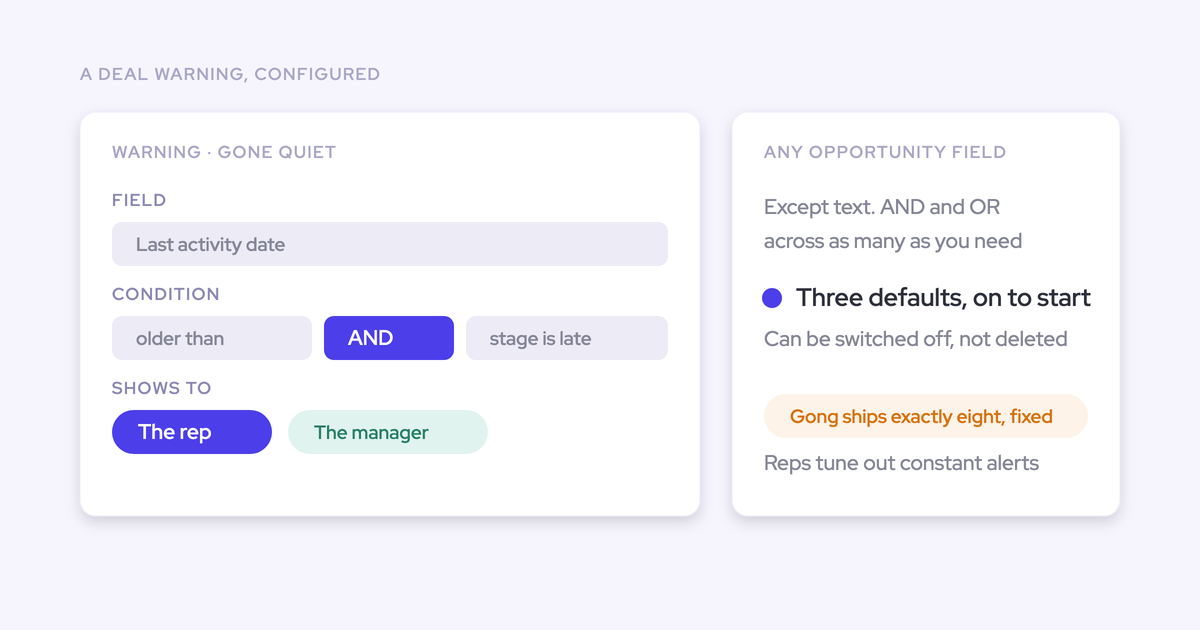
Configure Weflow warnings to identify deals that deserve this investigation before another close-date push. Each warning needs a relevant threshold and a clear response.
Set thresholds from your own sales-cycle benchmarks
Base Weflow warning thresholds on your company’s won-deal patterns. Weflow supports rules using Salesforce fields and computed signals, so your sales motion can determine what warrants attention.
- Have the sales manager and RevOps agree on the comparable deal population.
- Start with a small set of signals, such as stage duration, push count, and inactivity.
- Test proposed rules against deals you already understand, including healthy procurement delays.
- Review how many warnings lead to a useful action, then adjust thresholds that produce noise.
- Define the response before enabling a warning for the team.
| Warning input | Threshold basis | Expected response |
|---|---|---|
| Days in stage. | Comparable won deals’ time in that stage. | Check the missing buyer milestone. |
| Close-date push count. | Push patterns among comparable won deals. | Verify the basis for the current date. |
| Days inactive. | Normal communication gaps for that sales cycle. | Check capture coverage and buyer participation. |
A warning that catches ordinary behavior every day won’t survive contact with the team. Narrow the rule before adding more notifications.
Show the same warnings to managers and reps
Give reps access to the same Weflow deal warnings managers use. The rep should have a chance to inspect the signal and act before receiving a manager’s escalation.
| Rep responsibility | Manager responsibility |
|---|---|
| Review warnings in the deal view before the scheduled deal discussion. | Make sure the shared view exposes the relevant warnings and signals. |
| Check whether the warning reflects buyer risk or a data gap. | Ask for missing context before drawing a performance conclusion. |
| Record the next action and agreed response date. | Provide support where the rep needs access, escalation, or a decision. |
| Complete or revise the action at the agreed checkpoint. | Escalate missed commitments rather than merely repeating the warning. |
Agree on response timing as a team. A visible warning should start useful work, not an automatic stream of chase messages.
Frequently asked questions
Check packaging, history coverage, and retention before relying on Weflow for this investigation.
Which Weflow plan includes this investigation workflow?
Weflow’s Revenue AI Business bundle includes activity capture, conversation intelligence, and deal intelligence for the full workflow described here. It costs $59 per user per month, billed annually, with a 10-user minimum.
- Weflow Deal Intelligence & Forecasting costs $39 per user per month, billed annually, for teams buying deal analysis separately. Recording and automatic activity capture are separate products.
- Revenue AI Enterprise costs $79 per user per month, billed annually, and adds forecasting to Revenue AI Business. You don’t need formal forecasting for this single-deal review.
Weflow Conversation Intelligence supplies the recording and transcript evidence used in the verification step. Don’t assume that buying deal analysis alone also starts recording your calls.
Can Salesforce field history replace Weflow opportunity snapshots?
Yes, if your existing Salesforce history reliably answers the close-date question. You don’t need another system for a narrow audit your current setup already supports.
| Salesforce history is sufficient when… | Weflow snapshots add value when… |
|---|---|
| The relevant field history covers the change you need to inspect. | You need periodic before-and-after opportunity states alongside deal signals. |
| You only need to establish how a tracked close date changed. | You need to connect the change with stage duration, activity, engagement, and call context. |
| Your required fields support history tracking. | Your analysis depends on calculated or roll-up values that Salesforce field history can’t track. |
Salesforce field history depends on what your setup collected. Weflow snapshots also have a start date. Neither should become a promise of historical evidence that doesn’t exist.
Do opportunity edits in Weflow sync to Salesforce?
Yes. Weflow provides real-time, two-way Salesforce sync, so opportunity edits in either system keep the deal record aligned. Salesforce permissions, validation rules, and field dependencies still apply; confirm that your stage, close-date, and next-step updates saved before ending the review.
What happens to Weflow snapshots after cancellation?
Weflow stores opportunity snapshots in Weflow, not in Salesforce. Don’t assume the activity-data ownership promise also guarantees continued access to snapshot history after cancellation.
| Artifact | Location and cancellation boundary |
|---|---|
| Opportunity snapshots. | Stored in Weflow. Confirm retention, export options, and post-cancellation access before ending the subscription. |
| Captured activities and contacts. | Stored in Salesforce objects and remain in your Salesforce org after cancellation. |
| Opportunity field edits. | Written to the Salesforce opportunity and remain part of that record. |
| Recording files. | Stored by Weflow. Confirm their retention and retrieval terms separately from Salesforce records. |
Test the workflow with an opportunity whose latest slip falls inside the available snapshot history. Aim to leave with one verified gap and one buyer-owned next action.