How to Build the Business Case for Conversation Intelligence Beyond Call Coaching
Learn how to build a CFO-ready case for conversation intelligence beyond call coaching.


The coaching ROI case for conversation intelligence doesn't survive a CFO, and two facts explain why. Your managers don't have the hours to watch the calls. And transcription is now close to free.
The case that does survive counts three things a CFO can see:
- Salesforce fields your reps never fill, written from the calls.
- The customer's voice, delivered to product, marketing and CS.
- Conversation data that stays in your own Salesforce, priced at today's market rate instead of legacy recorder pricing.
Below, we run five paths through those three line items, from staying on free Teams transcripts to renewing Gong. The article ends with a 90-day measurement plan you can run whichever path you pick. We built Weflow Conversation Intelligence + AI Field Updates around the first line item, so we'll tell you where we fit and where we don't.
Why the call coaching ROI case falls apart with a CFO
Coaching ROI is the wrong foundation because it depends on the one resource you can't buy more of: manager hours.
Ten reps generate 150+ call hours a week managers can't review
Run the arithmetic for your own team. Ten reps on three to four hours of calls a day produce 30 to 40 hours of conversation every day. Over a week, that's 150 to 200 hours.
Your managers also run deal reviews, build the forecast and often sell. Even at an hour of review a day, they see a sliver of what was said.
An archive nobody watches is a cost with no return. That's the soft spot every CFO presses on.
The coaching story has this weakness because of how the category started. First-generation CI was built before generative AI, as a "never lose a conversation" archive with search on top. Coaching was the use that archive enabled, so the ROI story got built on the activity that needs the most human time.
Transcripts are free now, so recording isn't a line item
Recording can't carry the case because you probably have it already. Teams and Zoom produce transcripts, and plenty of teams run one or two notetakers on top. What's missing is everything after the transcript.
Buyers now tell us in the first five minutes of a demo that every vendor sounds the same. On the transcript, they're right.
Legacy CI pricing was set when transcription was expensive. The cost of transcription collapsed, and the price level stayed where it was.
"CI is transcription and conversational intelligence are commodities in many ways. It's all about what happens after that, the data pre-processing, the embedding, the actions you build off it."
— Kyle Norton, Chief Revenue Officer at Owner.com
The three line items a CFO will actually count
A defensible CI case counts three things that show up somewhere the CFO can see: in Salesforce reports, in other teams' work, and on the invoice.
Salesforce fields reps never fill, written from recorded calls
Your qualification, next-step and methodology fields are empty for a structural reason. A rep doing the job well spends the day talking to customers and writing to them, so the CRM is what gets left.
Mandates and validation rules raise completion without improving the content. Reps type whatever clears the rule.
Leadership then reads the empty fields as proof that the methodology isn't being followed. Usually the qualification happened. It's sitting in calls and emails, just not in Salesforce.
Writing those fields from the call gives you two things you can count:
- Reportable data. A picklist, number or date written from what the buyer said can be grouped, filtered and charted. A paragraph in a notes field can't.
- Selling time back. Every field the AI writes is one a rep didn't have to type.
Count the first through field completion on the fields your forecast and stage gates read. Measure the second against your own baseline rather than a vendor's number.
One prospect told us they expect automation to save each rep three to five hours a week. That's their expectation, not a measured result, and it's a useful hypothesis to test in your own 90 days.
Customer voice your product, marketing and CS teams can use
Once conversation data is structured, most of the demand for it comes from outside sales. That changes who champions the purchase. It also changes who can help fund it: often a CMO, CTO or CS leader rather than the sales leader.
Here's what each team gets, and what it replaces:
- Product gets what buyers actually asked for and objected to, instead of interviewing sellers and getting an anecdote weeks later.
- Marketing can check its ICP and messaging against what buyers said on real calls, instead of guessing why a lead came in.
- Customer success can read churn signals and feature requests across months of conversations, instead of trusting a health picklist someone updates once a quarter.
- Leadership sees why deals were lost based on what was said, instead of the closed-lost reason a rep picked from a dropdown on the way out.
"Most importantly, getting a little bit more of the customer voice available to us as a company, in particular for the product teams, we do have a gap because right now sellers have the meetings and we need to interview sellers in order to get that perspective. So it becomes a little bit anecdotal."
To put a figure on this line item, name every non-sales team that will consume the data and the manual work it replaces. KORE Wireless framed its whole purchase that way.
"We weren't buying conversation intelligence. We were buying a unified data layer that the entire go-to-market motion could run on, and a partner who understood that distinction."
— Scott Jones, SVP of GTM Revenue Intelligence & Enablement at KORE Wireless
Conversation data you own in Salesforce, priced at today's market rate
Conversation data written into your own Salesforce is reportable, permissioned, and still there after the subscription ends. A link back to a vendor cloud gives you a second portal that your reports, flows and AI can't read.
The price itself is now part of the argument. In our buyer conversations, the market benchmarks CI at roughly $30 per user per month on its own, or $40 to $50 combined with activity capture.
Above that band, nobody compares the tool on features. It simply becomes hard to defend internally.
"you join an organization, you come there, and then the first thing you do is spend fifty grand or one hundred grand to just introduce CI. Maybe not the best way to introduce yourself to the CFO, but that's a different discussion."
So this line item counts two things: what you own if you leave, and whether the seat price sits inside the band.
Five paths for turning call transcripts into business value
The five paths differ on which line items they deliver and what they cost to run. Transcription quality barely separates them.
| Path | Fields written to Salesforce | Customer voice for other teams | Where the data lives, and what it costs to run |
|---|---|---|---|
| Free Teams or Zoom transcripts | None. Transcripts stay in the meeting platform. | Manual. Someone opens a transcript and reads it. | Included in licenses you already pay for. Nothing reaches Salesforce, and nobody maintains it. |
| Standalone AI notetaker | Text fields at best, and some overwrite them on every meeting. | Readable summaries, in a separate app. | Low seat cost. The insight stays in the notetaker's app. |
| DIY build with Claude or ChatGPT connected to Salesforce | Possible, if you build safe picklist writes yourself. | Ad hoc questions to an assistant. | An assistant seat you may already own, plus RevOps hours to build and maintain it. |
| Renew full-suite Gong | Partial: up to 20 extractors, existing fields only, and the latest reading overwrites the field. | The deepest conversation analytics, inside Gong. | Data sits in Gong's cloud. Field updates cost extra on top of a recording license. |
| CI that writes Salesforce fields | Picklists, numbers, dates and multi-selects, written from each call. | Free viewer seats and questions across many calls. | Transcripts live in your Salesforce. Price sits at or near the market band. |
Stay with free Teams or Zoom transcripts if nobody needs the data yet
Doing nothing is a legitimate choice when no team is asking questions of your conversations yet.
- Fits when: your sales team is small, deals are simple, and nobody in product, marketing or CS is asking what customers say.
- Breaks when: anyone needs the transcripts synced to a record, mapped to a field, or analyzed across calls.
Implementation note: if you stay, start measuring field completion and recording ratio now. When someone does ask, you'll already have a baseline.
Add an AI notetaker if summaries are all you need
Good summaries are cheap now, and a notetaker delivers them well. The gap is where the output lands.
Output that never reaches Salesforce fields leaves the insight stranded in a second app. Some notetakers write only into long text fields and overwrite them on every new meeting. Others write to Salesforce only after a rep opens each meeting in the notetaker's app and pushes the values.
- Fits when: reps want help remembering calls and writing follow-ups, and nobody reports on the result.
- Breaks when: you need picklists, numbers or dates filled for reporting, or you need the data without a rep clicking.
Implementation note: before you buy, list the five fields your forecast depends on and test whether the notetaker can write each one.
Build with Claude and Salesforce if you can maintain it
Build versus buy no longer means writing software. An assistant connected to Salesforce, plus transcripts from your meeting platform, reproduces a recognizable share of what a CI product does.
Here's what the build gives you and what it doesn't:
- The build answers ad hoc questions about calls and records, for the cost of a seat you may already own.
- The build doesn't capture meetings reliably when one is rescheduled or nobody pressed record.
- The build doesn't write picklists safely unless you engineer it to. A model asked to fill a picklist will invent values the field won't accept.
- The build doesn't come with the security posture your procurement team will ask for.
- The build needs an owner who maintains it after the person who built it moves on.
"If you could just hook Claude into Salesforce and it gives you the truth. I mean, in theory, if it's a system of truth, it should be able to do it. But the reality is it just doesn't work."
— Philipp Stelzer, Co-founder and CPO at Weflow
Implementation note: price the build in RevOps hours per month, not in seat cost. That's the number your CFO will compare against.
Renew Gong if deep coaching analytics drive your team
Gong invented this category, and it has the deepest conversation analytics on the market. If coaching depth is your real driver and your team runs the full Gong suite, renewing is a rational call. We'd tell you to stay.
The case weakens when it rests on Salesforce fields. Gong's AI Data Extractor writes call answers into CRM fields automatically, within these limits:
- A workspace can publish at most 20 extractors, and only a business admin can create them.
- Extractors write only into fields that already exist in your CRM.
- Each extractor overwrites the previous value with the latest reading, so a value from an earlier stage of the deal disappears.
- Field updates cost extra on top of a recording license, and they do less for teams that bought Gong only for CI.
Implementation note: count the fields you want written from calls. If the list runs past 20, or most of your team uses Gong only to record, your renewal case rests on coaching again.
Choose CI that writes Salesforce fields to cover all three line items
CI that writes Salesforce fields is the one path that delivers fields, cross-team customer voice and owned data together. It holds up as a business case when the seat price sits inside the market band.
Its own limit is coverage. Call-driven updates only reach deals that have recorded calls, so email capture has to cover the rest.
Implementation note: measure your recording ratio before you sign, because it sets the ceiling on line item one.
Why we'd start the case with Salesforce field updates
If you can lead with only one line item, lead with fields written from calls. We'd argue that for three reasons:
- It's the most countable. Field completion is a number in a Salesforce report, not a story about better coaching.
- It moves inside 90 days. You start from an empty-field baseline, so any field the AI writes shows up as improvement.
- It feeds the other two line items. Structured fields are what product, marketing and CS can report on, and they live in your Salesforce.
Be realistic about the split between people and automation. Sales leaders tell us they can hold reps to about five fields.
So plan it that way. Reps own the handful of fields that drive the forecast, such as amount, close date and stage. Automation fills the rest.
Your accuracy bar also shifts once you're comparing against an empty field rather than a correct one.
That tolerance stops at fields a rep already wrote. Once a rep watches their own note get blanked, they stop maintaining the field. That's why per-field control over what writes automatically matters as much as accuracy.
How Weflow Conversation Intelligence + AI Field Updates builds the case
Weflow is the Revenue AI Orchestration platform for sales, customer success, and RevOps teams. We built it for Salesforce teams, and Weflow Conversation Intelligence + AI Field Updates is the part of the platform that turns calls into Salesforce data. Here's how each capability maps to a line item, and where it stops.
Weflow writes picklists, numbers, dates and multi-selects into Salesforce
Weflow writes call outcomes into every Salesforce field type except relationship lookups, so the fields your reports read fill from what the buyer actually said. That covers Account, Contact, Opportunity and Lead, plus custom objects, which Weflow support sets up for you.
The field type decides what your reports can do with the value:
| Field type written from the call | What your report can do with it |
|---|---|
| Picklist, such as qualification strength scored 0 to 3 | Group the pipeline by score and filter out weak deals. |
| Multi-select, such as competitors mentioned | Count open deals per competitor, by region or segment. |
| Number, such as seats or projected amount | Sum and average across the pipeline. |
| Date, such as the buyer's decision date | Filter deals by timing window and compare against the close date. |
Before writing a picklist, Weflow reads the field's allowed values and matches its output against them, so it never writes a value the field won't accept. Your validation rules still apply. A stage change a rule blocks stays blocked until the fields behind the rule are filled.
You don't start from a blank page. Weflow ships more than 250 pre-built prompts covering MEDDIC, MEDDPICC, SPICED, BANT and other methodologies. Accuracy depends on how well each prompt is written, so expect to tune them.
Weflow can also write the opportunity Stage itself when the exit criteria in your prompt are met on the call. That's where field updates start driving the sales process. It's also where a wrong extraction costs you most, so we'd keep Stage under review.
You decide per field whether Weflow writes or waits for review
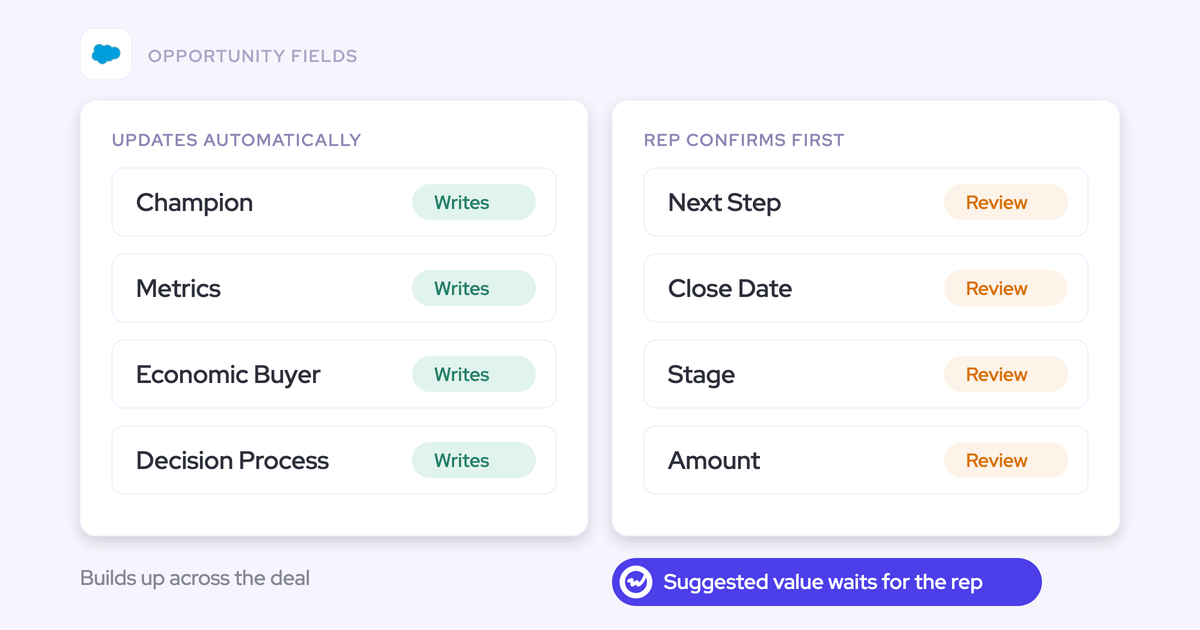
Weflow lets you set automatic writing or rep review per field, not per team or workspace. An unambiguous field such as a website can update itself, while an interpretive field such as the champion stays under review for the same rep.
In review mode, the rep sees the current value beside the AI suggestion. They accept, edit or reject each one, and sync only what should change.
For automatic fields, add one line to the prompt: leave the field unchanged when the call adds nothing new. That stops a short check-in call from wiping qualification a rep captured weeks earlier.

Here's how we'd split a typical setup:
| Field | Setting | Why |
|---|---|---|
| Website | Automatic | One right answer, low risk if wrong. |
| Billing address | Automatic | Unambiguous and rarely contested. |
| Pain | Review | Interpretive. The rep knows what the buyer meant. |
| Champion | Review | Interpretive, and it changes the read on the deal. |
| Next step and close date | Review | One misheard sentence moves the forecast. |
| Stage and amount | Review | Single values that change the number the moment they change. |
Product, marketing and CS get the customer's voice without paid seats
Weflow gives the teams that consume conversation data free viewer and analytics seats, so line item two doesn't grow your license count. Here's what each of those teams can do:
- Product, marketing and leadership view recordings, summaries, transcripts and analytics on free viewer seats.
- Anyone can ask Ask Weflow AI one question across many recordings at once, such as which objections came up in last month's lost deals.
- Trackers count mentions of competitors, pricing, objections or product feedback across every call and roll them up by rep, team and region.
- CS and onboarding run their own templates, so their calls write to the objects they work in rather than sales fields.
- Your team can pull conversation data through the Weflow API and analyze it in Claude or ChatGPT.

Transcripts land in a Weflow recording object in your Salesforce
Weflow stores the transcript and summary of every call in a Weflow recording object inside your Salesforce, and writes the summary onto the Salesforce Event too. That means the conversation is reportable, permissioned and queryable with everything else in your CRM.
It also survives the end of the subscription. If you leave Weflow, the transcripts and summaries stay in your org.
The video and audio files themselves live in Weflow's storage rather than in Salesforce file storage, which is expensive. You choose the region: Frankfurt, New York or Sydney.
Where Weflow falls short, and how to plan around it
These are the limits that would surface after you've sold this internally, so plan for them now.
| Limit | How to plan around it |
|---|---|
| There's no live in-meeting assistant. Summaries, field updates and coaching arrive after the call. | Build the case on post-call outcomes. If live battlecards are a hard requirement for your reps, weigh that before you switch. |
| A filled field isn't marked as coming from the call or from a web search. | Restrict any field that must come from the buyer to the conversation in its prompt. Web search is off by default and set per prompt. |
| Transcript search shows which calls mention a term, not where in the call it was said. | Set up a tracker for terms you report on. Tracker hits give you results at the level of each mention. |
| Call-driven updates only cover deals with recorded calls. Our customers typically record 50 to 70 percent of their meetings. | Pair Conversation Intelligence with Weflow Activity & Contact Capture so email covers the deals that never get a recorded call. |
What Weflow Conversation Intelligence costs at your seat count
Weflow Conversation Intelligence costs $39 per user per month, and the Weflow Revenue AI Foundation bundle, which adds Weflow Activity & Contact Capture, costs $49. We publish our pricing so you can build the case before you talk to anyone.
| Weflow Conversation Intelligence | Weflow Revenue AI Foundation | |
|---|---|---|
| Price | $39 per user per month | $49 per user per month |
| What's included | Recording, transcripts, AI field updates, summaries, follow-up emails, coaching scorecards, trackers, clips | Everything in Conversation Intelligence, plus Weflow Activity & Contact Capture for emails, meetings and contacts |
| Also included | Ask Weflow AI Pro, the desktop app, Mobile Copilot | Ask Weflow AI Pro, the desktop app, Mobile Copilot |
| Viewer seats | Unlimited and free | Unlimited and free |
| Billing | Annual, 10-user minimum | Annual, 10-user minimum |
There are no platform fees and no implementation fees. We quote prices in dollars and euros at the same number.
Against the market band, here's where we sit:
- Weflow Revenue AI Foundation at $49 sits inside the $40 to $50 band buyers use for capture plus CI.
- Weflow Conversation Intelligence at $39 sits above the roughly $30 mark buyers name for CI alone.
That's why most teams we talk to take the bundle. For $10 more per user, Weflow Activity & Contact Capture covers the deals that never get a recorded call, which is the main gap in line item one.
Here's the arithmetic for a 50-seat team. Swap in your own seat count:
- Weflow Revenue AI Foundation: 50 seats × $49 × 12 months = $29,400 a year.
- Weflow Conversation Intelligence alone: 50 seats × $39 × 12 months = $23,400 a year.
For reference, a team of roughly 62 seats on capture plus CI lands at about $36,000 a year. Put that number next to your current CI or notetaker spend.
How to prove the business case in your first 90 days
Track five metrics, baseline each one before rollout, and measure them in Salesforce. These work on any path you choose, including ours.
| Metric | How to baseline it | How to measure it | Line item it proves |
|---|---|---|---|
| Field completion on key fields | Report the percentage of open opportunities with each target field filled today. | Rerun the same report every two weeks. | 1: fields |
| Recording ratio | Count recorded meetings against all external meetings on the calendar. | Track it weekly by team. | 1: fields |
| Rep admin hours | Ask a sample of reps to log time spent on CRM updates and follow-ups for one week. | Repeat the same log in month three. | 1: fields |
| Non-sales consumers | List who outside sales uses conversation data today. Often nobody. | Count active viewers in product, marketing and CS. | 2: customer voice |
| Closed-lost reason versus what was said | Pull last quarter's lost deals and their picklist reasons. | Compare those reasons against what the calls actually show. | 2: customer voice |
Run it in this order:
- Days 1 to 30: capture every baseline before anything changes. Turn on field updates in review mode for all interpretive fields, and set only unambiguous fields to automatic.
- Days 31 to 60: tune prompts from what reps accept, edit and reject. The useful corrections are usually a sentence added or a few words removed.
- Days 61 to 90: move the fields that held up in review to automatic, rerun every baseline report, and take the before-and-after to your CFO.
Walk through the product yourself, no call required.
Questions RevOps leaders ask about the conversation intelligence business case
How accurate are AI field updates, and who writes the prompts?
Accuracy depends on how well each field's prompt is written. Weflow ships more than 250 pre-built prompts as a starting point, and your RevOps team adapts them to your fields and picklist values. Simple prompts tend to outperform over-specified ones. Start interpretive fields in review mode, then move the ones that hold up to automatic.
Will AI field updates overwrite what reps already typed?
In review mode, no. The rep sees the current value beside the suggestion and syncs only what should change. In automatic mode, Weflow writes what the latest call produced, so add a prompt instruction to leave the field unchanged when the call carries nothing new. For fields that build up across a whole deal, AI Playbooks in Weflow Deal Intelligence & Forecasting read every email, meeting and transcript on the opportunity rather than one call.
What happens to deals that never have a recorded call?
Call-driven field updates only reach deals with recorded calls, and our customers typically record 50 to 70 percent of their meetings. Weflow Activity & Contact Capture brings the email side of those deals into Salesforce. That matters for qualification, because facts like who the champion and decision maker are often come up only in email.
Can we import the Teams, Zoom or Gong recordings we already have?
Yes. Weflow imports recordings from most conversation intelligence tools, either through the vendor's API or from files exported out of the tool. Imported recordings are re-linked to the right Salesforce records, so your history doesn't start from zero.
Do product and marketing need paid licences to see clips and insights?
No. Weflow viewer and analytics seats are free and unlimited, so product, marketing and leadership can view recordings, clips, summaries and analytics without a paid seat. You can also reallocate seats between types each quarter as your team changes.
What will security and legal ask about conversation intelligence?
Expect questions on certifications, data use and residency. Weflow is SOC 2 Type II certified and GDPR compliant, runs Zero Data Retention for AI processing, and never uses customer data to train AI models. You choose the region where recordings are stored. ISO 27001 is in progress, not certified, so plan around that if your procurement team requires it.
What if legal won't let us record calls at all?
Then there's no conversation intelligence case for you today, and no vendor can change that. Your case rests on email and activity data, which Weflow Activity & Contact Capture writes into Salesforce, until the recording policy changes.
How should we time a switch against an existing Gong renewal?
Treat the renewal as your decision window, because it's the one month a year you have leverage. Start your measurement baseline well before the renewal date, so you're comparing numbers rather than impressions. Migration runs by import, and your existing tracker set can carry over, so keyword reporting doesn't restart from zero.
How do we handle reps who like the tool they already have?
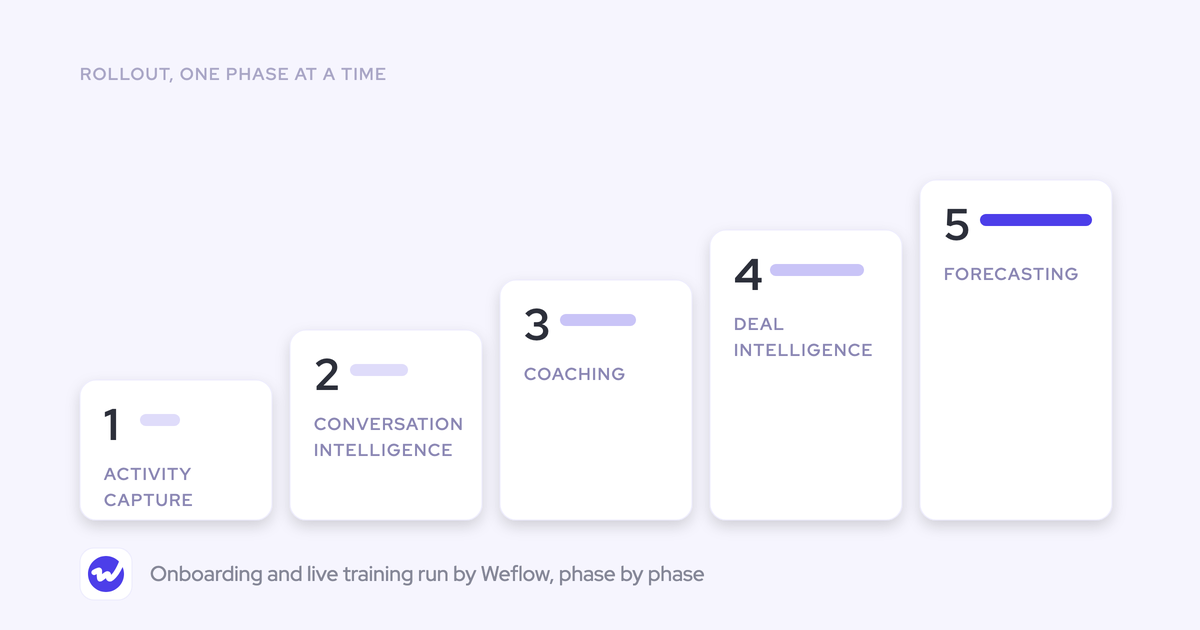
Split the decision in two. RevOps decides on cost, Salesforce sync and data ownership, while reps are won on feature parity and on seeing their fields fill without typing. A phased rollout helps: KORE Wireless moved in five phases, from activity capture to conversation intelligence, coaching, deal intelligence and then forecasting.