How to Get Call Recording Approved by a German Works Council
Learn how to get call recording approved by a German works council, from consent to EU residency


To a works council, a call recorder is a monitoring tool. So every question it asks comes back to one thing: can this be used to judge employees?
The way to get call recording approved is to answer that question in writing, before the meeting. In practice, the council needs five answers:
- What is recorded
- Who can see it
- How employees are evaluated with it
- Where it lives and who processes it
- Whether any of it trains a model
Bring those answers as a documentation pack, and back each one with a configuration decision you've already made: consent mode, retention and video deletion, enrolment scope, and visibility.
That approach also settles the bot-versus-botless debate. Hiding the recorder removes the consent proof the council relies on, so the lever that gets you approved is scope, not invisibility.
We're writing this from inside a German vendor hosted in Frankfurt. Weflow is the Revenue AI Orchestration platform for sales, customer success, and RevOps teams, and the settings in the steps below are the ones in Weflow Conversation Intelligence.
Just keep in mind that this is a process guide, not legal advice: the legal reading belongs to your counsel, and nothing here guarantees approval.
Why your works council has a say over call recording
Conversation intelligence can monitor how employees behave and perform, and German co-determination gives the council a binding say over exactly that.
Those rules sit in the Works Constitution Act (Betriebsverfassungsgesetz, BetrVG), but how they apply to your company is your counsel's call.
A conversation intelligence tool records every customer conversation a rep has and turns those conversations into per-rep scores and metrics, which puts it squarely in scope.
Transcript accuracy and summary quality, on the other hand, don't matter to the council at all.
The trouble is that first-generation conversation intelligence was built as a US-first video archive, and each of its defaults turns into an objection in a German council meeting:
- Video: A visible recorder in the call, plus footage of the employee.
- Long retention: Calls kept for years, and some kept indefinitely.
- Rep scoring: Scorecards and metrics that read like a performance file.
- US-first storage: Data that sits, or gets processed, outside the EU.
Take a product with those defaults to the council, and you'll end up arguing each one down in the room. The rest of this guide helps you settle them before the meeting instead.
What your works council will ask about your recording tool
Expect four questions from the council and a fifth from legal on model training. Each one needs a written answer, not a certificate, so use this table as the skeleton of your pack.
| The council asks | What it's really testing | What answers it |
|---|---|---|
| What is recorded? | Whether the scope is contained, or whether every conversation of every employee ends up in the tool | Enrolment scope, internal-meeting rules and domain exclusions (Step 1), plus consent mode (Step 2) |
| Who can see it? | Whether a recording can reach people with no business reason to open it | Access tied to existing CRM permissions (Step 4) |
| How are employees evaluated with it? | Whether scores and metrics can feed performance reviews, warnings or dismissals | A named list of every rep-level metric, with agreed limits on its use (Step 5) |
| Where does it live, and who processes it? | Whether you can point to a physical location and a processing chain, not only a storage region | Hosting and processing map (Step 6), retention and deletion rules (Step 3) |
| Does any of it train a model? | Whether employee and customer conversations reach an AI provider that learns from them, including through a sub-processor | Written commitments covering the whole sub-processor chain (Step 7) |
Underneath all five sits the question from the start of this guide. If your pack answers that one plainly, the rest become much easier to land.
Pick your recording path before you book the council meeting
Before the meeting, choose one path and the scope that comes with it. Each path trades coverage against council exposure differently, and if you walk in with several options, the council will likely pick the narrowest one for you.
| Path | What gets stored | How consent is proven | Council exposure and what you give up |
|---|---|---|---|
| Visible bot with product-run consent | Audio, video, transcript, summaries and CRM fields. | A notice to every participant, a stop or opt-out link, and a consent log you can export. | The council will challenge video and rep scoring. You keep full coverage, but you have to win the hardest conversation in the room. |
| Botless desktop recorder | The same audio, video and transcript, captured from the rep's machine. | Not by the product. The rep informs participants, and local law decides what's enough. | Legal may read an invisible recorder as more exposure. You lose the consent record that a visible bot gives you. |
| Transcript-only tool | Text, with no audio or video. | Vendors in this class build around not having to give a recording notice. Your counsel has to share that reading. | Least resistance on video. You get nothing to replay, and you lose the analysis that depends on recorded audio. |
| Recording prospects only | Full recordings, limited to new-business conversations. | The same product-run consent as the visible bot. | An easier first agreement. You leave existing customers, often your largest accounts, out of the data. |
| Not recording | Nothing. | Not needed. | No council exposure. You also drop conversation intelligence and the AI work that depends on conversation data. |
And if your council's position is "never record," take it seriously. A transcript-only tool, or no recording at all, is the honest answer there. Pushing a recorder through anyway puts the whole business case at risk.
Why a botless recorder can make approval harder, not easier
When you remove the visible recorder, you also remove the product-run consent and its log. So you don't lose the recording, but you do lose the proof that people agreed to it.
Many buyers see botless recording as an escape hatch: no bot in the call, nothing for the council to object to. But the council and your legal team aren't objecting to the bot's avatar. They want to know whether participants knew and agreed.
We've heard legal teams say this outright. One buyer told us their counsel preferred the conferencing-platform setup, where participants are asked and their answer is logged.
The same counsel rejected a background desktop recorder as non-compliant, even though the team found it useful. For some buyers, the consent prompt is exactly what gets the tool approved.
| What the council looks at | Visible bot with consent | Botless recorder |
|---|---|---|
| Notice to participants | Posted by the product in every meeting, with an optional email before the call | Depends on the rep saying it out loud |
| The consent record | A per-meeting log an admin can export | No product record. At best, the rep's word. |
| What happens when someone objects | The bot leaves and the recording gets deleted | The rep has to stop recording manually |
| Who carries the responsibility | The company, through a configured and auditable setting | The individual rep, under local law |
This applies to us too. The Weflow desktop app records Zoom, Google Meet and Microsoft Teams meetings without a bot joining, and those recordings get the same summaries, field updates and scorecards.
But since nothing joins the meeting to post a notice or leave when someone objects, none of the consent flow runs. The rep starts each recording and owns the consent.
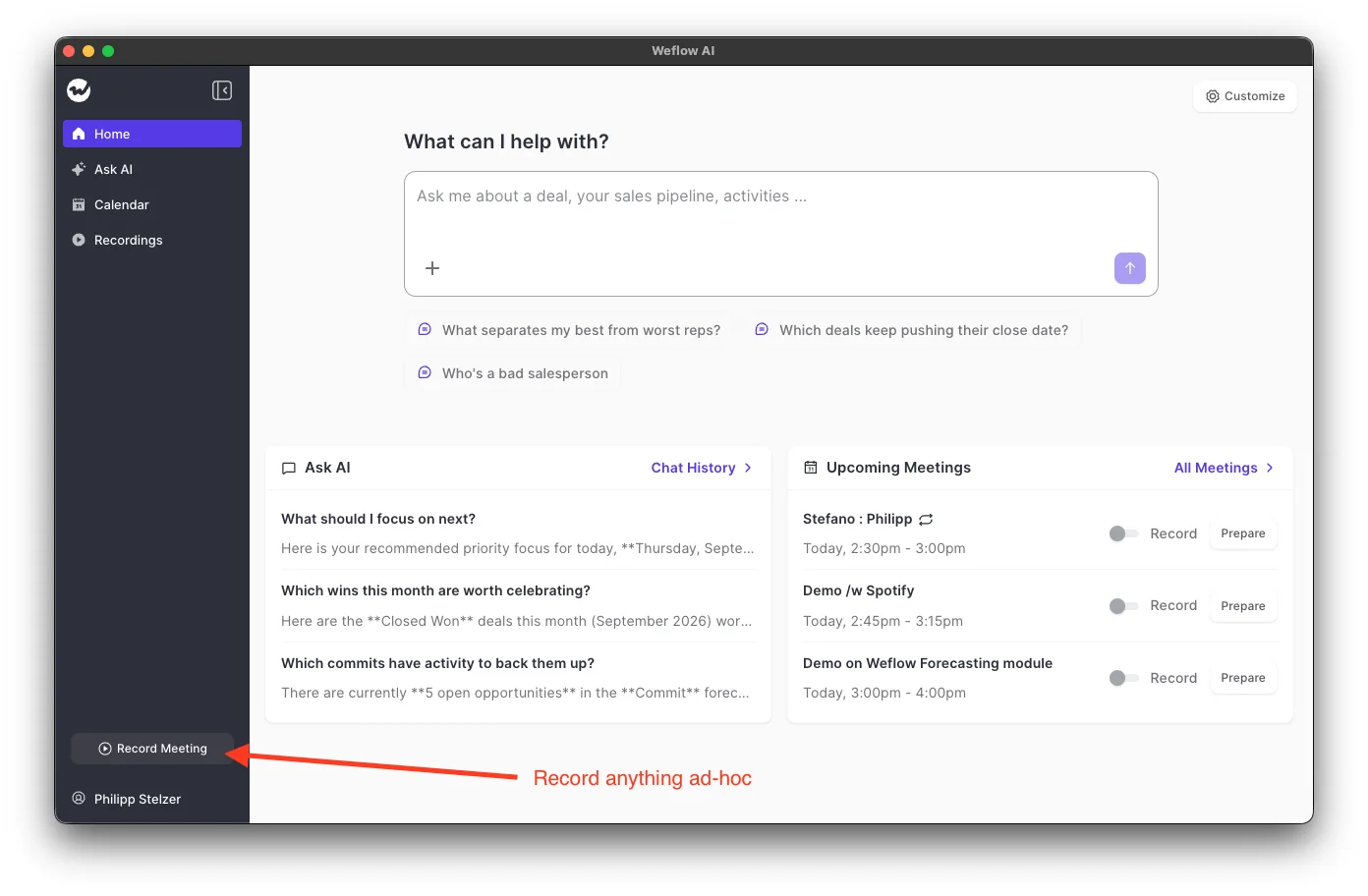
So the desktop app is useful when a meeting can't take a bot, but it's a poor way around a works council. If you want the council to say yes, narrow who and what gets recorded, and keep consent visible.
What to have ready before you build the pack
Your pack depends on inputs other people hold, so gather these first:
- Your Salesforce org's hosting region: Where your CRM sits shapes the residency answer in Step 6.
- A named owner on the HR or council side who will draft or negotiate the Betriebsvereinbarung with you.
- Your data protection officer or legal counsel, who will judge consent wording, retention periods and the processing basis.
- The teams and users in scope, plus a decision on whether existing customers are included or only prospects.
- The meeting platforms you use, and your Microsoft Teams tenant's policy on third-party bots.
- The vendor's DPA, sub-processor list and SOC 2 report, so legal can read them next to your procedures.
- Sales leadership's position on mandatory recording, agreed internally before the council hears about it.
How to build your works council documentation pack
By the end, you'll have two things: a pack that answers the council's questions, and a configured workspace where nobody is enrolled yet.
Each step covers one decision, shows where to set it in Weflow Conversation Intelligence, and ends with the line that goes into your pack.
Step 1: Decide who gets recorded and who only watches
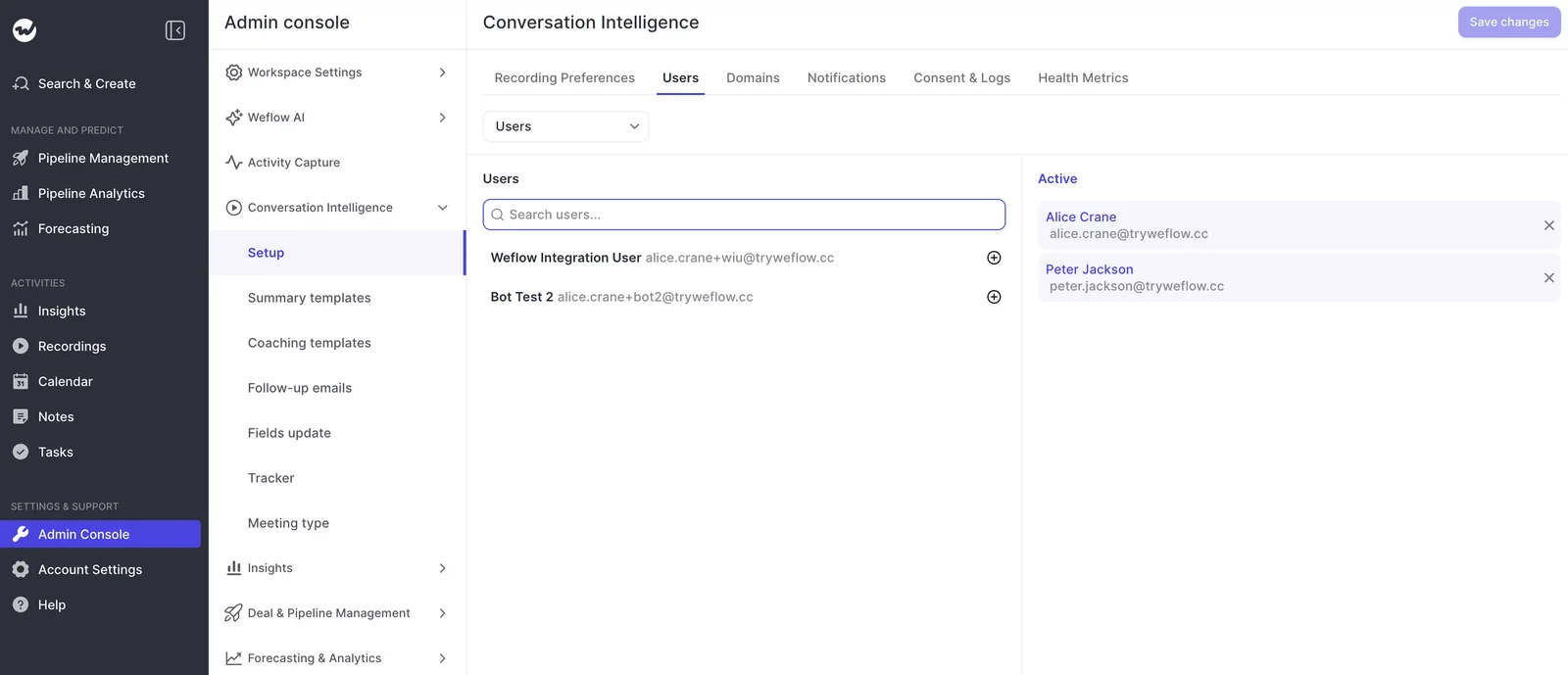
In Weflow, recording follows enrolment, not app access. Only the people you add to the Conversation Intelligence configuration get their meetings recorded, so everyone else, including the managers who review calls, can stay out of it entirely.
Define the scope with four decisions:
- Enrol only the reps in scope: You add users or whole teams on the Users tab, and anyone you don't add isn't recorded.
- Give leaders view access without enrolment: A sales leader with a view-only licence or admin rights can watch the team's recordings without being recorded themselves. View-only licenses are unlimited with Conversation Intelligence.
- Keep internal meetings out by default: Weflow records an internal meeting only when someone opts that meeting in explicitly.
- Exclude domains you won't record: Add customer domains to the notetaker exclusion list. That's also how you run a prospects-first scope: exclude existing customers and record new business only.
Pack line: "Only named, enrolled employees are recorded, and only in external meetings, except where a meeting is opted in individually. Managers review recordings without being recorded themselves. These customer domains are excluded: [list]."
Step 2: Set the consent mode and per-call notice in Weflow
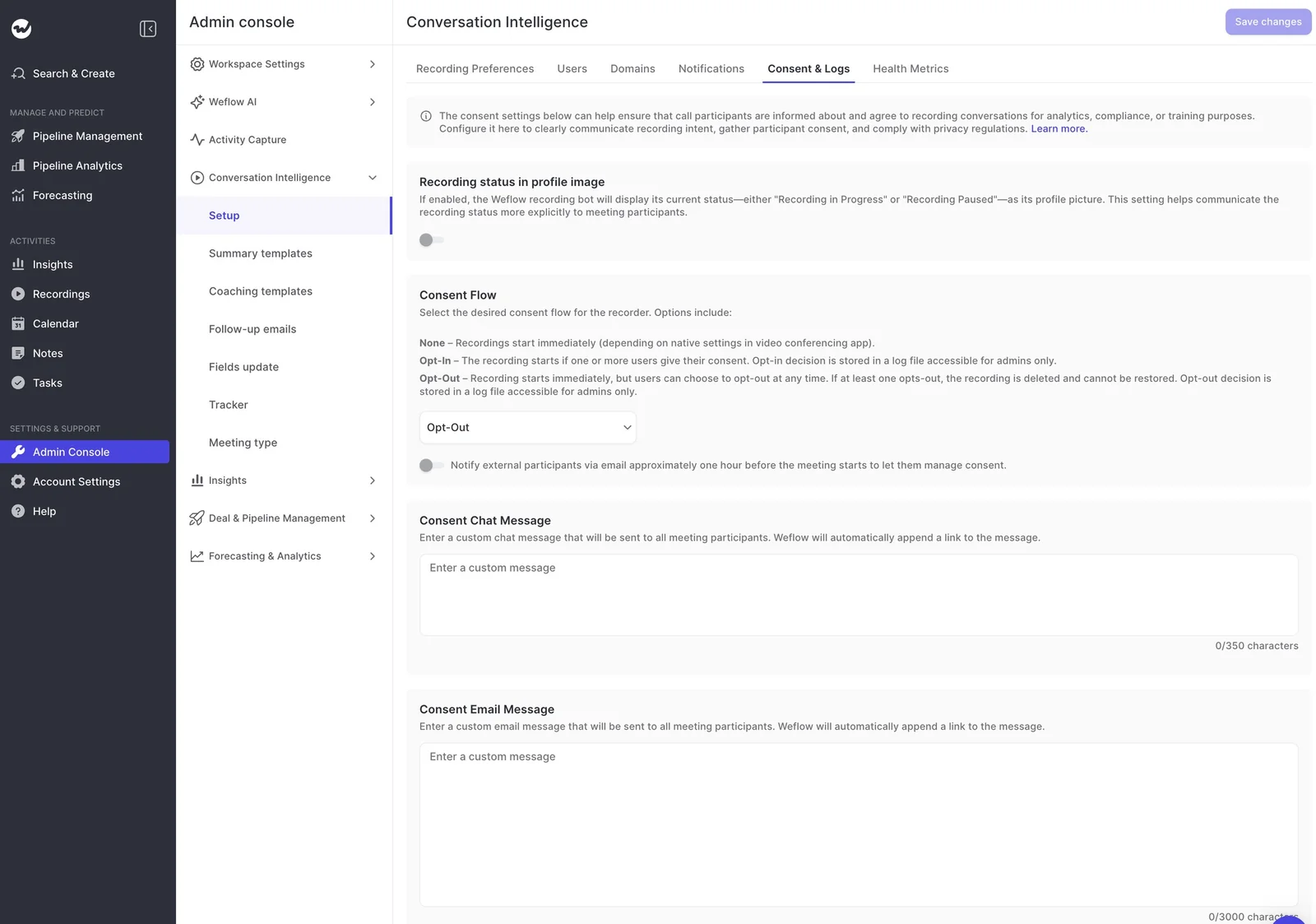
Consent has to run per session, through the product, not through a clause in the employment contract. In Weflow, you choose the mode and write the notices on the Consent & Logs tab.
| Setting | How it behaves | When it fits a German council |
|---|---|---|
| Opt-out | Recording starts immediately. If any participant opts out, the bot leaves and the recording, transcript and notes are deleted permanently. | The mode most of our customers run. It keeps coverage high, and the stop link plus deletion gives every participant a real veto. |
| Opt-in | Recording starts once one or more participants give consent. | The concession to offer if the council wants affirmative consent. Expect thinner coverage, especially in larger meetings. |
| None | Recording starts immediately, subject only to the video platform's own settings. | Don't take this one to a German council. |
| Pre-meeting email | A separate switch that emails external participants about an hour before the meeting, with the consent link. | Turn it on. Guests decide before the call, and your reps don't spend the first minutes asking permission. |
Write both notices in German. The chat message allows up to 350 characters and the email up to 3,000, and Weflow always appends the consent link, so a custom message can't leave it out. Each notice should cover:
- Who is recording, named as your company
- Why you record, and that the recording is processed and analyzed, not only stored
- Where the data lives and how long you keep it
- How to object, which is the appended link
Next, turn on "Recording status in profile image," so the notetaker's picture shows Recording in Progress or Recording Paused for the whole call.
This matters on Microsoft Teams, where chat settings can hide the notice from people who join late. Either way, the notetaker stays visible in the participant list.
While you're in setup, give the recorder a plain name such as "Notetaker." It draws fewer objections than an AI-styled name, because participants judge the name before they read any notice.
One thing to watch: consent to be recorded and consent to have the recording processed and analyzed are two separate legal questions.
Your notice text is where you describe the second one, but whether that's enough is your counsel's call, so give them the exact wording to judge.
Pack line: "Every recorded meeting carries its own notice, in German, in the meeting chat and by email beforehand. Any participant can stop the recording, and an objection deletes the recording, transcript and notes."
Step 3: Match retention and video deletion to your agreement
Your retention period should mirror the one your agreement sets, and the tool should enforce it. By default, Weflow keeps recordings for as long as you subscribe, but you can replace that with a deletion rule on a fixed period, such as every 30 days.
You also decide what goes and what stays:
| Deletion rule | What gets deleted | What remains, and what still works |
|---|---|---|
| Delete recordings, keep transcripts | Audio and video | The transcript stays, so summaries, field updates and Ask Weflow AI keep working from the text |
| Delete recordings and transcripts | Audio, video and transcript | Whatever was already written to Salesforce, such as summaries and fields, stays in your CRM |
| Delete transcripts, keep summaries | The transcript | The AI summaries remain. You lose the full text behind them. |
| Default | Nothing, until the contract ends | Everything stays available through the contract term and for 90 days after it |
Deleting audio and video while keeping transcripts is the closest real answer to the council's "no video" concern. Just be precise in the room: Weflow still records audio and video first, because the transcript is built from it.
What you're offering is a short life for the footage, not a tool that never records.
Pack line: "Audio and video are deleted automatically after [period]. Transcripts are kept for [period] / deleted after [period]. The rule is enforced in the tool, not by manual cleanup."
Step 4: Tie recording access to your Salesforce permissions
Access to a rep's calls follows the model you already run in Salesforce. That makes it easy to prove, because the council and IT already know how it works.
- Weflow inherits Salesforce permission sets, field-level security and role hierarchy, so a user sees in Weflow what they can see in Salesforce.
- Sign-in goes through Salesforce, using whatever SSO or two-factor your org enforces. Deactivating a user in Salesforce removes their Weflow access immediately.
- Only admins can delete a recording: Reps can't remove their own calls, so you can trace any missing recording to a named admin action.
One caveat: if your org restricts access through list views or Lightning component visibility rather than permissions, Weflow doesn't inherit that.
You can reproduce it with pipeline and account views that you create centrally and assign per team, then switch off users' ability to build their own views.
Pack line: "Access to recordings follows the existing Salesforce role hierarchy and permissions. Leavers lose access the moment their Salesforce user is deactivated. Only [named admins] can delete recordings."
Step 5: Name the rep scores and metrics your agreement governs
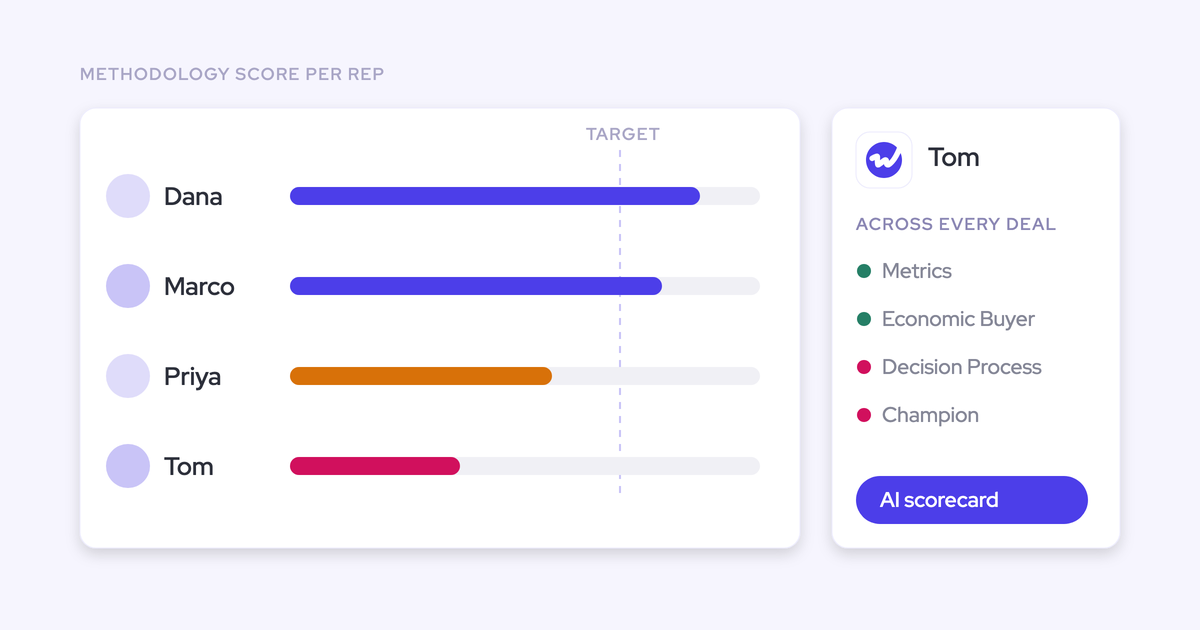
This is the council's real question, so list every rep-level output openly and let the agreement govern how each one is used. Hiding the metrics is the fastest way to lose the council's trust.
Here's what Weflow Conversation Intelligence produces:
| Data produced | Where a manager sees it | Clause type the agreement can set |
|---|---|---|
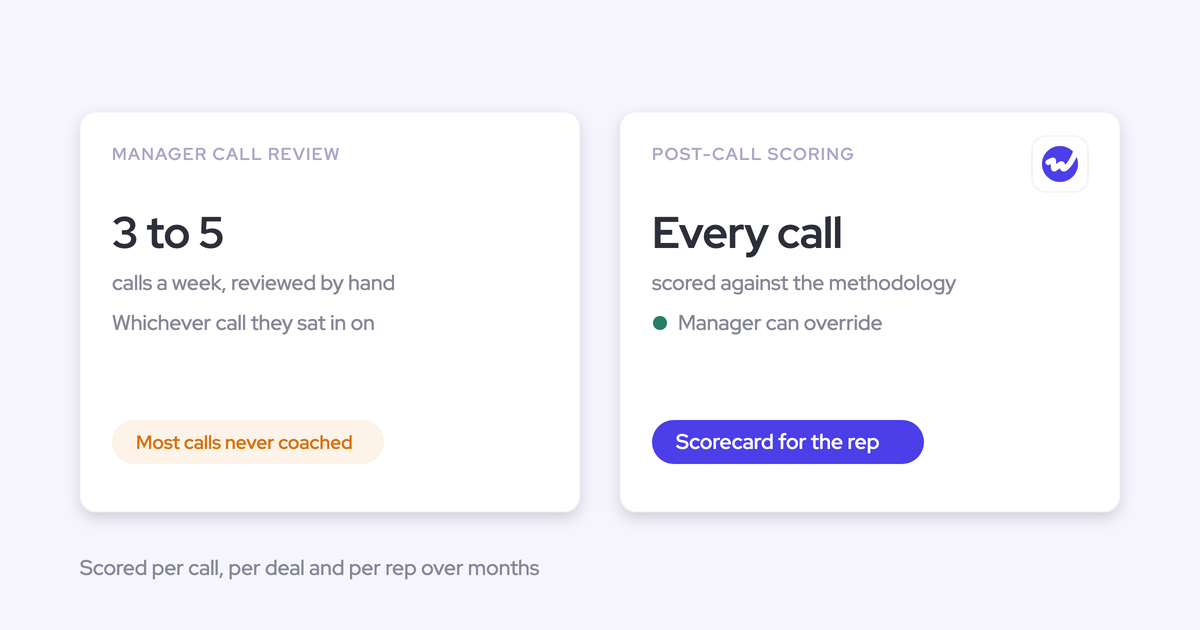
| Coaching scores, per recorded call, against your methodology or scorecard | The coaching tab on each recording | Purpose limit, for example coaching and enablement only, never performance evaluation |
| Interaction metrics, such as talk ratio and questions asked | The Insights tab, rolled up by rep, team and period | Aggregation rule, for example team-level reporting only in reviews |
| Tracker hits, such as competitor or pricing mentions | The Insights tab, by rep, team and period | Use limit, for example market and product insight, not individual assessment |
| Recording volume per rep, internal and external, with a weekly average | Recording coverage reporting | Rule on whether coverage figures can appear in any individual conversation |
These clause types are categories to discuss, not legal text. Your HR owner and counsel write the actual wording.
Be clear with the council about what's fixed: the product produces these outputs, and the agreement decides what they can be used for, by whom and in which meetings.
A council that sees the full list, plus a purpose limit you proposed yourself, has much less reason to assume you're hiding something.
Step 6: Show where recordings live and who processes them
Legal will only accept a location answer that covers both storage and processing. Weflow runs your instance in the region of your Salesforce org, with an override to keep data in the EU or the UK, so residency is a setting, not a migration project.
| Data type | Where it lives |
|---|---|
| CRM activity and fields (activities, contacts, Weflow fields synced to Salesforce) | In your own Salesforce org, separated from other customers by design |
| Recordings and video | Held by Weflow in AWS in your chosen region (Frankfurt, New York or Sydney) and streamed back to you. Video isn't stored in Salesforce. |
| Transcripts and Weflow-native fields | Weflow's AWS environment in the same region, scoped to your tenant and encrypted at rest and in transit |
| Temporary processing data | The same tenant isolation, and deleted after processing |
Weflow is SOC 2 Type II certified, and these segregation controls sit inside the audited scope.
Pack line: "Recordings and transcripts are stored in AWS Frankfurt by a German provider, in a tenant isolated from other customers. CRM data stays in our own Salesforce org. Video is held by the provider and is not copied into Salesforce."
Step 7: Put the model-training answer in writing for every sub-processor
This is the question that now stops deals before a pilot, and a spoken "we don't train on your data" isn't enough. Get the answer in writing, and make sure it covers the whole chain, not only the vendor.
Collect these commitments from any vendor you evaluate:
- A written statement that customer data is never used to train AI models, covering every sub-processor, including any LLM provider.
- Zero Data Retention for AI processing, so the AI provider doesn't keep prompts or outputs.
- A DPA (AVV) with EU Standard Contractual Clauses.
- A public sub-processor list with the jurisdiction of each entry.
- Advance notice of sub-processor changes, with the right to object before a change takes effect.
- A breach notification commitment with a stated deadline.
Weflow commits to all of these in writing: Zero Data Retention, no model training on customer data, a DPA with EU SCCs, a public sub-processor list with advance change notice, and breach notification within 48 hours.
Step 8: Write down the procedures legal will run on day one
This is the question that now stops deals before a pilot, and a spoken "we don't train on your data" isn't enough. Get the answer in writing, and make sure it covers the whole chain, not only the vendor.
Write one short procedure per request type.
Deletion request
- Your DPO receives the request and identifies the meetings involved.
- A named Weflow admin deletes the recordings in the Weflow library. Only admins can delete, so the action is traceable.
- Your Salesforce admin removes any related activity and fields through your normal Salesforce process, since that data lives in your org.
- If a participant opted out during a meeting, the recording, transcript and notes were already deleted at that moment. Nothing further is needed for that call.
Consent evidence request
- A Weflow admin opens the Consent & Logs tab. Only admins can access the consent log.
- The admin downloads the history as CSV. It shows each meeting's outcome and the reason, such as an opt-out, the notetaker not being admitted, or an error.
- The DPO files the export with the request. Note that the log shows what happened in each meeting, not who removed the notetaker.

Retention audit
- The pack names the retention rule from Step 3: the period, and which artifacts it deletes.
- Once a quarter, the accountable admin checks that no recordings older than the period remain in the library. You can filter by period.
- The admin records the result for the DPO and the council contact.
Finally, name one accountable person for each procedure. Keep the record-versus-process consent question with counsel, using the notice wording from Step 2 as the evidence.
Step 9: Configure everything now and enrol nobody until approval
Approval to trial a recording tool can take months, but you don't have to spend that time waiting. Since nothing gets recorded until users are enrolled, you can finish the technical work while the council deliberates.
- Build: Connect the Salesforce integration and the calendar provider, set the recorder name, consent mode, notices, retention rule and domain exclusions. Leave the Users tab empty.
- Verify: Check that no meetings are being joined, and that access matches your Salesforce permissions.
- Show: Demo the configured, inert workspace to the council contact. Seeing the consent screen and the empty user list beats a slide that describes them.
- Enroll on approval: Add the agreed users or teams the day the agreement is signed.
Mistakes that send a recording proposal back to the council
Most rejections come down to framing and sequencing, not the tool. Here are the mistakes we see stall DACH projects most often:
- Relying on a consent line in the employment contract: The council expects consent per session. Configure a notice and objection route for every recorded meeting instead.
- Handing over the certification pack as the answer: SOC 2 and a DPA are necessary, but they don't answer how employees are evaluated. Lead with the Step 5 metric list and the Step 8 procedures.
- Promising sales leadership mandatory recording before the council has a position: Leaders want full coverage so the data isn't missing the weakest calls. Agree internally on what you'll ask for, then let the agreement settle it.
- Running a rep pilot first: A pilot with reps who've never been recorded becomes a referendum on being tracked. Make the adoption decision as leadership and take the configured scope to the council.
- Going botless to dodge the question: You lose the consent record and gain an exposure legal may like even less.
- Hiding the per-rep metrics: The council will find them. Name them first and propose the limits yourself.
- Leaving existing-customer scope undecided: Recording customers feels riskier than recording prospects. Decide it before the meeting, even if the answer is "prospects first."
What to re-check in your pack if you're replacing Gong
If you're moving off Gong, re-check the points where Gong's defaults differ from what your pack now promises, since these are often exactly what the council will question.
| What to re-check in your pack | Why it matters to the council |
|---|---|
| Gong stores new customers' data in the US by default | A European company that never actively chose EU storage at onboarding may have its recordings in the US |
| EU storage in Gong still means processing in the US, Israel and Ireland | The council and legal ask who processes the data, not only where it's stored |
| Moving Gong data between regions is a paid relocation | A residency fix becomes a budget line in the middle of the contract |
| Gong keeps calls, transcripts and statistics for up to three years by default | A three-year archive of employee conversations is hard to defend next to a short retention clause |
| Calls saved in the Gong library are kept indefinitely | Your retention answer has two parts, and only one of them appears in the policy |
| Private Gong scorecards still appear in API and CSV exports | An assessment marked private can still reach anyone who runs an export |
| Ad hoc Gong recordings bypass the exclude lists | An excluded domain or HR conversation gets recorded the moment someone adds the assistant manually |
To be fair, Gong's consent profiles set rules per team and per region, which is more granular than our per-team configuration, and its certification set (SOC 2 Type II, ISO 27001, 27017, 27018 and 27701, CSA STAR) is strong.
Weflow imports your existing Gong recordings through the API or from exported files, and re-links them to Salesforce records. HolidayCheck moved from Gong to Weflow looking for an EU-made, GDPR-safe alternative:
"Weflow ticked all the boxes: GDPR-compliant, tightly integrated with Salesforce, simple to use - and without the heavy price tag of U.S. vendors."
— Bastian Stosic, Head of Media Sales Operations at HolidayCheck
Where Weflow Conversation Intelligence won't fit your works council
Weflow isn't the right fit in a few cases, and it's worth knowing them before you build a pack around it:
- Your council accepts only "never record": Weflow isn't a transcript-only tool, since notes, fields and summaries are built from recorded audio. A transcript-only tool, or not recording at all, will serve you better.
- You need botless recording with product-run consent: The Weflow desktop app drops the consent flow entirely, and consent then rests on the rep.
- You need consent to vary by the customer's region: Weflow sets consent per team configuration, not per account region. Teams selling into several jurisdictions need separate configurations.
- Your procurement requires ISO 27001 today: Weflow holds SOC 2 Type II, not ISO 27001.
- Your council won't accept any per-rep scoring: Weflow produces coaching scores and interaction metrics per rep. Your agreement has to govern their use.
Where Weflow does fit is with a council that will approve recording with limits. You get a German, Frankfurt-hosted platform whose consent, retention, scope and access controls are settings you can write straight into a Betriebsvereinbarung.
Walk through the product yourself, no call required.
FAQ: Works council approval for call recording
Has Weflow been through a German works council before?
Not that we can show you yet. We have no works council approvals on file to share, and we don't provide a template Betriebsvereinbarung.
Your HR owner, council and counsel draft the agreement, and this guide gives them the pack structure, the configuration behind each answer, and our written commitments.
Can we keep audio and transcripts but delete the video?
No. Weflow's deletion rules remove audio and video together, not video alone. The closest option to "no video" is deleting recordings on a set period while keeping transcripts, but the meeting is still recorded first.
Can recording be mandatory for reps?
Recording follows enrolment, which an admin sets centrally, and only admins can delete a recording.
But participant consent still applies on every call, and the host can remove the notetaker, so whether recording is mandatory for employees is a question for your agreement.
Can the host stop recording partway through a call?
Yes. The host can remove the notetaker mid-call, and Weflow keeps everything recorded up to that point. If any participant opts out instead, the recording, transcript and notes for the whole call are deleted.
What if our Microsoft Teams tenant blocks third-party notetakers?
Then the notetaker can't join. The Weflow desktop app can record Teams meetings from the rep's machine instead, but without the product's consent flow, so the rep has to inform participants.
Check your tenant policy with IT before you choose a path, since it changes your consent answer.
Can we start with prospects only, and what does that cost?
Yes, by adding existing customers' domains to the notetaker exclusion list (see Step 1). Seats follow enrolled users, and leaders who only watch can use unlimited view-only licenses.
Weflow Conversation Intelligence is $39 per user per month, billed annually, with a 10-user minimum, and Weflow Revenue AI Foundation bundles it with Weflow Activity & Contact Capture at $49 per user per month.
What happens to our existing Gong recordings?
Weflow imports them through Gong's API or from exported files and re-links them to the right Salesforce records. Just include them in your Step 3 retention rule, so the old archive doesn't outlive what your new agreement promises.