What Gong and Clari Recording Exclusion Lists Actually Stop (and What They Don't)
Learn what Gong and Clari recording exclusion lists block, what bypasses them, and how to test.



You configured the exclude list, told legal and security it was handled, and moved on. That sentence is the one worth checking, because the exclude list is not an absolute control. It's a filter sitting on one of several paths a conversation can take into the system.
Gong's own help documentation describes what happens on the other paths, and it isn't what most admins assume. Clari Copilot's release notes describe a different version of the same structural problem. Neither failure throws an error, which is exactly why nobody catches it until a reviewer asks.
Below is the map: every documented gap, traced to the vendors' own docs, a routine you can run this week to test your own setup, and then an honest look at where recording control can live structurally, when the data lands inside the Salesforce org you already own and govern instead of in a vendor cloud with its own rules.
Does the Gong exclude list actually stop a recording?
Partly. Gong's exclude lists stop scheduled recordings and email imports that match a rule, and they stop nothing that reaches Gong by another route.
That isn't a bug. It's what a blocklist can do. A recording pipeline has several entry points, and a list can only police the path it sits on:
- Scheduled meetings the recorder auto-joins from the calendar
- Ad hoc recordings a person starts: adding the Gong assistant to the participants, forwarding the invite to it, or hitting record on the homepage or in the mobile app
- Outbound email and meeting invitations sent from the connected mailbox
- Inbound email arriving from outside
The list governs the first path and both email paths. It does not govern the ad hoc path at all, and on inbound mail it can only act on what it can see. Everything below follows from that.
The six documented gaps in Gong's exclusion lists
Every row here comes from Gong's own help documentation, which is the point. This is not a review-site complaint or a competitor's characterization, it's the behavior Gong publishes, which is what makes it usable in a security review.
| The gap | What admins assume | What Gong documents |
|---|---|---|
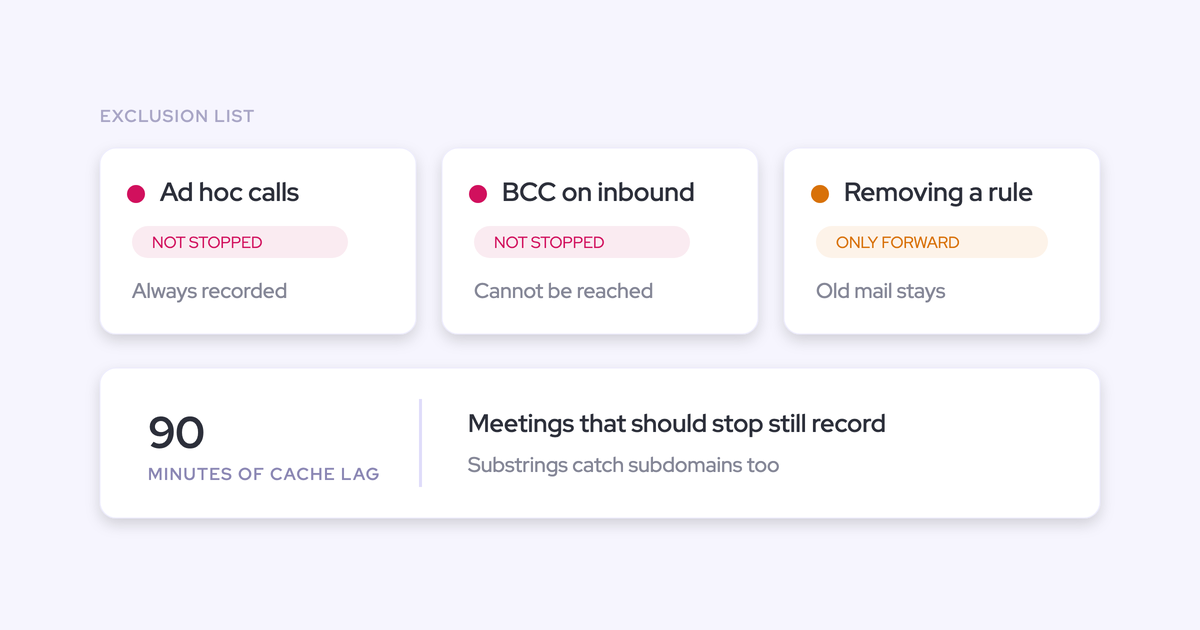
| Ad hoc recording | An excluded domain can't be recorded by anyone | Ad hoc recordings are always recorded and bypass the exclude lists entirely |
| Inbound BCC | An excluded address anywhere on the email keeps it out | On incoming mail Gong can't see a BCC'd address, so the email imports |
| Removing an entry | Correcting a wrong entry repairs the record | Existing email is never reprocessed, so the blocked period stays permanently absent |
| Adding an entry | One action removes the conversation | Matching emails already imported are deleted; meetings already recorded stay in place |
| Matching | The rule matches what you typed | Matching is substring-based: a domain catches its subdomains, and HR also catches "three" |
| Timing | The change applies now | The cache refresh takes up to 90 minutes, and meetings that should be recorded may be missed |
Ad hoc and manual recordings bypass the exclude list entirely
This is the dangerous one, because any employee with a seat can trigger it and nothing anywhere flags that a rule was overridden.
Gong documents a call as ad hoc when someone:
- Adds the Gong assistant to the meeting participants
- Forwards the calendar invite to the assistant
- Starts a recording from the Gong homepage
- Records from the mobile recorder
Any of those records the conversation regardless of what the exclude lists say. So the counsel domain you blocked is blocked on the scheduled path and open on the manual one, and the moment a well-meaning rep adds the assistant to a call with your legal team, that conversation is in Gong.
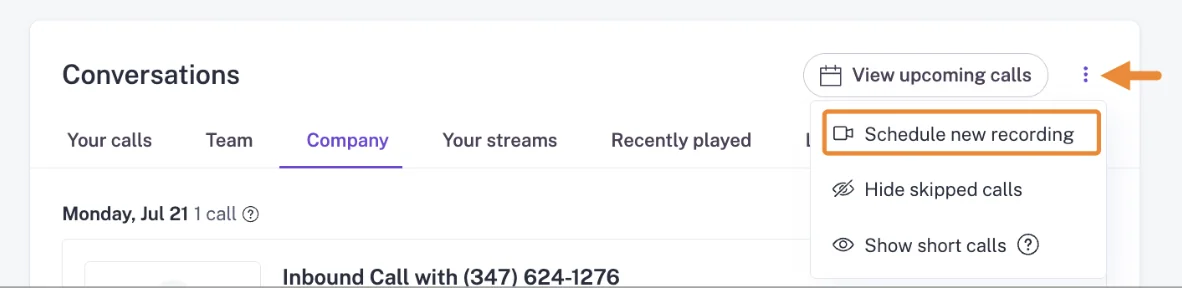
Here's Gong's own Conversations screen, where the manual scheduling path lives one click into an overflow menu:
A BCC'd excluded address on inbound email still imports
This gap can't be configured away. Gong cannot enforce an exclude rule against a BCC recipient on incoming mail, because the information never reaches Gong in the first place.
| Direction | What the exclusion does |
|---|---|
| Outgoing email and meeting invitations | A BCC'd excluded address does prevent import |
| Incoming email | Gong has no way to see the BCC'd address, so the mail imports unless another rule matches |
The exclusion holds in the direction your company controls and fails in the direction it doesn't. If your assurance to legal covered "any email involving that address," it was accurate for half the traffic.
Removing an exclusion never restores the emails it blocked
A wrong entry creates a permanent hole, not a temporary one. Gong evaluates new mail against the updated rules and never reprocesses existing mail, so messages blocked under the old rule stay absent forever.
Web conferences behave differently: cached data is deleted and existing meetings are reprocessed, on a delay of up to an hour and a half. Two data types, one action, two outcomes again.
The practical consequence: if someone added an over-broad entry six months ago and nobody noticed, that email record is gone and correcting the rule today does nothing for it.
Adding an exclusion deletes emails but keeps recorded meetings
The asymmetry sits inside a single admin action, which is why it catches people.
| Data type | What happens when you add the exclusion |
|---|---|
| Emails already imported | Matching emails are deleted |
| Meetings already recorded or in progress | Left in place; each call has to be deleted separately |
| Future scheduled meetings | Prevented |
Read that in the situation that usually prompts it. An admin excludes a domain for a legal or privacy reason, the paper trail of emails disappears, and the recordings of those conversations stay exactly where they were. That's the opposite of what the person who asked for the exclusion expects.
Substring matching over-excludes: domains catch subdomains, "HR" catches "three"
Gong's exclude lists match on substrings by default, which is the permissive behavior, and it fails silently.
- A domain entry also excludes every subdomain under it
- A word entered without quotation marks matches that sequence inside other words. Gong's own docs use the example: entering HR also excludes any meeting with "three" in the title
- Quotation marks force whole-word matching, but you have to know to use them
Nothing errors. The loss shows up as calls that were never recorded, which is the hardest kind of gap to notice, because you're looking for the absence of something. If your recording coverage dipped in a quarter nobody can explain, a hastily written exclude entry is a candidate.
Rule changes take up to 90 minutes to apply
After a change to Gong's web conference exclude rules, the cache refresh takes up to an hour and a half, and Gong documents that meetings which should be recorded may be missed during that window.
Gong's own recommended workaround is to add the bot to the meeting by hand.
So an exclusion change is a scheduled operation, not a reactive one. If someone comes to you at 9:40 asking you to block a domain before a 10:00 call, changing the rule is not the thing that protects that call.
Where Clari Copilot's recording controls slip the same way
Clari Copilot has the same class of gap, arriving from a different direction. Its controls anchor to the meeting organizer and to the rep's own behavior, so a sensitive conversation can be recorded despite the policy, and a covered conversation can silently go unrecorded.
That pattern repeating across two unrelated products is the tell. It's structural to how recording exclusion is built, not a quirk of one vendor.
Recording follows the meeting organizer, not the meeting
Clari Copilot evaluated its blocklist against the meeting organizer only, until a change dated August 2026. And on Zoom, the Copilot bot joins when the organizer joins and leaves when the organizer leaves, which Clari attributes to Zoom's stricter third-party access requirements.
Both behaviors key off one participant rather than the conversation. Two consequences follow, and neither produces an error:
- A rep's own sensitive call, organized by someone whose blocklist doesn't apply, gets recorded
- A meeting that continues after the organizer drops off simply stops being recorded, and a call where the organizer joins late starts recording late
You find out by opening the call library and seeing a recording that shouldn't exist, or a 12-minute file for a 50-minute conversation.
Mobile and ad hoc recordings rest on the rep confirming consent
The Clari Copilot iOS app records in-person meetings, either from a scheduled meeting or as an ad hoc recording with no meeting attached at all.
The consent step is the rep confirming that all participants have consented. An audible chime plays, and that chime is the only signal the room gets. Attribution to an account and opportunity happens afterwards, before transcription, speaker diarization and CRM sync.
Read that as a control and it's a self-declaration sitting inside the recording path. The admin holds nothing here. This is precisely the question a works council asks, and "the rep ticks a box" is a hard answer to defend.
How to stress-test your exclude list before the security review does
None of these failures raise an alert. The only way to know whether your assurance holds is to go and try to break it, in this order:
- Test the ad hoc path first. Take a meeting with an excluded domain, add the assistant manually, and see whether the recording appears. It will. Now you know your exposure and can write policy around it instead of relying on the list.
- Audit inbound mail from excluded domains. Pull imported emails involving addresses you believe are blocked and check where the excluded party sat on the header. Anything that arrived inbound with a BCC is a documented gap, not a misconfiguration.
- Re-read every entry as a substring. For each one, write down what else it catches: subdomains, word fragments, a three-letter entry hiding inside longer words. Add quotation marks where you meant whole words.
- Check what each added exclusion left behind. For every domain you've excluded for a legal or privacy reason, search the recorded calls for it. The emails went, the recordings stayed, and they need deleting call by call.
- Time rule changes around the calendar. Make changes when the calendar is quiet, allow the 90-minute window, and for anything urgent add the bot manually rather than trusting the rule to take effect.
- Rewrite the assurance you gave. Replace "that domain is excluded" with what's actually true: scheduled recording and email import are blocked for these domains; manual recordings started by any employee are not; inbound mail with a BCC is not.
That last step is the one that matters in the review. A reviewer can live with a partial control that's accurately described. They cannot live with a control described as absolute that turns out not to be.
How Weflow governs recording control inside Salesforce
Now the structural point, and it's a different question from the one above. The durable question isn't whose blocklist has fewer edge cases. It's whether access, control and deletion run through a permission model and a system of record your company owns, or through a separate vendor cloud with its own access model and its own retention clocks.
Weflow is the Revenue AI Orchestration platform for sales, customer success, and RevOps teams, built for Salesforce teams. Its answer to recording control is architectural rather than a better list, and the limits of that answer are named further down, before the comparison table.
Recording access follows the Salesforce hierarchy security already approved
Who can see a Weflow recording is decided by the Salesforce role hierarchy by default: managers see their reports' recordings, and users see the meetings they were invited to. Admins can override that with a custom Weflow hierarchy, grant access through Teams, or issue a View-Only license to someone who isn't a Salesforce user.
Sign-in works the same way. The only way into Weflow is through the customer's Salesforce authentication, using OAuth and whatever SSO the org already enforces, so deactivating a user in Salesforce removes their Weflow access immediately. There's no second identity to deprovision.
Ask Weflow AI then applies its own guardrails on top of Salesforce permissions and will withhold information a user could reach directly in Salesforce, which is the right direction of travel for a review that's worried about a chat interface surfacing reachable data at scale.
Compare that with the kind of surprise a separate access model produces. Gong's scorecard visibility settings govern the call page only, and Gong states plainly that private scorecards, including those restricted to the scorer alone, still appear in API and CSV exports.
Conversation data lands in Salesforce objects you own and delete
Weflow writes conversation data into two native Salesforce objects: a recording object holding the summary and the full transcript, and an indexing object. The transcript is a Salesforce record, so it's permissioned, reportable and deletable under the rules your admins already run.
That collapses the two-clock problem. There's no split where emails delete retroactively and meetings don't, and no library that quietly escapes the retention policy, because retention is governed where the record lives.
We use the native objects in Salesforce. If you ever stop using Weflow, the data persists. It is your data. That is very, very important in everything we do.
One honest exception: video recordings are held by Weflow and streamed back, because Salesforce is a poor place to store large files. Transcripts and summaries, the parts a privacy request usually concerns, are in your org.
Recording scope is set per team and follows the org chart
Weflow configures Conversation Intelligence recording by team rather than user by user, and a team added that way updates dynamically as its membership changes. Teams can still be populated by hand where a dynamic definition doesn't fit.
This is the inverse of exclusion-by-list. Instead of patching who isn't in scope, you define who is, and the definition follows the org chart instead of decaying every time someone joins or moves.

Data residency follows your Salesforce region, with certifications scoped honestly
Weflow is a German company hosted in Frankfurt, and a customer instance spins up in the region where that customer's Salesforce sits. It can be overridden to keep data in the EU or the UK. Residency is a configuration decision, not a paid migration project.
Set that against Gong: new customers choose between a US and an EU data centre at the point of becoming a customer, the default is the US, and choosing EU storage doesn't confine processing to the EU.
For the consent conversation specifically, Weflow's flows are configurable: a Microsoft Teams pre-meeting email with an opt-in and opt-out link, and an in-call chat message with a removal option that triggers immediate permanent deletion of all recording data for that call. That's the artifact a works council wants to see, rather than a policy statement.
The trust claims, each with its scope:
- SOC 2 Type II: held.
- GDPR and CCPA: compliant, with EU infrastructure for European customers.
- HIPAA: compliant, with a BAA available.
- Zero Data Retention for AI processing: customer conversation data is never used to train models.
- ISO 27001: in progress, target December 2026. A commitment with a date, not a certificate we hold.
- FedRAMP: not certified. US government contractors with a FedRAMP mandate are not a fit.
What Weflow does not document: exclusion granularity, private recordings, read-only admin
Three things you should hear from us rather than find out in week three of an evaluation:
- Exclusion granularity. Weflow's own documentation does not establish a domain and keyword exclusion mechanism more granular than Gong's. There's a Domains and Consent configuration alongside Recording Preferences and Users, and scope is governed by team configuration, but if a bulletproof block list is your core requirement, test the exclusion behavior directly before you sign anything.
- Private recordings. Individual Weflow recordings cannot be made private. Access is shaped by hierarchy and teams, not by locking a single call.
- No read-only admin role. Seeing everything in the workspace requires full admin, which also carries the ability to change the configuration. If your control model depends on an auditor who can see without editing, that's a gap today.
Gong vs Clari vs Weflow: where recording control actually lives
The three products differ less on recording features than on where the control sits: a vendor-side list with documented side doors, organizer-anchored rules, or your own Salesforce permission model and objects.
| Dimension | Gong | Clari Copilot | Weflow |
|---|---|---|---|
| What decides whether a meeting is recorded | Scheduled calendar meetings, filtered by exclude lists on domain, address and subject keyword, matched as substrings by default | Blocklist evaluated against the meeting organizer only until an August 2026 change; on Zoom the bot joins and leaves with the organizer | Recording configured per team, updating as team membership changes; access follows the Salesforce role hierarchy |
| Ad hoc and in-person recording | Always recorded. Adding the assistant, forwarding the invite, or recording from the homepage or mobile bypasses the exclude lists entirely | The iOS app records scheduled or ad hoc in-person meetings once the rep confirms participants consented; an audible chime is the only signal to the room | Mobile Copilot records in-person meetings and recordings can be uploaded and linked to Salesforce records. We don't document an exclusion rule that overrides a manual recording, so verify this directly |
| What an admin exclusion does to data already captured | Deletes matching emails already imported; leaves meetings already recorded in place, to be deleted call by call. Removing an entry never restores blocked email | Not established in the Clari documentation we've reviewed. Ask for it in writing | Transcripts and summaries are Salesforce records, so deletion runs under your org's rules, one set of them, for every conversation artifact |
| How long recordings are kept | Three years by default for calls and derived artifacts. Calls saved to the library are exempt and kept indefinitely | Recordings live in Clari Copilot's own call library; retention behavior not established in the documentation we've reviewed | Governed by the retention rules on the Salesforce objects in your org |
| Where the data lives, and what happens if you leave | Recordings, transcripts and intelligence sit in Gong's own cloud; access ends with the subscription | Conversation data sits in Clari Copilot's platform | Summaries and transcripts are native Salesforce records in your org and persist if the subscription ends; video is held by Weflow and streamed back |
| EU storage vs EU processing | US or EU storage, chosen at onboarding, defaulting to US. Processing happens in the US, Israel and Ireland, with sub-processors in the US, UK and EMEA, covered by SCCs and DPF | Not established in the documentation we've reviewed; ask for storage and processing separately | Instance spins up in the region of your Salesforce and can be pinned to the EU or UK; German company, Frankfurt infrastructure |
| Certification posture | Broader than ours today: SOC 2 Type II with a HIPAA mapping, ISO 27001, 27017, 27018 and 27701, CSA STAR, EU-US Data Privacy Framework with the UK extension, Swiss-US framework, PCI DSS handling in transit | Verify directly with Clari | SOC 2 Type II, GDPR, CCPA, HIPAA with BAA, Zero Data Retention for AI. ISO 27001 in progress, target December 2026. Not FedRAMP |
Two things that table should make obvious. Gong's formal compliance posture is genuinely stronger than ours right now, and any comparison that implies otherwise is checkable and wrong. And Gong's certification set has nothing to do with whether its exclude list stops an ad hoc recording, which is the thing you actually came here about.
Fix the exclude list, or move where control lives?
Nobody replaces a recording platform because of an exclude list, and you shouldn't either. The gaps above are documented behavior, which means they're manageable once you stop treating the list as absolute.
The structural argument only earns a decision when your requirements are structural. Here's the honest split:
- Harden Gong or Clari if the tool is otherwise working, adoption is fine, and the real problem is that the assurance you gave was broader than the control. Run the stress test, write policy around the ad hoc path, fix the substring entries, and restate to legal what "excluded" actually covers. That solves it, this week, for free.
- Rethink where control lives if your requirements are the ones a list can't satisfy: proof for a works council that stands on a permission model security already approved, EU residency without a paid migration, deletion that runs under one set of rules, and ownership of the conversation record when the contract ends.
One thing we hear constantly from teams in exactly this position, and it's usually the thing that limits a rollout:
If that's your situation, the honest advice is to test the control yourself rather than take anyone's word for it, ours included.
Walk through the product yourself, no call required.
Frequently asked questions on Gong, Clari and recording exclusion
How long does Gong keep recordings, and what escapes retention?
Gong keeps recorded calls and all related artifacts, including transcripts and statistics, for up to three years by default. But calls stored in the Gong library are excluded from that policy and preserved indefinitely.
Any team member can move calls into the library, from the call page, from search, or in bulk, and the flow makes no mention of retention. So the honest answer to a retention question is two answers: three years for calls, and forever for anything anyone saved. Only the first appears in the policy.
Does choosing Gong's EU data centre keep processing in the EU?
No. Storage and processing are separate questions. New Gong customers choose between US and EU storage at onboarding, with the US as the default, and Gong processes data in the United States, Israel and Ireland, engaging sub-processors in the United States, the UK and EMEA. Those transfers are covered by standard contractual clauses in Gong's DPA and its Data Privacy Framework certification.
That distinction is the one that matters in a data protection assessment, and it's the one most often missed by teams who selected the EU data centre and assumed the question was closed.
Does Weflow have its own exclude or block list?
Weflow's Conversation Intelligence configuration has a Domains and Consent tab alongside Recording Preferences and Users, and recording scope is governed by team configuration rather than by patching exceptions.
What our own documentation does not establish is exclusion matching more granular than Gong's. If a precise block list is your hard requirement rather than a nice-to-have, put it in the evaluation and test the behavior directly instead of taking this article's word for it.
What happens to conversation data if we stop using Weflow?
It stays. Summaries and transcripts are written into native Salesforce objects in your own org, so they remain as Salesforce records after the subscription ends, permissioned and reportable like any other record. Video files are the exception: Weflow holds those and streams them back.
Can we migrate our Gong or Clari recordings to Weflow?
Yes. Weflow imports recordings and transcripts from the platform you're leaving through that provider's API, and maps each recording to the right Salesforce account, opportunity or contact. All we need is an API key; where the association isn't retrievable through the API, we run our own lookup to match records.
It takes about one to two weeks depending on volume, at no extra cost. Where no API key exists, a raw file export can work but our team has to evaluate it first.
Is Weflow's AI metered on top of the seat price?
No. Weflow is seat-based with AI bundled in: recordings, transcripts, AI templates and Ask Weflow AI prompts carry no usage caps or meter, governed by a fair use policy no customer has reached. Bundles run from $49 per user per month for Revenue AI Foundation to $79 for Revenue AI Enterprise, billed annually, with pricing published on the site.
Gong meters AI usage in credits on top of per-seat pricing. Each paid core seat contributes 2,000 credits a year to a company-wide pool that resets each contract year, and the cost is set by the volume of data processed, not the question asked: a call over ten minutes costs one credit, a shorter call half a credit, an email a tenth. The same brief is free generated by hand in the Gong interface and costs credits through the API or MCP server, so the bill rises specifically as you wire Gong into the rest of your stack.