Weflow MCP privacy guide for Claude: Summaries, transcripts, and Salesforce permissions
Learn what Claude can read through Weflow MCP: summaries, transcripts, and Salesforce permissions.


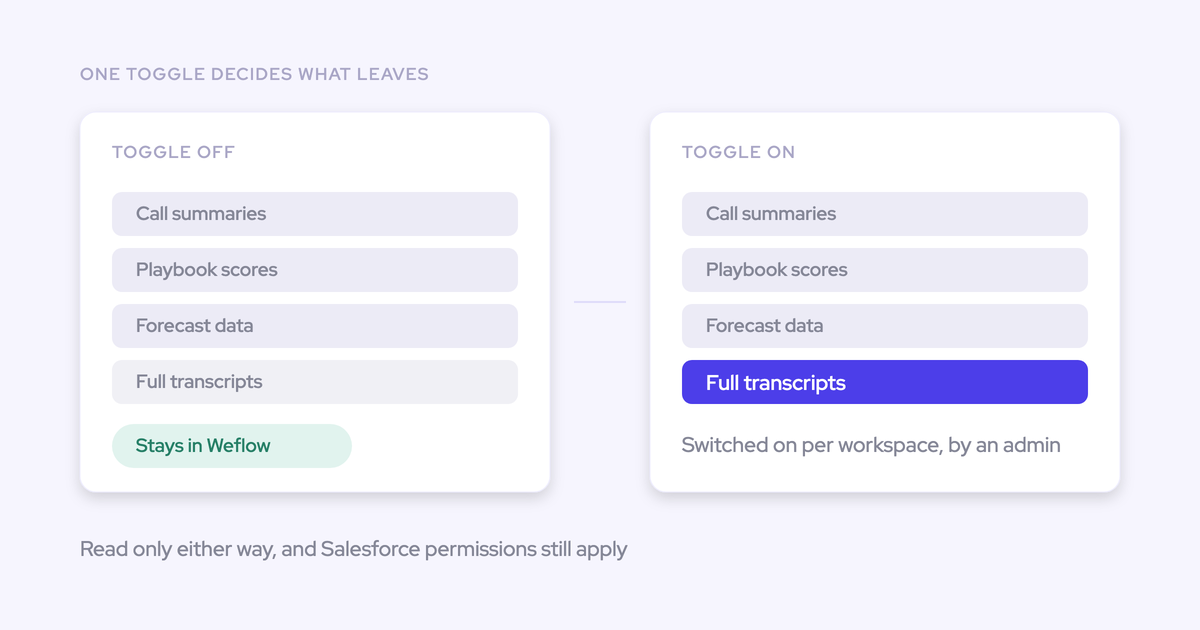

Disabling transcript access in Weflow MCP blocks full transcripts through that connector. It doesn't stop summaries from reaching Claude, and it doesn't close a separate Salesforce MCP route to the same conversation. Your security review needs to cover both paths.
If your team already works in Claude, the useful question is what context employees need for AI-assisted deal reviews. A manager checking next steps may need a summary. Someone analyzing the customer's exact language needs more. Start by separating those use cases, identifying who needs each one, and deciding what information your company allows into its corporate Claude environment.
Weflow is the Revenue AI Orchestration platform for sales, customer success, and RevOps teams. Built for Salesforce teams, Weflow provides an official, read-only Model Context Protocol (MCP) connector for accessing revenue context from Claude.
We recommend starting with transcript access off. Enable deeper access only after you can demonstrate why summaries aren't enough and test the permissions across every connected route.
What can Claude read through Weflow MCP?
Claude can query Weflow AI playbooks, call summaries, forecast calls, and revenue metrics through Weflow MCP. Full call transcripts require a separate workspace setting.
The transcript toggle controls access to the verbatim source. It doesn't remove sensitive information from summaries or other derived outputs.
| Data class | Transcript access off | Transcript access on | Source system | Privacy consideration |
|---|---|---|---|---|
| AI call summaries | Available within permitted scope | Available within permitted scope | Weflow; summaries also sync to Salesforce | Summaries can contain customer names, commercial terms, and sensitive discussion points. |
| Full call transcripts | Unavailable through Weflow MCP | Available within permitted scope | Weflow; transcripts also sync to the Salesforce recording object | The separate Salesforce copy needs its own access review. |
| AI playbook output | Available; the transcript toggle isn't a playbook exclusion control | Available | Weflow; playbooks can also update Salesforce fields | Derived answers can carry sensitive information from their source material. |
| Forecast calls, submissions, and targets | Available within connector scope | Available within connector scope | Weflow application | Forecast commitments and targets remain confidential business data. |
| Weflow-computed revenue metrics and underlying opportunity IDs | Available within permitted scope | Available within permitted scope | Weflow calculations using revenue data and forecast configuration | Aggregates reveal performance; opportunity IDs connect those figures to individual deals. |
| Tracker hits | Weflow-held context; validate returned content with transcripts off | Weflow-held context; validate returned content | Weflow application | Don't assume whether a result contains an excerpt without inspecting it. |
Weflow's metrics include weighted and unweighted pipeline, closed-won amounts and counts, win rate, average deal size, sales cycle length, coverage, and gap to forecast. The connector returns underlying opportunity IDs alongside those numbers, so you can investigate the deals behind an aggregate.
For approval, inspect actual connector responses from representative queries. A list of accessible data classes doesn't establish every field or text fragment that Claude receives.
Weflow MCP, Salesforce MCP, API, or Ask AI?
Use Weflow MCP when employees need Weflow-specific forecast or conversation context inside Claude. If Salesforce already holds everything your use case needs, keep Weflow MCP disabled.
Weflow forecast calls, submissions, targets, and tracker hits don't all live in Salesforce. That's the reason to add a second connector, rather than assuming two connections automatically produce better answers.
| Route | Available context | Interface and action model | Permission boundary | Owner and implementation effort | Best fit |
|---|---|---|---|---|---|
| Weflow MCP | Supported Weflow conversation, playbook, and forecast data | Claude; read-only | Weflow workspace settings and applicable Salesforce-derived access | Weflow and Claude admins; configure the official connector and test access | Employees need Weflow context in their existing assistant. |
| Salesforce MCP | Salesforce-resident records, including accessible Weflow recording data | Claude; review the enabled tools because Salesforce MCP can support actions | Salesforce authorization and connector configuration | Salesforce and Claude admins; review the existing connection | The required context already lives in Salesforce. |
| Both connectors | Salesforce records plus Weflow-held context | Claude; action scope differs by connector | Two independent access routes | All three admins; separate tests plus a combined test | A defined question requires both datasets. |
| Weflow public API | Supported API data, including conversation data | Your application or agent framework; verify required endpoints and actions | API authorization and your implementation | Engineering and Security; own integration code, access handling, and maintenance | A custom workflow needs programmatic access beyond an assistant connection. |
| Ask Weflow AI | Context from recordings, CRM records, activities, and pipeline views | Weflow's built-in assistant | Weflow access controls | Weflow admin; no external Claude connector to maintain | Revenue users want contextual analysis where they already review deals. |
| Leave Weflow disconnected from Claude | No direct Weflow MCP access; Salesforce may still expose synced data | Existing approved interfaces | Existing system controls | RevOps and Security; check alternate data paths | No approved use case justifies another connection. |
Ask Weflow AI loads sources from the recording, record, or pipeline view you're working in. Claude gives employees their chosen interface and access to other approved connectors.
Don't assume feature parity between the assistants. Test the questions employees actually ask, including whether they can inspect the evidence behind an answer.
How do Weflow MCP admin controls work?
Weflow separates connector availability, full transcript access, and connected-user visibility. Review each control independently.
Weflow workspace and transcript settings
A Weflow admin enables MCP per workspace and decides separately whether connected assistants can retrieve full transcripts.
| Setting | Scope and effect |
|---|---|
| Enable MCP Connector | Turns the Weflow MCP endpoint on for the workspace. |
| Allow transcript access | Controls full transcript retrieval through Weflow MCP. With the setting off, assistants can receive AI summaries without receiving the verbatim transcript. |
The documented transcript setting is workspace-wide. Don't plan a mixed-access rollout around separate team, user, account, or call-level transcript toggles without confirming that capability first.
Connected-user oversight in Weflow
Weflow's admin console shows connected users, their email addresses, and when they connected. That lets you check adoption against your approved access list.
- Match connected email addresses to approved employees.
- Investigate unexpected connections.
- Review connection dates after onboarding and offboarding changes.
| Visible in the console | Verify separately |
|---|---|
| Who connected and when | Whether an admin can revoke one MCP connection without disabling the workspace connector |
| Connected users' email addresses | Which records each user queried and what data the connector returned |
| Workspace connector configuration | How quickly disablement affects active sessions and credentials |
A connected-user list isn't a query audit trail. If Security requires record-level evidence, settle that requirement before launch.
Which Salesforce controls carry into Weflow MCP?
Weflow applies Salesforce permission sets, field-level security, and role hierarchy. Salesforce list-view restrictions and Lightning component visibility don't carry over as data-access controls.
For an MCP deployment, turn that permission model into negative access tests. Confirm that the assistant can't retrieve restricted information, rather than checking only that an authorized user gets an answer.
Salesforce permissions Weflow can enforce
Review object, record, field, and hierarchy access separately. A successful test at one layer doesn't prove the others.
Use the following boundaries as acceptance criteria for your deployment, including Weflow-held data that doesn't map directly to a Salesforce field.
| Control layer | Salesforce owner | Test user | Required access boundary | Validation method |
|---|---|---|---|---|
| Object access through profiles and permission sets | Salesforce admin | User without access to the relevant object | No restricted object data in connector results | Request a known record by ID and inspect the response. |
| Record access | Salesforce admin | User outside the approved record scope | No restricted record content | Compare an accessible deal with a deliberately restricted deal. |
| Field-level security | Salesforce admin | User who can read a record but not a sensitive field | No restricted field value | Ask for that field directly, then ask for a broader deal summary. |
| Role hierarchy | Salesforce admin with RevOps | Rep and manager with different access | Results follow their approved scopes | Compare deal lists, opportunity IDs, and forecast metrics. |
Test sensitive values in derived content too. Hiding a Salesforce field doesn't establish that the same information never appears in a call summary or playbook answer.
Salesforce UI restrictions Weflow cannot inherit
Hiding a record in the Salesforce interface doesn't remove the user's underlying authorization to read it.
| Authorization control | UI-only restriction that doesn't replace it |
|---|---|
| Object access through profiles and permission sets | Removing an object from a familiar navigation path |
| Record-access configuration | Limiting which list views users can open |
| Field-level security | Hiding a Lightning component that displays the field |
Weflow supports centrally configured views, team assignments, and restrictions on creating views. Those controls help govern Weflow's interface, but don't assume they restrict MCP retrieval.
- Express confidentiality requirements in underlying data permissions.
- Identify restrictions that currently depend on list views or Lightning components.
- Test those records directly through MCP before approving access.
Can Salesforce MCP still expose Weflow transcripts?
Yes. If Salesforce MCP can read Weflow's recording object and transcript content, Claude has a separate retrieval path even when Weflow MCP transcript access is off.
Weflow recording object access in Salesforce
Weflow's managed Salesforce recording object holds the call summary and full transcript. That gives customers a persistent, usable record, and makes the object's permissions part of the Claude security review.
Don't treat recording-object access as routine package setup. Review what each connected identity can retrieve:
- Profiles: Who has read access to the recording object?
- Permission sets: Which assignments add access beyond the profile?
- Records: Which recorded conversations can each identity reach?
- Fields: Can the identity read summaries, transcripts, or both?
- Salesforce connector: Which identity and enabled tools govern retrieval?
Test with the identity the Salesforce connector actually uses. An admin's Salesforce screen doesn't establish what an employee's Claude connection can read.
Transcript controls across both MCP routes
Test Weflow MCP and Salesforce MCP separately, then test Claude with both connected. A prompt asking Claude to avoid transcripts isn't an access control.
| Route | Control owner | Data source | Transcript boundary | Test query | Expected result for a transcript-off pilot |
|---|---|---|---|---|---|
| Weflow MCP | Weflow admin | Weflow conversation data | Allow transcript access off, plus applicable permissions | Retrieve the full transcript for the approved test recording. | No full transcript through Weflow MCP; permitted summary retrieval still works. |
| Salesforce MCP | Salesforce and Claude admins | Weflow recording object in Salesforce | Salesforce access and enabled connector tools | Retrieve transcript content from the corresponding Salesforce recording record. | No transcript content if the pilot excludes transcripts across both routes. |
For a transcript-approved deployment, repeat the tests with authorized and restricted users. Approval should expand access only within the scope Security accepted.
Who controls retention, training, and consent?
Weflow controls its own processing. Your Claude administrator governs the receiving environment, and your company owns the legal basis for sending customer information there.
| Responsibility | Owner | What approval must establish |
|---|---|---|
| Weflow processing and storage | Weflow, reviewed by Security | Applicable processing commitments, storage location, retention, and deletion procedures |
| Salesforce copy | Salesforce admin and data owner | Access, retention, and deletion of synced recording data |
| Data received by Claude | Customer's Claude admin | Retention, model use, user access, connector governance, and data location |
| Lawful downstream use | Customer's Legal and privacy teams | Notices, legal basis, contractual obligations, and request handling |
Weflow processing and data residency controls
Weflow uses Zero Data Retention for AI processing and doesn't use customer data to train AI models. Those commitments don't mean Weflow deletes the customer records that its products store.
| Weflow control | Evidence to review | Boundary |
|---|---|---|
| SOC 2 Type II and GDPR compliance | Applicable report, processing agreement, and operating procedures | These don't approve your downstream Claude configuration. |
| Zero Data Retention for AI processing; no training on customer data | Processing terms and model-provider commitments | Distinguish temporary AI processing from persistent application storage. |
| Workspace-scoped logical segregation outside Salesforce | Tenant-isolation controls and their audited scope | Review Weflow-held data separately from records in your Salesforce org. |
| Regional storage configuration | Written confirmation of your workspace's storage and processing locations | Don't infer Claude's location from Weflow's or Salesforce's location. |
Request the configured region for each relevant data class, including recordings. A general residency statement isn't enough to explain every copy and processing step.
Claude account retention and training settings
Your Claude administrator must approve how the corporate Claude environment handles data returned by Weflow MCP.
- Retention: Confirm handling of chats, connector results, deletion, and any applicable logs.
- Model use: Verify the current account terms and settings for training and other data use.
- Identity: Confirm which employees can access the approved environment.
- Connector governance: Establish who can add connectors and how administrators remove access.
- Data location: Review applicable processing and residency commitments.
Don't copy settings from another company's Claude plan. Record what applies to your account and contract.
Recording consent for downstream Claude analysis
Your counsel should review downstream Claude analysis separately from the original recording notice. Recording permission alone doesn't settle every later processing purpose.
These are questions for customer counsel, not legal advice:
- Do participant notices cover the intended external AI analysis?
- What legal basis applies to the processing and each affected jurisdiction?
- Do customer contracts restrict external processors or secondary uses?
- Do employee policies cover analysis of internal participants?
- How will the company handle access, deletion, and litigation requests across Weflow, Salesforce, and Claude?
What must Security and Legal approve before launch?
Approve a tested configuration, with named owners and shutdown procedures. Compliance documents support that decision; they don't replace an access test.
Use this register for sign-off. Leave a control pending until the owner attaches evidence or the approver explicitly accepts the gap.
| Control | System owner | Evidence required | Test required | Approver | Status |
|---|---|---|---|---|---|
| Identity | Salesforce and Claude admins | Approved users and authentication configuration | Connect an approved user; test offboarding. | IT / Security | Pending |
| Data scope | Weflow admin / RevOps | Approved data classes and representative responses | Inspect summaries, playbooks, metrics, and IDs. | Data owner | Pending |
| Transcript paths | Weflow and Salesforce admins | Both route configurations | Test transcript denial or approved retrieval independently. | Security | Pending |
| Auditability | Weflow and Claude admins | Available logs, scope, access, and retention | Trace a test query as far as available evidence allows. | Security | Pending |
| Retention and training | System owners / Legal | Terms, settings, and deletion procedures for each copy | Walk through a sample deletion request. | Legal / Privacy | Pending |
| Residency | System owners | Confirmed storage and processing locations | Reconcile the data-flow inventory with configuration. | Security / Legal | Pending |
| Plans and limits | Weflow and Claude admins | Eligibility, commercial terms, and technical limits | Run representative workload queries. | Procurement / IT | Pending |
| Historical access | Weflow admin | Confirmed historical availability and scope | Query an approved older recording. | Data owner | Pending |
| Consent and purpose | Legal / Privacy | Notices, legal basis, and contractual review | Trace a sample recording to the applicable notice and policy. | Legal | Pending |
| Individual revocation | Identity and connector admins | Confirmed removal procedure | Remove test-user access and retry retrieval. | Security / IT | Pending |
| Workspace disablement | Weflow and Claude admins | Shutdown procedure and retained-data responsibilities | Disable MCP and retry from an existing connection. | Security | Pending |
How to deploy Weflow MCP with least privilege
Start with an approved pilot, transcript access off, and a separate review of Salesforce MCP. Broaden access only after the pilot passes both useful-query and denied-access tests.
- Define the minimum use case. RevOps names the questions, users, and required data classes.
- Acceptance: Identify a question that needs Weflow-held context.
- Stop condition: If Salesforce alone answers it, leave Weflow MCP disabled.
- Clear prerequisites. The Weflow and Claude admins confirm plan eligibility, custom-connector availability, and the approved connection procedure.
- Acceptance: Security accepts the data flow and Claude handling.
- Stop condition: Don't connect production data while required approvals remain open.
- Prepare representative identities and records. The Salesforce admin selects an authorized user, a restricted user, and test records with different permissions.
- Acceptance: Document expected object, record, field, and hierarchy boundaries.
- Stop condition: Replace UI-only hiding with enforceable permissions before continuing.
- Enable the narrow configuration. The Weflow admin turns on Enable MCP Connector and leaves Allow transcript access off.
- Acceptance: Record the settings and approved pilot scope.
- Rollback: Turn the connector off if you can't govern who connects.
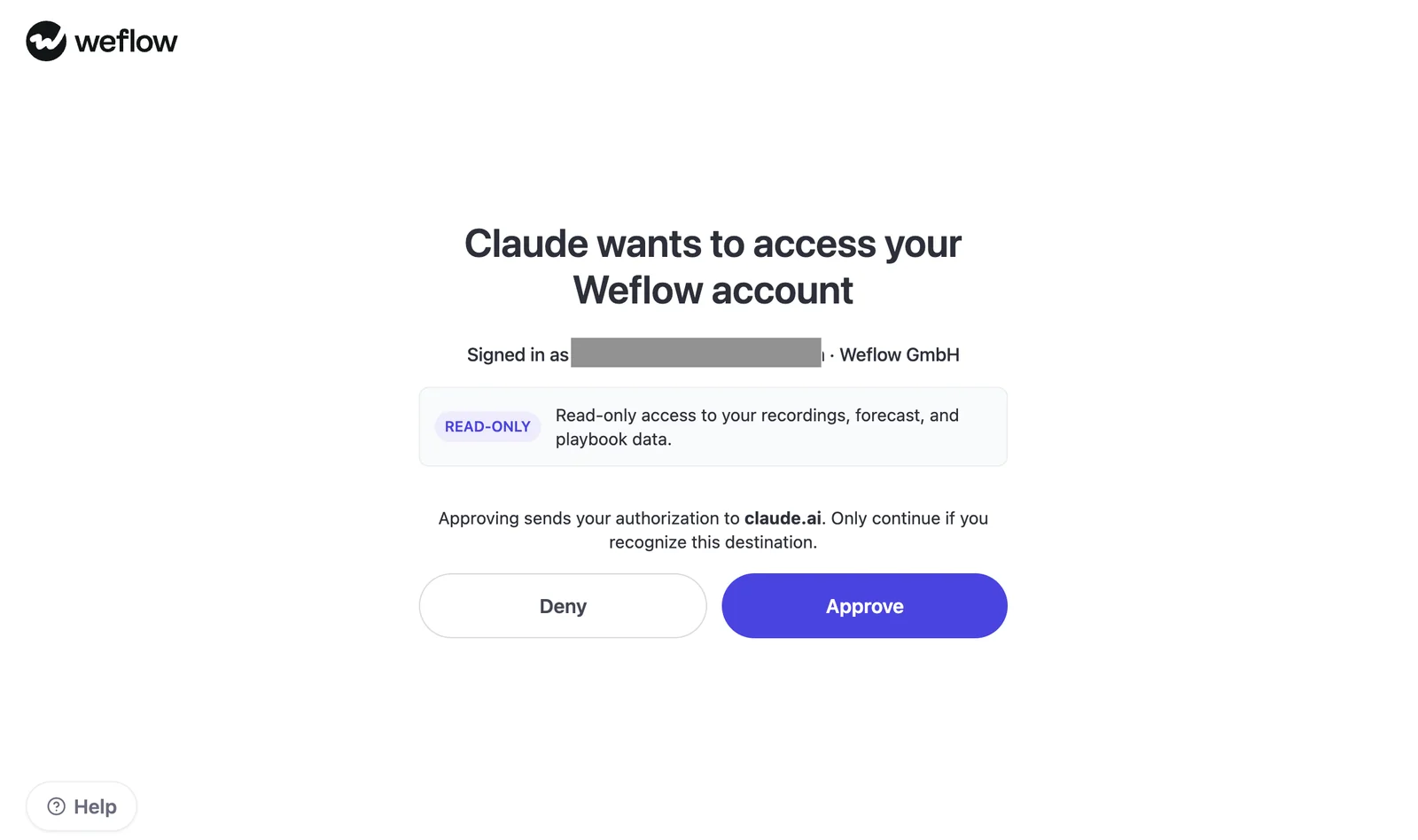
- Connect the approved Claude account. Add the Weflow-provided URL as a custom connector and review the authorization screen.
- Acceptance: Confirm the intended user and read-only scope for recordings, forecast, and playbook data.
- Rollback: Deny authorization if the account or scope doesn't match approval.
Weflow's OAuth consent screen identifies Claude as the requesting assistant and labels the requested access as read-only.
- Test Weflow MCP alone. RevOps and Security query an approved summary and a forecast metric, then request a full transcript and restricted record.
- Acceptance: Useful queries work; prohibited data doesn't appear in connector responses.
- Rollback: Disable MCP if returned content exceeds approval.
- Test Salesforce MCP separately, then both together. The Salesforce admin checks the recording-object route using the actual connected identity.
- Acceptance: Neither route supplies transcripts when the pilot prohibits them.
- Rollback: Remove the offending access path and retest before resuming.
- Rehearse removal and shutdown. IT tests the confirmed individual-revocation procedure and workspace disablement from an existing connection.
- Acceptance: Record what stops, when it stops, and what remains in Claude.
- Stop condition: Hold rollout if incident-response behavior remains unresolved.
- Decide whether full transcripts earn access. The data owner documents a use case that summaries can't satisfy, then seeks separate approval.
- Acceptance: Security accepts workspace-wide transcript configuration and both route boundaries.
- Rollback: Return to transcript-off and address any data already received under the approved deletion procedure.
The rollout gate is concrete: useful answers, successful denial tests, named operational owners, and a tested shutdown. A good demo answer alone doesn't pass.
Weflow MCP and Claude FAQs
Weflow MCP's read-only boundary and workspace transcript setting are documented. Confirm plan eligibility, limits, historical access, and session behavior for your current deployment rather than inferring them from other Weflow features.
Can Claude write data through Weflow MCP?
No. Weflow MCP is read-only, so Claude can't use it to update Weflow or Salesforce records. Other connected routes may support writes and need separate approval.
Does transcript-off block quotations and citations?
Weflow MCP transcript-off blocks retrieval of the full verbatim transcript through that endpoint. It doesn't guarantee that summaries or playbook outputs contain no quoted language, or that Claude produces no citations.
Validate the returned content, including excerpts and tracker results, against your policy.
Can transcript access vary by user or team?
The documented Weflow MCP transcript toggle applies to the workspace. Salesforce-derived permissions still matter, but they aren't a substitute for a separate per-team transcript setting. Confirm finer-grained controls before designing a mixed-access rollout.
Can admins revoke one connected Claude user?
Weflow shows individual connected users, but that visibility doesn't establish a per-connection revocation control. Salesforce user deactivation removes Weflow application access; verify its effect on active MCP connections and the procedure for removing only a Claude connection.
Does Weflow MCP provide query-level audit logs?
The documented Weflow admin view lists connected users, email addresses, and connection dates. It doesn't establish query-level logging. Confirm available query, record-access, and response evidence with Weflow and your Claude administrator before making auditability a launch commitment.
Are historical Weflow transcripts available immediately?
Immediate historical transcript availability through Weflow MCP needs confirmation. Don't infer the answer from email backfill or recording-migration capabilities. Test an approved older recording and confirm any storage, permission, or indexing prerequisites.
Which Claude and Weflow plans support MCP?
Confirm Weflow MCP entitlement and Claude custom-connector eligibility separately.
| Subscription | What to confirm |
|---|---|
| Weflow | MCP eligibility for your plan and connecting users. Ask Weflow AI inclusion doesn't establish MCP entitlement. |
| Claude | Current plan support for custom connectors and your organization's administrator requirements. |
Recheck eligibility at deployment and expansion. Connector availability and subscription requirements can change.
Are Weflow MCP requests metered or rate-limited?
Weflow's included AI usage doesn't establish MCP-specific billing or technical limits. Verify each constraint independently.
| Constraint | Owner | Documented status for this guide | Confirmation source |
|---|---|---|---|
| MCP entitlement and usage charges | Weflow | Requires confirmation | Current Weflow commercial terms |
| Request rate and concurrency limits | Weflow | Requires confirmation | Current connector specifications |
| Result size, pagination, and truncation | Weflow | Requires confirmation | Connector specifications and workload tests |
| Claude usage allowances | Customer's Claude admin | Account-dependent; verify separately | Current Claude account terms |
What happens when Weflow MCP is disabled?
The workspace setting turns the Weflow MCP endpoint off. Confirm how disablement affects active connections, credentials, and re-enablement. Don't treat it as deletion of information Claude already received or as shutdown of Salesforce MCP.
- Retry a new query from an existing Claude connection after disablement.
- Check retained chats and results against the approved Claude retention procedure.
- Test the Salesforce route independently and confirm what reconnecting requires.
Keep transcript access off until the business need and both retrieval paths pass review. See how Weflow captures activity, updates Salesforce fields from calls, and rolls up your forecast. Book a 30-minute demo.