
Why Einstein Activity Capture Maps Activity to the Account, Not the Opportunity (and How Weflow Fixes It)
Learn why Einstein Activity Capture maps to Accounts, not Opportunities, and when Weflow fits better


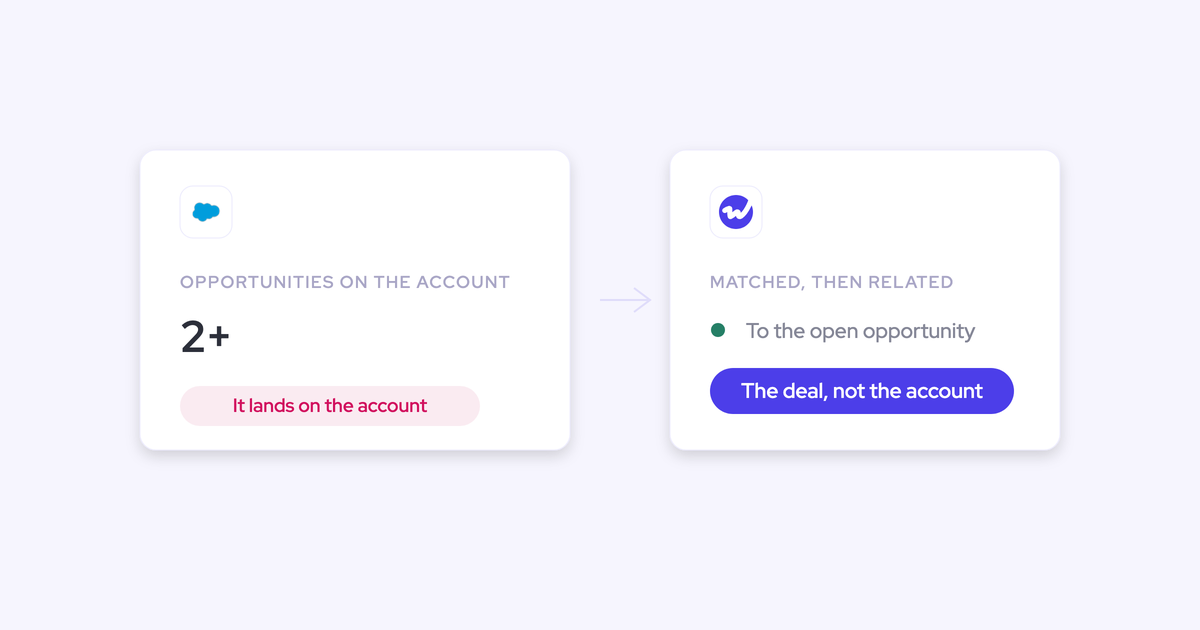

Einstein Activity Capture decides which opportunity an email or meeting belongs to by following opportunity contact roles. Where an account carries exactly one open opportunity, that link resolves cleanly. Where it carries three, new business plus a renewal plus an upsell, there is no one-to-one link to follow, so the activity falls back to the account.
That isn't a misconfiguration in your org. It's the mechanism.
And it lands hardest in the accounts with the most going on. The account timeline looks busy, every individual deal under it looks dead, and the reporting you switched capture on to get, activity at the opportunity level, is the one thing the setup structurally can't produce. Which means the two questions every deal review opens with, how many meetings have we had on this deal and when did we last touch it, have no answer in Salesforce.
Below is the precise failure mechanism, the first-principles reason no server-side matcher can fix it with a better algorithm, and an even comparison of how Weflow's hybrid model resolves it. Including where Weflow falls short, and where Einstein Activity Capture is genuinely the right call.
Why Einstein Activity Capture logs activity to the account
Three things stack up here, and they compound. One dependency that most orgs don't maintain, one structural collapse that happens in the normal case, and one missing interface that makes both permanent.
Mapping runs on opportunity contact roles
Einstein Activity Capture attributes activity to an opportunity through the opportunity contact role. That's the object linking a contact to a deal, and it's one of the most frequently unpopulated objects in Salesforce.
So your opportunity-level activity data is a function of contact-role hygiene, not of the capture layer. In most orgs that's a lottery.
This is also why the diagnosis so often goes wrong. Capture volumes look healthy in aggregate, deal timelines are empty, and everyone blames the tool. Before you blame anything, run a report on contact-role coverage across your open pipeline. If it's thin, no capture tool on the market will produce deal-level activity from it automatically.
More than one open opportunity breaks the link
Now assume perfect contact-role hygiene. The mapping still collapses the moment an account carries several open opportunities, because the same contacts sit on more than one of them.
It works more or less if you have one opportunity per account. Most teams don't have one opportunity per account.
Companies routinely run new business, existing business, upsell and renewal as separate record types under one parent account. Teams selling multiple product lines or by region hit it even harder. So the ambiguous case is the common case, not a caveat buried in the docs.
What that looks like in practice:
- The account shows constant engagement, while each deal under it shows nothing.
- You can't answer how many meetings a specific deal has had, or whether the buyer is replying, which is exactly what a deal review asks.
- Meeting counts get inflated at the same time, because Einstein Activity Capture creates one calendar Event per attendee, so a five-person meeting reports as five.
- Standard fields you built reports on stay stale. Because the activity isn't recognized as a native Salesforce activity, Last Activity Date doesn't move.
"Einstein Activity Capture activities don't update the standard "Last Activity Date" field because they are stored externally and aren't recognized as native Salesforce activities. This was a huge issue for our reports."
— Irina Smirnova, Senior Sales Operations Manager, Blacklane
No rep-facing UI means wrong mappings stay wrong
Einstein Activity Capture runs as pure background logging with no user interface. Matching is fully automatic, and configuration is admin-only, through Flow.
Here's the part most teams get wrong: the Salesforce Outlook and Gmail add-in is a separate service that is not connected to Einstein Activity Capture. They're routinely assumed to be one product. Installing the add-in gives a rep manual logging; Einstein carries on matching in the background with its own logic, unaffected.
So there's nowhere for a rep to see which record an activity was mapped to, no way to correct it, and no path for a correction to feed back into the matcher. The wrong match isn't just made. It's permanent.
Falling back to the add-in doesn't rescue it either. That flow is built for outgoing email, an incoming reply can only be logged after the fact by opening the thread, and logging a single email to a custom object can take four clicks. Where logging depends on a rep clicking, only around a quarter to a half of activities ever reach the CRM. Replies are the first thing to go, and replies are the strongest evidence a real conversation is happening.
It's also becoming less optional. Salesforce is sunsetting its native Outlook add-in and pushing those customers onto Einstein Activity Capture, which turns this from a background annoyance into a forced evaluation.
"Einstein Activity Capture is the clunkiest part of Salesforce and I hate it so much."
Why no server-side algorithm can pick the right opportunity
This is the part worth arguing carefully, because it changes what you should be shopping for.
Take one contact who holds a role on two open opportunities at the same account: a renewal and an expansion. An email arrives from that person. Which deal does it belong to?
The contact roles say both. The email domain says both. The account says both. Nothing in the data distinguishes them, because the information that would, what the conversation is actually about and which deal the rep is progressing, exists in the rep's head at the moment they send the message. A server-side matcher is reading signals that were never able to carry that answer.
That's not an Einstein bug. It's a ceiling on the fully automatic model, and you can see the same ceiling in every tool that sits on that side of the line:
- Clari Capture maps server-side on the email domain, so it misses emails where a contact isn't mapped to the right account and misattributes activity when an account has several open opportunities. The engagement timeline looks right; the mapping under it often isn't.
- Outreach, Salesloft and Apollo map activity to the contact rather than the opportunity, and typically log to the Task object, which discards the from and to information. That makes reply rate impossible to calculate at all.
Weflow's automatic layer hits the same wall in the same case. We'll come back to that in the limits section, because it matters.
So the question to put to any capture vendor isn't "do you capture activity." Everyone captures activity. The question is what your tool does in the ambiguous case, and whether the answer involves the one person who knows which deal the email belongs to.
Weflow vs Einstein Activity Capture at a glance
Weflow is the Revenue AI Orchestration platform for sales, customer success, and RevOps teams. The product in scope for this comparison is Weflow Activity & Contact Capture, which is sold standalone.
The two products diverge on the mapping model and on correctability, not on whether emails and meetings reach Salesforce.
| Dimension | Einstein Activity Capture | Weflow Activity & Contact Capture |
|---|---|---|
| How activity maps to an opportunity | Follows opportunity contact roles. Where roles are unpopulated, there is no path to any opportunity. | Matches the contact or lead on email address, then relates the activity to an open opportunity in preference to the account. Closed opportunities are never written to. |
| Account with multiple open opportunities | No one-to-one link to follow, so activity falls back to the account. Opportunity-level reporting is empty in those accounts. | Also falls back to the account while it's ambiguous, then routes to the opportunity the rep picks in the mail extension. |
| Rep-facing correction of a wrong mapping | None. Matching is fully automatic with no UI; admin configuration only through Flow. The Outlook and Gmail add-in is a separate service and doesn't feed back into matching. | Outlook add-in and Chrome extension show which records an email will log to. The rep re-maps once and the choice is stored against the thread, so every later reply follows it. |
| Where activity is stored and whether you can report on it | Historically stored outside Salesforce on AWS and Hyperforce and streamed into the activity timeline, so it couldn't be queried, used in flows, or exported to BI. Salesforce added an opt-in "Sync Email as Salesforce Activity" path in Summer '25 and moved toward native records around the start of 2026; existing orgs have to migrate through Salesforce Support. | Written permanently into native objects (EmailMessage, Task, Event, standard or custom), so it's queryable, reportable, usable in flows and exportable to Looker, Tableau or Power BI. |
| Contacts, attachments and object choice | Contact capture is weak, attachments aren't logged, and an admin can't choose whether an email lands as an email message or a task. One Event is created per attendee, which inflates meeting counts. | Creates contacts under guards (existing accounts only, a per-event cap, deduplication on top of Salesforce's own duplicate rules) and can set opportunity contact roles. Attachments logged with a size cap. Admin chooses EmailMessage or Task per configuration. One parent Event per meeting with child Events per attendee. |
| Running alongside another capture tool | Bidirectional event sync creates a duplication loop when a second tool also writes to Salesforce. | Runs in parallel once Einstein's event sync is set to one direction, and also deduplicates activity already logged by Outreach, Salesloft, Apollo or Clay. |
| Price | Bundled free up to 100 users, then roughly $50 per user per month. | $19 per user per month, billed annually, 10-user minimum. Includes Ask Weflow AI Pro and the Agent Builder free tier. |
When Einstein Activity Capture is still the right choice
It genuinely is, for some teams, and pretending otherwise wastes your time.
Einstein Activity Capture runs server-side, so there's nothing for a rep to click. Compared with manual add-in logging, where a quarter to a half of activity ever lands, it's a straightforward upgrade. And under 100 users it's bundled at no extra cost, which is hard to argue with when the alternative is a new line item.
Stay on it if all of these are true:
- You're under 100 Salesforce users, so it's free, and nobody is asking you to justify the spend.
- Your accounts carry one open opportunity at a time, so the ambiguity this article is about doesn't arise.
- You run on standard objects and don't need activity logged to custom objects.
- You need activity visible in the timeline for context, not reportable for analysis, automation or BI.
- You don't need attachments, automatic contact creation, or control over which object an email lands on.
- Your reps sell from a desk. Einstein Activity Capture works acceptably on desktop and is weak on mobile, which is where field teams actually work.
The failure documented here only starts to cost you money once you need the reporting it can't produce.
How Weflow's hybrid capture resolves the multiple-opportunity problem
The fix isn't a smarter matcher. It's a division of labor: automation covers everything unambiguous, and the rep resolves the ambiguous case once, from inside the mailbox they already work in.
Weflow Activity & Contact Capture runs in three modes, fully automated, hybrid, or manual. Hybrid is the one that matters here.
Server-side capture prefers the open opportunity over the account
The capture itself sits between the mail tenant and Salesforce, through a central app installed in Microsoft Entra or Google Workspace. Not a per-rep plugin. So mail sent from a phone, a browser or a desktop client is captured the same way, and coverage doesn't depend on rep adoption. Writes go through the integration user almost immediately, not on a nightly batch.
The mapping rules are ones you can verify in a trial:
- The activity is matched to the contact or lead on the email address, then related to an open opportunity in preference to the account.
- It attaches to an opportunity when the contact holds a contact role on exactly one open opportunity, or when a single open opportunity sits under the parent account.
- Closed opportunities are never written to.
- Nothing is logged that can't be matched to an existing Salesforce record, so capture never spawns orphan activity.
- Contacts are created automatically against existing accounts only, capped per event so a hundred-person webinar doesn't write ninety-nine contacts, and deduplicated on top of your own duplicate rules. If the address already exists as a lead, the activity attaches to the lead.
- New contacts can be attached to the opportunity as a contact role automatically, which is how contact-role coverage gets better over time instead of worse.
Configuration is per team, per user and per object, so a sales team and a CS team can log to different objects without one team's rules leaking into the other's. Admins choose whether an email lands as an EmailMessage or a Task, whether attachments are stored and at what size cap, which domains to exclude, and can block logging against an entire Salesforce record based on any field on the object.

The rep re-maps a thread once, and Weflow remembers it
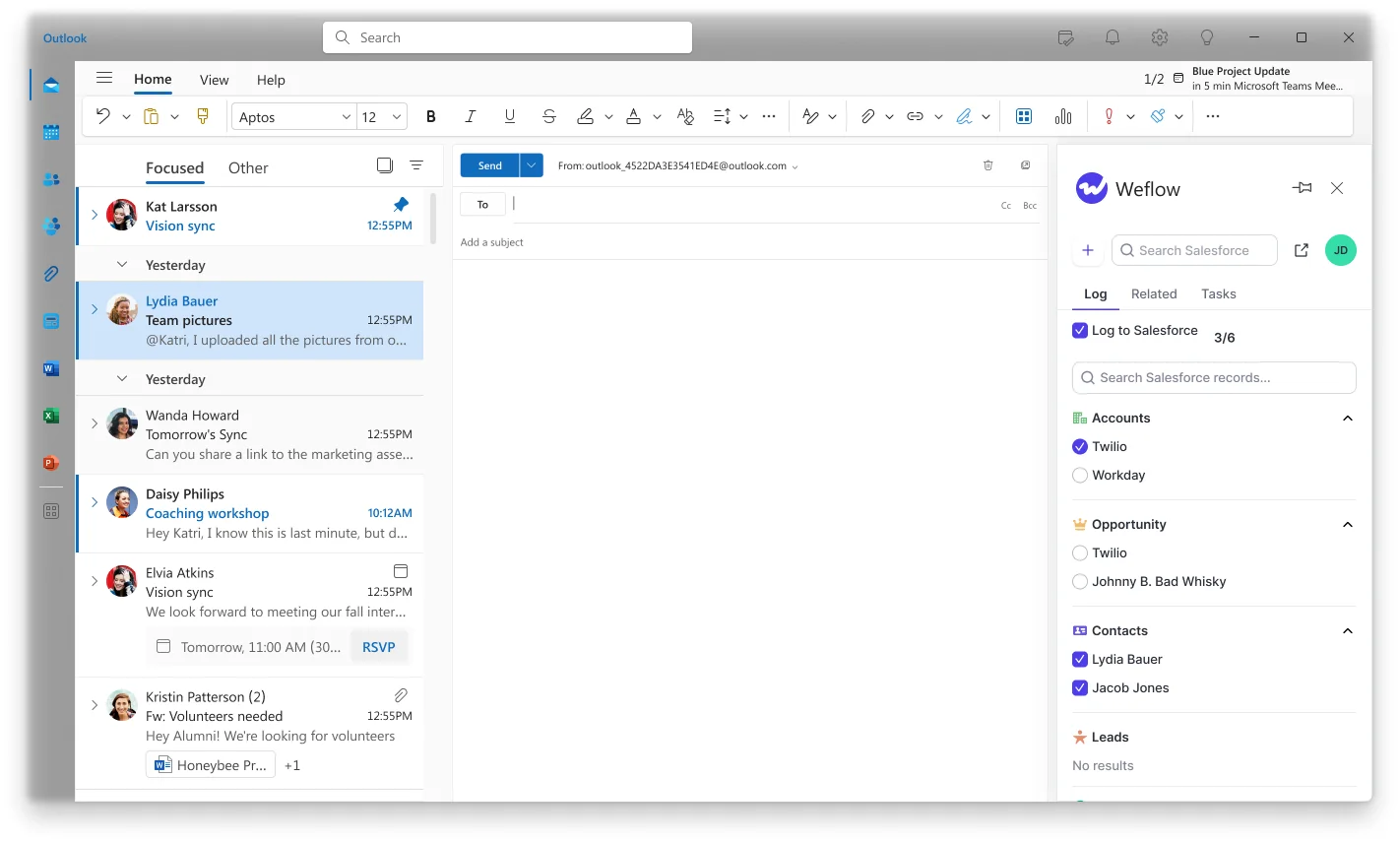
The Outlook add-in and Chrome extension show the rep, in the side panel, which Salesforce records an email will log to: the contact, the account, and the open opportunities Weflow matched.
When two open opportunities come back, the rep picks the right one. That's the whole interaction.
The decision is then stored against the thread. Every later reply routes to the same record without anyone touching it again, and starting a new thread resets the choice. One decision per conversation, not per email, taken at the only moment the answer actually exists.
That's the difference from Einstein Activity Capture, and it isn't about accuracy percentages. Einstein has no correction at all. Weflow's correction sticks.
Activities land as native Salesforce records you can report on
Fixing the mapping only matters because of where the record ends up. Weflow writes activity permanently into native Salesforce objects, so it's queryable through the API, reportable in Salesforce, usable in flows, and exportable to your BI tool. Last Activity Date moves. Meeting counts are clean, because one meeting produces one parent Event with child Events per attendee rather than one Event per person in the room.
This is the reason teams switch off Einstein Activity Capture rather than tune it. Blockaid, Blacklane, ADVISA, Lendz Financial and United Fintech all did.
"What did the team do? What has the team booked for next week? With Einstein Activity Capture, I was trying to report on how many meetings we have. I got on a call with Salesforce support, who was just as confused as I was. I also learned that activities are just temporarily stored on Salesforce's side. It's actually not even my own data."
"We tried Einstein Activity Capture but faced several problems. As activities are not stored as records in Salesforce, we couldn't properly report on activities or use activities for automations"
— Irina Smirnova, Senior Sales Operations Manager, Blacklane
Blacklane now has emails, meetings and key contacts logged against 96% of leads, accounts and opportunities. United Fintech saw roughly three times more activity captured after switching, and assumed the data was wrong until they checked manually.
Where Weflow's mapping still falls short
You'll test this in your own org, so here's what you'll find.
- Automatic mapping still depends on your contact-role and opportunity structure. Where it's genuinely ambiguous, Weflow also falls back to the account until the rep resolves it. The difference is that the rep can resolve it and the choice persists. It isn't a magic matcher.
- The first message in a thread sets the mapping for the whole thread. One wrong start silently pulls an entire conversation onto the wrong record until someone corrects it.
- The activity timeline is built on opportunities. Activity sitting on an account with no open opportunity doesn't appear in the timeline at all. An account-level activity view is in development.
- Nothing is logged that can't be matched to an existing record. That's deliberate, so capture never creates orphan data, but it means an email to a company with no account, contact or lead in Salesforce isn't captured. Weflow never creates accounts, leads or opportunities.
- Salesforce only. Weflow is built entirely on the Salesforce API, which is what lets it respect your custom objects, validation rules and permission sets with no field-mapping step. If you're on another CRM, or a group where some operating companies aren't on Salesforce, this isn't a fit for that part of the estate.
- No VoIP or phone call capture today. If your motion is phone-heavy, your dialer's own Salesforce integration still has to carry that.
Can you run Weflow alongside Einstein Activity Capture?
Yes, and it's the sane way to migrate. But there's one setting you have to change first, or you'll conclude the new tool is broken.
Einstein Activity Capture's event sync must be set to one direction, from the mail and calendar system into Salesforce. Left bidirectional, it creates a loop: the event is written to Salesforce, pushed back out to the calendar, and written to Salesforce again. With a second capture tool also writing, you get two events per meeting.
Two things people get wrong here. Removing the Einstein permission from users does not stop the loop. And duplicates already written are not cleaned up automatically, so they keep distorting activity metrics: the same rep shows thirteen meetings a week in one view and eight in another until you deal with them.
A safe transition order:
- Set Einstein Activity Capture's event sync to one direction, from your workspace into Salesforce, before enabling anything else.
- Turn Weflow on for one pilot team rather than the whole org.
- Check parity against Einstein for that team: emails logging, events coming through, contacts created, and specifically whether activity is landing on the open opportunity rather than the account.
- Clean up the duplicate events created during any bidirectional period. Nothing does that for you.
- Then either disable Einstein Activity Capture, or leave it running and let Weflow add call summaries and codings onto the events Einstein already creates.
Phasing is low-risk because a capture gap doesn't become a permanent hole. Any meeting or email that failed to sync can be inspected, the rule corrected, and the record pushed into Salesforce afterwards, whether the failure was a week or a month ago.
What Einstein Activity Capture and Weflow actually cost
| Einstein Activity Capture | Weflow Activity & Contact Capture |
|---|---|
| Bundled free up to 100 users, then roughly $50 per user per month above that threshold. | $19 per user per month, billed annually, 10-user minimum. Includes Ask Weflow AI Pro and Agent Builder free tier. Historical backfill of up to 24 months is an add-on. |
So the comparison flips with headcount. Under 100 seats, staying put costs nothing and switching costs $19 a seat, and the case you have to make internally is about the reporting you can't produce today, not about savings.
Above 100 seats, Einstein Activity Capture stops being free and becomes the more expensive of the two, at roughly $50 against $19, for the setup that can't answer deal-level questions. That's a much easier conversation with a CFO.
Choose Weflow if, choose Einstein Activity Capture if
The dividing line isn't which tool "captures better." It's whether your accounts carry multiple open opportunities, and whether you need activity you can report on, automate against and export.
Choose Weflow if:
- Your accounts routinely carry several open opportunities, new business plus renewal plus upsell, and you need activity on the right one.
- You need opportunity-level activity reporting for deal reviews, cycle analysis or capacity planning.
- You want activity as native Salesforce records you can query, use in flows, and pull into Looker, Tableau or Power BI.
- Your Salesforce runs partly on custom objects and activity has to log there too.
- You need contacts and contact roles created automatically so multi-threading becomes a reportable fact rather than a rep's assertion.
- Your team includes CSMs and account managers, not just the roles that happen to hold a sales engagement license.
- You're above 100 Salesforce users, where Einstein Activity Capture stops being free.
Choose Einstein Activity Capture if:
- You're under 100 users and it's bundled at no cost.
- Accounts carry one open opportunity at a time.
- You run on standard objects only.
- Activity in the timeline for context is all you need, and nobody is asking for activity-based reports, automations or BI.
- Attachments, automatic contact creation and object-level control are things you can live without.
Walk through the product yourself, no call required.
FAQ: switching from Einstein Activity Capture to Weflow
Does Weflow map activities to custom Salesforce objects?
Yes. Weflow logs activity to standard and custom Salesforce objects, configured per object in the capture configuration, and roughly 20 to 30% of Weflow customers use custom-object logging alongside standard objects. Because Weflow is built entirely on the Salesforce API, there's no generic data model to map onto, so there's no field-mapping step at setup. Einstein Activity Capture's default matching covers standard objects only, with Cases excluded; custom-object matching exists under "Sync Email as Salesforce Activity" but requires admin Flow customization, and Salesforce warns that complex matching rules can slow the sync.
Do reps have to do anything for capture to work?
No. Capture runs server-side at the mail tenant level through a central app installed in Microsoft Entra or Google Workspace, so every email and meeting is logged regardless of device or client with nothing for a rep to click. The Outlook add-in and Chrome extension are an optional layer for visibility and correction, not a workload, and admins can restrict who's allowed to override a mapping at all.
"The beauty is that end-users don't actively use it - it just works. Everything is captured automatically."
— Erick Mahle, Vice President of Revenue Operations & Digital Transformation, Lendz Financial
Does correcting a mapping require fixing contact roles in Salesforce?
Not for the common case. Re-pointing a thread at a different existing record is a click in the extension, and the choice sticks for the rest of that thread.
Structural fixes are still structural. If the right record doesn't exist, or a contact sits under the wrong account, or the account has no open opportunity at all, that has to be corrected in Salesforce. What reduces the structural work over time is Weflow creating contacts and setting opportunity contact roles automatically, so coverage improves as capture runs instead of decaying.
Can historical activity be backfilled into Salesforce?
Yes. Any meeting or email that failed to sync can be recovered and pushed into Salesforce later, whether the failure was a week or a month ago, and historical backfill of up to 24 months is available as an add-on. Lendz Financial had several months of historical email backfilled, which gave them a complete past-activity picture and training input for their own internal AI models. This is also what makes a phased rollout safe: a gap during transition doesn't become a permanent hole in the record.
How long does Weflow take to set up?
The technical setup is a 30 to 45 minute session with a Salesforce admin and your Google Workspace or Microsoft admin. Activity capture is rolled out centrally through OAuth, so there's nothing to install per rep. United Fintech had capture live in under an hour, and HolidayCheck installed the managed package and started syncing in the same window. Full time-to-value, including capture configurations, exclusion rules and team rollout, typically runs two to three weeks.
How does Weflow authenticate and what permissions does it need?
The only way to sign in to Weflow is through your Salesforce authentication, using OAuth and whatever SSO your Salesforce org already enforces, or Salesforce two-factor. Email and password login isn't supported, so there's no separate Weflow identity to manage and deactivating a user in Salesforce removes their access immediately. Writes to Salesforce go through the integration user, and Weflow respects existing validation rules, field dependencies, permissions and role hierarchy. On the compliance side: SOC 2 Type II, GDPR and CCPA, HIPAA, Zero Data Retention for AI processing, and customer data is never used to train AI models. ISO 27001 is in progress, and Weflow is not FedRAMP certified.







