Backstory (People.ai) vs Einstein Activity Capture (2026)
Compare Backstory vs Einstein Activity Capture on Salesforce mapping, sync-back, and EAC replacement.


If you're choosing between Backstory (People.ai) and Einstein Activity Capture, the AI features won't settle it. The case that breaks capture will: one contact sitting on two open opportunities, usually a renewal and an expansion.
Here's where each tool lands on that case:
- Einstein Activity Capture (Summer '25 or later) writes email into your org as both Task and EmailMessage records. It picks the opportunity through contact roles, then a chain of account-level tiebreakers. You correct a wrong match on the email record in Salesforce.
- Backstory scores every possible match. Only the primary match reaches Salesforce, as a Task, and you correct it in Backstory's web app.
- Weflow logs to the account when the evidence doesn't settle which deal an email belongs to. Your reps fix the match from their inbox once, and the rest of the thread follows.
We're the third option in this comparison, so here's what we are. Weflow is the Revenue AI Orchestration platform for sales, customer success, and RevOps teams.
The product being compared is Weflow Activity & Contact Capture, at $19 per user per month. It goes through the same ten capabilities as the other two, limits included.
At the end you'll find a parity test you can run on the boring part of capture before you buy anyone's AI layer.
Backstory vs Einstein Activity Capture vs Weflow at a glance
All three capture email automatically. Where they differ is in what reaches Salesforce and how they choose the opportunity.
| Capability | Weflow | Backstory (People.ai) | Einstein Activity Capture |
|---|---|---|---|
| Automatic email capture | Server side through a central app in Microsoft Entra or Google Workspace, for every enrolled user on any device. Logs only mail that matches a Salesforce record. | Server side through org-level Microsoft Graph access or a Google Marketplace app, with no rep action. | Background capture over OAuth, connected per org or per user. Customers report connections dropping without explanation. |
| Matching activity to the right records | Primary and secondary email fields to contacts, leads, accounts and custom objects, with account fallback on the Website domain. | Confidence score built from domain, contacts, owners and contact roles, with eligibility and ranking rules per profile. | Users first, then contacts and leads, then accounts and opportunities. Admins edit the logic in Flow or Apex. |
| Choosing the right opportunity | Contact role, then a single open opportunity, then owner, mailbox owner, account relationship and stage. Otherwise the account. Reps re-map once per thread from the inbox. No nearest-close-date rule. | Confidence score, plus optional content-based multi-opportunity matching. Only the primary match is written to Salesforce. Corrections happen in the web app. | Contact role first, then the account's opportunities through a tiebreaker chain. Corrections happen on the email record. |
| Activity stored as Salesforce records | EmailMessage or Task (admin's choice) and Event, written almost immediately. | Tasks and Events plus summary fields. No EmailMessage option. CRM sync within one business day. | Summer '25 or later: both Task and EmailMessage, with no setting to pick one. Legacy orgs keep email off-org until they switch. |
| Historical backfill | 24 months standard, up to 3 years custom, written into Salesforce. Paid separately and paced by a 50,000 API-calls-per-day cap. | Markets two years of history analyzed at go-live. No CRM backfill window documented. No transcript backfill. | 180 days and up to 50,000 emails per user. Past events only if an admin sets a window. |
| Automatic contact creation | Contacts from To and CC when the rep sends. Existing accounts only, per-event cap, blocked prefixes, real-time duplicate check. Never leads. | Contacts under domain and ownership rules, contact roles, and lead conversion on request. | Unavailable under Sync Email as Salesforce Activity. Address-book contact sync remains. |
| Integrations with other tools | Salesforce, Gmail, Google Calendar, Outlook, Zoom, Teams, Meet, Slack and the Outreach dialer. Salesforce only. | Email, calendar, Zoom, Teams, Meet, Webex, Gong, Slack, Sales Navigator and a Transcript API. Salesforce plus Dynamics 365 and Oracle. | Microsoft 365, Exchange and Google Workspace, alongside Salesforce's own products. |
| Access from AI assistants (MCP) | Read-only connector for conversation and forecast data. It doesn't return captured email content. | Its own MCP server for Claude, ChatGPT, Copilot, Gemini and n8n. Answers deal questions from activity. | No MCP of its own. Assistants use Salesforce Hosted MCP Servers, which need Flex Credits. |
| Raw data access outside the tool | REST API bulk export as JSON or CSV. No native Snowflake, Databricks or BigQuery connector. | API for data and analytics delivery, export and deletion. | In-org records through reports, SOQL and APIs. Off-org activity data isn't exportable. |
| Pricing | Published: $19 per user per month, billed annually, 10-user minimum. | Model published (platform fee per connected person plus AI answers). No figures. | Standard version included in lower editions. Full version included in Unlimited or with Sales Engagement at $50 per user per month. |
The two-opportunity case is traced row by row further down.
Why teams leaving Einstein Activity Capture shortlist Backstory
Why the June 2026 Einstein Activity Capture migration forces a decision
A forced change turns years of EAC irritation into an evaluation. Several are landing at once:
- The Salesforce Outlook plugin is losing support, and the default destination is Einstein Activity Capture.
- Salesforce is auto-migrating legacy EAC orgs to Sync Email as Salesforce Activity from June 2026.
- Activity 360 Reporting, Activity Metrics and the Activities Dashboard are retiring. Reports built on them get rebuilt on standard activity reports.
- Salesforce now names Momentum, not EAC, as the future of activity capture and call recording.
One admin put the first change plainly on a call with us:
We have the Salesforce Outlook plugin, but it goes out of support this month, so we have to move over to Einstein Activity Capture.
So the migration work gets spent whichever way you go. Staying on EAC means rebuilding reports and rethinking contact creation on a product whose roadmap points somewhere else. That's why "native" no longer means "stable," and why the cost of switching starts to look like the cost of complying.
Why Backstory looks like the enterprise answer
Backstory is a revenue intelligence and AI-answer platform built on capture, not a capture tool. People.ai rebranded as Backstory in 2026 and calls itself "the context layer for the agentic enterprise." It sells to CROs, sales leaders, RevOps, IT and marketing, and it says outright that it isn't a rep productivity tool or a call recorder.
Its org-wide capture is the real thing. Turning it on changes what a leadership team can see about customer interactions, and it connects to Salesforce natively plus Microsoft Dynamics 365 and Oracle through API integrations. If you run more than one CRM, that's a point none of the other options here can match.
The breadth cuts both ways for a capture decision. Backstory's best matching and its engagement metrics live in Backstory. If your goal is to fix what's in Salesforce, you risk swapping one source of truth outside Salesforce for another.
What happens when one contact sits on two open opportunities
Salesforce lets an activity relate to one opportunity or to the account, never both. Every capture tool works inside that limit. When a tool can't decide, the activity lands on the account with no warning: the account looks busy and the deal looks dead.
The opportunity contact role is the main signal for choosing the deal, and most orgs don't maintain it. When they do, renewal and expansion motions usually copy the primary contact role onto both deals, so the signal points at both. That's why the ambiguous case is the common case.
Buyers who've lived with this are clear about what they won't accept:
If there are multiple opportunities, they just don't know where to map it and just randomly assign it to something. This is not acceptable.
Our position: an email silently mapped to the wrong deal is worse than an email on the account. The wrong match gets built into reports and forecast calls. The account fallback is visible and easy to move.
| On a renewal plus an expansion | Weflow | Backstory (People.ai) | Einstein Activity Capture |
|---|---|---|---|
| How it decides the opportunity | Weighs contact role, owner, mailbox owner, account relationship and stage. If that doesn't settle it, the email goes to the account. | Confidence score. With multi-opportunity matching on, content links the email to both deals. | Contact role first, then tiebreakers that always resolve to one deal, ending with the most recently modified. |
| What gets written to Salesforce | One EmailMessage or Task on the contact and either one opportunity or the account. | One Task on the primary match only. Contact roles go on the primary opportunity only. | Task and EmailMessage on the deal the tiebreakers picked. |
| What the opportunity timeline shows | The email once it's mapped to the deal. Until then, it sits on the account timeline. | The primary match only. Backstory's engagement metrics include secondary matches, so they can disagree with Salesforce. | The tiebreaker's pick, which may not be the deal the email was about. |
| Where a wrong match is fixed | In the Outlook add-in or Chrome extension, before or after the email logs. | In the Activity Table in Engagement Dashboards. The change reaches Salesforce within 24 hours. | On the email record in Salesforce. |
| What the fix covers | The rest of the thread. A new thread starts fresh. | The activity you re-mapped. | That email record. The matching flow won't overwrite it. |
How Weflow Activity & Contact Capture handles your activity
Three design choices run through everything below:
- Every capture outcome lands as standard Salesforce Task, EmailMessage and Event records.
- Weflow doesn't guess when the evidence is ambiguous.
- Reps correct a match from their inbox, once per thread.
Each limit is named inside its own section.
How Weflow captures email server side and matches it to records
Weflow captures email through a central app installed in Microsoft Entra or Google Workspace, so coverage doesn't depend on reps. Mail sent from a phone, a browser or a desktop client is captured the same way, and nobody has to connect a mailbox.
Weflow logs only what matches a Salesforce record. It looks up every address in the primary and secondary email fields on contacts, leads and custom objects. Where no contact exists yet, a setting falls back to the account by matching the sender's domain to the account's Website field.
You configure capture per team, per region and per object. That lets a sales team and a CS team log to different objects without one team's rules leaking into the other's. Internal-only threads never log.
The limits:
- Matching depends on the Website field. A wrong or shared domain there, including a free-mail domain, sends every matching email to that one account.
- Mail sent from a separate deliverability subdomain isn't captured, because it doesn't match the sender address in Salesforce.
- Personal email accounts, SMS and calls from personal mobiles aren't captured.
- Each mailbox pairs with one Salesforce user, so people without a Salesforce user aren't captured.
How Weflow picks the opportunity and lets reps fix it in the inbox
Weflow maps an email to a deal on the email address and the Salesforce relationships around it, in a fixed order:
- The contact holds an opportunity contact role on an open opportunity.
- The account has exactly one open opportunity.
- Several are open: Weflow weighs the contact role, the opportunity owner, the mailbox owner, the account relationship and the stage together.
- Nothing settles it: the email logs to the account.
Weflow never logs to a closed opportunity, and it doesn't read the email body to decide. We tested content-based matching and left it out because it wasn't accurate enough. The principle is simple: logging to the account is easy to fix, logging to the wrong deal isn't.
The fix happens where the rep already works. The Outlook add-in and Chrome extension show the contact, account and open opportunities an email will log to before it logs. The rep picks a different opportunity, account or custom object once, and every later reply in that thread follows. They can also move an email that's already logged.
Weflow never moves logged activity on its own. You can also turn on automatic opportunity contact roles: when an email maps to a deal where the contact has no role, Weflow adds one. Every later email from that contact then resolves through the role, so mapping gets more accurate the longer the deal runs. We create the role without a type, because a job title doesn't tell you who's the champion.
Some RevOps leaders see any rep click as a failure. We disagree for this one case. The rep is the only person who knows which deal a renewal-and-expansion thread is about, and they answer once per thread, not once per email.
The limits:
- There's no nearest-close-date rule.
- Two open opportunities with the same owner on one account can't be split automatically. The email stays on the account until the rep moves it.
- The first message in a thread sets the mapping, so a wrong first match pulls the whole conversation with it until someone corrects it.
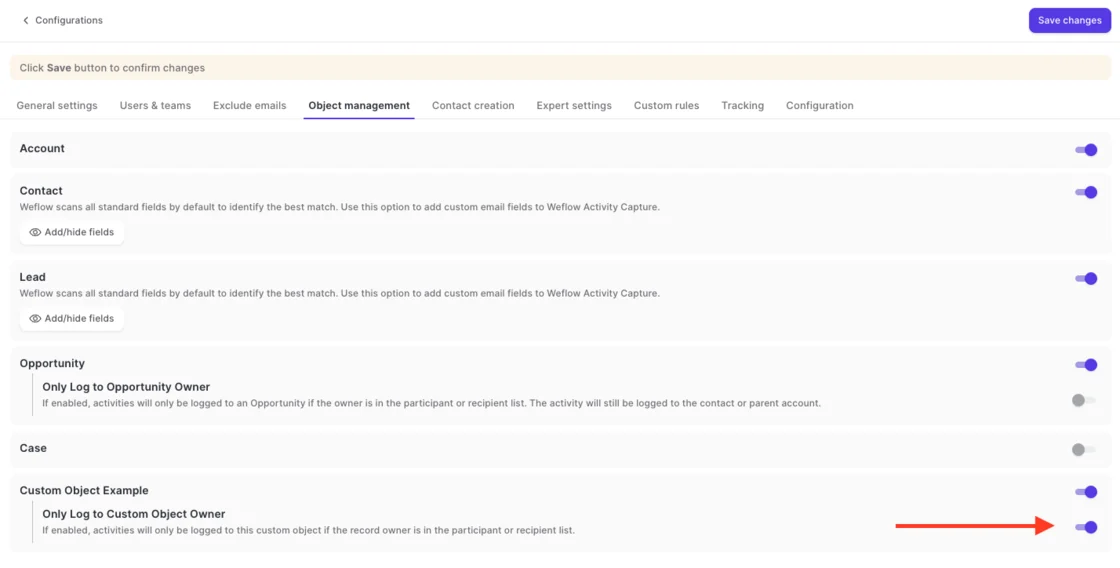
What works instead of a close-date rule is lane configuration: one configuration for the renewals team and one for everyone else, filtered on opportunity type or a close-date threshold. You can also restrict logging to the opportunity owner. We don't recommend it, because it drops activity from everyone else on the deal.
What Weflow writes into Salesforce as EmailMessage, Task and Event
Weflow writes every email as a standard EmailMessage or Task record, your admin's choice per configuration, and every meeting as an Event. Writes go through the integration user almost immediately, not on a nightly batch. What's in Salesforce is the whole answer, because nothing about the match is held back in another app.
About nine in ten of our customers choose EmailMessage. Here's the trade-off:
| Consideration | Task | EmailMessage |
|---|---|---|
| Storage | Lighter, which matters near your storage limit. | Roughly seven times heavier per record. |
| Reporting | One activity report spans tasks and events. | Sits outside the activity reporting model, so it doesn't appear next to meetings and calls. |
| Thread metadata | No native From, To, Cc or thread structure. | Native From, To, Cc and thread structure. |
| Recipients | One record per relationship. | One record relates to up to 50 recipients. |
| Access controls | Salesforce offers more controls on tasks. | Fewer controls than Task. |
The captured content is the same either way. Weflow can also store attachments with a size cap, set in the same configuration.

How much email history Weflow syncs back into Salesforce
Weflow syncs back 24 months of email and meetings as standard, and up to 3 years on a custom request, written into Salesforce as the same records as live capture. Our team runs it, and it's charged separately from the subscription.
The charge exists because of API calls. A single email can cost up to about 50 Salesforce API calls, so we cap a sync-back at 50,000 API calls per company per day. When it hits the cap, it pauses and resumes the next day. Expect anywhere from about 72 hours to a week, depending on volume and what your other integrations draw from the same allowance.
Blacklane is a good reference point: we synced 4 months of their historic emails and meetings, batched over one week to protect their daily API limits.
Two things matter for planning:
- You enroll users in an activity capture configuration first, or the backfill produces nothing.
- Enrollment doesn't require a license, so you can backfill a test group before you buy the wider rollout.
How Weflow creates contacts without flooding Salesforce
Weflow's contact creation is built around what stops it first:
- Creation can be restricted to accounts that already exist, so it can't spawn orphan contacts.
- A cap limits how many contacts one event creates, so a 200-person webinar doesn't write 199 contacts.
- Standard prefixes such as invoice, billing, no-reply and support are blocked.
- Before creating anyone, Weflow checks the address in real time across contacts, leads and custom objects, including secondary email fields.
- If the address already exists as a lead, the activity attaches to that lead instead.
- Reps can clear the tick in the Outlook or Gmail extension before sending.
Within those guards, Weflow creates contacts from the To and CC fields when the rep sends, not when they receive. It never creates leads, accounts or opportunities. Enrichment fills name, title, email, phone and LinkedIn at no extra charge.
The limits:
- There's no admin review queue for new contacts.
- Required fields on a page layout silently block creation, because a tool can't see them through the API.
- A validation rule that requires a field enrichment couldn't fill stops that contact.
- With the existing-accounts restriction on, someone at a prospect not yet in Salesforce isn't created, and nobody is told.
How AI assistants and BI tools reach Weflow data
Data leaves Weflow three ways:
- Integrations: Weflow connects natively to Salesforce, Gmail, Google Calendar, Outlook, Zoom, Teams, Meet and Slack. It also pulls Outreach dialer calls in as recordings.
- API: the REST API bulk-exports data as JSON or CSV into a warehouse or BI tools such as Tableau and Looker.
- MCP: the read-only MCP connector serves conversation and forecast data to Claude, ChatGPT and other assistants. That covers playbooks, call summaries, transcripts, forecast calls and pipeline metrics.
Here's the honest part for a capture buyer: the MCP connector doesn't return the content of captured emails. Those emails already sit in Salesforce as standard records, so an assistant reads them through a Salesforce connector. If you only buy Activity & Contact Capture, our connector adds little until you record calls.
Inside Weflow, Ask Weflow AI and agents do read captured email alongside Salesforce data, and Ask Weflow AI Pro comes with every plan. There's no native Snowflake, Databricks or BigQuery connector, so warehouse teams move data through the API.
How Backstory (People.ai) captures activity and writes it to Salesforce
Backstory captures strongly and matches intelligently. The part that matters for this decision is that its best matching and its metrics live in Backstory, and only part of that reaches Salesforce.
How Backstory captures email and scores matches to records
Backstory sets capture up once at org level:
- Microsoft 365: a Microsoft admin grants read-only, application-level Graph access, scoped to chosen users or groups. Because access isn't delegated, capture keeps working when users change passwords.
- Google Workspace: a super administrator installs a Marketplace app for the domain, which can be scoped to a group or organizational unit.
Most activity appears in Backstory within two hours and syncs to the CRM within one business day. Single-participant and cancelled meetings aren't captured.
Matching is a confidence score built from account name and domain, the account's contacts, account and opportunity owners, and opportunity contact roles. Ownership can come from owner fields, account or opportunity teams, or territory objects.
Configuration profiles carry eligibility and ranking groups, so admins decide which records qualify and which wins. By default, Backstory syncs only activity tied to a contact or lead. Account-only sync is enabled on request.
Alternate email domains, common after acquisitions, take admin work. You build a custom domain-mapping object in Salesforce, and Backstory support completes the mapping and reprocesses past activity.
How Backstory picks the opportunity and where you correct it
Backstory's eligibility filters are a genuine strength here. You can keep a renewals team's activity off new-business opportunities by record type or owner, and ranking groups set priority when several records still qualify.
Multi-opportunity matching goes further. It reads activity content, such as opportunity-name keywords and product mentions, to link one email to several opportunities on the same account. Your customer success manager switches it on, and switching it off requires reprocessing the activity it matched.
Corrections happen in Backstory, not in the inbox. A user searches for the right record in the Activity Table in Engagement Dashboards, which lists the last 30 days of their matched activity, and the new association reaches Salesforce within 24 hours.
Backstory has no Gmail extension or Outlook add-in. Its one Chrome extension opens the Backstory App as the browser's homepage.
What Backstory writes into Salesforce and what stays in Backstory
Backstory writes emails as Tasks and meetings as Events, and it syncs to the CRM within one business day. Here's how the rest splits:
| Item | Written to Salesforce | Stays in Backstory |
|---|---|---|
| Emails | Tasks with direction, from and to fields, and the body. No EmailMessage option. | Nothing extra. |
| Meetings | Events with meeting status and last calendar change. | Nothing extra. |
| Opportunity matches | The primary match only. | Secondary matches, counted in Backstory's metrics. |
| Contact roles | Created on the primary opportunity only. | Nothing extra. |
| Engagement fields | First and last touch, last email sent and received, next meeting date and, when enabled, engagement level. | Engagement level and last activity date that include secondary matches, so they can disagree with the Salesforce activity feed. |
| Activity type | TaskSubtype and EventSubtype. The editable Type fields only on request or through workflow rules. | Nothing extra. |
| Push-excluded activity | Not synced. | Kept for Backstory's metrics. |
| Attachments | Not captured. | Not captured. |
How much history Backstory brings in at go-live
Backstory markets that it analyzes two years of historical activity when a customer goes live, with go-live in two to four weeks for most teams. No help article documents how far back email and calendar history is imported, or whether that history is written to Salesforce.
Meeting transcripts are never backfilled. Backstory ingests them only from the day the integration is switched on, and gaps from an outage aren't recovered either.
How Backstory creates contacts and opportunity contact roles
Backstory's contact creation is strong, and lead conversion is something Weflow doesn't offer. It works under these conditions:
- Backstory creates a contact only when no matching contact or lead exists.
- The activity has to carry the person's first name, last name and email.
- The email domain has to match an account's domain.
- The Backstory user on the activity has to own the account or opportunity, or sit on its team.
- Additional contact roles are added only after one already exists on the opportunity, unless First OCR is on. First OCR creates the first role only when exactly one opportunity matches.
- Contact roles are never added to closed opportunities.
- Lead conversion turns an existing lead into a contact and contact role. It needs another participant to already be a contact on that account, and Backstory's Technical Success team turns it on per organization.
- Bouncing email addresses can mark a contact inactive in Salesforce.
How AI assistants and other tools reach Backstory data
Backstory connects natively to Google Workspace, Microsoft 365, Exchange on-premises, Zoom, Webex, Teams, Meet, Gong, Slack and LinkedIn Sales Navigator. It also reads any dialer that logs calls to Salesforce as a Call task, and it has a Transcript API for other conferencing tools.
Its MCP server is stronger than ours for one specific job: answering deal questions from activity. Claude, ChatGPT, Microsoft Copilot, Google Gemini and n8n connect to it. Its tools cover account and deal status, scorecards, the last 30 days of activity, engaged people, company news and similar past deals.
Since August 2026, it authenticates with Backstory credentials instead of Salesforce ones, so customers on other CRMs can use it too. The API supports export and deletion, with up to five key pairs that admins manage.
How Einstein Activity Capture works after the Summer '25 change
EAC is better than its reputation on storage. It still leans on contact roles, admin-built Flow and Apex, and connections that can drop without anyone being told.
How Einstein Activity Capture connects mailboxes and matches email to records
EAC connects over OAuth 2.0, either at org level, where an admin authenticates everyone, or at user level, where each rep connects their own account. It supports Microsoft 365, on-premises Exchange and Google Workspace. Hybrid Exchange deployments aren't supported.
The connection is the complaint we hear most on calls:
EAC just got disconnected for no reason. We talked with the support multiple times, like a thousand times I would say. So it hasn't been fixed, so that's why we are looking for a new alternative.
Per-user connections fail quietly. A rep who dismisses a re-authentication prompt stops syncing, and the gap shows up weeks later as a deal with no activity.
Matching runs as four default actions in the Activities: Match Email to Records flow:
- Find users.
- Find contacts and leads.
- Find accounts and opportunities.
- Create the email activity with its associations.
An address that belongs to both a user and a contact goes to the user. Admins extend the flow in Flow Builder or Apex, for example to prefer a customer account over a partner account, block certain emails, match on custom email fields or relate email to custom objects. Out of the box, matching covers users, contacts, leads, accounts and opportunities, and Cases are excluded.
How Einstein Activity Capture picks the opportunity and where you correct it
EAC looks for a contact who holds any contact role on the opportunity first. If none matches, it falls back to the account's opportunities and applies tiebreakers in this order:
- Exclude opportunities whose close date is more than 60 days before the email.
- The opportunity owner is on the email.
- The related account is owned by a matched user.
- The opportunity was created within 60 days after the email.
- The email date falls between the opportunity's create and close dates.
- Open before closed.
- Earlier close date.
- Most recent LastActivityDate.
- Most recent LastModifiedDate.
Credit where it's due: EAC uses close date as a signal, which Weflow doesn't. The catch is that the chain always resolves to one deal. On a renewal and an expansion where nothing separates them, the opportunity touched last wins, and that isn't necessarily the deal the email was about.
All of it is editable in the matching flow. A rep corrects a wrong match on the email record, and the flow doesn't overwrite that manual association. The logic holds up when an admin builds and maintains it.
The inbox side panel is a separate product, the Outlook and Gmail integration. A rep who clicks Log Email there while EAC is running can log the same email twice.
What Einstein Activity Capture now stores in your Salesforce org
The old claim that "EAC doesn't store records" is out of date for any org set up from Summer '25 on. Our customers who left EAC before then hit that wall, but today it depends on which side of the change your org sits:
| Consideration | Legacy org, not yet switched | Summer '25 or later org |
|---|---|---|
| Where email lives | On Salesforce's Activity Platform, off the org. | In the org, through Sync Email as Salesforce Activity. Also held on the Activity Platform for up to 30 days. |
| Record types | Shown on the activity timeline only. | Both Task and EmailMessage, with no setting to pick one. |
| Reports and automation | Not available to reports or other platform tools. | Available to reports, workflows, triggers, SOQL and APIs. |
| Activity reporting | Activity 360, Activity Metrics and the Activities Dashboard, all retiring. | Standard activity reports. |
| Meetings | Event records in the org. | Event records in the org. |
| Attachments | Not synced or stored. | Not synced or stored. |
Separately, Salesforce keeps de-identified data derived from EAC activity for up to two years and uses it with machine learning models.
How much history Einstein Activity Capture pulls in when users connect
When an account first connects, EAC pulls up to 50,000 emails from the past 180 days. Past events come across only if an admin sets a window, up to 180 days and 5,000 events.
Why Einstein Activity Capture stopped creating contacts automatically
Under Sync Email as Salesforce Activity, the default since Summer '25, Contact Auto-Creation and Contact Suggestions aren't available. That's why the buying committee lives in the inbox and not in your CRM.
It goes further than missing contacts. An email from an unknown address isn't logged at all until someone creates the contact or lead, and only new emails after that point sync. The conversation with a new stakeholder stays out of Salesforce until a person adds them.
Address-book contact sync remains, up to 50,000 contacts per user, with filters and ownership rules.
How AI assistants and other tools reach Einstein Activity Capture data
EAC connects to Microsoft 365, Exchange and Google Workspace, and works alongside Salesforce's own products: Inbox, Einstein Conversation Insights and Agentforce. Agentforce agents use the email it captures as context.
EAC has no MCP server of its own. Claude and ChatGPT reach its in-org email and event records through Salesforce Hosted MCP Servers, which are intended for customers with Flex Credits and may be billed by usage.
In-org records are reachable through reports, SOQL and the Salesforce APIs. Activity data EAC holds outside the org isn't exportable.
What Weflow, Backstory and Einstein Activity Capture actually cost
Weflow publishes per-seat prices. Backstory publishes its pricing model but no figures. EAC's cost depends on your Salesforce edition.
| Cost factor | Weflow | Backstory (People.ai) | Einstein Activity Capture |
|---|---|---|---|
| Pricing model | Per seat. Agent Builder is the only consumption-priced product. | A platform fee per connected customer-facing person, plus a pooled allotment of AI answers. Viewers use it free. | Included by edition, or through an add-on. |
| Published list price | Weflow Activity & Contact Capture at $19 per user per month. Weflow Revenue AI Foundation, which adds Conversation Intelligence, at $49. | No figures published. | Standard version included with Starter, Pro Suite, Professional and Enterprise. Full version included with Unlimited, Einstein 1 Sales and Agentforce 1, or through Sales Engagement at $50 per user per month. |
| Minimums and terms | 12-month minimum term, billed annually, 10-user minimum. | True Forward: sized at the start of the term, never metered or back-billed mid-term, resized to actual use at renewal. | Billed with your Salesforce contract. The free Standard version is capped at 100 users. |
| What costs extra | Historical sync-back. Agent Builder beyond the free tier of 25 actions a month. | Adding customer-facing people raises the platform fee. Adding managers or ops doesn't. | The full version on most editions. Standard keeps 6 months of activity and has no Activity Metrics or Activity 360. |
If you're on Unlimited, be clear about the business case. You keep the edition either way, so EAC costs you nothing extra and Weflow at $19 is new spend. The only license saving is a redundant line, such as Sales Engagement or extra capture licenses bought on top of an edition that already includes them. Beyond that, the case for leaving EAC rests on reliability, multi-opportunity mapping and contact creation, not on price.
Who should choose Weflow, Backstory or Einstein Activity Capture
Choose Weflow Activity & Contact Capture if Salesforce must hold everything
Choose Weflow if:
- You run Salesforce only, from mid-market to enterprise.
- You want every capture outcome as standard Salesforce Task, EmailMessage and Event records, with nothing held in another app.
- You want reps to fix ambiguous matches from the inbox, once per thread.
- You want contact creation with guards, and contact roles that improve mapping over time.
- You want a published seat price.
It stops at:
- There's no nearest-close-date rule.
- Same-owner ties on one account need the rep.
- There's no admin review queue for new contacts.
- Historical sync-back is paid and paced by API calls.
- The MCP connector doesn't serve captured email content.
- It works with Salesforce only.
Choose Backstory if you're buying a revenue intelligence layer
Choose Backstory if:
- You're a large enterprise, possibly running more than one CRM.
- You're buying an AI-answer layer for CROs and RevOps, delivered through MCP, Slack and dashboards.
- You need eligibility profiles that keep teams off each other's opportunities.
- You want automated lead conversion.
It stops at:
- Only the primary opportunity match is written to Salesforce.
- Corrections happen in the web app only, with no inbox add-in.
- Emails land as Tasks only, and CRM sync takes up to one business day.
- Attachments aren't captured.
- No CRM backfill window is documented, and transcripts are never backfilled.
- The integration user needs View All Data, with the System Administrator profile recommended.
- Price figures aren't published.
Choose Einstein Activity Capture if accounts mostly carry one opportunity
Stay on EAC if all of these are true:
- Your org is on Summer '25 or later.
- Your accounts mostly carry a single open opportunity.
- You're already licensed through Unlimited Edition or Sales Engagement.
- You have an admin happy to own the matching Flow and Apex.
It stops at:
- Connections can drop without explanation.
- There's no contact auto-creation under Sync Email as Salesforce Activity.
- Attachments aren't stored.
- Backfill covers 180 days.
- Bidirectional event sync loops when a second tool writes meetings.
- Legacy reports are retiring.
- The roadmap points at Momentum.
How to run a one-for-one parity test before you switch
Judge a capture swap on what gets lost, not on features. The teams we see switch successfully run the new tool on defaults, with no templates and no custom use cases, and check that it tracked one for one. Configuration comes after.
Two tools can't capture the same user at the same time without duplicates. Splitting users between tools doesn't work either, because activity volume differs from person to person. So here's the method:
- Write your requirements down first: activity is reportable, both incoming and outgoing email sync, records are stored permanently in Salesforce, and each activity maps to the right object.
- Save the current EAC reports for your test users.
- Pick test users, including the reps who complained most about the current setup.
- Use real customer domains and clear contact roles. Free-mail test addresses create ties between opportunities that production data rarely has, so you end up testing your test data.
- Set EAC event sync to one way, from the calendar into Salesforce, or switch the test users off in EAC.
- Move the test users fully onto the candidate, on defaults.
- Backfill the test window with a message-ID check, so the backfill adds only what EAC missed. What it fills in is your measure of the difference.
- Inspect your multi-opportunity accounts: where activity landed, and how corrections behaved.
- Run a qualitative check with the test users.
- Configure only after parity is proven.
Running the same test on Backstory takes more planning. Its CRM sync takes up to one business day, so you compare Salesforce a day behind. And without a documented CRM backfill window, step 7 has no published equivalent to lean on.
See how Weflow captures activity, updates Salesforce fields from calls, and rolls up your forecast. Book a 30-minute demo.
Questions RevOps leaders ask about Backstory and Einstein Activity Capture
How much does Backstory cost per connected person?
Backstory doesn't publish figures. Its model is a platform fee for each connected customer-facing person, plus a pre-packaged allotment of AI answers that pools across the organization, while viewers such as managers, finance and ops use it free. Nothing is metered or back-billed mid-term, and under True Forward the next term is resized to your actual usage at renewal.
What changes for legacy orgs in the June 2026 Einstein Activity Capture migration?
From June 2026, Salesforce auto-migrates legacy EAC orgs to Sync Email as Salesforce Activity, using the org's maximum email retention history. Activity 360 Reporting, Activity Metrics, the Activities Dashboard and the objects behind them (UnifiedEmail, UnifiedMeeting, UnifiedTask) retire. Reports get rebuilt on standard activity reports with Email Message as the primary object, and Contact Auto-Creation becomes unavailable.
Can Weflow run alongside Einstein Activity Capture during the switch?
Yes, once EAC's event sync is set to one way, from the calendar into Salesforce, or the user is switched off in EAC. Otherwise the bidirectional sync loops: you get duplicate events, and customers can get repeated calendar notifications. Removing the EAC permission from users isn't enough, and duplicates already written aren't cleaned up automatically. Weflow's Settings Health check inside Salesforce reports whether EAC is detected.
What Salesforce permissions does the Backstory integration user need?
Backstory's integration user needs API Enabled, Edit Tasks, Edit Events, View All Data and View All Users, sits at the top of the role hierarchy, and Backstory recommends the System Administrator profile. A least-privilege alternative swaps View All Data for View All on accounts, contacts, leads and opportunities plus View Setup and Configuration. With that alternative, you troubleshoot sync failures caused by insufficient access. Signing in to Weflow runs only through your Salesforce OAuth and SSO, so deactivating a user in Salesforce removes their Weflow access immediately.
How do Outreach or Salesloft emails avoid duplicate activity?
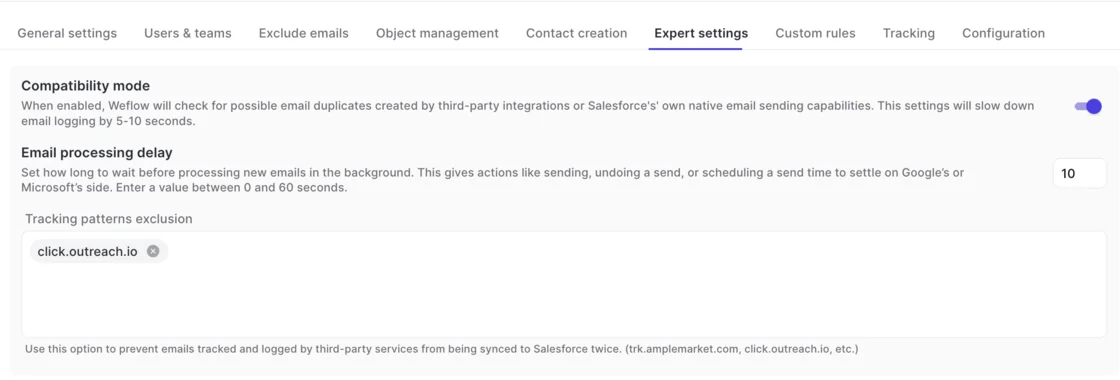
Weflow uses compatibility mode. It holds its sync back by about ten seconds so the other tool can log first, then matches on the record ID so the same email isn't written twice. Tracking patterns, such as click.outreach.io, suppress a sequencer's bulk sends entirely. Backstory with Outreach relies on a manual setup where Outreach writes each email's message ID to the Salesforce Task so Backstory skips it.
How do you spot a user whose capture has gone dark?
With EAC's per-user OAuth, a connection can drop silently and you find out when a rep complains. Backstory's Engagement Log shows each user what was captured and whether it reached the CRM. Weflow shows a warning icon next to a user when the mailbox subscription fails or their email address differs between Microsoft and Salesforce. Activity Capture Health inside Salesforce flags the data conditions that make capture fail quietly, such as duplicate accounts sharing a domain.

Does Backstory replace a call recorder or conversation intelligence?
No. Backstory doesn't record meetings. It pulls transcripts that Zoom, Teams, Meet, Webex and Gong already hold, starting from the day the integration is switched on, and never backfills them. At Weflow, recording sits in Weflow Conversation Intelligence, separate from Weflow Activity & Contact Capture, and the two come together in the Weflow Revenue AI Foundation bundle.
What contract terms come with Weflow Activity & Contact Capture?
Weflow Activity & Contact Capture runs on a 12-month minimum term, billed annually, with a 10-user minimum. Seats added mid-term are charged pro rata to the end of the term. You can't reduce seat count mid-term, but you can reassign a seat when someone leaves.