Best Tools That Log Customer Success Emails and Meetings to Cases and Custom Objects (2026)
See which tools log customer success emails and meetings to Cases and custom objects in Salesforce.


For customer success, the test of a capture tool is where a CSM's email or meeting lands when there's no open deal to attach it to. Three routings decide it:
- An escalation thread lands on the Case.
- A QBR lands on the account, or on the custom object you track the customer on.
- Nothing lands on an unrelated renewal opportunity.
A wrong record does more damage than a missing one. Nobody notices it until a renewal review reads escalation notes as deal evidence.
Here's how the five tools in this roundup handle that test:
- Weflow Activity & Contact Capture logs to Cases automatically, using subject patterns to find the right one. It also logs to any custom object. When the deal is ambiguous, it logs to the account instead of guessing.
- Revenue Grid and Cirrus Insight log to custom objects, mostly through their inbox sidebars.
- Einstein Activity Capture leaves Cases out of default matching and needs Flow or Apex for custom objects.
- Momentum captures no mailbox email at all and doesn't log to custom objects.
We're Weflow, and we wrote this comparison. Revenue Grid supports Service Cloud and the industry clouds, and Einstein Activity Capture is free on Standard up to 100 users. Both are real strengths, and we treat them that way. Where Weflow stops, we say so.
Five post-sale capture tools compared on Cases and custom objects
Two of the five don't fully meet this article's test. Momentum captures no email and doesn't log to custom objects. Einstein Activity Capture keeps Cases out of default matching and needs admin work for custom objects.
| Capability | Weflow | Einstein Activity Capture | Revenue Grid | Momentum | Cirrus Insight |
|---|---|---|---|---|---|
| Logging to custom objects (and Cases) | Offers. Any object, including Cases (subject-pattern detection) and custom objects, logged automatically | Partial. Custom objects need Flow or Apex. Cases sit outside default matching | Offers. Custom objects with Allow Activities on, documented through the Sidebar | Not offered. Calls map to account, lead or opportunity only | Offers. Custom objects that allow activities, filed from the sidebar. Custom File relates an email to a case |
| Automatic meeting capture | Offers. Every external meeting goes to Event, recorded or not | Offers. Event records. Duplicate copies when the organizer is out of scope, and internal meetings get logged | Offers. Two-way calendar sync. New meetings reach Salesforce within a couple of minutes | Partial. Event mapping only once an admin enables it, and only going forward | Offers. Calendar Sync logs Events, with direction set per user |
| Automatic email capture | Offers. Server side at tenant level, every enrolled mailbox, no rep action | Offers. Background capture. Reps report about 80% capture and dropped connections | Offers. Server-side Sync Engine on a 30-minute default cycle | Not offered. Reads only email already logged as Salesforce Tasks | Offers. Email Sync logs only when a contact or lead is on the email. 15-minute minimum cycle |
| Matching activity to the right records | Offers. Primary and secondary email fields, never a closed opportunity, account fallback when ambiguous | Offers. Contact roles first, then tiebreakers. A user beats a contact on a shared address | Offers. Opportunity link needs rep ownership, a contact role and an open deal | Partial. Attendee email to contact or lead, with manual remap in the web app | Offers. Contact over lead. Smart Link picks the most recently touched record |
| Capture exclusions and privacy controls | Offers. Domain, object, keyword and field-based rules, private flag, manual mode | Offers. Addresses, domains, keywords, automatic PII patterns, header-only mode | Offers. Three blocklists plus a confidential users list that support configures | Offers. Address, domain or CRM-rule exclusion lists, plus per-user recording controls | Offers. Admin-only wildcard blocklists, plus owned-record and folder filters |
| Integrations with other tools | Partial. Native mail, calendar, meeting tools, Slack and the Outreach dialer. No native warehouse connector | Partial. Microsoft, Exchange and Google, plus Salesforce's own products | Partial. Microsoft, Google, Teams and Zoom. Third-party API integrations sold in a paid package | Offers. Five conversation intelligence tools, seven dialers and contact centers, Slack or Teams | Partial. Gmail, Outlook, Teams, Zapier and scheduling webhooks |
| Access from AI assistants (MCP) | Offers. Read-only connector for conversations, playbooks and forecast. Captured email content isn't included | Partial. No server of its own. Salesforce Hosted MCP, which needs Flex Credits | Offers. MCP server since July 2026, connected manually | Partial. No server of its own. Salesforce Hosted MCP | Not offered. No MCP server or connector |
| Raw data access outside the tool | Offers. REST API bulk export in JSON or CSV, plus native Salesforce records | Partial. Native records are reachable. Data held off-org isn't exportable | Partial. No public API for captured activity. Salesforce's API only | Partial. API off by default, capped at 100 requests per 15 minutes | Partial. Preview REST API. No direct Snowflake connection |
| Pricing | Offers. $19 per user per month, public. 10-user minimum, annual billing | Offers. Standard free up to 100 users. Full version about $50 | Offers. $30, $49 and $149 list prices, sold by quote | Offers. Included in Max at $550. Standalone from $69 | Offers. À la carte. $27 for sidebar, email and calendar |
What we judged each tool on for post-sale capture
Judge a post-sale capture tool on routing first and coverage second. A tool that captures everything onto the wrong record gives you a worse CRM than the one you have.
The three routings every post-sale email has to pass
Make every vendor show you these three routings on your own data, in the demo, before anything else.
| Post-sale activity | Where it should land, and why |
|---|---|
| Escalation thread about a broken implementation | The Case. That's where the ticket, the SLA and the support history already live. On the account, it reads as engagement. On a deal, it reads as deal evidence. |
| QBR, adoption call or onboarding session | The account, or the custom object your business tracks the customer on. This is the proactive engagement your health score should count. |
| Any post-sale conversation that isn't about a live deal | Never an unrelated renewal opportunity. Opportunity contact roles are mostly empty, so an opportunity-centered tool attaches CSM activity to whatever deal a participant happens to touch. |
A CSM said this to us on a call, watching an escalation attach itself to a renewal:
"This is a project call, and I have just had an escalation call before this one. It should not be referring to that opportunity at all. Not all of my calls are talking about opportunities or referring to MEDDIC. Some of them are escalations or issues with customers, and they could be completely unrelated to any opportunity in Salesforce."
Routing by object is also a reporting requirement. CS teams treat proactive engagement (QBRs, adoption calls, onsite visits) as the strongest renewal signal, and reactive engagement (escalations) as a risk signal.
If both land in the same place, an account drowning in escalations looks like your healthiest customer. The metric inverts.
The nine capabilities we compared across all five tools
Every capability below earns its place for a CS-specific reason. The meeting capabilities matter more than most teams expect, because the post-sale funnel is a meeting funnel.
"This doesn't stop on the left side of the bow tie. It continues with onboardings, QBRs, renewal discussions, expansion discussions. Right? There's probably multiple funnels you want to track, and for that, the meeting object is really crucial."
— Janis Zech, CEO & Co-founder of Weflow
| Capability | Why it matters for CS | How to test it |
|---|---|---|
| Logging to custom objects (and Cases) | Post-sale work sits on Cases, the account or an industry-specific custom object. Roughly a fifth to a third of our customers log to custom objects, and it's the most common reason a capture evaluation fails on function. | Send a real escalation reply and a real QBR invite. Open the Case and the custom object and look for both. |
| Automatic meeting capture | Onboardings, QBRs and renewal calls are the post-sale funnel. If they don't land as Events, you can't report on that funnel. | Book a QBR with two customer contacts. Count how many Events appear and where they're related. |
| Automatic email capture | Account history needs AE and exec-sponsor mail, not just the CSM inbox. | Have an exec sponsor email a customer from a phone. See whether it reaches the account. |
| Matching activity to the right records | One contact often sits on a renewal and an expansion at once. The tool's behavior in the ambiguous case is the real test. | Email a contact who holds roles on two open opportunities. See where it lands, and whether one correction holds for the thread. |
| Capture exclusions and privacy controls | Sensitive escalations, HR-adjacent threads and confidential accounts have to stay out. | Flag an account confidential on a Salesforce field. Confirm nothing logs to it. |
| Integrations with other tools | CS runs on dialers, meeting tools and a CS platform beside Salesforce. | List every tool that writes activity today. Ask what each one stops writing once the new tool is live. |
| Access from AI assistants (MCP) | CS Ops increasingly asks Claude or ChatGPT about account risk directly. | Connect the assistant and ask for the last three QBR summaries on one account. |
| Raw data access outside the tool | Health and churn models often run in a warehouse or BI tool, not in Salesforce. | Export a month of activity for ten accounts and load it where your health model runs. |
| Pricing | If CSM seats are priced as a premium, CS ends up out of scope again. | Price every customer-facing role, CSMs included. Ask what costs extra. |
Weflow Activity & Contact Capture: how we route post-sale activity
Weflow is the Revenue AI Orchestration platform for sales, customer success, and RevOps teams. Weflow Activity & Contact Capture is the product in that platform that puts emails, meetings and contacts into Salesforce.
It's built for Salesforce teams and works only with Salesforce. Everything it captures lands in native Salesforce objects that your CS reports and automations already read.
How Weflow logs escalations to Cases and reviews to custom objects
Weflow routes post-sale activity to the Case, the custom object or the account automatically, and it doesn't guess a deal. Here's what that looks like on the first four capabilities.
| Capability | What Weflow does |
|---|---|
| Custom objects and Cases | Logs to the Case object, with regex pattern matching on subjects and titles to find the right Case. Logs to any other Salesforce object, including custom objects. Your CSMs can also see those objects in the Outlook and Gmail extension and link an email to one directly. |
| Meetings | Logs every external meeting to the Event object, whether or not it was recorded. Recordings don't need an opportunity: transcripts and extracted fields can go to the account or a custom object. |
| Captures server side through a central app in Microsoft Entra or Google Workspace. CSM, AE and exec-sponsor mailboxes are all captured on any device, with no action from the person sending. | |
| Matching | Matches on primary and secondary email fields. Never logs to a closed opportunity, and falls back to the account when the deal is ambiguous. A CSM's correction holds for the rest of the thread. Separate capture configurations let CS log to different objects and opportunity types than sales. |
Server-side capture is what closes the gap we hear about most from CS leaders:
"We have customer success manager emails coming into [the platform] but our salespeople don't have their email synced, our executive sponsors don't have their emails synced. And so there's actually quite a bit of the story that we are still missing."
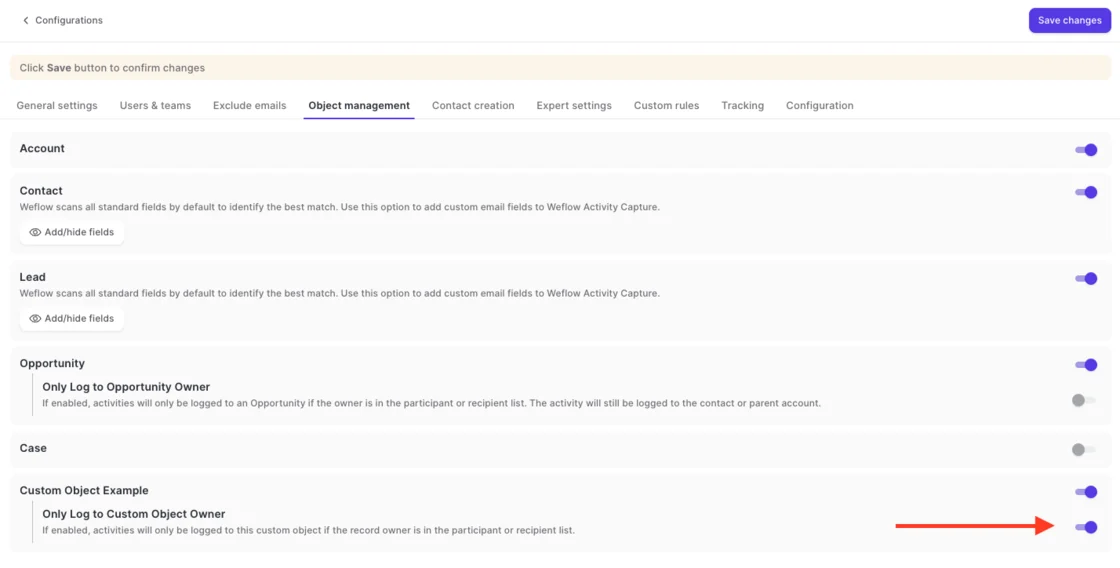
Custom objects get one more control, because logging everything to them makes them noisy. You can restrict a custom object, or Opportunity, so it only collects conversations its owner was part of. That keeps the record reportable. It's a toggle per object in Object Management:
The account fallback is a deliberate choice. A conversation logged to the account is easy to move. A conversation logged to the wrong deal quietly pollutes deal reviews until someone catches it.
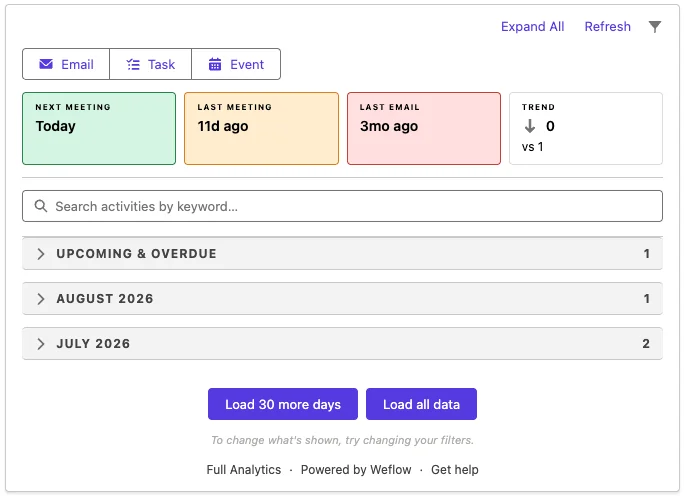
You don't lose visibility by falling back, either. The Weflow Activity Timeline on an account shows activity logged to its child records, so a CS leader reading the account sees every email and meeting across its deals and Cases in one place.
Weflow exclusion controls, integrations, MCP connector and API access
- Exclusions. Weflow excludes capture in layers:
- internal and external domains
- whole objects
- keywords in the email body
- custom rules on any field on the account, opportunity, contact or Case
- Integrations. Weflow integrates natively with:
- Salesforce
- Gmail, Google Calendar and Outlook
- Zoom, Teams and Google Meet
- Slack
- the Outreach dialer
- MCP connector. Weflow's read-only MCP connector gives Claude, ChatGPT and other assistants transcripts, summaries, tracker hits, playbook results and forecast calls. A separate admin toggle controls transcript access. The connector doesn't return captured email content. Those emails are native Salesforce records, so an assistant reads them through a Salesforce connector.
- API. The REST API bulk-exports transcripts, metadata, scores and signals as JSON or CSV into a warehouse, or into BI tools such as Tableau and Looker.
Where Weflow fits customer success teams, and where it stops
| Fits if | Look elsewhere if |
|---|---|
| You run CS on Salesforce and want CSM, AE and exec-sponsor activity on Cases, custom objects and the account automatically. | You need a helpdesk. Weflow reads Salesforce Cases, but ticket handling stays in Zendesk or Intercom. |
| You want CS-specific capture rules that don't leak into sales. | You want an account board that rolls CS work up by customer, the way Clari's account module does. Weflow doesn't have one. |
| You want health signals scored on the account. AI playbooks attach to the account object, not just the deal. | Your CSMs work only in Planhat, ChurnZero or Gainsight with no Salesforce seat. Weflow captures Salesforce users only. |
| You want a published price per CSM seat. | Your CS team is fewer than 10 people. Weflow's minimum is 10 users. |
Weflow's prices sit with the other four in the pricing section below.
Einstein Activity Capture: free to start, Cases outside default matching
Einstein Activity Capture is Salesforce's own background capture. Most readers already have it. Standard comes free with Starter, Pro Suite, Professional and Enterprise editions for up to 100 users.
Under Sync Email as Salesforce Activity, the default since Summer '25, captured email lands as Task and EmailMessage records you can report on. Two gaps matter for CS: Cases are excluded from default matching, and custom objects need Flow or Apex work.
Where Einstein Activity Capture logs CSM email and meetings
| Capability | What Einstein Activity Capture does |
|---|---|
| Custom objects and Cases | Partial. Default matching covers users, contacts, leads, accounts and opportunities, and Cases are excluded. Relating email to custom objects means an admin edits the Activities: Match Email to Records flow in Flow Builder or adds Apex. |
| Meetings | Syncs calendar meetings to Event records with up to 50 attendees. When the organizer isn't in a syncing configuration, each syncing attendee gets their own copy. Internal meetings and room bookings get logged too. |
| Captures sent and received email automatically from the connected Microsoft or Google account. Reps on calls with us estimate about 80% capture and describe connections that drop without explanation. | |
| Matching | Matches through a contact holding a contact role, then falls back to opportunities on the account, using a chain of tiebreakers. An address held by both a user and a contact matches to the user. A rep can correct a match on the email record, and the flow won't overwrite it. |
Einstein Activity Capture exclusions, integrations and data access
- Exclusions. These are solid:
- org-wide and user-added address and domain lists
- keywords
- automatic exclusion of emails with card or national ID numbers
- header-only capture that users can override for themselves
- Integrations. It connects to Microsoft 365, on-premises Exchange and Google Workspace. Beyond those, it works alongside Salesforce's own Inbox, Einstein Conversation Insights and Agentforce, with no catalog of dialer, BI or meeting-tool integrations.
- MCP. It has no MCP server of its own. Assistants reach the records it writes through Salesforce Hosted MCP Servers, which are intended for customers with Flex Credits.
- Data access. Email synced as native records is reachable through reports, SOQL and the APIs. Salesforce doesn't support exporting the activity data held in Einstein Activity Capture's own store, or the insights built from it.
Where Einstein Activity Capture fits CS teams, and where it stops
| Fits if | Look elsewhere if |
|---|---|
| You already hold it, and Standard is free for up to 100 users. | Escalations need to land on the Case without custom matching work. |
| Your CS work maps to accounts, contacts and opportunities. | Contracts and quotes arrive as attachments. Einstein Activity Capture doesn't sync them. |
| You have admin capacity to edit the matching flow for custom objects. | You need more than 6 months of history on Standard, or a connection that stays up. |
| You'll accept Salesforce's roadmap risk. | That roadmap worries you. Salesforce names Momentum, not Einstein Activity Capture, as the future of capture. |
Revenue Grid: Service Cloud support and custom objects via Sidebar
Revenue Grid has the broadest cloud coverage in this roundup. It supports Sales Cloud, Service Cloud, Health Cloud, Financial Services and Experience Cloud. If your org runs service on Salesforce alongside sales, that's a real point in its favor.
It pairs an Outlook add-in or Gmail extension (the Sidebar) with a server-side Sync Engine. Revenue Grid markets sync rules for standard and custom objects. Its documentation describes custom-object saving through the Sidebar.
Where Revenue Grid logs CSM email and meetings
| Capability | What Revenue Grid does |
|---|---|
| Custom objects and Cases | The Sidebar saves emails and calendar items to custom objects, as long as Allow Activities is on for the object in Salesforce. |
| Meetings | Syncs calendar items both ways, and new meetings reach Salesforce within a couple of minutes. Pushing Salesforce events to the calendar instantly is a paid add-on and doesn't support Google Workspace. |
| The Sync Engine saves every non-blocklisted email automatically, in sessions every 30 minutes by default. On quiet mailboxes that stretches to 60 or 120 minutes. | |
| Matching | Links an auto-saved email to an opportunity only when the rep owns it, a contact on the email holds a contact role, the deal is open, and opportunity linking is switched on. Most CSM work meets none of those conditions. |
Revenue Grid blocklists, integrations, MCP server and data access
- Exclusions. Three blocklists keep mail out of automatic sync: one each rep manages, one admins set, and a fixed list of free email domains. A confidential users list replaces subject and body with "Confidential". Support configures that list on request.
- Integrations. It records Microsoft Teams meetings and processes Zoom recordings through a connected Zoom account. API integrations with third-party apps are sold inside a paid customization package.
- MCP. Revenue Grid launched an MCP server on 13 July 2026 for ChatGPT, Claude, Copilot and custom agents. Customers connect it manually.
- Data access. There's no public API for captured activity or AI outputs. Captured emails and meetings are reachable through Salesforce's API.
Where Revenue Grid fits CS teams, and where it stops
| Fits if | Look elsewhere if |
|---|---|
| You run Service, Health, Financial Services or Experience Cloud alongside Sales Cloud. | You want custom-object routing without the CSM acting in the Sidebar. |
| Your CSMs are happy to file to custom objects from the Sidebar. | You need more than the last 6 days of history at activation without paying for a service. |
| A 30-minute sync cycle is fast enough for your team. | You need a public price, or recording below the $149 Ultimate tier. |
Momentum: strong on calls, no email capture or custom objects
Momentum is Salesforce's own path for conversation capture. It earns its place post-sale: one of its largest customers uses it to write support cases automatically after long support calls.
For this article's test, though, it falls short on three counts:
- It captures no mailbox email.
- It maps calls only to the account, lead or opportunity.
- It works with Sales Cloud only today.
Where Momentum logs post-sale calls in Salesforce
| Capability | What Momentum does |
|---|---|
| Custom objects and Cases | Not offered. A call links to an account, a lead, or an opportunity under one of them. |
| Meetings | Partial. Momentum writes call logs to Event records only once an admin switches on Event mapping, and only for calls processed after that. |
| Not offered. Momentum reads emails only from Salesforce Tasks that someone has already logged, once support sets up the ingestion. | |
| Matching | Matches attendee email addresses to contacts or leads, then picks the open opportunity with the most contact roles among attendees. A wrong match is remapped by hand in the web app. |
Momentum exclusion lists, integrations and API access
- Exclusions. Exclusion lists skip calls and emails by address, by domain, or by a rule on CRM fields, such as an account's recording opt-out.
- Integrations. This is Momentum's strongest area in the roundup:
- five conversation intelligence tools: Gong, Chorus, Clari Copilot, Attention and Salesloft Conversation Intelligence
- seven dialers and contact centers
- Slack or Microsoft Teams
- MCP. It has no MCP server of its own. Assistants reach what it captures through Salesforce's Hosted MCP Server, over the records it writes.
- API. The API is off by default. Support switches it on per workspace, and it's capped at 100 requests per 15 minutes.
Where Momentum fits CS teams, and where it stops
| Fits if | Look elsewhere if |
|---|---|
| Your post-sale value sits in calls, not email. | You run CS or support on Service Cloud. Service Cloud support is still in development. |
| You're already on the Max edition, where Momentum is included. | You need Salesforce Voice. That integration is still being built. |
| You already record with Gong or Chorus and want structured fields on top. | CSM email and custom objects are where your account history lives. |
Cirrus Insight: sidebar filing to cases, contact-gated email sync
Cirrus Insight is an inbox add-on for Gmail and Outlook, sold à la carte. You can license only the CS seats you need, capability by capability.
CSMs file to cases and to custom objects from the sidebar. The background Email Sync, though, logs only when a contact or lead already exists on the email.
Where Cirrus Insight logs CSM email and meetings
| Capability | What Cirrus Insight does |
|---|---|
| Custom objects and Cases | Custom objects related to Account or Contact show up in the sidebar automatically, but they must allow activities. Custom File relates an email to the person plus one record, such as a case. |
| Meetings | Calendar Sync logs meetings as Salesforce Events, in one or both directions set per user. |
| Email Sync logs only when an existing contact or lead is on the To, CC or From line. It runs on a 15-minute minimum cycle, or 5 minutes with Fast Sync. | |
| Matching | Smart Link relates email to the most recently created or edited record of one object type, not the record the conversation is about. Each email gets one Related To record, so never an opportunity and a case at once. |
Cirrus Insight blocklists, integrations and API access
- Exclusions. Admins block domains and addresses with wildcards, and blocklists are admin-only. Sync can also be restricted to owned records or to inbound or outbound folders.
- Integrations. It connects to Salesforce, Gmail, Outlook and Teams. Everything else goes through Zapier and webhooks, which fire only on scheduling and configuration events.
- MCP. Cirrus Insight has no MCP server or connector for AI assistants.
- API. A Platform API is in preview. There's no direct Snowflake connection, so activity reaches a warehouse through Salesforce.
Where Cirrus Insight fits CS teams, and where it stops
| Fits if | Look elsewhere if |
|---|---|
| A small CS team files the important threads by hand. | Routing has to happen without the CSM choosing a record. |
| You want to license only a few CS seats. | One email concerns both a renewal and a case. |
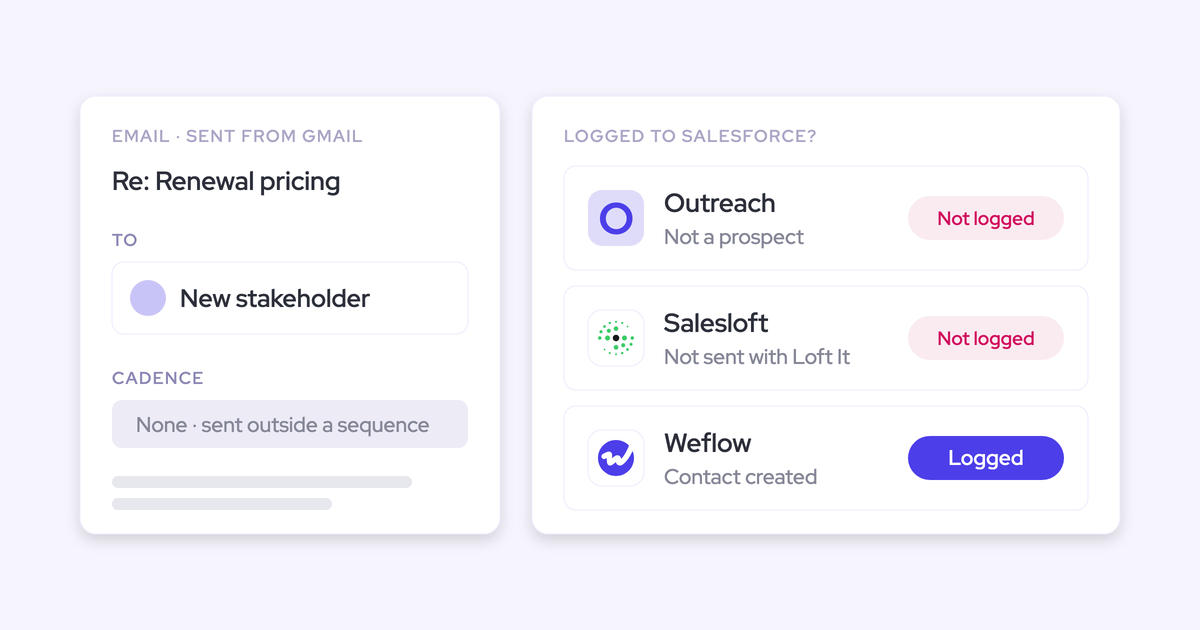
| Your contacts are already in Salesforce before the email arrives. | New stakeholders email you before anyone creates their contact. |
What it costs to put every CSM on each tool
Here's what covering the whole post-sale team costs on each tool, and what costs extra.
| Tool | Capture list price | Recording | Terms and what costs extra |
|---|---|---|---|
| Weflow | $19 per user per month for Weflow Activity & Contact Capture | Weflow Conversation Intelligence at $39, or Weflow Revenue AI Foundation (capture plus recording) at $49 | Billed annually on 12-month terms, 10-user minimum. Seats added mid-term are charged pro rata. Historical backfill up to 24 months is an add-on. |
| Einstein Activity Capture | Standard free up to 100 users. The full version comes in Sales Engagement at $50 per user per month | Not part of capture. Salesforce sells conversation insights separately | Standard keeps 6 months of activity, the full version 24. Full is included in Unlimited Edition. |
| Revenue Grid | $30 Activity Capture 360 | Only in Ultimate at $149 | Quote-based, yearly commitment, one-time implementation fee. Backfill beyond 6 days is a service. |
| Momentum | Included in Max at $550. Announced for Core ($195) and Advanced ($395). Standalone Business at $69 and Transformation at $99 | The core of the product. Standalone conversation intelligence add-on at $30 | A paid add-on on Starter and Pro Suite, priced only in a quote. |
| Cirrus Insight | $27 for sidebar, email and calendar sync | Meeting Capture at $39. Writing to Salesforce needs CRM Updates at $15 | À la carte per capability and headcount, no minimum tier. Fast Sync is $5. |
Revenue Grid's tiers, Momentum's Starter and Pro Suite add-on, and Momentum's standalone plans all sit behind a quote or a sales conversation. Weflow publishes its list prices and applies volume discounts in the quote.
Which tool fits your customer success setup
Fit follows how your CS team works today.
| If your CS setup looks like this | Start with |
|---|---|
| You run Service, Health, Financial Services or Experience Cloud alongside Sales Cloud | Revenue Grid |
| You're on Einstein Activity Capture Standard, CS work sits on standard objects, and you have admin capacity for Flow | Einstein Activity Capture |
| Your post-sale motion is call-heavy and you're already on the Max edition | Momentum |
| A handful of CSMs file important threads by hand | Cirrus Insight |
| You want automatic Case and custom-object routing across CSM, AE and exec-sponsor mailboxes, under CS-specific rules | Weflow |
One caveat applies to Weflow. CSMs who have no Salesforce seat and live only in a CS platform won't be captured.
On budget, the cheapest path is the one you already own: Einstein Activity Capture Standard, if Cases and custom objects aren't central to your reporting. Once they are, compare the published per-seat prices above against the admin time Flow and Apex work would take.
How to test a capture tool on your post-sale data
Run a parity test before a feature demo. The risk you're managing is a hole in the account history that nobody spots for months. Here's how to run it:
- Move a test user fully onto the new tool. Two tools on the same user write the same emails twice, and comparing different users fails because activity volumes differ.
- Set Einstein Activity Capture event sync to one direction, from the calendar into Salesforce, before enrolling anyone. A two-way sync running beside a second tool loops, and customers on the invite can get repeated calendar notifications.
- Backfill the period the old tool missed. A backfill that checks each message ID adds only what's missing, so the backfill itself shows you the gap.
- Compare against saved reports from the old tool, leaving the new one on its defaults.
- Then check the three routings on a real escalation thread and a real QBR.
If your reps also log from the Salesforce for Outlook extension, the same email logs twice, but it doesn't loop. Configuration and AI features come after parity is proven, never before.
Weflow's Settings Health check runs inside your Salesforce org and shows what to switch off. It detects Einstein Activity Capture, and it flags the duplicate accounts and missing website domains that break matching.

Want to see where a post-sale email lands before you trial anything? Walk through the product yourself, no call required.
What changed in Salesforce post-sale capture during 2026
- Salesforce acquired Momentum and bundled it into the new sales editions announced on 3 September 2026. It's included in Max and marked coming soon for Core and Advanced, and Service Cloud support is still in development.
- Salesforce named Momentum the future of call recording and activity capture. Salesforce is also retiring Einstein Activity Capture's Activity 360 Reporting, Activity Metrics and Activities Dashboard in favor of standard activity reports.
- Revenue Grid launched an MCP server on 13 July 2026 for ChatGPT, Claude, Copilot and custom agents.
- Cirrus Insight put a public Platform API into preview, covering scheduling, transcripts and CRM records.
- Salesforce stopped letting an integration user double as a person who logs in. Every capture tool now needs its own dedicated integration user.
How we sourced and checked this comparison
We built the competitor entries from vendor documentation and public pricing pages, checked in 2026. We added a small number of points buyers raised with us on calls, such as Einstein Activity Capture's dropped connections, and we attribute those to buyers in the text.
Weflow's entries come from our own product. Where a vendor documents nothing on a point, we left that point out rather than infer an answer.
Questions CS leaders ask us about post-sale capture
Do CSMs who live in Planhat or ChurnZero still get captured?
Only if they're Salesforce users. Weflow pairs each mailbox with one Salesforce user, so a CSM with no Salesforce seat isn't captured.
People who aren't Salesforce users can still get recordings through a separate Weflow Conversation Intelligence license. Einstein Activity Capture and Revenue Grid also tie capture to a user's Salesforce connection.
How does a tool choose between the Case, account and renewal opportunity?
Each tool uses different logic:
- Weflow uses subject patterns to find the Case, never logs to a closed opportunity, falls back to the account when the deal is ambiguous, and remembers a CSM's correction for the rest of the thread.
- Einstein Activity Capture leaves Cases out of default matching and follows contact roles to opportunities.
- Revenue Grid links an opportunity only when rep ownership and a contact role line up.
- Cirrus Insight's Smart Link picks the most recently touched record of one object type.
- Momentum picks the open opportunity with the most contact roles among attendees.
Can sales and customer success run different logging rules in one org?
In Weflow, yes. One workspace runs as many capture configurations as you have teams, so CS logs to different objects and opportunity types than sales without the rules leaking between them.
Einstein Activity Capture lets admins add configurations for specific users or profiles, while custom-object routing lives in the matching flow admins edit.
Do these tools work with Service Cloud and Salesforce Voice?
Revenue Grid supports Service Cloud editions alongside Sales, Health, Financial Services and Experience Cloud. Momentum works with Sales Cloud only today, with Service Cloud and Salesforce Voice still in development. Weflow logs emails and meetings to the Case object.
Will a new tool double-log alongside Einstein Activity Capture?
Only if Einstein Activity Capture's event sync stays two-way. Set it to one direction, from the calendar into Salesforce, before anyone is enrolled. Weflow then adds summaries onto the events Einstein Activity Capture already creates.
Duplicates already written aren't cleaned up automatically. The Salesforce for Outlook extension double-logs email but doesn't loop.
Can we separate QBRs from escalations in health reporting?
Yes, once they land on different objects. An escalation on the Case and a QBR on the account or a custom object can be split in a standard Salesforce activity report by the related record.
Meeting counts reflect meetings scheduled, not attended, unless the meeting was recorded. Recording is what proves a QBR happened.
How much account history can each tool backfill on day one?
- Revenue Grid saves the last 6 days of Inbox and Sent email at activation, with more as a paid service.
- Cirrus Insight's Calendar Sync reaches back 7 days, and email backfill is scoped as a service.
- Einstein Activity Capture's switch to Sync Email as Salesforce Activity can bring in up to six months of past email.
- Weflow offers historical backfill of up to 24 months as an add-on.
How do we keep sensitive escalation threads out of Salesforce?
Use the exclusion layers each tool offers:
- Weflow: domain, object, keyword and custom rules on any account, contact or Case field.
- Einstein Activity Capture: keywords, PII patterns and header-only capture.
- Revenue Grid: blocklists and a confidential users list.
- Cirrus Insight: admin blocklists.
None of these read what an email means. Momentum's Smart Quarantine does judge context, but it applies to recorded meeting transcripts.
Will escalation content pollute renewal forecasts and methodology scores?
Not with Weflow's routing. It never logs to a closed opportunity, and it falls back to the account instead of guessing when several deals are open.
You can restrict Opportunity logging to conversations the owner joined. AI playbooks score the account rather than a single deal, so CS evidence doesn't land in a renewal's MEDDIC fields.
Does a capture tool replace our CS platform or feed it?
It feeds it. Capture puts CSM, AE and exec-sponsor activity into Salesforce, where renewal and risk already live, and your CS platform reads from there.
Weflow isn't a helpdesk and has no account board, so ticket handling and CS workflows stay where they are.