

Best Revenue Grid Alternatives for Salesforce Email and Calendar Sync (2026)
Decide which Revenue Grid alternatives fit Salesforce email and calendar sync in 2026




Every tool on this list gets email into Salesforce. Three things separate them: where the email lands, how fast it gets there, and what you pay once you want more than capture.
So we've built this page around one test you can run in your sandbox this week. Create an account with two open opportunities and see where each tool logs the email. Clean one-deal accounts flatter every vendor. The ambiguous account is where they differ.
Weflow is the Revenue AI Orchestration platform for sales, customer success, and RevOps teams. It's built for Salesforce teams, and Weflow Activity & Contact Capture is its capture foundation. We'll be plain about where we fit and where we don't.
The short answer, sorted by fit rather than rank:
- Weflow fits if you want opportunity mapping your reps can correct, automatic contacts and opportunity contact roles, and near-immediate writes.
- Stay on Revenue Grid if you need two-way calendar sync, dedicated hosting or a non-Salesforce CRM.
- Cirrus Insight fits if you prefer reps choosing what gets filed, bought line by line.
- Einstein Activity Capture fits if your edition already includes it and you accept its limits.
- Nektar.ai fits enterprise data teams that want headless capture into Salesforce and Snowflake.
- Gong fits if conversation intelligence is the purchase and capture comes second.
Whether you're at renewal or being pushed off Salesforce for Outlook with Revenue Grid as the lean, the same test applies.
Revenue Grid alternatives compared on Salesforce email and calendar sync
This table sorts nothing. It lays out what each tool does on the capabilities you'll actually test, and fit comes later in the article.
| Capability | Weflow | Revenue Grid | Einstein Activity Capture | Cirrus Insight | Nektar.ai | Gong |
|---|---|---|---|---|---|---|
| Automatic email capture | Server side through an Entra or Google Workspace app, any device, near-immediate writes; logs only mail that matches a Salesforce record | Server-side Sync Engine; 30-minute sessions, stretching to 120 minutes on quiet mailboxes | Background capture of sent and received mail; reps report about 80% logged | Email Sync ($5) logs only when an existing contact or lead is on the email; 15-minute cycle | Admin-level background capture; about an hour to Salesforce, up to 9 hours | Server-side import; Salesforce export runs forward from the day an admin enables it |
| Automatic meeting capture | Every external meeting logged to Event, recorded or not; one-way calendar sync recommended | Two-way calendar sync; new meetings reach Salesforce within a couple of minutes | Events with up to 50 matched attendees; separate copies when the organizer isn't syncing | Calendar Sync ($11), one or both directions set per user | Calendar events written as Events; events more than three months out wait | Exported as tasks or events once an admin turns export on |
| Matching activity to the right records | Weighs contact role, opportunity owner, mailbox owner, account and stage; never logs to closed opportunities; falls back to the account | Links an opportunity only if the rep owns it, the contact holds a role on it, it's open and linking is on | Contact roles first, then account-level tiebreakers; admins edit the matching flow | Smart Link picks the most recently created or edited record | Machine-learning affinity scoring; account fallback when ambiguous; rules not visible to admins | Admin-configured deal rules; can associate several deals, up to 20 |
| Inbox extension or add-in | Outlook add-in and Chrome extension; rep re-maps once and the thread follows | Sidebar as Outlook add-in and Gmail Chrome extension | None of its own; the Outlook and Gmail integration is a separate product | Gmail extension and Outlook add-in for filing and creating records | None; background service only | Gong Anywhere, which requires Gong Engage |
| Automatic contact creation | Contacts from To and CC on send, with guards; optional opportunity contact role; never leads | Two creation modes, both off by default; no contact roles | Contact Auto-Creation unavailable under Sync Email as Salesforce Activity | Email Sync never creates contacts; reps add them from the sidebar | Automatic contacts under the domain-matched account; contact roles in Harvest | None from email; inactive Flow template for call participants |
| Integrations with other tools | Salesforce, Google, Microsoft, Zoom, Teams, Meet, Slack, Outreach dialer; compatibility mode with sequencers | Microsoft 365, Exchange, Google Workspace, Teams and Zoom; third-party API integrations in a paid package | Microsoft and Google mail and calendar, plus Salesforce's own products | Zapier, scheduling webhooks, Zoom and Teams meeting links | Salesforce, Snowflake, Google Workspace, Microsoft 365, Zoom | About 450 marketplace integrations |
| Access from AI assistants (MCP) | Official read-only MCP connector with a separate transcript toggle | MCP server launched July 2026, no public documentation, connected manually | None of its own; Salesforce Hosted MCP Servers with Flex Credits | None | None of its own; assistants read through Salesforce's MCP | Three record-scoped tools, AI insights only, metered credits |
| Raw data access outside the tool | REST API bulk export as JSON or CSV; no native warehouse connector | No public API for captured activity; reachable through Salesforce's API | Task and EmailMessage records through Salesforce APIs; off-org data not exportable | Preview REST API; activity lands in Salesforce | Snowflake delivery, including a headless option | API capped at 10,000 calls a day; Data Cloud about $5,000 a year |
| Pricing | Published: $19 for capture, bundles from $49 to $79 | Public list prices of $30, $49 and $149, sold by quote | Standard included in several editions; full version via Unlimited or the $50 Sales Engagement add-on | À la carte; $27 for sidebar, email and calendar sync | Quote only; backfill at $8 per user per month of history | Quote only; Foundation plus applications and AI credits |
What Revenue Grid does well and why teams look elsewhere
Revenue Grid positions its activity capture as the replacement for Salesforce for Outlook and the alternative to Einstein Activity Capture. It's an Outlook add-in or Gmail extension paired with a server-side Sync Engine, and it writes native Tasks, EmailMessages and Events into your org.
That last point matters for how we argue this page. Revenue Grid already puts the data in your Salesforce. The reasons teams leave are about mechanics, and Revenue Grid documents every one of them.
Where Revenue Grid is still the better choice
Some teams should stay. Revenue Grid is the stronger fit if you need any of these:
- Two-way calendar sync, where Salesforce events push back to Outlook. Instant Sync gets them there in about five minutes as a paid add-on, though it doesn't support Google Workspace.
- Email attachments saved to Salesforce as Content documents or Attachment records, filtered by an admin allow-list of extensions.
- A private cloud or dedicated hosting deployment.
- An architecture for more than 100,000 users with multi-geo Microsoft 365 support.
- A CRM other than Salesforce. Revenue Grid markets integrations with Siebel, Oracle Sales Cloud, SAP Hybris Cloud, Workbooks and Creatio.
Why Revenue Grid logs so much activity to the account
Revenue Grid links an auto-saved email to an opportunity only when all four of these hold at once:
- The rep owns the opportunity.
- An address on the email belongs to a contact with a contact role on it.
- The opportunity is open.
- Linking to opportunities is switched on in sync settings.
Miss any one and the email lands on the account. A solutions engineer emailing your champion fails condition one. A new stakeholder fails condition two.
The second condition is the one that bites. Revenue Grid doesn't create opportunity contact roles, and its contact creation is off by default. So the roles its rule depends on stay sparse.
Salesforce allows one Related To record per activity, so anything that can't resolve to the opportunity falls back to the account with no warning. The account timeline looks busy, and the deal looks dead.
Why auto-saved email reaches Salesforce on a 30-minute cycle
Revenue Grid markets its Salesforce integration as real-time. Its Sync Engine saves automatically captured email in sync sessions every 30 minutes by default, and it stretches the gap when a mailbox goes quiet.
| Mailbox state | Time between sync sessions |
|---|---|
| Default | 30 minutes |
| After one session with no changes | 60 minutes |
| After a second quiet session | 120 minutes, until a change or a Force sync |
| Rep clicks Save in the Sidebar | Written immediately |
Admins can change the base interval. Only the manual save writes right away, and that's the one step the automatic sync was meant to remove.
Why Revenue Grid clashes with Outreach and Salesloft logging
Revenue Grid must not run alongside any other tool that moves data between the mailbox and Salesforce, such as Lightning Sync, Salesforce Inbox or Salesforce for Outlook. The two create sync conflicts and duplicate items.
It also has no handling for activity a sales engagement tool like Outreach or Salesloft already logged. Most mid-market stacks run a sequencer that logs its own email, so the same message lands twice and your activity counts inflate.
Why a rep-free Revenue Grid rollout needs an extra Salesforce licence
A fully admin-authorized Revenue Grid rollout needs a separately paid Salesforce licence for a custom service account. Instant Sync also needs a dedicated integration user with the System Administrator profile.
Without the service account, each rep authorizes Salesforce and their mailbox with their own login. Revenue Grid itself calls that option lower in scalability and higher in user-side error risk. Even with a service account, reps still sign in to Salesforce to use the Sidebar.
Why recording and forecasting sit only in Revenue Grid Ultimate
Revenue Grid sells three tiers, each on a yearly commitment and sold through a quote:
- Activity Capture 360, $30 per user per month: email and calendar capture, the Sidebar, scheduling and native activity reporting.
- Knowledge Capture, $49: adds AI chat and search across captured data.
- Ultimate, $149: adds meeting assistance, pipeline predictions, forecasting, team analytics and deal guidance.
If you want meeting recording or AI deal predictions next to capture, you pay the full Ultimate price for every seat that needs them. That's close to five times the capture tier.
Test every tool on one account with two open opportunities
You judge a capture tool on the ambiguous account. Multiple open deals per account are normal once you sell renewals, expansions or several product lines, so this is the common case.
And a tool that maps silently and wrongly is worse than one that falls back to the account. Logging to the account is easy to fix later. Logging to the wrong deal gets built into reports before anyone notices.
"If there are multiple opportunities, they just don't know where to map it and just randomly assign it to something. This is not acceptable."
A RevOps buyer evaluating capture tools
How to set up the two-opportunity test in your sandbox
- Create one account with two open opportunities: a renewal and an expansion.
- Put one contact on an email thread. Run the test once with that contact holding a contact role on both opportunities, and once with no contact role at all.
- Send and receive the email from a rep who doesn't own one of the two opportunities.
- Open each logged Task or EmailMessage and check its Related To value.
- Check whether the rep can see the match from the inbox, correct it, and whether the correction holds for later replies in the thread.
What a good answer looks like when the mapping is ambiguous
Score what you see against these behaviors. The tool verdicts come later in each tool's section.
| Behavior | Passes | Fails |
|---|---|---|
| Closed opportunities | Never logs to a closed opportunity | Attaches new email to a closed deal |
| Only one opportunity open | Picks that opportunity | Drops to the account anyway |
| Two opportunities, no clear evidence | Falls back to the account | Guesses and writes to one deal |
| What the rep sees | Shows the match in the inbox before or after logging | Rep only finds out in Salesforce, if at all |
| Corrections | Remembers the correction for the rest of the thread | Rep fixes every email by hand |
Five more checks before you switch capture tools
Once mapping passes, five things decide the rest. Each one is something you can measure yourself.
How fast does activity actually reach Salesforce?
Measure send-to-record time yourself, on a live mailbox and a quiet one. Ask whether writes run in batches, on what interval, and whether the interval stretches when a mailbox goes quiet.
A pass is a record you can see in Salesforce within minutes, without the rep clicking save.
Do new stakeholders become contacts and contact roles?
Put an unknown address in To and CC and see whether it becomes a contact. Then check the guards:
- creation limited to accounts that already exist,
- a cap per event, so a webinar doesn't create two hundred contacts,
- blocks on addresses like billing, invoice and no-reply.
Then check whether the tool adds the contact role on the opportunity. The contact role is what makes the next email map correctly, so a tool that skips it keeps failing the two-opportunity test.
Will it double-log what Outreach or Salesloft already writes?
Ask what the tool will stop writing, not only what it writes. Run the pilot with your sequencer still logging and count the duplicates.
"All my activities are already logged through Outreach. Is there any conflict with weflow? Is it gonna double log into Salesforce?"
A prospect on a Weflow sales call
Does the rollout need anything from your reps?
Compare tenant-level authorization with per-rep mailbox connections. Per-user connections break on password resets, MFA prompts, token expiry and conditional access changes, and every break is a silent gap in the record.
Discount anything that depends on rep setup. You already know how that goes.
"A lot of the other ones are like, oh, like get them to like install the thing and do the setup. But I'm like, they're not going to. They're not going to do it. It's just like herding cat."
A buyer comparing capture tools
How does the price move once you go past capture?
Ask at which tier recording and forecasting become available, and the per-seat difference from the capture price. Then ask what's extra:
- history at go-live,
- faster sync,
- implementation fees,
- extra Salesforce licences,
- AI usage.
We put the numbers side by side further down.
Weflow: automatic capture with opportunity mapping reps can correct
Weflow Activity & Contact Capture is the foundation of the Weflow platform. It writes emails, meetings and contacts into native Salesforce objects. This entry runs longest because it answers each Revenue Grid reason in turn.
How Weflow Activity & Contact Capture logs email and meetings
Weflow captures email and meetings server side, through a central app you install in Microsoft Entra or Google Workspace. It logs mail sent from a phone, a browser or a desktop client the same way, and your reps don't do anything.
Writes go to Salesforce through the integration user almost immediately, with no 30-minute batch to wait for. Weflow logs inbound and outbound mail on the same rules.
Weflow logs only activity it can match to a Salesforce record, and it logs every external meeting as an Event whether or not anyone recorded it. Two things it doesn't capture:
- personal email accounts, SMS and calls from personal phones,
- mail sent from a separate deliverability subdomain, since matching runs on the sender address in Salesforce.
Where Weflow logs activity when an account has several opportunities
Here's what Weflow does in your two-opportunity test. It maps by email address and the Salesforce relationships around it, and it never reads the email's content to decide.
- It looks up the address in primary and secondary email fields and logs to the contact, lead or custom object that holds it.
- It checks for an opportunity contact role.
- If the account has exactly one open opportunity, it picks that one.
- If several are open, it weighs the contact role, opportunity owner, mailbox owner, account relationship and stage.
- It never logs to a closed opportunity.
- When the evidence doesn't settle it, it logs to the account instead of guessing.
Then the rep gets the last word. The Outlook add-in and Chrome extension show which contact, account and open opportunities Weflow matched. The rep picks a different one once, and Weflow routes every later reply in that thread to the same record. A new thread resets the choice.
Reps or admins can also move an email that's already logged, from the same panel, without editing the activity in Salesforce.
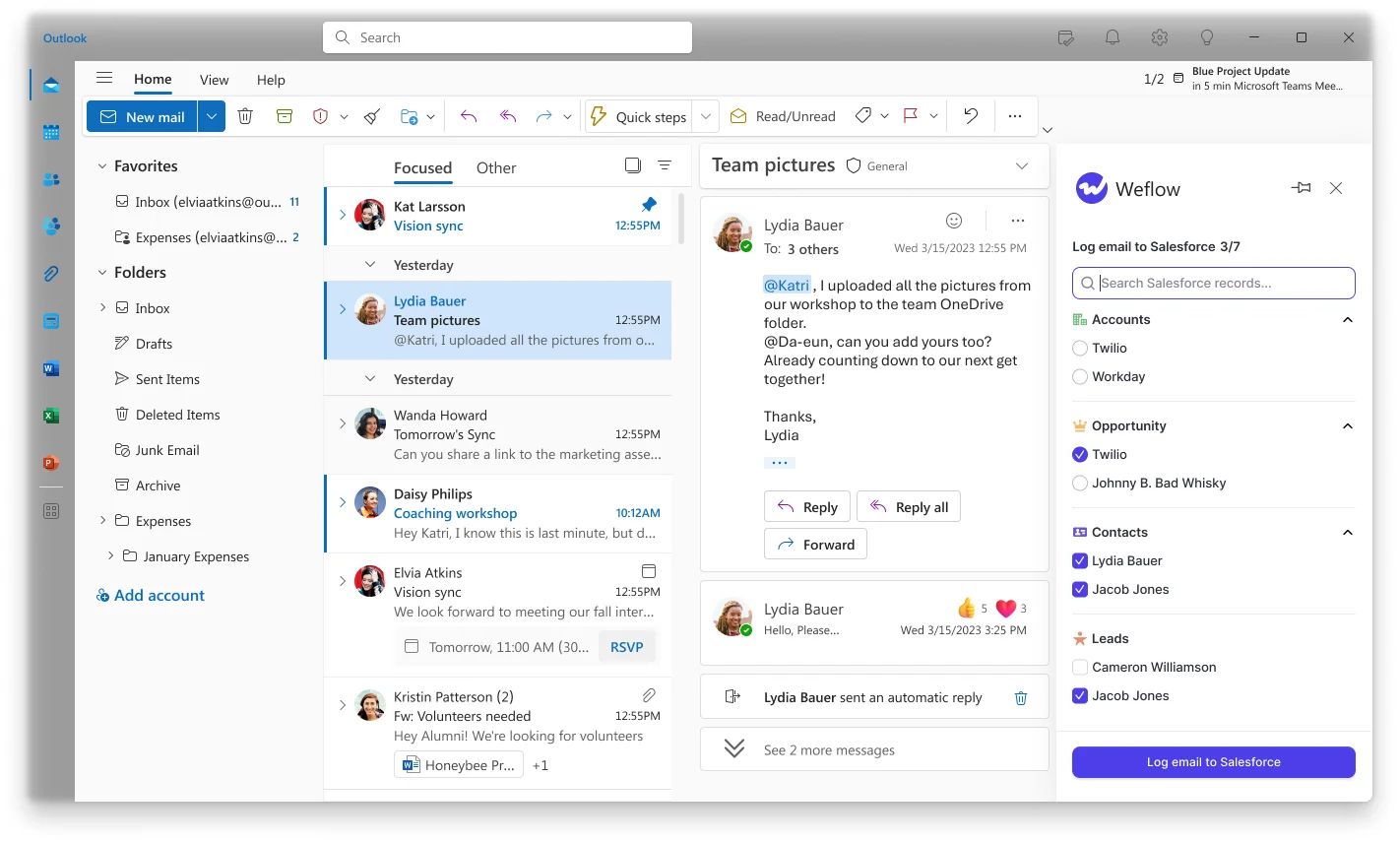
Weflow decides each email against your Salesforce data at that moment. Add a contact role between two emails and the second one can land differently, which is usually what you want.
How Weflow creates contacts and opportunity contact roles
Weflow creates Salesforce contacts automatically for people on To and CC when the rep sends. It looks up the address across contacts, leads, custom objects and secondary email fields first, so it doesn't create duplicates.
You control creation with these settings:
- switch it off entirely,
- restrict it to accounts already in Salesforce,
- cap contacts per meeting or thread,
- block prefixes such as invoice, billing, no-reply and support,
- let the rep clear it per email in the extension.
Weflow enriches each contact before writing it, filling fields like title, phone and LinkedIn. A validation rule that requires a field enrichment couldn't fill will stop that contact from saving.
The option that matters most for mapping: when Weflow logs an email to a contact and an opportunity and the contact has no role there, it can create the opportunity contact role automatically. Every later email from that person then resolves to the deal. This is the gap Revenue Grid's linking rule leaves open.
Three limits, stated once:
- Weflow never creates leads.
- With creation limited to existing accounts, an email from a domain with no account creates no contact, and nobody is notified.
- The contact role is fixed per configuration, so every auto-created role on an opportunity gets the same value.
How Weflow works with sequencers, AI assistants and your warehouse
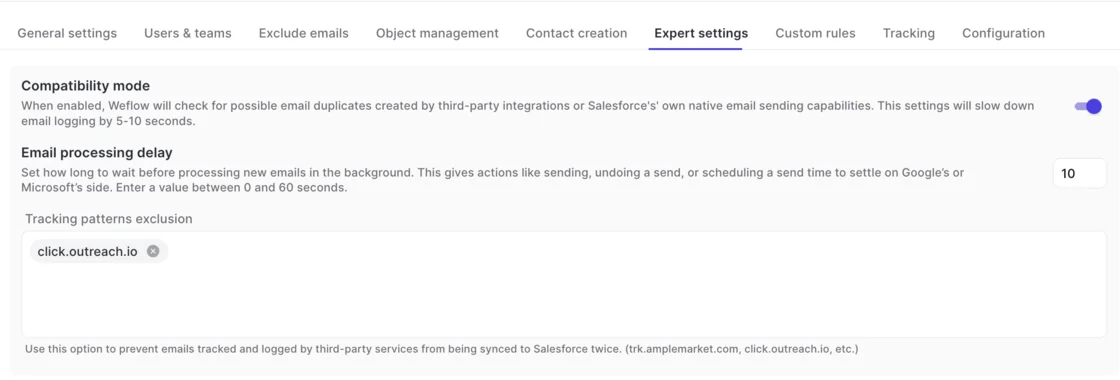
- Sequencers: compatibility mode reads the sequencer's tracking pattern in the email body and skips the message, so only one tool writes it to Salesforce. Outreach and Salesloft keep logging, and you stop seeing duplicates.
- AI assistants: Weflow's official read-only MCP connector gives Claude, ChatGPT and other assistants playbooks, call summaries, transcripts, forecast calls and pipeline metrics. An admin turns it on per workspace, with a separate toggle for transcript access.
- Warehouse and BI: the REST API bulk-exports transcripts, metadata, scores and signals as JSON or CSV into Tableau, Looker or a warehouse. Weflow has no native Snowflake, Databricks or BigQuery connector, so teams move data there through the API.
What Weflow costs, from capture to the full platform
Weflow publishes its prices, billed annually per user per month:
- Weflow Activity & Contact Capture: $19
- Weflow Conversation Intelligence: $39
- Weflow Deal Intelligence & Forecasting: $39
- Revenue AI Foundation (capture plus Conversation Intelligence): $49
- Revenue AI Business (Foundation plus Deal Intelligence): $59
- Revenue AI Enterprise (all products, including Forecasting): $79
Ask Weflow AI, AI summaries and AI field updates are in the seat. Agent Builder is the only consumption-priced product, with a free tier of 25 actions a month on every plan.
Up to 24 months of email and calendar history is standard, and there's no implementation or platform fee.
Where Weflow falls short and who it fits
- Pick it if you're a mid-market Salesforce team that wants capture with no rep setup, mapping reps can correct once per thread, contacts and contact roles created for you, coexistence with your sequencer, and a short price step to conversation intelligence and forecasting.
- Skip it if you book meetings from Salesforce and need them pushed back to the calendar. Weflow recommends one-way calendar-to-Salesforce sync because the reverse direction is unreliable, so Revenue Grid or Cirrus Insight serves you better. Skip it too if you're not on Salesforce, need capture to create leads, or are under 10 users. Weflow works only with Salesforce, and contracts run 12 months with a 10-user minimum.
Einstein Activity Capture: the included option, with known limits
Einstein Activity Capture is Salesforce's own background capture. It's often where teams land by default when Salesforce for Outlook support ends.
How Einstein Activity Capture logs email and calendar meetings
Einstein Activity Capture captures sent and received email automatically from the connected Microsoft or Google account. An admin connects the whole org through OAuth, or each rep connects their own account.
It syncs meetings as Event records with up to 50 attendees matched to users, contacts and leads. Calendar-to-Salesforce is the recommended direction and typically syncs within five minutes.
Reps we speak with estimate it logs about 80% of their activity, and teams report connections dropping without explanation. Treat both as what users report, not as a measured rate.
Where Einstein Activity Capture logs activity on multi-opportunity accounts
Einstein Activity Capture matches an email to an opportunity through a contact who holds a contact role on it first. With no matching contact role, it picks among the account's opportunities with tiebreakers like close date, owner on the email and open before closed.
- Admins edit the logic in the Activities: Match Email to Records flow or with Apex.
- Reps correct a wrong match on the email record in Salesforce, and the flow won't overwrite it.
It has no inbox panel of its own. Salesforce sells the Outlook and Gmail integration separately, and a rep clicking Log Email there can log the same email twice.
Why Einstein Activity Capture won't create contacts from email
Under Sync Email as Salesforce Activity, the default for every setup since Summer '25, Contact Auto-Creation and Contact Suggestions aren't available. An email from an unknown address isn't logged at all until someone creates the contact or lead.
Contact sync still brings people in from users' Microsoft or Google address books. New stakeholders who only appear on email threads stay invisible.
How Einstein Activity Capture connects to reports and AI assistants
- Integrations: Microsoft 365, on-premises Exchange and Google Workspace, alongside Salesforce's own Inbox, Einstein Conversation Insights and Agentforce.
- AI assistants: no MCP server of its own. Claude and ChatGPT reach its records through Salesforce Hosted MCP Servers, which are intended for customers with Flex Credits.
- Raw data: email synced as Task and EmailMessage records works in reports, SOQL and the Salesforce APIs. Salesforce doesn't support exporting the activity data Einstein Activity Capture holds outside the org.
What Einstein Activity Capture costs by Salesforce edition
Einstein Activity Capture Standard comes with Sales Cloud Starter, Pro Suite, Professional and Enterprise, free for up to 100 users. The full version comes with Unlimited, Einstein 1 Sales and Agentforce 1, or with the Sales Engagement add-on listed at $50 per user per month billed annually.
Who should stay on Einstein Activity Capture
- Pick it if your edition already includes it, you're under the 100-user line, and your accounts mostly carry one open opportunity.
- Skip it if you need attachments on the record, automatic contacts from email, or a capture roadmap you can plan around. It doesn't sync attachments, and Salesforce now names Momentum as the future of activity capture in Salesforce.
Cirrus Insight: rep-directed filing you buy line by line
Cirrus Insight is an inbox add-on for Gmail and Outlook that connects only to Salesforce, sold as 16 separately priced capabilities. Buyers often compare it directly with Revenue Grid.
How Cirrus Insight syncs email and calendar meetings
Reps file email by hand from the sidebar, and the background Email Sync ($5) logs the rest by admin rules. Email Sync logs a message only when an existing Salesforce contact or lead is on it.
Sync runs on a 15-minute minimum cycle, or every five minutes with the Fast Sync add-on. Calendar Sync logs meetings as Events in one or both directions, set per user.
Where Cirrus Insight logs email on multi-opportunity accounts
Smart Link relates each synced email to the most recently created or edited record of one object type the admin picks. On your two-opportunity account, the email lands on whichever deal someone touched last.
- Thread-Based Smart Link keeps a whole thread on the record a rep filed it to by hand.
- The sidebar runs in Gmail and Outlook, so reps see and choose records from the inbox.
Why Cirrus Insight Email Sync never creates contacts
Email Sync needs an existing contact or lead, so it never creates one. Reps add unknown addresses from the sidebar, where Cirrus pre-fills the account and pulls title, phone and company from the signature.
Cirrus treats this as a deliberate choice. In practice, buying committee members you only meet by email stay out of Salesforce until a rep adds them.
How Cirrus Insight connects to your stack and AI assistants
- Integrations: Zapier, scheduling webhooks, and Zoom, Teams and Google Calendar links for meetings booked through its scheduler.
- AI assistants: no MCP server or connector for Claude or ChatGPT.
- Raw data: a preview REST API covering scheduling, transcripts and CRM records. Captured activity goes into Salesforce, not straight into a warehouse.
What Cirrus Insight costs, capability by capability
Each capability has its own per-user monthly price. The Salesforce Sidebar ($11), Email Sync ($5) and Calendar Sync ($11) add up to $27 per user per month, and Fast Sync brings it to $32.
Who Cirrus Insight fits best
- Pick it if you want reps choosing what gets logged, plus scheduling pages and two-way calendar sync, bought only for the users who need each line.
- Skip it if you need contacts created automatically or email mapped to the relevant opportunity rather than the most recent one.
Nektar.ai: headless capture for enterprise data teams
Nektar.ai is a background data service with no rep interface. It writes activities, contacts and contact roles into Salesforce and Snowflake, and it sells to organizations with 50 or more Salesforce seats, so it sits mostly in the enterprise.
How Nektar.ai captures email and meetings in the background
Nektar connects at the organization level through Google Workspace and Microsoft 365, so reps install nothing. It captures an email or meeting only when a participant is an existing contact or lead, or shares a company domain with one.
Its pipeline runs in batches with a deliberate wait. A new email typically takes about an hour to reach Salesforce, up to nine hours, and longer when Nektar first has to create the contacts.
Where Nektar.ai logs activity when the opportunity is ambiguous
Nektar scores candidate opportunities with machine-learning affinity models. When the choice between open opportunities is ambiguous, it logs to the account, which is the right instinct.
- It re-matches past activity as new data arrives and learns from manual edits in Salesforce.
- Admins see a score but can't read or adjust the rules behind a match, and reps have no interface to correct one.
How Nektar.ai creates contacts and opportunity contact roles
Nektar creates missing contacts under the account whose domain matches, fills name, title and phone from signatures, and skips public domains. Automatic opportunity contact roles come only in its higher Harvest package.
How Nektar.ai delivers data to Snowflake and AI assistants
- Integrations: Salesforce, Snowflake, Google Workspace, Microsoft 365 and Zoom, plus meeting data from Teams and Meet.
- AI assistants: no API or MCP server of its own. Assistants reach its data through Salesforce's MCP once Nektar writes it there.
- Raw data: Snowflake delivery, including a headless option. Nektar doesn't deduplicate against other capture tools on the same users, so those have to be switched off.
What Nektar.ai costs: quote-only packages and paid backfill
Nektar sells two packages, Bloom and Harvest, with no published per-user price. The one published figure is backfill: $8 per user for every month of history, charged once, up to 18 months back.
Who Nektar.ai fits best
- Pick it if you're an enterprise data or AI team building on Snowflake and you want capture with no rep layer at all.
- Skip it if your reps need to see or correct where email lands, or you need activity in Salesforce within the hour.
Gong: call-centric capture for conversation intelligence buyers
Gong is a conversation intelligence platform that records and analyzes calls in its own cloud. It invented the category and has the deepest conversation analytics on this list. It isn't a direct capture competitor, but plenty of teams ask whether it can cover capture too.
How Gong brings email and meetings into Salesforce
Gong imports email and calendar meetings server side from each team member's mailbox, keeping emails only when a participant matches a CRM record. Once an admin turns on export, it writes them to Salesforce as tasks or events.
Email export runs forward from the day you enable it. There's no historical email or calendar backfill.
Where Gong logs activity when an account has several deals
Gong narrows deals with admin-configured rules: deal filters, whether the owner or a contact role holder took part, and a chosen date field. If several deals still qualify, it associates all of them, up to 20.
- There's no mailbox add-in where a rep sees and corrects the mapping.
- Gong Anywhere, its Gmail extension and Outlook add-in, requires Gong Engage.
Why Gong doesn't create Salesforce contacts from email
Gong logs a new person's email in Gong only and doesn't create the contact in Salesforce. The Gong for Salesforce package ships an inactive Flow template that, once an admin activates it, creates contacts or leads for call participants, never for email-only stakeholders.
How Gong connects to your stack and AI assistants
- Integrations: about 450 integrations and partner solutions, including roughly thirty dialers.
- AI assistants: an MCP server with three record-scoped tools that returns AI insights, not transcripts, and draws metered credits.
- Raw data: an API capped at 10,000 calls a day, plus Data Cloud for warehouse delivery at about $5,000 a year.
What Gong costs: Foundation, applications and AI credits
Gong publishes no prices. You buy the Gong Foundation core licence plus applications on top, a platform fee that scales with users, and AI credits from a company-wide pool of 2,000 per paid core seat per year.
Who should use Gong for activity capture
- Pick it if you're buying conversation intelligence first and your capture needs center on recorded calls.
- Skip it if capture is the job. Email history, contacts from email and rep-correctable mapping all sit outside what Gong does. If you want conversation intelligence and capture writing into Salesforce, Weflow gives you better AI at half the price.
What each Revenue Grid alternative costs per user
List price is only part of the number. History, faster sync, implementation, extra licences, AI credits and tier jumps change the comparison. Two vendors, Nektar.ai and Gong, publish no price at all.
What you pay to stay at email and calendar capture
| Tool | Capture price per user per month | Minimum and term | History at go-live | What costs extra |
|---|---|---|---|---|
| Weflow | $19 published (Weflow Activity & Contact Capture) | 10 users, 12 months | Up to 24 months standard | No implementation or platform fee |
| Revenue Grid | $30 list (Activity Capture 360), sold by quote | Yearly commitment | Six days of Inbox and Sent mail | One-time implementation fee, older history, Instant Sync, bulk calendar sync, a Salesforce licence for the service account |
| Einstein Activity Capture | Standard included in Starter, Pro Suite, Professional and Enterprise | Free up to 100 users | Up to six months of past email when switching to Sync Email as Salesforce Activity | Full version via Unlimited or Sales Engagement at $50 |
| Cirrus Insight | $27 for sidebar, email and calendar sync | Term and billing chosen in the configurator | Calendar reaches back up to 7 days; email backfill scoped as a service | Fast Sync $5, Task Sync $2.50, historical sync service |
| Nektar.ai | Quote only | Sells to 50+ Salesforce seats | None included | Backfill at $8 per user per month of history; contact roles need Harvest |
| Gong | Quote only | Foundation licence required | No email or calendar backfill | Platform fee, Engage for the inbox add-in, Data Cloud, AI credits |
What you pay to add recording and forecasting
| Tool | Recording | Forecasting | How AI is charged |
|---|---|---|---|
| Weflow | Revenue AI Foundation, $49 | Revenue AI Enterprise, $79 | In the seat; only Agent Builder is metered beyond its free tier |
| Revenue Grid | Ultimate, $149 | Ultimate, $149 | AI chat starts at Knowledge Capture, $49 |
| Einstein Activity Capture | Einstein Conversation Insights, included in Sales Engagement at $50 | Not part of Einstein Activity Capture | Agentforce is a separate product; Hosted MCP Servers use Flex Credits |
| Cirrus Insight | Meeting Capture, $39, plus CRM Updates at $15 for Salesforce write-back | No forecasting of its own | Priced per capability line |
| Nektar.ai | Doesn't record calls | Doesn't forecast | Meeting intelligence in Harvest, quote only |
| Gong | Gong Foundation | Forecast Essentials or Gong Forecast, as applications | Credits from a shared pool |
The step from capture is where the paths split. Revenue Grid goes from $30 to $149 for recording and forecasting. Weflow goes from $19 for Weflow Activity & Contact Capture to $49 for Revenue AI Foundation, $59 for Revenue AI Business and $79 for Revenue AI Enterprise.
Which Revenue Grid alternative fits your team
Four things decide fit: where your activity has to land, which way your calendar syncs, your CRM and hosting needs, and whether you want more than capture.
| If your team… | Look at… |
|---|---|
| Needs email on the right opportunity when accounts carry several open deals | Weflow, for evidence-weighted mapping reps can correct once per thread |
| Runs Outreach or Salesloft logging alongside capture | Weflow, for compatibility mode with sequencer tracking patterns |
| Wants contacts and opportunity contact roles created without reps | Weflow, or Nektar.ai on its Harvest package |
| Wants recording and forecasting without a large per-seat jump | Weflow's Revenue AI Foundation, Business or Enterprise bundles |
| Books meetings from Salesforce and needs them pushed to the calendar | Stay on Revenue Grid, or look at Cirrus Insight |
| Needs private or dedicated hosting | Stay on Revenue Grid |
| Runs a non-Salesforce CRM such as Siebel or Oracle | Stay on Revenue Grid |
| Deploys to more than 100,000 users across geographies | Stay on Revenue Grid |
| Prefers reps choosing what gets logged, plus scheduling | Cirrus Insight |
| Already has it in their edition, under 100 users, mostly one deal per account | Einstein Activity Capture |
| Is an enterprise data team feeding Snowflake with no rep layer | Nektar.ai |
| Is buying conversation intelligence first | Gong |
How to run a fair capture pilot against Revenue Grid
You compare capture tools on parity: did the new one lose anything? Move users fully, backfill the gap, compare against saved reports, and judge it unconfigured before anything else.
Why two capture tools can't share one inbox
Two tools on the same mailbox write the same emails and meetings, so you get duplicates and learn nothing. Revenue Grid also tells you not to run it beside other mailbox-sync tools.
Splitting users between tools doesn't work either. Activity volume differs from person to person, so the numbers never line up.
How to switch users over and backfill the gap
- Save baseline activity reports from Revenue Grid for the pilot users and period.
- Disable Revenue Grid for those users.
- Enable the new tool for the same users.
- Backfill the period you're comparing.
- Compare the new tool's activity against your saved baseline.
- Sit down with the users who complained most about missing email and ask what changed.
How to judge parity before you configure anything
Run the new tool on its defaults, with no templates and no custom use cases, and check it one for one against the baseline. The risk you're managing is a hole in the activity record nobody spots for months.
Configure after parity is proven. Summaries, scorecards and forecasting come later, once you trust the capture underneath them.
When you're ready to run your own two-opportunity account through Weflow, we'll do it live with you. See how Weflow captures activity, updates Salesforce fields from calls, and rolls up your forecast. Book a 30-minute demo.
FAQ
Will Weflow's backfill duplicate emails Revenue Grid already logged?
In the pilot method above, Revenue Grid is off for the pilot users and Weflow backfills the period. The backfill checks each email's message ID before writing, so it adds what Revenue Grid missed. What it fills in becomes your measure of the difference.
What happens to the Tasks and EmailMessages Revenue Grid already wrote?
They stay in your org. Revenue Grid writes native Tasks, EmailMessages and Events, so they're your Salesforce records after you switch. Reports built on standard activity objects keep reading them alongside what Weflow writes.
Should we log emails as Task or EmailMessage in Salesforce?
You set it per configuration. About nine in ten Weflow customers choose EmailMessage, which carries native From, To and Cc and thread structure. Task is roughly seven times lighter, which matters near your storage ceiling, and it lets one activity report span emails, tasks and events.

What does Weflow need in Salesforce before capture starts?
You install the managed packages, connect the integration user and add the workspace app in Entra or Google Workspace. Technical setup takes 30 to 45 minutes with your Salesforce admin and your Google or Microsoft admin.
None of that reads a mailbox. Enrolling users in an activity capture configuration is the switch, so you can finish setup while legal review is still open. Users sign in to Weflow only through Salesforce authentication.
Weflow's Settings Health check reports whether Shared Activities and Enhanced Email are enabled and whether Einstein Activity Capture is detected.

How do we keep executive and HR mailboxes out of Salesforce?
You control it in layers:
- Leave those users out of every capture configuration, and Weflow never reads their mailboxes.
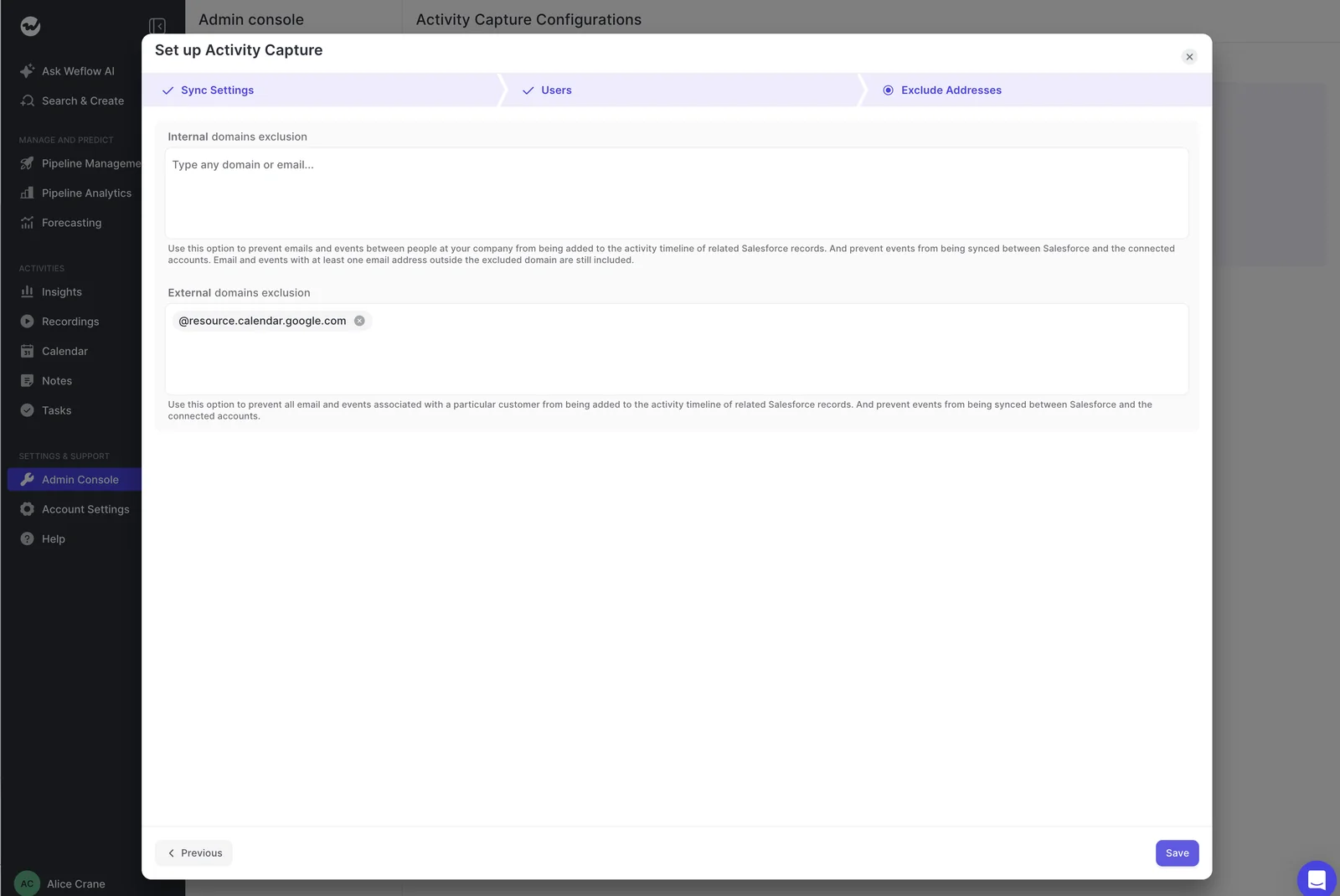
- Exclude domains and addresses.
- Reps mark individual events and emails private.
- Custom rules block logging against whole records based on any field, which keeps confidential accounts out.
Weflow also never logs threads where every participant is on an internal domain.
Can Weflow log activity to custom Salesforce objects?
Yes. Weflow logs to any Salesforce object, including cases and custom objects. You give us the object label and the fields to show, and it appears in the extension so reps can link an email to it directly.
Does Weflow save email attachments to Salesforce?
Yes, per configuration. You switch attachment logging on and set a size cap for each capture configuration.
What happens when validation rules block a new contact?
A rule that requires a field enrichment couldn't fill stops that contact from saving. You can relax the rule for the integration user, or accept that reps create those few contacts by hand from the extension. We'd keep contact creation on either way, since it's what reveals the buying committee.
Can Weflow run alongside Einstein Activity Capture during a switch?
Yes, once you set Einstein's event sync to one direction, from the calendar into Salesforce. Left two-way, the same meeting gets written twice. With the setting changed, Weflow adds summaries onto the events Einstein already creates.
What contract term and seat minimum does Weflow require?
Weflow's standard contract is 12 months with a 10-user minimum. Seats you add mid-term are charged pro rata to the end of the term. You can't reduce seats mid-term, but you can reassign a seat when someone leaves.
What does Weflow's security review cover?
Weflow is SOC 2 Type II certified and GDPR compliant, runs Zero Data Retention for AI processing, and never uses customer data to train AI models. Our support team sees how Weflow decided to log or skip each email, never the email's content.










