Weflow vs Chorus for Call Summary Templates by Team and Meeting Type (2026)
Decide between Weflow vs Chorus for team and meeting-type call summary templates in Salesforce.


If your team runs discovery calls, renewals and technical sessions, you've probably seen what happens to a one-size-fits-all Chorus recap. It reads fine, but managers stop opening it after the first month, and reps go back to retyping calls into the company's note format.
Weflow Conversation Intelligence lets your admin create as many summary templates as you need and assign them by team. It also sorts every recording into meeting types you define, so a discovery call and a renewal each get their own summary.
Chorus, on the other hand, uses default templates that teams switching from it tell us can't be varied by team or user.
Weflow is the Revenue AI Orchestration platform for sales, customer success, and RevOps teams. It's built for Salesforce teams, so if that's you, our rule of thumb is simple: if you run one sales motion, stay on Chorus. If you run several, switch.
Weflow vs Chorus on summaries, follow-ups, data and price
The biggest difference is in the summaries. Weflow tailors them by team and meeting type, while Chorus uses one default format for every call. Chorus connects to more of your stack, and Weflow publishes its pricing.
| Capability | Weflow | Chorus |
|---|---|---|
| AI meeting summaries | Summary within about a minute, from as many admin-defined templates as you need, assigned per team and able to vary by detected meeting type. Written to the Salesforce Event. Next steps are listed, not assigned to a named person. | Automatic post-call summary with next steps and action items, sent to everyone on the call. Default templates that switching teams report can't vary by team or user. Summaries are always in English. |
| AI follow-up emails | Drafted from the transcript using templates per team and situation, pulling Salesforce fields, written in the meeting's language. The rep sends it and adds recipients. | Drafts follow-up emails from meeting notes automatically. |
| CRM field updates from conversations | Every Salesforce field type except relationship lookups, set to automatic or reviewed per field. | MEDDIC, MEDDPICC, BANT or SPIN values to mapped opportunity fields, after the rep approves. |
| Integrations with other tools | Salesforce, Gmail, Outlook, Google Calendar, Zoom, Teams, Meet, Webex, Slack, the Outreach dialer and dialers we activate. Salesforce is the only CRM, and there's no native warehouse connector. | 19 conferencing tools, 30+ dialers, Salesforce, HubSpot and Dynamics, Clari, Gainsight. Slack and Zapier need the Enterprise package. |
| Access from AI assistants (MCP) | Official read-only connector for Claude, ChatGPT and other MCP clients: summaries, transcripts, playbooks and forecast calls. Switched on per workspace, with a separate transcript toggle. | ZoomInfo's first-party MCP server across most major AI clients, with a tool that answers from Chorus calls. Usage runs on ZoomInfo credits. |
| Raw data access outside the tool | REST API bulk export of transcripts, scores and signals as JSON or CSV. Recordings export to your own storage. Transcripts and summaries sit on a Salesforce recording object. | API access comes with the Enterprise package. Transcripts can land in Salesforce through the managed package. |
| Pricing | $39 per user per month for Conversation Intelligence, billed annually, 10-user minimum. Bundles at $49, $59 and $79. | No published price. Custom quotes across Basic, Revenue Intelligence and Enterprise packages. |
Why one Chorus summary template fails multi-motion sales teams
One template assumes one sales motion, so once your team runs several, the summary fits none of them. Teams moving off Chorus tell us that's the main reason they leave.
Here's how you end up there:
- Chorus started as a rule-based record-and-track product.
- Generative summaries arrived later, in May 2023, as a fixed default: summary, next steps, action items.
- ZoomInfo now sells Chorus as one engagement feature inside its data platform, and leads its AI story with ZoomInfo Copilot, GTM Studio and its MCP server. So we don't expect per-team templates to be a Chorus priority anytime soon.
- Your team split into motions: new business, renewals, onboarding, technical deep dives. Each one needs a different read of the same kind of call.
- Eventually, nobody reads the summary. It's either too generic for everyone or tuned for the biggest team and useless for the rest.
Then the admin work you bought the tool to get rid of creeps back in, and managers can't spot the unusual call, because every recap looks the same.
Notes end up scattered again. As one prospect put it on a call with us:
The conversation intelligence is the piece the managers ask about a lot, because reps are taking notes and putting them in multiple places.
Weflow still sends the automatic recap your team relies on
Weflow emails an AI recap after every recorded meeting, and your admin decides who gets it.
Here's how the two compare:
| Recap detail | Chorus recap today | Weflow recap |
|---|---|---|
| Sent automatically | After every recorded call | After every recorded meeting |
| Default recipients | Everyone on the call, or anyone it's shared with | The rep who held the call |
| Recipients an admin can add | The recap already reaches the whole call | Internal participants, each rep's direct manager as set in Salesforce, and external participants |
| What's in it | Summary, next steps and action items | The sections from your template, plus links to the recording, the field updates and the drafted follow-up |
| How sections are built | One default shape, no setup | A separate AI prompt per section, such as summary, next steps and timeline, previewed on a sample call before saving |
One thing to plan for: out of the box, only the rep gets the recap. To add internal participants, direct managers and external participants, your admin ticks the matching boxes in the Notifications tab.
Most sales managers will want the manager option. Weflow pulls the reporting line from Salesforce, so you can see what each rep discussed without opening Weflow.
Customers get their own version, too. Weflow has separate Internal and External recap templates, and the external one goes out automatically once the meeting ends.
Just note that recaps only go to participants and their managers, so you can't send them to a shared mailbox.
Don't confuse the recap with the follow-up, though. The recap is the automatic summary email, while the follow-up is a separate draft the rep reviews and sends.
How Chorus and Weflow summarize discovery and renewal calls
In Chorus, your discovery and renewal calls come out with the same sections. In Weflow, each call gets the sections its reader actually needs: pain points and next steps for the AE, or risks, adoption and renewal signals for the CSM.
Here's what each tool produces for a team with both a sales and a CS motion:
| Call and tool | Sections in the summary | Who it's shaped for |
|---|---|---|
| Discovery call in Chorus | Summary, next steps, action items, attendees, topics discussed | The default reader, the same one as every other call |
| Renewal call in Chorus | Summary, next steps, action items, attendees, topics discussed | The default reader, the same one as every other call |
| Discovery call in Weflow, sales team template | Customer needs and pain, current process, stakeholders, decision process, next steps | The AE, and you in the one-on-one |
| Renewal call in Weflow, CS team template on a custom Renewal meeting type | Adoption and usage, risks, renewal timeline, expansion signals, stakeholders, next steps | The CSM and account manager |
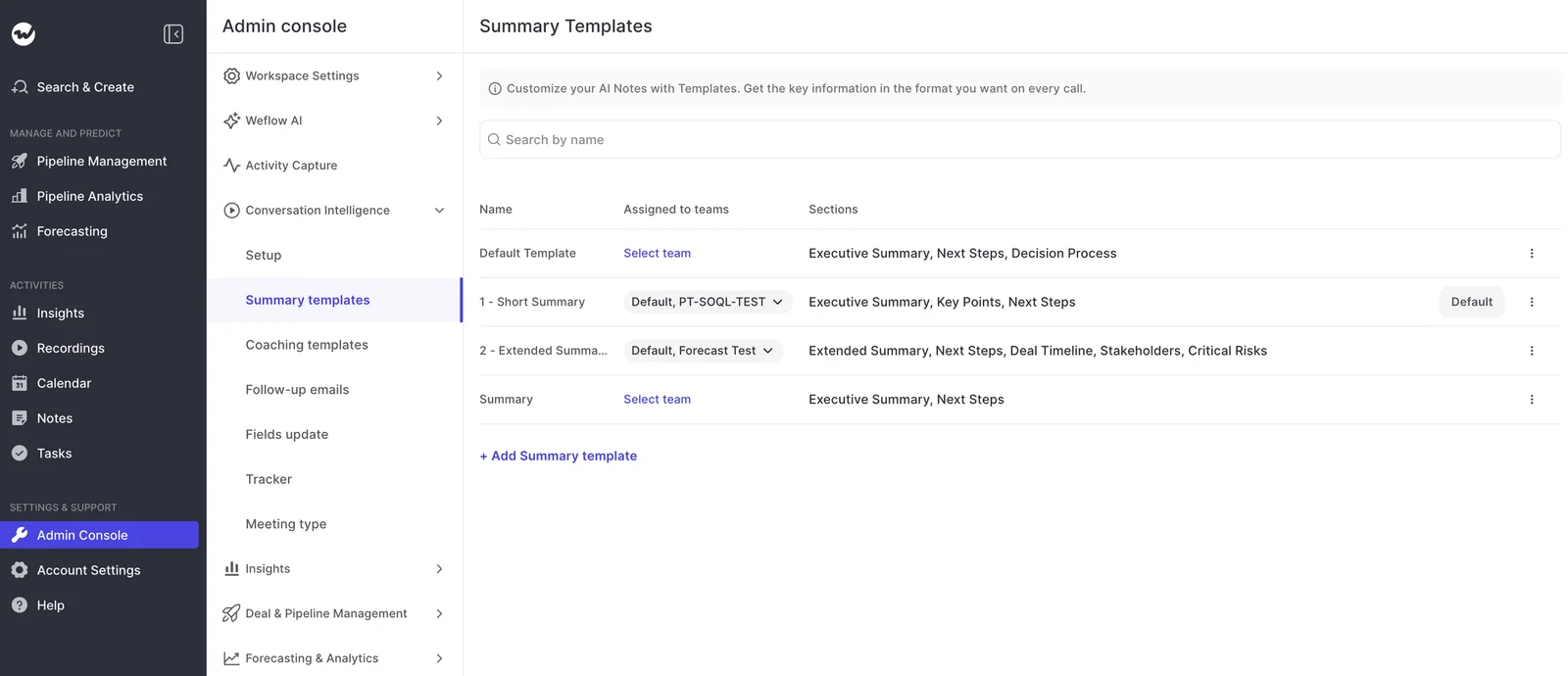
In the admin console, that setup is a list of templates, each with its own sections and the teams it's assigned to.
Where the summary lands matters, too. Weflow writes it to the Salesforce Event, so it appears on the opportunity timeline, and stores it with the transcript on the Weflow recording object in Salesforce.
Each section can also post to Chatter on the linked record.
This is what fixes cold CS handovers. When a renewal comes up, the CSM opens the account and reads call history written for them, not an AE recap from six months ago.
How Weflow Conversation Intelligence shapes summaries and call data
Every AI output in Weflow comes from a template your admin can rewrite and assign, so it can fit each team.
Weflow writes summaries from templates per team and meeting type
Each team gets its own summary, and you can keep your company's note format exactly as it is. Here's how:
- Unlimited templates: Your admin builds as many as you need and assigns each to a team. Reps can also switch a call to another template from a dropdown and regenerate the summary.
- One prompt block per section: A template is a stack of independent prompts, one for each section, so "Risks" and "Next steps" don't compete inside one long instruction.
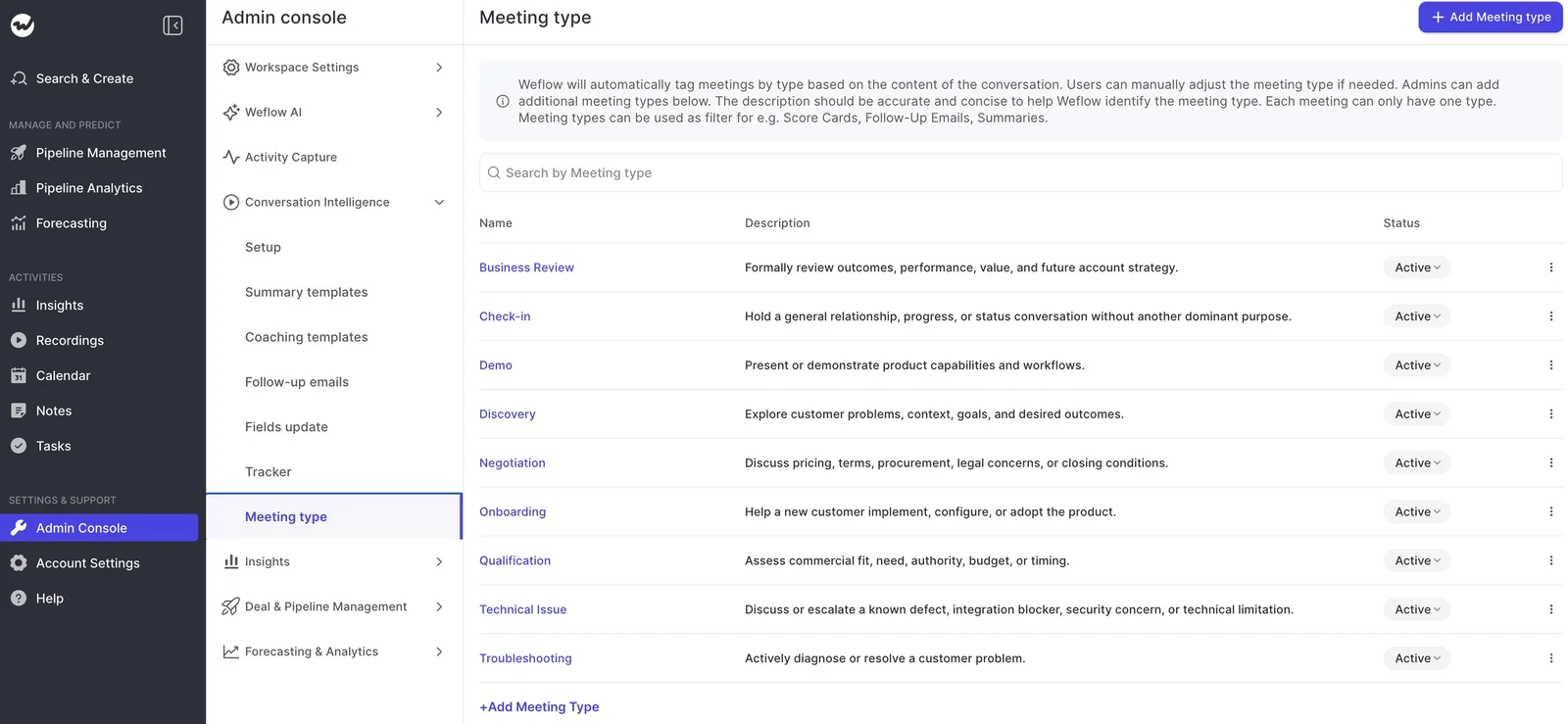
- Meeting types you define: Set up to ten, remove the defaults you don't use and add your own. Weflow classifies every recording automatically, and a different summary can apply per type.
- Company context once: Weflow maintains a company-level system prompt with who you sell to, your value proposition and your competitors, built from the material you send us, so templates don't have to repeat it.
Each meeting type has a description that helps Weflow detect it, and users can change a call's type if Weflow gets it wrong.
Since each template is a prompt, you can add team-specific instructions. For example, your UK team's template can ask for British spelling without affecting anyone else's.
The one limitation is that summaries list next steps but don't assign them to a specific person.
Weflow drafts follow-up emails for each call situation
Your admin builds follow-up templates from predefined or custom prompts, assigns them to teams and sets a default. The predefined prompts include:
- No-show follow-up, which acknowledges the missed meeting and offers new time slots.
- Post-proposal and proposal follow-up.
- Pricing and budget.
- Objection handling.
- Cross-sell and upsell.
- Contract and next steps.
- Scheduling the next meeting.
- Thanks and summary.
Templates pull in Salesforce fields, so each email includes deal context. Weflow also detects the spoken language and writes the follow-up in the language the meeting was held in.
The catch is that Weflow doesn't send the email or fill in recipients. The rep copies the draft into their mail client and adds the addresses.
Weflow writes call values into most Salesforce field types
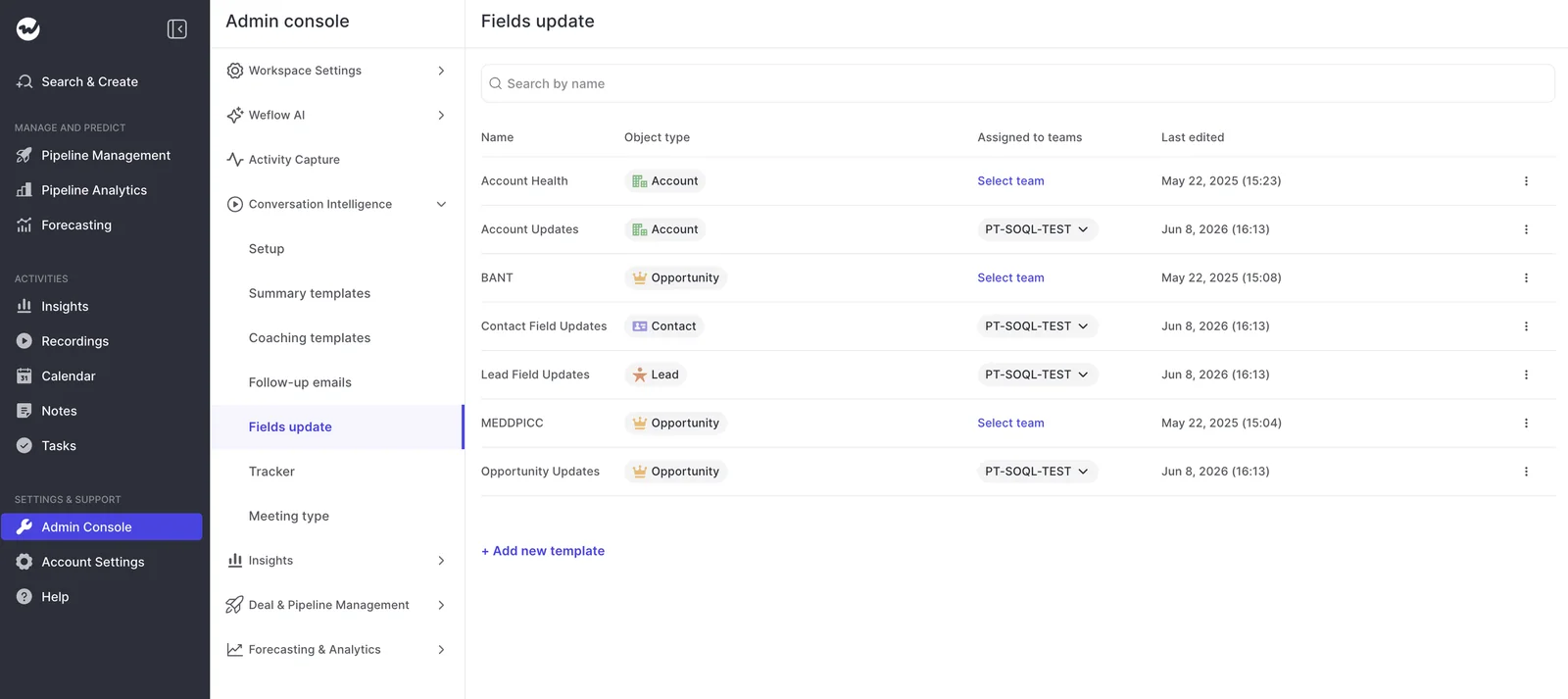
Weflow writes call values into every Salesforce field type except relationship lookups, including picklists, numbers, dates and multi-selects.
Your admin decides whether each field updates automatically or waits for the rep's review. Custom objects work too, with setup help from our support team.
Weflow connects natively to Salesforce, your calendar and meeting tools
Weflow covers the core of a Salesforce sales stack, but its list is deliberately shorter than Chorus's. Native integrations include:
- Salesforce.
- Gmail, Outlook and Google Calendar.
- Zoom, Microsoft Teams, Google Meet and Webex.
- Slack and the Microsoft Teams chat app.
- The Outreach dialer, which your admin connects in the console.
- Aircall, CloudTalk, Dialpad and Zoom Phone, which our team activates.
Keep in mind that Weflow works only with Salesforce. There's also no native Snowflake, Databricks or BigQuery connector, so data reaches your warehouse through the API.
Claude and ChatGPT query Weflow call data through MCP
Weflow's official read-only MCP connector gives Claude, ChatGPT and any other remote MCP client access to your call summaries, transcripts, playbook results and forecast calls.
Your admin turns it on per workspace and uses a separate toggle to decide whether assistants see full transcripts or only AI summaries. The console also lists every user who has connected an assistant.
Weflow's API exports transcripts, scores and signals in bulk
Weflow's REST API bulk-exports transcripts, metadata, scores and signals as JSON or CSV for your warehouse or BI tools such as Tableau and Looker.
Recordings export to your own cloud storage, since video is too heavy for Salesforce. Transcripts and summaries already live on the Weflow recording object in your Salesforce org, so you can report on them there.
How Chorus handles summaries, follow-ups and call data
Chorus does zero-setup capture and recaps well, and it connects to more of your stack than we do. Where it falls short is the summary format.
Chorus sends one default summary shape for every call
Chorus automatically emails everyone on the call a summary with next steps and action items. It needs no setup, and reps value it.
Chorus is also ahead of us in two areas:
- Meeting Briefs: A morning list of the day's meetings, a pre-meeting brief that summarizes previous meetings and the latest email with the account, and a post-meeting brief. They're on by default in every package.
- The Action Items page: Action items from every meeting on one page, filterable by assignee or account, each playing the recording from the moment it came up.
Beyond the fixed format, the main limit is language. Chorus doesn't detect the spoken language. It transcribes in each user's preset default, and summaries and next steps always come out in English.
Chorus drafts follow-up emails from meeting notes automatically
Chorus drafts follow-up emails from meeting notes on its own, so reps don't have to ask for them. The draft builds on the generative summaries Chorus has produced since May 2023, which users had generated more than 2.3 million times by mid-2026.
Chorus writes four qualification frameworks after rep approval
Chorus drafts MEDDIC, MEDDPICC, BANT or SPIN values from a call into the opportunity fields your admin maps, with a choice to overwrite or append. Nothing is written until the rep approves it, either from the meeting page or the Slack recap.
Chorus also logs a Task with attendees, topics and next steps 30 to 60 minutes after the call, and pushes keyword tracker hits to Salesforce if its managed package is installed.
Chorus connects to 30+ dialers, 19 conferencing tools and three CRMs
Chorus's integration list is broader than ours. It covers:
- 19 web-conferencing and screen-share providers, including Zoom, Teams, Meet, Webex, GoToMeeting and BlueJeans.
- More than 30 dialers, including Outreach, Salesloft, Aircall, Dialpad, Five9, Orum, RingCentral and Talkdesk.
- Salesforce, HubSpot and Microsoft Dynamics, cloud versions only.
- Clari and Gainsight.
- Okta, Microsoft Entra ID and JumpCloud for single sign-on.
Slack and Zapier are only available on the Enterprise package. Below Enterprise, you have neither.
ZoomInfo's MCP server answers questions from Chorus conversations
ZoomInfo ships its MCP server as an official first-party connector across Claude, ChatGPT, Perplexity, Cursor, VS Code Copilot and others, which is wider distribution than ours.
Since July 2026, its conversation intelligence tool has answered account questions using Chorus calls, emails and transcripts, and it cites its sources.
You'll need a ZoomInfo licence, though, and ZoomInfo meters MCP usage against your plan's credits. Search and lookups are free, while enrichment and research agents use credits.
Chorus keeps API access behind the Enterprise package
Chorus only includes API access in its Enterprise package, so getting raw data out depends on what you're paying for.
That said, with its managed package and Push Transcript turned on, full transcripts land in Salesforce on the Engagement object as reportable records.
This gate also matters if you migrate (more on that below).
What your team gives up moving from Chorus to Weflow
Switching does come with trade-offs, and your reps will notice some of them. Here's what changes and how teams work around it:
| What Chorus does | What changes in Weflow | How teams handle it |
|---|---|---|
| Drafts the follow-up email | Weflow drafts it but doesn't send it or fill in recipients | The rep copies the draft into their mail client and adds the addresses from the invite |
| Next steps with assignees on the Action Items page | Next steps are listed in each call's summary, not assigned to a named person | Teams tag people in Weflow comments, or push next steps through the API into a task system that owns assignment |
| Automatic pre-meeting briefs | No automatic brief lands in the morning | Reps use Ask Weflow AI to prep for a meeting, with the meeting attached as context |
| HubSpot or Dynamics | Weflow works only with Salesforce | No workaround; teams on those CRMs stay where they are |
| Summaries in a team Slack channel | The native Slack recap goes to the rep | An Agent Builder agent posts to the channel using metered actions, or a Salesforce Flow on the summary does it without metering |
| Summaries on heavily accented English | Weflow summaries degrade on heavily accented English | Teams set that region's template and test it on the region's own calls before rollout |
| Integration breadth | A narrower native list, no warehouse connector | Data reaches other systems through the API and MCP connector |
One more trade-off that won't show up on a feature list: per-team templates need an owner on your side (more on that in the switching section).
What Weflow Conversation Intelligence and Chorus cost
Weflow publishes per-seat pricing with AI included, while Chorus doesn't publish pricing at all.
| Pricing detail | Weflow | Chorus |
|---|---|---|
| Pricing model | Per seat, billed annually | Custom quote through sales |
| List price | Conversation Intelligence $39 per user per month. Revenue AI Foundation $49, Revenue AI Business $59, Revenue AI Enterprise $79 | Not published |
| Minimum seats | 10 users | Not published |
| What's included | Ask Weflow AI Pro, Agent Builder Free tier with 25 actions a month, Mobile Copilot, the desktop app, no caps on recordings or AI templates | Unlimited recordings, transcriptions and storage |
| What costs extra | Paid Agent Builder tiers: Growth $299 a month for 500 actions, Scale $999 for 2,500, Enterprise custom | Enterprise package for API, Slack and Zapier; MCP usage on ZoomInfo credits |
| Packages | Three standalone products and three bundles | Chorus Basic, Revenue Intelligence, Enterprise |
ZoomInfo publishes no Chorus price. Buyers we talk to report paying roughly $8,000 a year for a base package with three seats, plus about $1,200 a year per extra seat. Keep in mind these are reported benchmarks, not quotes.
Based on those numbers, a 20-seat team would pay about $28,000 a year for conversation intelligence alone.
The same 20 seats on Weflow Conversation Intelligence come to $9,360 a year at list, or $11,760 on Revenue AI Foundation with Activity & Contact Capture included.
How to switch from Chorus to Weflow without losing history
You can bring your call history with you. Just make sure your templates have an owner from day one.
Import your Chorus recordings through the API or file export
Weflow imports recordings from Chorus either through its API or from exported files:
- Check which Chorus package you're on, since API access requires Enterprise.
- On Enterprise, Weflow pulls recordings and transcripts straight from Chorus with an API key.
- On a lower package, or if you've already exported your library, Weflow imports the exported recording files instead.
- Weflow re-links the imported recordings to your Salesforce records, so history sits on the right deals.
Name an internal owner for your summary templates
Technical setup takes 30 to 45 minutes with your Salesforce admin, and most teams reach full value in one to three weeks, mostly spent fine-tuning templates.
We build the templates with you during guided setup and maintain the company system prompt. After that, someone on your team needs to own the per-team templates, because motions change and templates go stale without an owner.
Template changes apply to new calls automatically, but older calls keep their original summaries until someone opens each one and regenerates it.
Stay on Chorus for one motion, switch to Weflow for several
For most teams, it comes down to templates.
Choose Weflow if:
- Your team runs more than one motion on Salesforce, such as new business plus renewals or sales plus CS onboarding.
- Your company mandates a specific note format and reps are still retyping calls into it.
- Your managers stopped reading recaps because every call comes back in the same shape.
- Your team sells in several languages and needs customer emails in the meeting's language but one consistent language in Salesforce.
- You want a published per-seat price with summaries, follow-ups and field updates included.
Choose Chorus if:
- You run a single motion and the default recap works for your team.
- You need HubSpot or Microsoft Dynamics.
- Automatic pre-meeting briefs and the Action Items page are part of your reps' day.
- You depend on Chorus's dialer and conferencing coverage or on the wider ZoomInfo platform.
If you're in the first group, the best way to decide is to see Weflow on your own discovery and renewal calls.
See how Weflow captures activity, updates Salesforce fields from calls, and rolls up your forecast. Book a 30-minute demo.
Weflow vs Chorus call summary FAQ
Can a rep correct a Weflow summary or add their own line?
Yes. Reps can switch a call to another template and regenerate the summary, and they review and edit field suggestions before they sync to Salesforce. If you want reps' own take on top of the AI summary, many teams simply add a short rep note alongside it.
What language do Weflow summaries and follow-up emails use?
Weflow automatically detects the spoken language across 96 languages. Follow-up emails are written in the meeting's language, while summaries in Salesforce use your workspace language. Chorus writes summaries in English only.
What contract and minimum seats does Weflow require?
Weflow uses a standard 12-month term with a 10-user minimum, and you can reassign seats when someone leaves. An early opt-out after three months isn't standard, but it can be negotiated.
How does Weflow handle security review compared with Chorus?
Weflow is SOC 2 Type II certified and GDPR compliant, runs Zero Data Retention for AI processing, and never uses customer data to train AI models. You choose an EU, US or APAC region for your data.
Chorus is covered by ZoomInfo's ISO 27001, ISO 27701 and SOC 2 Type II certifications. ZoomInfo hosts data in US data centers, and its privacy policy lists model training among the uses of collected data, including Chorus recordings.
Will reps push back on switching recorders?
Usually not, as long as recording adds no extra work for them. Once reps see summaries arriving in their own format, they notice the time they get back.
Adoption also works best when leadership makes the call and backs it with enablement, rather than leaving it to a pilot group. Plus, your admin can rename the notetaker, and the Weflow desktop app records without a bot joining the call