Weflow vs Salesloft for Logging Emails to the Right Salesforce Opportunity (2026)
Decide if Weflow or Salesloft logs emails to the right Salesforce opportunity more accurately.


Salesloft and Weflow both log emails to Salesforce, but they show up very differently in your opportunity reports. The difference comes down to how each tool picks the deal an email belongs to, and how easy it is to spot and fix a wrong pick.
Salesloft only logs an email when it's sent through Salesloft or a rep Lofts it. It then attaches the activity to the contact or lead that matches the address, and to the most recently modified open opportunity.
Weflow is the Revenue AI Orchestration platform for sales, customer success, and RevOps teams. Weflow Activity & Contact Capture, on the other hand, reads every email your reps send and receive, server-side, and follows a fixed set of rules to pick the deal.
If those rules can't settle it, Weflow logs the email to the account instead of guessing. When a rep corrects the mapping once, the rest of the thread follows. The one limit is that each email lands on a single opportunity.
You've probably already decided to keep Salesloft for sequencing. So the real question is which tool should handle logging.
Weflow vs Salesloft at a glance for opportunity logging
The biggest differences are in how each tool picks the opportunity and how you fix a wrong pick. Salesloft comes out ahead on native data sync.
| Capability | Weflow | Salesloft |
|---|---|---|
| Choosing the right opportunity | Fixed precedence: contact role, a single open opportunity, then opportunity owner, mailbox owner, account relationship and stage. Logs to the account when that doesn't settle it. One opportunity per email, and no nearest-close-date rule. | Logs to the matched lead or contact and the most recently modified open opportunity. Reps can pick another record where an admin enables CRM Record Selection. |
| Matching activity to records | Captures every sent and received email server-side. Matches primary and secondary email fields to contacts, leads, accounts and custom objects, with optional account-domain fallback. Depends on a correct account Website field. | Logs only Lofted or Salesloft-sent mail, matched by exact address, Contact first and then Lead. People with no CRM record stay unlinked unless an admin automation rule creates them. |
| Rep review and correction | The Outlook add-in and Chrome extension show the mapping. One re-map covers the whole thread, and logged emails can be moved afterwards. No mapping control on a phone, and the first message sets the thread. | Reps decide email by email whether to Loft. Where enabled, CRM Record Selection picks the record per email and adds Salesforce API calls. |
| Integrations | Native with Salesforce, Gmail, Google Calendar, Outlook, Zoom, Teams, Meet, Slack and the Outreach dialer. Compatibility mode handles sequencers. No native Snowflake, Databricks or BigQuery connector. | The data layer syncs with Salesforce, Dynamics, Snowflake, Databricks, Gmail, DocuSign, ZoomInfo and LinkedIn. Recording covers Zoom, Teams, Meet, Webex and several dialers. |
| AI assistant (MCP) access | Official read-only connector for Claude, ChatGPT and other MCP clients. It returns playbooks, summaries, transcripts, forecast calls and pipeline metrics, but not captured email content. | Read-only beta server behind the paid Agentic add-on. It reaches accounts, people, opportunities and conversations, with no transcripts and no cadences. |
| Raw data access | Captured emails live as native Salesforce records. The REST API bulk-exports transcripts, metadata, scores and signals as JSON or CSV. Warehouse loads go through the API. | Self-service REST API with webhooks covering activities, emails, meetings, conversations and transcripts, plus native Snowflake and Databricks sync. |
| Pricing | $19 per user per month, billed annually, 10-user minimum. An added seat on top of Salesloft. | No published seat prices. Advanced and Elite packages, plus paid add-ons. |
Most teams end up running both tools, and we cover how to set that up without duplicate emails further down.
Why Salesloft logs emails to the wrong opportunity
Salesloft logs email as a by-product of sending, and its tiebreak on multi-opportunity accounts is the most recently modified deal. That's the whole story behind a renewal that looks dead while the expansion holds the emails. It isn't your config.
Here's how it plays out:
- Salesforce lets an activity relate to one opportunity or to the account, never both.
- The usual link to the right deal is the opportunity contact role. In most orgs, these are mostly empty, and renewals and expansions often share the same copied primary role.
- Salesloft only logs mail sent through Salesloft or Lofted from Gmail or Outlook. So a one-off email an AE sends with the normal Send button never reaches Salesforce.
- On a multi-opportunity account, that means the email lands on whichever deal someone touched last.
- Meanwhile, the deal the email was actually about shows no activity, so a manager who opens it sees an empty timeline and assumes the rep has gone quiet.
This hurts most in account management and expansion, where one account can run many deals of very different value, and account-level activity can't tell you which one got the work.
"You're running seventeen different opportunities at one account sometimes, and some of those are worth five k, and some of those are worth five million."
— Kelly Lewis, RevOps and sales leadership coach; co-host, The Revenue Insiders podcast
How Weflow picks the opportunity for every email
Here are the exact rules Weflow follows, so you can test each one in a sandbox.
Weflow works through a fixed precedence before it picks a deal
Weflow uses the email address and the Salesforce relationships around it, checking things in this order:
- First, it looks up the address in primary and secondary email fields and logs the email to the matching contact, lead, or custom object.
- Next, it checks for an opportunity contact role.
- If the account has exactly one open opportunity, it picks that one.
- If several are open, it weighs the contact role, the opportunity owner, the mailbox owner, the account relationship and the stage.
- It never logs to a closed opportunity.
- If it still can't decide, it logs to the account.
Weflow doesn't read the email's content to decide. We tested content-based matching, but it wasn't accurate enough, so we left it out.
The account fallback is a design choice. An email on the account is easy to fix, while an email on the wrong deal quietly skews every report built on top of it, and nobody notices.
Keep in mind that Weflow checks your Salesforce data as it stands when each email arrives, so a contact role added between two emails changes where the second one lands.
Two limits to plan around:
- An email can relate to several contacts but only ever one opportunity.
- There's no rule that picks the opportunity with the nearest close date.
Weflow matches every sent and received email to Salesforce records
Weflow captures email at the mail tenant level, through an app in Microsoft Entra or Google Workspace. That means it catches mail sent from a phone, browser, or desktop client the same way, including normal Send and inbound replies.
Here's what gets matched and what never gets logged:
- Matched: Contacts, leads and custom objects by primary or secondary email field, then accounts.
- Optional fallback: Where no contact exists, the sender's domain matched against the account Website field puts the email on the account.
- Not logged: Internal-only mail, where every participant is on your own domain.
- Not logged: Mail with no matching contact, lead or account domain in Salesforce.
The one thing to watch is the account Website field. A wrong value there, or a domain shared by duplicate accounts, sends activity to the wrong account.
On the plus side, if someone creates the account after a rep has already emailed people there, Weflow logs those earlier emails to it automatically.
Reps see the mapping and fix it once per thread
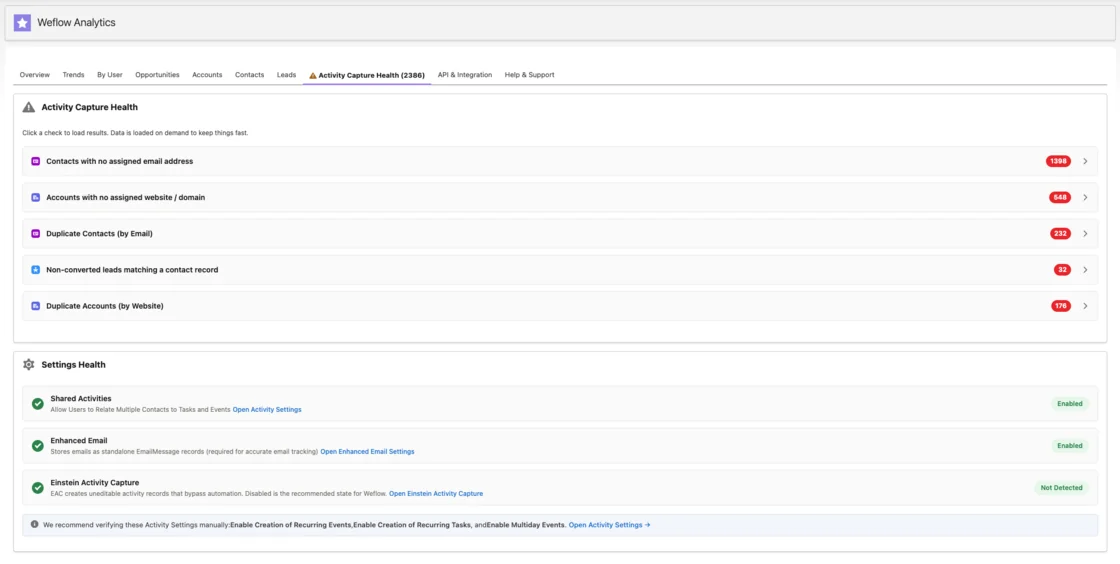
Reps can see which contact, account, and open opportunities Weflow matched right in the Outlook add-in or Chrome extension, and pick a different opportunity, account, or custom object if needed.
Weflow saves that choice for the whole thread, so every later reply, in either direction, goes to the same record without the rep touching it again.
For an inbox-heavy rep, that's one correction per conversation instead of a button on every email.
| What the rep wants to do | What Weflow does |
|---|---|
| See where an email will log | The add-in or extension side panel shows the matched records. |
| Fix a wrong deal | Re-map once, and the rest of the thread follows. |
| Correct an email that already logged | Move it to the right record from the add-in or extension. |
| Keep a thread out of Salesforce | Untick logging for that thread, unless the admin removed that control. |
| Rely on Weflow to clean up later | Weflow never moves logged activity on its own. |
| Change mapping from a phone | Not available. Phone mail is matched automatically, and a thread already mapped on desktop keeps its mapping. |
| Override a bad first message | The first message sets the thread's mapping, so a wrong first match pulls the thread with it until someone re-maps. |
Weflow connects to sequencers, dialers, BI tools and meeting platforms
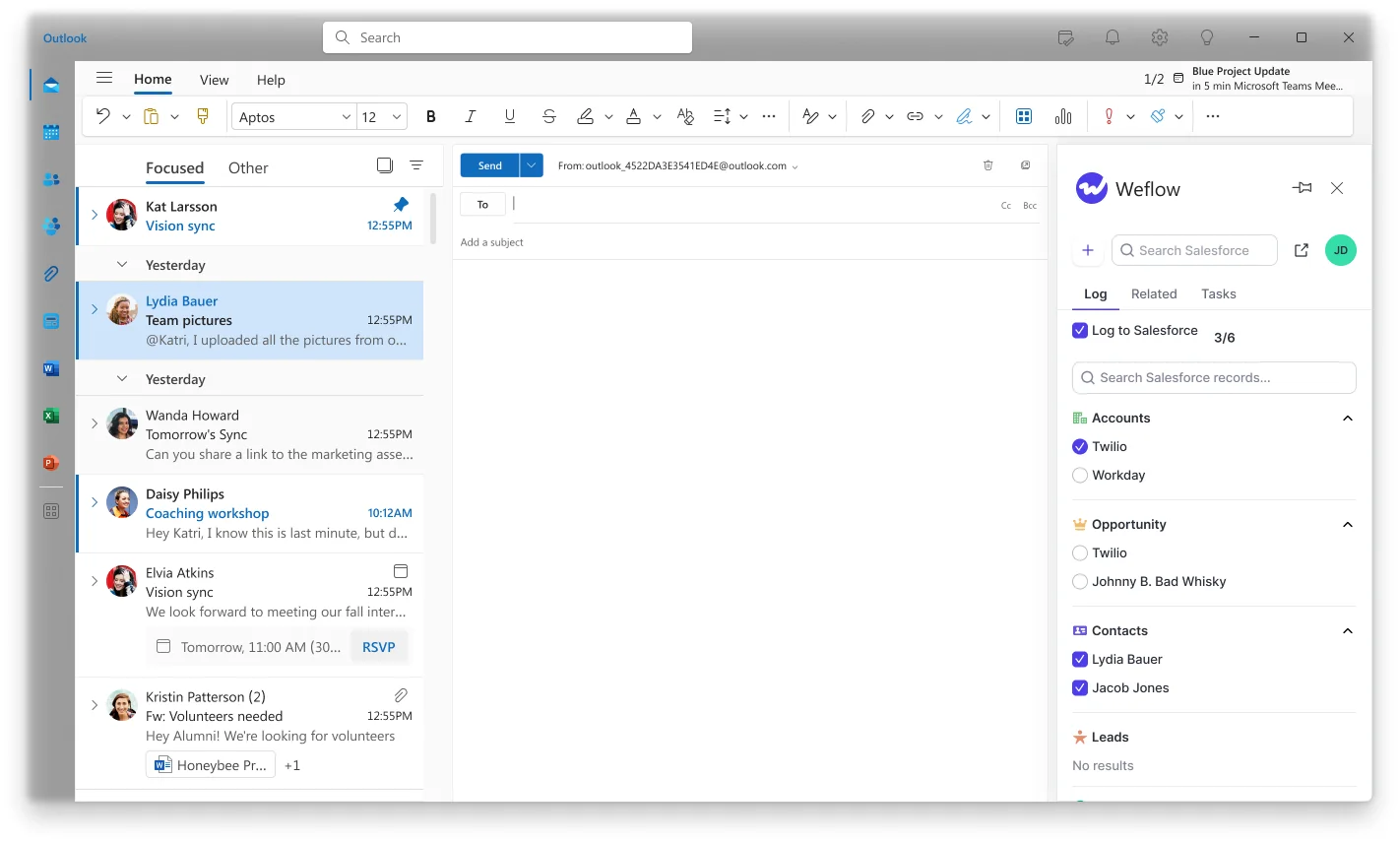
Weflow integrates natively with the tools around email capture and reaches the rest through its API:
- Salesforce
- Gmail, Google Calendar and Outlook
- Zoom, Microsoft Teams and Google Meet
- Slack
- The Outreach dialer
- Sequencers such as Salesloft, through compatibility mode
- BI tools such as Tableau and Looker, through the API
There's no native Snowflake, Databricks or BigQuery connector, and Weflow isn't an integration platform with a connector catalogue.
AI assistants reach Weflow data through a read-only MCP connector
Weflow's official MCP connector is read-only and works with Claude, ChatGPT and any client that supports remote MCP servers. It returns playbooks, call summaries, transcripts, forecast calls and pipeline metrics.
An admin switches it on per workspace. A separate toggle decides whether assistants can read full transcripts or only AI summaries.
The Weflow MCP connector does not return the content of emails captured by Weflow Activity & Contact Capture. Those emails sit in Salesforce as native records, so your assistant reads them through a Salesforce connector.
Weflow exports raw data through its API, not a warehouse connector
Captured emails are native Salesforce records, so the email data is already yours and sits wherever your Salesforce data goes.
For everything else, the REST API bulk-exports transcripts, metadata, scores and signals as JSON or CSV. Teams load warehouses through the API rather than a native sync.
How Salesloft picks the opportunity for a logged email
Salesloft's logging comes bundled with sequencing, which is a real strength for some teams.
Salesloft logs to the most recently modified open opportunity
To give credit where it's due, Salesloft logs automatically, so reps don't have to pick a record for every cadence email.
By default, Salesloft writes a logged activity to the lead or contact tied to the email address and to the most recently modified open opportunity.
Where it falls short is on accounts with a renewal or professional-services deal open next to new business. For those, admins can switch on CRM Record Selection (more on that below).
Salesloft matches Lofted emails to people it already knows
Salesloft's coverage depends on Lofting and on its own person records, which leaves a few gaps:
- Emails sent with the normal Send button in Gmail or Outlook aren't logged. Only Salesloft-sent or Lofted mail reaches Salesforce.
- Salesloft links a person to the CRM by exact email address, Contact first and then Lead. When several records share an address, it picks the most recently updated.
- Someone with no Salesloft or CRM record stays unlinked unless an admin automation rule, or a rep, creates the Lead or Contact. Automation rules can't create CRM accounts.
- Calendar Sync logs a meeting only where at least one guest already exists as a Salesloft person. Other meetings need the Loft It toggle or booking through Salesloft.
CRM Record Selection lets reps pick the record email by email
Reps decide email by email whether to Loft. If an admin switches on CRM Record Selection, they also pick the record before the email logs.
It works in the dialer, Salesloft email, the Chrome extension, and Salesloft Connect for Outlook, with a few caveats:
- Switching it on raises your team's Salesforce API calls.
- It doesn't cover Insert Availability.
In short, Salesloft's correction is per email, while Weflow's is per thread.
Salesloft syncs natively with Snowflake, Databricks and your CRM
This is where Salesloft pulls ahead. Its Unified Revenue Data Layer syncs continuously with:
- Salesforce and Microsoft Dynamics
- Snowflake and Databricks
- Gmail
- DocuSign, ZoomInfo and LinkedIn
Recording covers Zoom, Microsoft Teams, Google Meet and Webex. Calls come in from Aircall, Dialpad, FreshCaller, HubSpot, Orum and the Salesloft Dialer.
Salesloft's MCP server is a beta behind a paid add-on
Salesloft's MCP server is read-only and in beta. It comes with the paid Agentic add-on, and an admin enables it in settings.
It reaches accounts, people, opportunities and conversations. It returns no cadences. Transcript retrieval was removed, so conversation data reaches the assistant only as AI-generated summaries, extracted fields and key moments.
Salesloft's REST API exposes activity, emails and transcripts
Salesloft's self-service REST API reads and writes people, accounts, activities, emails, meetings, conversations, media and transcripts, with webhooks for events.
Bulk data also leaves through the native Snowflake and Databricks sync, which is a cleaner warehouse path than Weflow offers today.
What happens when a renewal and expansion share one account
This is the scenario most teams are really trying to fix. Say an account manager emails the customer's primary contact about the renewal while an expansion opportunity is also open, and the same primary contact role sits on both. Here's how each tool handles it.
| Step | Salesloft | Weflow |
|---|---|---|
| Email goes out | Logs only if sent through Salesloft or Lofted. | Captured server-side, whatever client the rep used. |
| Person match | Exact address, Contact first, then Lead. | Primary or secondary email field to the contact. |
| Contact role check | Not the deciding rule. The default picks the most recently modified open opportunity. | The contact role points at both deals, because the primary role was copied, so it doesn't decide. |
| Tiebreak | Whichever deal someone last edited. | Opportunity owner, mailbox owner, account relationship and stage. With configuration lanes in place, only renewal-type opportunities are in scope for the renewals team. |
| Still ambiguous | Lands on the most recently modified deal anyway. | Logs to the account. |
| Correction | Per email, before logging, where CRM Record Selection is on. | The rep re-maps once in the add-in, and the thread follows. Logged emails can be moved. |
| Later emails | Same rule runs again on each email. | Replies follow the thread's mapping. New people on the thread get a contact role on the mapped deal if auto-creation is on. |
Since Weflow has no close-date tiebreak, you separate parallel deals with configurations. Here's how teams usually set up these lanes:
- Create a configuration for the renewals team and enroll the account managers who own renewals.
- Filter that configuration to renewal opportunities, by opportunity type or by a close-date threshold.
- Put everyone else in a second configuration filtered to the other opportunity types.
- Leave the opportunity-owner restriction off. Turning it on drops everyone else's activity on the deal.
- Turn on contact-role auto-creation so later emails resolve to the deal through the role.
Each user belongs to exactly one configuration. If users from two configurations are on the same email, Weflow logs it under the more permissive rules.
What Weflow Activity & Contact Capture costs next to Salesloft
Weflow Activity & Contact Capture costs $19 per user per month, billed annually. It's an extra seat on top of Salesloft, not a replacement, since Weflow doesn't do sequencing (and it isn't on our roadmap).
| Commercial term | Weflow | Salesloft |
|---|---|---|
| Pricing model | Published per-seat prices. | No published seat prices. The pricing page routes to a Talk to Sales booking page. |
| List price | $19 per user per month for Activity & Contact Capture. | Not published. The pricing page routes to a Talk to Sales booking page. |
| Minimum and term | 10-user minimum, 12-month term, billed annually. Seats added mid-term are charged pro rata. | Not published. |
| Included | Ask Weflow AI Pro and Agent Builder Free with 25 agent actions per month. | Every package includes Cadence, Conversations, Deals, Rhythm, CRM sync and the Ask Salesloft assistant. |
| What costs extra | Paid Agent Builder tiers and historical backfill of up to 24 months. | Forecasting, Account Agent, Coaching Agent and Dialer add-ons. MCP comes with the agent add-ons. Local presence numbers cost $1 per number per month. |
If you want more later, Activity & Contact Capture is also included in Weflow's bundles:
- Weflow Revenue AI Foundation, $49 per user per month, adds Conversation Intelligence.
- Weflow Revenue AI Business, $59 per user per month, adds Deal Intelligence.
- Weflow Revenue AI Enterprise, $79 per user per month, adds Forecasting.
How to run Weflow alongside Salesloft without duplicate emails
Keep it simple and let one tool own each activity type.
Use compatibility mode or turn off Salesloft email logging
You have two options here. Salesloft only dedupes its own emails, so if you leave both tools logging without compatibility mode, your counts double.
| Question | Both log, compatibility mode on | Salesloft email logging off |
|---|---|---|
| What logs emails | Salesloft logs its cadence mail. Weflow logs everything else. | Weflow logs all email, including cadence mail, which goes out through the same tenant Weflow reads. |
| How duplicates are avoided | Weflow waits about ten seconds and skips mail carrying Salesloft's tracking pattern. | Only one tool writes email at all. |
| What you configure | Compatibility mode, the Salesloft sending domain and any custom tracking domain in Weflow. | Salesloft's email logging toggle off. Salesloft keeps sending. |
| What goes wrong if misconfigured | A missing tracking domain doubles cadence emails. | Tracking patterns still set in Weflow suppress cadence mail, leaving a silent hole. |
| When to use | The interim, while you validate Weflow against Salesloft's logging. | The cleaner end state, once every email lands in one place. |
Add your Salesloft custom tracking domain to Weflow's patterns
If your team uses a branded tracking domain, the default pattern won't recognize it and every cadence email logs twice. This is the setting most likely to trip you up in the first week.
- Find the custom tracking domain in Salesloft's admin console, under custom domain.
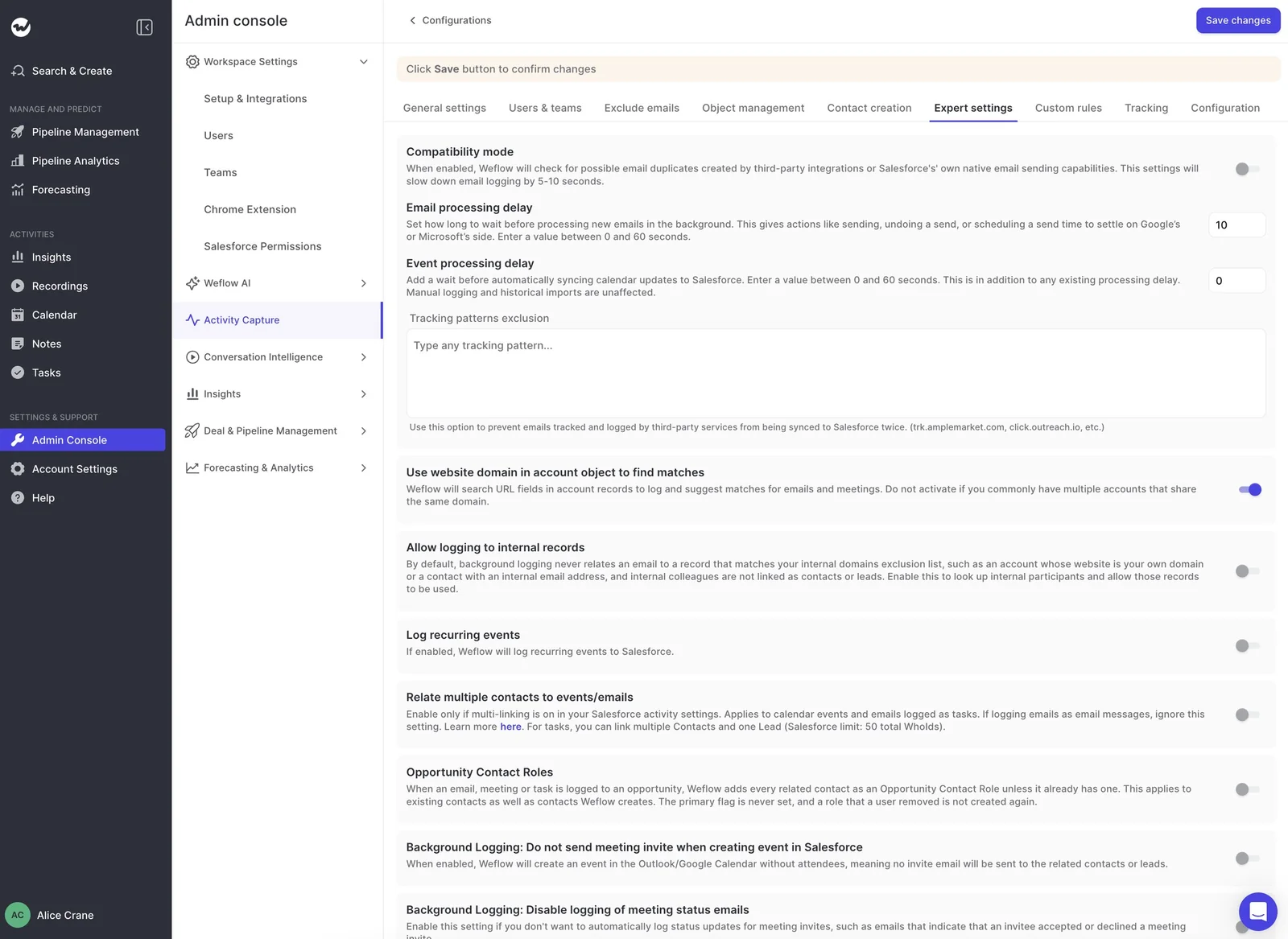
- Add it to the tracking patterns in Weflow's Activity Capture expert settings.
- Send a test cadence email through the branded domain and look for a single activity in Salesforce.
Decide which tool logs meetings and calls
Salesloft toggles CRM logging per activity type for the whole team, not per rep, so decide upfront who owns what:
- Emails and replies: One owner, per the state you picked above.
- Meetings: If Weflow logs calendar events, switch Salesloft's meeting logging off so two tools don't both write events.
- Calls and voicemails: Keep these with Salesloft if reps call from the Salesloft Dialer. Weflow Activity & Contact Capture handles email and calendar.
- Notes and cadence steps: These stay with Salesloft.
- Shared Activities: If meetings should relate to every attendee in Weflow, raise the Salesforce Shared Activities change early. In a large org it's a change request, not a toggle.
Test the setup in a Salesforce sandbox before enrolling reps
Weflow doesn't read any mailbox until a user is enrolled in a configuration, so you can finish setup and test with a single user first. Here are the cases to run:
- Send to external addresses on unique test domains, not gmail.com or outlook.com. Free-mail domains create ties that production data rarely has.
- Build a multi-opportunity test account with one clear contact role per opportunity.
- Send Salesloft cadence mail and check that each email logs once.
- Re-map a thread in the add-in and send replies in both directions.
- Create, move, reschedule and delete meetings to prove update rights, not only create.
Should Salesloft or Weflow own your email logging?
It depends on how your reps send email and how your accounts are structured.
Keep Salesloft logging your emails when cadences send almost everything
Salesloft's logging, with CRM Record Selection turned on, may be all you need if:
- Nearly all customer email goes out through Salesloft cadences.
- Accounts rarely carry more than one open opportunity.
- You want logging bundled with sequencing in one contract.
- Native Snowflake or Databricks sync matters to your data team.
Move email logging to Weflow when reps work from the inbox
Weflow is the better fit if:
- AEs and account managers send one-off mail from Gmail or Outlook that Salesloft never sees.
- Accounts run renewal, expansion or services deals side by side.
- You need a visible rule and once-per-thread correction you can defend in a pipeline review.
- You're fine with one opportunity per email and an extra seat next to Salesloft.
If you want to see the add-in mapping and the thread correction before talking to anyone, walk through the product yourself, no call required.
FAQs Sales Ops ask about Weflow and Salesloft logging
How often will reps have to re-map emails in Weflow?
It depends on your contact-role coverage and how many accounts carry several open opportunities. The best way to find out is to run the sandbox test on accounts shaped like your real ones.
What happens to activity Salesloft already logged to the wrong deal?
It stays where Salesloft put it. Weflow only corrects what Weflow logs.
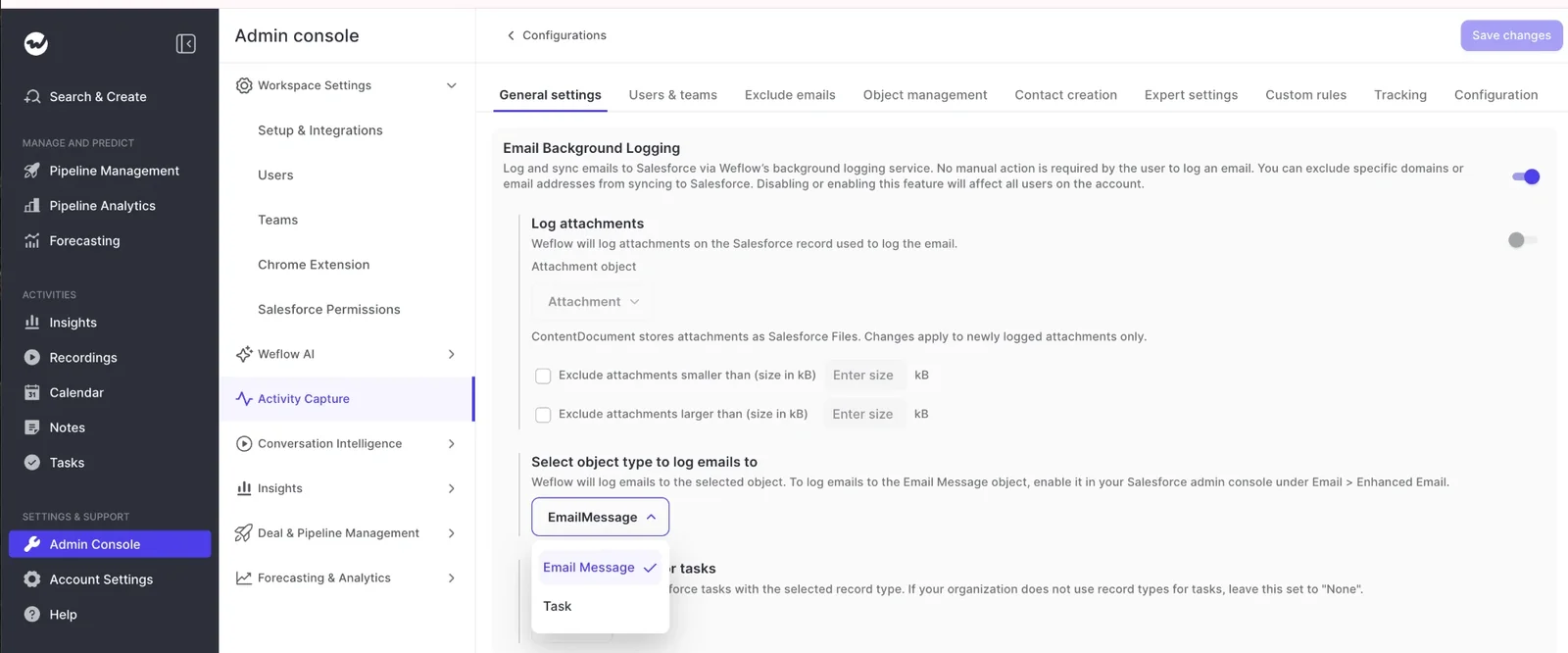
Should Weflow log emails as EmailMessage or Task records?
It's your choice, set per configuration, though about nine in ten of our customers go with EmailMessage. Here are the trade-offs:
- Reporting: A single activity report can span tasks and events but not EmailMessage, so Task keeps existing Task-based reports intact.
- Structure: EmailMessage carries From, To and Cc, thread structure, and up to 50 relations on one record. It needs Enhanced Email switched on in Salesforce.
- Storage: A Task is about 1.8 kB, and an EmailMessage is roughly seven times heavier, which matters for orgs near their storage ceiling.
Does Weflow create opportunity contact roles, and set role types?
Yes, if you turn it on. Weflow creates the contact role on the mapped opportunity as it logs, but leaves the role type blank, since a job title can't tell you whether someone is a champion or a detractor.
Who needs a Weflow seat if Salesloft stays for sequencing?
Anyone whose mailbox you want captured, with one Salesforce user per mailbox. That includes CS and account managers who email customers, since their threads are the ones landing on renewals and expansions.
How do we control whose mailboxes Weflow reads?
You have four controls:
- Enrollment: No mailbox is read until a user is enrolled.
- Entra: Entra limits mailbox reach to an assigned group, but only when the app's "Assignment required" property is set to Yes.
- Manual mode: Useful for executives, since nothing logs unless the person chooses to.
- Admin exclusions keep specific accounts or domains out centrally.