Weflow vs Momentum for Deal Boards and Buying Committee Mapping (2026)
Decide between Weflow vs Momentum for deal boards and buying committee mapping in Salesforce and Slack.


If you're a sales manager, you probably judge a deal tool on one thing: can you run Monday's deal review inside it without opening anything else?
That's exactly where Momentum and Weflow split. Momentum sends your deals to you in Slack, one at a time, while Weflow puts your whole team's pipeline on one board.
Each tool also has its own strength. Momentum is better at naming who's on a deal, since its Autopilot can suggest a call attendee for the Decision Maker field.
Weflow Deal Intelligence & Forecasting is better at showing whether those people are actually engaged, with replies, meetings and silence for each contact sitting right next to stage time and close-date pushes.
Weflow is the Revenue AI Orchestration platform for sales, customer success, and RevOps teams. We built it for teams that run on Salesforce. Below, we'll show you where each tool stops (ours included) and when Momentum is the better call.
Weflow vs Momentum at a glance: Seven capabilities side by side
| Capability | Weflow | Momentum |
|---|---|---|
| Deal board | A team board with opportunity, account and contact fields side by side, plus computed engagement columns. Every field is editable back to Salesforce, and admins publish company boards. | An Opportunities tab in a rep's Slack App Home, filtered by owner, stage or custom fields, plus a Slack Deal Room per deal. The tab's columns are not documented. |
| Buying committee mapping | Creates contacts from email threads and invites, attaches them as contact roles, and measures each contact's engagement. A person sets the champion and economic buyer. | Adds attendees as contacts or leads, and Autopilot can suggest an attendee for a Decision Maker lookup. Stakeholder mapping sits in Account Briefs. No per-person engagement view is documented. |
| Deal summaries across all interactions | An on-demand AI summary across every meeting on the opportunity. AI Playbooks score methodology across emails, meetings, transcripts and fields. | Retropilot re-reads past calls when a Salesforce event fires and writes a summary to a field. Account Briefs show a timeline and answer account questions. |
| Integrations with other tools | Salesforce, Gmail, Outlook, Google Calendar, Zoom, Teams, Meet, Slack and the Outreach dialer. Slack and Teams receive output only. There is no native warehouse connector. | Runs on Gong, Chorus, Clari Copilot, Attention and Salesloft Conversation Intelligence, plus seven dialers and Slack or Teams. Outlook calendar sync is in early beta, and follow-ups send through Gmail only. |
| Access from AI assistants (MCP) | An official read-only MCP connector for Claude, ChatGPT and other MCP clients. Admins switch it on per workspace, with a separate transcript toggle. | No MCP server of its own. Assistants read what Momentum wrote to Salesforce through Salesforce's Hosted MCP Server. |
| Raw data access outside the tool | A REST API for bulk export of transcripts, metadata, scores and signals as JSON or CSV. Recordings export to your own storage. | The API is off by default, enabled by support and capped at 100 requests per 15 minutes. It returns meetings, transcripts, recording links and AI Signal results. |
| Pricing | Published: Deal Intelligence & Forecasting at $39 and Revenue AI Business at $59 per user per month. Billed annually, 10-user minimum. | Follows the Salesforce edition. Included in Max at $550, announced for Core ($195) and Advanced ($395), and sold as an add-on by quote on Starter and Pro Suite. |
In short, Weflow leads on the team-wide board and per-person engagement, Momentum leads on role suggestions and Slack-first deal work, and both can summarize a deal's full history.
Why sales managers are comparing Weflow and Momentum right now
Chances are you didn't go looking for Momentum. It usually lands on your desk as part of a Salesforce packaging decision, in one of two ways:
- Salesforce bundled Momentum into its new sales editions. It's in Max today and announced for Core and Advanced, so leadership hears that capture is already paid for.
- Your existing Momentum contract moves onto an Agentforce SKU around renewal, which reopens the choice.
Either way, RevOps or your CRO is now weighing the two and wants to know one thing from you: which one lets you run your deal review?
That's not the same as asking whether a tool writes fields (Momentum does that well). It's about where you inspect your team's deals, and "already in Salesforce" doesn't automatically mean "already gives me a board."
Buying committee mapping asks two questions; Each tool answers one
"Who's on the deal" is really two questions: who the people are and what role each plays, and whether they're actually engaged. Momentum is ahead on the first, Weflow on the second, and neither does both.
| Question | Weflow | Momentum |
|---|---|---|
| Getting the people onto the deal | Creates contacts from email threads and calendar invites and attaches them to the opportunity as contact roles | Adds meeting attendees to Salesforce as contacts or leads, including invitees who didn't join |
| Naming the role (champion, economic buyer, decision maker) | A person picks the contact in the sidebar. Weflow doesn't infer roles. | Autopilot can suggest an external attendee for a Contact lookup such as Decision Maker |
| Measuring whether each person is engaged | Reply rate, engaged buyer contacts and whether that count is rising, and last and next meeting, all computed from captured email and meetings | Momentum's documentation describes no per-stakeholder engagement view |
| Where you see it | On the deal board, as columns next to stage and close date | Account Briefs and Slack |
You need both halves. A role label tells you who should matter, and engagement tells you whether they still do. After all, a named champion who stopped replying three weeks ago is a risk, not a strength.
How Weflow handles deal boards, buying committees and data access
We built Weflow so you can run your whole review from one board, using signals pulled from real activity rather than what reps type in.
Weflow's deal board puts opportunity, account and contact fields on one screen
Here's what Monday looks like: you open the company board your admin published and filter to this quarter. Every deal shows its stage, amount and close date right next to the people on it and when someone last spoke to them.
You can't get that from a standard Salesforce opportunity report. It's bound to its report type, so contact-level fields like role or engagement can't sit in an opportunity column.
Weflow's deal board, on the other hand, pulls columns from the opportunity, its account and its contacts into one view, streams live Salesforce data and writes every edit back to Salesforce.
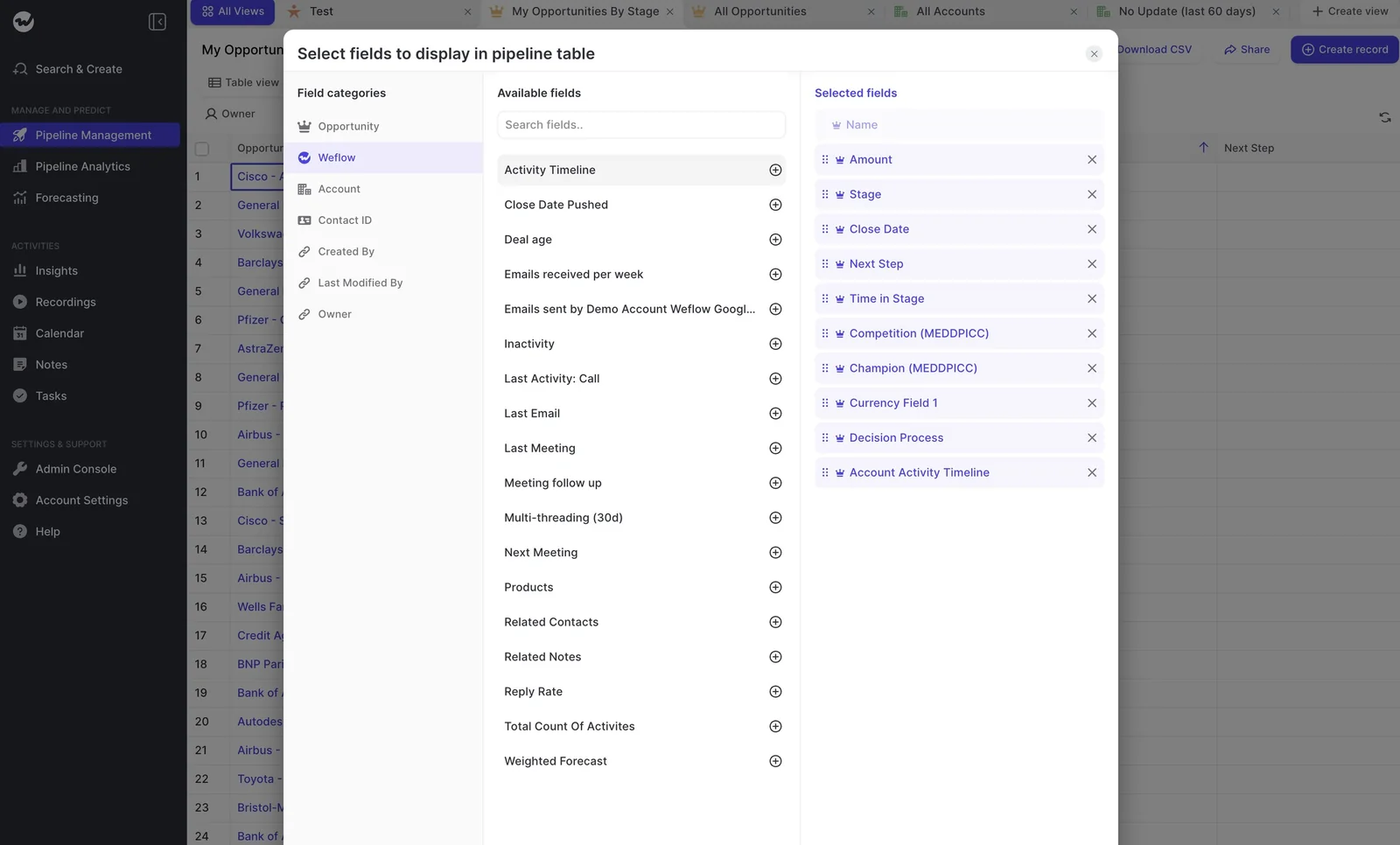
Most managers start by adding these computed columns:
- Inactivity shows how long it's been since anyone emailed or met the buyer, so a stale deal stands out before the rep tells you it's fine.
- Close Date Pushed counts how often the date moved, which gives you the trail that usually lives only in the rep's head.
- Last Meeting and Next Meeting tell you whether the deal has a booked next step.
- Reply Rate shows how often the buyer answers, so you can spot a busy-looking deal that's actually a one-way conversation.
- Multi-threading (30d) shows how many buyer-side people the team has been in touch with recently.
- Meeting follow-up shows how fast the rep followed up after each recorded meeting, in bands from within an hour to later than 24 hours.
This is how the board settles the argument you've had a hundred times:
the CRM says the deal is stale, the rep says 'I met them yesterday, it's fine'
Since Weflow reads Last Meeting from the calendar rather than from what the rep typed, you'll know who's right before the one-on-one even starts.
Your team can also write its own warnings. Each rule can run on any Salesforce or Weflow computed field, chained with And or Or. For example:
- Close date pushed more than twice
- Only one contact on the deal
- A missing methodology field
- Too many days in the current stage
- No activity in a set number of days
That way, a team on a 60-day cycle can flag 14 days of silence, while a team on a 12-month cycle doesn't have to. Warnings also show up on the forecast submission screen, so an unhealthy deal gets flagged the moment a rep commits it.
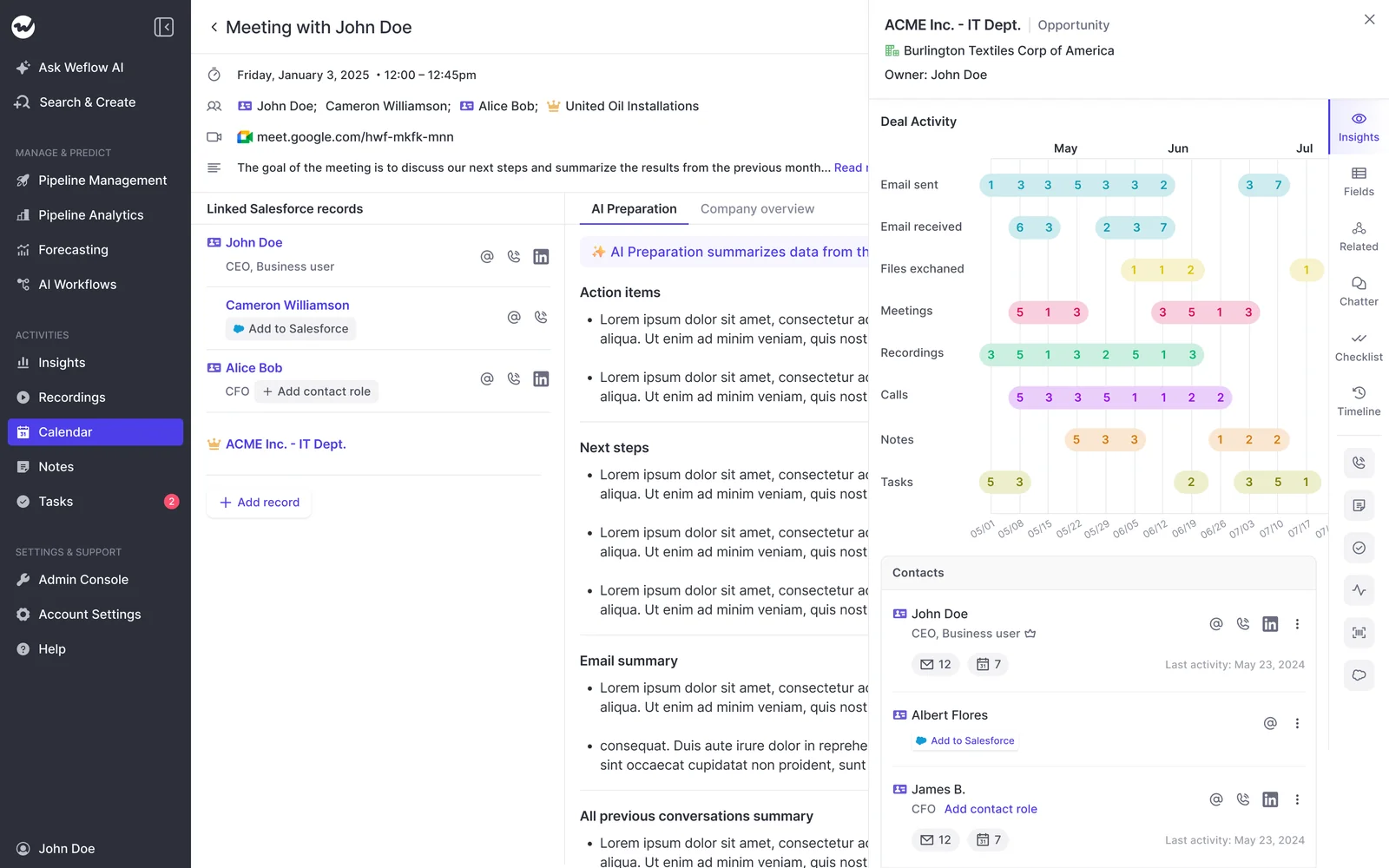
Weflow maps everyone on the deal and measures their engagement
Let's be honest: reps almost never add new participants by hand. That's how you end up with one contact in the CRM on a deal that has five people on the thread.
Weflow Activity & Contact Capture fixes that in the background by creating Salesforce contacts from email threads and calendar invites and attaching them to the matched account and opportunity, including as contact roles. To keep things clean, it:
- It creates contacts only on existing accounts
- It caps how many contacts a single event can create
- It deduplicates on top of Salesforce's own duplicate rules
As a result, multi-threading becomes a fact on the board instead of a claim in the review.
Engagement is measured from captured activity too, never typed in. That matters, because as one buyer told us:
I do not know for sure whether they have replied, or whether I am just looking at the fact that we have sent them ten emails and they have never once answered.
Weflow answers that with reply rate, the number of engaged buyer contacts (and whether it's rising), and follow-up time after every meeting.
There are two limits to keep in mind. First, Weflow doesn't infer roles, so you'll set the champion or economic buyer yourself by picking the contact in the deal board sidebar.
Second, since Weflow builds contacts from the seller's calendar events and email threads, someone who joins through an invite the buyer forwarded internally won't be created until they show up on an email thread with your rep.
| What Weflow fills in | What a person sets |
|---|---|
| New contacts from email threads and calendar invites, attached to the account and opportunity | Which contact is the champion |
| Opportunity contact roles for those contacts | Which contact is the economic buyer or decision maker |
| Reply rate, engaged buyer contacts and whether that count is rising | The role label on each contact role |
| Last email, last meeting and next meeting on every deal | Adding someone Weflow hasn't seen, such as a forwarded-invite attendee who never emailed your rep |
Weflow writes one AI deal summary across every meeting
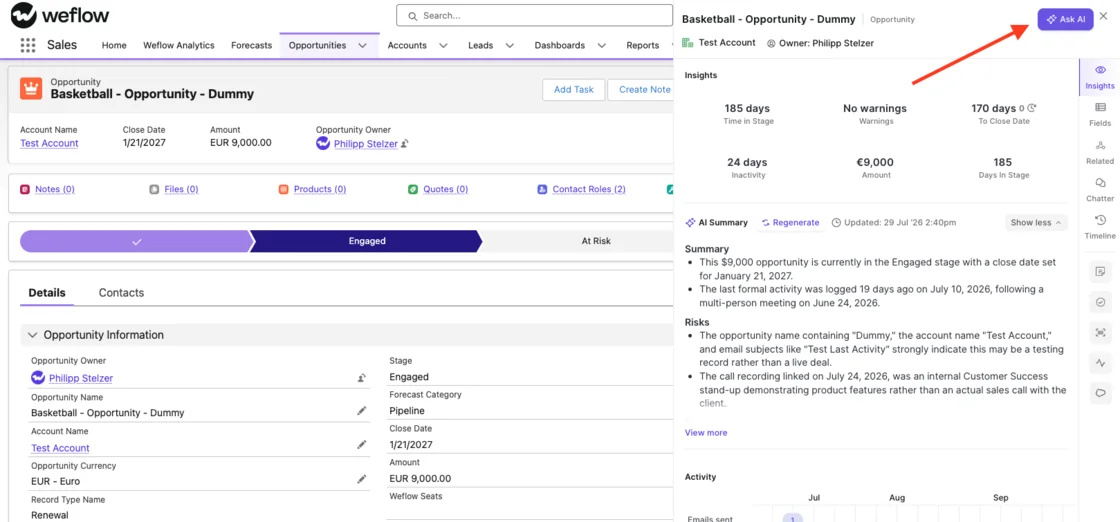
Need the deal's story without the rep in the room? The AI deal summary reads every meeting, email and transcript on the opportunity and gives you pros, cons, next steps and risks.
Because it's generated on demand (and you can regenerate it anytime), it's always current for the deal you're about to review, not stale from last week.
For qualification across the team, there are AI Playbooks. Each playbook scores the whole opportunity against your methodology, whether that's MEDDIC, MEDDPICC or SPICED, reading every email, meeting, transcript and CRM field on the deal and refreshing every few hours.
Results write back to Salesforce fields with a recommended next step, and where nothing supports a criterion, the playbook tells you (for example, that it found no relevant data on the economic buyer).
Add those results to the board, or set a warning for a missing methodology field, and you'll see which deals across the team are missing qualification without opening them one at a time.
Which tools Weflow connects to, and where it stops
Weflow connects natively to the tools most Salesforce teams already run:
- Salesforce, with real-time two-way sync.
- Gmail, Outlook and Google Calendar for email and meeting capture.
- Zoom, Microsoft Teams, Google Meet and Webex for recording.
- The Outreach dialer, connected by your admin, plus Aircall, CloudTalk and Dialpad once our support team activates them.
- Slack and Microsoft Teams chat for meeting summaries, forecast-call reminders and agent reports.
- BI tools such as Tableau and Looker through the API.
That said, there are a few gaps. Weflow sends output to Slack and Teams chat but doesn't read them as input, so a deal channel, a shared customer channel or a Teams chat stays outside the activity record. Reading Slack channels is on our roadmap.
There's also no native Snowflake, Databricks or BigQuery connector, so teams move data into the warehouse through the API. And Weflow isn't an integration platform with a catalog of connectors.
Claude and ChatGPT query Weflow through its own MCP connector
Weflow's official, read-only MCP connector gives Claude, ChatGPT or any client that supports remote MCP servers access to:
- Playbook results
- Call summaries and transcripts
- Forecast calls
- Pipeline metrics such as win rate, coverage and gap to forecast
An admin switches it on per workspace, and a separate toggle decides whether assistants can read full transcripts or only summaries.
The one gap is that saved deal boards aren't exposed by name, so an outside assistant has to rebuild the filter from the records. Inside Weflow, though, Ask Weflow AI can use a board as its context directly.
Weflow's REST API exports transcripts, scores and signals in bulk
The REST API bulk-exports transcripts, metadata, scores and signals as JSON or CSV, on a schedule or on demand, into a warehouse or BI tool.
Recordings export to your own cloud storage, while transcripts and call outputs land in Salesforce.
What Weflow Deal Intelligence & Forecasting and Weflow Revenue AI Business cost
Weflow publishes its per-seat prices, with AI usage included. Which package you need depends on whether you also want capture and forecasting.
| Package (per user per month) | What it includes for deal review |
|---|---|
| Weflow Deal Intelligence & Forecasting, $39 | Deal and pipeline health with AI insights, plus the forecast process |
| Weflow Revenue AI Business, $59 | Weflow Activity & Contact Capture, Weflow Conversation Intelligence and Deal Intelligence. That covers table and Kanban views, AI deal and account scoring, warnings and buying committee intelligence. |
| Weflow Revenue AI Enterprise, $79 | Everything in Revenue AI Business, plus pipeline analytics and forecasting |
Weflow bills annually, with a 10-user minimum.
How Momentum handles deal boards, buying committees and data access
Momentum is strong at routing deals to people in Slack, writing fields and suggesting roles. What its documentation doesn't describe is a team-wide inspection view or a per-person engagement view.
Momentum's pipeline view lives in a rep's Slack Opportunities tab
Momentum's pipeline list lives in Slack, across three surfaces:
- The Opportunities tab in Slack App Home. A rep filters their pipeline by owner, stage or custom fields, sorts it, opens a deal in Salesforce or requests an update.
- A Deal Room per opportunity. Files posted there upload to Salesforce, emoji-marked messages become Chatter comments, and the room becomes an Account Room after a win.
- AI Signals and Salesforce notifications. Prompt-defined risk flags arrive call by call, and record-based alerts come with action buttons that update the record from Slack.
If your team already works deals in Slack, that's a good fit, and Weflow doesn't have anything like the Deal Room.
However, Momentum doesn't document which columns the Opportunities tab shows, so it's unclear whether stage time, last activity and engagement sit together in one view.
Momentum suggests the Decision Maker from the people on the call
When it comes to naming roles, Momentum is ahead of Weflow. It adds meeting attendees to Salesforce as contacts or leads, including invitees who didn't join the call.
Its Autopilot can then suggest an external attendee for a Contact lookup such as Decision Maker. Momentum also says it updates contact roles automatically, though it doesn't describe how it picks them.
Stakeholder mapping sits in Account Briefs, which are part of the $30 per user per month Conversation Intelligence add-on on Momentum's own price list.
But Momentum doesn't describe what that mapping shows, and its documentation has no role or engagement view per stakeholder.
| What Momentum fills in | What isn't documented |
|---|---|
| Meeting attendees as Salesforce contacts or leads, including invitees who didn't join | Each stakeholder's engagement, such as replies or last contact |
| A suggested external attendee for a Contact lookup such as Decision Maker | A per-stakeholder role view |
| Contact roles on the opportunity | How Momentum picks contact roles, or whether it removes roles that no longer apply |
| Stakeholder mapping, listed in Account Briefs | What that mapping shows |
Momentum's Retropilot and Account Briefs summarize a deal's history
This is one area where Momentum matches Weflow. Retropilot re-reads a record's past conversations when a Salesforce event fires, such as a move to Proposal or a date 90 days before renewal. It writes what it finds, often a summary, into a Salesforce field.
Account Briefs summarize an account with a timeline of its calls, emails and CRM changes, and answer plain-language questions about that account, with sources.
Momentum connects to five call recorders, seven dialers and Slack or Teams
Integrations are a real strength for Momentum, and they mean you don't have to switch recorders. It connects to:
- Five conversation intelligence tools it can run on top of: Gong, Chorus, Clari Copilot, Attention and Salesloft Conversation Intelligence.
- Seven dialers and contact centers: Aircall, CloudTalk, Dialpad, Orum, RingCentral, Vonage Contact Center and Zoom.
- Zoom, Microsoft Teams and Google Meet for its own recording.
- Slack or Microsoft Teams as its working surface.
- Outlook calendar sync, which Momentum labels early beta.
- Gmail for sending follow-up emails, the only sending route.
Assistants reach Momentum data through Salesforce's hosted MCP server
Momentum doesn't have its own MCP server, so assistants read the records Momentum writes to Salesforce through Salesforce's Hosted MCP Server.
That's a clean design for a Salesforce-owned product, but it also sets a ceiling: assistants only see what landed in the CRM.
Momentum's API is off by default and rate-capped
Momentum's API returns:
- Meetings with attendees and full transcripts
- Linked Salesforce IDs
- Recording download links that last two hours
- AI Signal executions
The catch is that Momentum's support team has to switch the API on per workspace, it's capped at 100 requests per 15 minutes, and there's no endpoint for call summaries, Autopilot extractions or coaching scores.
On the plus side, Momentum lists Snowflake and BigQuery as destinations for structured data from calls, emails and CRM fields, which is a warehouse route Weflow doesn't offer natively.
What Momentum costs on each Salesforce edition
Momentum's price follows your Salesforce edition.
| Salesforce edition | Price per user per month | Momentum status |
|---|---|---|
| Starter Suite | $25 | Paid add-on, priced by quote |
| Pro Suite | $100 | Paid add-on, priced by quote |
| Core | $195 | Announced, marked coming soon |
| Advanced | $395 | Announced, marked coming soon |
| Max | $550 | Included today |
| Legacy Enterprise or Unlimited | Unchanged legacy pricing | Not bundled; you reach it by moving to a new edition |
Momentum's standalone subscription is now a legacy SKU, so existing customers move to an Agentforce edition when their current contract ends.
What Momentum's "already paid for" really costs next to Weflow
"Already paid for" is only true on Max. On Core and Advanced, Momentum is still coming soon, and on legacy Enterprise or Unlimited, you'd have to change editions to get it. On top of that, several costs sit outside the seat price.
| Cost element | Weflow | Momentum |
|---|---|---|
| Pricing model | Per seat, published. AI usage is included in the seat; only Agent Builder is consumption-priced. | Follows your Salesforce edition. Data 360 usage is billed by consumption. |
| List price | $39 for Deal Intelligence & Forecasting, $59 for Revenue AI Business, $79 for Revenue AI Enterprise | Included in Max at $550. Core ($195) and Advanced ($395) are coming soon. On Starter and Pro Suite, the price appears only in a quote. |
| What costs extra | Agent Builder beyond the free 25 actions a month: $299 for 500 actions or $999 for 2,500 actions per workspace | Data 360 consumption charges. Agentforce for Sales agents from $125 on Core and Advanced. On Momentum's own price list, Account Briefs with stakeholder mapping in a $30 add-on. |
| Recording allowance | No caps on recordings or transcripts within a bundle | 120 processed call hours per licence per year, pooled across the org. Unused hours expire. |
| Included for deal review | Deal board, computed engagement columns and warnings. Buying committee intelligence is named in Revenue AI Business. | Slack Opportunities tab, Deal Rooms, AI Signals and Salesforce alerts |
| Forecast included | Yes, in Deal Intelligence & Forecasting and Revenue AI Enterprise | No. Momentum sells no forecast for the board to feed. |
| Contract terms | 12-month minimum, annual billing, 10-user minimum. An early opt-out at three months can be negotiated. | Billed annually with the edition. Existing Momentum customers move to an Agentforce SKU around contract end. |
Can you run Weflow alongside Momentum or switch at renewal?
Yes, and renewal is the natural time to decide, since that's when the choice reopens anyway. Weflow can work alongside the fields Momentum already writes, and it rolls out in a set order.
Weflow shows the fields Momentum already writes to Salesforce
If Momentum keeps writing fields such as MEDDPICC into Salesforce, Weflow surfaces those fields in its deal views and sidebar, so you keep the methodology your team already fills in.
The one thing that changes is AI Playbooks, which only read transcripts Weflow recorded itself.
So while Momentum is still recording, playbook results come from the CRM record, emails and meeting metadata, and the methodology on the board is Momentum's rather than one Weflow generated.
Weflow goes live capture first, deal board second
We roll out in order of data foundation, so the engagement columns have clean data before you run your first review in Weflow:
- Weflow Activity & Contact Capture goes live first. It's a configuration exercise, takes roughly two weeks, and asks nothing of your reps.
- Weflow Conversation Intelligence follows if you're recording with Weflow, because reps get summaries and notes right away.
- The deal board comes next, with one or two company boards and your team's warning rules, once activity sits on the right opportunities.
- Forecasting comes last, because it encodes your operating cadence and needs sales leadership in the room.
When to choose Weflow and when Momentum is the better call
It really comes down to where you inspect deals and where your team works them.
| Choose Weflow if | Choose Momentum if |
|---|---|
| You review your whole team's deals on one board every week and want stage time, engagement and the people on each deal in the same view. | Your team works deals in Slack, with a deal room per opportunity. |
| You want engagement measured from replies, meetings and silence for each contact, not from emails sent. | You're already on Max, where Momentum is in the licence today. |
| You want warning rules your team writes, shown as reps commit deals to the forecast. | You review deal by deal in Slack, and alerts with action buttons suit how your managers work. |
| You want published per-seat prices with the forecast included. | You want Autopilot to suggest the Decision Maker from call attendees. |
| You're fine setting champion and economic buyer by hand, and with Slack and Teams chat staying outside capture. | You're fine with no forecast, undocumented Opportunities tab columns and stakeholder mapping without per-person engagement. |
Want to see the board before you take this to RevOps and your CRO? Walk through the product yourself, no call required.
Weflow vs Momentum FAQ: Deal boards, roles and pricing
Does Weflow's deal board need Weflow's own activity capture?
Yes, for the engagement columns. Reply rate, last meeting and days inactive are all computed from the email and meetings Weflow captures, which is why every rollout starts with Weflow Activity & Contact Capture.
How do I set the champion and economic buyer in Weflow, and can I make it required?
You pick the contact in the deal board sidebar, and admins can mark any field as required when they build the sidebar templates.
Edits write straight to Salesforce under its validation rules. Since AI field updates can't write lookup fields, these are always set by a person.
Can reps change the company deal board?
No. Admins publish company boards that everyone sees from their first login, and users can't change their fields. A rep who wants different columns can duplicate the board and build their own version, so the shared view stays the same for everyone.
Does Momentum include a sales forecast?
No. The closest it gets is Executive CRO Briefs, which summarize pipeline performance, and a Pipeline Change Agent that alerts you to changes. But neither takes forecast submissions, rolls up a number or predicts one.
How does Momentum's pooled call-hour allowance work?
Each license includes up to 120 processed call hours a year, prorated for contract length and pooled across all the org's licenses, so ten licenses give you 1,200 hours.
Unused hours expire at contract end. In practice, if your reps spend more than about two and a half hours a week on recorded calls, you'll run out before the year ends.
What contract terms does Weflow require?
Beyond the 12-month term and 10-user minimum covered above, your seat count stays fixed for the term, but you can reassign seats when someone leaves.