How to Build a Weflow Deal Board for Weekly Pipeline Reviews
Learn how to build a Weflow deal board for weekly pipeline reviews, with deal warnings and Salesforce sync


Build the board backwards from your review. Write down the four or five questions you already ask about every deal, then map each one to a column or a warning. Tune the warnings to your own sales cycle so the board stays close to empty when the pipeline is healthy. Then lock it as your team's template, so your reps see the same flags before you do.
Weflow is the Revenue AI Orchestration platform for sales, customer success, and RevOps teams. The deal board lives in Weflow Deal Intelligence & Forecasting, and it replaces the hour per team per week you spend stitching a stage-duration report to a last-activity report and still taking the rep's word for the rest.
The setup has a few gotchas. We flag each one at the step where it bites:
- grouping on formula fields
- one-way list view imports
- licences
- warnings that don't reach Salesforce reports
What you'll have once your Weflow deal board is built
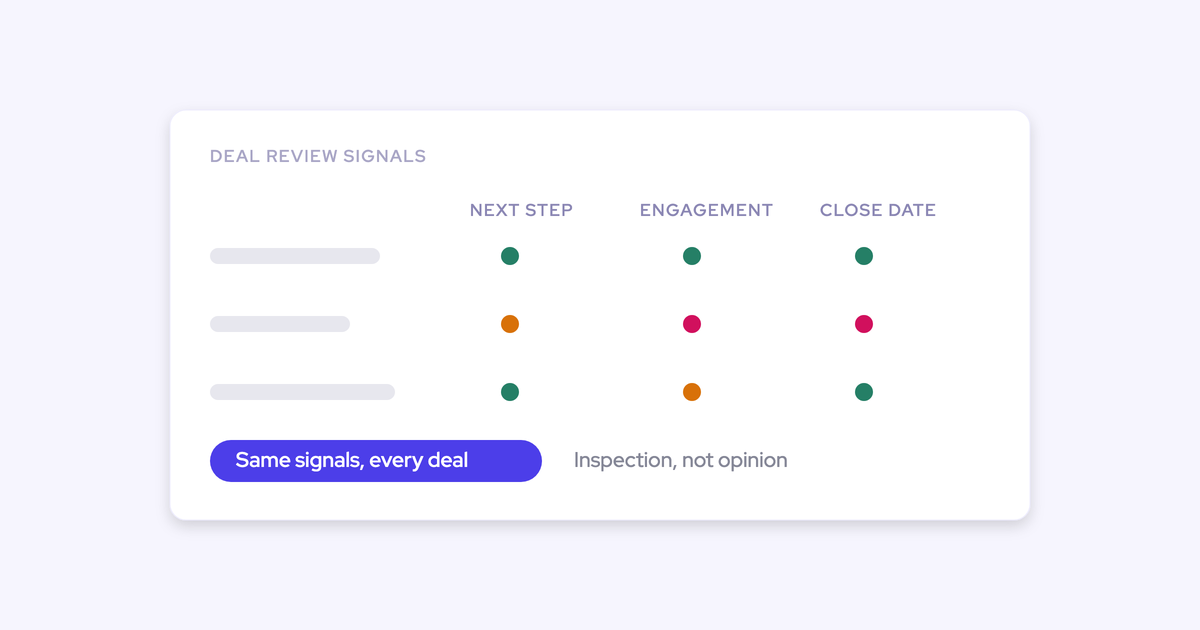
The finished board answers your weekly review questions in one view, without a second report open. Healthy deals stay quiet, and anything that shows a warning is already overdue.
- Every deal shows how long it has sat in its stage, how many times its close date moved, and how many days have passed since a real email or meeting with the buyer.
- Opportunity, account and contact fields sit side by side, so you can see who is involved and engaged without opening the deal.
- Warnings fire on thresholds your team set from its own sales cycle, so a flag means something.
- Your reps work from the same locked template, so they arrive at the review already knowing what's flagged on their deals.
- You fix contact roles and stale fields from the board itself, and every edit writes back to Salesforce.
What you need before you build the deal board
Three things have to be true before you start:
- the right bundle
- a clear split between what you build and what your admin builds
- email and meeting capture running underneath
Get these straight first and you won't stall halfway through.
Check that your Weflow bundle includes Deal Intelligence
Weflow Revenue AI Business includes the deal board views, warnings, AI deal scoring and buying committee intelligence. Pipeline Management is also sold as its own product and gives you the same board.
Pipeline analytics and the waterfall belong to the Forecasting package, and you can't license them on their own. The analytics upsell still shows in the app when the licence is absent. If your org holds Pipeline Management or Revenue AI Business, the board works and the analytics tab doesn't.
Decide what you build and what RevOps builds
You own the questions and the thresholds. Your admin owns the settings that hold the board together for the whole team.
| Part of the setup | Who owns it |
|---|---|
| The questions the board has to answer | You |
| Which columns go on the board | You |
| Warning thresholds (how many days, how many pushes) | You decide the numbers |
| Creating warning rules and assigning them to your team | Your admin or RevOps |
| Locking the board as a team template | Your admin or RevOps |
| Sidebar templates and required fields | Your admin or RevOps |
Bring your admin a short spec: the question list from Step 1, the columns from Step 3 and the thresholds from Step 4. That's everything they need to configure the rest.
Make sure email and meeting capture is running
Days inactive, engagement and the activity timeline are only as complete as the emails and meetings behind them. Weflow Activity & Contact Capture supplies that data, so if capture is patchy, a busy deal can look silent.
Get capture live for every rep on the team before you trust an inactivity warning.
Step 1: Write down the questions you ask every week
Every column and warning on the board has to answer a question you already ask in review. If a field answers no question, leave it off the board.
This is the step most teams skip. They start from the field list instead, and the board ends up with thirty columns nobody reads. The more fields a view shows, the less anyone looks at any of them.
I don't want a prettier board · show me stage-to-stage movement · how long deals sit in the same stage · where are we losing opportunities · protect deal velocity
Here's the mapping we'd start from. Copy it, cross out what you never ask, and add what's missing.
| The question you ask in review | The Weflow column or warning that answers it | Why a Salesforce report can't answer it today |
|---|---|---|
| Is it stuck? | Days in stage, plus a stage-duration warning | Salesforce has no days-in-stage field without a custom build and automation |
| Is anyone talking to the buyer? | Days inactive and the rolling four-week activity timeline | Last Modified moves on any field edit, so a neglected deal looks alive |
| Has the close date moved? | Close-date push count, plus a push warning | Salesforce doesn't count pushes on the record |
| Is a next meeting booked? | Next meeting and last meeting | Neither exists as a field on the opportunity |
| Who is involved, and are they engaged? | Contact fields, per-contact engagement and a single-contact warning | An opportunity report can't show contact-level fields in a column |
| Is it qualified? | Methodology fields, a missing-field warning and the AI Playbook panel | Finding gaps means opening deals one at a time |
Five or six questions is plenty. If you can't name the question a column answers, it doesn't make the cut.
Step 2: Create the board and scope it to your team
Start from a new Weflow view or import one of your existing Salesforce list views. Then narrow it to your team, the period under review and a deal-size threshold. That way the review starts where being wrong is expensive.
- In Pipeline Management, create a new opportunity view, or import the Salesforce list view your team already uses.
- Filter Owners to the reps on your team.
- Set the close date range to the period you're reviewing, for example this quarter.
- Set an Amount filter so small deals don't crowd out the ones that move your number.
- Choose table view for the review. Kanban by stage works too, but the table holds more columns.
Gotcha: imported list views are one-way. They refresh from Salesforce every couple of minutes, but nothing you change in Weflow syncs back to Salesforce. Duplicate the imported view and build your board on the copy, so the Salesforce original stays untouched and your edits stay put.
Step 3: Add the columns that answer your review questions
Your columns come from three places:
- Salesforce fields across the opportunity, account and contact objects
- Weflow's computed signals
- a grouping that actually works
Work through your Step 1 table row by row.
Put opportunity, account and contact fields side by side
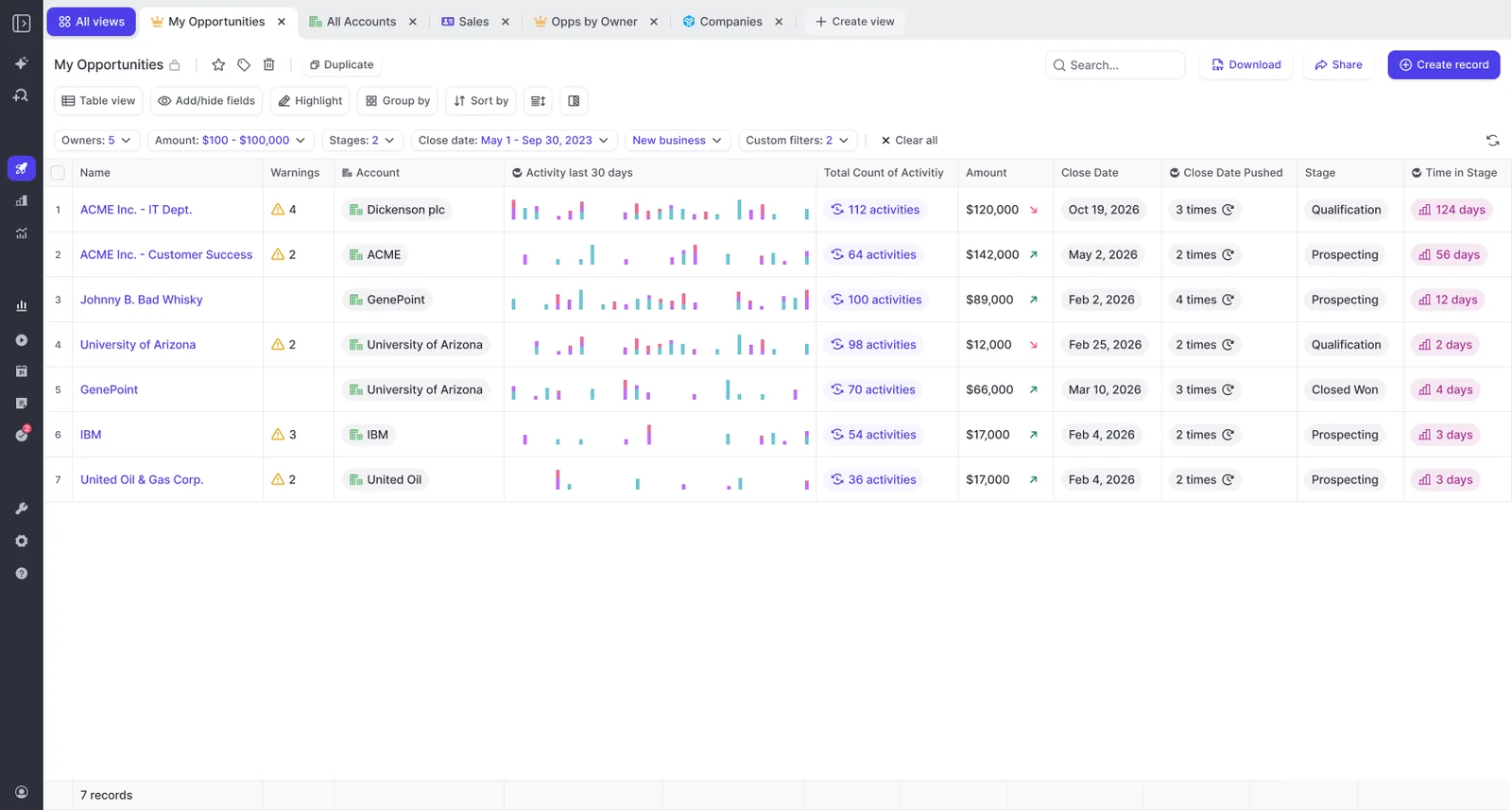
A Weflow view holds fields from the opportunity, its account and its contacts in one board. A standard Salesforce opportunity report can't do that, because Salesforce reports are bound to one report type.
Every field stays editable and writes back to Salesforce. Here's how that maps to the Step 1 questions:
- Who is involved: contact name and contact role next to the opportunity.
- Is it qualified: your methodology fields from the opportunity, such as Champion or Economic Buyer.
- Is it worth the time: account tier or segment from the account, next to amount and stage.
Add days inactive, days in stage and push count
Weflow computes days inactive, days in stage and close-date push count on every opportunity. You don't build custom fields or the automation to fill them. That's tech debt RevOps never gets around to, which is why most orgs don't have these fields today.
Days inactive is the one that changes the review. It counts only emails and meetings, so editing a field or adding a note doesn't make a deal "active."
| What you're comparing | Salesforce Last Modified | Weflow days inactive |
|---|---|---|
| What resets it | Any edit to the record | An email or meeting with the buyer |
| Rep updates the close date | Deal looks fresh | No change |
| Rep adds a note | Deal looks fresh | No change |
| A deal nobody has spoken to in a month | Can look current | Shows the real gap |
| Can a rep game it? | Yes, with one edit | Only by talking to the buyer |
Weflow has more computed fields worth a look:
- last meeting and next meeting
- last email
- the rolling four-week activity timeline, which shows sent mail, received mail, meetings and tasks
- per-contact engagement and activity velocity
Add only the ones that answer a Step 1 question. The rest can wait in the field picker.
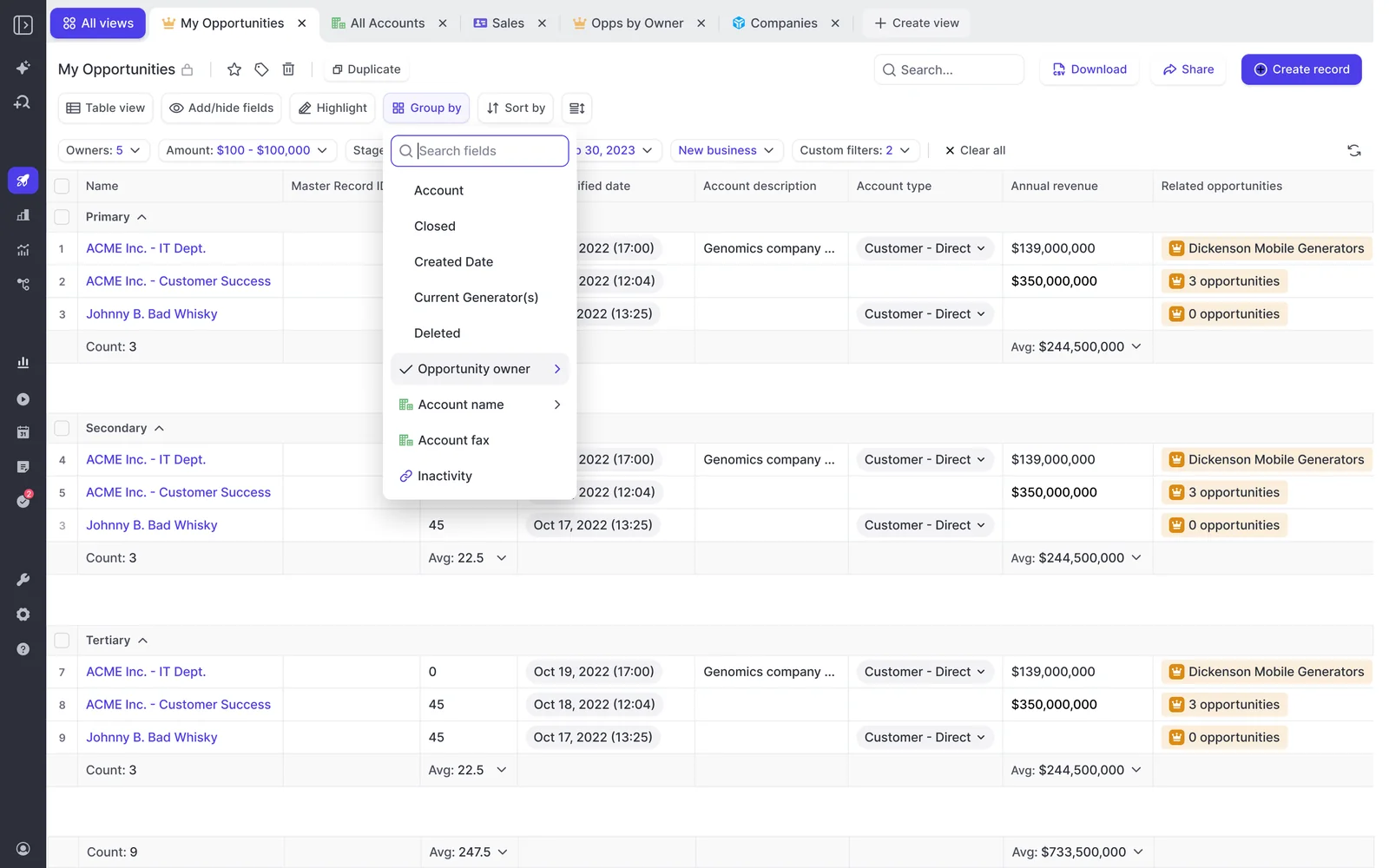
Group by owner instead of a formula team field
Weflow can't group or filter on a Salesforce formula or roll-up field. You can still add the field as a column and it displays correctly. Grouping and filtering resolve against the source object, though, not the rendered value.
The fix is to group by the field the formula reads from. Say your "Sales Team" field is a formula that derives the team from the opportunity owner. Group the board by owner title instead and you get the same split. Currency and amount roll-ups read without trouble.
Step 4: Set deal warnings that match your sales cycle
Weflow deal warnings are rules you write, not a fixed risk model you switch on. They only earn their place when they encode your team's own cycle and the ways your deals actually slip.
That's the target. A warning that fires on everything gets ignored within a week.
Build warning rules with AND/OR logic on deal fields
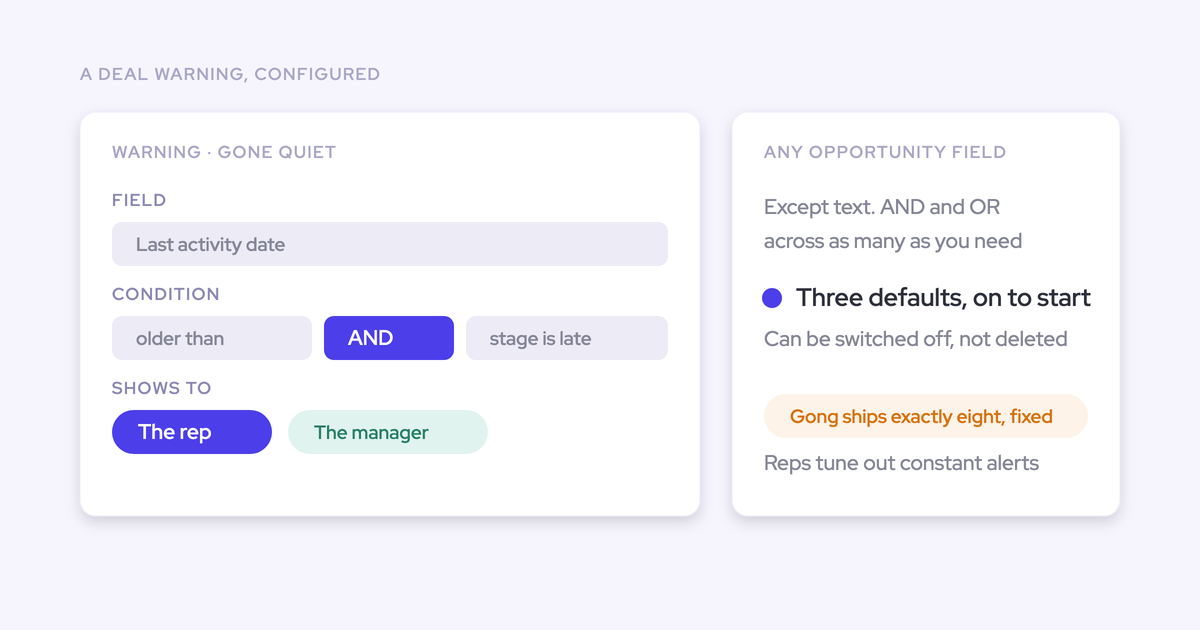
Weflow warning rules use AND/OR logic on any opportunity-related field except text fields, or on any computed field such as days inactive and push count.
Weflow ships three default warnings. You can deactivate them but not delete them, so switch off any that don't match a question you ask.
Here are five rules built from the triggers we see teams use most:
| Rule | Fields used | Review question it answers |
|---|---|---|
| Close date pushed more than twice | Push count | Has the close date moved? |
| Only one contact on the deal AND stage is past discovery | Contact count, stage | Who is involved? |
| No email or meeting in X days | Days inactive | Is anyone talking to the buyer? |
| Days in current stage above your benchmark | Days in stage, stage | Is it stuck? |
| Economic Buyer empty AND forecast category is Commit | Economic Buyer, forecast category | Is it qualified? |
Set thresholds from your own sales cycle length
A 60-day cycle and a 12-month cycle define "silent" differently. On a 60-day cycle, two weeks without a touch is a real warning. On a 12-month enterprise cycle, the same rule would flag half your healthy deals.
Take the numbers from your own closed-won history, not an industry benchmark. How long did deals that won spend in each stage? How many times did their close dates move? Those answers are your thresholds.
| Signal | Short cycle (around 60 days) | Long cycle (around 12 months) |
|---|---|---|
| Days inactive | 14 days of silence is a warning | A longer window, set from the gaps your won deals actually had between touches |
| Days in stage | Above the average your closed-won deals spent in that stage | Above the average your closed-won deals spent in that stage, which runs far longer |
| Push count | A single push matters when the whole cycle is two months | Repeated pushes matter more than one |
Then tune. Run the board for two weeks and look at what flags. If healthy deals keep showing up, loosen the threshold. You're aiming for a board that's close to empty when the pipeline is on track.
Assign warnings to your team so they actually fire
A warning takes effect only once it's assigned to a team. This is the most common reason a manager builds a rule and then sees nothing on the board.
Your admin assigns warnings in the Weflow admin console, and the inactivity threshold is set per team there too. Give them your thresholds and team name in the same message.
Step 5: Lock the board as your team's template
Your admin locks the column set for your team by assigning the board as a pipeline template. Reps see the columns you chose and can't add or remove them. They can only duplicate the view to build their own.
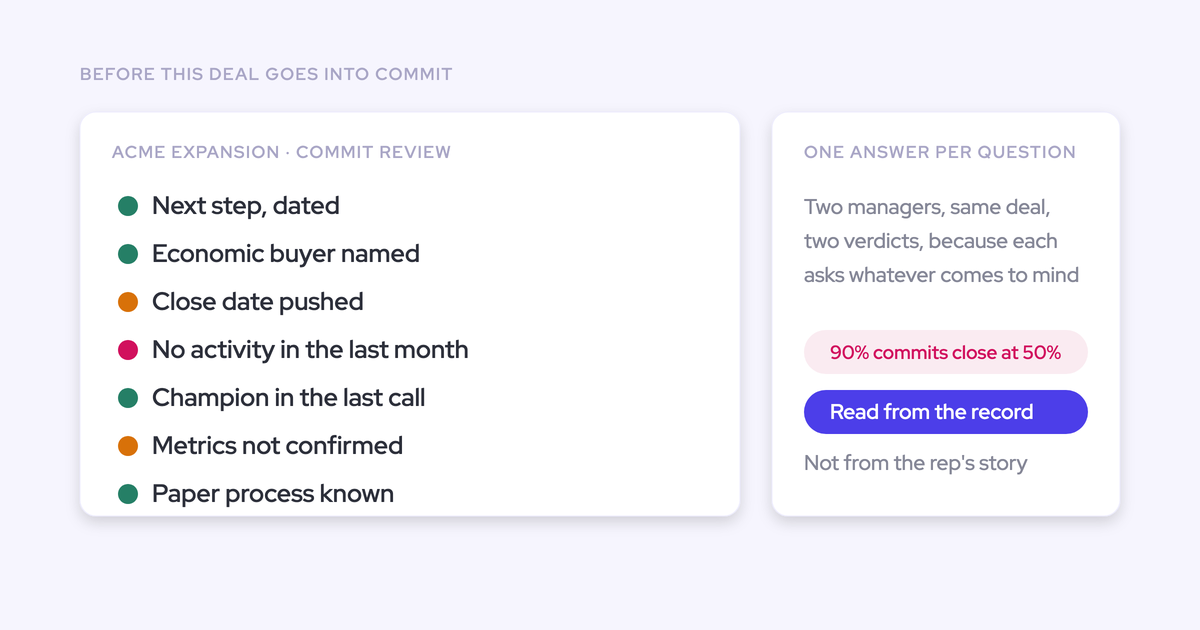
That's what keeps the shared view shared. A board everyone can reshape stops being a reference, and two managers looking at the same deal end up with two answers.
The lock also changes how reps experience the flags. When they see the same warnings you see, before the review, they fix the deal instead of defending it. If your team submits forecasts in Weflow, the warnings also appear on the forecast submission screen, right when a rep picks which deals to commit.
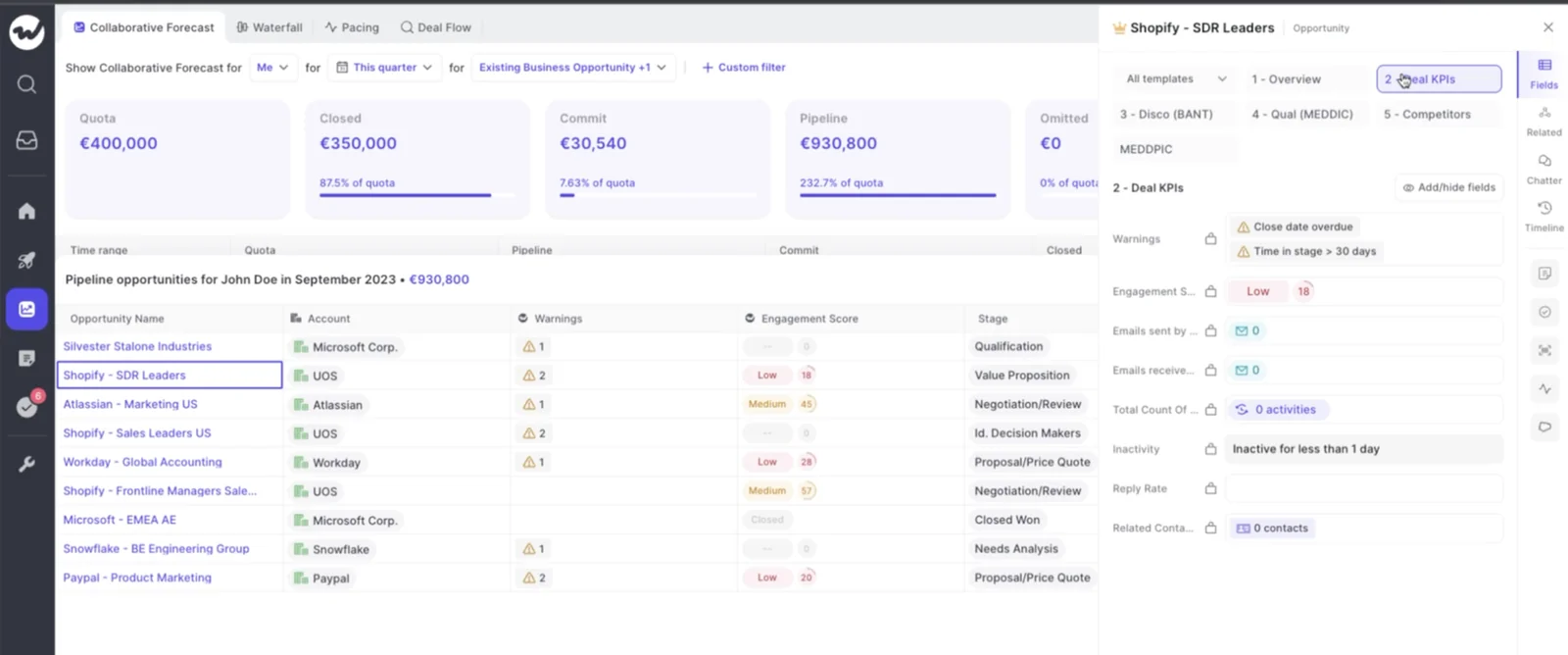
HolidayCheck saw this play out. Past-due opportunities fell by about 75%, and reps started arriving at meetings already aware of what was flagged.
"The visibility alone changed behavior. Reps come into meetings already aware of what's overdue or inactive. They're more proactive now, because they can actually see what needs attention."
— Bastian Stosic, Head of Media Sales Operations at HolidayCheck
Zeotap runs the same pattern, with custom pipeline views and templates for its weekly sales meetings and pipeline inspections. The board didn't produce Zeotap's 12% win-rate gain on its own. That came from the review and qualification discipline the board made possible.
Step 6: Run the weekly pipeline review inside the deal board
On Monday you open one board and run the review from it. You triage with AI before the meeting, test claims in the room, read qualification without opening deals, and fix records in place.
The point of the review is to act on risk while there's still time to do something about it.
"Forecasting is obviously not a number, it is a process, and that process should also enable you to execute better. If you have full visibility on all the deal risks, that means you can take action, you can mitigate those risks, and you can win more."
Ask Weflow AI which deals closing next month will slip
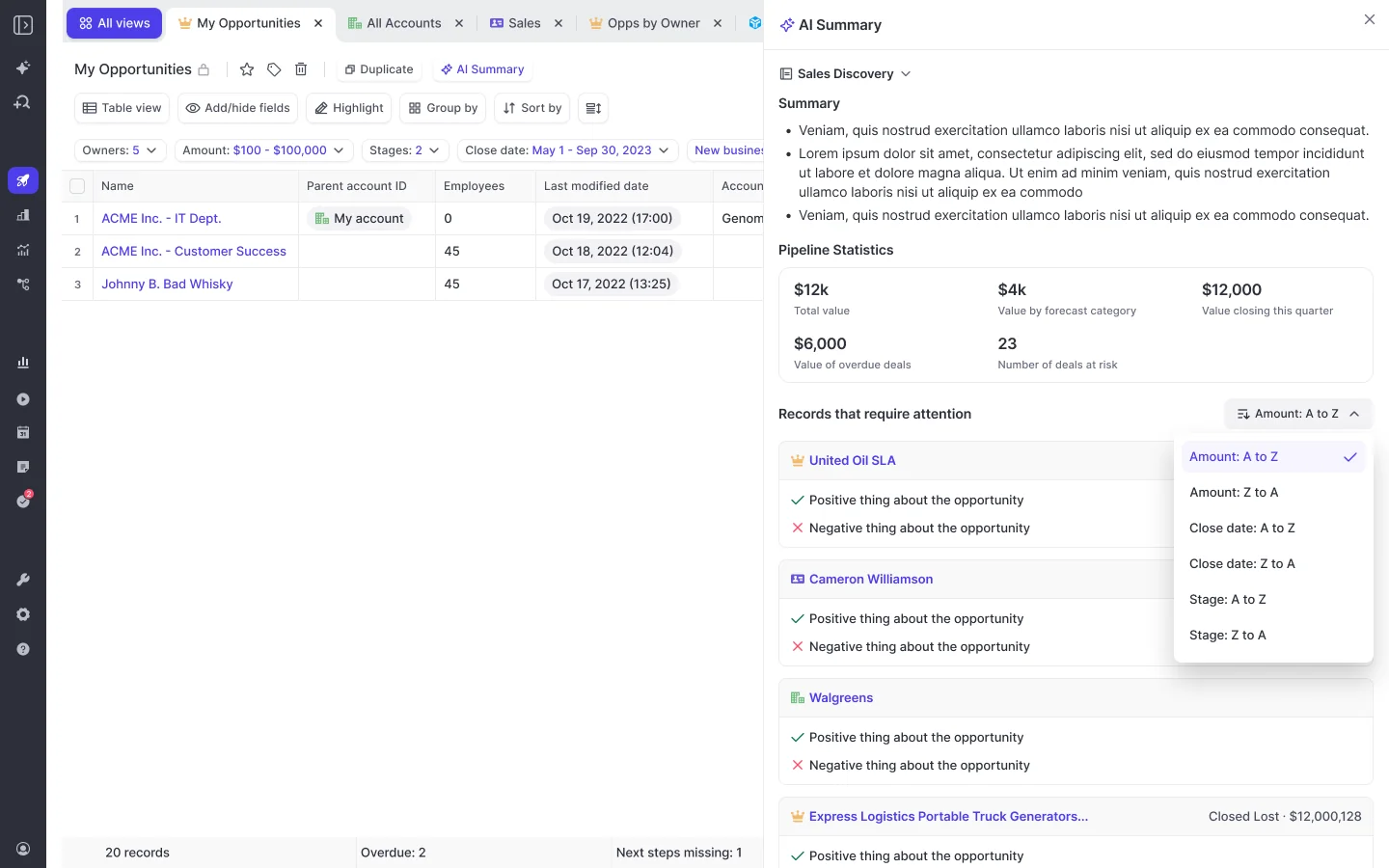
Before the meeting, open Ask Weflow AI on the board and ask a triage question. Ask Weflow AI reads what the pipeline view shows, and its answers list the sources they came from, so you can click through to the evidence.
Two limits to know:
- A single view is capped at 2,000 records.
- You can link up to ten views in one chat.
A single team board usually fits well within these limits.
Questions you can paste in:
- "For the opportunities closing next month, which ones are about to slip, and why?"
- "Which deals in Commit have no next meeting booked?"
- "Which deals have only one contact engaged in the last four weeks?"
Check a rep's claim against the activity timeline
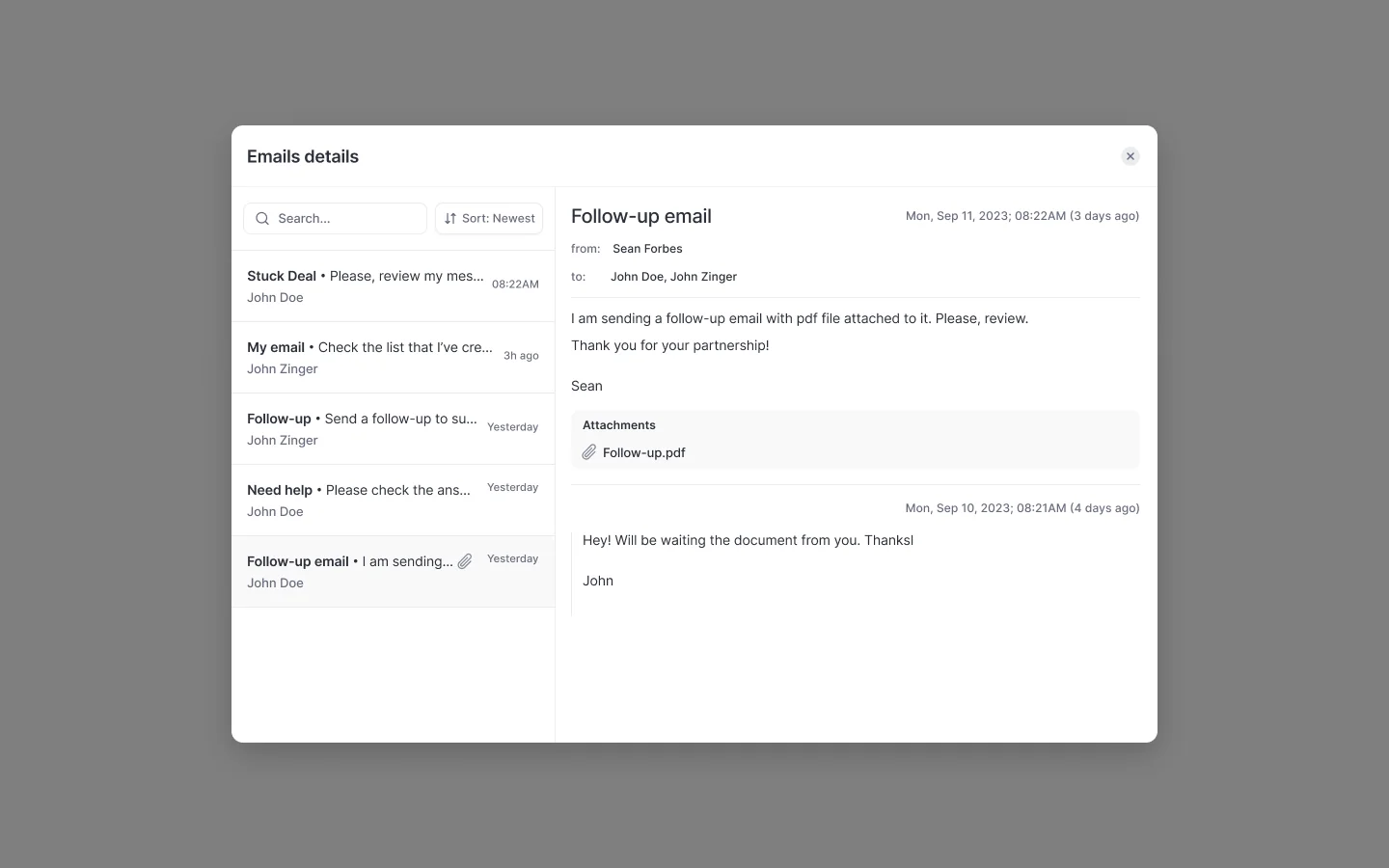
When a rep says "I met them yesterday, it's fine," the captured emails and meetings settle it in the room. The activity timeline on each deal clicks through to the messages themselves.
Most of the time the rep is right and the board catches up. When they're not, the gap between the record and the story becomes the agenda.
"At that frontline level, it's very different. You're looking for what is the system telling me, and then what is my rep telling me, and what is the disconnect? So that's where I can focus."
— Kelly Lewis, RevOps and sales leadership coach; co-host, The Revenue Insiders podcast
Read the AI Playbook panel before you question qualification
Two things sit next to the board and save you from opening deals one by one.
- The AI deal summary reasons across every meeting on the opportunity. It shows communication velocity and every person involved.
- The AI Playbook panel shows per-letter methodology status, such as MEDDIC. It tells you what's evidenced and what's missing, for example that no relevant data on the economic buyer was found.
The playbook refreshes every few hours and reads the deal's emails, meetings, CRM fields and the transcripts of meetings Weflow recorded.
Playbook results don't cite their sources, because each element is synthesized across many calls and emails. When you want the evidence behind a gap, ask Ask Weflow AI about the deal. Its answers list what it read.
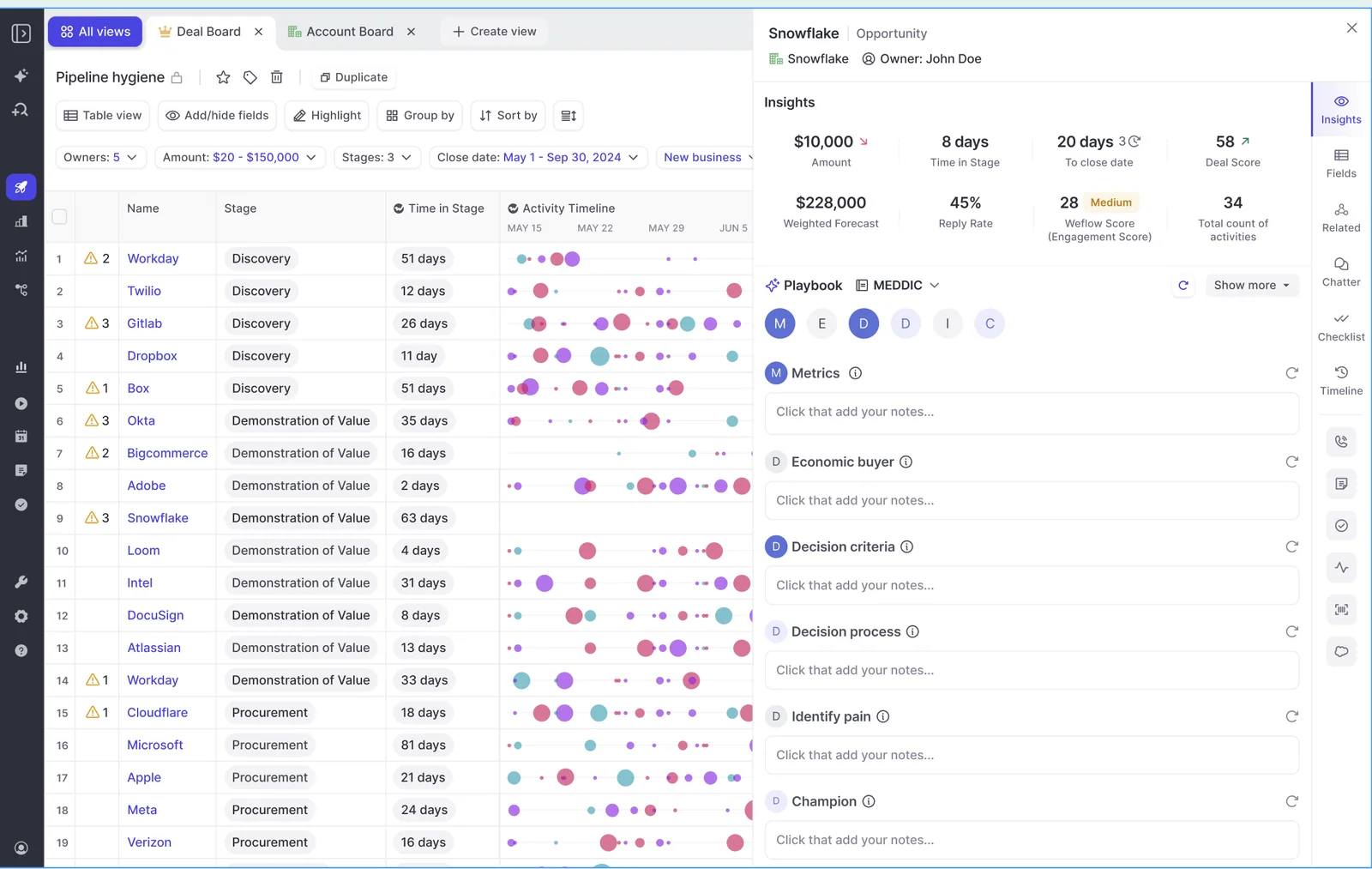
Fix contact roles and fields without leaving the board
From the deal board sidebar you can set the buying committee on the spot:
- Open the deal in the sidebar.
- In the Champion lookup, pick the contact the rep named.
- Do the same for Economic Buyer.
- Add or change opportunity contact roles for anyone else on the deal.
Edits write straight to Salesforce and run under your Salesforce validation rules. A person sets these roles. Weflow attaches captured contacts to the opportunity, but it doesn't infer who the champion or economic buyer is, and AI field updates can't fill a lookup.
For anything bigger, such as ten deals with a stale next step, use bulk edit on the board instead of the data loader export-fix-reimport loop.
Limits to plan around before you show leadership the board
The deal board is a team inspection tool. A few things it doesn't do today change what you can promise your VP.
| Limit | What it means for your review | What to do instead |
|---|---|---|
| Deal warnings aren't reportable in Salesforce dashboards or BI | The at-risk flag lives in Weflow and won't appear in the board deck built from Salesforce or Power BI | Show leadership the Weflow board itself. Weflow marks its own fields with a W, so you can see at a glance what won't reach a report |
| A view-only licence doesn't include pipeline management | There's no read-only deal board for an exec | Give leaders who need the board a paid seat, or bring the board to them in the review |
| Pipeline analytics and the waterfall need the Forecasting package | Revenue AI Business and Pipeline Management have no analytics tab | Use Revenue AI Enterprise, or add the Forecasting package, if leadership wants the waterfall |
| There's no account-level board | CS and account managers can't see a customer as a whole | Keep the board for opportunity reviews, including renewal opportunities |
| The deal score needs about six months of closed history | A new org won't get a meaningful 0 to 100 score on day one | Lead with warnings and computed fields until the model has trained |
If your exec reporting has to show the at-risk flag in Salesforce dashboards today, stay with what you have for that report. Plan the route to a Salesforce field with RevOps before you promise it, because RevOps has to build it.
Free Guide: Deal Insights & Pipeline Management Best Practices
Questions managers ask about the Weflow deal board
Which Weflow bundle includes the deal board and deal warnings?
Weflow Revenue AI Business ($59 per user per month, billed annually) includes Deal Intelligence: the deal board, AI deal scoring, warnings and buying committee intelligence. It doesn't include pipeline analytics or forecasting. Revenue AI Enterprise ($79 per user per month) adds the full forecasting layer. Bought on its own, Weflow Deal Intelligence & Forecasting is $39 per user per month, billed annually.
Can my VP or CRO get a read-only Weflow deal board?
No. Weflow's view-only licence covers recordings and the insights panel, not pipeline management or forecasting. A VP who wants to work the board needs a paid seat.
Who sets deal warning thresholds, me or RevOps?
You decide the thresholds, because they're a judgement about your team's sales cycle. Your admin or RevOps enters them in the Weflow admin console, builds the warning rules and assigns them to your team.
Can I group the board by a formula field like team or segment?
No. Weflow can show a Salesforce formula or roll-up field as a column, but it can't group or filter on it. Group by the field the formula reads from instead, such as owner title for a team field derived from the opportunity owner.
If I import a Salesforce list view, do my changes sync back?
No. Imported list views refresh from Salesforce every couple of minutes, but changes you make in Weflow stay in Weflow. Duplicate the imported view and build your board on the copy.
Can reps change the columns on a locked team template?
No. A Weflow pipeline template locks the column set for every team it's assigned to. Reps can duplicate the view to build their own, but the shared template stays as the admin set it.
Do days inactive and engagement include activity logged by Outreach?
Days inactive and engagement are computed from the emails and meetings Weflow captures. The Weflow Activity Timeline component in Salesforce shows activity Weflow logs. Activity another tool such as Outreach logs doesn't appear in it. Weflow runs alongside Outreach through compatibility mode.
Will edits from the deal board trip Salesforce validation rules?
Edits from the board and the sidebar write straight to Salesforce under your existing validation rules. The deal board follows the same rules your team already works under in Salesforce.
How many deals can Ask Weflow AI read at once?
Ask Weflow AI reads up to 2,000 records per pipeline view, and you can link up to ten views in one chat. Its answers list the sources they came from.
Do Weflow deal warnings show up in Salesforce reports?
No. Deal warnings and AI Playbook scores are Weflow fields, so they don't appear in Salesforce reports, dashboards or BI tools. Weflow marks its own fields with a W in the interface.
How long before the Weflow deal score is meaningful?
The Weflow deal score needs about six months of closed history in your org. After that it trains within a few days and recalculates nightly from your own closed deals. Each score comes with an explanation of what drives it.
Does the Weflow deal board replace our Gong deal board?
It can, but replace the daily habit, not only the recordings. Gong's deal board is the thing teams get attached to.
"Like the deal board specifically, the reason why I stuck with it was like the bubbles, like, you sort of get like addicted to the bubbles."
— Chris Nethercote, Head of Sales at Weflow, former Gong enterprise customer
Gong's AI Deal Monitor offers eight Gong-defined warnings that you can switch on or off and tune, but not add to. Weflow warnings are rules you write on your own fields and thresholds.
Should deal inspection be its own meeting, separate from the forecast call?
Yes. When inspection is folded into the forecast call, it gets rushed. Run a deal-health review from the board first, where reps fix what's stale or missing. Then hold the forecast call, which no longer has to argue about whether the data is right.