Weflow vs Microsoft Copilot for Logging Outlook Emails and Teams Meetings to Salesforce (2026)
Decide between Weflow vs Microsoft Copilot for logging Outlook emails and Teams meetings to Salesforce


If your team runs Salesforce on Microsoft 365, you've probably wondered whether Copilot can handle activity logging on its own.
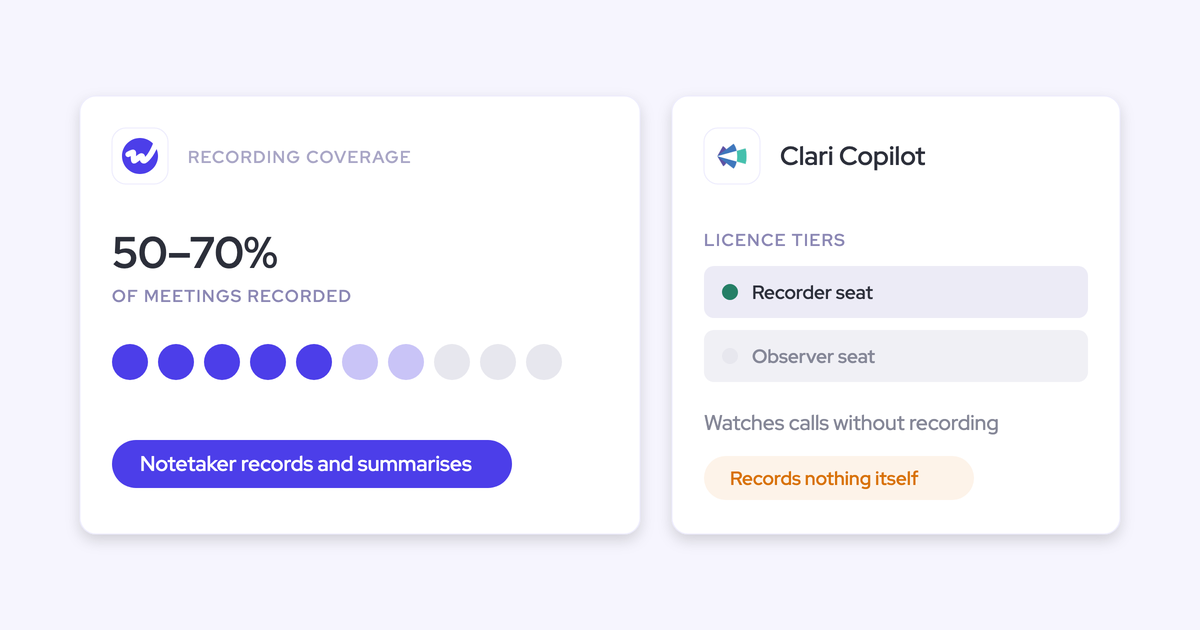
Here's the catch: Copilot's Sales agent only writes an Outlook email or meeting to Salesforce when a seller clicks Save, and on Salesforce it can't save recurring meetings at all.
Weflow Activity & Contact Capture takes the other approach. It logs every external email and meeting automatically, recurring series included, and maps each one to the right contact, account and opportunity, so reps don't have to click a thing.
Our take? Keep Copilot as your assistant in Outlook and Teams, and add Weflow underneath it to handle capture. That way, Salesforce (and Copilot's own answers) run on complete data.
Weflow vs Microsoft Copilot at a glance for Salesforce logging
In short, Copilot saves what a seller chooses to save, while Weflow captures what actually happened. You'll see that difference in every capture row below.
| Capability | Weflow | Microsoft Copilot (Sales agent) |
|---|---|---|
| Automatic email capture | Every inbound and outbound email for enrolled users, captured server side on any device with no rep action. Personal accounts, aliases and deliverability subdomains aren't captured. | Only when a seller selects Save on that email. Replies aren't saved automatically, and the save banner appears on at most two external emails a day. |
| Automatic meeting capture | Every external meeting written to a Salesforce Event, recurring series included, whether or not it was recorded. | Saved once, by hand, by each participant separately. Recurring meetings can't be saved to Salesforce. |
| Matching activity to the right records | Fixed order from contact or lead, to contact role, to open opportunity, with account fallback. A rep re-maps once and the rest of the thread follows. | Exact email address match, and the seller picks the record. On Salesforce, a saved activity can't be edited or re-linked from Outlook. |
| Integrations with other tools | Salesforce, Outlook, Teams, Gmail, Google Calendar, Zoom, Meet, Slack and dialers. Microsoft 365 and Google Workspace run in one configuration. | More than 100 Copilot connectors. Meeting intelligence covers Teams only, and Sales agent has no Gmail or Google Workspace version. |
| Access from AI assistants (MCP) | A read-only MCP connector returns conversation, playbook and forecast data. It doesn't return captured email content. | Work IQ is a usage-billed MCP server over Microsoft 365 data. It doesn't expose Sales agent's sales insights or the Salesforce data Sales agent reads. |
| Raw data access outside the tool | Native Salesforce records plus REST API bulk export in JSON or CSV. No native warehouse connector. | Saved records land in Salesforce. Sales agent insights stay in Dataverse for 30 or 90 days. Teams transcripts are readable through Graph once an admin enables it. |
| Pricing | $19 per user per month for capture, or $49 bundled with Conversation Intelligence. 10-user minimum, 12-month term. | $30 per user per month paid yearly ($31.50 monthly) on an annual commitment, plus metered Copilot Studio messages for some actions. |
The emails Copilot does save land on the same standard EmailMessage and Event objects Weflow uses, so data ownership isn't the issue. Coverage and mapping are.
Why Salesforce teams on Microsoft 365 compare Weflow and Copilot
This comparison usually starts with a question from IT or finance: "We already pay for Copilot. Why buy another tool to get emails into Salesforce?"
It's a fair question. Sales agent does connect to Salesforce, but Microsoft positions it as an assistant that brings CRM data into Outlook, Teams and Copilot chat, not as a system that captures activity into the CRM.
There's often a deadline adding pressure, too. The legacy Salesforce Outlook plugin is going out of support, and its default replacement is Einstein Activity Capture, so admins face a migration either way.
That's usually when teams start asking what their Copilot license actually covers.
We see the same pattern on our calls with Microsoft-stack teams. They run Teams, Outlook and Copilot alongside Salesforce, yet many have no automatic email, meeting or contact capture into the CRM at all, and their Teams transcripts never leave Teams.
Here's how one team described it:
We use Teams for our meetings and you can have the transcription in there, but we do not have a way to sync them to a central repository, and we do not do any analysis on them. You get the transcript if you record the meeting and then you can send it to someone or read it. It is fully manual.
Weflow is the Revenue AI Orchestration platform for sales, customer success, and RevOps teams. We built it for Salesforce teams, and activity capture is the foundation everything else in the platform runs on.
Which Microsoft Copilot license gives you the Sales agent?
When someone says "we have Copilot," they often mean the free web chat. Sales agent needs the paid Microsoft Copilot license, which you can get as an add-on, through Copilot Business, or bundled with Microsoft 365 E7.
| License | Includes Sales agent? | Who it's for and what it costs |
|---|---|---|
| Copilot Chat (web-grounded) | No. It chats over web data only, not your work data. | Included at no extra cost with an eligible Microsoft 365 plan. |
| Microsoft Copilot add-on | Yes. Sales agent comes as part of the Copilot license. | $30 per user per month paid yearly, or $31.50 paid monthly, on an annual commitment. Each user also needs a qualifying Microsoft 365 plan. |
| Copilot Business | Yes. It's the same Copilot product, sold to smaller organizations. | Organizations with 300 or fewer users on Microsoft 365 Business Basic, Standard or Premium. Annual commitment only. |
| Microsoft 365 E7 | Yes. Copilot is included for every licensed user. | E5 plus Copilot, the Microsoft Entra Suite and Agent 365, generally available since May 1, 2026. |
Keep in mind that even with the right license, a CRM admin still has to choose which CRM tables Sales agent can read and set up the account, opportunity and lead summaries before sellers get answers about their sales data.
How Weflow Activity & Contact Capture logs Outlook and Teams
Weflow runs capture at the mail tenant level, so nobody has to remember to log anything. Mapping follows a predictable order, and reps only step in when there's real ambiguity (and only once per thread).
Weflow captures every inbound and outbound email without a rep click
Weflow captures email through one central app installed in Microsoft Entra, logging every email for every enrolled user, sent or received, on any device or client.
There's no per-rep plugin or login to manage. A user can be enrolled without ever signing in to Weflow, and their mail is still captured like everyone else's. Emails reach Salesforce almost immediately, not in a nightly batch.
This matters most for replies. An inbound reply is proof a deal is alive, and it's the first thing manual logging misses.
The Outlook add-in is optional. It shows reps what's about to be logged and lets them override it, but some teams skip it entirely:
Most of our team doesn't even know we have Weflow for activity capture. That was a big attraction for me: I didn't need them to set it up or learn anything new.
Weflow only logs mail that matches a Salesforce contact, lead or account domain, so internal-only threads never make it in. It also doesn't capture:
- Personal email accounts, SMS, and calls from a personal mobile.
- Aliases that don't match the address on the rep's Salesforce user.
- Mail sent from a separate deliverability subdomain, until the buyer replies on the main domain.
Weflow logs every external meeting as a Salesforce Event
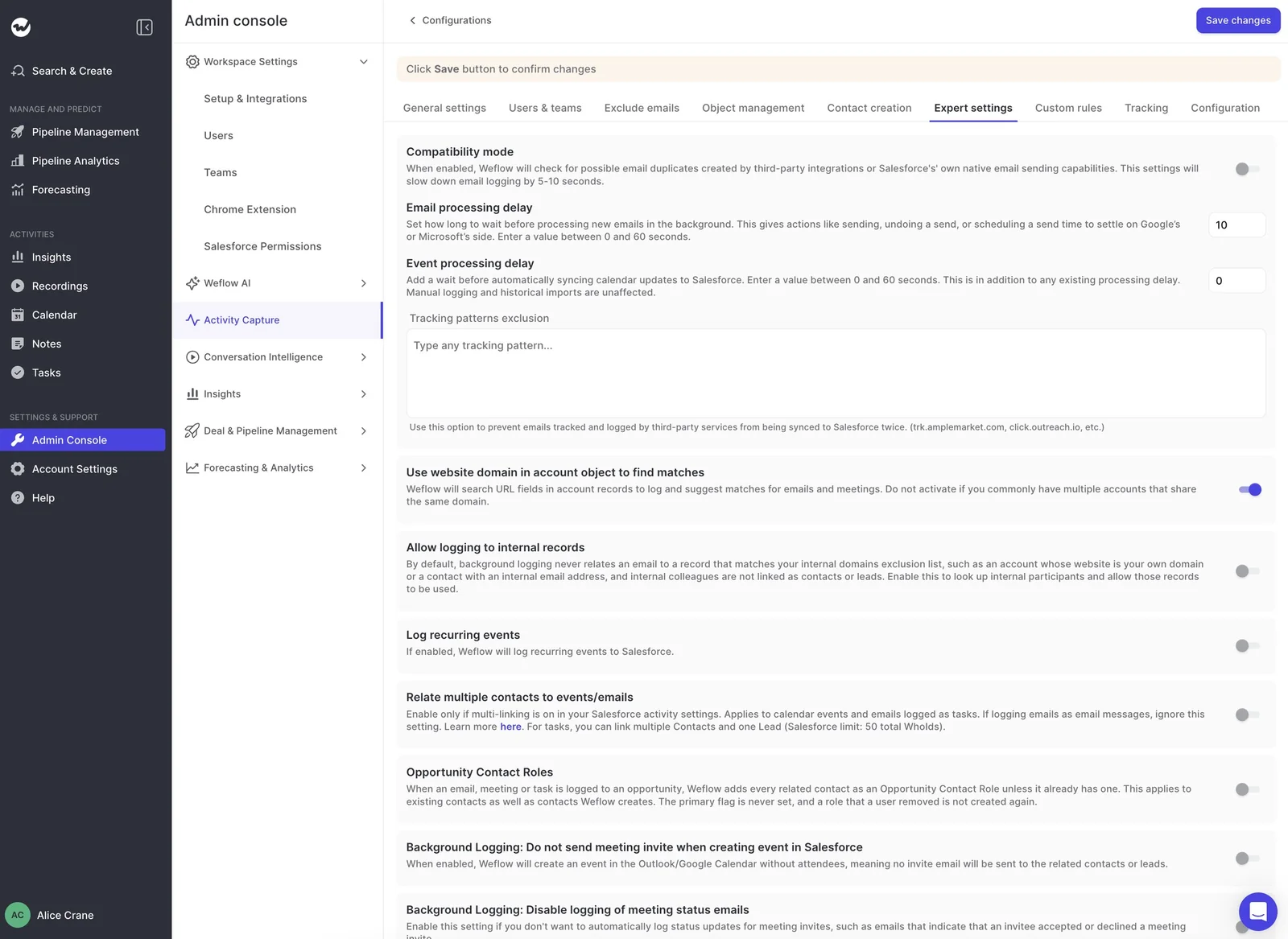
Every external calendar meeting becomes a Salesforce Event, whether or not anyone recorded it. Recurring series are logged too (just turn on the Log recurring events setting), which means your weekly customer call finally shows up on the deal.
Weflow skips anything marked private, plus calendar entries with no other attendees and no meeting link, like a lunch block.
We recommend one-way sync from your calendar to Salesforce. The reverse direction is where things break, and if your team creates events in the calendar anyway, one-way sync doesn't cost you anything.
If you have Shared Activities turned on in Salesforce, Weflow links the meeting to every attendee (up to 50), not just the primary contact.
Just note that Activity & Contact Capture logs the Teams meeting, not the recording. For recordings and transcripts, you'll need a Weflow Conversation Intelligence seat.
How Weflow decides which opportunity an email belongs to
Weflow maps each email based on the address and the Salesforce relationships around it, never on the email's content. We tested content-based matching and left it out because it wasn't accurate enough.
Here's the order it follows:
- Match the address in the primary or secondary email fields to a contact, lead or custom object.
- Check for an opportunity contact role.
- If the account has exactly one open opportunity, pick it.
- If several are open, weigh the contact role, the opportunity owner, the mailbox owner, the account relationship and the stage.
- If the evidence still doesn't settle it, log to the account.
Weflow never logs to a closed opportunity. The account fallback is deliberate, too, since an email logged to the account is easy to fix, but one logged to the wrong deal isn't.
If a rep needs to correct the mapping, they only have to do it once in the Outlook add-in. Every later reply in that thread follows their choice, while new threads start fresh. Reps can also move an already-logged email straight from their inbox.
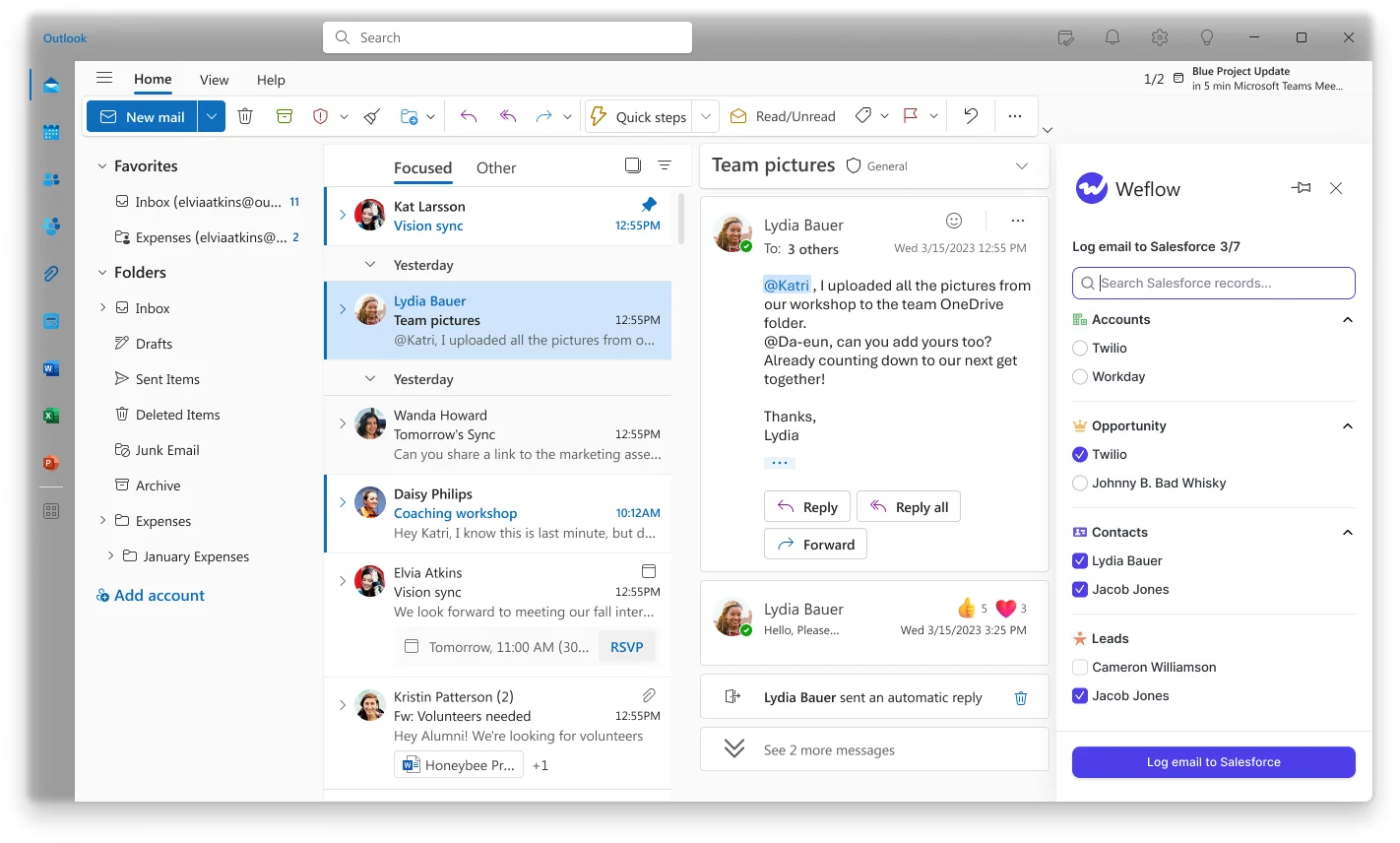
Shared threads don't multiply records either. One EmailMessage can relate to up to 50 recipients, so an email to a customer with three colleagues copied shows up on the sender, each colleague, the contact and the account as one record, not four.
Weflow also creates contacts from email threads and calendar invites (but never accounts, leads or opportunities), with three guardrails to keep your CRM clean:
- An existing-accounts-only rule, so capture can't spawn orphan records.
- A cap on how many contacts a single event can create, so a large webinar doesn't flood Salesforce.
- A dedupe layer on top of Salesforce's own duplicate rules.
It can also create the opportunity contact role as it logs, so every later email from that contact lands on the right deal. In other words, mapping gets better the longer it runs.
One thing to watch: matching depends on your account Website field and your contact roles. A wrong or shared domain in the Website field will send activity to the wrong account.
Which tools Weflow connects to across your revenue stack
Weflow connects natively to the tools a Microsoft-stack revenue team runs every day:
- Salesforce
- Outlook and Microsoft Teams
- Gmail, Google Calendar and Google Meet
- Zoom
- Slack
- Dialers such as Aircall and Dialpad, and the Outreach dialer
If part of your team still uses Google Workspace, that's not a problem. Both tenants connect to one workspace and run under a single capture configuration against one Salesforce org.
Outlook users get the Outlook add-in, and Google users get the Chrome extension.
Weflow isn't an integration platform with a connector catalog, though. For data outside your revenue stack, you'd use our API.
What Claude and ChatGPT can query through Weflow's MCP connector
Weflow's read-only MCP connector returns conversation and forecast data to any assistant that supports remote MCP servers, including Claude and ChatGPT.
Admins switch it on per workspace and use a separate toggle to decide whether assistants can read full transcripts or only AI summaries.
It doesn't return captured email content, though. Since captured emails are native Salesforce records, assistants read them through Salesforce's own connector.
| What the Weflow MCP connector returns | Where captured emails are read instead |
|---|---|
| Call summaries and transcripts when the admin allows it | Salesforce's own connector, because the EmailMessage and Event records are native |
| Playbook results, tracker hits and coaching scores | Ask Weflow AI, which reads captured email alongside Salesforce data |
| Forecast calls and pipeline metrics, with per-rep breakdowns for up to 25 owners | Agents built inside Weflow |
If you're only buying capture, the Weflow connector won't add much until you start recording calls. That's when it can answer questions Salesforce's connector can't.
How you get Weflow data into your warehouse and BI tools
Because captured emails and meetings are native Salesforce records, any Salesforce report, export or BI tool can read them without going through Weflow.
For conversation data, the REST API bulk-exports transcripts, metadata, scores and signals as JSON or CSV, which you can feed into tools like Tableau and Looker.
There's no native Snowflake, Databricks or BigQuery connector, so teams use the API to move that data.
How Microsoft Copilot Sales agent saves Outlook activity to Salesforce
With Sales agent, every write to Salesforce starts with a seller, one email and one participant at a time. Saving recurring series, editing saved activity and auto-saving updates are only available on Dynamics 365.
Sales agent saves an Outlook email only when a seller clicks Save
Sales agent doesn't capture anything in the background. Sellers have to open the Sales pane and select Save on each email, and Microsoft documents these limits for Salesforce users:
- The prompt banner appears on at most two external emails a day.
- Replies to a saved email aren't saved automatically.
- Drafts can't be saved.
- Nothing is saved from a shared mailbox.
- An email saved by one person shows as saved only for them, so every other participant saves it separately.
- Attachments save only when the seller selects them, and emails longer than Salesforce's body limit get truncated.
That puts the burden right where reps push back hardest:
Their biggest pain point is their inbox. They don't want to spend time in their inbox. So I do wonder if they would come in here and click log to Salesforce one by one.
Sales agent saves a meeting once and never a recurring series
Meetings work the same way. A seller saves each one to Salesforce by hand, and every participant who wants it there has to save it separately.
- A meeting changed after saving can't be saved again.
- Recurring meetings can't be saved to Salesforce at all.
- Sales insights from Teams skip recurring meetings too, and the Save to CRM button for AI meeting notes doesn't appear on them.
So your weekly customer call, the one that tells you the most about account health, never reaches the deal.
How Sales agent matches contacts and links records on Salesforce
Sales agent matches each participant to a Salesforce contact by exact email address, searching the email fields an admin has added to the Sales agent forms.
- One match connects automatically.
- Several matches prompt the seller to pick one.
- No match prompts the seller to create the contact.
- AI suggests related accounts and opportunities, and the seller picks the one record the activity links to.
- A saved Event carries only external attendees who already exist as contacts, and all of them only with Shared Activities on.
Once something's saved, though, sellers on Salesforce can't edit, re-link or remove it from Outlook, so any wrong link has to be fixed in Salesforce itself.
On the plus side, admins can add up to 10 Salesforce objects to Sales agent, custom objects included, so sellers can link saved activity to those records.
What Microsoft Copilot reaches through its 100+ Copilot connectors
For general search, Copilot reaches further than Weflow. Its 100+ Copilot connectors, included in the $30 license, pull in work data and line-of-business systems.
For sales work, though, its reach is narrower:
- Meeting and call intelligence covers Teams meetings and Teams calls only. It doesn't record or summarize Zoom, Google Meet or Webex.
- Facilitator, Copilot's note-taking agent in Teams, doesn't work in external meetings, so it takes no notes on customer calls.
- Sales agent has no Gmail or Google Workspace version.
What other AI agents can reach through Microsoft Work IQ
Work IQ is Microsoft's remote MCP server, A2A endpoint and REST API for Microsoft 365. It gives other agents about ten generic tools covering mail, calendar, files, people, chat and sites, and custom and third-party agents pay per use.
What it doesn't expose is Sales agent's sales insights or the Salesforce data Sales agent reads.
Where Sales agent insights and Teams transcripts are stored
Saved emails and meetings land in Salesforce, but everything else Sales agent produces lives somewhere else, and some of it doesn't stick around for long:
| What Sales agent produces | Where it lives and for how long |
|---|---|
| Saved emails | Salesforce EmailMessage records with Enhanced Email on. Without it, saving fails unless Microsoft Support enables a Task fallback. |
| Saved meetings | Salesforce Event records |
| Email insights | Dataverse (the msdyn_viva environment for Salesforce customers), deleted after 30 days |
| Meeting insights | Dataverse, deleted after 90 days |
| Email thread summaries the seller saves | A note on one Salesforce record, in the Notes and Attachments object |
| Teams transcripts | Readable by apps through Microsoft Graph only after an admin turns that access on |
Where Microsoft Copilot is the stronger choice
Copilot does a different job, and it does it well. If that's the job you need done, or if you run Dynamics 365, Copilot is the better choice.
Copilot drafts, summarizes and preps meetings inside Outlook and Teams
Copilot shines at helping sellers get work done without leaving Outlook and Teams. Weflow doesn't do in-Outlook drafting, so keep Copilot for:
- Email drafts and thread summaries in Outlook.
- Meeting preparation with CRM context pulled into Outlook and Teams.
- Teams intelligent recap, with AI notes, recommended tasks, chapters, topics and speaker timelines on recorded meetings.
- Opportunity summaries and deal rooms in Teams.
- Voice notes and opportunity updates on mobile through Outlook and the Copilot app.
This is also the story to take to IT. Nobody's arguing against the Microsoft purchase. Copilot keeps the assistant job, and capture is a separate job that runs underneath it.
Dynamics 365 sales teams should stay with Copilot
If your CRM is Dynamics 365, stick with Copilot. Recurring saves, editing saved activity and auto-saving updates all exist there. Weflow works exclusively with Salesforce, so it simply isn't an option for Dynamics teams.
What Weflow and Microsoft Copilot cost for Salesforce logging
Both vendors publish their prices, so the question is what each price actually buys you for capture.
| Pricing detail | Weflow | Microsoft Copilot |
|---|---|---|
| Pricing model | Per seat. Agent Builder's paid tiers are the only consumption-priced product. | Per seat, plus metered Copilot Studio messages for selected Sales agent capabilities. |
| List price | $19 per user per month for Activity & Contact Capture. $39 for Conversation Intelligence. $49 for the Revenue AI Foundation bundle with both. | $30 per user per month paid yearly, or $31.50 paid monthly. |
| What's included | Ask Weflow AI Pro and Agent Builder Free (25 agent actions a month) on every plan. Recordings, transcripts and AI processing have no usage caps. | Copilot in the Microsoft 365 apps, Sales agent, 100+ connectors, agents and Copilot Notebooks. |
| What costs extra | Agent Builder Growth ($299 a month for 500 actions) and Scale ($999 a month for 2,500 actions). Teams recordings need Conversation Intelligence. | A qualifying Microsoft 365 plan for every user. Copilot Studio message capacity, and metered actions stop when it runs out. |
| Minimums and term | 10-user minimum, 12-month term, billed annually. Seats added mid-term are charged pro rata. | Annual commitment. Copilot Business caps at 300 users. |
So the real comparison isn't $19 vs. $30. It's $19 on top of the $30 you already pay, versus capture that stays manual.
And if you also want Teams recordings and transcripts in Salesforce, Revenue AI Foundation at $49 covers capture and Conversation Intelligence together.
How to run Weflow alongside Microsoft Copilot without double-logging
Running both is straightforward. Keep Copilot, pick one tool to log emails and meetings, limit Weflow to the people you enroll, and measure capture by the data rather than by logins.
Decide which tool writes emails and meetings to Salesforce
If two tools log the same meeting, you get two Events, and every meetings-per-rep report gets inflated. As our CEO put it:
They both create an event object, which creates a duplicate.
That's why it's worth deciding up front which tool owns each job. Once Weflow captures every email and meeting, sellers no longer need Sales agent's Save button, so make sure you tell them that at rollout.
| Job | Which tool owns it |
|---|---|
| Email drafting, thread summaries, meeting prep | Microsoft Copilot |
| Email capture into Salesforce | Weflow Activity & Contact Capture |
| Meeting capture into Salesforce Events | Weflow Activity & Contact Capture |
| Teams recordings, transcripts and AI field updates | Weflow Conversation Intelligence or Teams recap, chosen deliberately, not both writing to Salesforce |
If other tools keep logging too, like a sequencer, Weflow's compatibility mode handles it. It holds Weflow's sync back by about ten seconds so the other tool logs first, then matches on the record ID so the same email isn't written twice.
Tracking patterns can also suppress a sequencer's bulk sends entirely.
Scope Weflow's Entra app to the people you enroll
Scope is the first thing IT will ask about, and you can prove every control:
- Weflow doesn't read any mailbox until a user is enrolled in a capture configuration. Installing the packages and the Entra app doesn't capture anything on its own.
- Assigning a group to the Entra app restricts access only when Assignment required is set to Yes. With it set to No, the app can still reach mailboxes outside the group.
- To test the restriction, add someone outside the scope to a configuration and save. You'll see a warning icon next to that user because the subscription fails.
- Executives can sit in their own configuration in manual mode, so nothing logs unless they choose to log it.
- When an executive emails a customer with sales team members, the most permissive configuration applies and the thread logs as usual.
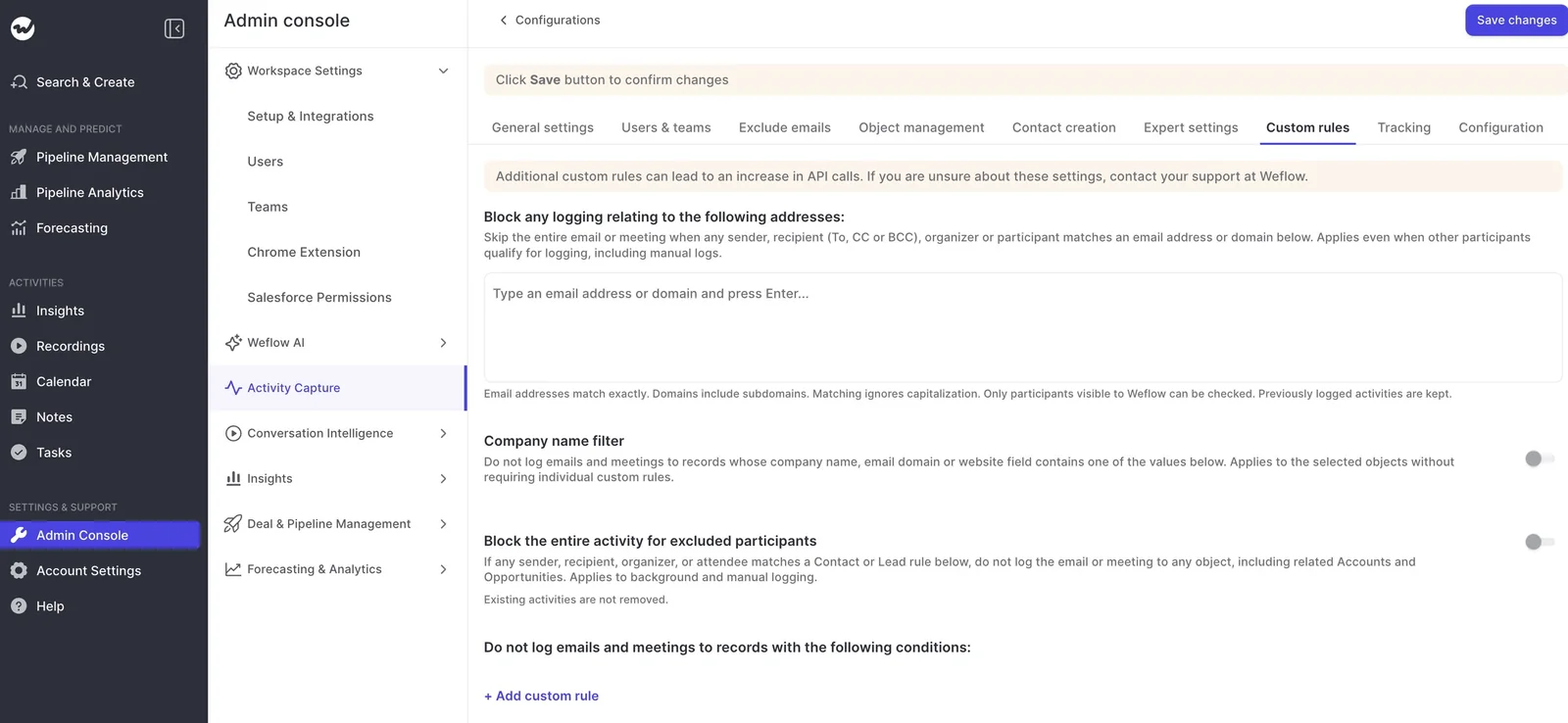
- Custom rules block logging against whole Salesforce records based on any field, which keeps NDA deals out.
- Weflow keeps no copy of your email. It holds a 30-day log of matching decisions so support can explain why something did or didn't log.
Users sign in through your Salesforce authentication and SSO. When you deactivate someone in Salesforce, they lose Weflow access immediately.
What your Salesforce and IT admins set up in one session
With a Salesforce admin and an IT admin in the same session, the install takes about 45 minutes.
- Install the core managed package. The second package, for email open tracking, is optional.
- Create the integration user and assign the Weflow permission set.
- Relax IP restrictions on the connected app for the install.
- Install the Weflow app centrally in Microsoft Entra and scope it to your group.
- Enroll users into a capture configuration.
Before you enroll anyone, make two Salesforce decisions:
- EmailMessage or Task: About nine in ten of our customers choose EmailMessage, which needs Enhanced Email on. It keeps From, To and Cc and can relate to up to 50 recipients. It's also roughly seven times heavier than a Task. Task suits orgs near their storage limit, and teams that want one activity report spanning emails and meetings.
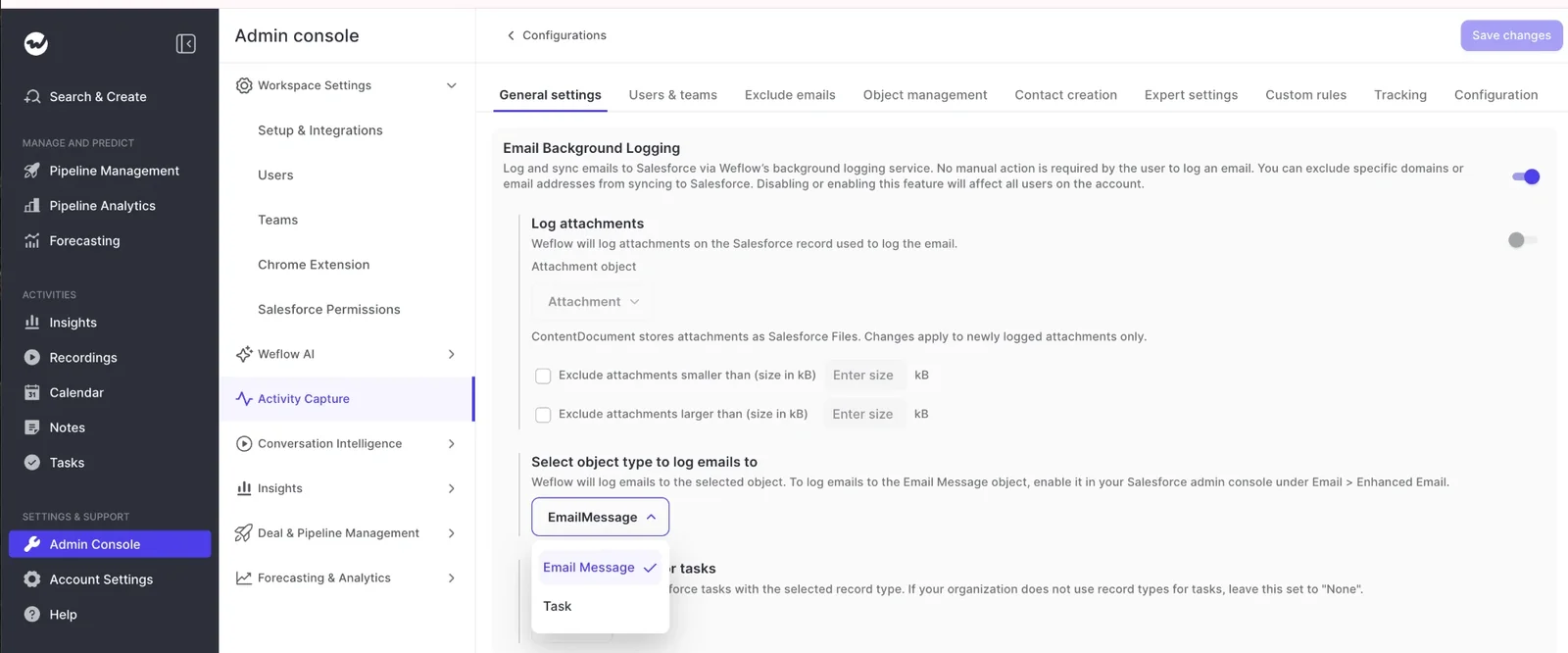
- Shared Activities: Turning it on lets a meeting attach to every attendee, which makes multi-threading measurable. In a large org it's a change request, not a toggle, so raise it early.
Confirm capture is working without counting logins
Don't worry if your login count is low. Enrolled users are captured without ever signing in, so logins don't tell you anything about coverage.
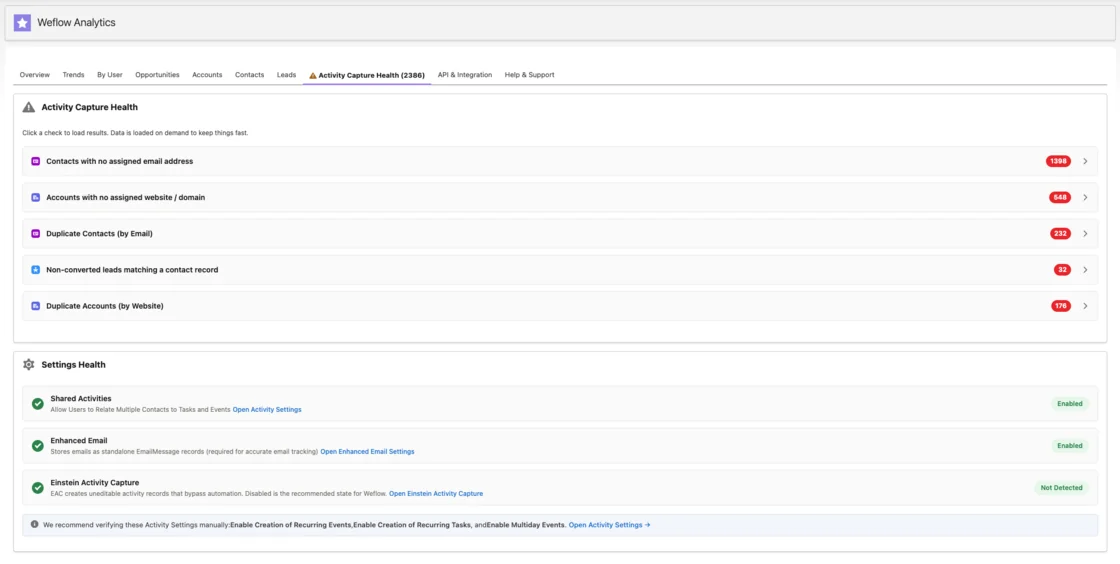
Look at the data instead. Activity Capture Health, a view inside Salesforce, flags the problems that quietly break mapping:
- Duplicate accounts and duplicate contacts.
- Non-converted leads that match a contact.
- Accounts sharing the same website domain, or with no domain at all.
- Capture settings not yet configured, plus Salesforce checks on Shared Activities and Enhanced Email.
In the first few weeks, reps may also see Salesforce's "email not connected" warning, because Salesforce doesn't know capture is running at the tenant level.
Let them know they don't need to connect their mailbox in Salesforce. The Outlook add-in will show them what was logged and where.
When to choose Weflow, Microsoft Copilot, or both
If you're a Salesforce team that needs complete activity data, the answer is both, with Copilot as the assistant and Weflow as the capture layer underneath it.
Choose Weflow if:
- You need every external email and meeting in Salesforce, inbound replies and recurring calls included, with no rep action.
- Your accounts carry several open opportunities, and activity has to land on the right deal, not the account.
- You want contacts and opportunity contact roles created from real threads, with guards against CRM pollution.
- Part of your team runs on Google Workspace beside Microsoft 365.
Choose Microsoft Copilot alone if:
- Your CRM is Dynamics 365, where Sales agent's recurring saves and editing exist.
- You need drafting, summaries and meeting prep, and you're comfortable with sellers saving the occasional important email by hand.
- You don't report on activity, build flows on it, or use it for deal reviews.
Run both if:
- You're on Salesforce and already pay for Copilot.
- Your sellers like Copilot in Outlook and Teams, and you won't ask them to click Save on every email.
- You want Copilot's answers, and every report and flow in Salesforce, built on complete activity data.
IT often overlooks this, but an AI assistant is only as good as the activity data in the CRM it reads. If Copilot pulls from a Salesforce org that's missing half its emails and every recurring call, it'll answer confidently and wrongly.
One RevOps consultant saw exactly that happen in a territory review she'd built with Copilot:
And the sales leader was just like, all of this data's wrong. None of it's right.
— Tiffany Jones, RevOps consultant and co-host of The Revenue Insiders podcast
Adding capture underneath Copilot keeps that meeting from happening to you.
See how Weflow captures activity, updates Salesforce fields from calls, and rolls up your forecast. Book a 30-minute demo.
Weflow vs Microsoft Copilot questions from Salesforce admins
Do we need to turn off Microsoft Copilot to use Weflow?
No. Keep Copilot for drafting, summaries and meeting prep, and let Weflow handle email and meeting capture into Salesforce. Agree on that split at rollout, so sellers stop using Sales agent's Save for activity Weflow already captures.
Are Viva Sales and Copilot for Sales the same as Sales agent?
Yes. Viva Sales, Sales Copilot and Copilot for Sales are all earlier names for Microsoft's Sales agent. You'll still see them in admin roles like Sales Copilot Administrator and in the msdyn_viva Dataverse environment.
Does Weflow log Teams recordings and transcripts to Salesforce?
Not with capture alone. Activity & Contact Capture logs every external Teams meeting as a Salesforce Event, but recordings and transcripts need Conversation Intelligence ($39 per user per month) or the Revenue AI Foundation bundle ($49).
How does Weflow handle one contact on a renewal and an expansion?
Weflow logs to the opportunity where the contact holds a contact role. If they hold one on both, you can separate the two with configurations (for example, one for renewals filtered on opportunity type), or the rep can re-map once in the Outlook add-in.
Can Weflow back-fill our historical emails and meetings?
Yes. Weflow syncs history in batches so it doesn't eat into your daily Salesforce API limits. For Blacklane, for example, we synced four months of history in one week.
What does Weflow store from our mailboxes, and for how long?
No email or meeting content. Weflow only downloads a message when it matches a Salesforce record, writes it to Salesforce, then deletes it from temporary storage. The only thing it keeps is a 30-day log of matching decisions.