Weflow for Microsoft 365 Sales Teams: What Works in Outlook and Teams, and What Does Not
Learn what Weflow supports in Microsoft 365: Outlook capture, Teams meetings and calls, but not chat.


Here's the short answer. In Outlook and Exchange, Weflow works without an add-in: Weflow Activity & Contact Capture logs every enrolled mailbox's email and calendar server side, through one Microsoft Entra app.
On the Teams side:
- Teams meetings work. Weflow records and analyzes them the same way it handles Zoom.
- Teams calls work with one condition. The rep has to start a recording in the Weflow Desktop App.
- Teams chat doesn't work. Weflow doesn't capture it and doesn't post into it, and there's no Teams Phone integration.
Weflow is the Revenue AI Orchestration platform for sales, customer success, and RevOps teams. It's built for Salesforce teams, so everything it captures lands in your Salesforce org.
We wrote this page because the timing keeps catching Microsoft shops out. Salesforce is moving Outlook plugin users onto Einstein Activity Capture, which turns a background irritation into a deadline. Microsoft-first buyers also tend to discover a vendor's Microsoft gaps late, in the demo.
So below you'll get each Microsoft surface with a straight verdict, and the limits are stated as plainly as the strengths.
Where Weflow works in Outlook and Teams, surface by surface
Every Microsoft surface gets one verdict: works, works with a condition, or does not.
| Microsoft surface | Verdict | How it works | Condition or limit |
|---|---|---|---|
| Outlook email (desktop and web) | Works | Server-side capture through one Entra app logs inbound and outbound mail for every enrolled mailbox | The Outlook add-in is optional. It's only needed if reps should see or change mapping |
| Outlook on a phone | Works with a condition | Mail sent from a phone is captured on the mail server like any other | The rep can't see or change which record it logs to from the phone |
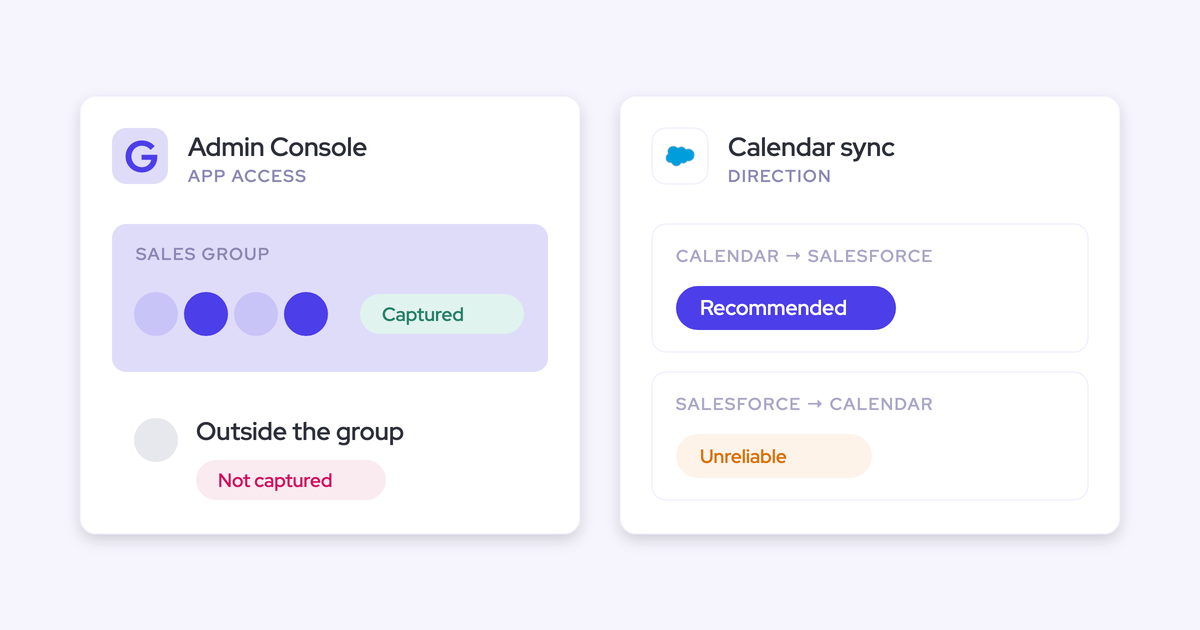
| Outlook calendar | Works | Meetings sync from Microsoft 365 into Salesforce, and changes, declines and cancellations resync | We recommend one-way sync, calendar to Salesforce |
| Exchange / Microsoft Entra | Works | One central Entra app, scoped to an assigned group | The group restriction holds only when "Assignment required" is set to Yes |
| On-prem Exchange | Does not | Not supported | Weflow requires Microsoft 365 or Google Workspace |
| Teams meetings | Works | The notetaker is auto-scheduled from the calendar onto every external meeting | The bot has to be admitted from the lobby |
| Teams calls and softphones | Works with a condition | The Weflow Desktop App records audio that runs through the computer | The rep starts each recording. There's no Teams Phone integration, and mobile carrier calls aren't captured |
| Teams chat as a capture source | Does not | Capture covers email, calendar and meetings | Deal context shared in Teams chat isn't logged |
| Teams chat as a notification surface | Does not | Alerts go to Slack and email. Agent Builder output goes to Slack, email or PDF | A Teams-only company uses email and PDF |
Each surface has its own section below, in the same order.
Teams replacing Outlook add-in logging or Einstein Activity Capture
This page is for a Salesforce team on Microsoft 365 whose capture is failing or being forced to change. On our calls, that usually looks like one of four situations:
- You rely on Outlook add-in clicks. Logging depends on reps remembering, it's mostly outbound, and reps reauthenticate after every restart. You can't see who has stopped.
- You run Einstein Activity Capture you never chose. Connections drop without telling anyone, and email on accounts with several open opportunities lands on the wrong deal.
- You're being moved off the Salesforce Outlook plugin onto Einstein Activity Capture. Someone else picked the destination, and you've been handed a deadline.
- Your capture is split across several tools. Each team logs a different way, so an empty account tells you nothing.
The forced migration is the one that changes the math. You'll spend the effort of moving either way, so the cost of moving to something better is roughly the cost of complying.
Outlook and Exchange: Weflow captures email without an add-in
No, capture doesn't depend on a plugin. Weflow captures Outlook email server side, and the add-in is an optional control on top.
How capture runs server side through one Microsoft Entra app
Weflow Activity & Contact Capture runs at the mail tenant level through one central app in Microsoft Entra. Every enrolled mailbox is logged in near real time:
- inbound and outbound mail
- from Outlook desktop, Outlook on the web or a phone
- with no rep action
Capture runs on a tenant-level Microsoft permission, so there's no per-rep token to expire. A rep who never signs in, or who ignores a reauthentication prompt, keeps being captured. That covers both failure modes that quietly empty out add-in data.
| Aspect | Outlook add-in logging | Weflow server-side capture |
|---|---|---|
| Trigger | The rep clicks "Log to Salesforce" on each email | The email hits an enrolled mailbox |
| Direction | Mostly outgoing. Replies are logged after the fact, if at all | Inbound and outbound, evaluated by the same rules |
| Devices | Only what passes through the add-in | Any client or device, phone included |
| Authentication | Per rep, with periodic re-login | Granted once for the tenant |
| RevOps visibility | No central view of who is logging | Capture health metrics in the admin console, with a CSV download |
The replies matter most. A reply is the proof that a human on the other side is still engaged, and it's exactly what add-in logging loses.
When something breaks at the connection level, for example the integration user disconnecting, Weflow emails your admin automatically and alerts your customer success manager.
Automated, hybrid or manual: when reps need the Outlook add-in
You set the capture mode per team. The add-in is a control you hand out where it helps, not a dependency for capture.
| Mode | What reps do | Typical team |
|---|---|---|
| Fully automated | Nothing. Email and meetings log in the background | Teams that want zero rep involvement |
| Hybrid | See in the add-in where an email will log, re-map it, or untick logging for that thread | Most of our customers, especially accounts with several open deals |
| Fully manual | Nothing logs unless the person chooses to log it | Leadership, whose mail is the most sensitive |
Hybrid fixes the multi-opportunity problem at the only moment anyone actually knows the answer. When a contact sits on a renewal and an expansion at once, the rep picks the right opportunity once from the Outlook side panel. Weflow then applies that choice to every later reply in the thread, in both directions.
Reps can also move an already-logged email to a different record from the same panel. And you can hand out the add-in with the suppress control removed, so a team sees the mapping but can't switch logging off.
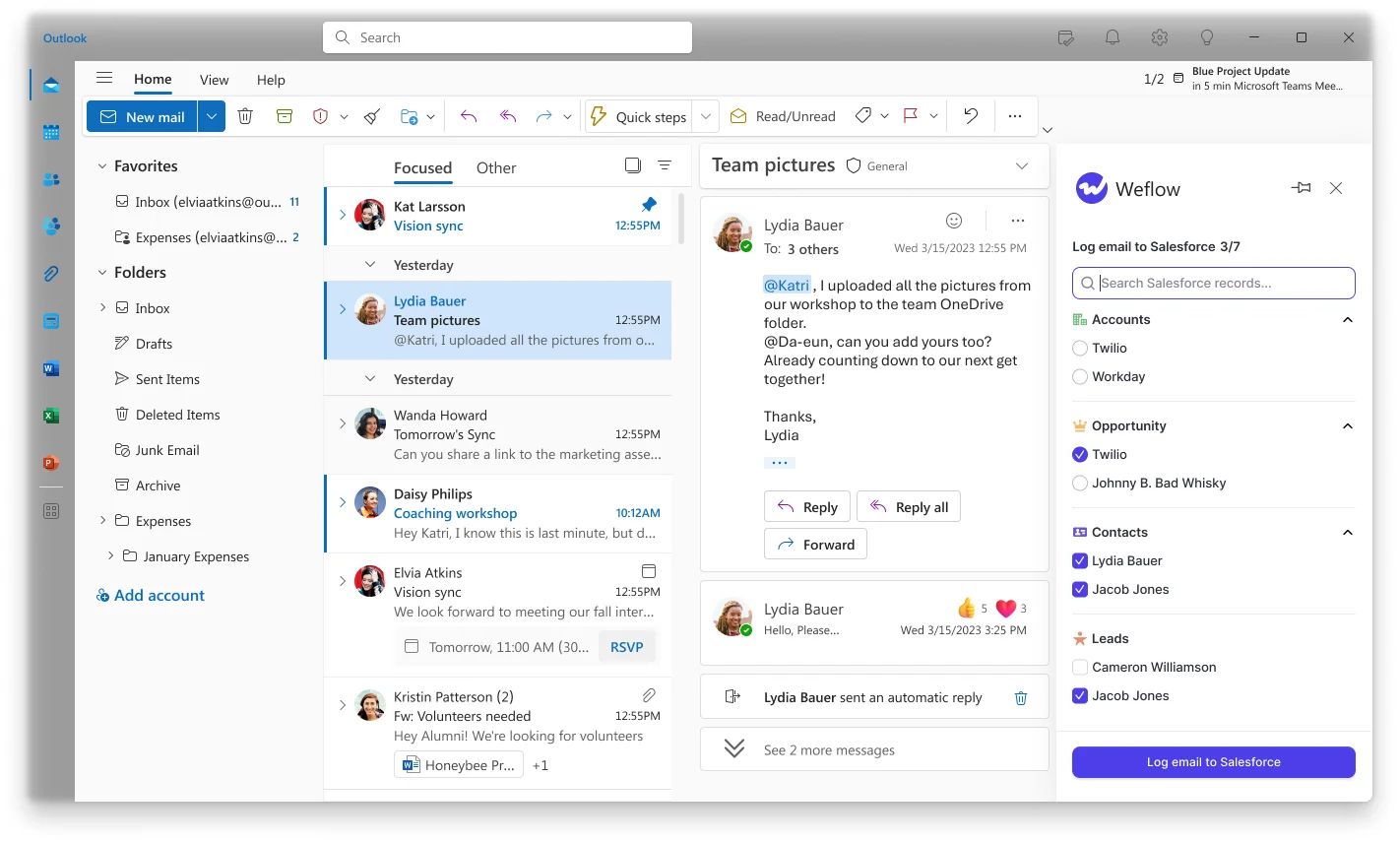
For comparison, Einstein Activity Capture has no inbox panel of its own. Salesforce sells the Outlook side panel as a separate product, the Outlook and Gmail integration.
How Weflow keeps internal and confidential threads out of Salesforce
This question comes up in the first ten minutes of almost every capture demo. Our answer is exclusion by construction first and rep discretion second, ordered here from central rule to rep control:
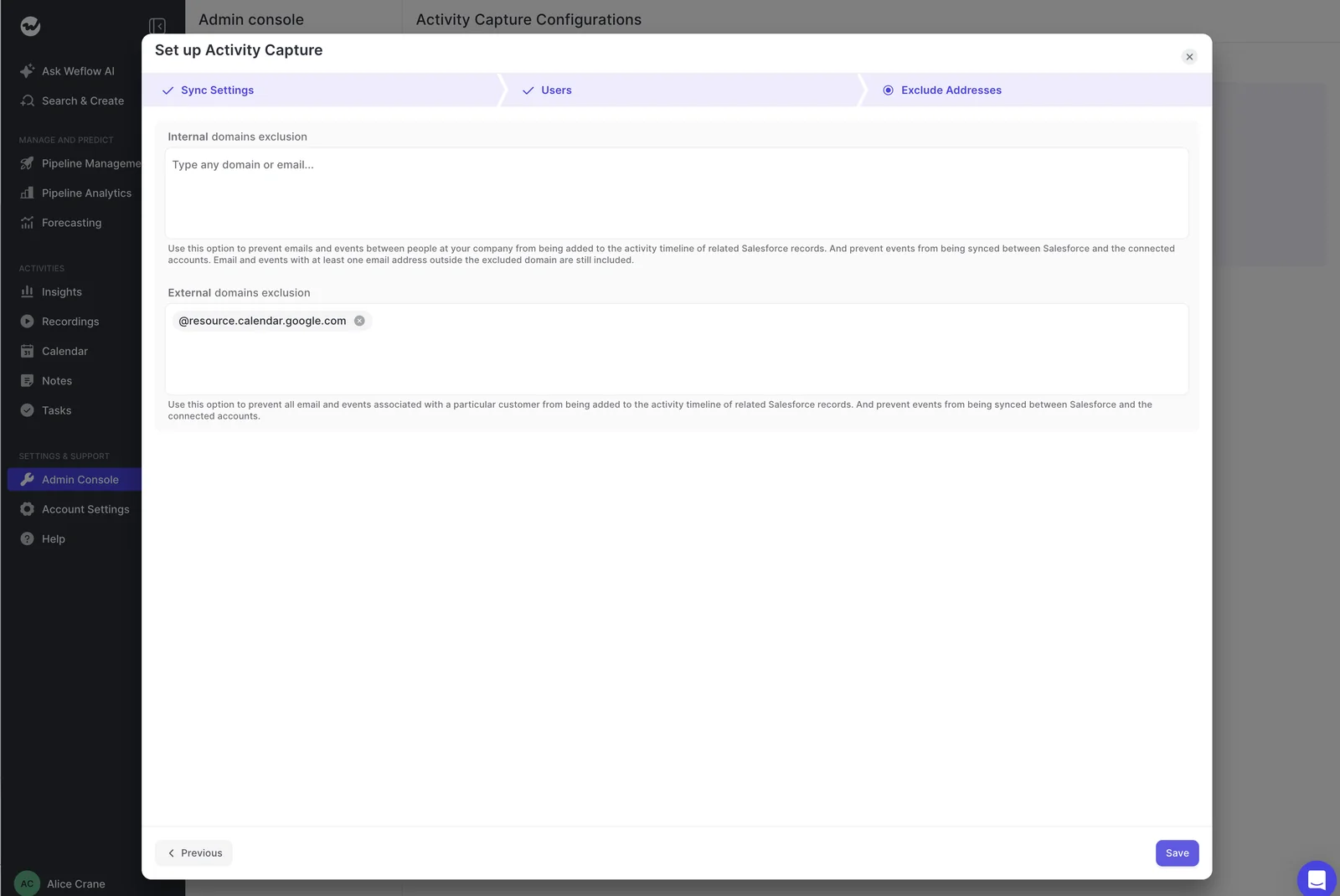
- Internal-only threads are never logged. If every participant sits on your internal domain, nothing is written to Salesforce, so HR threads between colleagues stay in Outlook.
- Admins exclude external domains and addresses centrally. Use this for employment lawyers, accountants, suppliers or noisy free-mail domains.
- Custom rules block logging against a whole Salesforce record, based on any field on the object. This is how regulated customers keep confidential or NDA accounts out of captured data entirely.
- A configuration can run with email logging off and calendar logging on. It's useful for a team in a country that restricts automated reading of work email.
- Leadership can sit on manual mode, so nothing from those mailboxes logs unless they choose it.
- In hybrid mode, a rep can untick logging for one thread. Weflow doesn't detect that a message is sensitive, so this layer only works where the rep notices. A customer who must never be captured belongs in a central rule.
What happens with phone mail, aliases and on-prem Exchange
Outlook capture stops in a few specific places:
- Captured, with a limit: mail sent from Outlook on a phone. Weflow matches it automatically by address and domain, and a thread already mapped on desktop keeps that mapping. The rep can't change the mapping from the phone.
- Not logged: mail sent from a separate deliverability subdomain. Capture matches on the sender address held in Salesforce, so those outbound touches only appear once the buyer replies on the standard domain.
- Not captured: personal email accounts. Weflow captures only what flows through your corporate Microsoft 365 tenant.
- Not supported: on-prem Exchange without Microsoft 365.
Microsoft Entra: how IT scopes and proves what Weflow reads
Mailbox scope is something IT can test themselves. Here's what they'll ask and how you answer it.
Weflow reads nothing until you enroll a user
Installing the managed packages, connecting the integration user and adding the Entra app captures nothing. Enrollment in an activity capture configuration is the switch.
Until you enroll someone, Weflow reads no email or calendar event and writes nothing to Salesforce. You can finish the technical setup while legal review is still open.
Each mailbox pairs with one Salesforce user, so a mailbox with no Salesforce user behind it is never synced.

How to lock the Entra app to one group and test it
Assigning a group to the Weflow Activity Capture enterprise app restricts access only when the app's "Assignment required" property is set to Yes. With it set to No, the tenant still lets the app reach users outside the group, guest accounts included.
- In Entra, add your capture group under Users and Groups on the Weflow Activity Capture enterprise app.
- Set "Assignment required" to Yes.
- In Weflow, add a test user who sits outside that group to an activity capture configuration and save.
- Look for the warning icon next to that user. It means the Microsoft Graph subscription failed, which is your proof the restriction holds.
One caution: the same warning appears when a user's email address differs between Microsoft and Salesforce. Use a test user whose addresses match.
Some IT teams add a second layer by scoping the app's Exchange Online access to the same group's mailboxes. A common setup keeps the Entra group refreshed from Salesforce so the two lists match.
Reps sign in through Salesforce SSO, not a Weflow password
The only way into Weflow is your Salesforce authentication: OAuth, plus whatever SSO or two-factor your Salesforce org already enforces. Email and password login isn't supported.
There's no second identity to phish or deprovision. Deactivate a user in Salesforce and their Weflow access goes with it, so joiners and leavers stay inside the process your IT team already runs.
Teams meetings: Weflow records and analyzes them like Zoom calls
Yes. In Weflow Conversation Intelligence, Microsoft Teams sits alongside Zoom, Google Meet and Webex, with the same recording, transcription, summaries and field updates.
How the Weflow notetaker joins your Teams meetings automatically
Coverage doesn't depend on reps inviting a bot. Weflow schedules the notetaker from the calendar connection:
- Default: it joins every external Teams meeting, shortly before the start, as a visible participant.
- Opt-out: reps can switch it off for a specific meeting.
- Internal meetings: recorded only when a user turns recording on for that meeting from the calendar.
- One per company: however many of your Weflow users attend, only one Weflow notetaker joins for your company.
The default is what makes the data trustworthy. Once reps have to remember to invite a recorder, the share of meetings recorded collapses, and your conversation data turns into a sample.
What a recorded Teams meeting writes back to Salesforce
Teams already gives you a transcript. What you can't do with it is query it.
We use Teams for our meetings and you can have the transcription in there, but we do not have a way to sync them to a central repository, and we do not do any analysis on them. You get the transcript if you record the meeting and then you can send it to someone or read it. It is fully manual.
Weflow Conversation Intelligence turns that Teams recording into Salesforce data. It writes AI field updates into the fields your team qualifies on, and adds the summary, attendees and recording link onto the same Salesforce event activity capture already logged. You get one meeting record carrying the call content, and no second copy inflating your meeting counts.
| Aspect | Teams' own transcript | Weflow Conversation Intelligence |
|---|---|---|
| Where it lives | In Teams, sent around by hand | On the Salesforce event, plus searchable in Weflow |
| Mapped to a record | No | Yes, to the event and the related Salesforce records |
| Salesforce fields | Untouched | AI field updates from the conversation |
| Analysis | None, someone has to read it | Summaries, chapters, scorecards, follow-up emails, Ask Weflow AI |
A recorded meeting is also your evidence that the meeting happened. An unrecorded calendar event only proves someone was invited.
What to do when the notetaker waits in the Teams lobby
This is the most common reason a Teams meeting that should have been recorded wasn't. The notetaker joins as a participant, so someone has to admit it. If the customer organized the meeting and never admits it, it leaves the lobby after about ten minutes.
Here's how the rep recovers mid-call:
- Open the Weflow calendar while the call is still running.
- Use the start-recording control on that meeting to send the notetaker back in.
- Ask the customer to admit it from the Teams lobby. The rest of the conversation is recorded.
Coverage reporting counts lobby misses separately from opt-outs, so you can tell a lobby problem from a rep who switched recording off.
How recording consent works on Teams without a native prompt
Zoom has a built-in recording consent prompt. Teams doesn't, so the Weflow notetaker's consent flow does the job. You configure it as opt-in, opt-out or none, using:
- An in-meeting chat notice carrying a link that stops the recording. Removal triggers immediate, permanent deletion of the recording data.
- An optional pre-meeting email to attendees with an opt-in or opt-out link.
Recording Teams without a bot using the Weflow Desktop App
The Weflow Desktop App for Windows and macOS records Teams meetings, video included, with no participant joining the call. The recording goes through the same pipeline as a notetaker recording: field updates, summaries, chapters, follow-up emails and scorecards.
Here's what you trade for the bot-free route:
- No Teams join prompt. The app's join notification covers Zoom and Google Meet. On Teams the rep presses Record meeting.
- The rep starts every recording. Nothing is scheduled from the calendar, so coverage depends on the rep.
- Weflow's consent flow doesn't run. Nothing joins the meeting to post a notice, so obtaining consent is the rep's responsibility. Check the requirements in your participants' countries with your legal team.
- macOS needs three permissions: Microphone, Screen recording and Accessibility. If your Mac fleet is managed by MDM, pre-allow them or every rep sees the prompts. On Windows, most permissions are granted automatically.
Teams Phone and softphone calls: what Weflow covers today
Weflow covers calls whose audio runs through the computer, recorded when the rep starts the Weflow Desktop App, plus Outreach dialer calls, which it pulls in automatically. Calls on a mobile carrier line aren't covered, and Weflow has no Teams Phone integration.
| Call route | Covered? | How | Who starts it |
|---|---|---|---|
| A call on the rep's computer, Teams included | Yes, with a condition | The Weflow Desktop App records system audio and microphone | The rep presses Record |
| Softphones such as Aircall or RingCentral on the computer | Yes, with a condition | The same system-audio recording, with no provider integration needed | The rep presses Record |
| Outreach dialer | Yes | Weflow pulls the recordings in with transcript, summary and coaching (no video) | Automatic once Outreach is connected |
| Mobile carrier line | No | Not captured | Reaches Salesforce only if the rep logs it by hand |
If your reps are phone-led, the deciding question is where they sit when they dial. On a computer, the desktop app gives each call the same transcript, field updates and scorecard as a meeting. On their own mobile number, it doesn't.
Teams chat: Weflow doesn't capture it or post into it
Teams chat is neither a capture source nor a delivery surface in Weflow.
Teams chat messages stay out of Salesforce
Weflow's capture scope is email, calendar and meetings, so deal context shared in Teams chat isn't logged to the opportunity. If your team works deals in Teams chat, that context stays where it is today.
We do chat through teams, and we have no way of logging anything through teams unless we take a snippet and then manually download it to the opportunity.
Where Weflow alerts and Agent Builder reports land instead
Weflow delivers notifications to Slack and email, and Agent Builder output to Slack, email or PDF. A Teams-only company gets its output through email and PDF.
| Output | Delivery options | Path for a Teams company |
|---|---|---|
| Recording-ready and meeting-summary alerts | Slack, email | |
| Forecast-call reminders | Slack | None in Teams chat |
| Agent Builder scheduled reports | Slack, email, PDF | Email, with the PDF attached |
For leadership, email works better than most people expect. Executives rarely open another system, and a scheduled report in the inbox on Monday morning gets read.
How a Weflow rollout runs alongside Einstein Activity Capture
You install, scope, enroll a pilot, prove parity, then switch Einstein Activity Capture off. Most teams run a one-for-one test on the boring part before they configure a single AI template, and this sequence is built for that.
- Install. Two Salesforce managed packages, one integration user with a dedicated permission set, and one Entra app. It takes one admin session of about 45 minutes, with a Salesforce admin and a Microsoft admin present. IP restrictions on the connected app need relaxing for the install.
- Scope. Assign the capture group in Entra and set "Assignment required" to Yes.
- Fix Einstein Activity Capture's event sync. Set it to one direction, calendar into Salesforce, for every user Weflow will capture.
- Enroll a pilot. Add a small group to an activity capture configuration.
- Run the parity check. Compare against saved Einstein Activity Capture reports.
- Switch off. Disable Einstein Activity Capture once parity holds.
Set Einstein Activity Capture's event sync to one direction first
Two-way event sync plus Weflow creates a loop. Each pass writes the event back to the calendar, and an update to an event with external attendees can notify them. So your customers get repeated calendar notifications, on top of the duplicate events in Salesforce.
Check these before enrolling anyone:
- For every user Weflow will capture, Einstein Activity Capture's event sync runs one way (calendar to Salesforce), or the user is switched off in Einstein Activity Capture.
- Remove nobody's permission as a shortcut. Taking the Einstein permission away from users doesn't stop the loop.
- Run Weflow's Settings Health check, which reports whether Einstein Activity Capture is detected in your org.
- Know what the Salesforce for Outlook extension does. It's a separate service, and running it alongside Weflow logs the same email twice but doesn't loop.
Duplicates already written don't clean themselves up, so get the setting right first.
Test parity with external email and moved meetings
A fair one-for-one test needs a few rules, because two capture tools on the same user both write the same activity:
- Use an external address. Mail between two addresses on your own domain is excluded as internal, so a test with colleagues logs nothing and looks broken.
- Create, move, reschedule and delete meetings. Creating proves the create permission. Moving and deleting proves the update rights that otherwise fail weeks after go-live.
- Move pilot users fully to Weflow and compare them against saved Einstein Activity Capture reports. Don't double-capture the same user, and don't compare different users, since activity volumes differ by person.
- Talk to the reps who complained most about Einstein Activity Capture. They know where the holes were.
What to tell reps when Salesforce says email isn't connected
Salesforce prompts each user to connect their own mailbox and shows a warning when they haven't. That warning doesn't see capture running at the tenant level. A correct rollout can still generate a wave of tickets in week one.
Our users are saying that red icon, your emails are not connected to Salesforce, because Salesforce is trying to get you to connect your email directly.
Get ahead of it with one line to your reps:
Ignore the "email not connected" warning in Salesforce and don't connect anything. Weflow captures your email and meetings centrally, and if you want to see where an email logged, open the Weflow panel in Outlook.
On a fully automated team with no add-in, drop the last clause. Reps who can check where an email landed stop asking.
When to switch Einstein Activity Capture off
Switch it off once parity holds. Weflow's Settings Health check recommends disabled as the state for Weflow, because Einstein Activity Capture creates uneditable activity records that bypass automation.
Most of our new customers disable Einstein Activity Capture during onboarding.

Lendz, United Fintech and ADVISA moved to server-side Outlook capture
Three Microsoft 365 and Outlook teams left add-in logging or Einstein Activity Capture for Weflow, and their reps don't log anything. Complete server-side capture is the foundation everything else in Revenue AI Orchestration runs on, and these teams started there.
| Customer | Moved from | How they run Weflow | Outcome |
|---|---|---|---|
| Lendz Financial | Einstein Activity Capture | Fully automated background capture from Microsoft 365 and Outlook into standard email message objects, with several email addresses associated with one contact | Virtually 100% of relevant emails captured in Salesforce, and clean data feeding their internal AI models |
| United Fintech | Outlook plugins and Einstein Activity Capture | Rolled out centrally through OAuth-based authentication | Activity capture live in less than an hour |
| ADVISA | Einstein Activity Capture | Fully automated, with no Outlook add-in | Attachments stored in Salesforce, and dashboards on last email and last meeting date driving automated follow-up workflows |
"None of the other tools gave us a full solution like Weflow. Most still relied on Outlook plugins for semi-automation - exactly what we were trying to move away from."
Rugile Pudzevelyte, Senior Revenue Operations Manager, United Fintech
"Most of our team doesn't even know we have Weflow for activity capture. That was a big attraction for me: I didn't need them to set it up or learn anything new."
Leslie Phillips, Director of Operations, ADVISA
What Weflow costs for a Microsoft 365 sales team
Weflow Activity & Contact Capture costs $19 per user per month, billed annually. Teams recording and the Weflow Desktop App come with the Weflow Conversation Intelligence seat, at no separate charge.
| Item | Price or inclusion | Notes |
|---|---|---|
| Weflow Activity & Contact Capture | $19 per user per month, billed annually | Server-side Outlook and calendar capture, contacts, and activity insights and reports |
| Ask Weflow AI Pro | Included with Activity & Contact Capture | No extra seat |
| Agent Builder | Free tier included with Activity & Contact Capture | 25 agent actions per month |
| Teams meeting recording | Included in the Weflow Conversation Intelligence seat | Same seat as Zoom, Google Meet and Webex recording |
| Weflow Desktop App | Included in the Weflow Conversation Intelligence seat | No separate license, standalone or inside a bundle |
| Capture plus Conversation Intelligence | Revenue AI Foundation at $49 per user per month | Roughly 16% less than buying the two standalone |
| Seats added mid-term | Pro rata to the end of the term | No need to hold hiring until renewal |
| Minimum | 10 users | Unlimited view-only licenses included |
Because of the bundle discount, starting with capture and adding Conversation Intelligence later costs less than the reverse.
When Weflow is the wrong fit for your Microsoft stack
You should stay where you are in three cases:
- You need every alert and report delivered inside Teams chat. Weflow delivers to Slack, email and PDF only.
- You run several Microsoft 365 tenants and need one admin view across them. Each tenant needs its own capture configuration. Weflow Conversation Intelligence setup accepts a single tenant, and every configuration has to list the other entities' domains to keep group-internal mail out.
- You're on on-prem Exchange without Microsoft 365. Weflow doesn't support it.
Weflow fits if you're a Salesforce team on a single Microsoft 365 tenant that wants Outlook capture with no rep action, Teams meetings turned into Salesforce fields, and IT-provable mailbox scope.
See how Weflow captures activity, updates Salesforce fields from calls, and rolls up your forecast. Book a 30-minute demo.
FAQ: Weflow on Microsoft 365, Outlook and Teams
Doesn't Microsoft Copilot already log Outlook email to Salesforce?
Only on a click. The Copilot Sales agent saves an Outlook email to Salesforce when the seller opens the Sales pane and selects Save, and it captures nothing in the background.
On Salesforce, replies to a saved email aren't saved automatically. Facilitator, Copilot's note-taking agent for Teams, doesn't work in external meetings, so it takes no notes on customer calls.
Where does Weflow store Outlook email and attachments in Salesforce?
Weflow writes email to standard email message records and meetings to event records in your org, and it stores attachments when you switch that on. Because these are native Salesforce records, your flows, reports and AI can use them. They stay put if you ever leave Weflow.
"If you ever stop using Weflow, the data persists. It is your data."
Janis Zech, Co-founder and CEO of Weflow
Can Weflow capture shared mailboxes and alias addresses?
Each mailbox pairs with one Salesforce user, so a shared mailbox with no Salesforce user behind it isn't synced. Mail sent from a deliverability subdomain isn't logged either.
A rep who sends from several aliases scatters their activity across identities, because matching runs on the address. No capture vendor fixes that. The fix is consolidating onto one domain.
Can we cap attachment size to protect Salesforce storage?
Yes. Each activity capture configuration sets whether attachments are stored and at what size cap. An org close to its storage ceiling can switch attachments off for some teams and keep them for others.
Can Weflow backfill email Einstein Activity Capture missed?
Yes. Weflow's backfill checks each email's message ID before writing, so it adds only what is missing and never duplicates what Einstein Activity Capture already logged. That's also why teams use it in parity tests: what the backfill fills in measures exactly what the old tool missed.
What gets rebuilt when we move from sandbox to production?
You switch activity capture and Conversation Intelligence off in the sandbox before production goes live, because running both against the same users causes conflicts. Our team copies your teams and templates from sandbox to production and can move sandbox recordings.
You set up the packages, the integration user and the Microsoft Entra connection again in production.
Do reps need a Weflow login for Outlook capture to work?
No. A user starts being captured as soon as an admin adds them to a capture configuration, whether or not they've ever signed in. Users on Weflow Activity & Contact Capture alone need no Weflow seat and aren't asked to do anything.