How to Run Weflow Alongside Outreach, Salesloft or Apollo Without Logging Emails Twice
Learn how to run Weflow with Outreach, Salesloft, or Apollo without duplicate Salesforce logs.


Yes, you can keep Outreach, Salesloft or Apollo logging its sequence emails while Weflow captures everything else, and each email still lands in Salesforce once. Weflow's Compatibility Mode does the work. It holds Weflow's sync back for a short delay, checks the email body for the sequencer's tracking pattern, and skips any email that matches.
Weflow ships presets for Outreach, Salesloft, Apollo and Clay, so you don't need a custom Message-ID field on either side. There's one condition you have to meet yourself. If your sequencer sends through a branded custom tracking domain, you add that domain by hand. If you miss it, those emails log twice.
The order matters more than any single setting:
- Decide which tool owns each type of email.
- Configure Compatibility Mode and tracking-pattern exclusions.
- Set the delay longer than your mail undo window.
- Prove it with a report before you enroll anyone beyond a pilot group.
Weflow is the Revenue AI Orchestration platform for sales, customer success, and RevOps teams. It does no sequencing, so your SDRs keep the sequencer. What Weflow adds is the AE and CSM mail nobody captures today: the one-off emails sent straight from Gmail or Outlook, mapped to the opportunity, so deal reviews carry the full touch history instead of only the sequenced part.
Why one Outreach sequence email shows up twice in Salesforce
A sequence email leaves from the rep's own mailbox, so two tools see it.
- The sequencer logs it as a Task on the lead or contact, because it sent it.
- Weflow reads the same mail tenant server side, sees an ordinary sent email, and writes its own record.
Without a shared identifier, neither tool knows about the other. Nothing throws an error. The first person to notice is whoever can't reconcile the activity report.
Here's what each side writes when both run with default settings:
| Your sequencer | Weflow | |
|---|---|---|
| Object it writes | A Task (Outreach, Apollo and Salesloft all log sequence emails as Tasks) | EmailMessage or Task, set in Weflow's sync settings |
| Record it attaches to | The lead or contact. Salesloft admins can also choose to attach activities to opportunities | The matched account, opportunity, contact or lead. Unmatched mail isn't logged |
| Mail it sees | Emails sent through the sequencer (or lofted, in Salesloft's case) | All mail from an enrolled user's primary address, on any device |
| How you spot it in a report | Subject syntax: Outreach's customizable prefix such as [Outreach], Apollo's subject prefix, Salesloft's "Email: [Subject]" | EmailMessages carry a message ID starting with W_. Tasks show the Weflow integration user in Created By |
Most coexistence setups in this space solve the missing identifier manually. Outreach's documented setup with People.ai (Backstory) maps a custom Message-ID field on both sides. Salesloft's only control is switching its own logging off per activity type. Weflow's Compatibility Mode skips the sequencer's emails by detecting its tracking pattern, so neither tool's field mappings change.
Compatibility Mode and tracking-pattern exclusions do different jobs
Compatibility Mode is for a sequencer that keeps logging, where your risk is a duplicate. Tracking-pattern exclusions are for bulk sends you want kept out of Salesforce entirely. Both live in the same place, and confusing their jobs is the most common way a coexistence setup goes wrong.
Here's how they work together in Weflow's expert settings:
- Compatibility Mode holds each email back, gives the other tool time to log it first, and then skips anything that's already logged or matches a listed pattern. It also catches emails Salesforce logged itself.
- The tracking-pattern list holds the strings Weflow looks for in the email body, typically a tracking link domain such as click.outreach.io. It matches on that string, not on the sender.
In both cases Weflow doesn't write the email. The difference is what happens on the sequencer's side, and that's what you're really choosing.
| Compatibility Mode | Tracking-pattern exclusions | |
|---|---|---|
| When to use it | The sequencer keeps logging its sequence emails to Salesforce | Bulk sequencer sends nobody wants in the CRM |
| What it matches on | The sequencer's tracking pattern after the delay, plus emails already logged in Salesforce | A string in the email body, usually the tracking link domain |
| What happens to the email | The sequencer's Task is the one record in Salesforce | Weflow never syncs it. With the sequencer's own logging off for that mail, it doesn't reach Salesforce at all |
| What goes wrong if misapplied | A missing pattern, such as a custom tracking domain, gives you a doubled count | Excluding mail you meant to keep leaves a silent hole in a rep's history |
The doubled count is the failure you'll catch first, because the numbers look wrong. The silent hole is the one to fear, because an empty record looks exactly like an account nobody touched.
Decide which tool owns each email before you configure anything
The rule for go-live is one writer per email type, decided up front and written into your rollout doc. Settings enforce the rule. They don't replace it.
The rule has to account for the sequencer's real gap. It logs what goes through it, to the lead or contact. The one-off emails AEs and CSMs send from their inbox, the ones deal reviews depend on, only Weflow captures and maps to the opportunity.
| Email type | Who logs it | What enforces it |
|---|---|---|
| Sequence step emails from a sequencer you keep | The sequencer | Weflow skips them through Compatibility Mode and the sequencer's tracking pattern |
| Bulk sends nobody wants in the CRM | Neither | Weflow tracking-pattern exclusions, with the sequencer's own logging off for that mail |
| AE and CSM one-off mail from Gmail or Outlook | Weflow | Server-side capture, mapped to the opportunity, account, contact or lead |
| Emails composed in Salesforce | Salesforce | Weflow skips them automatically (shipped mid-September 2026). Replies in the thread are still logged |
| Mail from a deliverability subdomain | The sequencer only | Weflow doesn't capture it, so the sequencer's logging has to stay on |
If your team reads email content for sentiment, buyer questions or deal risk, decide deliberately which object holds the record of truth. Weflow sets that object in its sync settings.

What you need before you turn on Compatibility Mode
Have these open before step 1. Weflow reads no mailbox until a user is enrolled in an activity capture configuration, so you can finish all of this first without capturing a single email.
- Admin access to the Weflow activity capture configuration, where the expert settings live.
- Admin access to each sequencer's admin console, so you can find any custom tracking domain.
- The undo-send timeout your Outlook or Google Workspace admin configured.
- Your ownership rule from the section above, agreed with whoever owns the sequencer.
- A short list of pilot users who send both sequence emails and one-off mail.
Set up Weflow Compatibility Mode for Outreach, Salesloft or Apollo
Five steps, all done before your pilot group is enrolled except the last.
Step 1: Turn on Compatibility Mode before anyone is enrolled
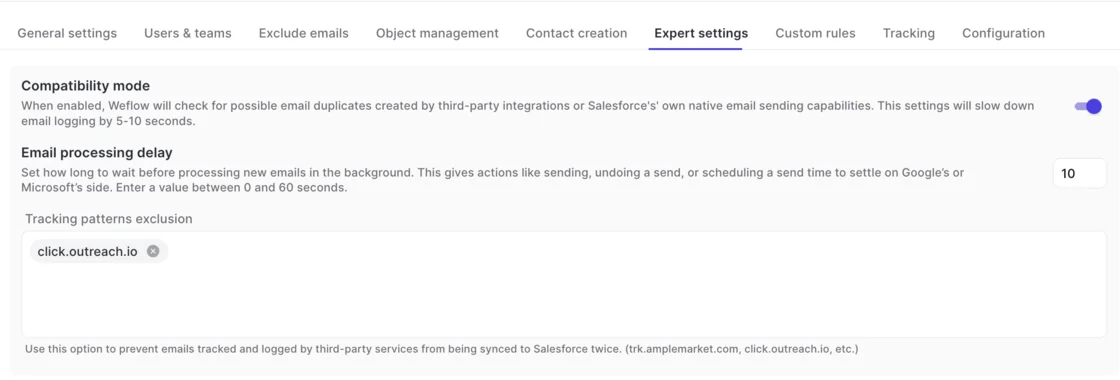
Open your activity capture configuration in Weflow, go to the Expert settings tab, and switch Compatibility mode on. You do this first because enrolment is the switch that starts reading mail. Turn it on afterwards and the first sequence emails from your pilot users are already doubled.
The trade-off is speed. Compatibility mode slows Weflow's email logging by five to ten seconds while it checks for duplicates, which nobody will notice on a deal timeline.
Step 2: Select the preset for each sequencer that keeps logging
Weflow ships presets for Outreach, Salesloft, Apollo and Clay. A preset carries the sending tool's standard tracking pattern, so Weflow already knows what that sequencer's emails look like.
Add a preset for every sequencer still logging to Salesforce, not just the main one. Teams that run Apollo for one region and Outreach for another need both.
Step 3: Add tracking-pattern exclusions, including your custom tracking domain
The standard patterns match each sequencer's own link domains, such as click.outreach.io or trk.amplemarket.com. Many teams configure a branded custom tracking domain instead, and Weflow's defaults don't recognize it.
- Find the domain in your engagement tool's admin console, under custom domain.
- Add it to the Tracking patterns field in Weflow's expert settings.
- Repeat for every sequencer and every branded domain you use.
This is the step that decides whether the title of this article holds for you. Miss the custom domain and every sequence email sent through it logs twice.
Step 4: Set the delay longer than your Outlook or Google undo window
The Email processing delay runs from 0 to 60 seconds and defaults to 10. Outlook and Google Workspace let an admin set an undo window on sent mail. If Weflow processes an email before that window closes, it can log a message the rep then recalled.
Set the delay above the undo timeout your mail admin configured. If they set a long undo window, raise the delay to match.
Step 5: Enroll a pilot group and let both tools run
Enroll your pilot users in the activity capture configuration. Pick people who sequence and also send one-off mail, so the pilot exercises both rows of your ownership rule.
Let both tools run for a defined period, at least long enough to cover several sequence steps, before you build the proof report.

Prove each email exists once in your Salesforce reports
Every record Weflow creates is traceable back to Weflow, so you can count duplicates and gaps directly instead of trusting a vendor's word.
Build a report that splits Weflow records from sequencer records
Build one report per object Weflow writes to, and filter it like this:
- For Weflow EmailMessages, filter on a message ID starting with W_.
- For Weflow Tasks, filter Created By on the Weflow integration user.
- For sequencer Tasks, filter on the sequencer's subject prefix or its integration user.
- Group by rep and by day, limited to your pilot users.
- Compare subjects across the Weflow and sequencer groups for the same rep and day.
A sequence email should appear once, as the sequencer's Task. A one-off email should appear once, as Weflow's record. Any subject that shows up on both sides points to a pattern you haven't added.
The Insights area in Weflow also lists each user's captured emails, which is a fast way to spot-check one rep without building anything.
See which rule made Weflow skip an email
When an email you expected is missing, Weflow support can see exactly how Weflow handled it: whether it synced, and which rule, such as Compatibility Mode, skipped it.
Support sees the logging logic, never the content. You read the message on your side to confirm what it was about. That gives you the diagnosis without anyone at Weflow reading customer correspondence.
Where emails can still double-log or go missing
A correct setup still leaves known edges. Each one has a fix or a trade-off you accept knowingly, and the silent gaps are the ones to put in your rollout doc.
| Edge | What happens | What to do |
|---|---|---|
| Custom tracking domain not added | Sequence emails log twice | Add it as a tracking pattern (Step 3) |
| Sends from a deliverability subdomain | Weflow never captures them, because capture matches the sender address held in Salesforce | Keep the sequencer's email logging on, or those touches vanish from Salesforce |
| Salesloft has no detection of other tools' activity | Its only control is switching its own logging off per activity type, which creates the same subdomain gap | Leave Salesloft logging on for sequence emails and let Weflow skip them |
| Outreach Standard and Advanced Task Mapping both on for the same activity type | Duplicate Tasks on Outreach's side | Fix it in Outreach. Compatibility Mode can't remove Tasks another tool creates |
| Delay below the undo window | Recalled emails get logged | Raise the delay (Step 4) |
| Auto-reply patterns | Only the exact wording you list is caught | Add each variant you see in the pilot |
| Personal accounts and other channels | Personal email, SMS and personal mobile calls aren't captured | Treat channel policy as part of the rollout |
The subdomain row is the one teams get wrong most. Switching off the sequencer's logging to "clean up" duplicates feels tidy, and it quietly deletes your prospecting history from the CRM.
What stays with your sequencer while Weflow captures email
Your sequencer stays. Weflow does no sequencing, cadences or dialing, and it doesn't send email to a customer on a rep's behalf. SDRs keep working exactly as they do today.
What stays with the sequencer:
- Sequences, cadences and step automation for SDRs.
- Logging of sequence emails, including sends from deliverability subdomains.
- Any dialing and phone numbers you run through it.
One limit to know before go-live: the Weflow Activity Timeline in Salesforce doesn't show activity Outreach logged. If your reps want one view of everything on the record, the standard Salesforce timeline still shows both.
Weflow Activity & Contact Capture covers the roles the sequencer never saw: AEs working long deals from their inbox, and CSMs on renewals and expansion. Their mail reaches the opportunity, not just the contact, so "when did we last touch this deal" finally has an answer.
Compatibility Mode is a bridge. It's needed only while a second capture tool is live. The cleaner end state is one capture tool per email type, and most teams get there at the sequencer's next renewal.
If you want a reference to keep open through the pilot, grab the free Salesforce Activity Capture Cheat Sheet.
FAQ: running Weflow beside Outreach, Salesloft or Apollo
Do I need to turn off my Outreach, Salesloft or Apollo Salesforce sync?
No. Keep the sync on, with the right preset selected in Weflow and any custom tracking domain added. Turning the sequencer's email logging off leaves sends from deliverability subdomains unlogged, because Weflow doesn't capture them.
Should sequence emails live as Tasks or EmailMessages in Salesforce?
Under Compatibility Mode, the sequencer's Task is the record that stays. EmailMessage carries direction and the full body, which is what supports reply counts and reply rates. Teams that mine email content weigh this explicitly, and Weflow writes its own captured mail to the object you set in its sync settings.
Are replies to sequence emails logged, and by which tool?
Weflow evaluates inbound mail from a buyer under the same matching rules as outbound mail. In threads started from the Salesforce composer, Weflow skips the original email and still logs the replies. In threads started from a deliverability subdomain, Weflow picks the conversation up once the buyer replies and the thread moves back to the rep's primary domain.
Can I configure Compatibility Mode in a sandbox before enrolling users?
You can configure everything before anyone is enrolled, because Weflow reads no mailbox until a user is enrolled in an activity capture configuration. Installing the packages and connecting the integration user captures nothing. For a contained first test, enroll a small pilot group and run the proof report on just those users.
Does Compatibility Mode work with Clay, Amplemarket or other senders?
Clay has a preset alongside Outreach, Salesloft and Apollo. Other senders are excluded by their tracking domain, for example trk.amplemarket.com for Amplemarket. Any sender that rewrites links through its own domain can be matched the same way.
Can Compatibility Mode keep automatic replies out of Salesforce?
Yes. Add a recurring phrase such as "Automatic reply" as a pattern, and Weflow drops replies containing it. Only that exact wording is caught, so auto-replies in other languages or with custom text still log.
How do I clean up duplicate emails already in Salesforce?
Compatibility Mode prevents new duplicates only. Existing ones need a dedup routine in Salesforce, for example marking the sequencer's Task or the EmailMessage as primary and removing the other. Run your proof report first so you know the scale before you delete anything.
Will Weflow's writes eat into our Salesforce API limits?
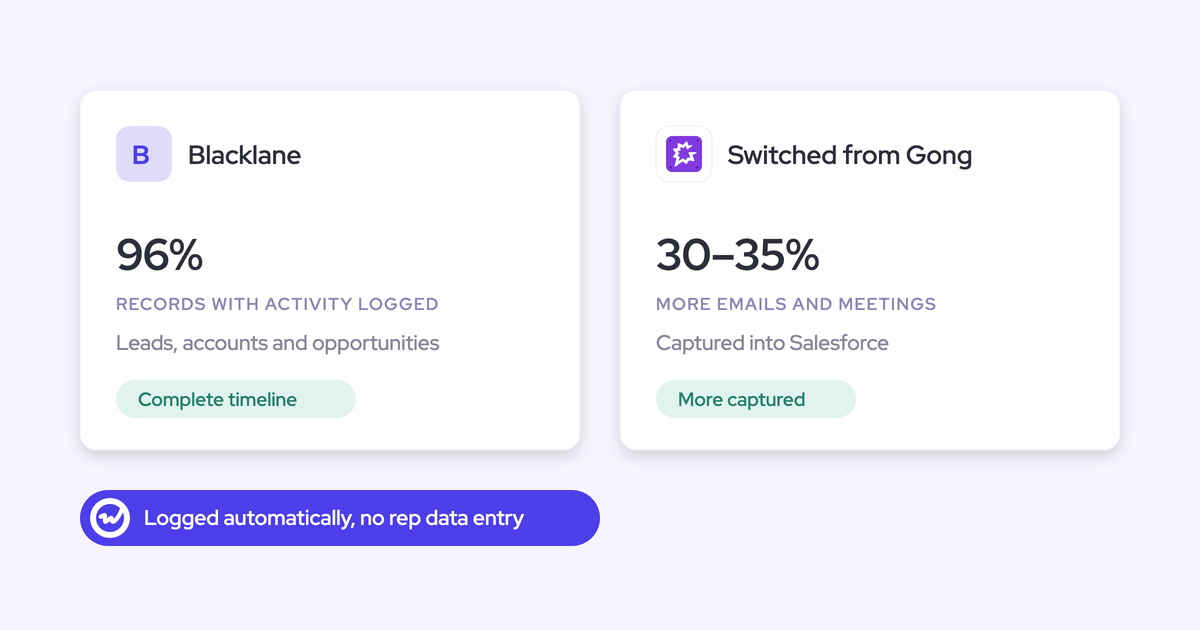
Emails Weflow skips are never written, so a sequence email handled by Compatibility Mode costs Weflow no write. Historic syncs can be batched to protect daily limits. When Blacklane moved to Weflow, we synced four months of historic emails and meetings batched over one week for exactly that reason.
How are Outreach dialer calls and Chili Piper meetings handled?
Calls and meetings follow different rules than email and sit outside this runbook. Outreach dialer calls arrive in Weflow Conversation Intelligence as recordings, with transcript, summary and coaching. For meetings, if you also run Einstein Activity Capture, its event sync has to run one way, from the calendar into Salesforce, before anyone is enrolled.
Can we drop sequencer seats for AEs who only use it for capture?
Often, yes. Sequencer seats kept alive only so activity flows into Salesforce are a pattern we see constantly: thirty seats where five people actually sequence. Weflow Activity & Contact Capture is $19 per user per month, billed annually, with a 10-user minimum. The sequencer stays for the SDRs who sequence.
Can Weflow support read our emails when troubleshooting?
No. Weflow support sees the logging logic for each message, whether it synced and which rule skipped it, but never the content. You read the message on your side when you need to know what it said.